TL;DR
- Grok Imagine's video API on HiAPI has three endpoints: 1.0 text-to-video, 1.0 image-to-video, and 1.5 image-to-video. All three cost the same: $0.015 per second at 480p, $0.0282 per second at 720p, and every clip comes with generated sound at no extra cost.
- 1.0 runs 6–30 seconds and takes up to 7 reference images. 1.5 runs 1–15 seconds, takes exactly one image, and can follow that image's shape with
aspect_ratio: "auto". - A 6-second 480p draft costs $0.09. Open the image-to-video model page to try it; new accounts get 200 free credits.
Which endpoint to use
| Model id | Input | Length | Aspect ratios | Extra |
|---|---|---|---|---|
grok-imagine/text-to-video | prompt | 6–30 s (default 6) | 2:3 (default), 3:2, 1:1, 16:9, 9:16 | mode: normal or fun |
grok-imagine/image-to-video | 1–7 images + optional prompt | 6–30 s (default 6) | same as above | mode; refer to images as @image1, @image2 |
grok-imagine-1.5/image-to-video | exactly 1 image + optional prompt | 1–15 s (default 8) | auto (default), 1:1, 16:9, 9:16, 3:2, 2:3 | no mode |
All three bill per second at $0.015 (480p, the default) or $0.0282 (720p). Live HiAPI prices, checked October 19, 2026. Failed tasks aren't charged.
How to choose:
- Longer than 15 seconds, or several product shots as references: 1.0 image-to-video.
- One still, a short clip, and the output should keep the still's shape: 1.5 image-to-video. It's also the only one that goes below 6 seconds, so a 4-second loop costs less.
- No image at all: 1.0 text-to-video.
| Clip | 480p | 720p |
|---|---|---|
| 4 s (1.5 only) | $0.06 | $0.11 |
| 6 s | $0.09 | $0.17 |
| 15 s | $0.23 | $0.42 |
| 30 s (1.0 only) | $0.45 | $0.85 |
Real outputs
1.0 image-to-video, one reference. A catalog still of a weekender bag:
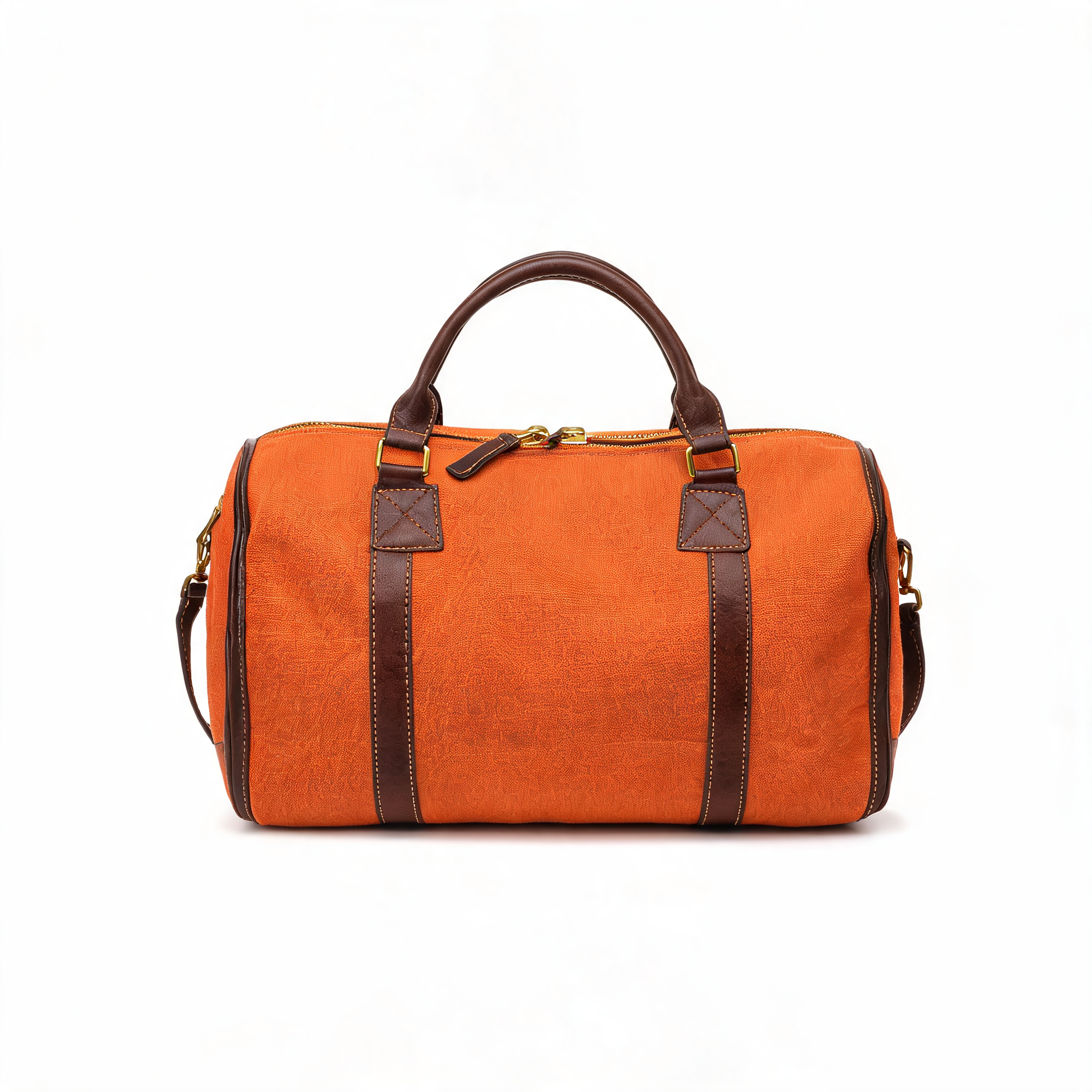
Slow cinematic orbit around the burnt-orange canvas weekender bag, camera circling smoothly from front to three-quarter view, studio lighting glinting off the brass zippers, seamless white background stays clean and shadowless, product perfectly sharp and unchanged, subtle premium e-commerce energy.
grok-imagine/image-to-video, 6 s, 720p, one reference, $0.17. We asked for 9:16; the square source came back square (960×960).
1.0 image-to-video, two references. Passing a lifestyle shot and the packshot together keeps the bag consistent in a new scene:
grok-imagine/image-to-video, 6 s, 720p, 9:16, two references, $0.17.
1.5 image-to-video, same still, two camera moves. The camera move lives in the prompt. Swap one verb and you get a different shot:
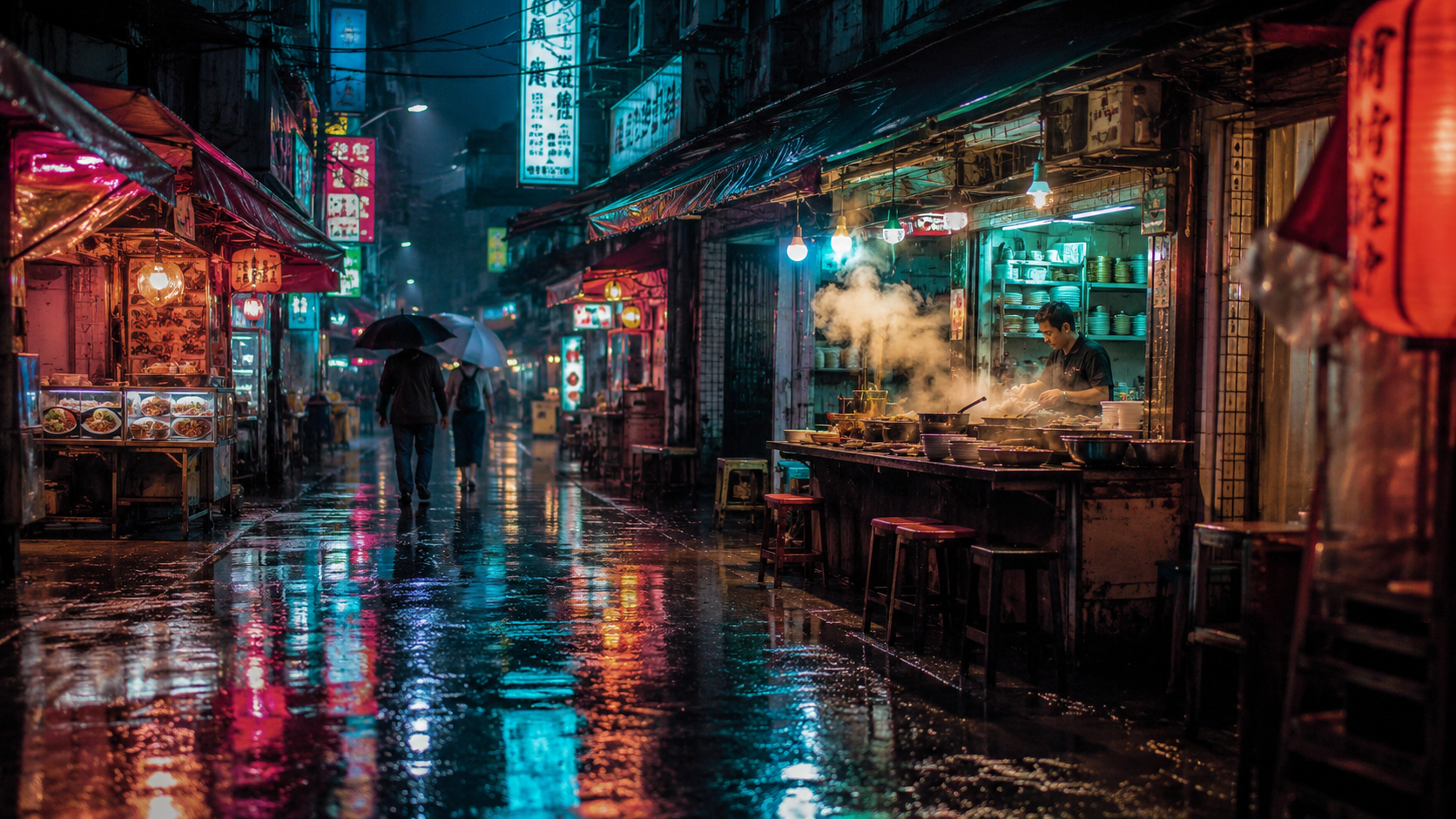
Slow steady dolly push-in down the rain-soaked market street toward the glowing noodle stall, steam rising and curling from the pots, rain falling in thin streaks, neon sign reflections shimmering on the wet pavement, pedestrians walking slowly away under umbrellas, smooth constant camera speed, one continuous shot, no cuts, cinematic pacing
Open the model page with this prompt (upload your still first) →
grok-imagine-1.5/image-to-video, 6 s, 720p, 16:9, $0.17.
Camera glides slowly to the left in a smooth lateral tracking move, strong parallax between the near market stalls and the far end of the street, rain keeps falling, neon reflections slide across the wet ground, the cook keeps stirring behind the counter, steam drifts sideways, one continuous move, no cuts, no zoom
grok-imagine-1.5/image-to-video, 6 s, 720p, 16:9, $0.17.
1.5, a 4-second ambient loop. With the camera locked off, all the motion comes from the scene:
grok-imagine-1.5/image-to-video, 4 s, 720p, 16:9, $0.11.
curl
Image-to-video on 1.0:
curl -s -X POST https://api.hiapi.ai/v1/tasks \
  -H "Authorization: Bearer $HIAPI_KEY" \
  -H "Content-Type: application/json" \
  -d '{
    "model": "grok-imagine/image-to-video",
    "input": {
      "image_urls": ["https://your-cdn.example.com/product.jpg"],
      "prompt": "Slow orbit around the product, studio light, background stays clean",
      "duration": 6,
      "resolution": "480p",
      "aspect_ratio": "9:16"
    }
  }'
You get a taskId back. Poll GET https://api.hiapi.ai/v1/tasks/{taskId} until data.status is success, then download data.output[0].url. The link expires, so save the file right away.
For text-to-video, change the model to grok-imagine/text-to-video and drop image_urls. For 1.5, change the model to grok-imagine-1.5/image-to-video, keep one image, and leave out mode.
Python: submit, poll, download
# pip install requests; export HIAPI_KEY=your-key first
import os, time, uuid, requests

API = "https://api.hiapi.ai/v1/tasks"
H = {"Authorization": f"Bearer {os.environ['HIAPI_KEY']}"}

def generate(model, timeout_s=900, **inp):
    body = {"model": model, "input": inp}
    # Reuse the same Idempotency-Key if you retry a submit, so a retry never bills twice
    r = requests.post(API, json=body, headers={**H, "Idempotency-Key": str(uuid.uuid4())}, timeout=30)
    res = r.json()
    if res.get("code") != 200:
        raise RuntimeError(res)  # 400s list every invalid field
    task_id = res["data"]["taskId"]
    deadline = time.time() + timeout_s
    while time.time() < deadline:
        d = requests.get(f"{API}/{task_id}", headers=H, timeout=30).json()["data"]
        if d["status"] == "success":
            return d["output"][0]["url"]
        if d["status"] == "fail":
            raise RuntimeError(d)
        time.sleep(10)
    raise TimeoutError(task_id)

still = "https://your-cdn.example.com/still.jpg"

# Draft cheaply on 1.5 at 480p, then re-render the keeper at 720p
draft = generate("grok-imagine-1.5/image-to-video", image_urls=[still],
                 prompt="slow push-in, steam rising, camera steady", duration=4, resolution="480p")
final = generate("grok-imagine-1.5/image-to-video", image_urls=[still],
                 prompt="slow push-in, steam rising, camera steady", duration=6, resolution="720p")

# A 20-second clip needs 1.0
long_clip = generate("grok-imagine/image-to-video", image_urls=[still],
                     prompt="slow push-in, steam rising, camera steady", duration=20, resolution="480p")

with open("clip.mp4", "wb") as f:
    f.write(requests.get(final).content)
Parameters
| Field | 1.0 text-to-video | 1.0 image-to-video | 1.5 image-to-video |
|---|---|---|---|
prompt | required, up to 5,000 characters | optional | optional, up to 4,096 characters |
image_urls | not accepted | 1–7, jpeg/png/webp, up to 10 MB each | exactly 1, jpeg/png/webp, up to 20 MB |
duration | 6–30 | 6–30 | 1–15 |
resolution | 480p (default) / 720p | same | same |
aspect_ratio | 2:3 default | 2:3 default | auto default (follows the image) |
mode | normal (default) / fun | same | not accepted |
Errors you'll hit
All of these return HTTP 400 when you submit, so no task is created and nothing is billed:
duration: minimum: got 4, want 6: 1.0 starts at 6 seconds. Use 1.5 for shorter clips.duration: maximum: got 20, want 15: 1.5 stops at 15 seconds. Use 1.0 for longer clips.image_urls: maxItems: got 2, want 1: 1.5 takes one image.additional properties 'mode' not allowed: 1.5 has nomode.resolution: value must be one of '480p', '720p': no 1080p, and use lowercase.
FAQ
1.0 or 1.5?
Same price per second. Choose by input and length: several references or more than 15 seconds means 1.0; one still and a short clip means 1.5. If you're unsure, render the same still on both at 480p for 6 seconds, which costs $0.18 in total.
Is there sound?
Yes. Every clip above came back with a generated audio track; the lighthouse loop has clearly audible waves. There's no switch to turn it off (generate_audio and audio are rejected as unknown fields), and sound doesn't change the price. If you don't want it, strip the track when you edit.
Can I get 1080p?
No. The maximum is 720p on all three endpoints.
What does mode: "fun" do?
It's a 1.0 option for more playful, exaggerated motion. normal is the default and the safer choice for product clips.
More examples: Grok Imagine 1.5 for short-form video. For full prices across the family, see Grok Imagine API pricing. For stills, see the Grok Imagine image API guide.