
使用指南
Grok Imagine Quality 图像到图像提示词配方:复制粘贴即可使用的编辑提示词及真实输出
四条经过实测的图像编辑提示词,适用于 grok-imagine-quality/image-to-image——一次定向重新打光、一次完整风格迁移、一次产品场景替换,以及一次双参考图合成——每条都展示其输入图像以及在实时 API 上产生的原始输出。
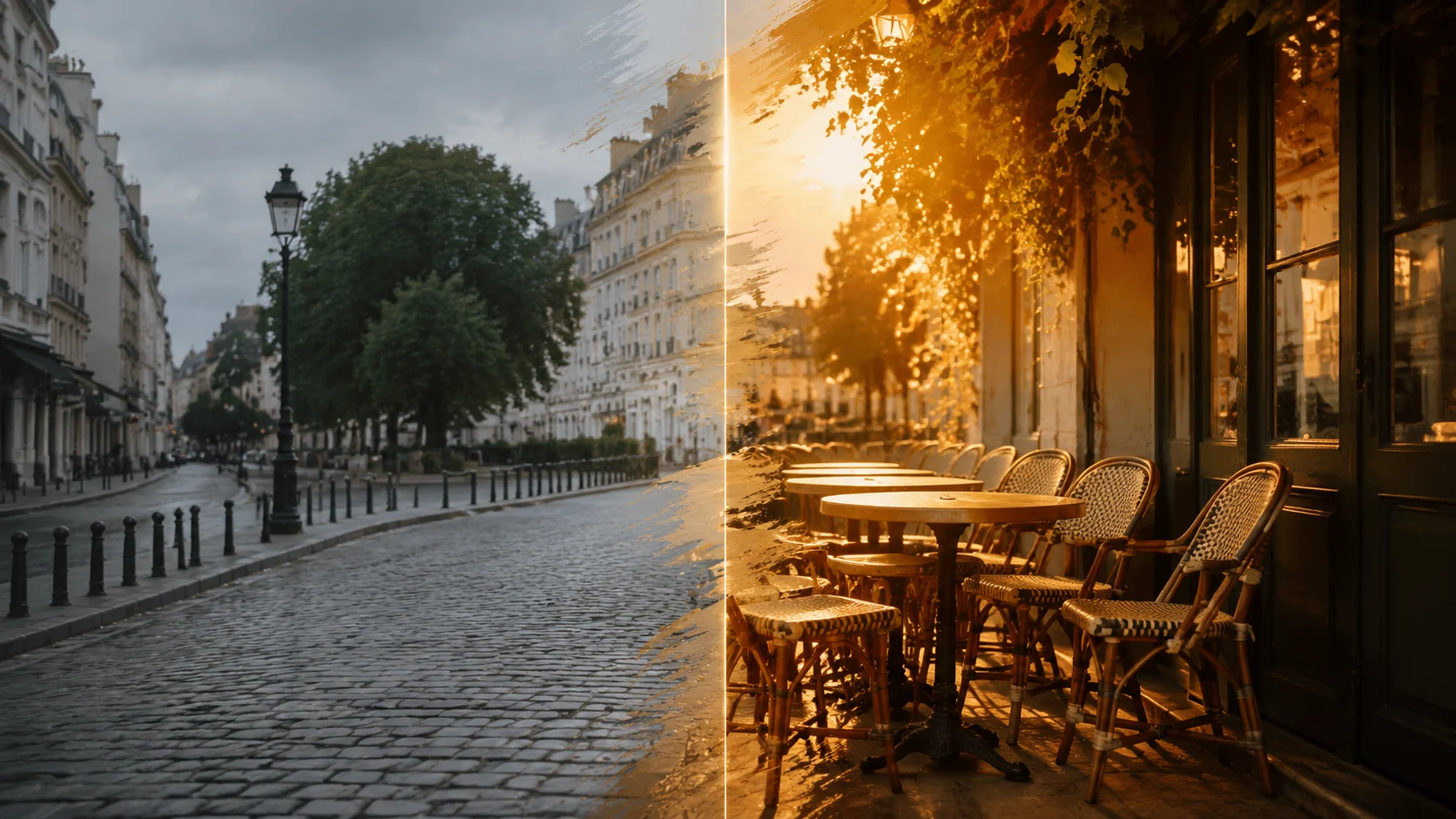
摘要
- 本文内容:四条可复制粘贴的图像编辑提示词,适用于 grok-imagine-quality/image-to-image,每条都展示其所基于的精确输入图像,以及在实时 API 上产生的原始输出——均为首次生成,未隐藏任何重试,并在此永久托管。
- 该模型的用途:高一致性编辑。你提供 1–3 张参考图像加一条指令,它重新渲染场景——重新打光、重新风格化、替换场景,或将两张参考图合成——同时保留你要求保留的部分。
- Schema 事实(2026-07-12 对照实时任务 API 验证):
prompt和image_urls为必填;image_urls接受1 至 3 个可公开访问的 URL;可选的resolution为小写1k或2k;可选的aspect_ratio接受auto以及 13 种固定比例,最高至超宽20:9和竖高9:20。没有strength,没有 seed,没有负面提示词——未知字段会被以 400 拒绝。 - 价格(来自定价页面):1K 每张输出图像 $0.08,2K 为 $0.10,另加每张参考图像 $0.015。本文中一次单参考 1K 编辑按当前费率是 $0.095,每次编辑都在 27–39 秒内完成。
- 本文当前预估媒体预算:两张 gpt-image-2 基础图像和一张封面,各 $0.03,加上四次 quality 档编辑(三次单参考编辑各 $0.095,一次双参考合成 $0.11)——按当前费率总计 $0.485。
这些配方的制作方式
每个配方包含三部分:输入图像、精确编辑提示词(原样复制即可)和原始输出。我用 gpt-image-2 生成了两张基础图像,自己撰写了每条编辑提示词,并把每一条都通过实时 hiapi 任务 API 运行在 grok-imagine-quality/image-to-image 上。每个输出下方都标注了设置和真实成本,便于你精确复现该调用。
由于 schema 并未暴露编辑强度旋钮,提示词承担了全部引导作用。始终有效的习惯:
- 把提示词拆成“变更子句”和“保留子句”。先说明要改什么,再逐一列出必须保留的一切:“Keep her face, expression, pose, the corduroy jacket, the marble table… exactly the same.”保留子句不是装饰——它是你唯一的一致性控制手段。
- 用属性而非类别来指称对象。“the mustard-yellow corduroy jacket”和“the black over-ear headphones”比“the jacket”或“the product”更能把模型锚定到参考图中的具体物品。
- 使用
aspect_ratio: "auto"继承输入画幅。在我们的运行中,3:2 输入返回 3:2(1248×832),方形输入返回方形。使用两张参考图时,输出跟随image_urls中的第一个 URL——顺序很重要。 - 预期会重新布景,而非像素冻结。模型重新渲染场景,而不是遮罩像素。身份、服装、布局和光线保留得出奇地好,但物体姿态可能会自然重新落位(你会在配方 3 和 4 中看到这一点)——如果精确朝向很重要,请在保留子句中锁定它。
配方 1——定向重新打光:黄金时刻,其他一切不动
目标:只改变光线,且仅改变光线——这是检验编辑模型是否真正保留身份的经典测试。
输入,一张 $0.03 的 gpt-image-2 静帧:
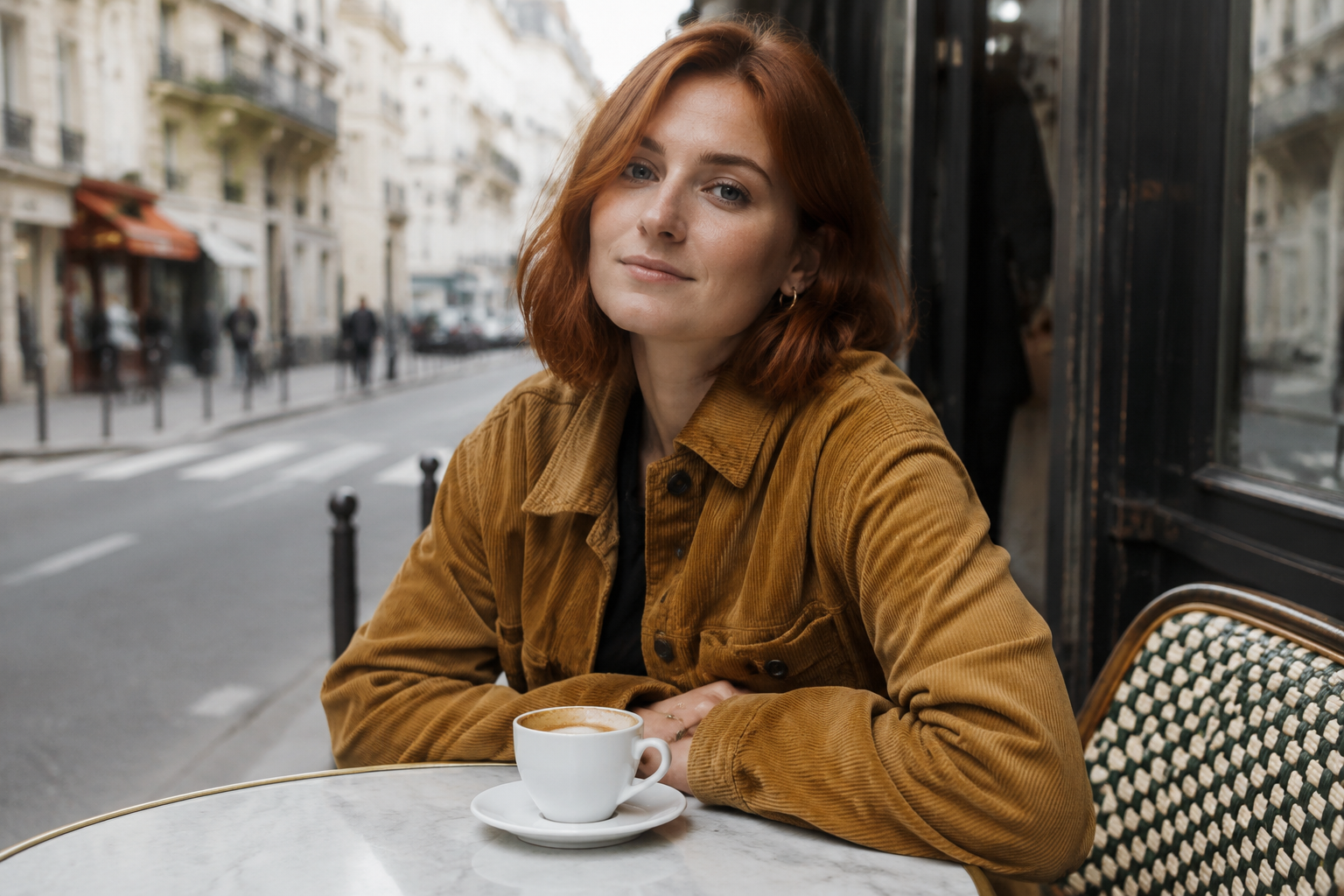
提示词:
Relight this photo as late golden hour: warm low sun coming from the left,
long soft shadows across the table, amber rim light on her hair and jacket.
Keep her face, expression, pose, the corduroy jacket, the marble table, the
coffee cup and the entire composition exactly the same. Photorealistic, same
camera angle, same framing.
原始输出:
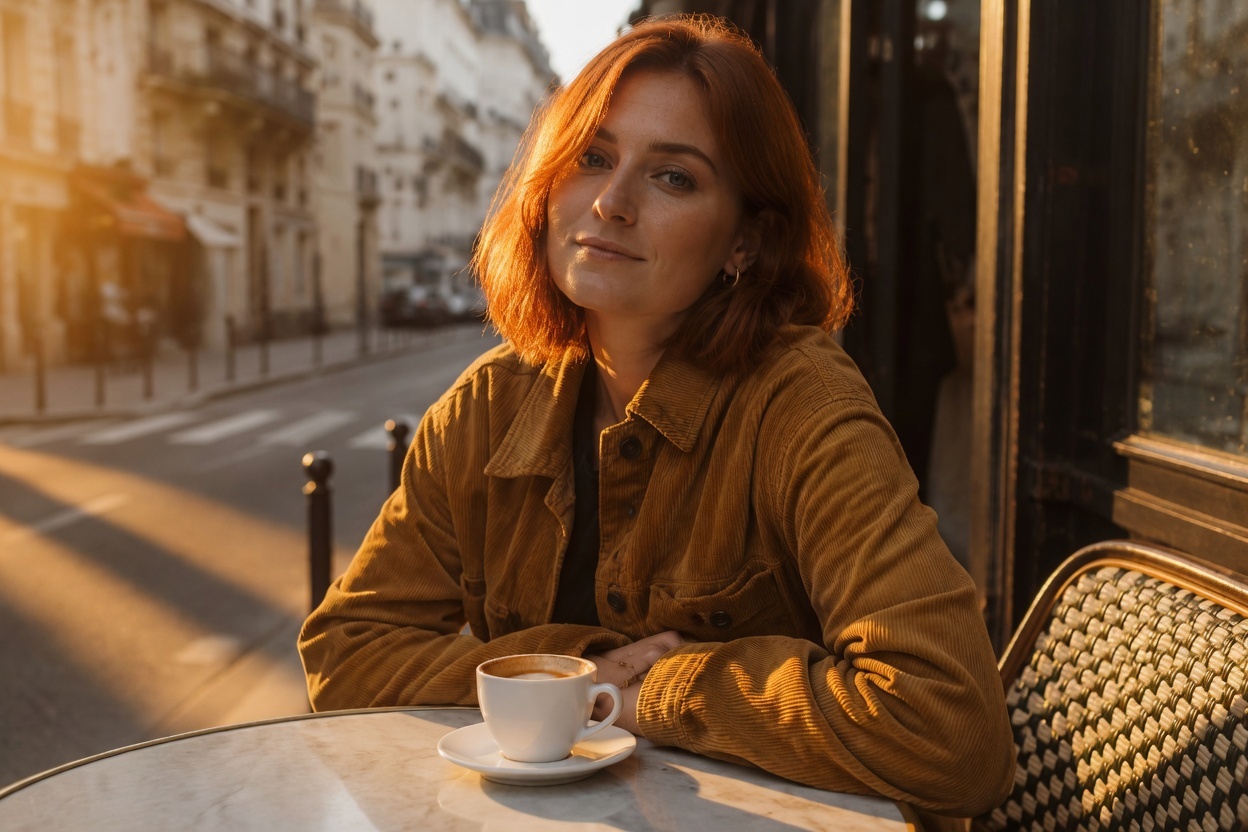
grok-imagine-quality/image-to-image · resolution: "1k" · aspect_ratio: "auto"(输入 3:2 → 输出 1248×832)· 39 秒 · 当前预估:$0.095
为什么有效:变更子句纯粹关于光线(方向、色温、阴影长度、轮廓光),而保留子句列举了每一个不能移动的元素。面部、雀斑、夹克纽扣、杯子位置和街景背景全部保留——只有太阳移动了。这个模式(重新打光 + 详尽保留子句)是本文中最可复用的配方:把“late golden hour”换成“blue hour just after sunset”“overcast diffused daylight”或“neon-lit night”,其余原样保留即可。
配方 2——完整风格迁移:照片 → 水彩
目标:与配方 1 相反——改变整个渲染风格,同时保留内容:姿态、表情、构图、场景。
输入静帧与配方 1 相同。提示词:
Repaint this exact scene as a loose watercolor illustration: soft translucent
washes, visible cold-press paper texture, fine ink outlines, muted earth
palette with the mustard-yellow jacket as the main color accent. Preserve the
composition, her pose and expression, the round marble table and the cafe
street behind her.
原始输出:
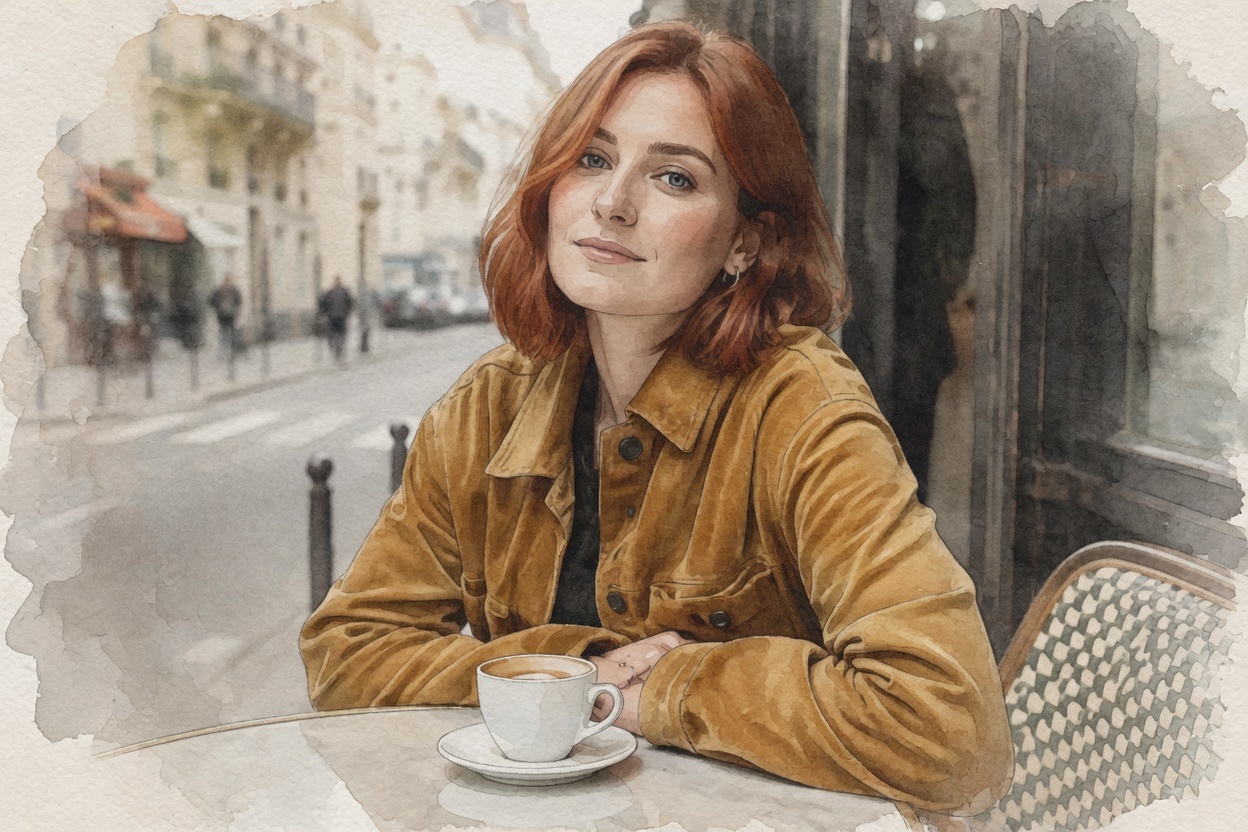
grok-imagine-quality/image-to-image · resolution: "1k" · aspect_ratio: "auto" · 38 秒 · 当前预估:$0.095
为什么有效:风格迁移提示词失败,往往是因为只点名风格(“make it watercolor”)。点名媒介的机制——半透明水洗、冷压纸纹理、墨线轮廓——给了模型具体可渲染的东西,而选择一个元素作为色彩点缀可以防止调色板变得浑浊。诚实说明:输出中的灯芯绒纹理更接近光滑麂皮;织物纹理是完整重绘会抹平的那类精细细节。
配方 3——场景替换:影棚产品图 → 生活场景照片
目标:拿一张干净的电商包装图,把它放进风格化场景——这是图像到图像最高频的商业用途。
输入,一张 $0.03 的 gpt-image-2 包装图:
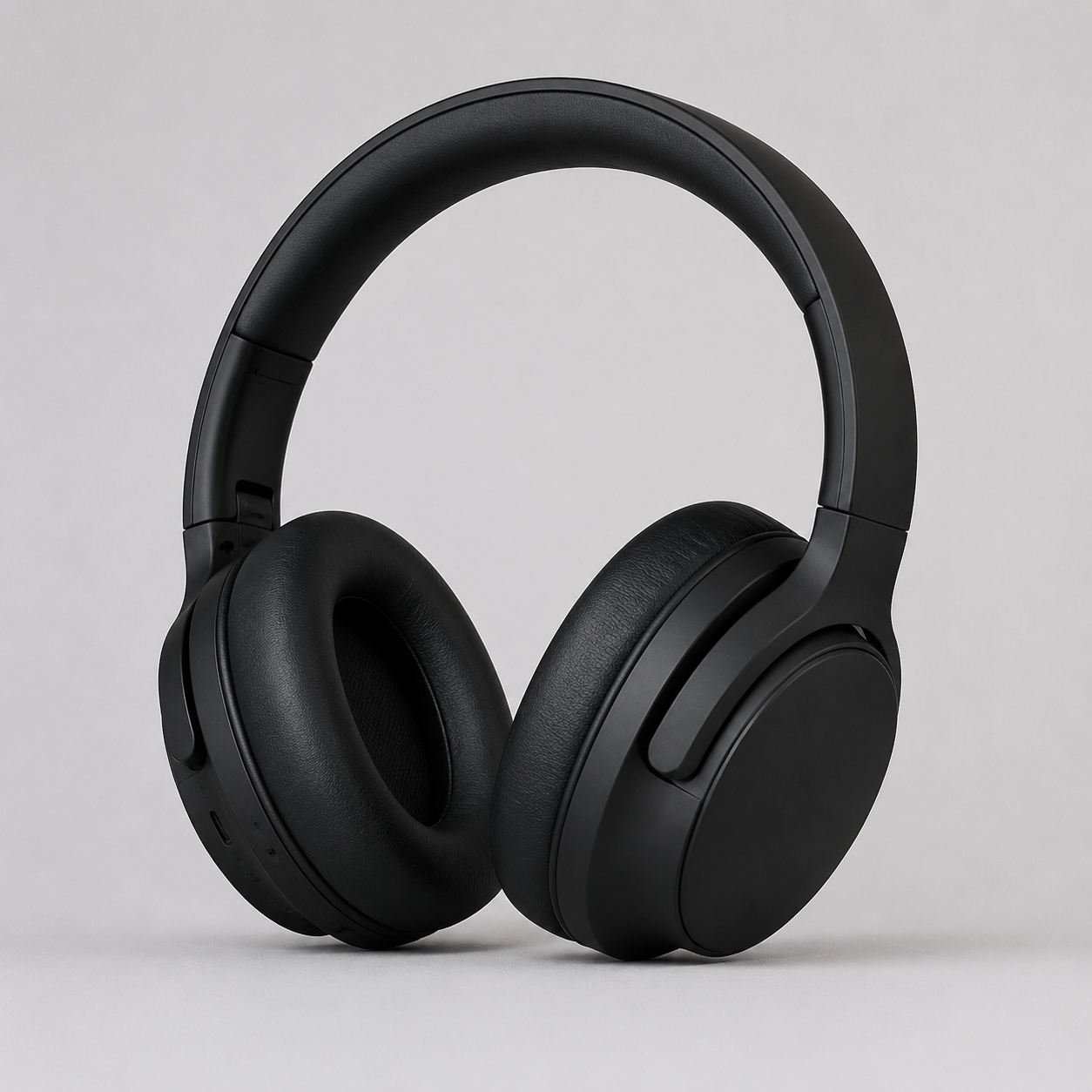
提示词:
Place these exact headphones on a sunlit wooden desk beside an open laptop
and a small potted plant, warm morning window light from the right, cozy
blurred home-office background, shallow depth of field. Do not change the
headphones themselves: same shape, same matte black finish, same angle, no
logos.
原始输出:
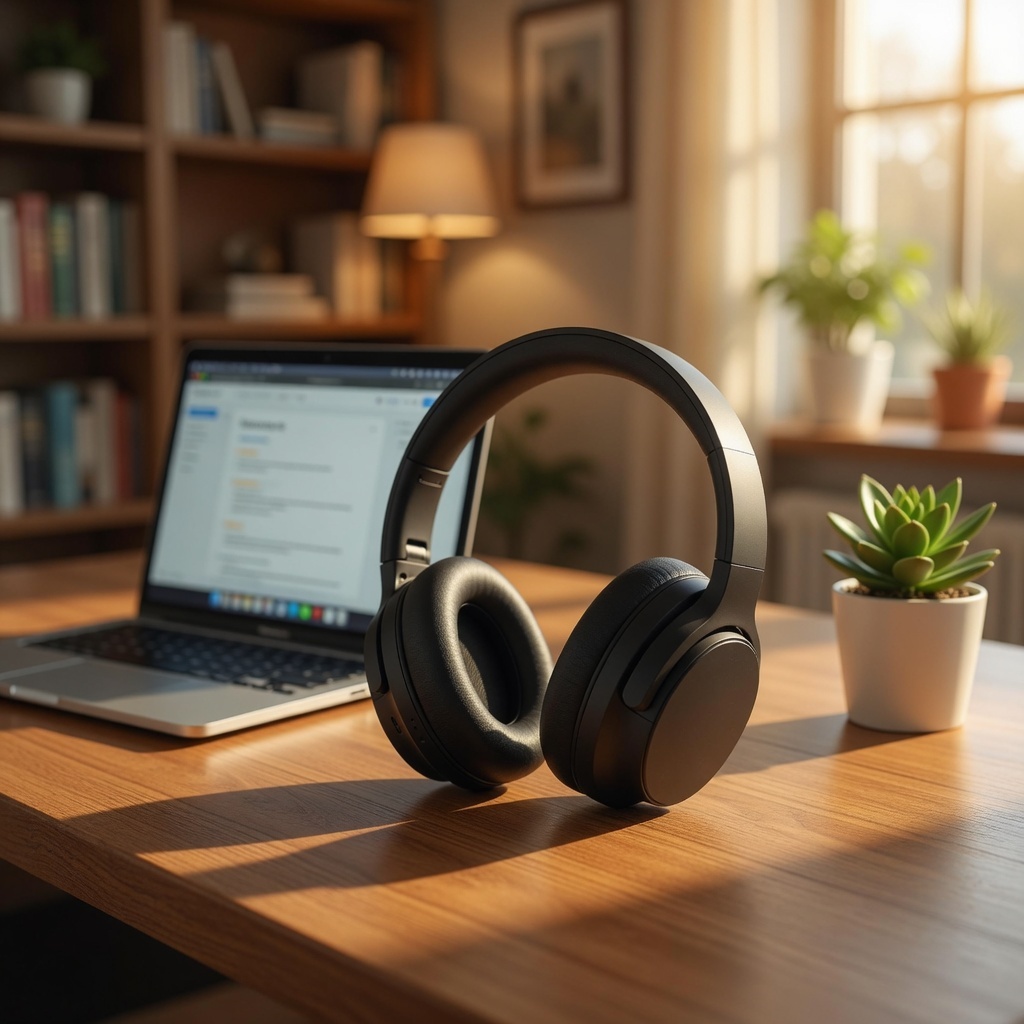
grok-imagine-quality/image-to-image · resolution: "1k" · aspect_ratio: "auto"(输入 1:1 → 输出 1024×1024)· 27 秒 · 当前预估:$0.095
为什么有效:场景描述承载布景(桌子、笔记本电脑、植物、窗光、浅景深),而保留子句锁定产品的形状和表面处理。本次运行有一个诚实的注意点:尽管写了“same angle”,模型仍重新摆放了耳机,使其自然靠在桌面上,而不是笔直竖立——耳罩形状、哑光表面和无 logo 设计都保留了,但朝向重新落位以符合场景物理。如果确切的商品目录角度不可妥协,请明确说明:“standing upright in exactly the same orientation as the reference”。
配方 4——双参考图:将产品合成进场景
目标:使用多参考图槽位(image_urls 最多接受 3 张)合并两张图像——把配方 3 的包装图放进配方 1 的咖啡馆场景。
输入:耳机包装图(第一个 URL)和咖啡馆肖像(第二个 URL)。提示词:
Combine these two images: place the black over-ear headphones from the first
image on the marble cafe table from the second image, next to the coffee cup,
resting naturally on the tabletop. Match the soft overcast daylight and
shallow depth of field of the cafe photo. Keep the woman, her pose and the
entire cafe scene from the second image unchanged.
原始输出:
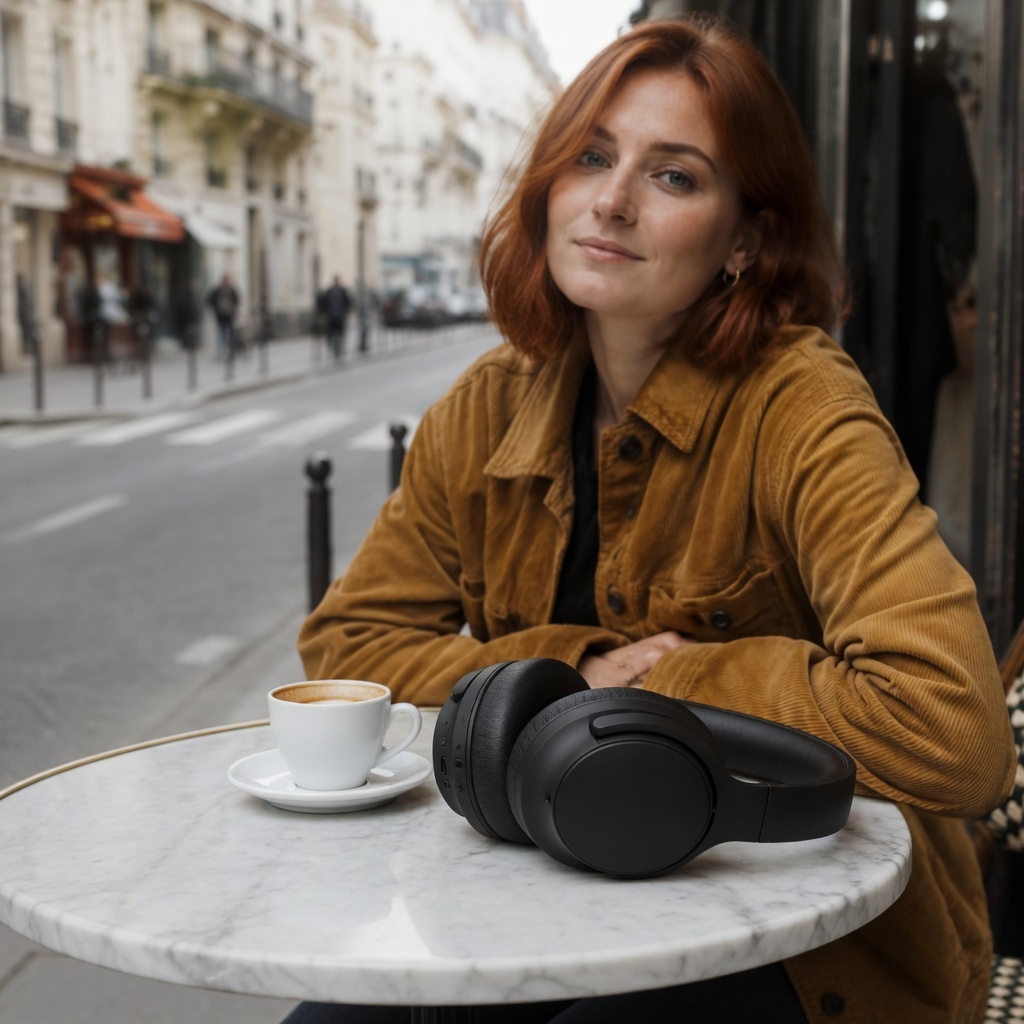
grok-imagine-quality/image-to-image · image_urls: [product, café] · resolution: "1k" · aspect_ratio: "auto"(跟随第一张参考图的 1:1 画幅)· 33 秒 · 当前预估:$0.11
为什么有效:按位置指称图像(“from the first image”“from the second image”)能干净地映射到 image_urls 数组,而给物体一个与场景的物理关系(“resting naturally on the tabletop, next to the coffee cup”)是合成成功的关键——模型匹配了阴天光线,甚至用柔和的接触阴影让耳罩落地。需要知道两件事:输出画幅跟随第一个 URL(方形,和包装图一样——如果你想要某个场景的画幅,就把它放在第一位),并且构图略微重新布景以给产品腾出空间,而不是逐像素冻结第二张图像。
自己运行这些配方
提交到任务端点,轮询直到 success,下载输出。参考图像必须是可公开访问的 URL——预签名的 S3/R2 链接完全可以。
curl -s -X POST https://api.hiapi.ai/v1/tasks \
  -H "Authorization: Bearer $HIAPI_API_KEY" \
  -H "Content-Type: application/json" \
  -d '{
    "model": "grok-imagine-quality/image-to-image",
    "input": {
      "prompt": "Relight this photo as late golden hour: warm low sun from the left, long soft shadows. Keep the subject, wardrobe and composition exactly the same.",
      "image_urls": ["https://your-host.com/your-photo.jpg"],
      "resolution": "1k",
      "aspect_ratio": "auto"
    }
  }'
同样的流程在 Python 中:
import time, requests

API = "https://api.hiapi.ai/v1/tasks"
HEADERS = {"Authorization": "Bearer YOUR_HIAPI_KEY"}

task = requests.post(API, headers=HEADERS, json={
    "model": "grok-imagine-quality/image-to-image",
    "input": {
        "prompt": ("Repaint this exact scene as a loose watercolor illustration: "
                   "soft translucent washes, visible paper texture, fine ink "
                   "outlines. Preserve the composition and the subject's pose."),
        "image_urls": ["https://your-host.com/your-photo.jpg"],  # 1-3 public URLs
        "resolution": "1k",        # 1k | 2k (lowercase)
        "aspect_ratio": "auto",    # auto follows the input frame
    },
}).json()
task_id = task["data"]["taskId"]

while True:
    t = requests.get(f"{API}/{task_id}", headers=HEADERS).json()["data"]
    if t["status"] in ("success", "fail"):
        break
    time.sleep(5)

assert t["status"] == "success", t.get("error")
url = t["output"][0]["url"]  # expiring link - download it now
open("edit.jpg", "wb").write(requests.get(url).content)
完整的请求演练(请求头、错误处理、任务生命周期)见 grok-imagine-quality 图像到图像 API 指南,通用平台文档见此处。
Schema 快速参考
| 字段 | 必填 | 取值(2026-07-12 实时验证) |
|---|---|---|
prompt |
是 | 自由文本,最少 1 个字符——你唯一的编辑控制手段 |
image_urls |
是 | 1–3 个可公开访问的图像 URL 组成的数组 |
resolution |
否 | 1k、2k——小写(1K 会被拒绝) |
aspect_ratio |
否 | auto、2:1、20:9、19.5:9、16:9、4:3、3:2、1:1、2:3、3:4、9:16、9:19.5、9:20、1:2 |
没有 strength,没有 seed,没有负面提示词,没有遮罩——schema 会以 400 拒绝未知字段,所以每个编辑决策都是提示词措辞。使用 aspect_ratio: "auto" 时,输出在我们所有运行中都跟随输入画幅;使用多张参考图时,它跟随第一个 URL。
常见问题
这与普通的 grok-imagine/image-to-image 有何不同? API 形态相同,档位不同。grok-imagine/image-to-image 每张图像 $0.03,另加每张参考图 $0.003——大约三分之一的价格——是高批量草稿的合适默认选择。quality 档的优势正是这些配方所依赖的:激进编辑下对参考图的保真度。先在基础档做原型,再把保留的成品放到 quality 档重跑。
我能控制编辑强度吗?
不能通过参数控制——没有 strength 字段,发送它会返回 400。编辑强度体现在措辞中:“relight as golden hour”是轻触,“repaint as watercolor”是完整重渲染,而保留子句的长度控制任一方向上保留多少。
面部会保持一致吗? 在我们的重新打光运行(配方 1)中,是的——同一张脸、同样的表情和雀斑,只有光线变了。那只是一次运行,不是基准:对于面部关键的工作,保持保留子句明确(“keep her face and expression exactly the same”),并在交付前审查输出。
四条提示词都可以复制——变更子句/保留子句的拆分适用于任何你能描述的编辑。获取一个密钥,把上面的代码片段指向 grok-imagine-quality/image-to-image,你的第一次编辑(单参考 $0.095)将在大约半分钟内返回。


