
教程
虚拟布置 API:用 AI 将空房间照片变成布置好的房源
一个可复现的图像到图像工作流,包含真实的生成前后对比图、精确提示词、批处理脚本和经过核实的定价
一套空置房源的图片向买家传达的信息不如一套配有家具的图片多。实体布置能解决这个问题,但每个单元都需要实际支出,并且预约排期需要数天。图像到图像 API 可以只用一张空房间照片完成同样的工作:保留真实房间——它的墙壁、地板、窗户和机位角度——并在周围添加家具。
本指南使用规范模型 ID gpt-image-2/image-to-image 完整走通该工作流,通过 POST https://api.hiapi.ai/v1/tasks 调用。文中包含为本指南生成的两组真实前后对比图(一间客厅和一间卧室)、它们的精确提示词、一个可复用的批处理脚本以及经过核实的定价。
图像到图像布置如何保持房间真实
文生图生成会根据描述凭空创造房间。这并不适合布置,因为输出必须与买家将走进的实际单元相符。图像到图像生成则以空房间照片为参考并对其进行编辑,因此房间的真实几何结构得以保留。
请求包含两部分:一个只描述应更改内容的 prompt(要添加的家具和装饰),以及一个包含参考照片的 input_urls 数组——即托管在公开 URL 上的空房间照片。模型读取参考图像,保持机位角度、墙壁、地板和窗户不变,并将家具渲染进场景,如同摆放在那个确切的房间里。
POST https://api.hiapi.ai/v1/tasks
{
  "model": "gpt-image-2/image-to-image",
  "input": {
    "prompt": "<furniture and decor to add, plus an instruction to keep the room unchanged>",
    "input_urls": ["<public URL of the empty-room photo>"],
    "aspect_ratio": "16:9",
    "resolution": "1K"
  }
}
这个单一的设计选择——输入参考、输出编辑——正是虚拟布置与通用房间生成的区别所在。下面两个示例分别在一张真实的未修饰空客厅照片和一张空卧室照片上展示了这一点。
前后对比:客厅
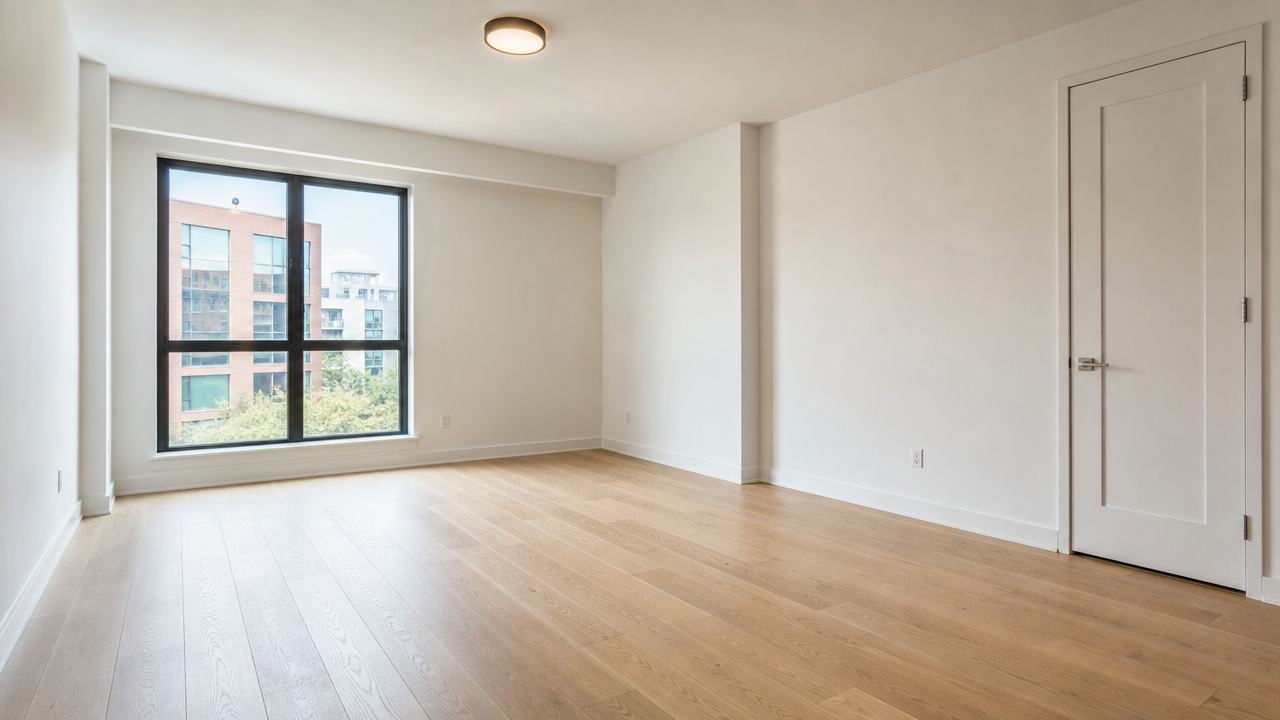
A professionally lit real estate photograph of a completely empty living room in
a modern apartment: light oak hardwood floors, plain white walls, one large
window with soft daylight, closed white door on the right wall, ceiling with a
single flush-mount light fixture, no furniture, no people, no text or
watermarks, wide-angle real estate listing photography style, sharp focus,
natural color grading.
第一张图片是参考照片,使用 gpt-image-2/text-to-image 生成,用于替代一张真实空置单元的房源照片(宽高比 16:9,分辨率 1K,记录成本 $0.03,生成于 2026-09-23)。在生产工作流中,这实际上就是经纪人自己上传的照片——无论空房间照片来自哪里,下面的布置步骤都以相同方式工作。
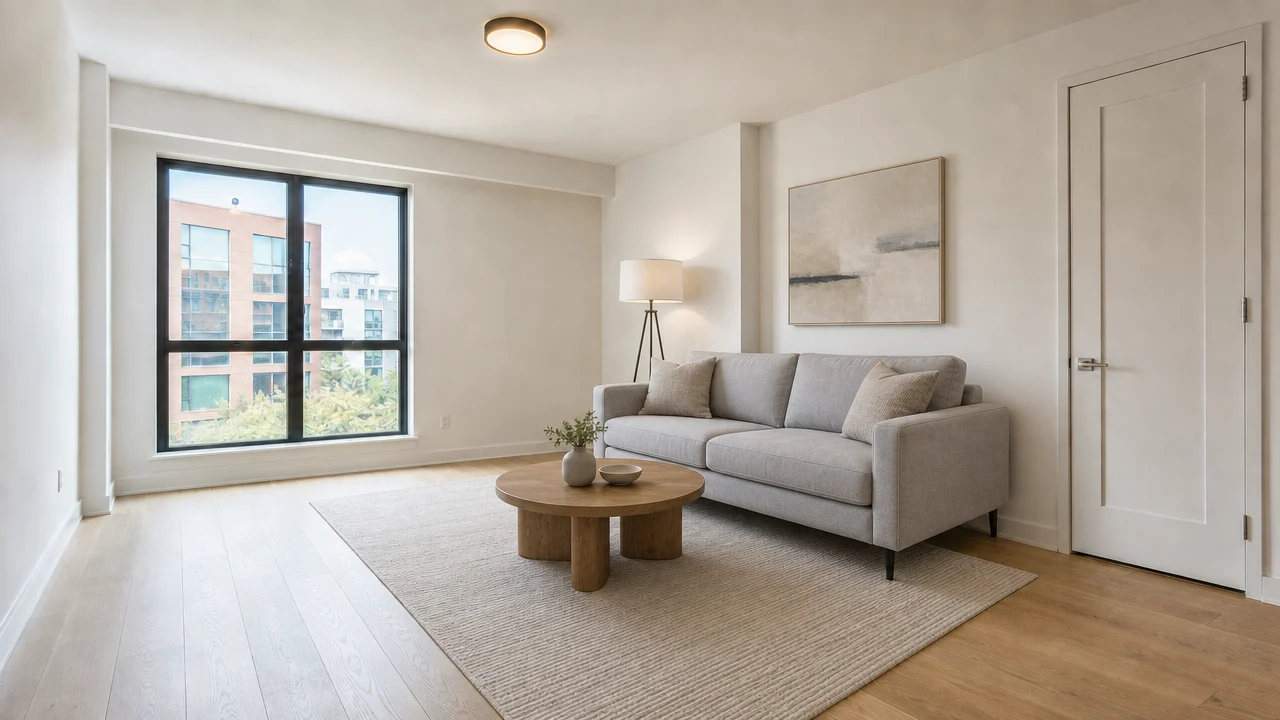
Using the empty room in the reference photo, keep the exact room geometry,
floor, walls, window, and door unchanged, and add tasteful modern furniture to
stage it as a livable listing photo: a light gray fabric sofa with two throw
pillows, a round wooden coffee table, a neutral area rug, a floor lamp in the
corner, and a piece of abstract wall art above the sofa. Keep the camera angle
and lighting identical to the reference photo. No people, no text or
watermarks, real estate listing photography style.
证据:模型 gpt-image-2/image-to-image,input_urls 设为上方空房间照片,aspect_ratio: 16:9,resolution: 1K,记录成本 $0.03,生成于 2026-09-23。窗户位置、右侧墙壁上的门、地板和墙壁色调都从参考照片延续而来——只有家具是新增的。
前后对比:卧室
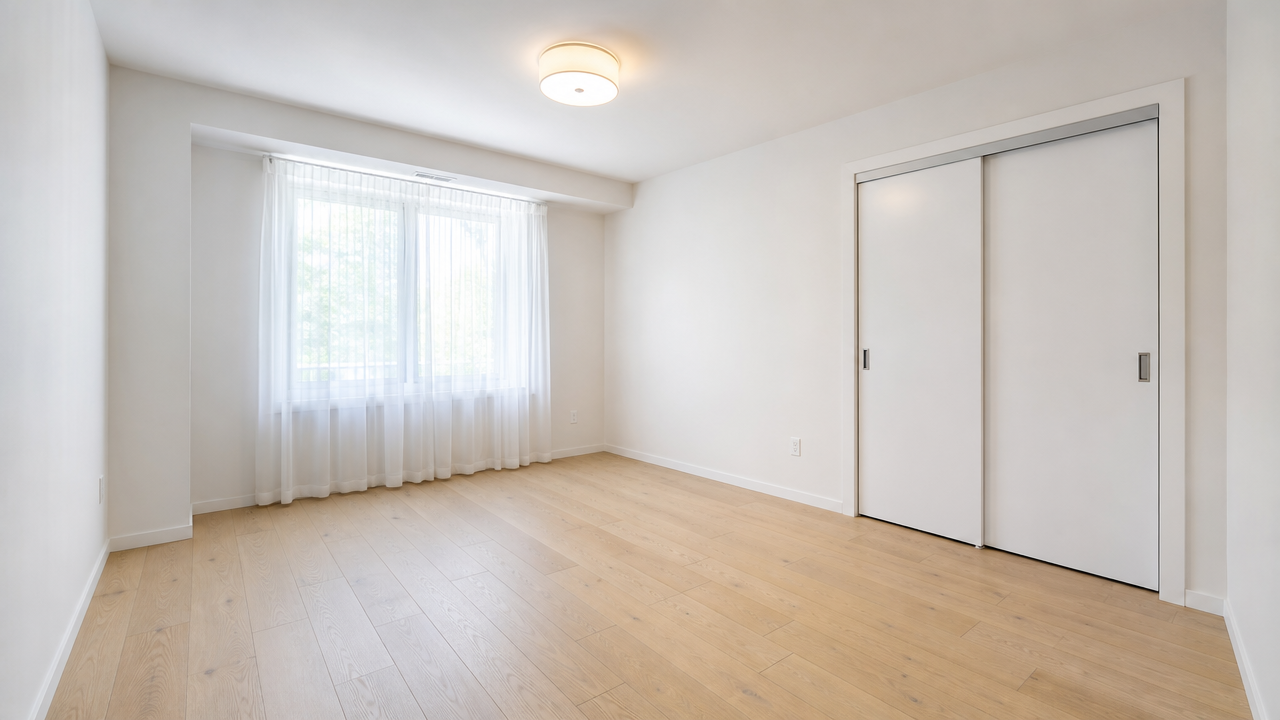
A professionally lit real estate photograph of a completely empty bedroom in a
modern apartment: light oak hardwood floors, plain white walls, one window with
sheer curtains letting in soft daylight, a closet with sliding white doors on
one wall, ceiling with a single flush-mount light fixture, no furniture, no
people, no text or watermarks, wide-angle real estate listing photography
style, sharp focus, natural color grading.
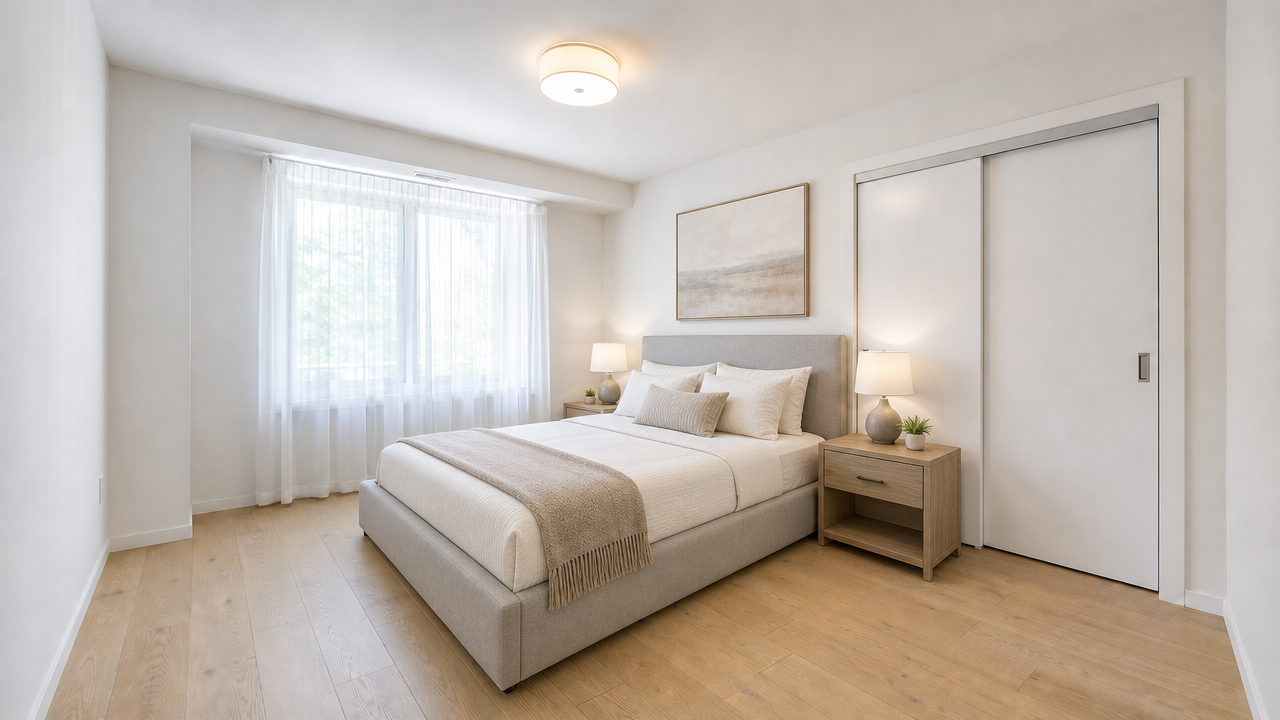
Using the empty room in the reference photo, keep the exact room geometry,
floor, walls, window, and closet doors unchanged, and add tasteful modern
furniture to stage it as a livable listing photo: a queen-size bed with a light
gray upholstered headboard and neutral bedding, two matching nightstands with
small lamps, a folded throw blanket at the foot of the bed, and a framed piece
of wall art above the headboard. Keep the camera angle and lighting identical to
the reference photo. No people, no text or watermarks, real estate listing
photography style.
证据:模型 gpt-image-2/image-to-image,input_urls 设为上方空卧室照片,aspect_ratio: 16:9,resolution: 1K,记录成本 $0.03,生成于 2026-09-23。推拉衣柜门和窗户位置保持不变;床、床头柜和挂画是唯一的添加物。
两个布置输出都来自每次包含三部分的提示词结构:保留参考房间的指令、具体的家具清单以及摄影风格标签。省略保留指令是这类任务最常见的出错方式——没有它,模型会更宽松地对待参考图,可能改变机位角度或房间比例。
使用任务 API 批量运行布置任务
单个房源通常需要布置不止一个房间,而一家经纪公司需要处理许多房源。下面的脚本接收一个空房间照片 URL 字典,为每个 URL 提交布置任务,并轮询直到所有输出就绪。
import os
import time
import requests

API_URL = "https://api.hiapi.ai/v1/tasks"
HEADERS = {
    "Authorization": f"Bearer {os.environ['HIAPI_TOKEN']}",
    "Content-Type": "application/json",
}

STAGING_BRIEF = (
    "keep the exact room geometry, floor, walls, and window unchanged, and add "
    "tasteful modern furniture to stage it as a livable listing photo, real "
    "estate listing photography style, no people, no text or watermarks"
)

# name -> public URL of the empty-room photo
ROOMS = {
    "unit-204-living-room": "https://your-storage.example.com/unit-204-living-room.jpg",
    "unit-204-bedroom": "https://your-storage.example.com/unit-204-bedroom.jpg",
}


def submit_staging_job(empty_room_url, aspect_ratio="16:9", resolution="1K"):
    response = requests.post(
        API_URL,
        headers=HEADERS,
        json={
            "model": "gpt-image-2/image-to-image",
            "input": {
                "prompt": STAGING_BRIEF,
                "input_urls": [empty_room_url],
                "aspect_ratio": aspect_ratio,
                "resolution": resolution,
            },
        },
        timeout=60,
    )
    response.raise_for_status()
    return response.json()["data"]["taskId"]


def wait_for_output(task_id, timeout_s=300, poll_interval=5):
    deadline = time.time() + timeout_s
    while time.time() < deadline:
        r = requests.get(f"{API_URL}/{task_id}", headers=HEADERS, timeout=30)
        r.raise_for_status()
        task = r.json()["data"]
        if task["status"] == "success":
            return task["output"][0]["url"]  # expires — download immediately
        if task["status"] == "fail":
            raise RuntimeError(task["error"])
        time.sleep(poll_interval)
    raise TimeoutError(f"task {task_id} did not finish in {timeout_s}s")


task_ids = {name: submit_staging_job(url) for name, url in ROOMS.items()}
staged_urls = {name: wait_for_output(tid) for name, tid in task_ids.items()}
print(staged_urls)
对于真实批处理,有两个细节很重要。首先,input_urls 每个任务接收一张参考照片——每次调用布置一个房间,而不是试图把多个房间合并到一个请求中。其次,响应中的每个 output[0].url 都是限时链接:任务成功后立即下载字节并存储到你自己的存储桶中,就像本指南立即将自己的输出上传到永久存储一样。
为一批布置任务定价
gpt-image-2/image-to-image 按输出分辨率定价,已于 2026-09-23 对照 HiAPI 的实时定价端点核实:
| 分辨率 | 每张布置图片价格 |
|---|---|
| 1K | $0.03 |
| 2K | $0.04 |
| 4K | $0.06 |
规划公式为:
batch cost = units × rooms staged per unit × price per image
使用表中的 1K 价格:
| 房源批次 | 每单元房间数 | 布置图片数 | 批次成本 |
|---|---|---|---|
| 1 个单元 | 3 | 3 | $0.09 |
| 10 个单元 | 3 | 30 | $0.90 |
| 50 个单元 | 4 | 200 | $6.00 |
| 200 个单元 | 4 | 800 | $24.00 |
价格会变化,因此在承诺大批量之前请查看实时定价页面,并根据你自己的审核通过情况添加重新生成余量——本指南中的两个示例并不代表通用的首轮通过率。
虚拟布置做不到的事
图像到图像布置编辑的是像素,而不是实际单元。在将其投入房源工作流之前,请记住三个限制:
- 它无法修复房间。 参考照片中的损坏、霉斑或结构问题不应被编辑掉,布置后的照片也绝不应歪曲单元的实际状况。
- 它不保证像素级完美的几何结构。 提示词要求模型保留房间,上面两个示例都保持了布局,但在发布到房源之前,仍应由人工将每张布置照片与其源照片进行对比。
- 披露规则仍然适用。 许多 MLS 系统和当地房地产法规要求房源披露哪些照片是虚拟布置的——发布前请检查适用于你所在市场的规则。
常见问题
AI 虚拟布置应该使用哪个模型?
使用 gpt-image-2/image-to-image 并调用 POST /v1/tasks,在 input_urls 中传入空房间照片的公开 URL,并在提示词中指定要添加的家具。完整输入模式请参阅模型文档。
布置后的照片真的与真实房间匹配吗?
应该匹配,但需要核实。本指南中的提示词结构——先保留参考图,然后只列出要添加的家具——在此处的两个示例中都保持了窗户、门、地板和墙壁色调的一致性。不过,发布前仍应逐张对照源照片审核输出,因为生成质量可能因房间和光线而异。
布置一套完整房源需要多少成本?
按 1K 价格每张图片 $0.03 计算,为一个单元布置三个房间需要 $0.09。将每单元房间数和批次单元数相乘即可规划更大规模的任务,并请先确认当前价格,因为分辨率及未来价格变化会影响总成本。
我需要披露照片是虚拟布置的吗?
请检查你所在市场的规则。许多 MLS 系统和当地法规要求在虚拟布置的照片上添加披露标签,这与房源图片的任何通用准确性要求是分开的。
这种图像到图像方法除了布置还能做更多吗?
可以——在更改所描述元素的同时保留参考图像是一种通用模式。GPT Image 2 电商工作流使用相同的底层任务 API 处理产品摄影批处理,提示词和定价结构也类似。
先从GPT Image 2 图像到图像模型页面上传一张空置单元照片开始,确认布置后的房间与真实单元相符,然后将相同的 input_urls 调用移入上面的批处理脚本,以处理房源的其余部分。


