
사용 가이드
Nano Banana 2.1 프롬프트 모음: 5가지 시나리오에서 바로 복사해 이미지 생성
이커머스 메인 이미지, 이벤트 포스터, 패션 화보, 모델 의상 교체, 인테리어 공간까지, 각 시나리오마다 실제 생성 이미지와 완전한 프롬프트를 제공하며 원클릭으로 모델 페이지에서 생성할 수 있습니다.
아래 5가지 시나리오는 모두 Nano Banana 2.1의 실제 생성 이미지이며, 각 이미지에 완전한 프롬프트가 첨부되어 있습니다. 복사하면 바로 사용할 수 있고, 「이 프롬프트로 생성」을 클릭하면 프롬프트가 그대로 입력된 채로 모델 페이지가 열립니다. Nano Banana 2.1은 HiAPI에 출시되었으며, 모델 페이지 열기에서 바로 생성할 수 있고, 신규 가입 시 200 크레딧을 드립니다.
1. 이커머스 메인 이미지: 세라믹 드리퍼
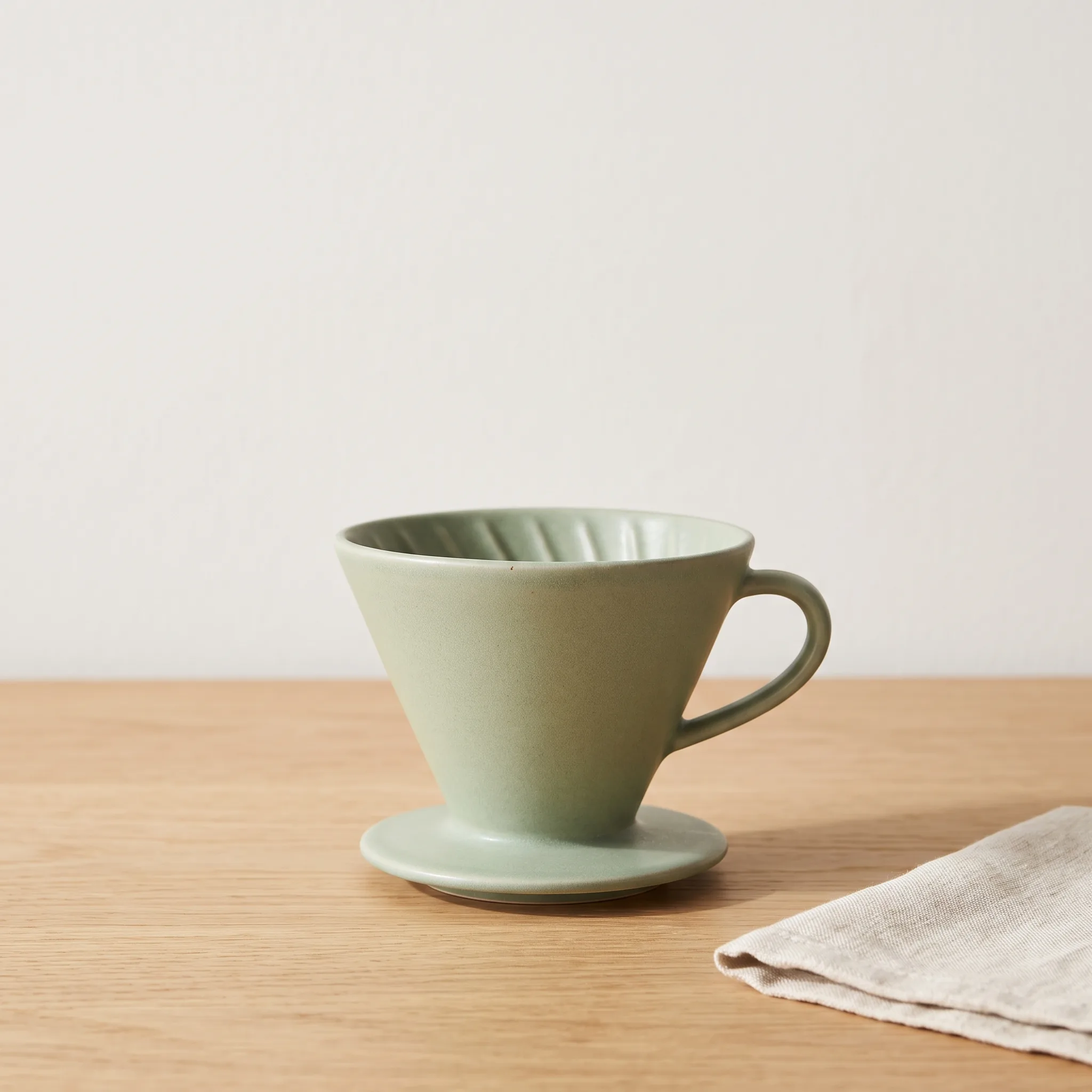
파라미터: 1:1 · 2K · 2048×2048
A clean e-commerce product photograph of a matte ceramic pour-over coffee dripper in soft sage green, centered on a light oak tabletop against a plain warm-white wall. Shot at a slight three-quarter angle from just above the object, 85mm lens, shallow depth of field with the dripper fully in focus. Soft window light from the left creates a gentle gradient on the glaze and a short, soft shadow on the table. Visible fine glaze texture and crisp edges; the shape and proportions are accurate and symmetrical. Minimal styling: one folded linen napkin at the lower right, nothing else. Leave open space above the product for later copy. No text, no logos, no watermark, no extra objects, no distorted shapes.
여러분의 제품으로 바꿀 때는 세 군데만 수정하면 됩니다. 제품명과 색상(matte ceramic pour-over coffee dripper in soft sage green), 상판과 벽면, 우측 하단의 소품입니다. Leave open space above the product 문장은 유지하세요. 메인 이미지 상단의 여백이 바로 판매 포인트 문구를 넣을 자리입니다.
2. 이벤트 포스터: BREW DAY
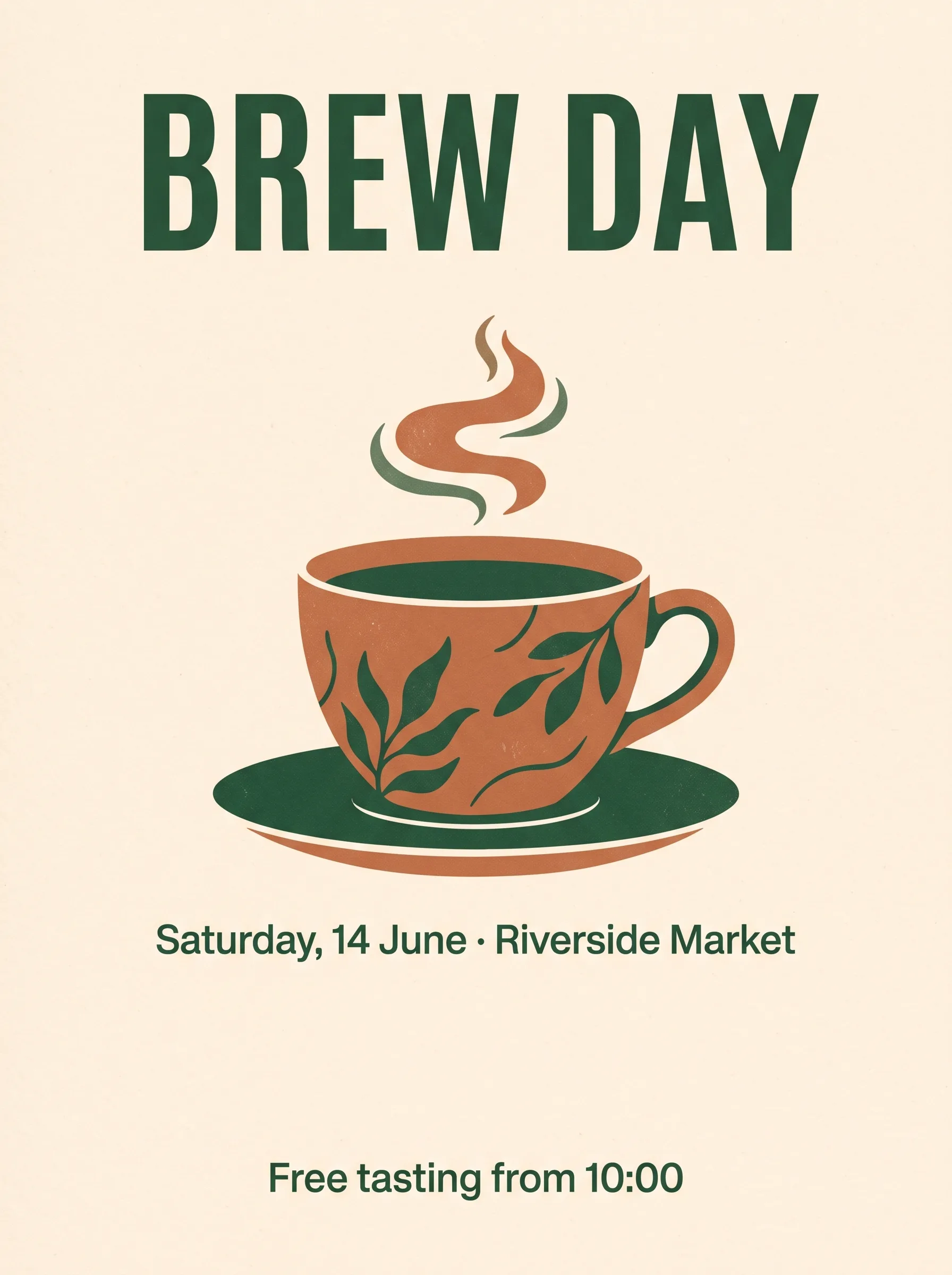
파라미터: 3:4 · 2K · 1792×2400
A vertical poster for a small neighborhood coffee festival. Warm cream background with a large flat illustration of a coffee cup in terracotta and deep green at the center. Exact text, spelled exactly as written: headline "BREW DAY" at the top in bold condensed sans-serif capitals; subtitle "Saturday, 14 June · Riverside Market" directly below the cup in a smaller regular weight; footer line "Free tasting from 10:00" at the bottom. Three text lines only, left-to-right, high contrast, centered, generous margins. Balanced composition with clear space between the headline and the illustration. No other text, no logos, no watermark.
세 줄의 영어 텍스트를 한 번에 정확히 만드는 비결은 각 줄의 텍스트를 따옴표로 감싸고 위치와 글자 굵기를 명확히 지정하는 것입니다. 여러분의 이벤트로 바꿀 때는 세 쌍의 따옴표 안 텍스트와 중앙의 일러스트 주제만 교체하고, 끝의 No other text는 그대로 두어 불필요한 텍스트를 억제하세요.
3. 패션 화보: 해안 테라스
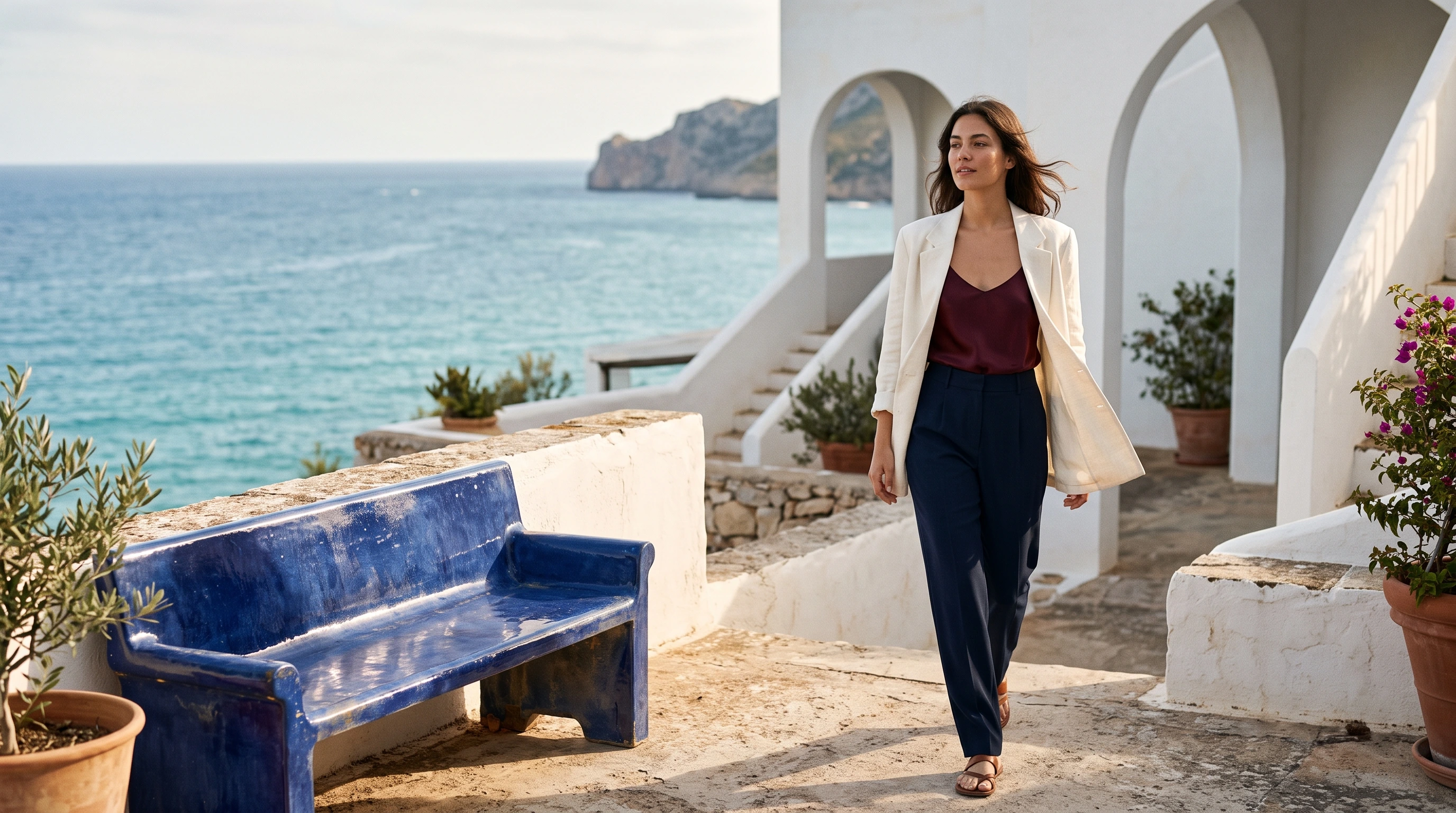
파라미터: 16:9 · 2K · 2752×1536
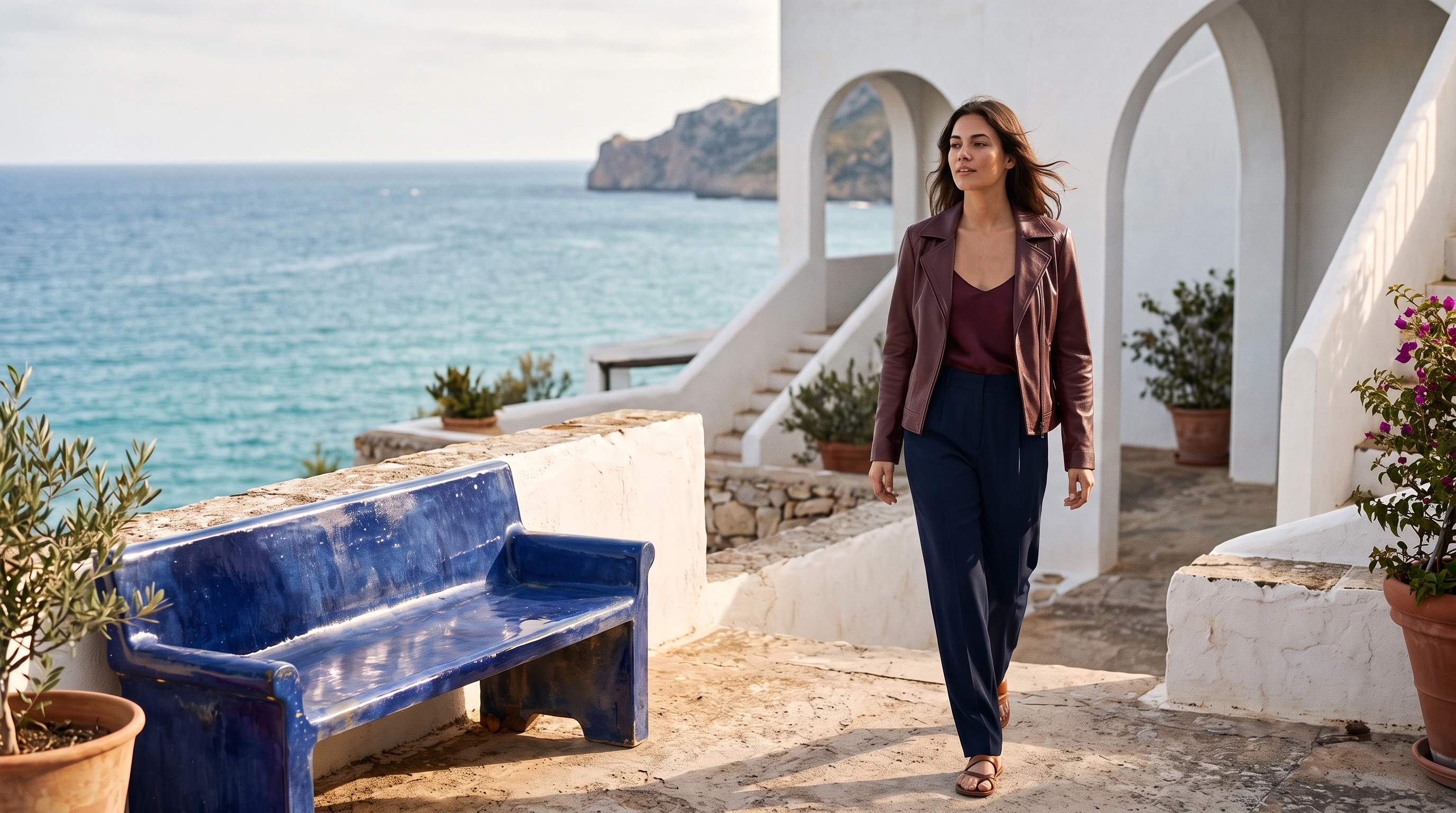
A fashion editorial photograph on a sunlit white-stucco terrace above the Mediterranean, shot at eye level with a 50mm lens. One adult woman in her late twenties is walking naturally toward the camera at the right-center of the composition, her head turned slightly toward the sea with a relaxed confident expression. She wears an oversized ivory linen blazer over a deep burgundy silk camisole, high-waisted navy tailored trousers, and simple leather sandals. Wind lifts a few strands of her dark shoulder-length hair and gently moves the blazer hem. A cobalt-blue glazed ceramic bench occupies the left foreground; beyond it, crisp ivory architecture frames a bright turquoise sea and a small distant headland. Directional late-afternoon sunlight reveals real skin texture, linen weave and silk highlights, with clean architectural shadows and controlled reflections. Rich but restrained cobalt, burgundy, ivory and warm skin tones, sophisticated magazine photography, believable proportions and hands, beautifully resolved clothing, candid physical movement, subtle film grain. The woman is the clear visual focus, with the surrounding terrace providing depth. No lettering, no logos, no watermark, no illustration, no CGI appearance, no airbrushed plastic skin.
이 프롬프트의 순서는 인물과 동작 → 각 의상의 색상과 소재 → 두세 가지 공간 소품 → 카메라와 조명입니다. 모델이나 의상을 바꿀 때는 이 순서대로 해당 문장을 교체하세요. 마지막 줄의 제외 항목은 유지하여 텍스트, 워터마크, 플라스틱 같은 피부를 제거하세요.
4. 모델 의상 교체: 재킷 하나만 교체
파라미터: 참조 이미지 1장(앞선 패션 화보) · 2K · 2752×1536
먼저 모델 페이지에서 원본 이미지를 참조 이미지로 업로드하고(API에서는 image_input에 넣습니다), 그다음 이 편집 프롬프트를 실행하세요:
Edit this exact fashion photograph. Replace only the woman's oversized ivory linen blazer with a beautifully fitted deep-burgundy soft leather jacket, worn open over the existing silk camisole. Give the jacket realistic fine leather grain, subtle natural highlights and believable folds that follow her current body and walking pose. Preserve the exact woman, face, expression, hair, skin tone, hands, body proportions, pose, navy trousers, sandals, camera framing, cobalt ceramic bench, terrace architecture, sea, sky and every background object. Maintain the existing directional sunlight and shadows; adapt only the jacket's light and reflections to its leather material. This is a garment replacement in the original photograph, not a new scene. Keep the photograph natural and editorial, with no text, no logos and no watermark.
핵심은 「무엇을 바꿀지」와 「무엇을 보존할지」를 두 문장으로 나누는 것입니다. Replace only 뒤에는 새 옷을 쓰고, Preserve the exact 뒤에는 바꾸면 안 되는 항목을 하나씩 나열하세요. 여러분의 이미지에 적용할 때는 이 문장 구조를 사용하세요:
Edit this exact photograph. Replace only the [바꿀 대상] with [새로운 모습, 색상·소재·핏을 명확히 작성]. Preserve the exact [인물 / 제품], [얼굴, 헤어스타일, 자세, 비율], [그 밖에 바꾸면 안 되는 의상이나 물체], camera framing and every background object. Maintain the existing lighting; adapt only the [바뀐 대상] light and reflections to its new material. This is an edit of the original photograph, not a new scene.
5. 인테리어 공간: 오후의 거실
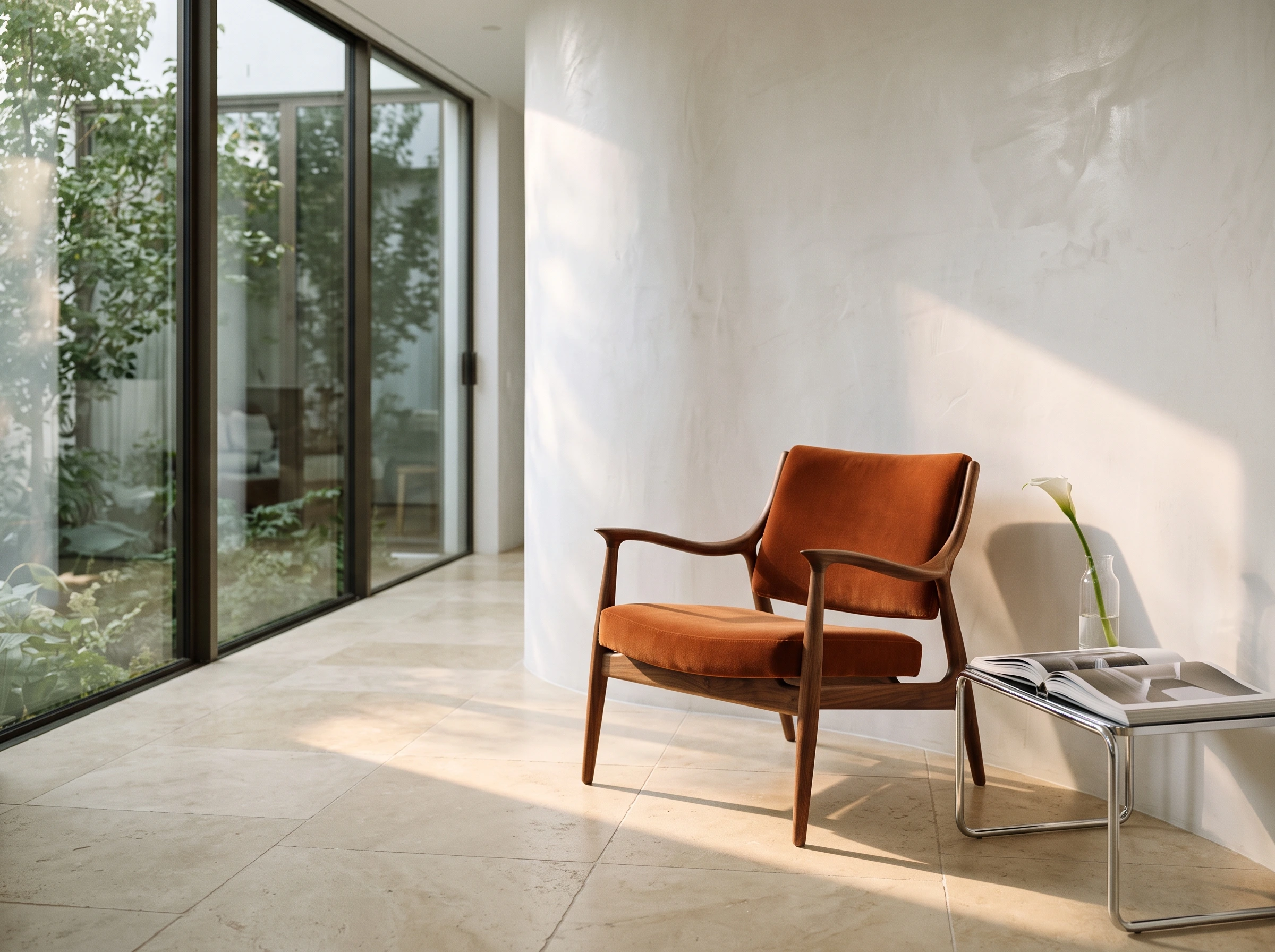
파라미터: 4:3 · 2K · 2400×1792
An architectural interiors photograph of a carefully curated modern living space, viewed at seated eye level with a 35mm lens. A sculptural walnut lounge chair with a burnt-orange velvet seat stands in the right foreground on warm ivory limestone flooring. Beside it is a low chrome side table holding a clear glass vase with a single white calla lily and an open large-format design book. A softly curved white plaster wall frames the scene; a floor-to-ceiling window at the left reveals a leafy courtyard. Late-afternoon sunlight enters from the left, creating a precise diagonal patch of warm light across the floor and grazing the velvet and curved wood, with gentle room bounce light preserving shadow detail. Clearly visible walnut grain, fine velvet pile, brushed metal reflections, imperfect hand-finished plaster and stone texture. Balanced asymmetrical composition, quiet generosity of space, high-end contemporary interiors magazine photography, natural perspective, warm-neutral palette with one controlled orange accent. No people, no readable lettering, no logos, no watermark, no computer-rendered appearance, no excessive props.
여러분의 가구로 바꿀 때는 주인공인 의자, 사이드 테이블 위의 두 소품, 창밖 풍경을 수정하세요. 카메라 높이와 빛의 방향에 대한 두 문장은 유지하세요. 화면의 공간감과 질감은 주로 이 두 문장에서 나옵니다.
범용 작성법
- 「주체 → 환경 → 카메라 → 조명 → 디테일」 순서로 작성하고, 마지막 문장에 원하지 않는 요소를 나열하세요.
- 구체적인 소재(린넨 직조, 벨벳, 유광 반사)를 쓰는 것이 "고급스러운" "정교한"보다 훨씬 효과적입니다.
- 이미지를 편집할 때는 변경 항목과 보존 항목을 따로 쓰고, 보존 항목은 하나씩 나열하세요.
- 먼저 1K로 구도를 잡고, 만족하면 2K나 4K로 올리세요. 1K는 장당 $0.022로, $10이면 약 450장을 생성할 수 있습니다. 먼저 1K로 한 장 시험해 보기 →
| 시나리오 | 화면 비율 | 시작 해상도 |
|---|---|---|
| 이커머스 메인 이미지 | 1:1, 4:5 | 1K로 구도 잡고 2K로 출력 |
| 이벤트 포스터 | 3:4, 4:5, 9:16 | 2K |
| 패션 화보 | 16:9, 4:5, 9:16 | 1K로 구도 잡고 2K로 디테일 확인 |
| 모델 의상 교체 | 원본 이미지와 동일 | 2K |
| 인테리어 공간 | 4:3, 3:2, 16:9 | 2K |
자주 묻는 질문
「이 프롬프트로 생성」을 클릭하면 프롬프트가 자동으로 입력되나요? 네. 모델 페이지가 열릴 때 프롬프트가 이미 입력되어 있으며, 이미지에 표시된 파라미터에 맞춰 화면 비율과 선명도를 선택하고 실행을 클릭하면 됩니다.
자신의 상품 이미지나 모델 이미지를 참조로 사용할 수 있나요? 네. JPEG, PNG, WebP 파일을 최대 10장까지 업로드할 수 있으며, 장당 30MB를 초과할 수 없습니다. 텍스트 투 이미지와 참조 이미지 편집은 동일한 모델입니다.
투명 배경 누끼 소재를 만들 수 있나요? 아니요, 매번 JPG 또는 PNG 한 장을 출력합니다. 투명 배경이 필요하면 GPT Image 2.5를 선택하세요. 차이점은 Nano Banana 2.1 vs GPT Image 2.5에서 확인하세요.
위의 이커머스 메인 이미지 프롬프트를 복사하고, 모델 페이지에서 첫 메인 이미지를 생성하러 가기 →
Nano Banana 2.1 시리즈 글
관련 글
모든 아티클 보기 →-

사용 가이드
seedream-5.0-pro/image-to-image 시작 가이드: 기능, 가격 및 연동 핵심 포인트
ByteDance 이미지 편집 모델의 기능 경계, 과금 방식 및 엔지니어링 연동 실무
-

사용 가이드
seedream-5.0-pro 텍스트-이미지 생성 입문 가이드: 능력 경계, API 연동 및 비용 관리
개발자를 위한 실무 관점: 파라미터 핵심부터 장당 $0.05 비용 추정까지
-

사용 가이드
Hailuo 2.3 Fast 이미지-투-비디오 입문 가이드: 성능 범위, 가격 및 연동 실무
개발자를 위한 MiniMax 이미지-투-비디오 모델 선택과 연동 핵심 포인트