
教程
Grok Imagine 视频 API:1.0 与 1.5 图生视频、文生视频
三个 Grok Imagine 视频端点该调用哪个、单条片段成本如何、带提示词的真实输出示例,以及可直接运行的 curl 与 Python 代码。

TL;DR
- HiAPI 上的 Grok Imagine 视频 API 有三个端点:1.0 文生视频、1.0 图生视频,以及 1.5 图生视频。三者价格相同:480p 每秒 $0.015,720p 每秒 $0.0282,并且每条片段都附带生成的音效,不额外收费。
- 1.0 时长 6–30 秒,最多可接受 7 张参考图。1.5 时长 1–15 秒,只接受一张图片,并可通过
aspect_ratio: "auto"让输出跟随该图片的形状。 - 一条 6 秒 480p 的草稿片段成本为 $0.09。打开图生视频模型页面即可试用;新账号赠送 200 免费额度。
该用哪个端点
| 模型 ID | 输入 | 时长 | 宽高比 | 附加项 |
|---|---|---|---|---|
grok-imagine/text-to-video |
prompt | 6–30 秒(默认 6) | 2:3(默认)、3:2、1:1、16:9、9:16 |
mode:normal 或 fun |
grok-imagine/image-to-video |
1–7 张图片 + 可选 prompt | 6–30 秒(默认 6) | 同上 | mode;用 @image1、@image2 引用图片 |
grok-imagine-1.5/image-to-video |
恰好 1 张图片 + 可选 prompt | 1–15 秒(默认 8) | auto(默认)、1:1、16:9、9:16、3:2、2:3 |
无 mode |
三个端点均按秒计费:$0.015(480p,默认)或 $0.0282(720p)。HiAPI 实时价格,查询于 2026 年 10 月 19 日。失败的任务不收费。
如何选择:
- 时长超过 15 秒,或需要多张产品图作为参考:1.0 图生视频。
- 只有一张静图、需要短片段、且输出应保持静图的形状:1.5 图生视频。它也是唯一能低于 6 秒的端点,因此一条 4 秒循环片段成本更低。
- 完全没有图片:1.0 文生视频。
| 片段 | 480p | 720p |
|---|---|---|
| 4 秒(仅 1.5) | $0.06 | $0.11 |
| 6 秒 | $0.09 | $0.17 |
| 15 秒 | $0.23 | $0.42 |
| 30 秒(仅 1.0) | $0.45 | $0.85 |
真实输出
1.0 图生视频,一张参考图。一张周末旅行包的产品目录静图:
Slow cinematic orbit around the burnt-orange canvas weekender bag, camera circling smoothly from front to three-quarter view, studio lighting glinting off the brass zippers, seamless white background stays clean and shadowless, product perfectly sharp and unchanged, subtle premium e-commerce energy.
grok-imagine/image-to-video,6 秒,720p,一张参考图,$0.17。我们请求了 9:16,但方形源图返回的仍是方形(960×960)。
1.0 图生视频,两张参考图。同时传入一张生活场景图和一张产品图,可让包在新场景中保持外观一致:
grok-imagine/image-to-video,6 秒,720p,9:16,两张参考图,$0.17。
1.5 图生视频,同一张静图,两种镜头运动。镜头运动体现在提示词里。换一个动词,就能得到不同的镜头:
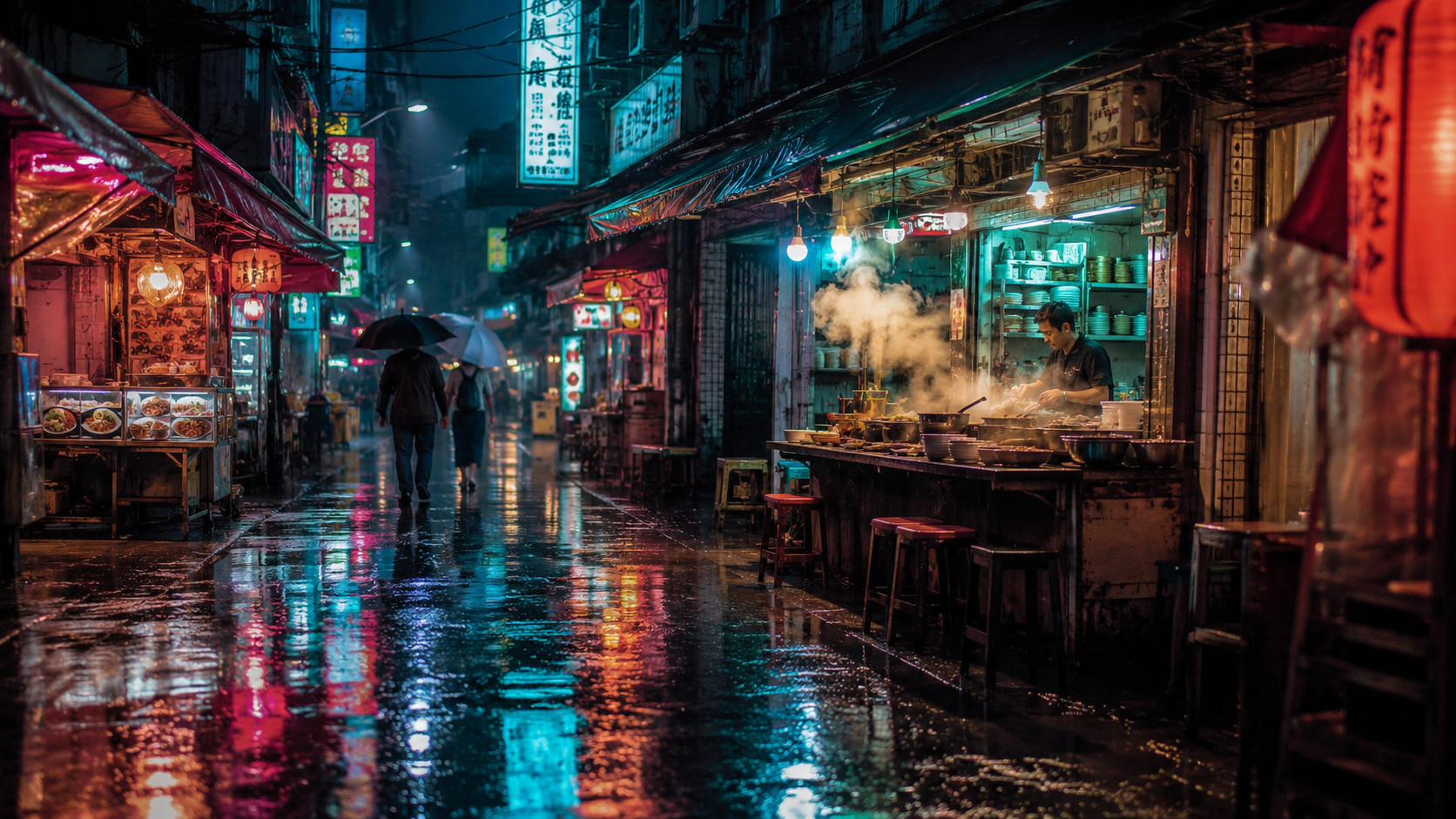
Slow steady dolly push-in down the rain-soaked market street toward the glowing noodle stall, steam rising and curling from the pots, rain falling in thin streaks, neon sign reflections shimmering on the wet pavement, pedestrians walking slowly away under umbrellas, smooth constant camera speed, one continuous shot, no cuts, cinematic pacing
grok-imagine-1.5/image-to-video,6 秒,720p,16:9,$0.17。
Camera glides slowly to the left in a smooth lateral tracking move, strong parallax between the near market stalls and the far end of the street, rain keeps falling, neon reflections slide across the wet ground, the cook keeps stirring behind the counter, steam drifts sideways, one continuous move, no cuts, no zoom
grok-imagine-1.5/image-to-video,6 秒,720p,16:9,$0.17。
1.5,一段 4 秒的环境循环。镜头固定不动时,所有运动都来自场景本身:
grok-imagine-1.5/image-to-video,4 秒,720p,16:9,$0.11。
curl
1.0 的图生视频:
curl -s -X POST https://api.hiapi.ai/v1/tasks \
  -H "Authorization: Bearer $HIAPI_KEY" \
  -H "Content-Type: application/json" \
  -d '{
    "model": "grok-imagine/image-to-video",
    "input": {
      "image_urls": ["https://your-cdn.example.com/product.jpg"],
      "prompt": "Slow orbit around the product, studio light, background stays clean",
      "duration": 6,
      "resolution": "480p",
      "aspect_ratio": "9:16"
    }
  }'
你会收到一个 taskId。轮询 GET https://api.hiapi.ai/v1/tasks/{taskId},直到 data.status 为 success,然后下载 data.output[0].url。链接会过期,请立即保存文件。
文生视频则把模型改为 grok-imagine/text-to-video,并去掉 image_urls。使用 1.5 时,把模型改为 grok-imagine-1.5/image-to-video,保留一张图片,并去掉 mode。
Python:提交、轮询、下载
# pip install requests; export HIAPI_KEY=your-key first
import os, time, uuid, requests

API = "https://api.hiapi.ai/v1/tasks"
H = {"Authorization": f"Bearer {os.environ['HIAPI_KEY']}"}

def generate(model, timeout_s=900, **inp):
    body = {"model": model, "input": inp}
    # Reuse the same Idempotency-Key if you retry a submit, so a retry never bills twice
    r = requests.post(API, json=body, headers={**H, "Idempotency-Key": str(uuid.uuid4())}, timeout=30)
    res = r.json()
    if res.get("code") != 200:
        raise RuntimeError(res)  # 400s list every invalid field
    task_id = res["data"]["taskId"]
    deadline = time.time() + timeout_s
    while time.time() < deadline:
        d = requests.get(f"{API}/{task_id}", headers=H, timeout=30).json()["data"]
        if d["status"] == "success":
            return d["output"][0]["url"]
        if d["status"] == "fail":
            raise RuntimeError(d)
        time.sleep(10)
    raise TimeoutError(task_id)

still = "https://your-cdn.example.com/still.jpg"

# Draft cheaply on 1.5 at 480p, then re-render the keeper at 720p
draft = generate("grok-imagine-1.5/image-to-video", image_urls=[still],
                 prompt="slow push-in, steam rising, camera steady", duration=4, resolution="480p")
final = generate("grok-imagine-1.5/image-to-video", image_urls=[still],
                 prompt="slow push-in, steam rising, camera steady", duration=6, resolution="720p")

# A 20-second clip needs 1.0
long_clip = generate("grok-imagine/image-to-video", image_urls=[still],
                     prompt="slow push-in, steam rising, camera steady", duration=20, resolution="480p")

with open("clip.mp4", "wb") as f:
    f.write(requests.get(final).content)
参数
| 字段 | 1.0 文生视频 | 1.0 图生视频 | 1.5 图生视频 |
|---|---|---|---|
prompt |
必填,最多 5,000 字符 | 可选 | 可选,最多 4,096 字符 |
image_urls |
不接受 | 1–7 张,jpeg/png/webp,每张最大 10 MB | 恰好 1 张,jpeg/png/webp,最大 20 MB |
duration |
6–30 | 6–30 | 1–15 |
resolution |
480p(默认)/ 720p |
同上 | 同上 |
aspect_ratio |
2:3 默认 |
2:3 默认 |
auto 默认(跟随图片) |
mode |
normal(默认)/ fun |
同上 | 不接受 |
你会遇到的错误
以下错误全部会在提交时返回 HTTP 400,因此不会创建任务,也不会产生费用:
duration: minimum: got 4, want 6:1.0 从 6 秒起。更短的片段请用 1.5。duration: maximum: got 20, want 15:1.5 最长 15 秒。更长的片段请用 1.0。image_urls: maxItems: got 2, want 1:1.5 只接受一张图片。additional properties 'mode' not allowed:1.5 没有mode。resolution: value must be one of '480p', '720p':没有 1080p,且必须小写。
FAQ
选 1.0 还是 1.5?
每秒价格相同。根据输入和时长选择:多张参考图或超过 15 秒用 1.0;一张静图和短片段用 1.5。拿不准的话,把同一张静图分别在两个端点上以 480p 生成 6 秒,总共花费 $0.18。
有声音吗?
有。上面每条片段都返回了生成的音轨;灯塔循环片段能清楚听到海浪声。没有关闭开关(generate_audio 和 audio 会被当作未知字段拒绝),声音也不影响价格。如果你不想要,可在剪辑时去掉音轨。
能出 1080p 吗?
不能。三个端点的最高分辨率都是 720p。
mode: "fun" 有什么作用?
这是 1.0 的选项,可让运动更活泼、更夸张。normal 是默认值,也是产品片段更稳妥的选择。
更多示例:Grok Imagine 1.5 用于短视频。查看整个系列的价格,请参阅 Grok Imagine API 定价。生成静态图片请参阅 Grok Imagine 图像 API 指南。


