
사용 가이드
qwen-image-3.0-pro/text-to-image 프롬프트 레시피: 바로 복사해 붙여넣는 프롬프트와 실제 출력
앱 아이콘, 제품 사진, 배너, 배경화면, 풍경, 인물을 아우르는 여섯 가지 실제 프롬프트, 실제 설정, 실제 출력.
대부분의 "프롬프트 가이드" 글은 한 줄짜리 아이디어와 썸네일 하나만 준다. 이 글은 다르다. qwen-image-3.0-pro/text-to-image에서 여섯 가지 서로 다른 용도로 우리가 사용한 전체 프롬프트 원문, 정확한 API 파라미터, 실제 이미지 1장당 비용, 그리고 실제 출력 이미지를 그대로 공개한다. 앱 아이콘, 제품 사진, 와이드 배너, 휴대폰 배경화면, 풍경, 인물이다.
- qwen-image-3.0-pro/text-to-image의 가격은 해상도별로 나뉘며 단일 가격이 아니다: 1K는 장당 $0.0497, 2K는 장당 $0.0993이다.
- API는
input페이로드에서aspect_ratio+resolution만 받는다.1024x1024같은 원시 픽셀 크기를 직접 넘길 수 없다. - 21:9 종횡비를 요청하면 해상도가 1K로 고정된다. 이 비율에는 현재 2K 경로가 없다.
- 아래 여섯 장의 이미지는 모두 실제, 편집되지 않은 태스크 API 출력이다. 스톡 사진도, 자리 표시자도 없다.
- 완전히 사용 가능한 프롬프트는 모두 바로 복사해 붙여넣을 수 있다. 주제만 바꾸고 구조는 유지하면 일관된 결과를 얻는다.
API가 크기 요청을 받는 방식
qwen-image-3.0-pro/text-to-image는 hiapi의 태스크 API에서 실행된다(POST /v1/tasks, GET /v1/tasks/{id}로 폴링, output[0].url에서 다운로드). input 객체는 픽셀 크기가 아닌 크기 관련 필드 두 개를 받는다:
curl -X POST https://api.hiapi.ai/v1/tasks \
  -H "Authorization: Bearer $HIAPI_API_KEY" \
  -H "Content-Type: application/json" \
  -d '{
    "model": "qwen-image-3.0-pro/text-to-image",
    "input": {
      "prompt": "your prompt here",
      "aspect_ratio": "16:9",
      "resolution": "2K"
    }
  }'
aspect_ratio는 표준 집합(1:1, 3:2, 2:3, 4:3, 3:4, 5:4, 4:5, 16:9, 9:16, 21:9, auto)을 받는다. resolution은 1K 또는 2K를 받으며, 가격이 선택한 등급에 따라 달라지므로 무조건 최대 옵션을 기본값으로 두기보다 의식적으로 고르는 편이 좋다.
1. 앱 아이콘 — 그라데이션 배경 위의 깔끔한 벡터 피사체
앱 아이콘에는 읽히는 단일 피사체, 조밀한 구성, 그리고 어수선함이 없어야 한다. 프롬프트에 "텍스트 없음"과 "중앙 구성"을 명시하지 않으면 모델이 빈 공간을 채우려 든다.
A minimalist app icon of a single white paper crane mid-fold, sharp geometric origami creases catching soft light, perched on a small circular teal-to-indigo gradient background inside a rounded square, subtle drop shadow beneath the crane for depth, one thin gold line accent along the crane's spine, flat modern vector-illustration style with crisp clean edges, no text, centered composition with even padding on all sides, app-icon composition
설정: aspect_ratio: 1:1, resolution: 1K — $0.0497

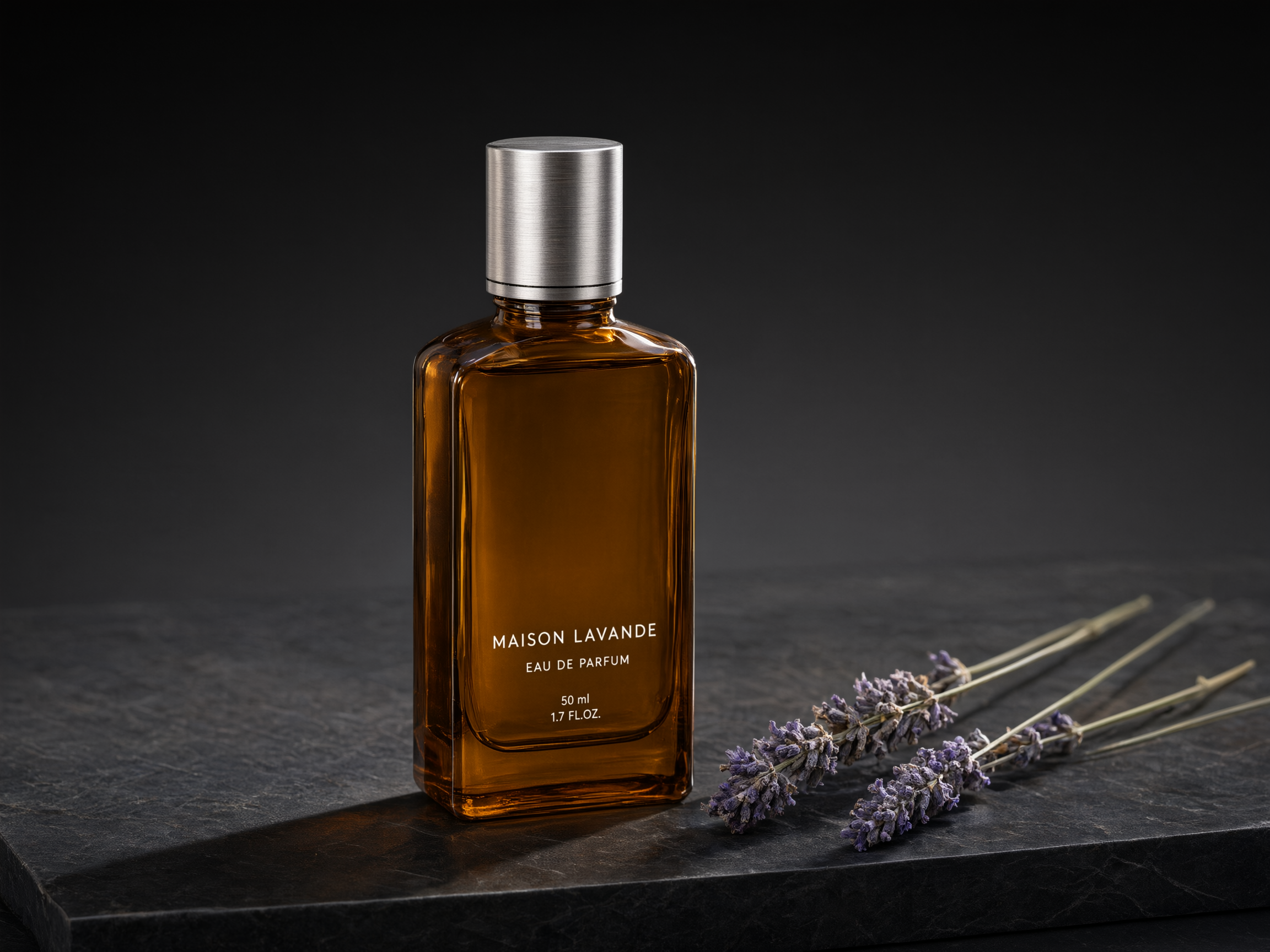
2. 제품 사진 — 단색 배경 위의 스튜디오 조명
상업용 제품 이미지의 경우 표면, 광원 방향, 그리고 헤드라인용으로 남길 네거티브 스페이스를 서술해야 한다. qwen-image-3.0-pro/text-to-image는 조명 방향 힌트를 잘 따른다.
Product photography of a tall amber glass perfume bottle with a brushed-silver cap, standing on a slab of dark honed marble, three dried sprigs of lavender resting beside the bottle, soft directional studio light from the upper left casting a long soft shadow to the right, shallow depth of field with a smooth dark-grey gradient background fading to black, a thin rim light tracing the bottle's right edge, generous negative space above the bottle for a headline, realistic commercial product photography, 4:3 aspect ratio
설정: aspect_ratio: 4:3, resolution: 2K — $0.0993
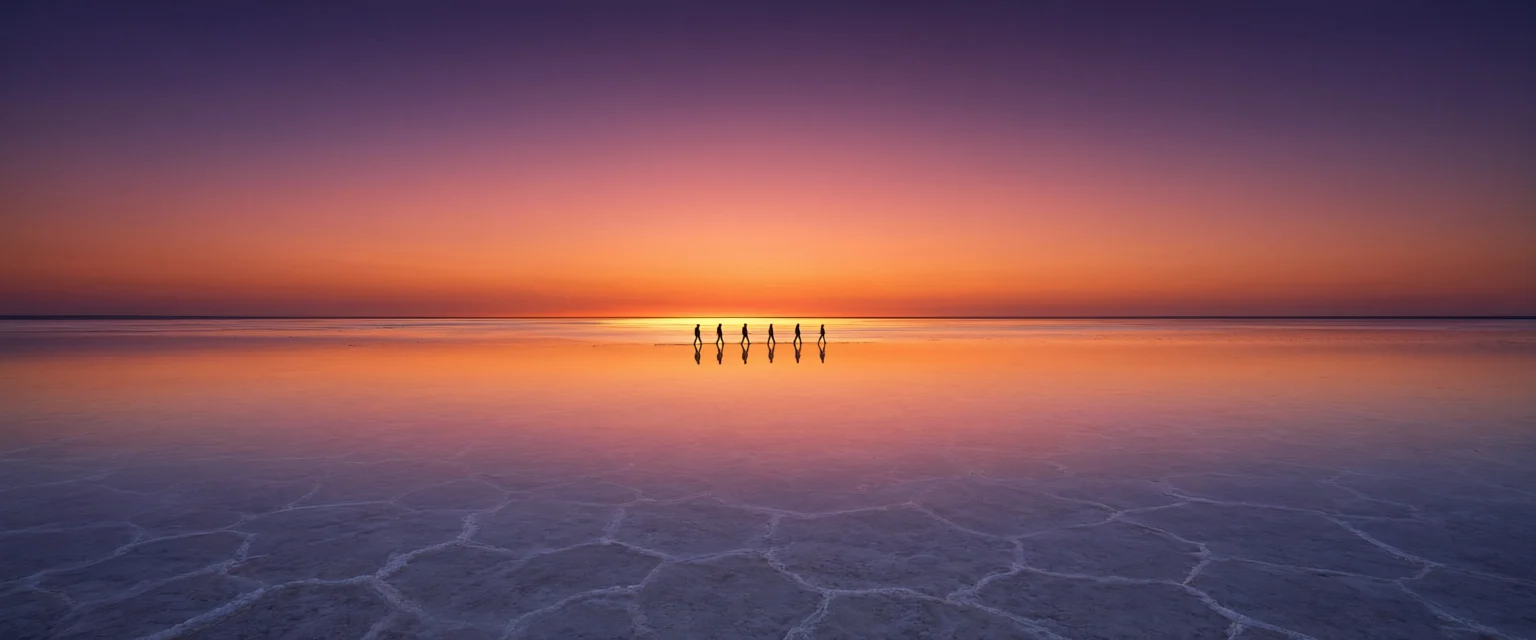
3. 와이드 히어로 배너 — 21:9 파노라마 구성
21:9는 특별한 경우다. 픽셀 크기가 아닌 비율 문자열로 직접 요청하며, 어떻게 요청하든 현재 1K 해상도로 고정된다는 점에 유의해야 한다.
Ultra-wide panoramic photo of a vast white salt flat stretching to the horizon at dusk, a single row of small dark human silhouettes walking in the distance for scale, the wet salt surface perfectly mirroring a sky layered in deep violet, coral pink and burnt orange, a thin band of golden light along the horizon where the sun has just set, minimalist symmetrical composition split evenly between sky and reflection, cinematic wide-format travel photography, extremely wide 21:9 aspect ratio suitable for a hero banner
설정: aspect_ratio: 21:9, resolution: 1K — $0.0497
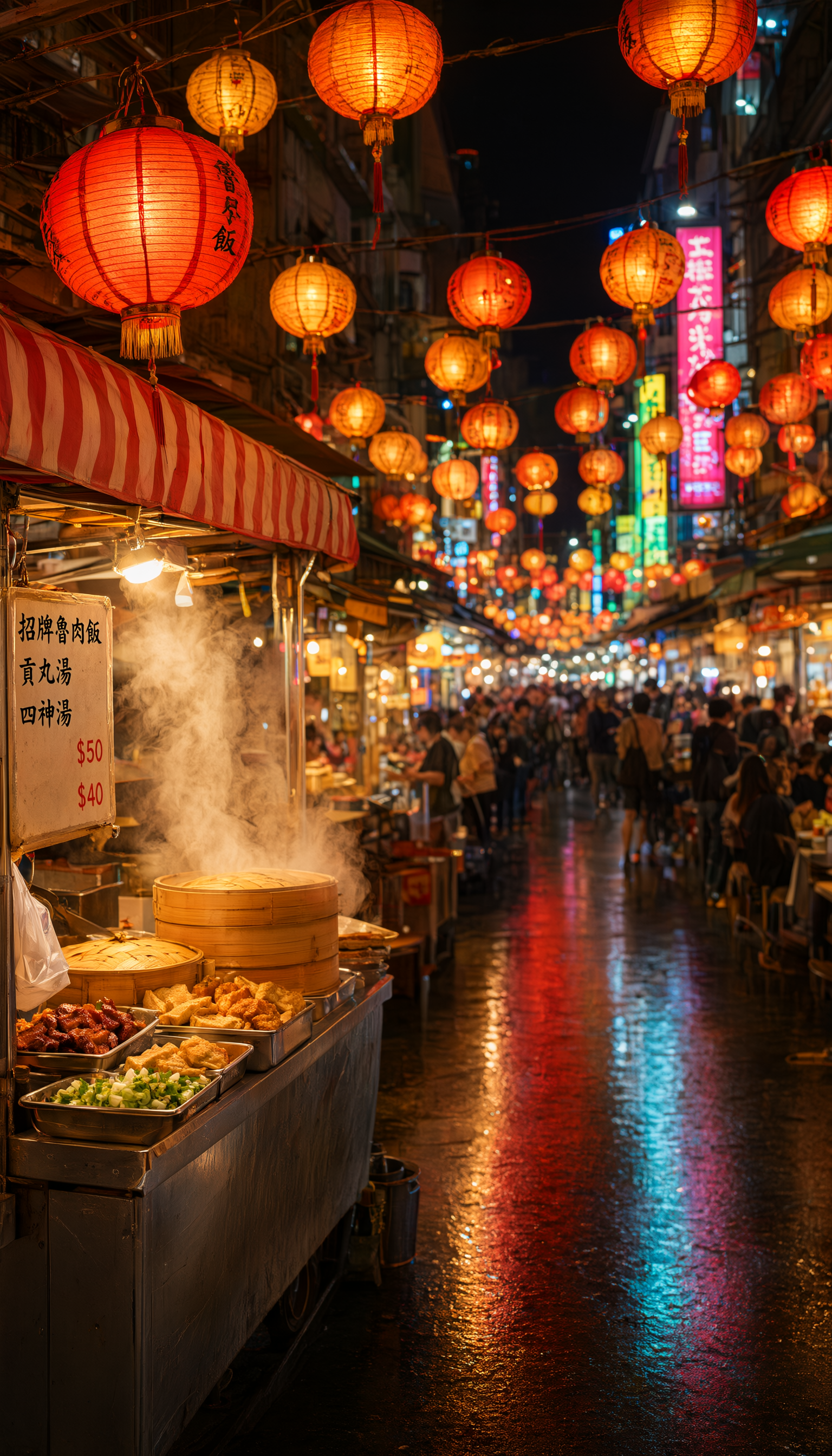
4. 휴대폰 배경화면 — 세로형 9:16 분위기
세로형 배경화면은 foreground/background(전경/배경) 레이어를 명확히 나누는 것이 좋다. 그래야 앱 아이콘과 위젯이 위에 겹쳐도 구성이 읽힌다.
Vertical phone wallpaper photo of a crowded night food-market alley in Taipei, strings of round paper lanterns in red and gold crisscrossing overhead and glowing warmly, a steaming food stall with a striped awning in the near foreground on the left, the alley receding into a soft blur of colorful signage and distant crowds, wet pavement reflecting the lantern light in warm streaks, lively but atmospheric night photography, shallow depth of field with the nearest lantern sharp, tall 9:16 aspect ratio framed for a phone lock screen
설정: aspect_ratio: 9:16, resolution: 2K — $0.0993
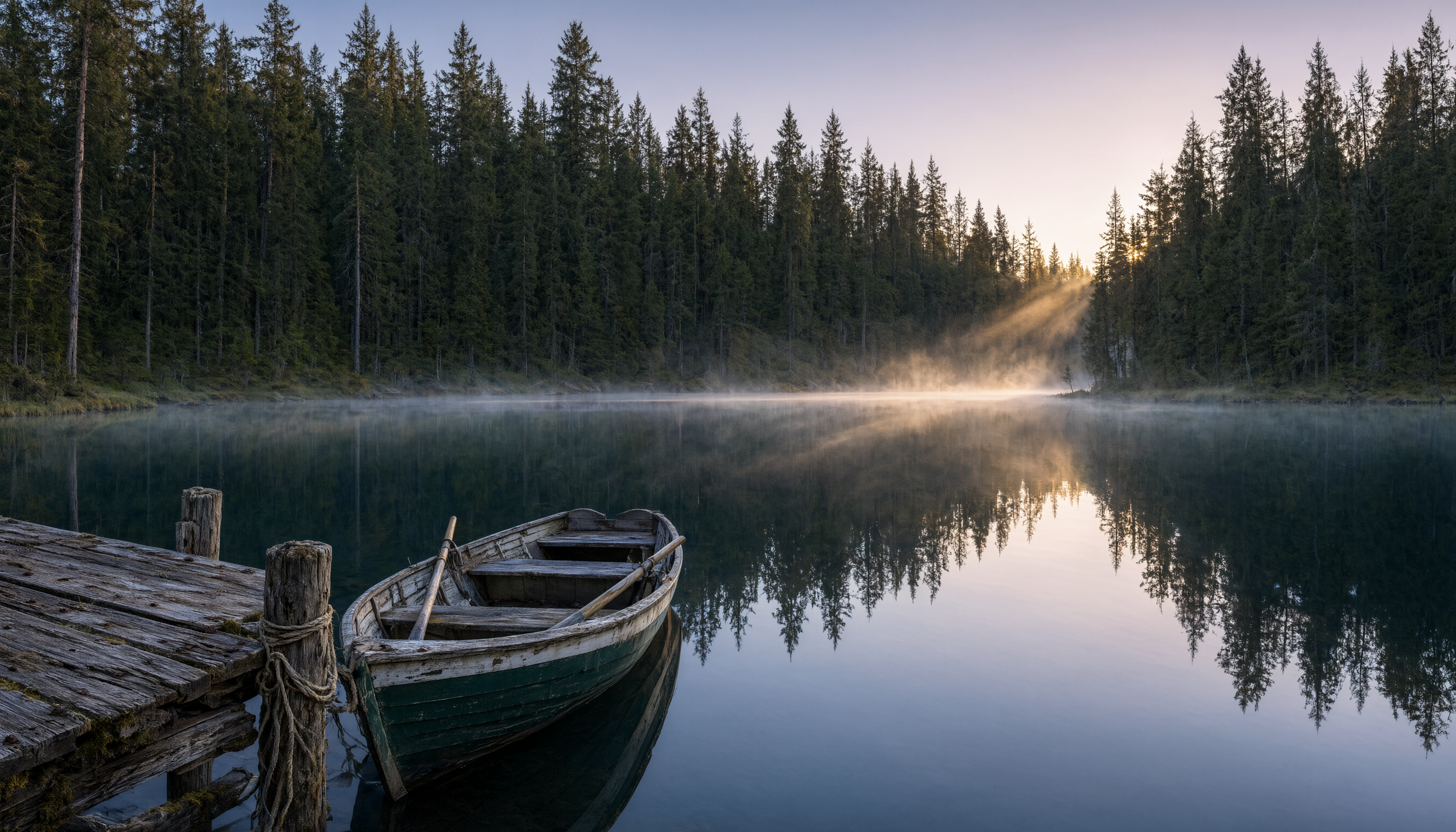
5. 풍경 사진 — 자연광과 분위기
자연 장면의 경우 시간대와 하나의 전경 고정 요소(여기서는 노 젓는 배)를 짚어주면 구성이 천편일률적으로 보이는 것을 막을 수 있다.
Wide landscape photo of a still glassy lake surrounded by dense dark-green pine forest at dawn, thin layers of mist hovering just above the water, a small empty wooden rowboat tied to a weathered dock in the lower-left foreground, low golden sunlight breaking through gaps in the pines on the far shore and catching the mist, muted cool color palette with warm highlights, tranquil nature photography with a strong sense of stillness, 16:9 aspect ratio
설정: aspect_ratio: 16:9, resolution: 2K — $0.0993
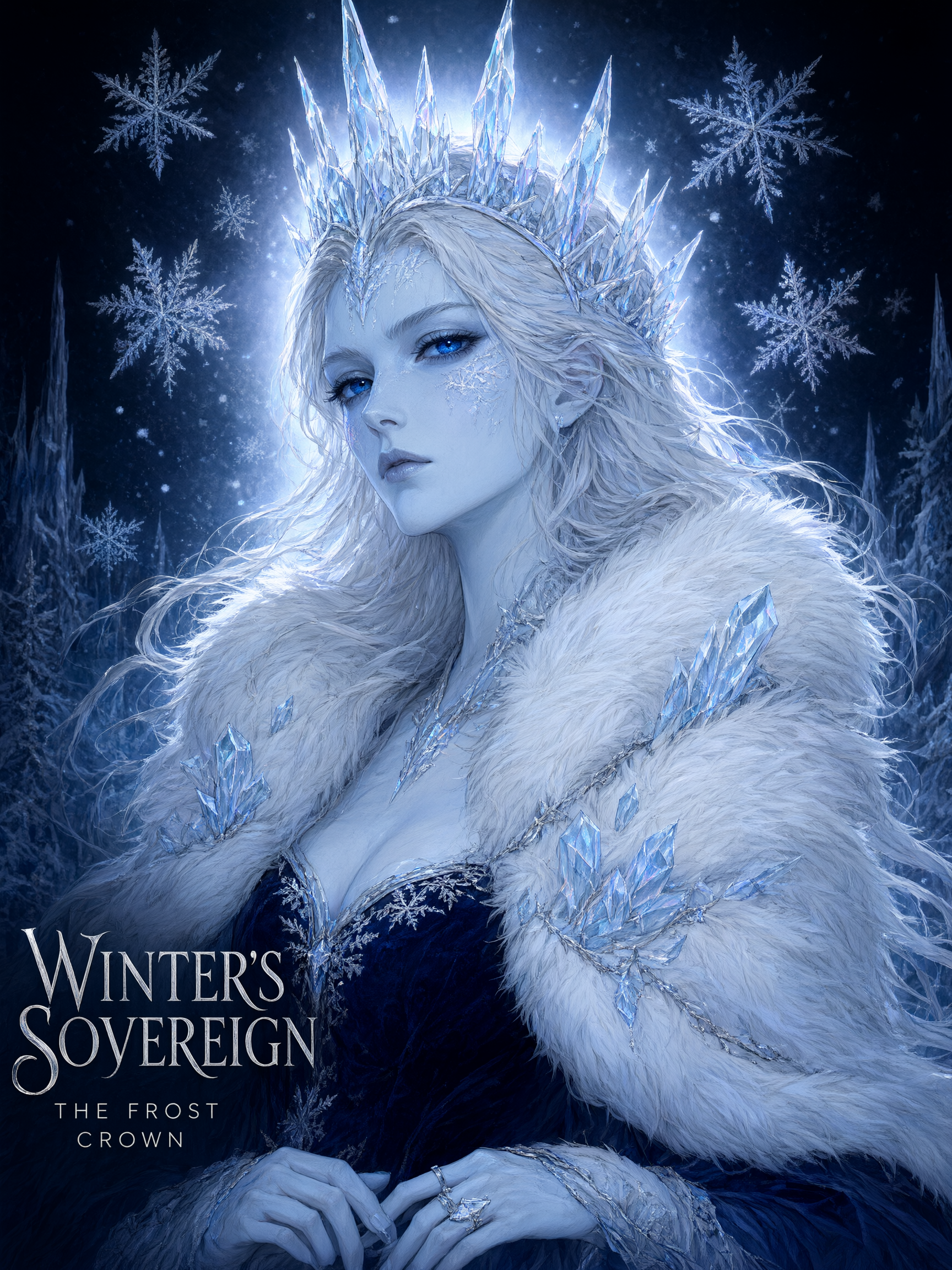
6. 인물 — 극적인 광과 그림자의 판타지 아트
캐릭터 아트 프롬프트는 피부/재질 묘사, 실루엣 디테일(왕관, 머리카락, 옷깃), 조명을 각각 별개의 절로 나누는 것이 가장 좋다. 이렇게 하면 모델에게 긴 서술문 하나가 아니라 명확한 체크리스트를 주게 된다.
Painterly digital portrait of a regal ice queen character from the chest up, pale blue-white skin with faint frost patterns along her cheekbones, sharp angular crown made of translucent icicle shards, flowing silver-white hair with frozen strands drifting as if caught mid-motion, deep sapphire eyes catching a cold rim light, richly detailed fur-and-crystal collar, soft volumetric light from behind creating a glowing halo through falling snow, dramatic fantasy character-art style with fine linework and soft shading, dark navy background fading to black, 3:4 aspect ratio suitable for a poster
설정: aspect_ratio: 3:4, resolution: 2K — $0.0993
이 여섯 레시피의 총비용
| 레시피 | 종횡비 | 해상도 | 비용 |
|---|---|---|---|
| 앱 아이콘 | 1:1 | 1K | $0.0497 |
| 제품 사진 | 4:3 | 2K | $0.0993 |
| 와이드 히어로 배너 | 21:9 | 1K | $0.0497 |
| 휴대폰 배경화면 | 9:16 | 2K | $0.0993 |
| 풍경 | 16:9 | 2K | $0.0993 |
| 인물 | 3:4 | 2K | $0.0993 |
| 합계 | $0.4966 |
가격이 단일 가격이 아니라 해상도별로 나뉘므로, 대규모 작업에서 비용을 가장 빠르게 줄이는 방법은 2K가 주는 추가 디테일이 중요하지 않을 때 1K를 기본값으로 쓰는 것이다. 아이콘, 썸네일, 작은 UI 소재는 2K가 거의 필요 없지만, 히어로 배너, 배경화면, 인쇄용 인물화는 보통 필요하다.
자주 묻는 질문
qwen-image-3.0-pro/text-to-image는 1024x1024 같은 원시 픽셀 크기를 지원하나요?
아니다. input 페이로드는 aspect_ratio(비율 문자열)와 resolution(1K 또는 2K)을 받으며, 픽셀 단위의 너비/높이를 받지 않는다. 픽셀 기반 API에서 이전하는 중이라면 먼저 목표 크기를 가장 가까운 지원 종횡비로 변환해야 한다.
21:9는 왜 1K 해상도만 지원하나요? 21:9를 직접 비율 문자열로 요청하면 이 모델은 현재 1K로만 해석한다. 이 비율에는 현재 사용 가능한 2K 변형이 없다.
qwen-image-3.0-pro/text-to-image의 가격은 장당 고정 가격인가요? 아니다. 해상도별로 나뉜다: 1K는 장당 $0.0497, 2K는 장당 $0.0993으로, 더 높은 해상도는 약 두 배다. 대량 실행 예산을 계획하기 전에 반드시 hiapi 가격 페이지에서 현재 요율을 확인하기 바란다.
처음부터 생성하지 않고 기존 이미지를 편집할 수 있나요? 가능하다. qwen-image-3.0-pro는 편집 및 참조 기반 생성을 위한 image-to-image 변형도 제공한다. 이 가이드는 text-to-image 경로만 다룬다.
직접 사용해 보기
전체 파라미터 레퍼런스, 실시간 가격, 브라우저 내 playground는 모두 qwen-image-3.0-pro/text-to-image 모델 페이지에 있다. 첫 API 호출을 설정 중이라면 qwen-image-3.0-pro API 가이드가 curl과 Python 예제를 처음부터 끝까지 설명한다. 이전 세대 모델의 프롬프트 성능을 비교하고 싶다면 qwen-image-2.0 프롬프트 레시피를 참고하라. 여기에도 복사해 붙여넣을 수 있는 프롬프트 여섯 가지가 있다.
관련 글
모든 아티클 보기 →-

사용 가이드
seedream-5.0-pro/image-to-image 시작 가이드: 기능, 가격 및 연동 핵심 포인트
ByteDance 이미지 편집 모델의 기능 경계, 과금 방식 및 엔지니어링 연동 실무
-

사용 가이드
seedream-5.0-pro 텍스트-이미지 생성 입문 가이드: 능력 경계, API 연동 및 비용 관리
개발자를 위한 실무 관점: 파라미터 핵심부터 장당 $0.05 비용 추정까지
-

사용 가이드
Hailuo 2.3 Fast 이미지-투-비디오 입문 가이드: 성능 범위, 가격 및 연동 실무
개발자를 위한 MiniMax 이미지-투-비디오 모델 선택과 연동 핵심 포인트