
사용 가이드
Seedream 4.5 프롬프트 레시피: 텍스트→이미지 및 이미지→이미지 프롬프트 10종
바로 복사할 수 있는 Seedream 4.5 프롬프트 10종과 실제 생성 결과: 포스터, 배너, 패키지, 메뉴, 4K, 그리고 색상 변경, 다중 참조 이미지 융합, 재조명, 캐릭터 일관성.
TL;DR
- HiAPI의 Seedream 4.5에서 바로 복사해 쓸 수 있는 프롬프트 10종: 텍스트→이미지 5종(포스터, 배너, 패키지, 메뉴, 4K 평면 구성 이미지 1장), 이미지→이미지 5종(색상 변경, 참조 이미지 3장 융합, 재조명, 캐릭터 일관성, 한 번의 4K 디테일 개선). 아래 출력물은 모두 실제 결과입니다.
- 두 엔드포인트 모두 이미지당 $0.045로 과금되며 2K와 4K 가격이 같습니다. 10가지 색상의 제품 매트릭스를 만들면 $0.45입니다.
- 효과적인 프롬프트 패턴: 등장해야 할 텍스트를 그대로 따옴표로 묶고, 어디에 어떻게 배치할지 설명합니다. 편집할 때는 바꿀 부분만 지목한 뒤 반드시 유지해야 할 항목을 모두 나열합니다. 텍스트→이미지 모델 페이지 열기에서 하나 시도해 보세요. 신규 계정에는 200 무료 크레딧이 지급됩니다.
준비 사항
| 텍스트→이미지 | 이미지→이미지 | |
|---|---|---|
| 모델 id | seedream-4.5/text-to-image |
seedream-4.5/image-to-image |
| 필수 | prompt |
prompt + image_urls (1–14) |
aspect_ratio |
1:1, 4:3, 3:4, 16:9, 9:16, 2:3, 3:2, 21:9 |
위와 동일 |
resolution |
2K 또는 4K |
위와 동일 |
| 가격 | $0.045 | $0.045 |
HiAPI 실시간 가격, 2026년 10월 20일 확인. 실패한 작업은 과금되지 않습니다.
curl -s -X POST https://api.hiapi.ai/v1/tasks \
  -H "Authorization: Bearer $HIAPI_KEY" \
  -H "Content-Type: application/json" \
  -d '{
    "model": "seedream-4.5/text-to-image",
    "input": {"prompt": "YOUR PROMPT", "aspect_ratio": "2:3", "resolution": "2K"}
  }'
# poll GET https://api.hiapi.ai/v1/tasks/{taskId} until data.status is "success",
# then download data.output[0].url (the link expires after about 7 days)
이미지→이미지에서는 모델을 바꾸고 "image_urls": ["https://..."]를 추가하세요. 매번 aspect_ratio와 resolution을 전달해야 합니다. 시드, 네거티브 프롬프트, 이미지 개수는 지원되지 않으며, 불필요한 필드가 있으면 400이 반환됩니다. 저희 텍스트→이미지 작업은 2K든 4K든 모두 61–112초 안에 완료되었습니다.
텍스트→이미지 레시피
1. 스크린 인쇄 공연 포스터: 세 구절의 텍스트, 하나의 스타일
A screen-printed gig poster for a fictional jazz festival, the title 'BLUE HOUR JAZZ FESTIVAL' in bold geometric sans-serif capitals stacked across the top half, a double bass player silhouetted against a huge orange evening sun rendered in flat layered inks, date line 'AUGUST 21-23' in a clean slab serif beneath the title, venue line 'RIVERSIDE PARK PAVILION' in small spaced capitals at the bottom edge, limited-palette screen print texture with visible paper grain, burnt orange, midnight blue and cream palette, premium gig-poster finish
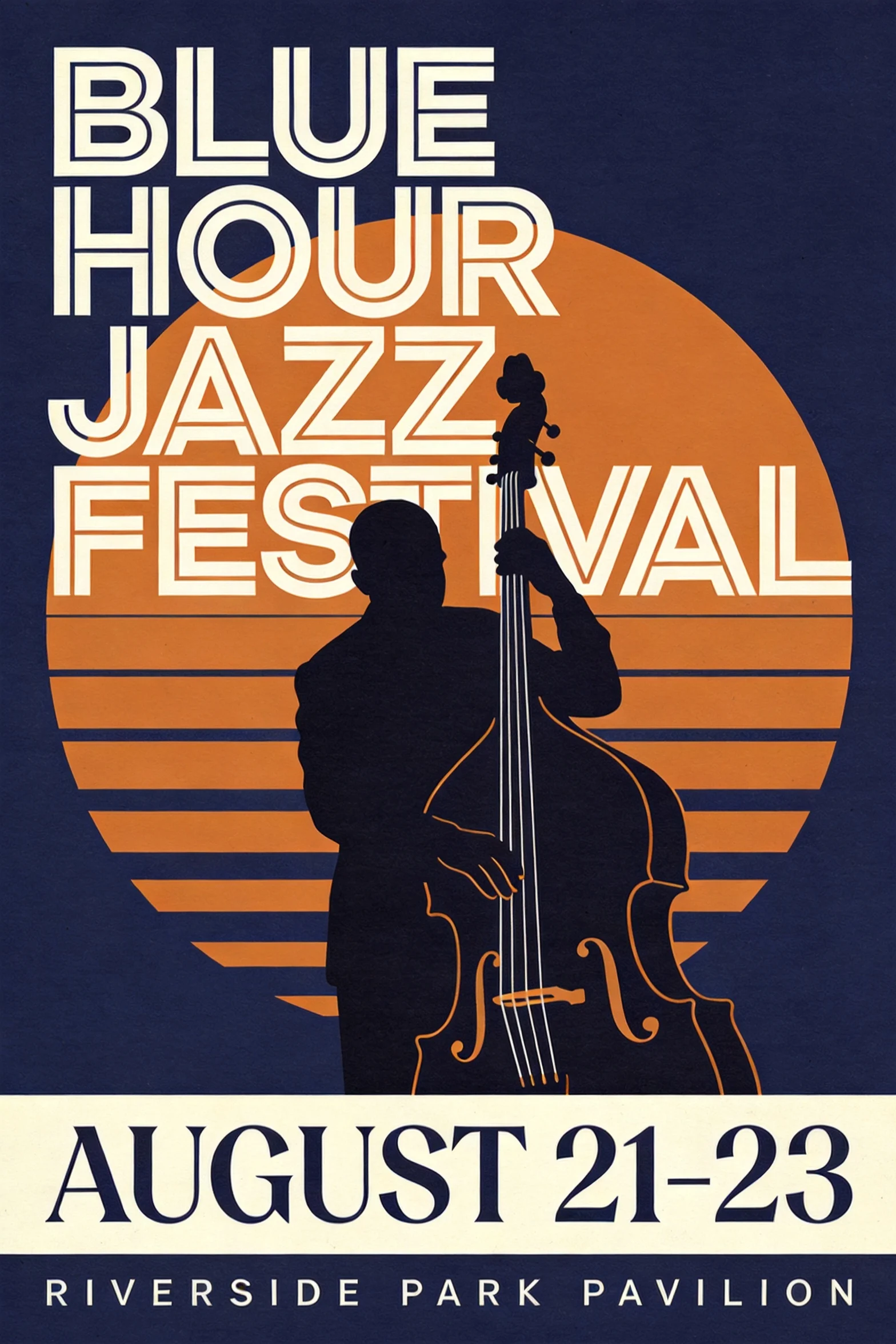
seedream-4.5/text-to-image, 2:3, 2K, $0.045.
제목, 날짜, 장소가 첫 시도에 모두 정확했습니다. 각 텍스트 구절에는 고유한 폰트 처리("slab serif", "small spaced capitals")와 고유한 위치("beneath the title", "at the bottom edge")가 지정되었습니다. 매체를 명시하면(스크린 인쇄와 평면 레이어 잉크) 전체 이미지가 하나의 스타일로 유지됩니다.
2. 프로모션 히어로 배너, 그리고 다시 실행한 이유
A wide e-commerce hero banner for a fictional headphone brand's summer sale, a matte black over-ear headphone with completely plain unbranded earcups, no logo or emblem anywhere on the product, floating at the right third with soft studio reflections, headline 'TURN DOWN THE NOISE' in heavy modern sans-serif on the left, subline 'up to 40% off wireless flagships' in light type beneath it, a small pill-shaped button labeled 'SHOP NOW' under the subline, clean gradient background from ice blue to white, soft studio lighting, crisp product edges, premium commercial finish
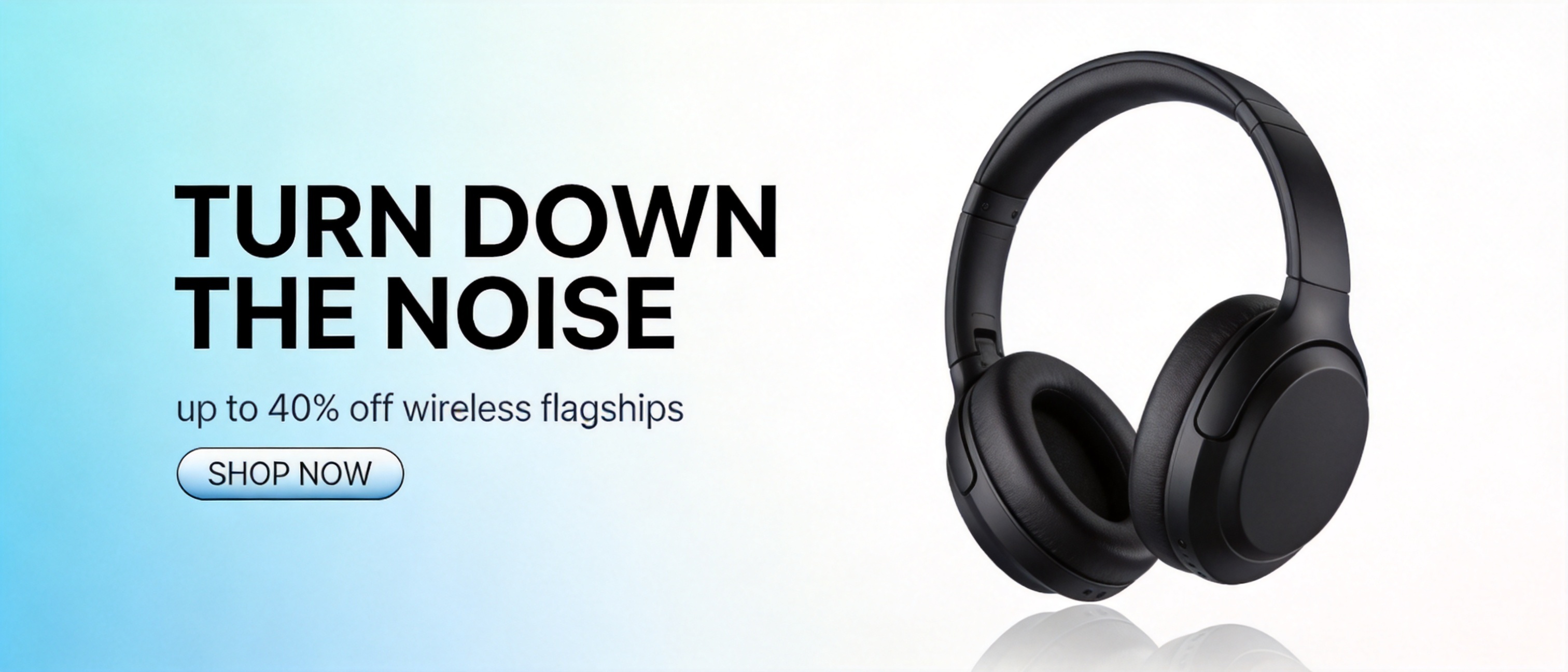
seedream-4.5/text-to-image, 21:9, 2K, $0.045.
텍스트는 첫 시도에 정확했지만, 이어컵에 실제 오디오 브랜드 로고와 매우 유사한 엠블럼이 생겼습니다. "completely plain unbranded earcups, no logo or emblem anywhere on the product"를 추가해 다시 실행하니 해결되었습니다. 모든 상업용 제품 프롬프트에 이 문구를 넣으세요.
3. 패키지: 대소문자 유지하기
A studio product shot of a matte kraft-paper coffee bag standing on a walnut counter, the bag's label reads 'HALFLIGHT ROASTERS' in a stamped serif wordmark with 'single origin - honey process' in small letterpress type beneath it, scattered roasted beans and a brass scoop in the foreground, steam rising from an out-of-frame cup catching the side light, warm morning side light, shallow depth of field, hyper-detailed product photography, premium commercial finish
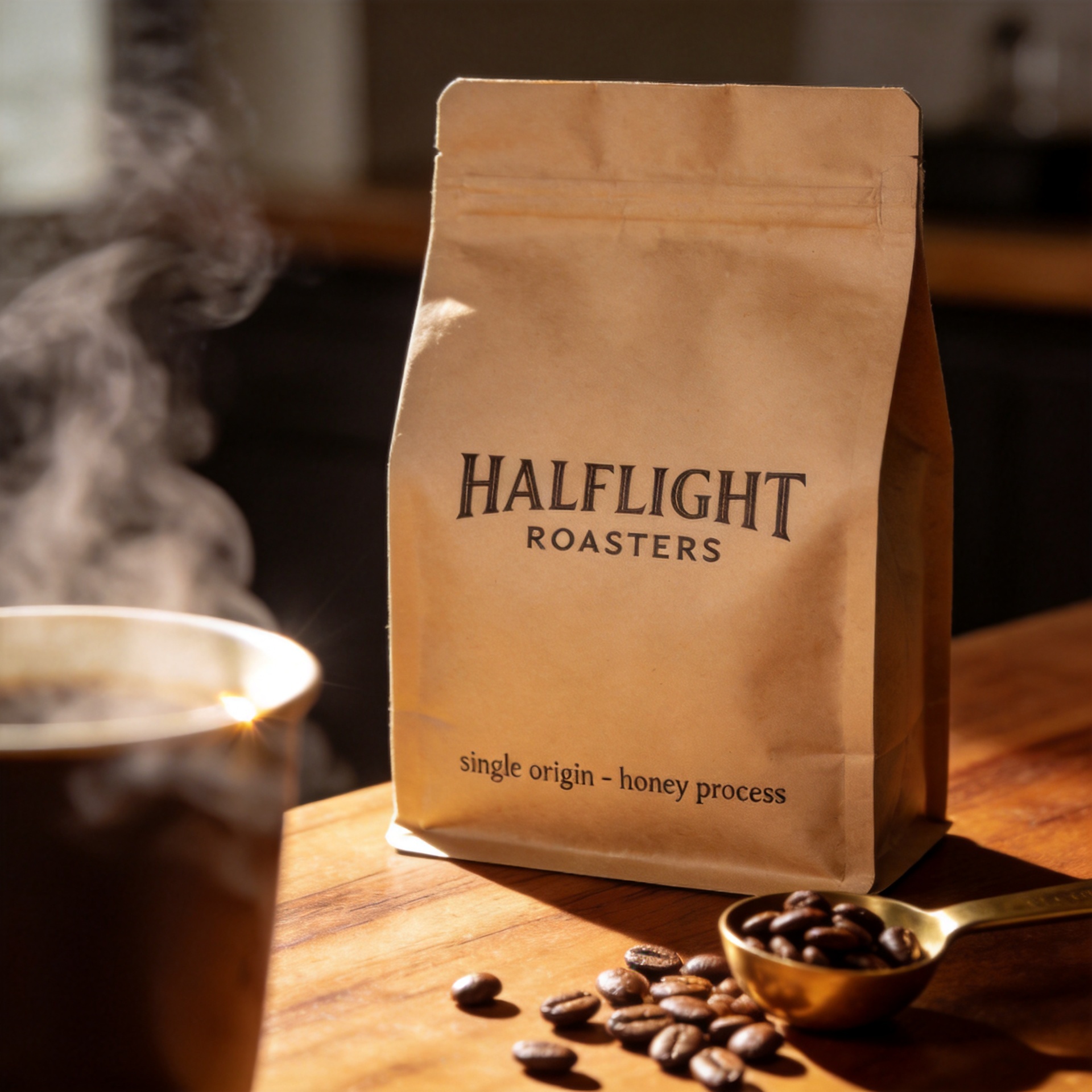
seedream-4.5/text-to-image, 1:1, 2K, $0.045.
브랜드 워드마크는 대문자이고, 하위 라벨은 소문자를 유지하며, 둘 다 봉투의 곡면을 따라갑니다. 텍스트가 표면에 어떻게 인쇄되는지("stamped", "letterpress") 설명하면 폰트와 인쇄 질감이 동시에 정해집니다.
4. 칠판 메뉴: 네 줄의 텍스트
A tall rustic cafe chalkboard menu photographed straight-on, hand-lettered chalk type on a black slate board framed in worn oak, the heading 'TODAY'S POUR' in tall chalk capitals with a decorative underline, three menu lines beneath it reading 'FLAT WHITE 4', 'OAT LATTE 5' and 'CASCARA FIZZ 6', small chalk illustrations of a coffee cup and a leaf in the corners, a string of warm cafe lights blurred in the background bokeh, cozy natural light, photorealistic, rich cohesive color grade
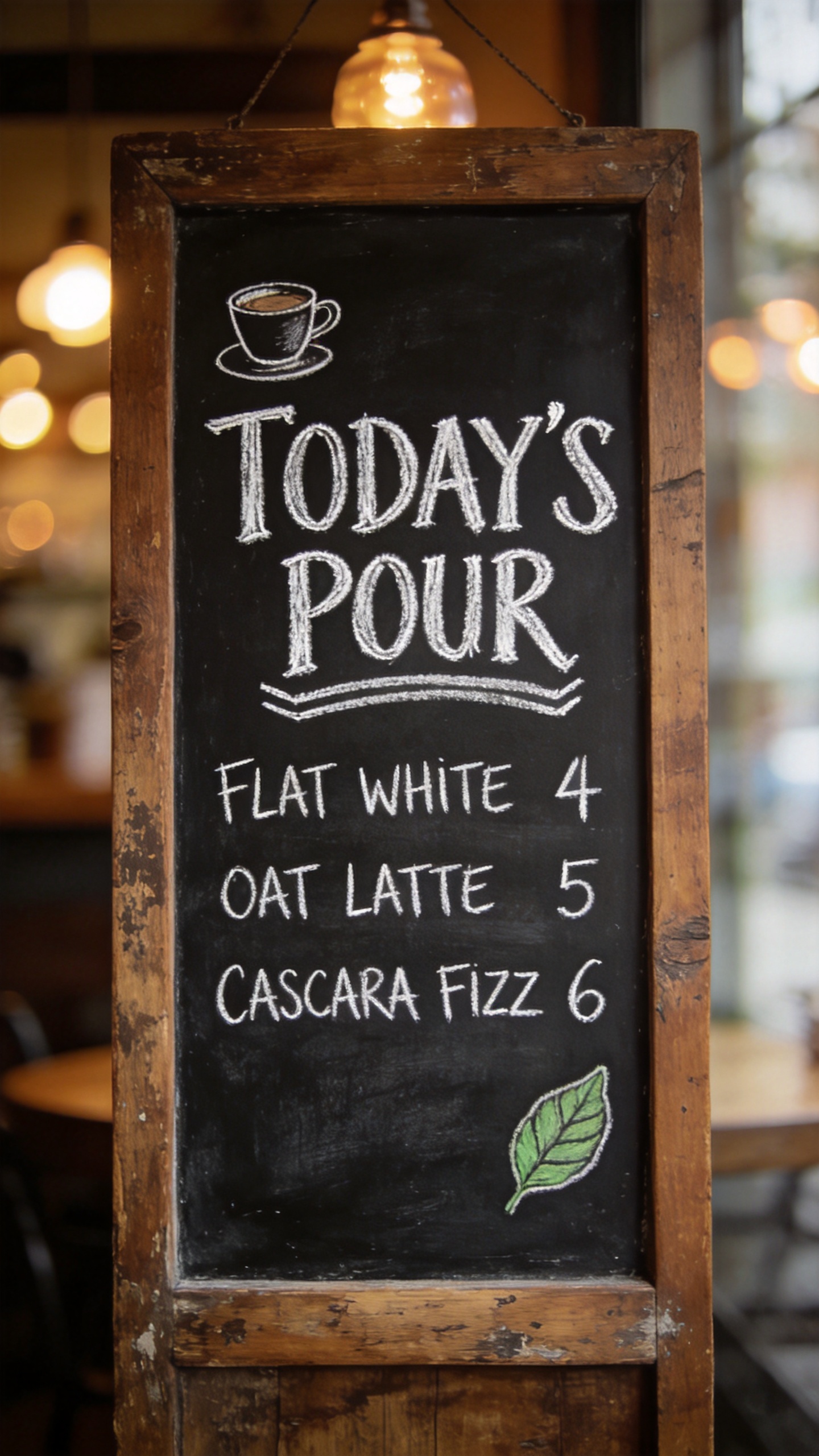
seedream-4.5/text-to-image, 9:16, 2K, $0.045.
네 구절의 텍스트가 아포스트로피까지 모두 정확합니다. 줄 수를 명시하면("three menu lines beneath it") 모델이 이를 규칙으로 실행합니다.
5. 같은 가격의 4K 평면 구성 이미지
An overhead knolling photograph of a vintage film photographer's complete kit arranged in a precise grid on dark green felt: a chrome rangefinder camera, three lenses with engraved focal-length rings, rolls of 35mm film, a handheld light meter, screw-on filters in open leather pouches, a horsehair brush, lens tissues and a weathered field notebook, every engraving and knurled texture sharp, even soft studio light, top-down composition, ultra-detailed, premium editorial finish
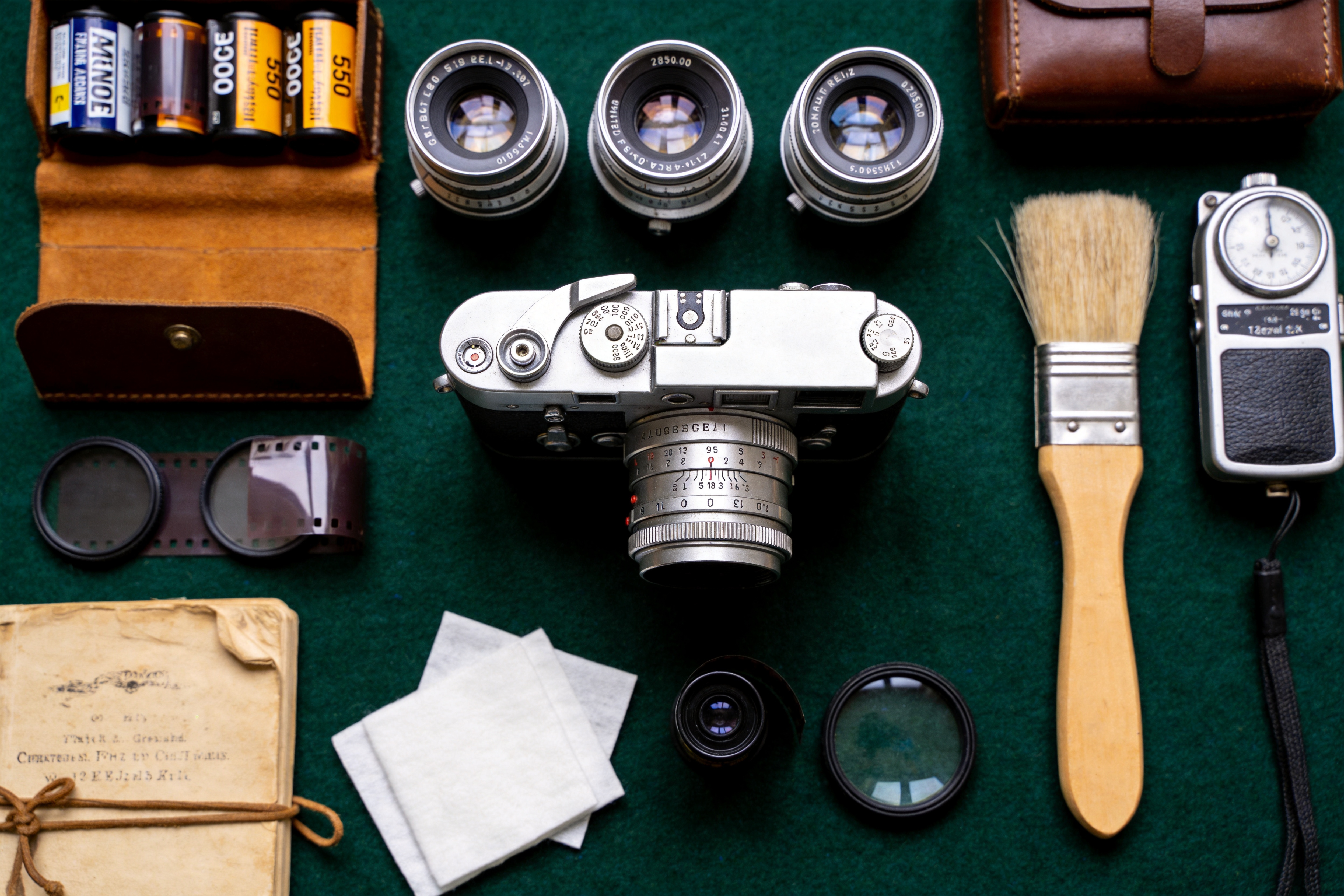
seedream-4.5/text-to-image, 3:2, 4K (4992×3328), $0.045.
널링, 가죽 질감, 펠트는 완전히 확대해도 견딥니다. 렌즈 링의 각인은 프롬프트에 명시된 적이 없어서, 가까이서 보면 지어낸 글자입니다. 따옴표로 묶은 텍스트는 그대로 렌더링되지만, 지정하지 않은 텍스트는 임의로 만들어진다는 점을 보여줍니다.
이미지→이미지 레시피
아래의 소스 이미지는 모두 Seedream 4.5 텍스트→이미지로 2K에서 먼저 생성한 뒤 image_urls로 전달한 것입니다.
6. 색상 변형
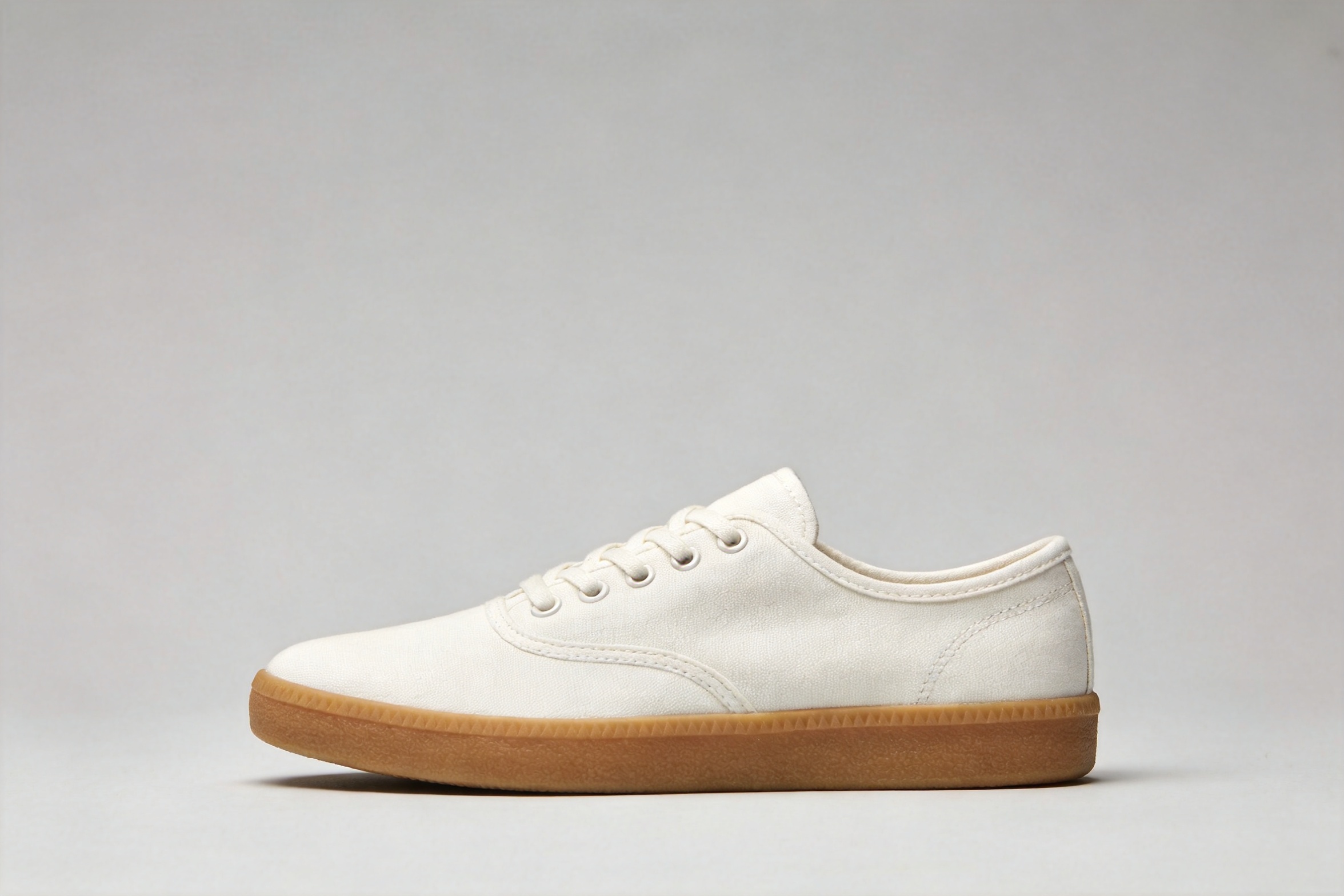
recolor the sneaker to a deep forest green canvas with an off-white sole and matching green laces; keep the exact same shoe shape, stitching, camera angle, lighting, shadow and gray background unchanged
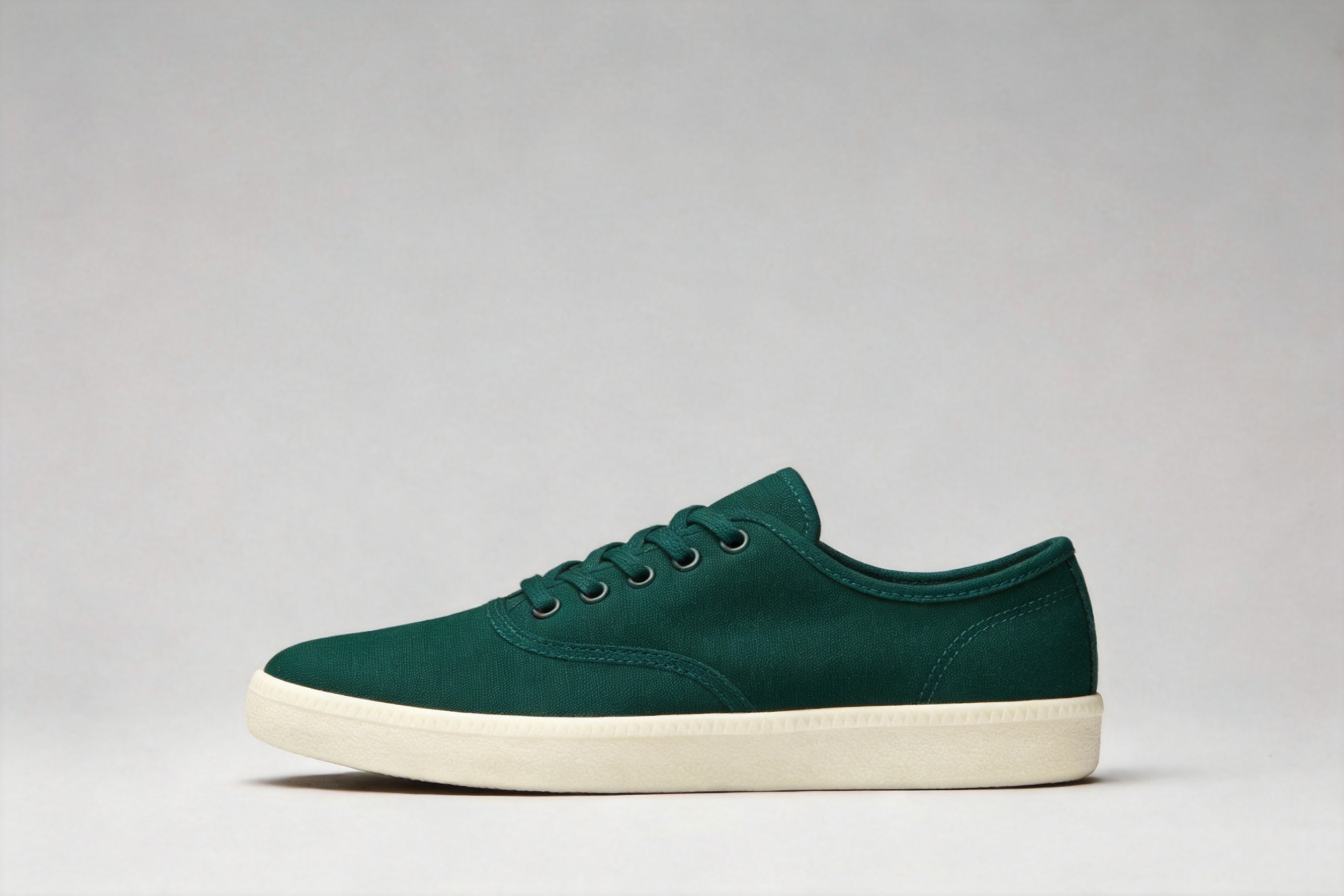
seedream-4.5/image-to-image, 참조 이미지 1장, $0.045.
각도, 접촉 그림자, 배경이 모두 유지되었습니다. 바꿀 부분을 한 번만 지목한 뒤, 프롬프트의 나머지 부분을 변경하면 안 되는 내용에 할애하세요.
7. 참조 이미지 세 장: 제품, 소재, 장면
위의 스니커에 참조 이미지 두 장을 추가합니다:
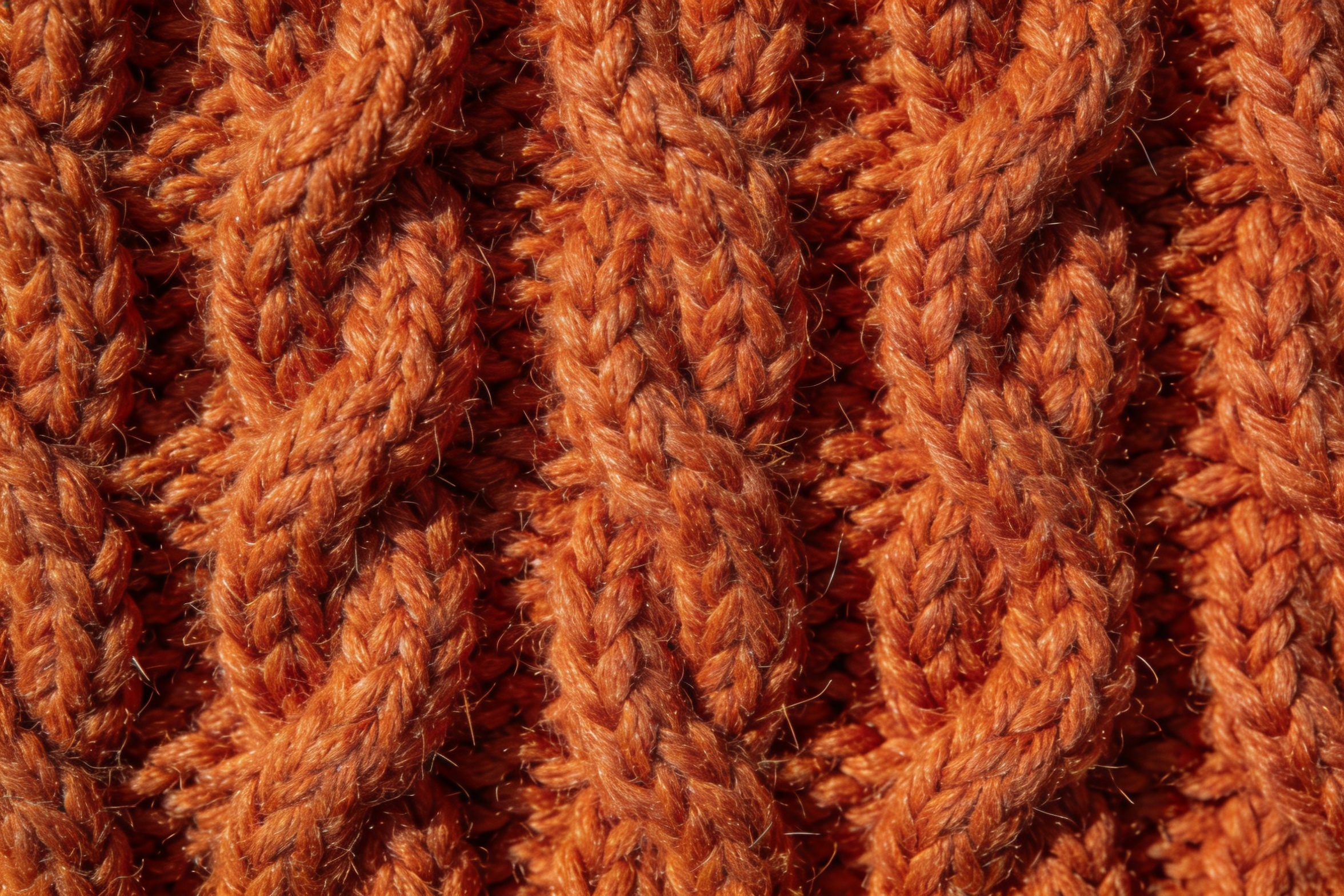
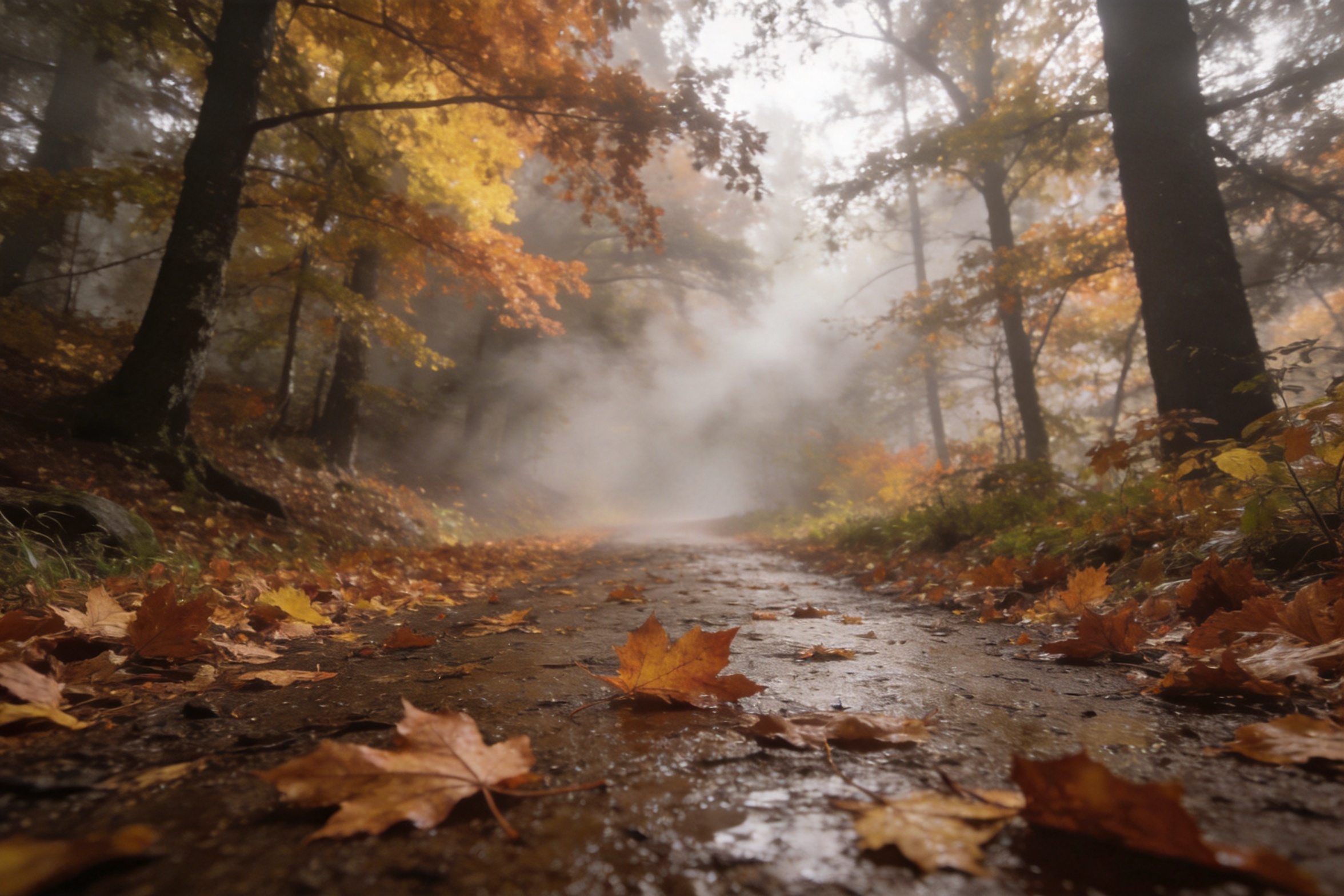
rebuild the sneaker from the first image with its canvas upper made of the burnt-orange cable-knit wool from the second image, then place it as a product hero shot on the wet leaf-covered forest trail from the third image, low camera angle, soft morning fog, keep the shoe's shape and proportions from the first image, photorealistic
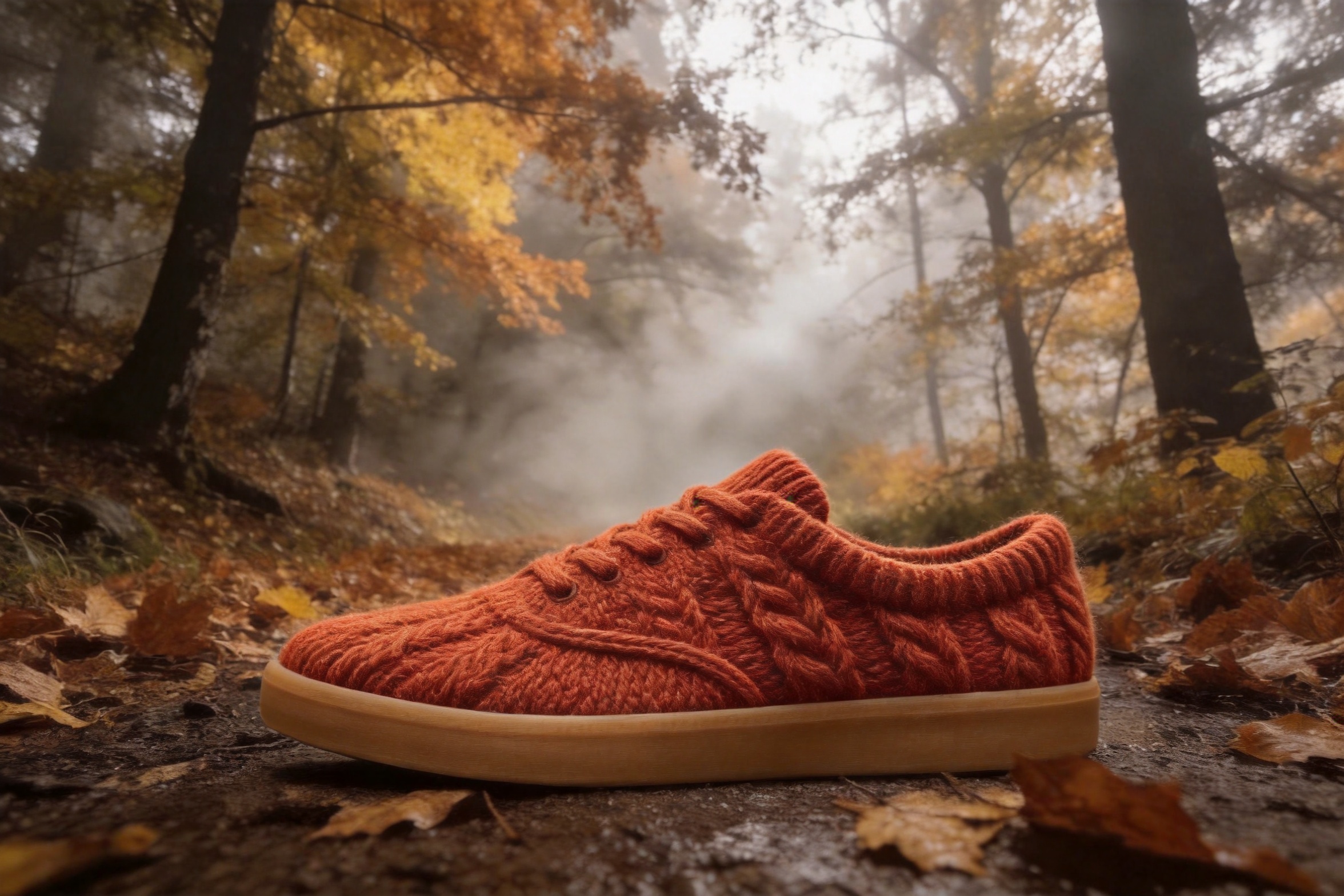
seedream-4.5/image-to-image, 참조 이미지 3장, $0.045.
신발 모양과 밑창은 첫 번째 이미지, 니트 소재는 두 번째, 숲길과 안개는 세 번째에서 가져왔습니다. 요청하지 않았는데 신발 끈까지 니트로 짜 버렸습니다. 소재는 명시적으로 제한하지 않으면 인접 부품으로 번집니다: "keep the laces standard cotton laces". 각 이미지를 위치로 지칭해야("from the second image") 모델이 구분할 수 있습니다.
8. 스마트폰 스냅샷을 푸드 사진으로
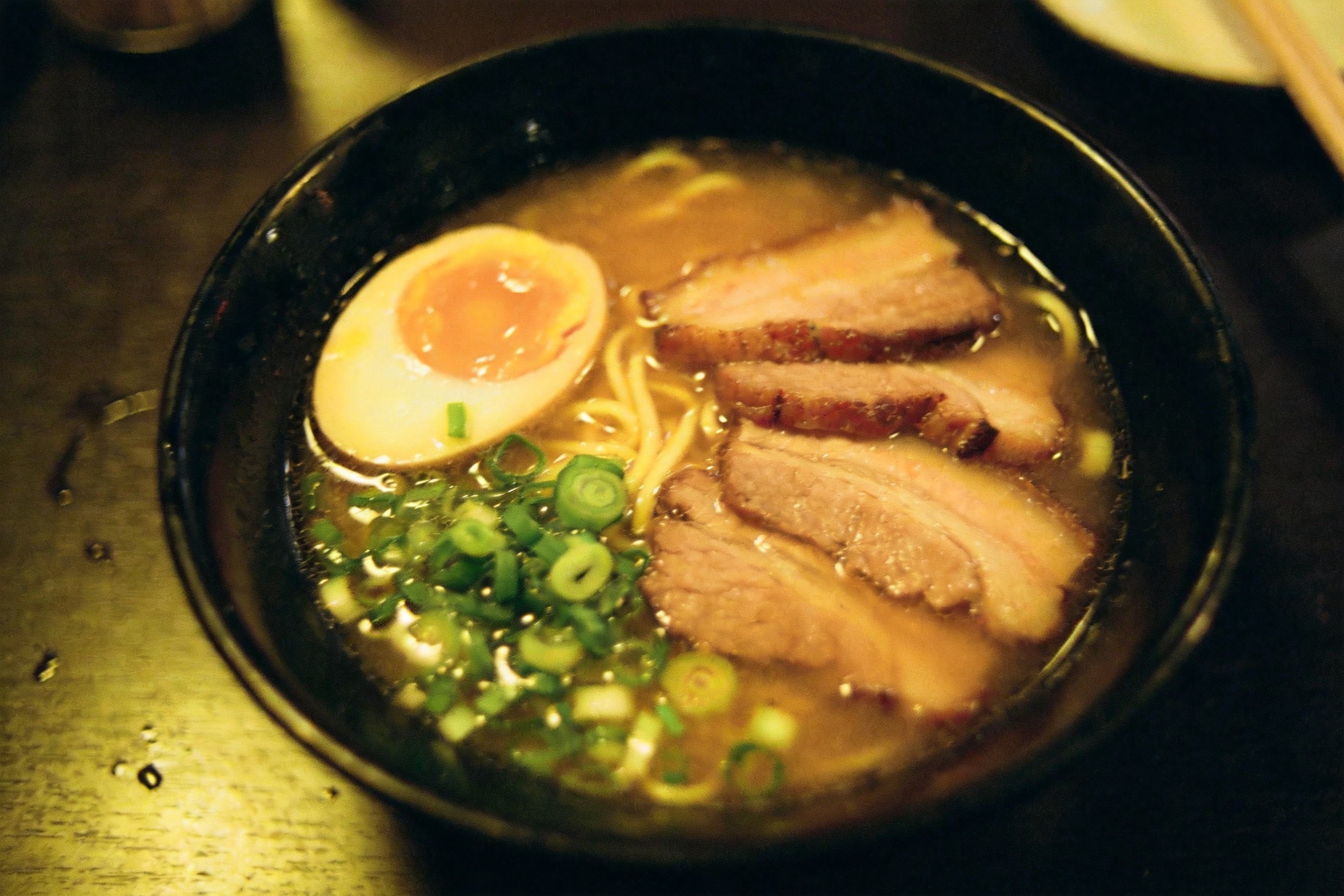
relight this exact bowl of ramen as a bright editorial food photograph: soft window key light from the upper left, clean neutral white balance, gentle steam rising, richer broth and egg color, keep the same bowl, ingredients, table and overhead framing
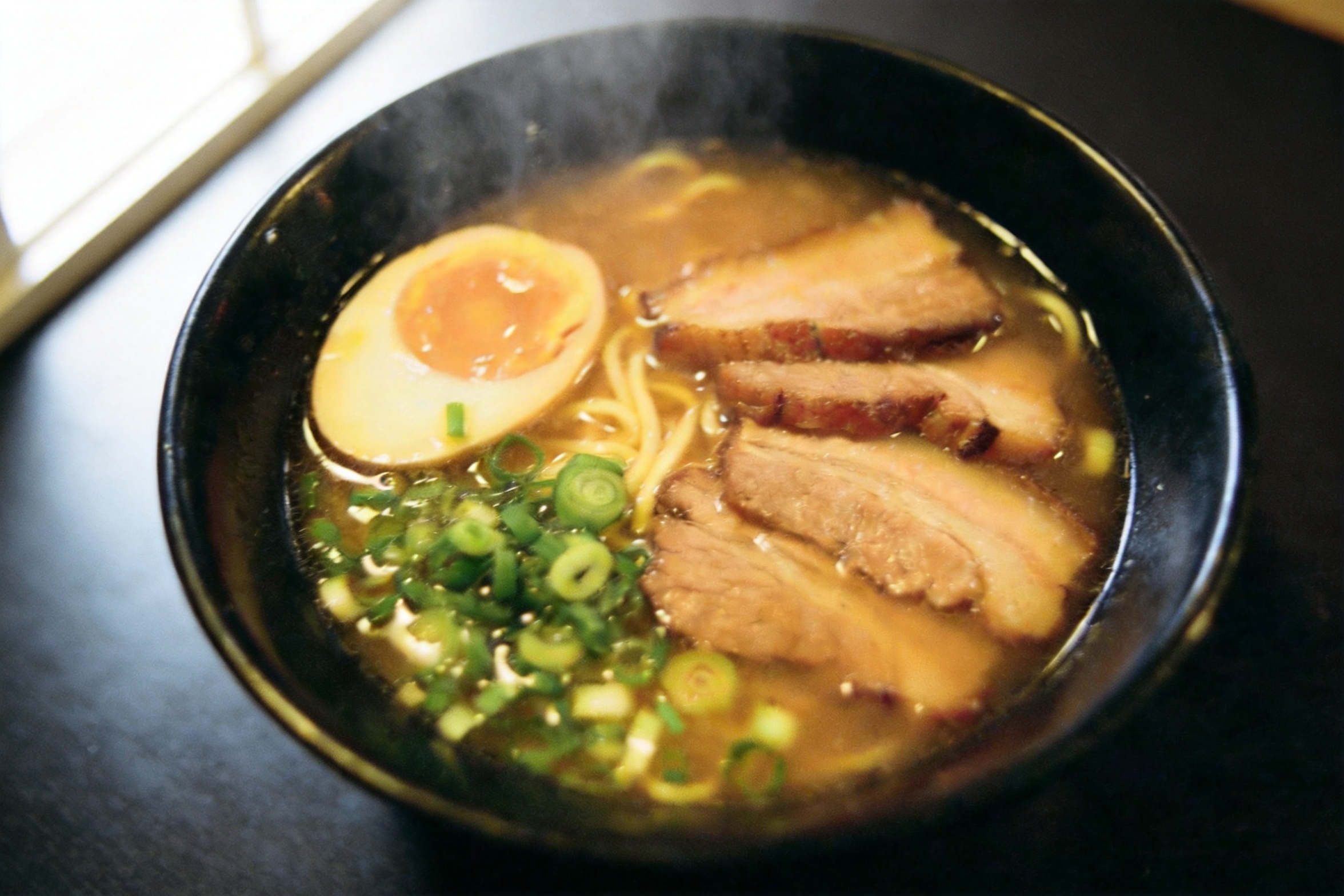
seedream-4.5/image-to-image, 참조 이미지 1장, $0.045.
화이트 밸런스와 김이 개선되었고 구도도 유지되었습니다. 두 가지 차이가 생겼습니다: 카메라 각도가 약간 달라졌고, 차슈 다섯 조각이 세 조각이 되었습니다. 재조명은 이미지 전체를 다시 렌더링합니다. 개수가 중요하다면 개수를 명시하고("exactly five slices of chashu") 확인하세요.
9. 같은 인물, 새로운 장면
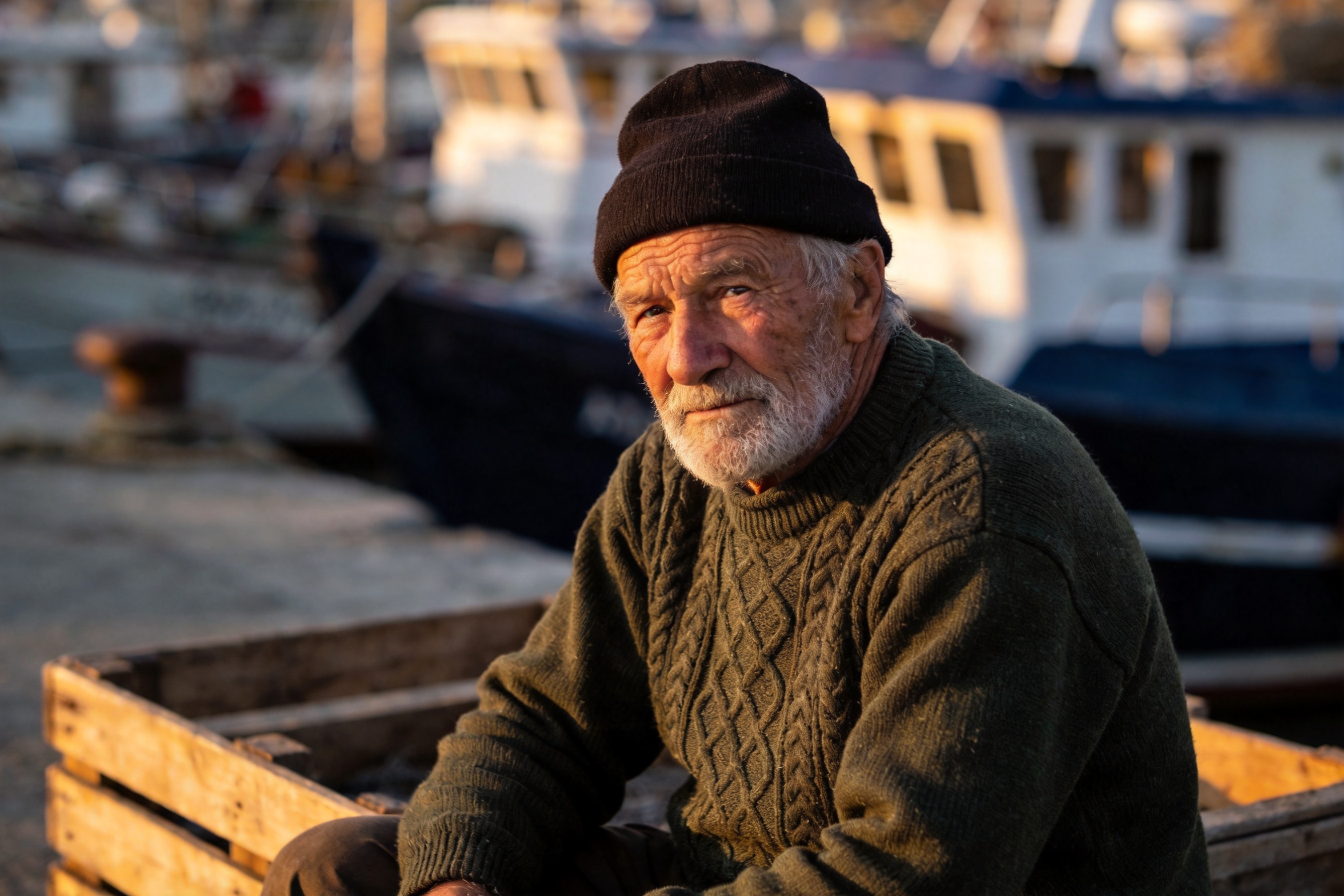
move this same fisherman, with identical face, beard, beanie and green sweater, into the wheelhouse of a small fishing boat at dawn, standing at the wooden helm, cold blue morning light through the windows mixing with warm cabin light, photorealistic
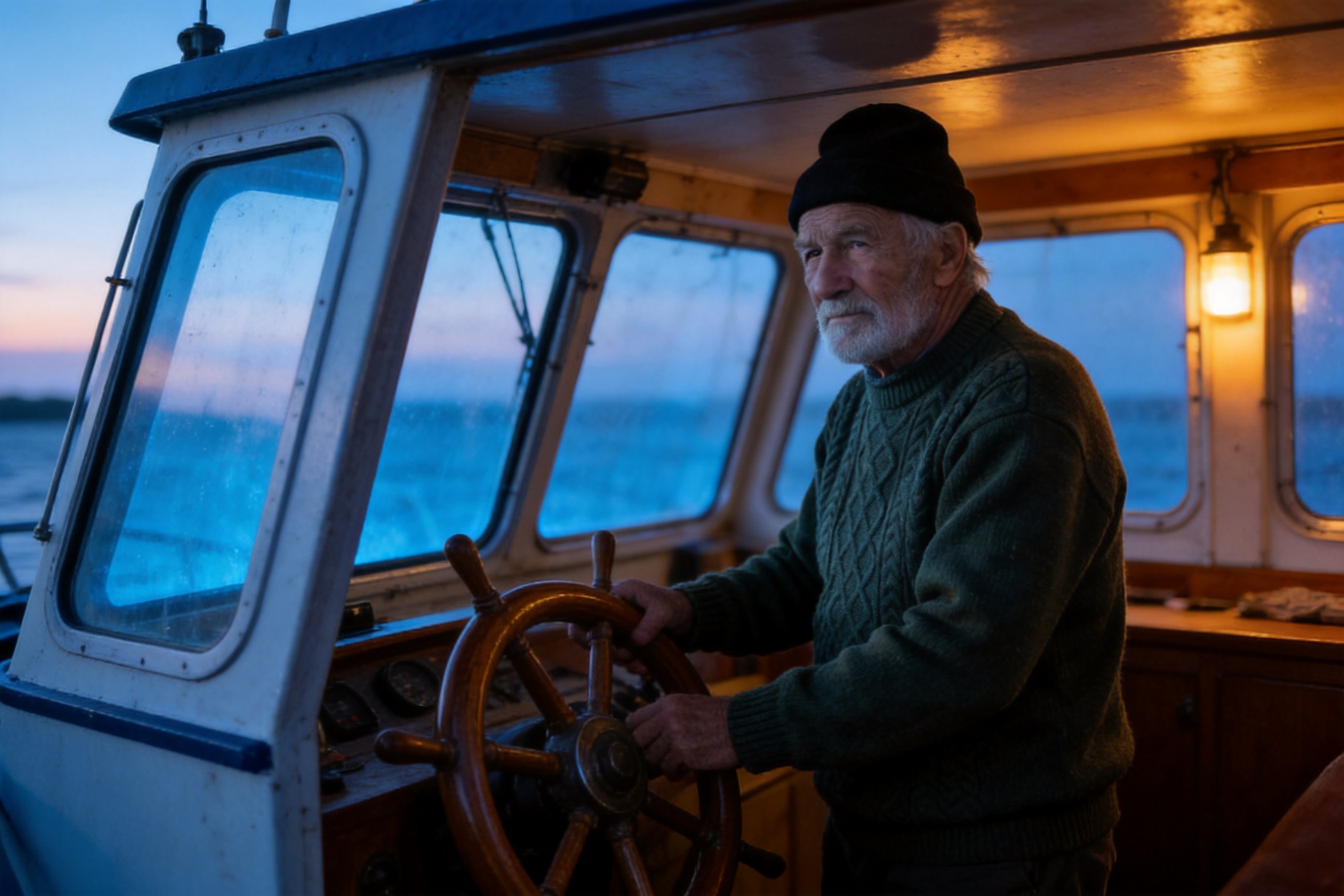
seedream-4.5/image-to-image, 참조 이미지 1장, $0.045.
얼굴, 수염, 비니, 스웨터는 장면과 조명이 완전히 바뀌어도 일관되게 유지되었습니다. "identical"을 신경 쓰는 특징에 붙이는 것이 막연히 "keep the subject consistent"라고 쓰는 것보다 효과적입니다.
10. 4K 디테일 개선
결과를 다시 입력으로 넣어 4K로 재렌더링합니다. 여기서 입력은 레시피 6의 초록색 스니커입니다.
re-render this product photo at maximum fidelity: keep the composition, colors, lighting and background exactly as they are, sharpen the canvas weave, lace texture and sole details, remove any compression artifacts
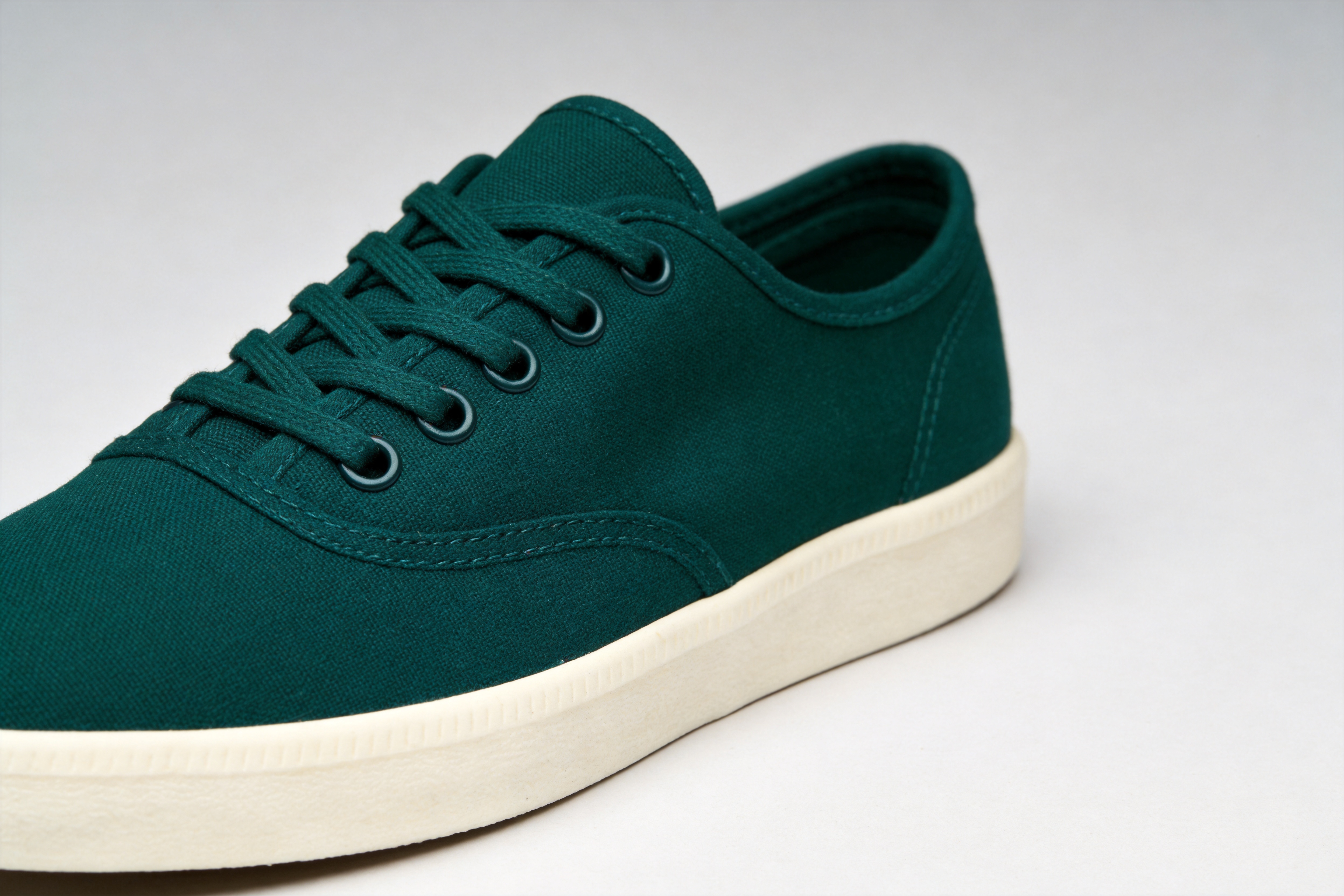
seedream-4.5/image-to-image, 참조 이미지 1장, 4K, $0.045.
색상 변경에 이 단계까지 더해 총 $0.09가 들었습니다. 호출마다 편집을 하나만 하면 각 단계를 개별적으로 검토할 수 있고, 한 단계가 실패해도 $0.045만 손실됩니다.
이 열 가지 레시피의 공통점
- 따옴표로 묶고, 위치를 정하고, 스타일을 정하라. 반드시 등장해야 할 모든 텍스트에 따옴표, 위치, 폰트 처리를 부여하세요.
- 매체를 명시하라. 스크린 인쇄, 활판 인쇄, 분필: 한 구절로 폰트와 질감을 동시에 정할 수 있습니다.
- 제품에는 로고를 금지하라. 모든 상업용 프롬프트에 "unbranded, no logo or emblem"을 추가하세요.
- 개수를 말하라. "Three menu lines", "exactly five slices".
- 편집할 때는 유지할 것을 나열하라. 편집 프롬프트의 대부분은 변경하면 안 되는 내용에 할애해야 합니다.
- 호출마다 한 가지만 바꿔라. 먼저 색상을 바꾸고, 그다음 업스케일하세요. 먼저 융합하고, 그다음 스타일을 바꾸세요.
Seedream 4.5 vs 5.0 Pro?
| Seedream 4.5 | Seedream 5.0 Pro | |
|---|---|---|
| 텍스트→이미지 | $0.045, 2K 또는 4K | $0.05 (1K), $0.10 (2K) |
| 이미지→이미지 | $0.045, 2K 또는 4K | $0.06 (1K), $0.10 (2K) |
| 최대 출력 | 4K | 2K |
웹용 배너, 패키지, 로고, 제품 편집에는 4.5부터 시작하세요. 4.5의 결과가 정교한 텍스트나 고난도 합성에서 한계에 도달하면 Pro로 전환하세요. Pro 레시피: Seedream 5.0 Pro 텍스트→이미지 프롬프트 및 Seedream 5.0 Pro 이미지→이미지 가이드.
자주 묻는 질문
Seedream 4.5는 얼마인가요?
두 엔드포인트 모두 이미지당 $0.045이며, 2K 또는 4K, 모든 화면 비율에서 동일한 가격입니다.
참조 이미지를 몇 장까지 전달할 수 있나요?
image_urls는 최대 14장까지 가능합니다. 프롬프트에서 위치로 지칭하세요.
1K로 출력할 수 있나요?
아니요. resolution은 2K 또는 4K만 허용하며, 다른 값은 400을 반환합니다.
긴 텍스트를 처리할 수 있나요?
제목, 라벨, 날짜, 버튼처럼 짧은 인용 텍스트는 안정적입니다. 긴 본문은 배경을 먼저 생성한 뒤 디자인 도구로 텍스트를 배치하는 것이 좋습니다.
코드 없이 편집을 한 번 시도해 보려면 이미지→이미지 모델 페이지 열기에서 본인의 이미지를 업로드하세요.
관련 글
모든 아티클 보기 →-

사용 가이드
seedream-5.0-pro/image-to-image 시작 가이드: 기능, 가격 및 연동 핵심 포인트
ByteDance 이미지 편집 모델의 기능 경계, 과금 방식 및 엔지니어링 연동 실무
-

사용 가이드
seedream-5.0-pro 텍스트-이미지 생성 입문 가이드: 능력 경계, API 연동 및 비용 관리
개발자를 위한 실무 관점: 파라미터 핵심부터 장당 $0.05 비용 추정까지
-

사용 가이드
Hailuo 2.3 Fast 이미지-투-비디오 입문 가이드: 성능 범위, 가격 및 연동 실무
개발자를 위한 MiniMax 이미지-투-비디오 모델 선택과 연동 핵심 포인트