
使用指南
Flux-2-Klein-9b 图生图:电商产品照片处理
在 hiapi API 上使用 flux-2-klein-9b/image-to-image 编辑现有产品照片的实战工作流——包含真实提示词、真实输出和批量代码。
为什么选择编辑产品照片而不是生成新照片
大多数电商商品目录面临的问题不是“从零生成”,而是 “一张照片,五种用途”。卖家拍摄一张主图, 通常是在杂乱的台面上或光线一般的情况下, 然后需要一张干净的纯白背景版本用于商城网格展示、 每个 SKU 一个颜色变体,以及用于广告和社交媒体的场景图。 为每个变体重新拍摄很慢;用文生图从头生成每一张 又无法保证结果与你实际销售的产品完全一致。
flux-2-klein-9b/image-to-image 正是为解决第二个问题而生:它接收一张现有的产品照片加 一条编辑指令,返回一张新图片,其中你没有要求改变的一切 ——形状、比例、瓶盖、logo——都保持不变。它是 hiapi 上 FLUX.2 [klein] 系列中更大、保真度更高的档位,在质量和价格上都高于 flux-2-klein-4b/image-to-image。
下面是一个基于单张起始照片的完整三步工作流: 先将一张杂乱的“改动前”照片清理成可用于商品目录的主图,然后 把这幅主图扩展出颜色变体和场景变体——三次真实编辑、 三条真实提示词、一个用于在商品目录中复用同一模式的批量脚本。
起始照片
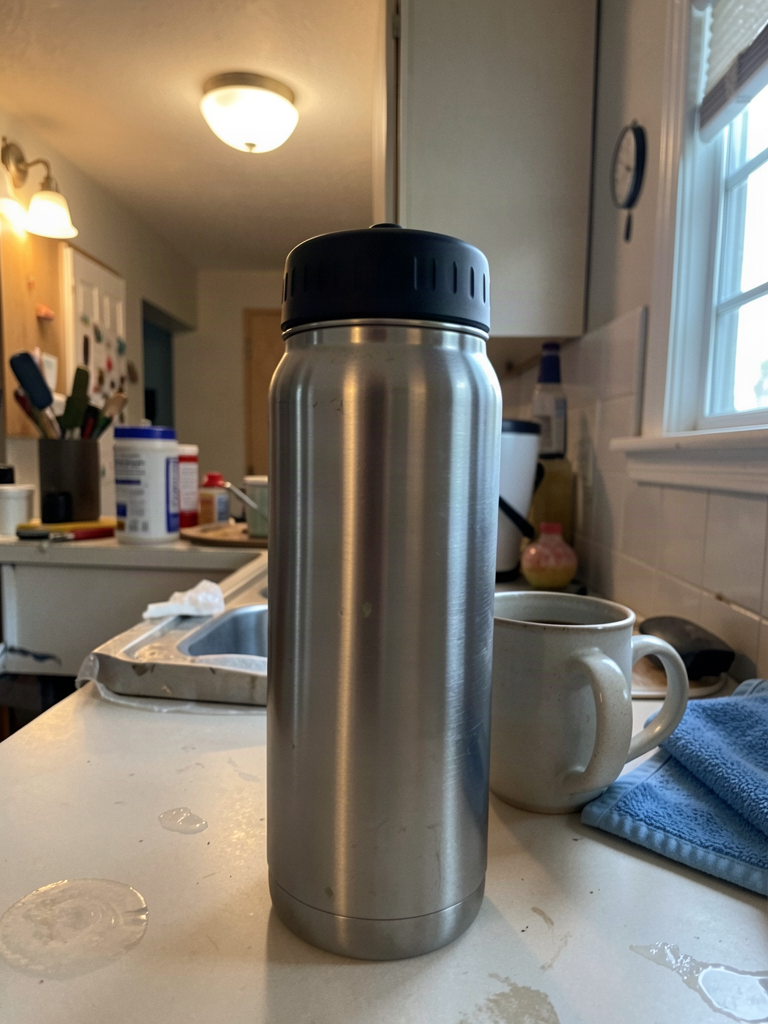
这就是卖家实际会上传的那种“改动前”照片:一个拉丝 不锈钢保温水瓶,配哑光黑色螺旋盖,拍摄于 杂乱的厨房台面上,旁边有一只咖啡杯和一块洗碗布, 光线混杂不均,构图偏离中心。它可作为参考,但不适合 作为商品列表图片。
用于生成这张起始照片的提示词(通过 flux-2-klein-9b/text-to-image):
A slightly imperfect phone photo of a brushed stainless steel insulated water bottle with a matte black plastic screw cap, standing on a cluttered kitchen counter next to a ceramic coffee mug and a folded blue dish towel, mixed warm ceiling light and cool window daylight creating an uneven color cast, faint reflections and fingerprint smudges on the counter, off-center composition, casual amateur snapshot quality, not professional photography
步骤 1:影棚清理——从杂乱台面到可用于商品目录
使用的提示词:
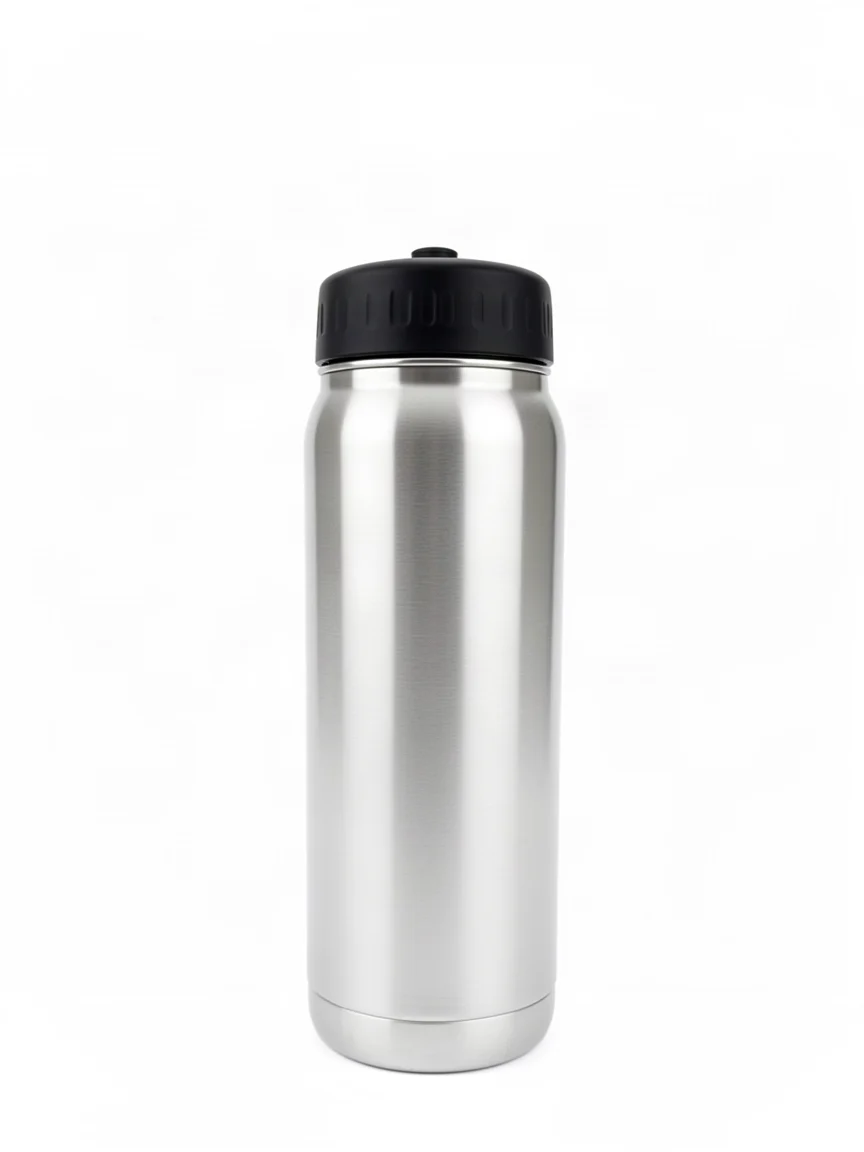
Keep the water bottle exactly as it is: same brushed stainless steel body, same matte black screw cap, same proportions and shape. Remove the cluttered counter, coffee mug, and towel completely. Replace the background with a seamless pure white studio background. Correct the lighting to even, shadowless studio lighting from the front, center the bottle in the frame, sharp focus, no reflections, no smudges, clean e-commerce catalog product photography.
这是实际工作流中最关键的一次编辑:一次调用就能把 手机快照变成可用于商城的白底图片,而且 瓶身形状和瓶盖完全不变。这个干净的结果将成为 主图——本指南中所有下游变体都从这张 图片生成,而不是从原始的杂乱照片,因此偏差不会在多次 编辑中累积。
步骤 2:从干净主图生成颜色变体
使用的提示词:
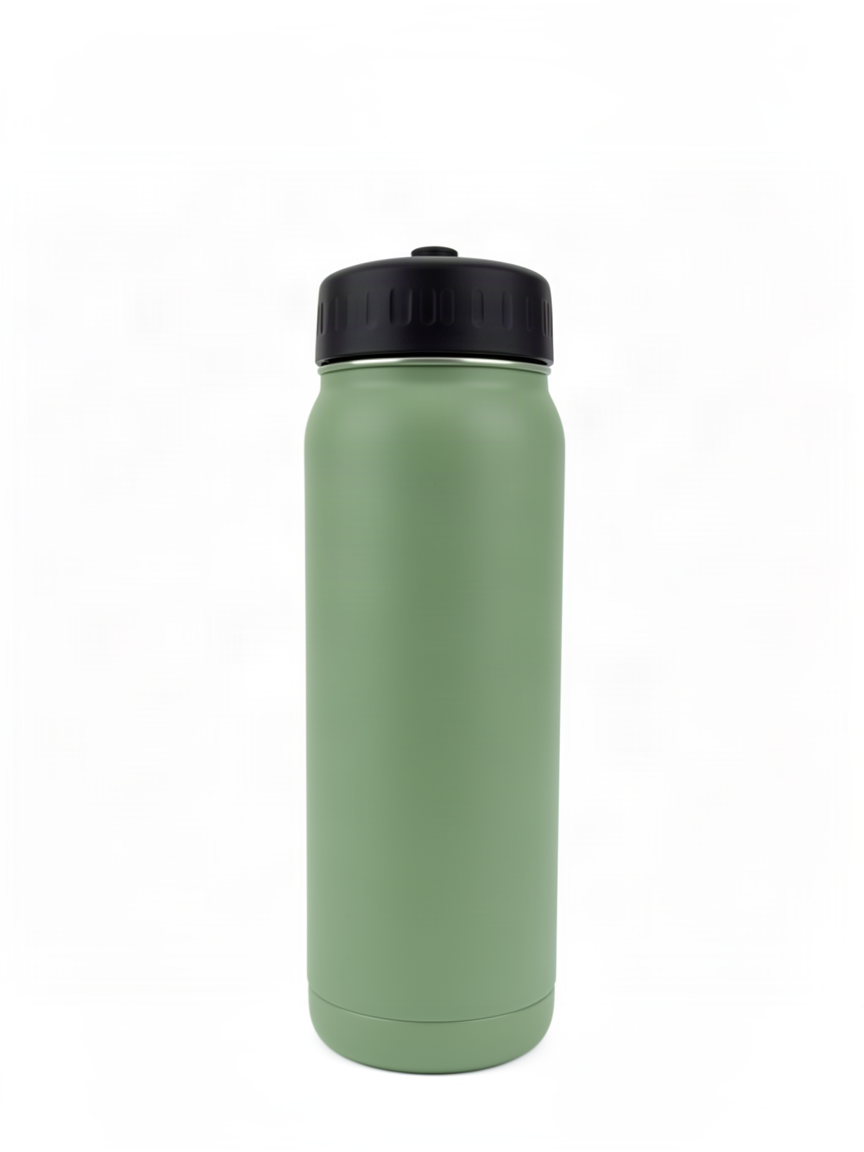
Keep the bottle's shape, screw cap, proportions, and pure white studio background exactly as they are. Change only the body color and finish from brushed stainless steel to a matte sage green, keep the black cap unchanged, keep the same lighting and shadow, e-commerce catalog product photography.
这就是多 SKU 场景:一个产品线有五种颜色, 不需要五次单独的拍摄。从干净主图出发, 并把提示词限定为只改颜色,就能让瓶盖、比例、光线和 背景完全固定——只改变瓶身材质的颜色。
步骤 3:从同一主图生成场景变体
使用的提示词:
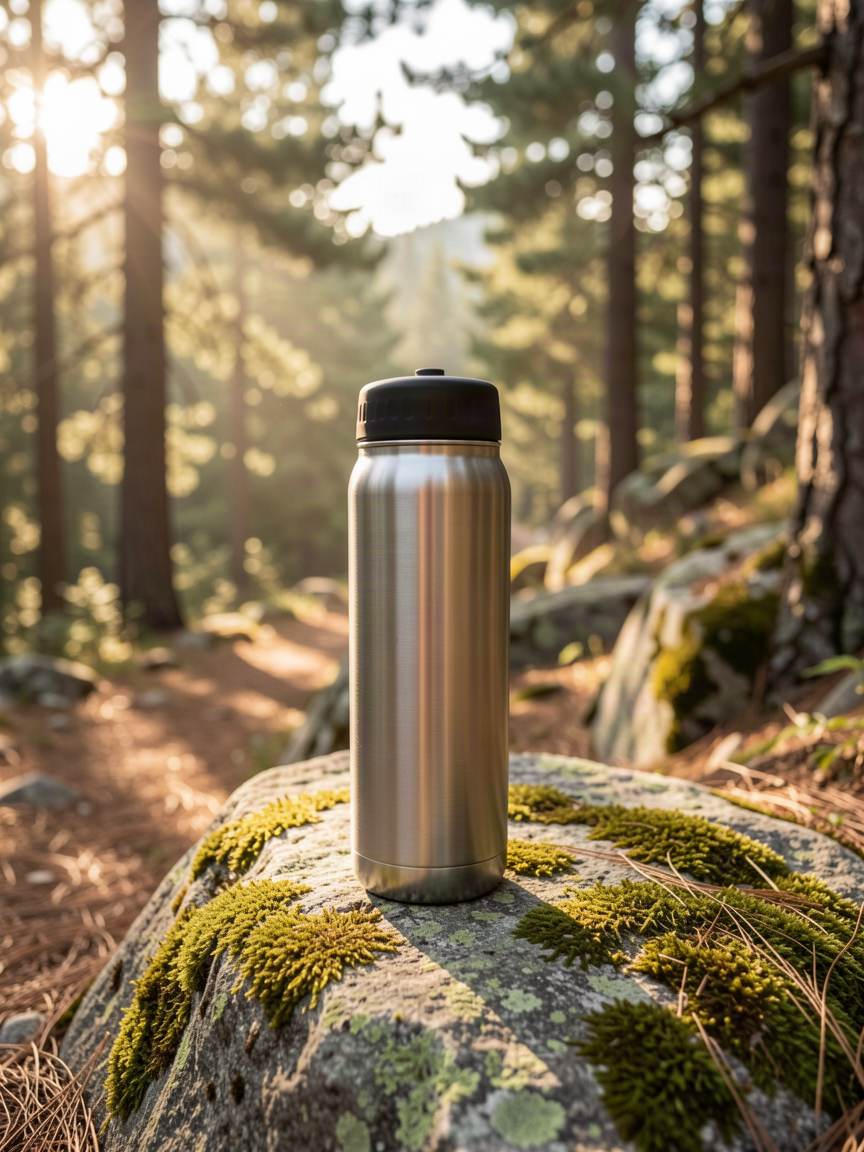
Keep the water bottle exactly as it is: brushed stainless steel body, matte black cap, proportions unchanged. Replace the plain white studio background with an outdoor lifestyle scene: the bottle resting on a moss-covered granite rock beside a hiking trail, soft early-morning sunlight filtering through pine trees, shallow depth of field, warm natural color grade, outdoor lifestyle product photography.
同一张主图,不同目的地:这是用于广告、社交 帖子或落地页主视觉的图片——户外场景环境而非 商品目录背景,产品身份由上述每条提示词中相同的 “保持原样”锚定语句牢牢锁定。
这些编辑为何可靠
- 先锚定不变的部分,再描述改动。上述每条提示词 开头都先说明不能改动的部分——形状、瓶盖、 比例——然后才提到新背景或颜色。 这种顺序正是让产品身份在三次 连续编辑中保持锁定、而不是每次进一步偏移的关键。
- 从干净主图链式编辑,而不是原始照片。步骤 2 和步骤 3 都 从步骤 1 的输出开始,而不是原始的杂乱照片。从 干净、正确的基底开始编辑,比试图在同一条提示词中同时修复杂乱 并替换背景更可靠。
- 每条提示词只限定一个改动。颜色变体只改动 颜色;场景变体只改动背景。两条提示词都不会 同时要求两个不相关的改动。
- flux-2-klein-9b/image-to-image 每次调用只接受一张参考图。
与一些接受多张参考图的编辑模型不同,
该模型的 schema 刻意保持精简:一个
prompt字符串和一个 最多一张图片的image_urls数组。图生图接口上没有resolution或aspect_ratio参数——输出 遵循输入照片的尺寸,因此除了提示词和源图之外 无需配置任何内容。
批量编辑商品目录
上述三次编辑共享相同的请求形状:一个参考图片 URL
加一条编辑提示词,提交到 hiapi 的异步任务端点。下面的代码片段
在一个 (base_image_url, prompt, output_name) 元组列表上循环该模式——
这正是你会用来一次性把整个商品目录
跑完清理、颜色变体和场景变体的结构。
import os
import time
import requests

API_BASE = "https://api.hiapi.ai/v1/tasks"
TOKEN = os.environ["HIAPI_API_KEY"]
MODEL = "flux-2-klein-9b/image-to-image"


def submit_edit(base_image_url: str, prompt: str) -> str:
    resp = requests.post(
        API_BASE,
        headers={"Authorization": f"Bearer {TOKEN}"},
        json={
            "model": MODEL,
            "input": {
                "prompt": prompt,
                "image_urls": [base_image_url],
            },
        },
        timeout=60,
    )
    resp.raise_for_status()
    return resp.json()["data"]["taskId"]


def wait_and_download(task_id: str, out_path: str, poll_s: int = 5, timeout_s: int = 300) -> None:
    deadline = time.time() + timeout_s
    while time.time() < deadline:
        r = requests.get(
            f"{API_BASE}/{task_id}",
            headers={"Authorization": f"Bearer {TOKEN}"},
            timeout=30,
        )
        task = r.json().get("data", {})
        if task.get("status") == "success":
            url = task["output"][0]["url"]
            img = requests.get(url, timeout=120)
            with open(out_path, "wb") as f:
                f.write(img.content)
            return
        if task.get("status") == "fail":
            raise RuntimeError(task.get("error"))
        time.sleep(poll_s)
    raise TimeoutError(f"task {task_id} did not finish in {timeout_s}s")


# One entry per product / variant. Chain color and lifestyle edits from a
# clean master, not the raw source photo, for best consistency.
batch = [
    ("https://cdn.example.com/products/bottle-raw.jpg",
     "Keep the bottle exactly as it is: same body, same cap, same "
     "proportions. Remove the cluttered background completely. Replace it "
     "with a seamless pure white studio background and even, shadowless "
     "lighting, clean e-commerce catalog product photography.",
     "bottle-clean-master.jpg"),
    ("https://cdn.example.com/products/bottle-clean-master.jpg",
     "Keep the bottle's shape, cap, proportions, and white studio "
     "background exactly as they are. Change only the body color to matte "
     "sage green, keep the cap unchanged.",
     "bottle-sage-green.jpg"),
    ("https://cdn.example.com/products/bottle-clean-master.jpg",
     "Keep the bottle exactly as it is: body, cap, proportions unchanged. "
     "Replace the white studio background with an outdoor lifestyle scene "
     "on a mossy rock beside a hiking trail, soft morning sunlight.",
     "bottle-lifestyle-hiking.jpg"),
]

for base_url, prompt, out_name in batch:
    task_id = submit_edit(base_url, prompt)
    wait_and_download(task_id, out_name)
    print(f"saved {out_name}")
每次任务调用都是独立的,因此对于完整商品目录,你通常会
并发运行一个小型池子,而不是严格一次一个地循环
——任务 API 的处理时间才是瓶颈,而不是你的客户端。注意
步骤 2 和步骤 3 都指向 bottle-clean-master.jpg,即步骤 1 的
输出:从清理后的结果链式生成、而不是从原始上传图,
正是让颜色变体和场景变体彼此保持一致的关键。
定价
flux-2-klein-9b/image-to-image 按图片计费,无论 输出尺寸如何都统一定价。截至 2026-08,每次图生图编辑费用为 $0.03143 每张图片;配套的文生图端点(本指南中用于生成起始照片) 费用为 $0.00858 每张图片。两者都明显高于 更小的 flux-2-klein-4b/image-to-image 档位的每次编辑 $0.00715——9B 用这一成本溢价换取更高的输出 保真度,尤其是在材质和颜色变化等细节密集的编辑上。请查看 定价页面 了解所有模型 的当前费率,因为价格可能变化。
常见问题
flux-2-klein-9b/image-to-image 每次调用支持多张参考图吗?
不支持。schema 在 image_urls 中只接受一张图片(maxItems: 1)。
对于需要合并两张独立源图的编辑,这不是合适的模型
——它专为单参考图编辑而构建,例如背景替换、
颜色更改和清理。
我能控制输出分辨率吗?
不能——图生图端点没有 resolution 或 aspect_ratio
参数。输出遵循输入照片的尺寸。如果你需要
特定的输出尺寸,请在提交前调整源图大小,或
在之后调整结果大小。
这与 flux-2-klein-4b/image-to-image 有何不同? 请求形状相同,单参考图 schema 也相同,但 9B 每次 编辑成本更高($0.03143 对 $0.00715),以换取更高的保真度——当 商品目录编辑涉及精细细节(材质纹理、颜色准确性) 而非简单的背景替换时,它是更好的选择。
为什么从“干净主图”链式编辑,而不是每次编辑原始照片? 从杂乱的原图编辑,要求模型在同一次处理中修复杂乱并应用 新改动,这会增加不必要 偏差的可能性。先清理一次,然后从那个单一的 干净结果分支生成每个变体,能让每张下游图片彼此保持一致。
我能一次性对整个商品目录运行吗?
可以——上面的批量脚本就是该模式:循环遍历 (image, prompt, output name) 元组,将每个作为独立任务提交,并并发运行少量
请求,而不是一个长长的顺序循环。
自己试试
本指南中的每次编辑——清理、颜色变体、场景变体——各用一次 API 调用, 从单张起始照片链式生成。如果你有 现有产品照片,并希望在不重新拍摄的情况下获得可用于商品目录的变体, hiapi 文档快速入门 涵盖了 认证和首次请求,只需几分钟即可完成。


