
사용 가이드
gpt-image-2 이커머스 제품 이미지: hiapi에서의 배치 워크플로
hiapi의 gpt-image-2/text-to-image 작업 API로 전체 상품 카탈로그를 위한 깔끔한 흰 배경 리스팅 이미지, 각도/디테일 변형, 라이프스타일 장면을 생성하세요 — 실제로 재현된 이미지, 검증된 장당 $0.03 가격, 그리고 바로 복사해 붙여넣을 수 있는 배치 스크립트까지.
TL;DR
- 무엇인가: hiapi의
gpt-image-2/text-to-image로 이커머스 제품 이미지를 생성하는 실행 가능하고 재현 가능한 워크플로입니다. 이 페이지의 모든 이미지는 옆에 인쇄된 원본 프롬프트로 렌더링되었습니다 — 스톡 사진도, 빌려온 데모도 없습니다. - 하나의 모델, 세 가지 용도: 깔끔한 흰 배경 카탈로그 이미지, 동일한 제품의 각도/디테일 변형, 그리고 라이프스타일 장면 — 모두 같은 텍스트-투-이미지 작업 인터페이스에서 나옵니다.
- API 사실(플랫폼에서 검증됨):
gpt-image-2/text-to-image는 비동기 작업 인터페이스(/v1/tasks)에서 실행됩니다.input객체에는prompt,aspect_ratio(리스팅용1:1, 소셜용4:5, 배너용16:9),resolution(1K/2K/4K)이 필요합니다. 결과 이미지는output[0].url에 있습니다. - 가격:
gpt-image-2/text-to-image는 장당 $0.03 균일입니다. 20개 SKU 카탈로그에 각 3장씩 총 60장이면 $1.80입니다. 실시간 가격은 가격 페이지에서 확인하세요. - 실행 방법: 작업 API에 POST하고
success가 될 때까지 폴링한 다음,output[0].url에서 이미지를 다운로드하세요 — 해당 URL은 만료되므로 바이트 내용을 즉시 저장해야 합니다. 페이지 끝에 전체 복사-붙여넣기 가능한 제출/폴링/다운로드 스크립트와 배치 루프가 있습니다.
제품 이미지에 gpt-image-2를 쓰는 이유
제품 이미지 파이프라인에는 지루하지만 엄격한 규격이 있습니다: 동일 제품, 깔끔한 표현, 일관된 배경, 리스팅에 적합한 종횡비. gpt-image-2/text-to-image가 이에 적합한 데는 세 가지 이유가 있습니다.
첫째, 여러 작업에 걸쳐 제품 설명을 안정적으로 유지합니다 — 상품을 한 번 설명하고, 그 설명을 재사용하며, 카메라 각도만 바꾸면 됩니다. 이것이 바로 '대표 이미지 한 장'을 완전한 리스팅 이미지 세트로 바꾸는 핵심입니다.
둘째, 이미지 한 장당 비동기 작업 하나입니다. 작업을 제출하고, 작업 id를 폴링하고, 완료된 파일을 가져옵니다 — 모든 다른 hiapi 생성 모델과 동일한 작업 프로토콜을 사용하므로, 이미 다른 모델을 호출하고 있다면 여기서의 제어 흐름도 완전히 동일합니다.
셋째, 반복 작업이 가능할 만큼 충분히 저렴합니다. 장당 $0.03이면 각 SKU마다 세 가지 각도를 렌더링하고 마음에 들지 않는 것은 버릴 수 있습니다.
유일한 규칙: 제품 사양은 한 번 쓰고 반복 사용
일관된 리스팅 이미지 세트를 만드는 비결은 프롬프트에서 제품 부분을 고정하고 샷 부분만 바꾸는 것입니다. 아래 모든 이미지가 사용하는 고정 제품 사양은 다음과 같습니다:
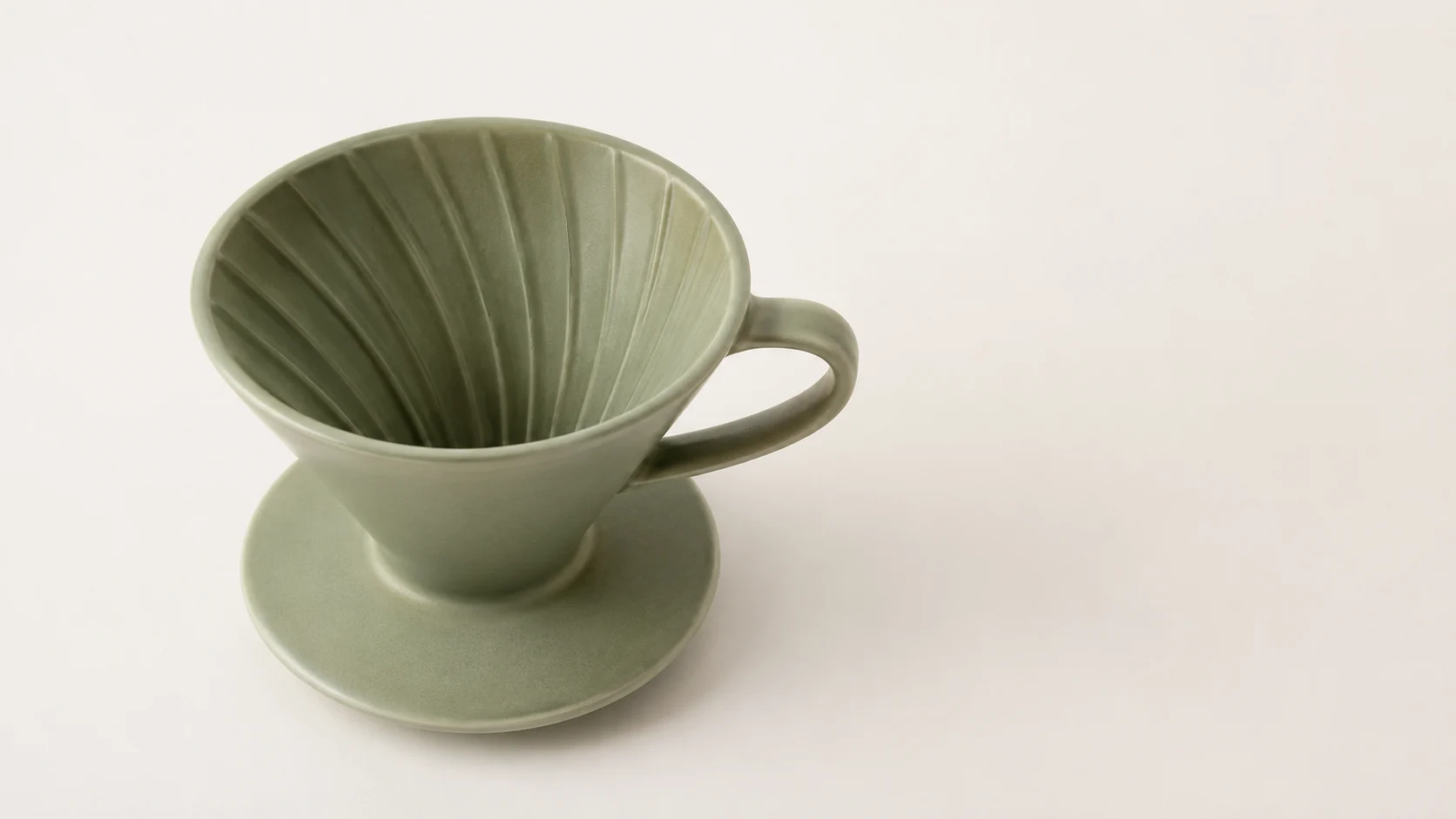
a matte ceramic pour-over coffee dripper in sage green with a short conical body and a small pouring spout
나머지 모든 것 — 각도, 배경, 조명, 구도 — 은 샷별로 추가합니다. 변수 하나에 넣고 이어 붙이면 됩니다.
샷 1 — 흰 배경 리스팅 이미지
마켓플레이스가 원하는 샷입니다: 순수 흰색, 부드럽고 고른 빛, 옅은 그림자 하나, 화면에 다른 것은 없음.
프롬프트: Studio e-commerce product photo of a matte ceramic pour-over coffee dripper in sage green with a short conical body and a small pouring spout, front three-quarter angle, centered on a pure white seamless background (#ffffff), soft even box lighting, subtle soft shadow directly beneath, sharp focus, true-to-life color, catalog listing style, no props, no text.
설정:
aspect_ratio: 1:1,resolution: 1K

샷 2와 3 — 동일 제품의 변형
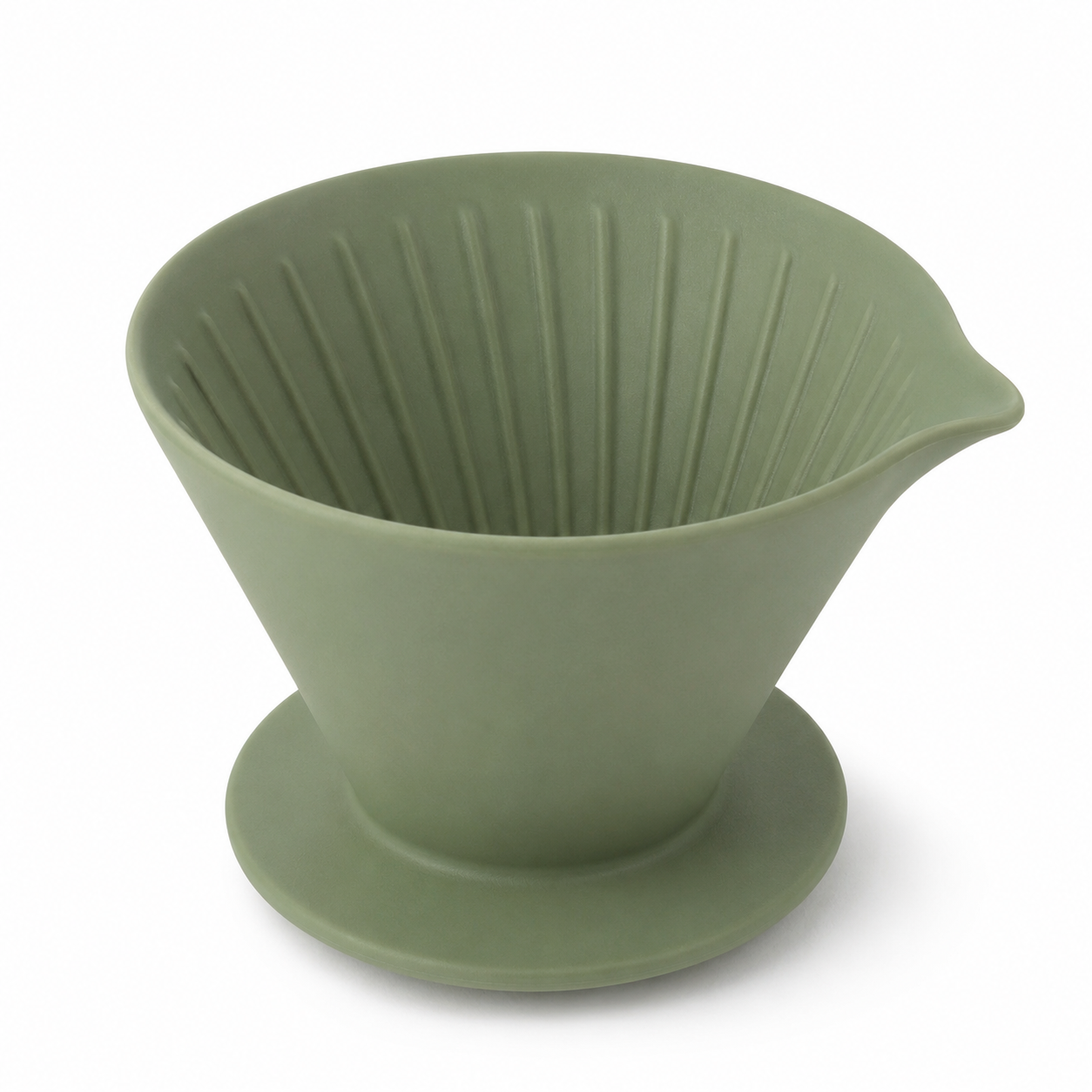
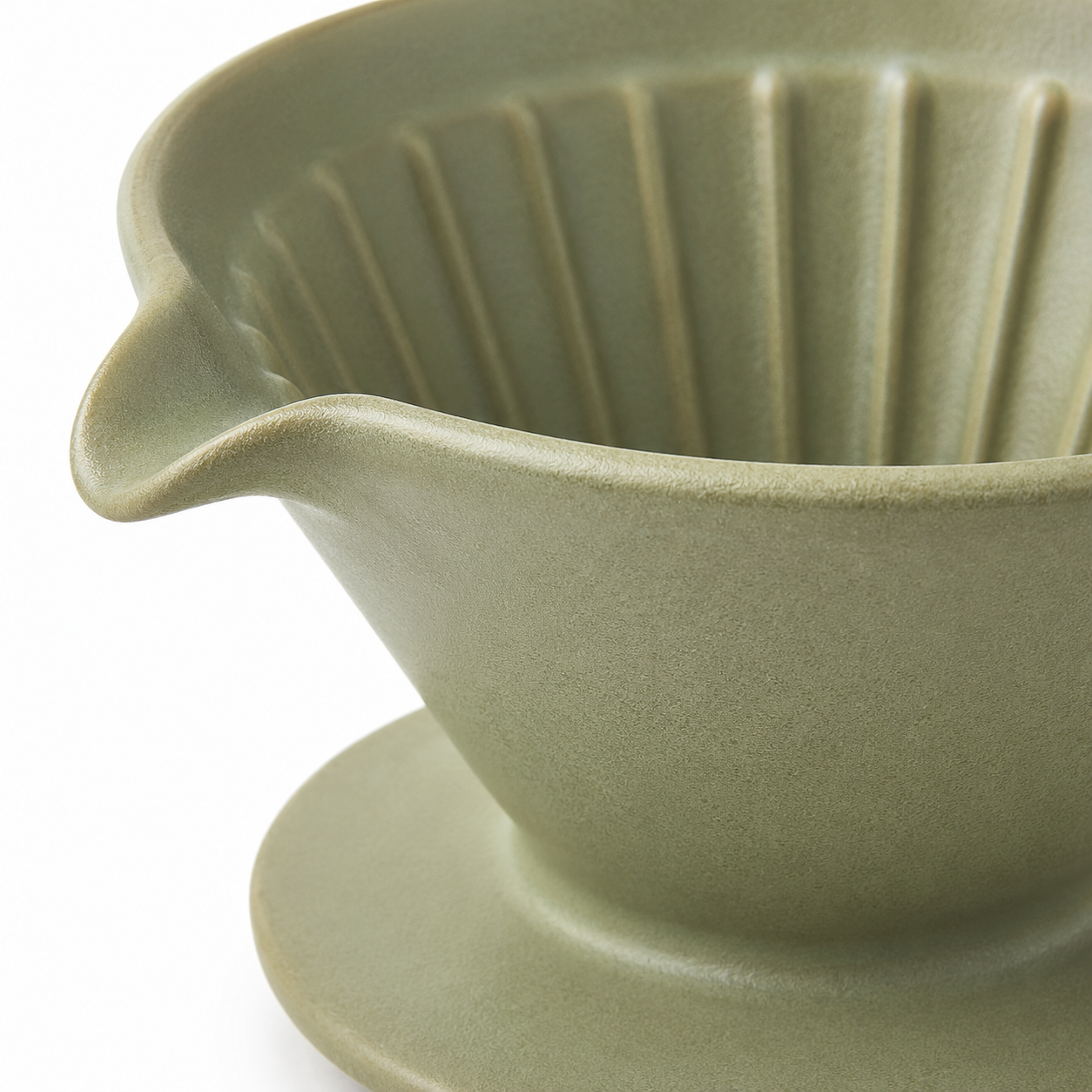
이제 완전히 동일한 제품 사양을 재사용하고 카메라 지시만 바꿉니다. 프롬프트의 제품 부분이 동일하기 때문에 드리퍼는 전체 이미지 세트에서 동일한 상품으로 식별 가능하게 유지됩니다.
프롬프트(각도): …high side angle looking down into the cone, pure white seamless background (#ffffff), soft even box lighting, subtle soft shadow, sharp focus, true-to-life color, catalog listing style, no props, no text.
프롬프트(디테일): Close-up… focus on the spout and rim texture, pure white seamless background (#ffffff), soft even box lighting, subtle soft shadow, sharp focus, macro detail, catalog listing style, no props, no text.
샷 4 — 라이프스타일 / 소셜 변형
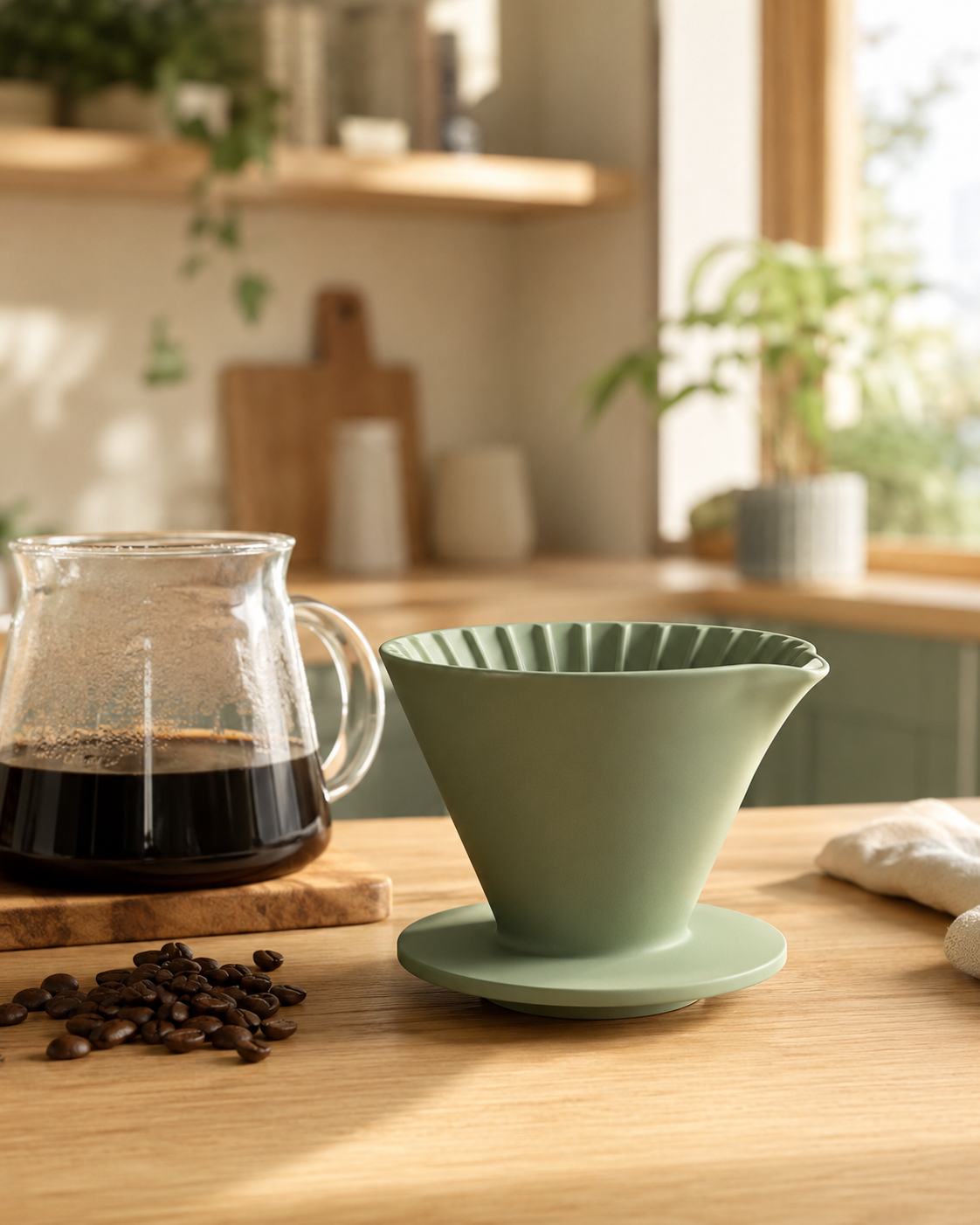
리스팅에는 깔끔한 누끼가 필요하고, 광고와 소셜에는 장면이 필요합니다. 동일한 제품 사양, 새로운 장면, 그리고 피드에 적합한 세로 4:5 프레임입니다.
프롬프트: Lifestyle e-commerce scene of a matte ceramic pour-over coffee dripper in sage green with a short conical body and a small pouring spout sitting on a light oak kitchen counter beside a glass carafe and a small pile of coffee beans, warm morning window light, shallow depth of field, cozy Scandinavian interior blurred in the background, natural color, premium social-media product shot, no text.
설정:
aspect_ratio: 4:5,resolution: 1K
API 엔드투엔드
세 번의 호출: 작업 제출, 폴링, 파일 다운로드.
1. 제출 — 모델과 input 객체를 POST:
curl -s -X POST https://api.hiapi.ai/v1/tasks \
  -H "Authorization: Bearer $HIAPI_TOKEN" \
  -H "Content-Type: application/json" \
  -d '{
    "model": "gpt-image-2/text-to-image",
    "input": {
      "prompt": "Studio e-commerce product photo ... no text.",
      "aspect_ratio": "1:1",
      "resolution": "1K"
    }
  }'
# -> {"data": {"taskId": "task_abc123"}}
2. 폴링 — status가 success가 될 때까지 작업을 GET:
curl -s https://api.hiapi.ai/v1/tasks/task_abc123 \
  -H "Authorization: Bearer $HIAPI_TOKEN"
# -> {"data": {"status": "success", "output": [{"url": "https://.../image.png"}]}}
3. 다운로드 — output[0].url은 임시이므로 즉시 저장하세요:
curl -s -o dripper-front.jpg "<output[0].url>"
배치 스크립트: 하나의 제품, 여러 이미지
다음은 하나의 제품 사양에서 전체 리스팅 이미지 세트를 렌더링하는 복사-붙여넣기 가능한 Python 루프입니다. 제품 설명을 고정하고 샷 지시만 반복합니다.
import os, time, requests

BASE = "https://api.hiapi.ai/v1/tasks"
TOKEN = os.environ["HIAPI_TOKEN"]
HEAD = {"Authorization": f"Bearer {TOKEN}", "Content-Type": "application/json"}

# Fixed product spec — write it once.
PRODUCT = ("a matte ceramic pour-over coffee dripper in sage green with a short "
           "conical body and a small pouring spout")

# Vary only the shot half.
SHOTS = {
    "front":     ("1:1", "front three-quarter angle, pure white seamless background (#ffffff), "
                         "soft even box lighting, subtle soft shadow, catalog listing style, no text"),
    "angle":     ("1:1", "high side angle looking into the cone, pure white background, "
                         "soft even lighting, catalog listing style, no text"),
    "detail":    ("1:1", "close-up macro on the spout and rim, pure white background, "
                         "soft even lighting, catalog listing style, no text"),
    "lifestyle": ("4:5", "on a light oak kitchen counter with a glass carafe and coffee beans, "
                         "warm morning window light, shallow depth of field, no text"),
}

def submit(prompt, ratio):
    body = {"model": "gpt-image-2/text-to-image",
            "input": {"prompt": prompt, "aspect_ratio": ratio, "resolution": "1K"}}
    r = requests.post(BASE, headers=HEAD, json=body, timeout=60)
    return r.json()["data"]["taskId"]

def wait(task_id, timeout=600):
    deadline = time.time() + timeout
    while time.time() < deadline:
        d = requests.get(f"{BASE}/{task_id}", headers=HEAD, timeout=30).json()["data"]
        if d["status"] == "success":
            return d["output"][0]["url"]
        if d["status"] == "fail":
            raise RuntimeError(d.get("error"))
        time.sleep(5)
    raise TimeoutError(task_id)

for name, (ratio, shot) in SHOTS.items():
    prompt = f"Studio e-commerce product photo of {PRODUCT}, {shot}."
    url = wait(submit(prompt, ratio))
    img = requests.get(url, timeout=120).content   # URL expires — save now
    open(f"dripper-{name}.jpg", "wb").write(img)
    print(f"saved dripper-{name}.jpg  (cost $0.03)")
PRODUCT를 당신의 SKU로 바꾸고, SHOTS 매핑을 유지하며, 바깥에 상품 카탈로그를 순회하는 루프를 감싸면 같은 방식으로 모든 제품을 렌더링할 수 있습니다.
실제 카탈로그 비용 계산
gpt-image-2/text-to-image는 장당 $0.03 균일하게 청구됩니다(플랫폼에서 검증됨; 현재 수치는 가격 페이지를 확인하세요). 따라서:
| 카탈로그 규모 | SKU당 샷 수 | 이미지 수 | 비용 |
|---|---|---|---|
| 20개 SKU | 3 | 60 | $1.80 |
| 100개 SKU | 3 | 300 | $9.00 |
| 100개 SKU | 4(라이프스타일 포함) | 400 | $12.00 |
배경 기준을 바꿀 때 다시 촬영하는 대신 전체 카탈로그를 다시 렌더링할 수 있을 만큼 충분히 저렴합니다.
정리
워크플로는 의도적으로 간결하게 유지됩니다: 제품 사양 고정, 샷만 변경, 제출 → 폴링 → 다운로드, 그리고 URL이 만료되기 전에 출력 바이트를 저장. 이미지 한 장당 gpt-image-2/text-to-image 작업 하나, 장당 $0.03, 이미 다른 hiapi 모델에서 사용 중인 것과 동일한 작업 프로토콜을 사용합니다. 배치 루프를 당신의 상품 카탈로그로 향하게 하면 선형적으로 확장됩니다.
관련 글
모든 아티클 보기 →-

사용 가이드
seedream-5.0-pro/image-to-image 시작 가이드: 기능, 가격 및 연동 핵심 포인트
ByteDance 이미지 편집 모델의 기능 경계, 과금 방식 및 엔지니어링 연동 실무
-

사용 가이드
seedream-5.0-pro 텍스트-이미지 생성 입문 가이드: 능력 경계, API 연동 및 비용 관리
개발자를 위한 실무 관점: 파라미터 핵심부터 장당 $0.05 비용 추정까지
-

사용 가이드
Hailuo 2.3 Fast 이미지-투-비디오 입문 가이드: 성능 범위, 가격 및 연동 실무
개발자를 위한 MiniMax 이미지-투-비디오 모델 선택과 연동 핵심 포인트