
튜토리얼
Qwen Image 2.0 및 2.0 Pro API: 가격, 실제 출력 및 코드 예제
Qwen Image 2.0의 두 가지 티어를 다루는 가이드: 중영문 이중 언어 텍스트 테스트, 제품 이미지, 고정 크기 값, 그리고 2.0과 2.1, 3.0의 비교.
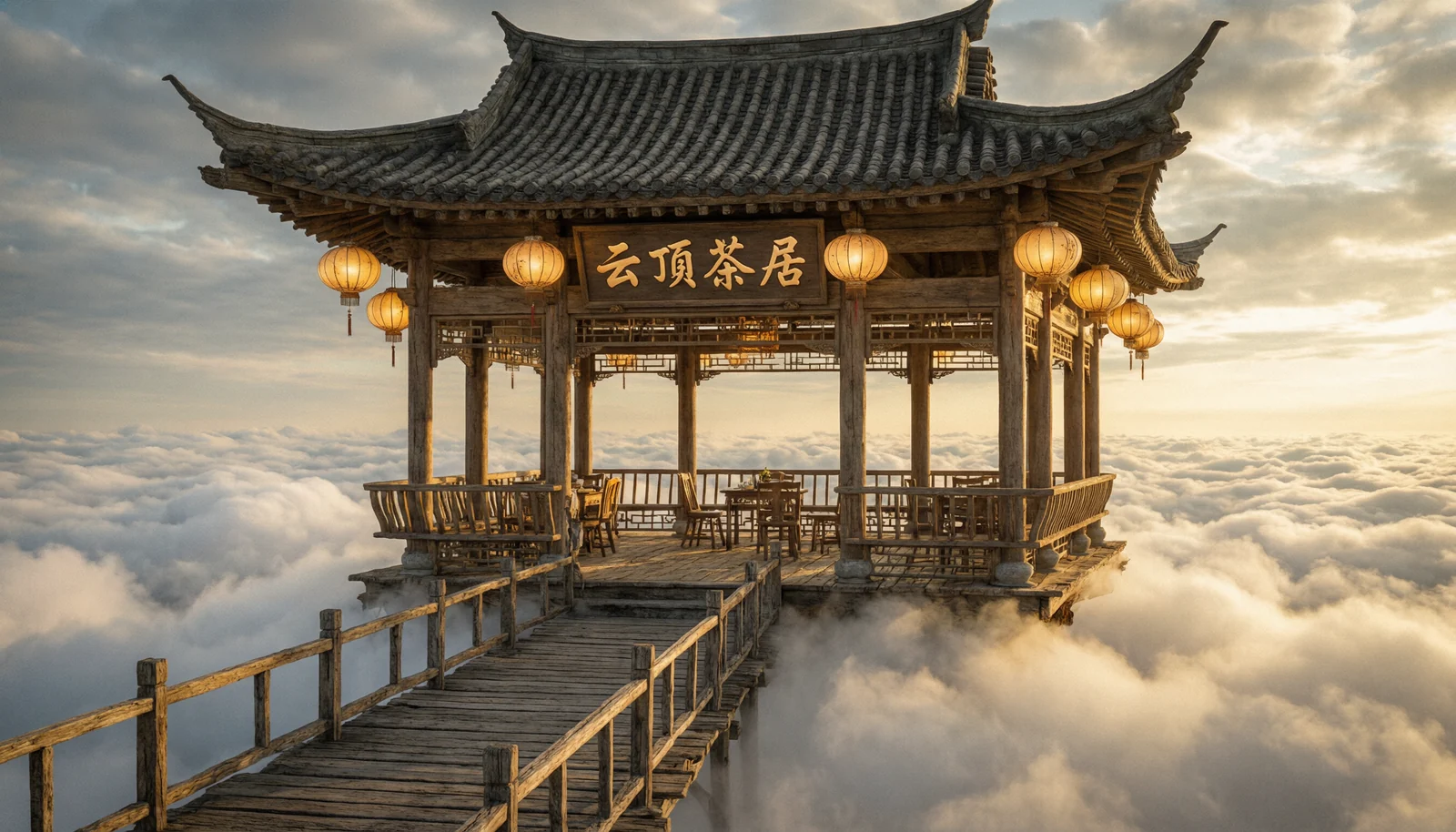
요약
- Qwen Image 2.0은 알리바바의 텍스트-이미지 모델로, 이미지 안에 중국어와 영어 텍스트를 생성하는 데 뛰어납니다. HiAPI에서 두 가지 티어로 제공됩니다:
qwen-image-2.0은 장당 $0.0422,qwen-image-2.0-pro는 장당 $0.107입니다. - 두 모델 모두 동일한 요청을 받습니다:
prompt와 다섯 가지 고정size값 중 하나.aspect_ratio필드는 없으며 이미지 입력도 받지 않습니다. - 새 프로젝트를 시작한다면 더 최신 버전을 우선 고려하세요: Qwen Image 3.0은 장당 $0.0358, 2.1 Turbo는 장당 $0.02로 2.0보다 저렴하며 둘 다 참조 이미지를 지원합니다. 비교는 글 말미를 참고하세요. Qwen Image 2.0 Pro 모델 페이지 열기에서 바로 시험해 볼 수 있으며, 신규 계정에는 200 포인트 무료 크레딧이 제공됩니다.
2.0인가 2.0 Pro인가
qwen-image-2.0 |
qwen-image-2.0-pro |
|
|---|---|---|
| 이미지 장당 가격 | $0.0422 | $0.107 |
| 입력 | prompt + size |
동일 |
| 크기 | 고정 값 5개, 최대 2688×1536 | 동일 |
| 참조 이미지 | 미지원 | 미지원 |
| 적합한 용도 | 초안, 이중 언어 포스터, 표지판 | 최종 제품 이미지 및 배너 |
HiAPI 실시간 가격, 2026년 10월 20일 조회 기준. 실패한 작업은 과금되지 않습니다.
요청이 완전히 동일하므로 티어를 바꾸려면 model에서 단어 하나만 변경하면 됩니다. 2.0에서 프롬프트를 작성하고 테스트한 뒤, 동일한 seed로 Pro에서 최종 버전을 렌더링하세요.
실제 출력
이중 언어 간판 (2.0)
A small Tokyo-style ramen shop at night, photoreal, soft drizzle on the pavement, warm interior light spilling out, customers visible through a frosted window. Above the door, a hand-painted wooden sign with two clean lines of text: the top line in large Chinese characters reads "幸福拉面", the bottom line in smaller English reads "Lucky Noodles · Since 2019". A small red paper lantern hangs to the left. 35mm street photography, shallow depth of field, cinematic colour grade.
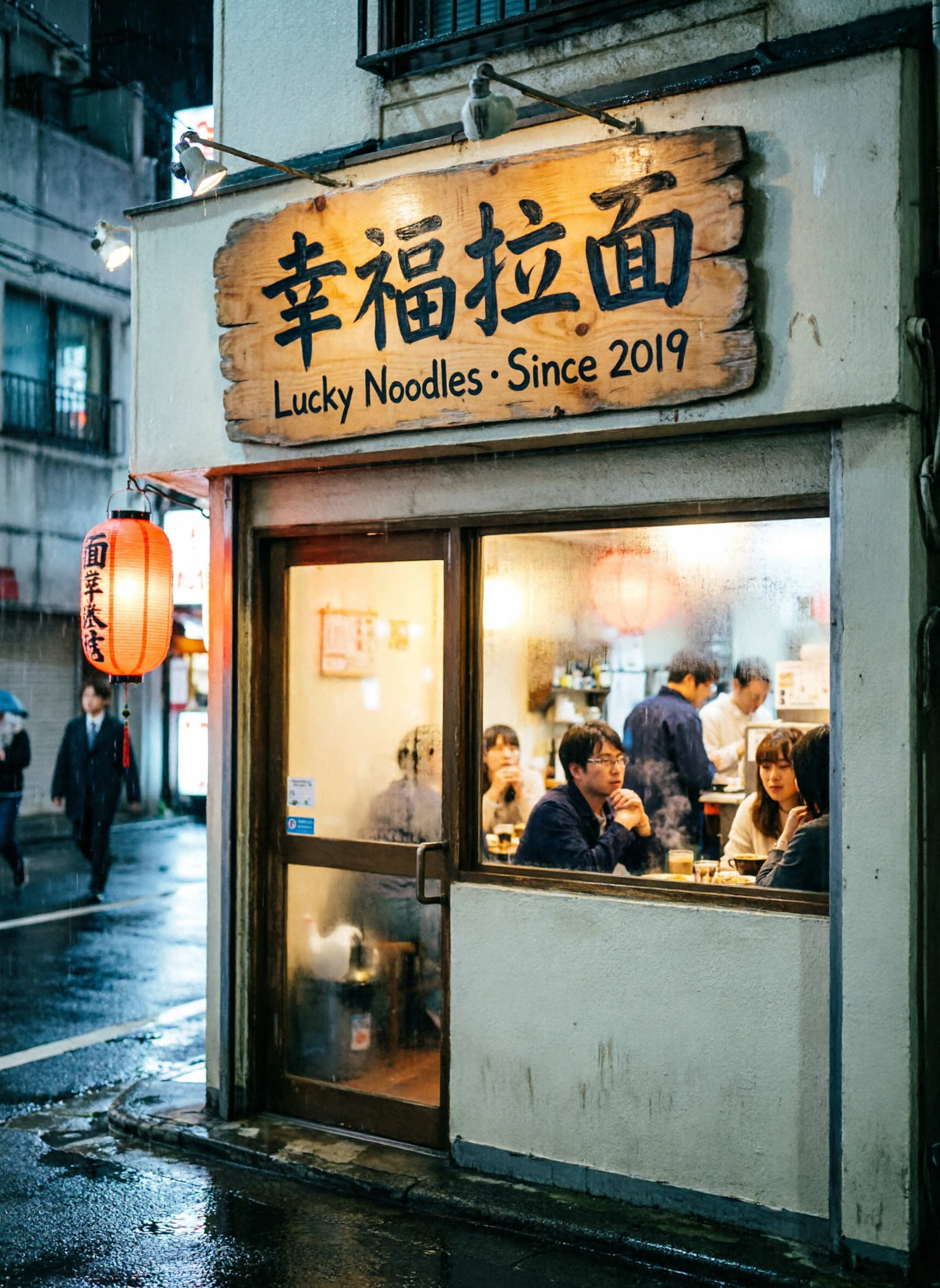
qwen-image-2.0, size 1728*2368, 오늘 가격 기준 $0.0422.
간판의 두 줄 텍스트가 가운데 점을 포함해 프롬프트와 일치했습니다. 프롬프트에서 텍스트를 지정하지 않은 등불에는 잡다한 문자가 몇 개 나타났습니다. 텍스트가 포함된 이미지를 게시하기 전에 작은 표면 하나하나를 확인하세요.
세 개의 텍스트 블록이 있는 포스터 (2.0)
A modern minimalist promotional poster for a specialty coffee shop, cream background with a subtle paper grain. Centred composition: Top half: a large flat-illustration espresso cup with steam, terracotta-and-cream palette. Middle: large bilingual headline. Chinese line on top reads "夏日新品", English line directly below reads "SUMMER MENU 2026". Both lines are perfectly centred. Lower third: a short body line in smaller Chinese reads "全场买二赠一", and an English line beneath reads "Buy two, get one free". Bottom footer: a single small line of English reads "Through August 31". Clean geometric sans-serif typography, generous whitespace, magazine-quality layout.
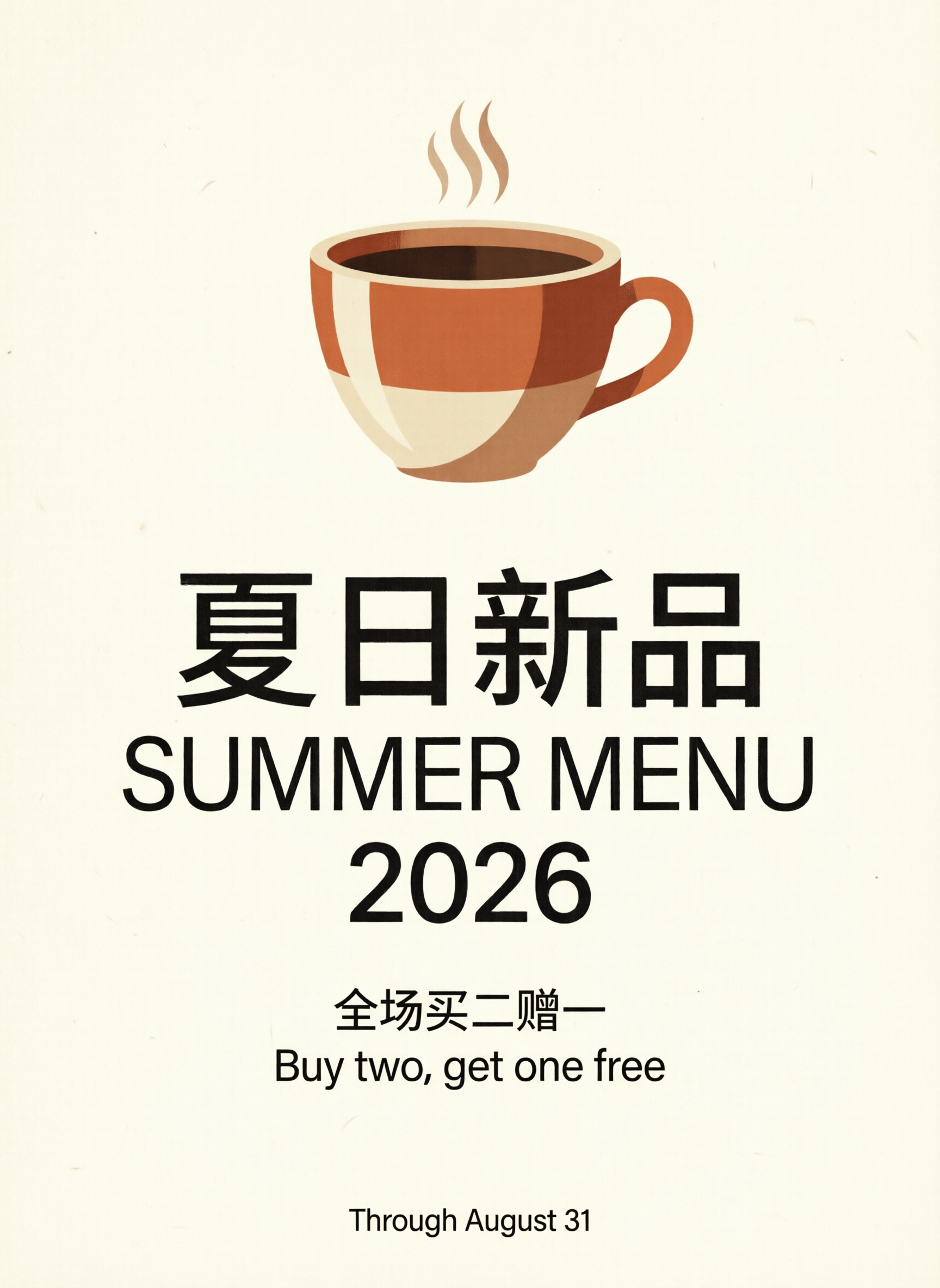
qwen-image-2.0, size 1728*2368, 오늘 가격 기준 $0.0422.
다섯 개 문자열이 모두 표시되었고 철자도 정확했습니다. 제목 "SUMMER MENU 2026"은 프롬프트에서 요구하지 않았는데도 두 줄로 나뉘었습니다.
제품 메인 이미지 (2.0 Pro)
Studio product photograph of a single amber glass skincare dropper bottle with a blank matte white label, standing centered on a round travertine stone pedestal, seamless warm off-white studio background, soft diffused key light from the upper left, a subtle soft shadow falling to the right, hyper-detailed macro texture on the glass and brushed-metal dropper cap, photorealistic, catalog-ready e-commerce hero shot, no text, no logos, no props
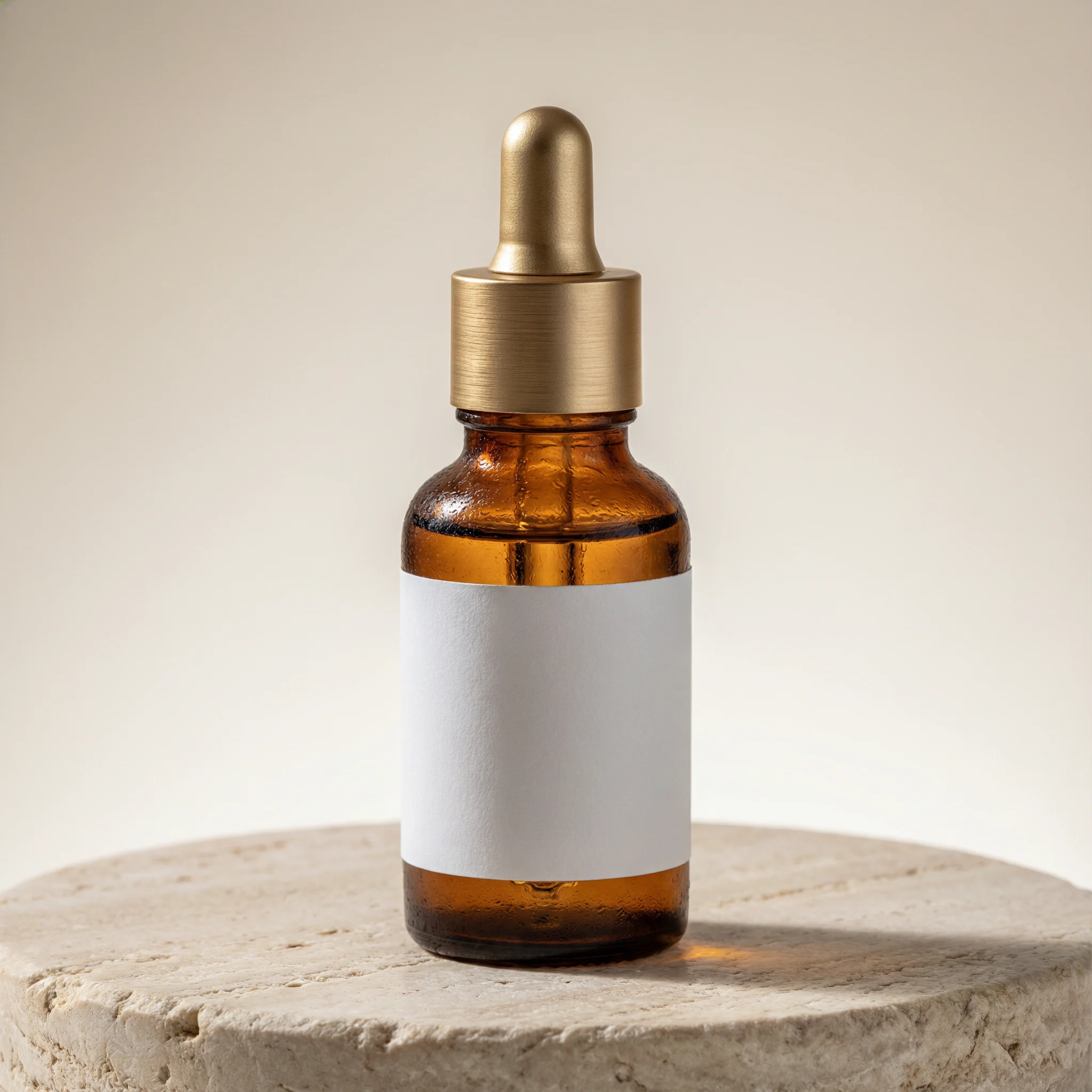
qwen-image-2.0-pro, size 2048*2048, $0.107.
제품 라벨은 비워 두고 라벨 텍스트는 나중에 추가하세요. 작은 곡면 위의 작은 글씨는 어떤 모델이든 문자를 정확히 처리하기 가장 어려운 부분이며, 빈 라벨은 문구가 바뀔 때 업데이트하기도 더 쉽습니다.
프로모션 배너 (2.0 Pro)
Flat-lay e-commerce promo banner photograph: three amber glass skincare dropper bottles arranged diagonally on a warm terracotta backdrop with dried eucalyptus sprigs, soft overhead studio lighting with gentle shadows, in the upper right corner bold clean white sans-serif text reading SUMMER GLOW SALE, directly beneath it smaller white text reading SAVE 20% TODAY, no other text anywhere, photorealistic commercial photography, sharp focus
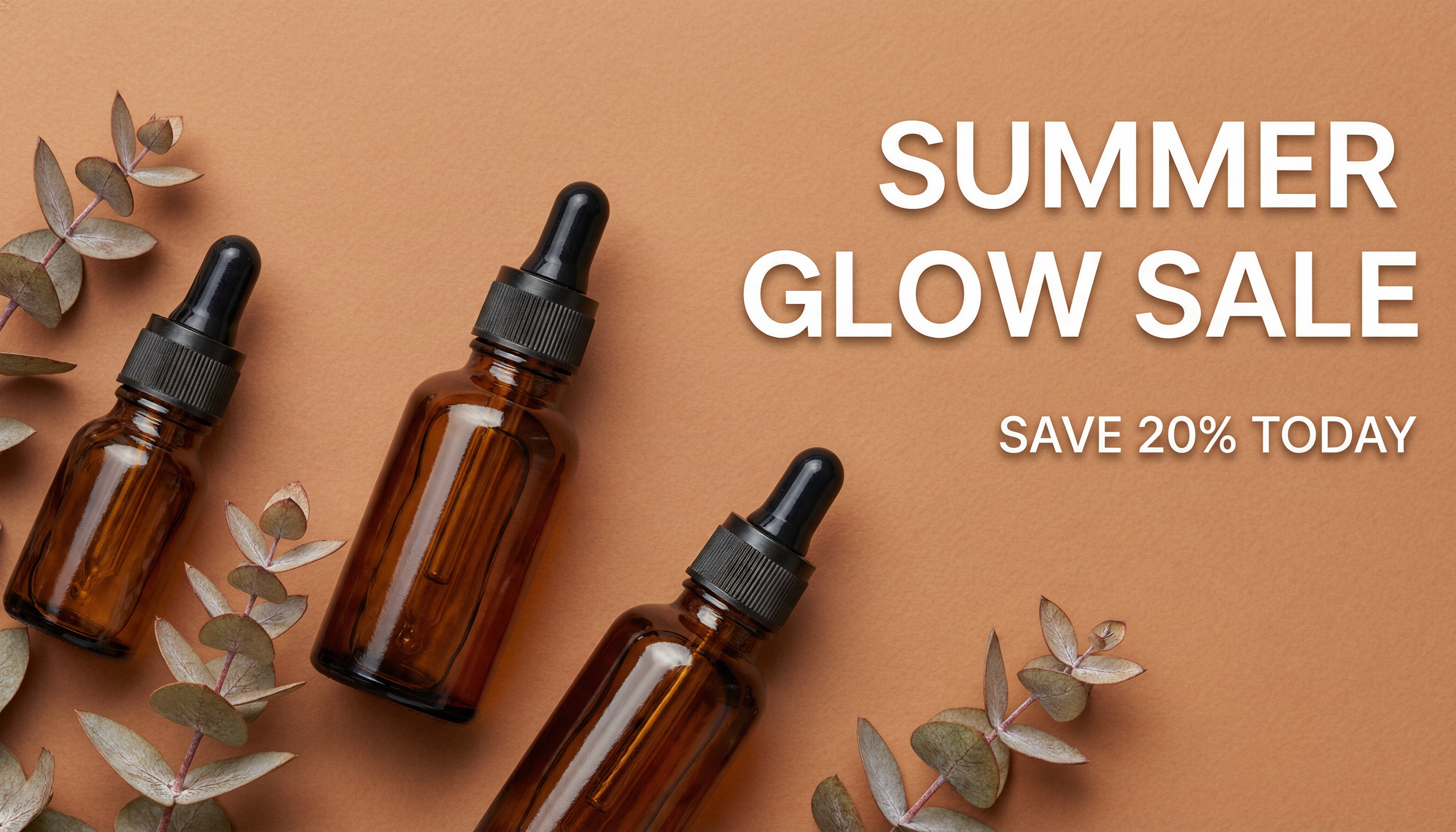
qwen-image-2.0-pro, size 2688*1536, $0.107.
문구와 위치가 프롬프트와 일치했습니다. 이 결과물은 하단 가장자리에 얇은 검은 테두리가 생겼으므로 배너를 게시하기 전에 자르기를 계획하세요.
curl
curl -s -X POST https://api.hiapi.ai/v1/tasks \
  -H "Authorization: Bearer $HIAPI_KEY" \
  -H "Content-Type: application/json" \
  -d '{
    "model": "qwen-image-2.0-pro",
    "input": {
      "prompt": "A storefront window sign that reads \"GRAND OPENING\" in bold red letters, photorealistic, golden-hour light",
      "size": "2688*1536",
      "seed": 42
    }
  }'
taskId를 받게 됩니다. data.status가 success가 될 때까지 GET https://api.hiapi.ai/v1/tasks/{taskId}를 폴링한 다음 data.output[0].url을 다운로드하세요. 링크는 작업 완료 후 약 7일 뒤 만료되므로 파일을 저장해 두세요.
Python: 하나의 프롬프트, 두 가지 티어
# pip install requests; export HIAPI_KEY=your-key first
import os, time, requests

API = "https://api.hiapi.ai/v1/tasks"
H = {"Authorization": f"Bearer {os.environ['HIAPI_KEY']}"}

def generate(model, timeout_s=300, **inp):
    r = requests.post(API, json={"model": model, "input": inp}, headers=H, timeout=30).json()
    if r.get("code") != 200:
        raise RuntimeError(r)  # a 400 names every invalid field
    task_id = r["data"]["taskId"]
    deadline = time.time() + timeout_s
    while time.time() < deadline:
        d = requests.get(f"{API}/{task_id}", headers=H, timeout=30).json()["data"]
        if d["status"] == "success":
            return d["output"][0]["url"]
        if d["status"] == "fail":
            raise RuntimeError(d.get("error"))
        time.sleep(4)
    raise TimeoutError(task_id)

prompt = 'A bakery chalkboard that reads "FRESH BREAD" in white chalk, morning light'
draft = generate("qwen-image-2.0", prompt=prompt, size="2048*2048", seed=7)
final = generate("qwen-image-2.0-pro", prompt=prompt, size="2048*2048", seed=7)

for name, url in [("draft.png", draft), ("final.png", final)]:
    with open(name, "wb") as f:
        f.write(requests.get(url, timeout=120).content)
매개변수
| 필드 | 필수 여부 | 값 | 설명 |
|---|---|---|---|
prompt |
예 | 텍스트 | 원하는 정확한 텍스트를 따옴표로 감싸세요 |
size |
아니요 | 2688*1536, 2368*1728, 2048*2048(기본값), 1728*2368, 1536*2688 |
x가 아니라 *를 사용하세요 |
negative_prompt |
아니요 | 텍스트 | 피하고 싶은 내용 |
seed |
아니요 | 0–2147483647 | 동일한 seed와 프롬프트는 티어 간에 안정적인 출발점을 제공합니다 |
prompt_extend |
아니요 | true(기본값) / false |
문구를 정확히 그대로 유지해야 할 때 끄세요 |
watermark |
아니요 | false(기본값) / true |
다섯 가지 크기는 대략 16:9, 4:3, 1:1, 3:4, 9:16에 해당합니다. 21:9나 4:5가 필요하면 가장 가까운 크기로 렌더링한 뒤 자르세요.
마주치게 될 오류
다음 모든 경우는 제출 시 HTTP 400을 반환하므로 작업이 생성되지 않고 과금도 되지 않습니다:
size: value must be one of '2688*1536', ...:2048x2048또는 사용자 지정 크기를 보냈습니다. 다섯 값 중 하나를*로 구분해 사용하세요.additional properties 'aspect_ratio' not allowed: 2.0은size를 사용합니다. Qwen Image 3.0과 2.1은aspect_ratio로 바뀌었습니다.additional properties 'image_urls' not allowed: 2.0은 참조 이미지를 받을 수 없습니다. 편집에는 2.1 또는 3.0을 사용하세요.additional properties 'n' not allowed: 작업 하나당 이미지 한 장이 생성됩니다. 여러 작업을 병렬로 제출하세요.
Qwen Image 2.0, 2.1, 아니면 3.0
| 모델 | 이미지 장당 가격 | 참조 이미지 | 크기 제어 |
|---|---|---|---|
qwen-image-2.1-turbo |
$0.02 | 1–10, 선택 사항 | aspect_ratio(5개 값) |
qwen-image-3.0/text-to-image |
$0.0358 | 별도의 image-to-image 엔드포인트, 1–3 | aspect_ratio(8개 값) + resolution 1K/2K |
qwen-image-2.0 |
$0.0422 | 미지원 | size(5개 값) |
qwen-image-2.1-pro |
$0.05 | 1–10, 선택 사항 | aspect_ratio(5개 값) |
qwen-image-3.0-pro/text-to-image |
$0.0497(1K) / $0.0993(2K) | 별도의 image-to-image 엔드포인트, 1–3 | aspect_ratio(8개 값) + resolution |
qwen-image-2.0-pro |
$0.107 | 미지원 | size(5개 값) |
- 프로덕션에서 이미 2.0을 사용 중: 아무 문제 없습니다. 여전히 사용할 수 있습니다. 3.0으로 전환하면 비용이 더 저렴하지만
size를aspect_ratio와resolution으로 바꿔야 합니다. - 새 프로젝트: Qwen Image 3.0 또는 2.1 Turbo로 시작하세요. 더 저렴하고 기존 이미지를 편집할 수 있습니다.
- 최고 품질의 Qwen 출력: 3.0 Pro의 1K 버전은 2.0 Pro의 절반도 안 되는 가격입니다.
3.0 사용법은 Qwen Image 3.0 API 가이드를 참고하세요.
자주 묻는 질문
Qwen Image 2.0으로 기존 이미지를 편집할 수 있나요?
아니요. 2.0의 두 티어 모두 이미지를 받지 않습니다. Qwen Image 3.0에는 image-to-image 엔드포인트가 있고, 2.1 Pro와 Turbo는 동일한 요청에서 최대 10장의 참조 이미지를 받을 수 있습니다.
중국어 텍스트를 렌더링할 수 있나요?
네, 이것이 강점입니다. 위 예제에서 요구한 모든 중영문 문자열이 정확한 철자로 표시되었습니다. 요구하지 않은 텍스트, 예를 들어 라멘 가게의 등불 같은 경우에는 여전히 잡다한 문자로 나타날 수 있습니다.
같은 이미지를 다시 얻으려면 어떻게 해야 하나요?
동일한 seed, 프롬프트, 크기를 전달하세요. 이렇게 하면 프롬프트를 2.0에서 Pro로 옮기면서도 비슷한 레이아웃을 유지할 수 있습니다.
왜 2.0이 3.0보다 비싼가요?
각 모델은 자체 가격이 있습니다. 오늘 가격 기준으로 3.0은 이미지 장당 $0.0358, 2.0은 $0.0422입니다. 가격이 중요하다면 결정 전에 자신의 프롬프트로 둘을 비교해 보세요.
코드 없이 프롬프트를 시험해 보려면 Qwen Image 2.0 모델 페이지 열기.
관련 글
모든 아티클 보기 →-

튜토리얼
HiAPI API로 hailuo-2.3-fast/image-to-video 호출하는 방법: curl과 Python 실전
빠르고 저렴한 이미지-투-비디오 등급의 첫 실행 요청 — 모델 ID부터 MP4 다운로드까지
-

튜토리얼
HiAPI API로 hailuo-2.3/text-to-video를 호출하는 방법: curl, Python 및 실행 가능한 요청 예시
-

튜토리얼
HiAPI에서 Kandinsky 6.0 Pro 텍스트-투-비디오 사용하기: curl 및 Python 튜토리얼
요청 우선 실전 데모: 프롬프트에서 비디오 클립까지의 호출 구성, 요청 제출, 완료 상태 폴링 및 결과 다운로드