

Alibaba
Wan 2.6 Flash
wan2.6-flash/image-to-video
A speed-optimized image-to-video version of the Wan 2.6 series, with lower cost and faster output, suitable for draft exploration and high-frequency batch generation, though its visual refinement is not on par with the standard version
Try wan2.6-flash/image-to-video
Input
Showcases
View all showcasesOutput
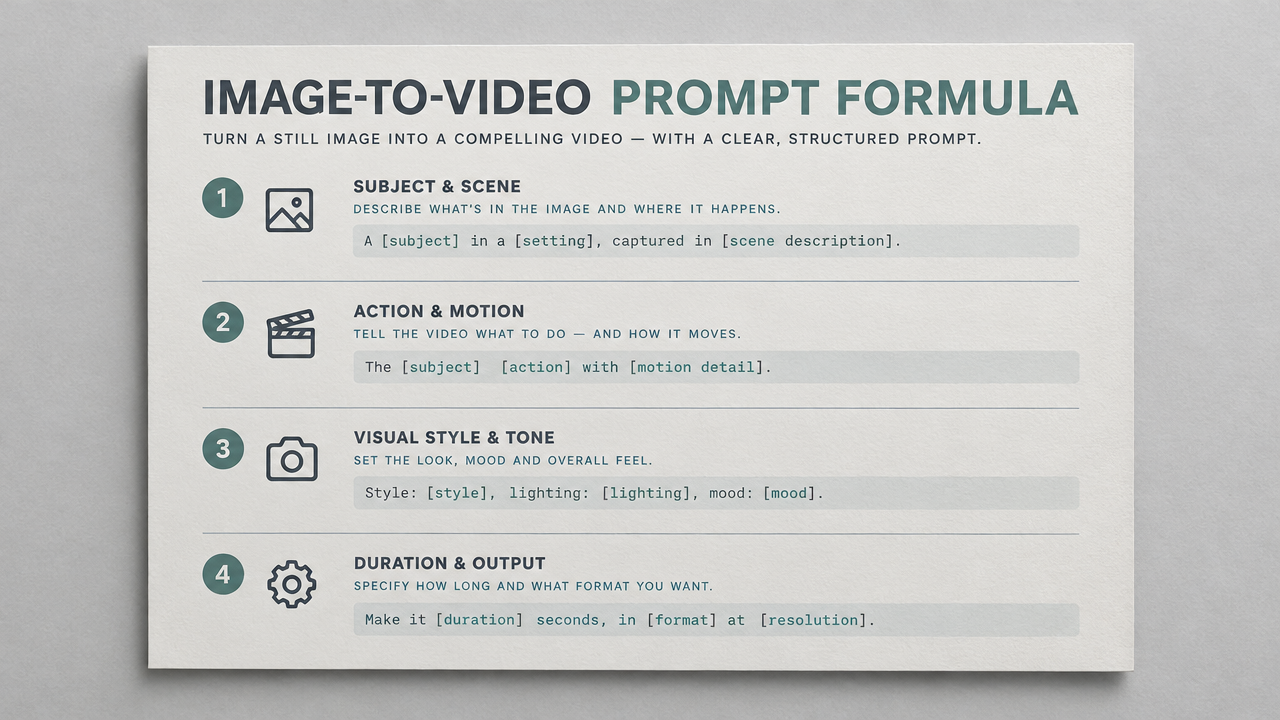
videoWan 2.6 Flash Image-to-Video Prompt Formula Card
Style prompt-guide · Motion Design · Social short video
Reference inputs
image_urls
Prompt
The camera glides slowly and controllably over a flat-lying reference card. Starting from a slight overhead angle on the full card, then pushing in with soft parallax so that the four labeled blocks—subject, action, camera, atmosphere—are read in sequence; the card edges have slight depth-of-field falloff, soft neutral studio light comes from the upper left, and the paper shows subtle texture and faint shadows. The motion is steady and unhurried, with no shake and no cuts; the card itself remains motionless while the camera moves smoothly, finally stopping on a medium close-up of the example sentence block. Clean editorial design aesthetic, soft color palette, high readability, 720p compositing.
Copy the full prompt and adapt it for your own generation.
Tags
Cinematic Language Visual Notes: Camera Movement Demonstration (Image-to-Video)
Style Camera Movement · Storyboard · Quick Draft
Reference inputs

image_urls
Prompt
Animate the static storyboard frame into a continuous camera movement: slowly push in from a wide shot to a medium close-up, with subtle parallax as the camera drifts to the right, slight handheld micro-shake, shallow depth of field pulling focus from the foreground to the subject; soft directional window light, low-saturation cinematic color grading, atmospheric haze in the background; control the pacing within five seconds, no cuts, the subject remains consistent, keeping only natural motion.
Copy the full prompt and adapt it for your own generation.
Tags
Storyboard to Final Cut: Wan 2.6 Flash Image-to-Video Concept Demo
Style Storyboard · Image-to-Video · Concept Art
Reference inputs

image_urls
Prompt
Generate an image-to-video from a single storyboard keyframe: a slow dolly shot along a narrow sci-fi corridor, the camera pushing forward at a steady speed, overhead strip lights flickering in sequence, faint volumetric fog drifting through the frame, with a slight handheld micro-jitter for a documentary feel, depth of field gradually compressing in the background as the camera advances, cool cyan and amber accent lighting, a restrained 5-second rhythm that builds tension progressively without any cuts, cinematic 16:9 composition, clean and smooth motion, subject maintaining identity consistency across frames.
Copy the full prompt and adapt it for your own generation.
Tags
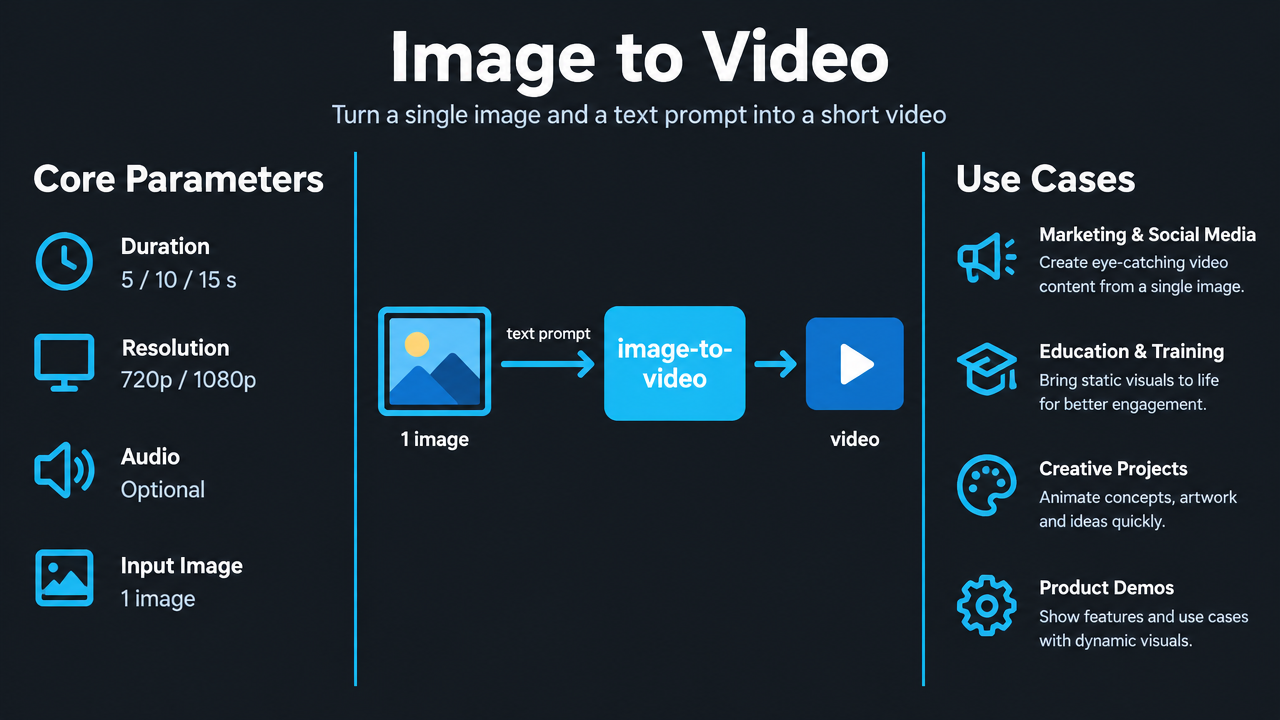
Wan 2.6 Flash Image-to-Video Capabilities Illustrated: Parameters and Scenarios
Style capability-diagram · Technical Explanation · Product Image
Reference inputs
image_urls
Prompt
Turn a clean technical infographic poster into a short explainer video. Start from the static poster image; the camera slowly and steadily pushes in toward the middle column, then gently pans sideways to reveal the left and right columns, and finally pushes in slightly toward the feature list at the bottom. Add a soft moving highlight sweep over key labels to guide the viewer's eye, with subtle parallax between the three columns while keeping all text crisp and legible. Lighting is flat, even, studio-neutral lighting, with a faint cyan glow along the panel edges; motion is smooth and restrained, with no jitter, no text distortion, and no new elements introduced. 16:9 aspect ratio, clean UI-style graphics, high legibility, professional tech-explainer atmosphere.
Copy the full prompt and adapt it for your own generation.
Tags
Pricing
wan2.6-flash/image-to-video per second
Overview
wan2.6-flash/image-to-video is a fast version designed for image-to-video scenarios: input a single source image and a text prompt to generate a short video with motion, camera movement, and atmosphere. It supports 5/10/15-second durations, 720p and 1080p resolutions, and optional audio output. It prioritizes generation speed and cost, making it suitable for developers who need high-frequency output and quick validation of creative directions, and also suitable as a drafting stage to first screen out viable shots before further refinement.
Key Highlights
- Fast version for high-frequency output — optimized for inference speed and resource allocation, suitable for high-frequency generation workflows involving repeated prompt and shot experimentation.
- Selectable duration and resolution, covering drafts to first cuts — choose between 5, 10, and 15 seconds, and output at 720p or 1080p, trading off speed and image quality as needed.
- Optional integrated audio-video generation — when the audio switch is enabled, audio synchronized with the visuals is produced alongside the generated frames; the audio track is billed separately from the video.
- Starts from a single image as the first frame, with prompt-driven motion — uses a jpeg/png/webp image no smaller than 256×256 as the video starting point, with prompts describing motion, camera movement, and atmosphere.
Capabilities
Single-image first-frame video generation: pass in one source image as the video starting point, along with a Chinese or English prompt describing motion and camera movement, to directly obtain a short video beginning with that image, reducing the cost of redrawing storyboards.
Controllable duration and resolution: duration is limited to three options—5, 10, and 15 seconds—and resolution can be 720p or 1080p, making it easy to choose output specifications based on placement and clarity requirements.
Optional synchronized audio: an audio switch determines whether audio is produced synchronously with the generated frames; the audio track is billed separately, allowing flexible choice based on whether sound is needed.
Prompt-driven camera and atmosphere: prompts can be up to 1500 characters and support Chinese or English, used to describe subject motion, camera movement, and overall atmosphere to control the direction of the generated content.
Use Cases
- Creative teams batch-testing prompts and shot directions — generate multiple candidate videos with different prompts in one go for internal topic review, then move the viable directions into refinement.
- Social media operations producing short videos at high frequency — use a single product image or portrait as the first frame to quickly generate vertical or horizontal assets suited to short-video platforms for daily content updates.
- Quick dynamic sample output during prototype validation — during product and concept design, convert effect renders into several-second dynamic previews for proposal presentations and user testing, shortening the iteration loop.
- Pre-screening for final rendering during the drafting stage — first use this model to produce multiple shot drafts at low cost, confirm composition and motion feasibility, then perform final high-quality rendering on the selected shots.
Limitations and Selection Advice
This is a speed-first image-to-video version, and its upper limit for image refinement and detail polishing is lower than the standard version. It is better suited as part of drafting, creative exploration, and high-frequency batch generation rather than as a final production cut. Input supports only a single image as the first frame; multi-image stitching or specifying first and last frames is not supported; duration is limited to the three options of 5, 10, and 15 seconds. If the final output demands high image quality and detail, it is recommended to first use this model to screen shots, then hand the selected shots to the standard version in the same series for final rendering.
Frequently asked questions
View all FAQs →-
What does Wan 2.6 Flash Image to Video need?
One image and a prompt. The image opens the video; the prompt describes motion, camera and mood.
-
Can I pass several images?
No. image_urls takes exactly one image.
-
What are the image requirements?
JPG, PNG or WebP, at least 256×256 pixels and up to 10MB.
-
Which lengths are supported?
5, 10 or 15 seconds; 5 by default.
Create a generation task
https://api.hiapi.ai/v1/tasks Headers
AuthorizationstringRequiredAccount API key. Required on every request. Example: Bearer YOUR_HIAPI_API_KEY. Get your API key
Content-TypestringOptionalThe request body is always parsed as JSON; when sent, only application/json (optionally with charset) is accepted — any other value returns 415. Example: application/json.
Idempotency-KeystringOptionalIdempotency key, up to 255 bytes. Retries with the same key from the same account create the task only once; replays return the original taskId.
On network timeouts or client retries, the same key creates the task only once — no double charges (scope: the API key's account). Use a business-unique identifier as the key (e.g. "order-42"); replays return the original taskId, and keys expire 24 hours after the first request. See the Unified Async API overview for the full scenario matrix.
Body
modelstringRequiredCurrent fixed value: wan2.6-flash/image-to-video
routestringOptionalCurrent fixed value: default
inputobjectRequired
Business parameters for wan2.6-flash/image-to-video and route default — see the parameter table below.
audiobooleanOptionalDefault: falseWhether to generate audio synchronized with the visuals; takes a boolean value, default false (not generated); when enabled, audio is billed separately.
promptstringRequiredminLength 1maxLength 1500Describe the motion, camera work, and atmosphere of the video; can be in Chinese or English, with a maximum length of 1500 characters.
durationintegerOptionalDefault: 5min 5max 15The duration of the output video, in seconds, default 5 seconds.
51015image_urlsarrayRequiredminItems 1maxItems 1An array of images to serve as the starting frame of the video; one image must be passed in; the image must be at least 256×256 pixels, supported formats are jpeg/png/webp, and the size must not exceed 10MB.
Array [ string ]
resolutionstringOptionalDefault: "720p"The resolution of the output video, takes a string value, default 720p.
720p1080pcallbackobjectOptional
Terminal-state notification config. When omitted, no callback is delivered — poll the task yourself. See the callback note below.
Provide callback.url when creating a task and HiAPI POSTs to your service once the task reaches a terminal state — no polling needed. The callback payload mirrors the task detail structure; signature verification, delivery retries and idempotency are documented on the Unified Async API overview page.
urlstringRequiredRequired when callback is present. A POST is sent to this URL once the task reaches a terminal state; must be a valid http(s) URL.
whenstringOptionalDefault: "final"Only final is supported today — notified on both success and fail.
finalstoragestringOptionalDefault: "temp"Artifact storage tier: temp (default, retained about 7 days) or persistent (long-term, billed by size). Insufficient balance or exceeding the storage cap silently downgrades to temp; the effective tier is shown in the task detail response.
temppersistentRequest examples
# Submit an async task; returns a taskId immediately (no waiting for generation)
curl -X POST "https://api.hiapi.ai/v1/tasks" \
  -H "Authorization: Bearer $HIAPI_API_KEY" \
  -H "Content-Type: application/json" \
  -d '{
  "model": "wan2.6-flash/image-to-video",
  "input": {
    "audio": false,
    "prompt": "…",
    "duration": 5,
    "image_urls": "…",
    "resolution": "720p"
  }
}'
const res = await fetch("https://api.hiapi.ai/v1/tasks", {
method: "POST",
headers: {
Authorization: `Bearer ${process.env.HIAPI_API_KEY}`,
"Content-Type": "application/json",
},
body: JSON.stringify({
model: "wan2.6-flash/image-to-video",
input: {
"audio": false,
"prompt": "…",
"duration": 5,
"image_urls": "…",
"resolution": "720p"
}
}),
});
const task = await res.json();
// { code: 200, message: "success", data: { taskId } }import os, requests
res = requests.post(
"https://api.hiapi.ai/v1/tasks",
headers={"Authorization": f"Bearer {os.environ['HIAPI_API_KEY']}"},
json={
"model": "wan2.6-flash/image-to-video",
"input": {
"audio": False,
"prompt": "…",
"duration": 5,
"image_urls": "…",
"resolution": "720p"
}
},
)
print(res.json()) # { code, message, data: { taskId } }200 OK
{
  "code": 200,
  "message": "success",
  "data": {
    "taskId": "tk-hiapi-01HZTQ8BX2N3GM3YFK4Z9D7VQR"
  }
}
400 Bad Request
{
  "code": 400,
  "message": "invalid request",
  "data": null,
  "error_code": "INVALID_REQUEST"
}
Get task detail
https://api.hiapi.ai/v1/tasks/:id Response fields
taskIdstringRequiredTask ID, always prefixed with tk-hiapi-.
modelstringRequiredResolved full model name. Tasks submitted with the route parameter return base@route (e.g. gpt-image-2/text-to-image@ext); otherwise identical to the name passed at creation.
routestringOptionalPresent only when the task was submitted with an explicit route parameter; echoes the submitted value.
statusstringRequiredTask status.
queued Queued, not started yet.
handling Being processed.
archiving Processing finished, artifacts being prepared.
success Terminal: completed, artifacts available (output returned).
fail Terminal: failed (error returned).
After submission, check status: success and fail are terminal, everything else is non-terminal. Poll every 1–3 seconds until terminal. On success, download artifacts from output[].url and transfer them before expireAt; pass storage: "persistent" at creation time when long-term retention is needed.
creatednumberRequiredTask creation time (Unix seconds).
completednumberRequiredUnix seconds when the task reached a terminal state; fixed to 0 while not terminal.
outputarrayOptional
Present only when status == success. Artifact list — always an array; a single task may return multiple types at once (e.g. video + first_frame).
Array [ object ]
Array items
urlstringRequiredArtifact URL, directly downloadable.
typestringRequiredCurrent possible values: video, image, audio, first_frame, last_frame, thumbnail; more may be added later.
expireAtnumberRequiredUnix seconds until which the artifact remains accessible; download or transfer before it expires.
errorobjectOptional
Present only when status == fail.
codestringRequiredBusiness error code.
messagestringRequiredError description.
Response examples
Success
{
  "code": 200,
  "message": "success",
  "data": {
    "taskId": "tk-hiapi-01HZTQ8BX2N3GM3YFK4Z9D7VQR",
    "model": "happyhorse-1-0",
    "status": "success",
    "created": 1777282033,
    "completed": 1777282099,
    "output": [
      {
        "url": "https://cdn.hiapi.ai/tasks/.../video.mp4",
        "type": "video",
        "expireAt": 1777886899
      }
    ]
  }
}
Processing (non-terminal)
{
  "code": 200,
  "message": "success",
  "data": {
    "taskId": "tk-hiapi-...",
    "model": "happyhorse-1-0",
    "status": "archiving",
    "created": 1777282033,
    "completed": 0
  }
}
Failed
{
  "code": 200,
  "message": "success",
  "data": {
    "taskId": "tk-hiapi-...",
    "model": "happyhorse-1-0",
    "status": "fail",
    "created": 1777282033,
    "completed": 1777282099,
    "error": {
      "code": "TASK_FAILED",
      "message": "task failed"
    }
  }
}Articles
View all articles →Related Models
View all models →Same Type
-
 Grok Imagine 1.5 Lite xAI $0.029 /second
-
 Veo 3.1 Google $0.290 /second
-
 Kling 3.0 Kuaishou $0.100 /second
-
 HeyGen Avatar IV HeyGen $0.150 /second
-
 PixVerse V6 PixVerse $0.036 /second
-
 HeyGen Avatar V HeyGen $0.150 /second
-
 Veo 3.1 Lite Google $0.060 /second
-
 Hailuo 2.3 MiniMax $0.270 /video
-
 Gemini Omni 1.1 Flash Google $0.450 /video
-
 Vidu Q3 Vidu $0.149 /second
-
 Runway Gen 4.5 Runway $0.172 /second
-
 Kling 2.5 Kuaishou $0.060 /second
Same Provider
-
 HappyHorse 1.1 Alibaba $0.160 /second
-
 Z-Image Alibaba $0.008 /image
-
 Wan 3.0 Video Alibaba $0.040 /second
-
 Qwen Image 2.0 Alibaba $0.042 /image
-
 Qwen Image 2.1 Alibaba $0.020 /image
-
 Wan 2.7 Image Alibaba $0.035 /image
-
 Qwen Audio 3.0 TTS Alibaba $0.030 /1,000 characters
-
 Qwen Image 3.0 Alibaba $0.036 /image
-
 Wan 2.7 Video Alibaba $0.100 /second
-
 HappyHorse 1.0 Alibaba $0.168 /second