Ideogram
Ideogram V3 Character
ideogram-v3-character
Lock the same character using a reference image, keep the face and clothing consistent across changes in scene, pose, and lighting, and carry forward Ideogram's strength in in-image text layout
Try ideogram-v3-character
Input
Showcases
View all showcasesOutput
image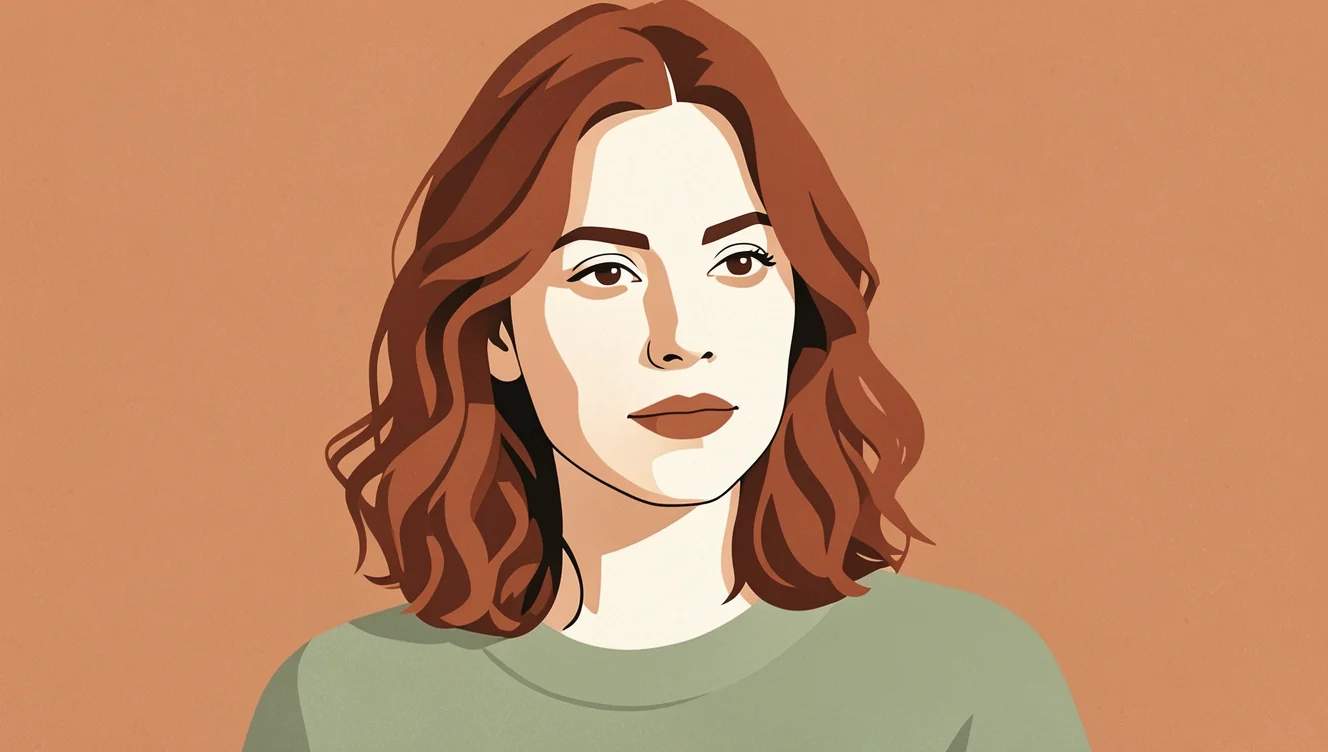
Art Style Spectrum Under Character Consistency: From Realistic to Flat
Style Character Design · style-transfer · Illustration
Reference inputs

reference_image_urls
Prompt
Flat vector illustration of the reference character, hard-edged geometric color blocks, no gradients, simplified facial features with minimal lines, two-tone cel shading, a limited palette based on soft terracotta, sage green, and off-white, bold negative space, subtle paper grain texture, centered three-quarter bust composition, set against a clean warm background, even diffused light, editorial poster aesthetic, crisp contours
Copy the full prompt and adapt it for your own generation.
Tags
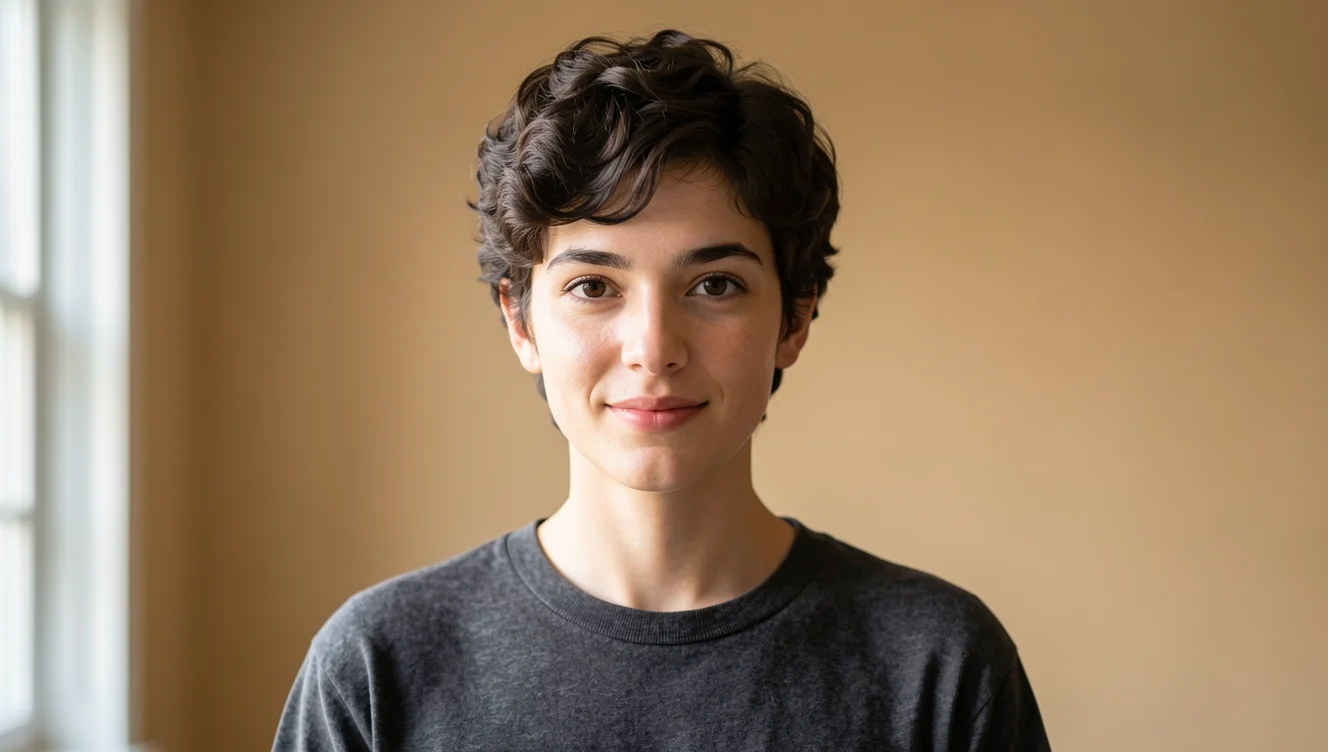
Character-Consistent Portraits: Ideogram V3 Character Reference Image Demo
Style Portrait Consistency · Editing · Character Design
Reference inputs
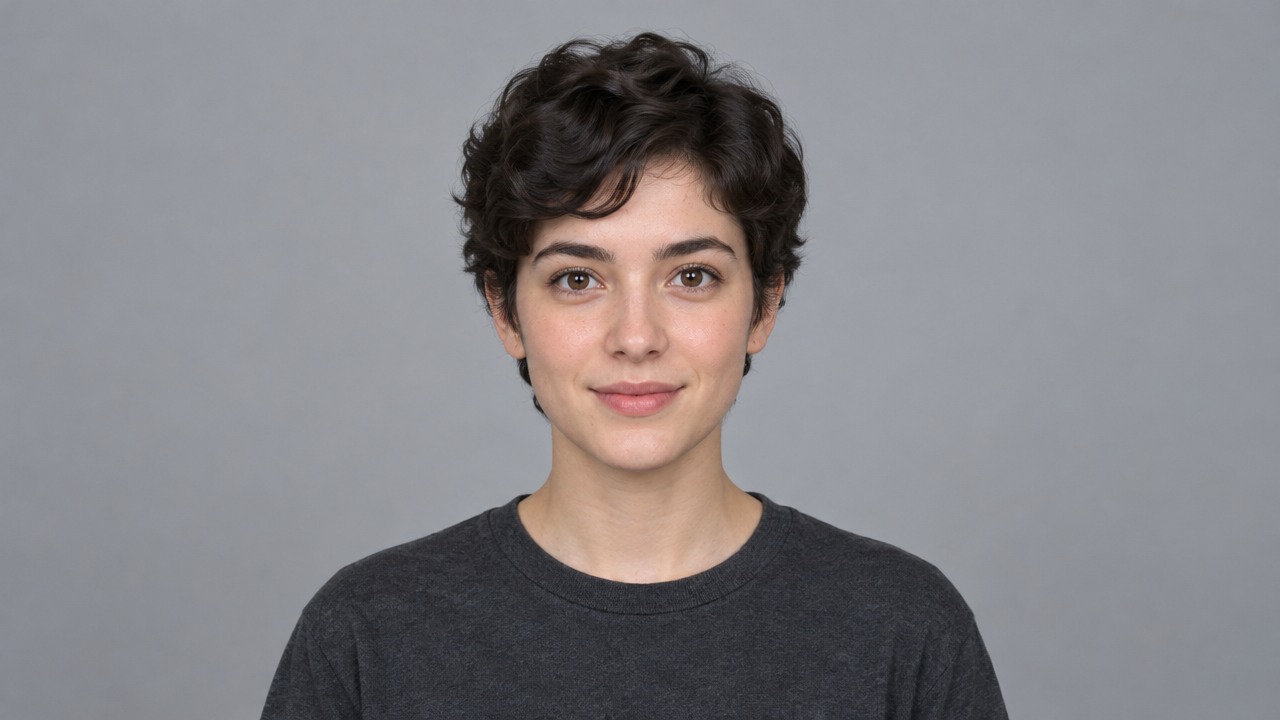
reference_image_urls
Prompt
A realistic full-color portrait of a fictional character, medium shot, three-quarter side view, face in clear focus, natural window light from the left of the camera, soft shadow transitions, neutral warm-toned gradient background, 85mm lens quality, shallow depth of field, highly detailed skin texture and fabric weave, consistent hairstyle and clothing silhouette, editorial-style character design reference, 16:9 composition, subject slightly off-center
Copy the full prompt and adapt it for your own generation.
Tags
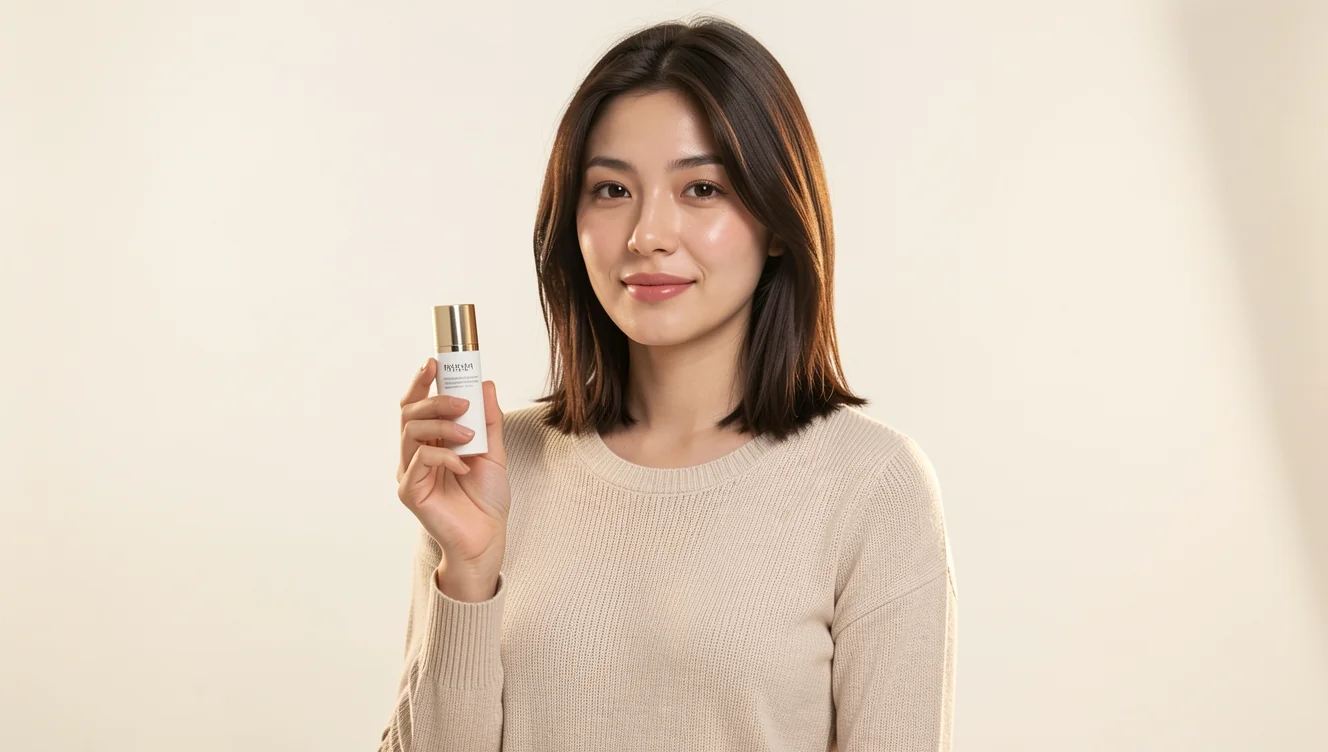
E-commerce-grade product photography series of the same character
Style Product Photography · Character Consistency · e-commerce
Reference inputs

reference_image_urls
Prompt
Still frame of an e-commerce character styling shot: a female model retaining the reference character's face, hairstyle, and clothing, standing in a clean seamless studio set, holding a small cylindrical skincare bottle at chest height, three-quarter body framing, 85mm portrait lens effect with slight compression, a large softbox key light from camera left, a subtle rim light on the right shoulder, neutral warm-white background with a faint floor shadow, balanced color temperature, crisp highlights on the product surface, visible fabric texture and skin detail, natural relaxed expression, vertical headroom above, high-end commercial catalog photography, photorealistic, no text overlay
Copy the full prompt and adapt it for your own generation.
Tags
Pricing
ideogram-v3-character per image
| Specifications | Unit Price |
|---|---|
| TURBO | $0.090 |
| BALANCED | $0.130 |
| QUALITY | $0.180 |
Positioning Overview
ideogram-v3-character is an image generation model that uses a reference image as a visual anchor for a character: given a clear character photo as input, it preserves the person's facial features, hairstyle, clothing, and body proportions across multiple generations, while allowing prompts to change the scene, pose, lighting, and background. It is suited for developers and creative teams that need to reuse the same character across comic panels, social media series illustrations, and brand mascot extensions, and it carries on Ideogram's strength in in-image text layout.
Key Highlights
- Lock a character with a single reference image — with just one JPEG, PNG, or WebP character image as input, the model uses it as a visual anchor to keep the character's appearance consistent.
- Change the scene, not the person — while locking the character's appearance, prompts can substantially adjust the scene, pose, lighting, and background.
- Reproducible parameter control — supports seed, negative prompt, and rendering speed presets, making it easy to produce stable outputs in batch generation and to tune detail and pacing as needed.
Capabilities
Reference-image character consistency: with a character reference image as input, the generated results preserve the face, hairstyle, clothing, and body proportions, making it suitable for series content that needs the same character reused across images.
Prompt-driven scene changes: while the character is locked, prompts up to 5,000 characters describe new scenes and poses, and negative prompts can exclude unwanted elements.
Reproducible generation: supports setting a random seed, making it easy to reproduce the same result during debugging or batch production and reducing selection costs.
Rendering preset options: offers three rendering speed presets — TURBO, BALANCED, and QUALITY — so developers can balance speed and quality according to output cadence and detail requirements.
Use Cases
- Comic and storyboard artists: continuous frames of the same character — input a character model sheet plus a single-panel scene description to produce storyboard images with a coherent appearance, ready for layout and post-production workflows.
- Social media operations: consistent character across series content — use a fixed character reference image to batch-generate illustrations on different themes, keeping the visual protagonist consistent across multiple installments.
- Brand teams: mascot extensions across scenes — use mascot images to generate extension assets for different campaigns, seasons, or poster scenes for marketing material distribution.
Limitations and Model Selection Advice
Character consistency is not absolute: under complex scenes, exaggerated poses, and expression changes, the face and details may still show visible deviations. Reference image quality directly affects the results, so character images with a clear face, even lighting, and little occlusion are recommended. If you only need a single standalone creative image and do not need a fixed character, a general text-to-image model is more suitable. For commercial projects with extremely high requirements for character fidelity, it is advisable to validate consistency with a small number of samples before batch generation.
What's new
View changelog →- New model Added ideogram-v3-character and ideogram-v3-character/edit d…
Frequently asked questions
View all FAQs →-
What are the mask requirements?
The mask must match the source aspect ratio. Black areas are repainted and white areas are kept; a mask slightly larger than the silhouette looks more natural.
-
What size is the output?
The output keeps the source size; a 1024×768 source returns 1024×768.
-
Can I replace a person already in the image?
Yes. Paint that person into the mask and describe the new character's action; people and background outside the mask are kept.
-
What format should the mask be?
An image with the same aspect ratio as the source, with the area to repaint in black on white; the examples on this page use PNG masks.
Create a generation task
https://api.hiapi.ai/v1/tasks Headers
AuthorizationstringRequiredAccount API key. Required on every request. Example: Bearer YOUR_HIAPI_API_KEY. Get your API key
Content-TypestringOptionalThe request body is always parsed as JSON; when sent, only application/json (optionally with charset) is accepted — any other value returns 415. Example: application/json.
Idempotency-KeystringOptionalIdempotency key, up to 255 bytes. Retries with the same key from the same account create the task only once; replays return the original taskId.
On network timeouts or client retries, the same key creates the task only once — no double charges (scope: the API key's account). Use a business-unique identifier as the key (e.g. "order-42"); replays return the original taskId, and keys expire 24 hours after the first request. See the Unified Async API overview for the full scenario matrix.
Body
modelstringRequiredCurrent fixed value: ideogram-v3-character
routestringOptionalCurrent fixed value: default
inputobjectRequired
Business parameters for ideogram-v3-character and route default — see the parameter table below.
seedintegerOptionalmin 0max 2147483647Random seed for reproducible generation results; the value is an integer, and the same seed reproduces the same output.
stylestringOptionalDefault: "AUTO"Style type, controls the overall style of the generated image; defaults to AUTO.
AUTOREALISTICFICTIONpromptstringRequiredminLength 1maxLength 5000Scene prompt describing the referenced character, with a maximum length of 5000 characters.
expand_promptbooleanOptionalDefault: trueWhether to enable MagicPrompt to expand the prompt; defaults to true.
negative_promptstringOptionalmaxLength 5000Negative prompt specifying content to exclude from the image, with a maximum length of 5000 characters.
rendering_speedstringOptionalDefault: "BALANCED"Rendering speed tier: TURBO is the fastest and cheapest, QUALITY has the richest detail, and billing differs by tier; defaults to BALANCED.
TURBOBALANCEDQUALITYreference_image_urlsarrayRequiredminItems 1maxItems 1Array of character reference images, must contain exactly one character reference image, supports JPEG, PNG, or WebP format, maximum 10 MB each.
Array [ string ]
callbackobjectOptional
Terminal-state notification config. When omitted, no callback is delivered — poll the task yourself. See the callback note below.
Provide callback.url when creating a task and HiAPI POSTs to your service once the task reaches a terminal state — no polling needed. The callback payload mirrors the task detail structure; signature verification, delivery retries and idempotency are documented on the Unified Async API overview page.
urlstringRequiredRequired when callback is present. A POST is sent to this URL once the task reaches a terminal state; must be a valid http(s) URL.
whenstringOptionalDefault: "final"Only final is supported today — notified on both success and fail.
finalstoragestringOptionalDefault: "temp"Artifact storage tier: temp (default, retained about 7 days) or persistent (long-term, billed by size). Insufficient balance or exceeding the storage cap silently downgrades to temp; the effective tier is shown in the task detail response.
temppersistentRequest examples
# Submit an async task; returns a taskId immediately (no waiting for generation)
curl -X POST "https://api.hiapi.ai/v1/tasks" \
  -H "Authorization: Bearer $HIAPI_API_KEY" \
  -H "Content-Type: application/json" \
  -d '{
  "model": "ideogram-v3-character",
  "input": {
    "style": "AUTO",
    "prompt": "…",
    "expand_prompt": true,
    "rendering_speed": "BALANCED",
    "reference_image_urls": "…"
  }
}'
const res = await fetch("https://api.hiapi.ai/v1/tasks", {
method: "POST",
headers: {
Authorization: `Bearer ${process.env.HIAPI_API_KEY}`,
"Content-Type": "application/json",
},
body: JSON.stringify({
model: "ideogram-v3-character",
input: {
"style": "AUTO",
"prompt": "…",
"expand_prompt": true,
"rendering_speed": "BALANCED",
"reference_image_urls": "…"
}
}),
});
const task = await res.json();
// { code: 200, message: "success", data: { taskId } }import os, requests
res = requests.post(
"https://api.hiapi.ai/v1/tasks",
headers={"Authorization": f"Bearer {os.environ['HIAPI_API_KEY']}"},
json={
"model": "ideogram-v3-character",
"input": {
"style": "AUTO",
"prompt": "…",
"expand_prompt": True,
"rendering_speed": "BALANCED",
"reference_image_urls": "…"
}
},
)
print(res.json()) # { code, message, data: { taskId } }200 OK
{
  "code": 200,
  "message": "success",
  "data": {
    "taskId": "tk-hiapi-01HZTQ8BX2N3GM3YFK4Z9D7VQR"
  }
}
400 Bad Request
{
  "code": 400,
  "message": "invalid request",
  "data": null,
  "error_code": "INVALID_REQUEST"
}
Get task detail
https://api.hiapi.ai/v1/tasks/:id Response fields
taskIdstringRequiredTask ID, always prefixed with tk-hiapi-.
modelstringRequiredResolved full model name. Tasks submitted with the route parameter return base@route (e.g. gpt-image-2/text-to-image@ext); otherwise identical to the name passed at creation.
routestringOptionalPresent only when the task was submitted with an explicit route parameter; echoes the submitted value.
statusstringRequiredTask status.
queued Queued, not started yet.
handling Being processed.
archiving Processing finished, artifacts being prepared.
success Terminal: completed, artifacts available (output returned).
fail Terminal: failed (error returned).
After submission, check status: success and fail are terminal, everything else is non-terminal. Poll every 1–3 seconds until terminal. On success, download artifacts from output[].url and transfer them before expireAt; pass storage: "persistent" at creation time when long-term retention is needed.
creatednumberRequiredTask creation time (Unix seconds).
completednumberRequiredUnix seconds when the task reached a terminal state; fixed to 0 while not terminal.
outputarrayOptional
Present only when status == success. Artifact list — always an array; a single task may return multiple types at once (e.g. video + first_frame).
Array [ object ]
Array items
urlstringRequiredArtifact URL, directly downloadable.
typestringRequiredCurrent possible values: video, image, audio, first_frame, last_frame, thumbnail; more may be added later.
expireAtnumberRequiredUnix seconds until which the artifact remains accessible; download or transfer before it expires.
errorobjectOptional
Present only when status == fail.
codestringRequiredBusiness error code.
messagestringRequiredError description.
Response examples
Success
{
  "code": 200,
  "message": "success",
  "data": {
    "taskId": "tk-hiapi-01HZTQ8BX2N3GM3YFK4Z9D7VQR",
    "model": "happyhorse-1-0",
    "status": "success",
    "created": 1777282033,
    "completed": 1777282099,
    "output": [
      {
        "url": "https://cdn.hiapi.ai/tasks/.../video.mp4",
        "type": "video",
        "expireAt": 1777886899
      }
    ]
  }
}
Processing (non-terminal)
{
  "code": 200,
  "message": "success",
  "data": {
    "taskId": "tk-hiapi-...",
    "model": "happyhorse-1-0",
    "status": "archiving",
    "created": 1777282033,
    "completed": 0
  }
}
Failed
{
  "code": 200,
  "message": "success",
  "data": {
    "taskId": "tk-hiapi-...",
    "model": "happyhorse-1-0",
    "status": "fail",
    "created": 1777282033,
    "completed": 1777282099,
    "error": {
      "code": "TASK_FAILED",
      "message": "task failed"
    }
  }
}Articles
View all articles →Related Models
View all models →Same Type
-
 Muse Image 1.0 Meta $0.015 per task
-
 Krea 3 Krea $0.036 /image
-
 BRIA Eraser Bria $0.058 /image
-
 Z-Image Alibaba $0.008 /image
-
 GPT Image 2.5 OpenAI $0.017 /image
-
 851 Labs Background Remover 851 Labs $0.002 /image
-
 Seedream 5.0 ByteDance $0.025 /image
-
 Recraft Crisp Upscale Recraft $0.004 /image
-
 Ideogram V4.5 Ideogram $0.011 /image
-
 FASHN Tryon v1.6 FASHN $0.107 /image
-
 FLUX.2 Klein 9B Black Forest Labs $0.0086 /image
-
 FLUX 3 Image Black Forest Labs $0.041 /image