

Black Forest Labs
FLUX.2 Klein 4B
flux-2-klein-4b/text-to-image
A 4-billion-parameter distilled small model that unifies text-to-image generation and image editing, with end-to-end inference as fast as under 1 second and runs on about 13GB of VRAM
Try flux-2-klein-4b/text-to-image
Input
Showcases
View all showcasesOutput
image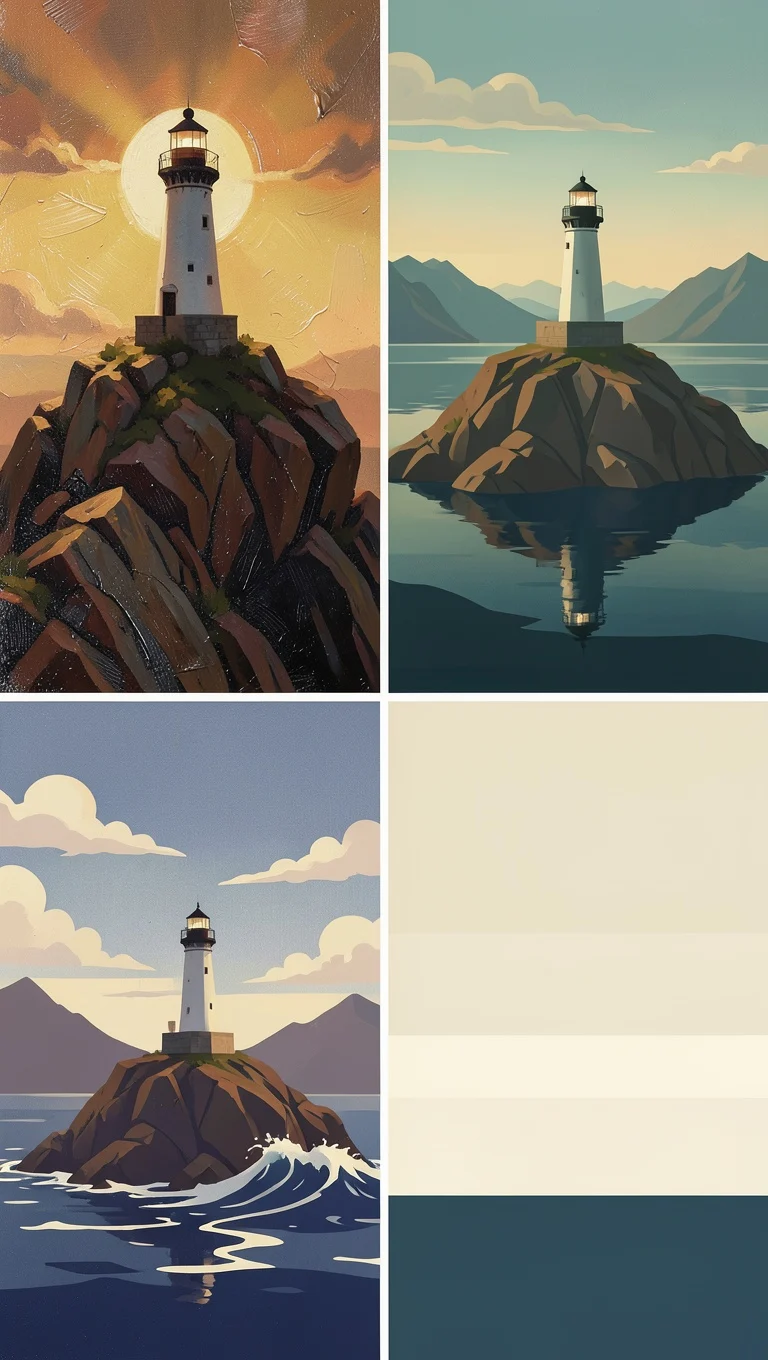
From Realistic to Flat: A Four-Panel Spectrum of Illustration Styles
Style Illustration · style-spectrum · Editing
Prompt
A single scene presented in four illustration styles in a 2x2 grid, all depicting the same solitary lighthouse on a rocky cliff overlooking a tranquil lake and distant mountains: top left, a realistic oil painting with impasto brushstrokes, warm ochre and umber tones, dramatic warm backlighting and visible canvas texture; top right, a semi-realistic cinematic editorial illustration with soft rim light, soft teal and amber tones, painterly yet clean forms; bottom left, a stylized vector-like illustration using large flat color blocks with subtle grain, simplified wave and cloud shapes, a limited palette dominated by indigo, cream, and rust; bottom right, a minimalist flat geometric illustration with pure solid color fills, no gradients, simplified into circles, triangles, and horizontal bands, with ample negative space. The four images maintain a consistent composition and horizon line, a tranquil and contemplative atmosphere, high detail, crisp edges
Copy the full prompt and adapt it for your own generation.
Tags
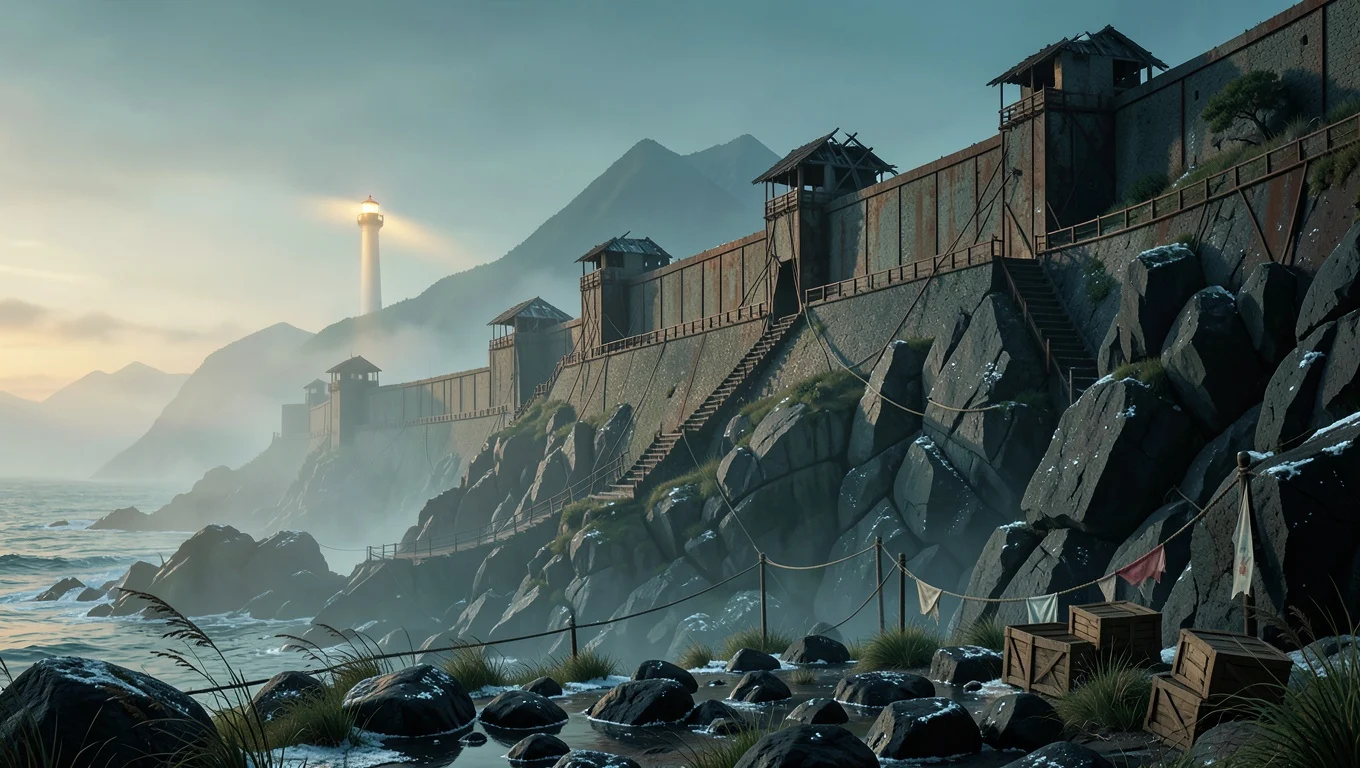
FLUX.2 klein 4B Worldbuilding Concept Art: Dusk on the Salt-Mist Great Wall
Style Concept Art · Worldbuilding · Cinematic
Prompt
Wide-angle concept scene of a massive defensive wall built along a salt-mist coastline at dusk. Midground: terraced rammed-earth and rusted iron fortifications stepping down a basalt cliff, an abandoned watchtower with a collapsed roof, stairs cut into the rock. Background: a distant lighthouse still in operation casting a thin, elongated warm beam through the mist, faint mountain silhouettes dissolving into the atmosphere. Foreground: wet black stones, salt crust, sparse wind-bent grass. Traces of human presence: rope suspension bridges, faded flags, small stacked cargo crates. Lighting: low-angle backlight raking across the wall, cool blue shadows filling the leeward side, volumetric fog, a low-saturation palette of teal and ochre with a single warm accent. Composition: 16:9, the wall forming a strong diagonal from lower right to upper left, deep atmospheric perspective, clear separation of foreground, midground, and background, no text, no watermark. Style: high-end production concept art, painterly yet structurally precise, digital matte painting texture.
Copy the full prompt and adapt it for your own generation.
Tags

FLUX.2 klein 4B Portrait Prompt Comparison: Realistic vs. Artistic Approaches
Style Portrait & Photography · Prompt Reference · Photorealistic
Prompt
A realistic portrait of a woman in her early thirties, three-quarter side view, soft north-facing window light coming in from the left, visible skin texture and fine pores, natural catchlights in the eyes, wearing a low-saturation earth-tone knit sweater, neutral gray studio background, f/2 shallow depth of field, 85mm lens look, slight film grain, 3:4 vertical composition, head and shoulders occupying the upper two-thirds of the frame, calm neutral expression, no heavy retouching
Copy the full prompt and adapt it for your own generation.
Tags
Pricing
flux-2-klein-4b/text-to-image per image
| Specifications | Unit Price |
|---|---|
| 0.25 MP | $0.00036 |
| 0.5 MP | $0.00072 |
| 1 MP | $0.00143 |
| 2 MP | $0.00286 |
| 4 MP | $0.00572 |
Overview
FLUX.2 klein 4B is a compact text-to-image model from Black Forest Labs, built on a 4-billion-parameter rectified flow architecture that inherits its understanding of lighting, materials, and composition from the larger FLUX.2 base through distillation. It suits developers who need low-cost batch image generation and reliable integration into interactive or latency-sensitive workflows. Accessed through the unified HiAPI.ai interface, it produces a finished image at the target resolution and aspect ratio from a single prompt submission.
Key Highlights
- Compact size, controllable generation cost — The 4B parameter scale combined with distillation acceleration keeps per-image generation cost low, making it suitable for development scenarios that require large batches and repeated trial-and-error.
- Distilled from a larger FLUX.2 base — Its understanding of lighting, materials, and composition comes from distilling a larger model, so quality exceeds what its parameter count would suggest.
- Image specifications fixed in a single call — Resolution, aspect ratio, output format, and compression quality are all request parameters, so output specifications are determined within one call.
- Reproducible seeds — A random seed can be supplied to reproduce or fine-tune results for the same prompt, which helps with debugging and regression verification.
Capabilities
Text-to-image generation: Submit a text prompt and get the corresponding image with no reference image required; the prompt is the only required parameter, keeping integration simple.
Multiple resolution and aspect ratio options: Output supports five resolution tiers from 0.25 to 4 MP and more than ten aspect ratios such as 1:1, 16:9, and 21:9, matching layout needs such as hero images and portrait-format assets directly.
Output format and quality control: Choose from webp, jpg, and png, and adjust compression quality for jpg/webp from 0 to 100 to balance sharpness and file size as needed.
Reproducible random seeds: The seed parameter lets identical inputs produce repeatable results, making it easy to compare different parameter combinations and reproduce problem samples.
Use Cases
- Batch image generation for content platforms — Operations or backend developers generate images in bulk with templated prompts, specifying aspect ratio and webp format for direct use in article illustrations and list thumbnails.
- Instant previews in interactive creation tools — Creative apps turn user input into images in real time, using lower resolution for quick previews before rendering final outputs at high resolution.
- Specification-driven images for marketing materials — Select a ratio such as 16:9 or 9:16 and a target resolution for each distribution channel, producing banners and cover assets ready to publish in a single call.
- Parameter tuning and regression verification of generation results — Use seeds and quality parameters for A/B comparisons, and build reproducible samples into a prompt library and quality baseline.
Limitations and Selection Advice
Only text-to-image is supported; when editing an existing image or constraining with a reference image is required, choose an image-editing line instead. This is a 4B distilled model, so its capability ceiling is constrained by parameter scale: it is less stable than larger models on complex compositions, dense text, and fine details, and larger models are recommended for such high-precision needs. Resolution and aspect ratio are preset enums, so arbitrary sizes are not supported. Independent horizontal benchmark data is currently lacking, so selection decisions should be based on testing with your own prompts.
Frequently asked questions
View all FAQs →-
What is FLUX.2 [klein] 4B best for?
It fits batch drafts, product concepts, social assets, and cost-sensitive iteration. Move to 9B when realism, typography, and fine detail matter more.
-
How should I choose between 0.25 and 4 MP?
Start with 0.25 or 0.5 MP for drafts, use 1 MP for typical web assets, and select 2 or 4 MP for larger output. Price changes by megapixel tier.
-
Which aspect ratios are supported?
1:1, 16:9, 9:16, 3:2, 2:3, 4:3, 3:4, 5:4, 4:5, 21:9, and 9:21.
-
How can I reproduce a composition direction?
Keep seed, prompt, ratio, megapixel tier, and output settings fixed while changing one variable at a time.
Create a generation task
https://api.hiapi.ai/v1/tasks Headers
AuthorizationstringRequiredAccount API key. Required on every request. Example: Bearer YOUR_HIAPI_API_KEY. Get your API key
Content-TypestringOptionalThe request body is always parsed as JSON; when sent, only application/json (optionally with charset) is accepted — any other value returns 415. Example: application/json.
Idempotency-KeystringOptionalIdempotency key, up to 255 bytes. Retries with the same key from the same account create the task only once; replays return the original taskId.
On network timeouts or client retries, the same key creates the task only once — no double charges (scope: the API key's account). Use a business-unique identifier as the key (e.g. "order-42"); replays return the original taskId, and keys expire 24 hours after the first request. See the Unified Async API overview for the full scenario matrix.
Body
modelstringRequiredCurrent fixed value: flux-2-klein-4b/text-to-image
routestringOptionalCurrent fixed value: default
inputobjectRequired
Business parameters for flux-2-klein-4b/text-to-image and route default — see the parameter table below.
seedintegerOptionalRandom seed used to control the reproducibility of the generation results; the same seed with the same input yields consistent output, provided as an integer.
promptstringRequiredText prompt used for image generation, describing the desired image content, provided as a string.
resolutionstringOptionalDefault: "1 MP"The size of the output image, specified in megapixels (MP); the default is 1 MP.
0.25 MP0.5 MP1 MP2 MP4 MPaspect_ratiostringOptionalDefault: "1:1"The aspect ratio of the generated image; the default is 1:1.
1:116:99:163:22:34:33:45:4Show all (3)
4:521:99:21output_formatstringOptionalDefault: "jpg"The output format of the generated image; the default is jpg.
webpjpgpngoutput_qualityintegerOptionalDefault: 95min 0max 100The compression quality for jpg and webp output; the default is 95, provided as an integer.
callbackobjectOptional
Terminal-state notification config. When omitted, no callback is delivered — poll the task yourself. See the callback note below.
Provide callback.url when creating a task and HiAPI POSTs to your service once the task reaches a terminal state — no polling needed. The callback payload mirrors the task detail structure; signature verification, delivery retries and idempotency are documented on the Unified Async API overview page.
urlstringRequiredRequired when callback is present. A POST is sent to this URL once the task reaches a terminal state; must be a valid http(s) URL.
whenstringOptionalDefault: "final"Only final is supported today — notified on both success and fail.
finalstoragestringOptionalDefault: "temp"Artifact storage tier: temp (default, retained about 7 days) or persistent (long-term, billed by size). Insufficient balance or exceeding the storage cap silently downgrades to temp; the effective tier is shown in the task detail response.
temppersistentRequest examples
# Submit an async task; returns a taskId immediately (no waiting for generation)
curl -X POST "https://api.hiapi.ai/v1/tasks" \
  -H "Authorization: Bearer $HIAPI_API_KEY" \
  -H "Content-Type: application/json" \
  -d '{
  "model": "flux-2-klein-4b/text-to-image",
  "input": {
    "prompt": "…",
    "resolution": "1 MP",
    "aspect_ratio": "1:1",
    "output_format": "jpg",
    "output_quality": 95
  }
}'
const res = await fetch("https://api.hiapi.ai/v1/tasks", {
method: "POST",
headers: {
Authorization: `Bearer ${process.env.HIAPI_API_KEY}`,
"Content-Type": "application/json",
},
body: JSON.stringify({
model: "flux-2-klein-4b/text-to-image",
input: {
"prompt": "…",
"resolution": "1 MP",
"aspect_ratio": "1:1",
"output_format": "jpg",
"output_quality": 95
}
}),
});
const task = await res.json();
// { code: 200, message: "success", data: { taskId } }import os, requests
res = requests.post(
"https://api.hiapi.ai/v1/tasks",
headers={"Authorization": f"Bearer {os.environ['HIAPI_API_KEY']}"},
json={
"model": "flux-2-klein-4b/text-to-image",
"input": {
"prompt": "…",
"resolution": "1 MP",
"aspect_ratio": "1:1",
"output_format": "jpg",
"output_quality": 95
}
},
)
print(res.json()) # { code, message, data: { taskId } }200 OK
{
  "code": 200,
  "message": "success",
  "data": {
    "taskId": "tk-hiapi-01HZTQ8BX2N3GM3YFK4Z9D7VQR"
  }
}
400 Bad Request
{
  "code": 400,
  "message": "invalid request",
  "data": null,
  "error_code": "INVALID_REQUEST"
}
Get task detail
https://api.hiapi.ai/v1/tasks/:id Response fields
taskIdstringRequiredTask ID, always prefixed with tk-hiapi-.
modelstringRequiredResolved full model name. Tasks submitted with the route parameter return base@route (e.g. gpt-image-2/text-to-image@ext); otherwise identical to the name passed at creation.
routestringOptionalPresent only when the task was submitted with an explicit route parameter; echoes the submitted value.
statusstringRequiredTask status.
queued Queued, not started yet.
handling Being processed.
archiving Processing finished, artifacts being prepared.
success Terminal: completed, artifacts available (output returned).
fail Terminal: failed (error returned).
After submission, check status: success and fail are terminal, everything else is non-terminal. Poll every 1–3 seconds until terminal. On success, download artifacts from output[].url and transfer them before expireAt; pass storage: "persistent" at creation time when long-term retention is needed.
creatednumberRequiredTask creation time (Unix seconds).
completednumberRequiredUnix seconds when the task reached a terminal state; fixed to 0 while not terminal.
outputarrayOptional
Present only when status == success. Artifact list — always an array; a single task may return multiple types at once (e.g. video + first_frame).
Array [ object ]
Array items
urlstringRequiredArtifact URL, directly downloadable.
typestringRequiredCurrent possible values: video, image, audio, first_frame, last_frame, thumbnail; more may be added later.
expireAtnumberRequiredUnix seconds until which the artifact remains accessible; download or transfer before it expires.
errorobjectOptional
Present only when status == fail.
codestringRequiredBusiness error code.
messagestringRequiredError description.
Response examples
Success
{
  "code": 200,
  "message": "success",
  "data": {
    "taskId": "tk-hiapi-01HZTQ8BX2N3GM3YFK4Z9D7VQR",
    "model": "happyhorse-1-0",
    "status": "success",
    "created": 1777282033,
    "completed": 1777282099,
    "output": [
      {
        "url": "https://cdn.hiapi.ai/tasks/.../video.mp4",
        "type": "video",
        "expireAt": 1777886899
      }
    ]
  }
}
Processing (non-terminal)
{
  "code": 200,
  "message": "success",
  "data": {
    "taskId": "tk-hiapi-...",
    "model": "happyhorse-1-0",
    "status": "archiving",
    "created": 1777282033,
    "completed": 0
  }
}
Failed
{
  "code": 200,
  "message": "success",
  "data": {
    "taskId": "tk-hiapi-...",
    "model": "happyhorse-1-0",
    "status": "fail",
    "created": 1777282033,
    "completed": 1777282099,
    "error": {
      "code": "TASK_FAILED",
      "message": "task failed"
    }
  }
}Articles
View all articles →Related Models
View all models →Same Type
-
 FLUX 3 Image Black Forest Labs $0.041 /image
-
 FLUX.1 Schnell Black Forest Labs $0.005 /image
-
 Wan 2.7 Image Alibaba $0.035 /image
-
 Google Virtual Try-On Google $0.107 /image
-
 BRIA Product Shot Bria $0.058 /image
-
 BRIA Eraser Bria $0.058 /image
-
 FASHN Tryon v1.6 FASHN $0.107 /image
-
 GPT Image 2.5 OpenAI $0.017 /image
-
 FLUX 1.1 Pro Black Forest Labs $0.050 /image
-
 Z-Image Alibaba $0.008 /image
-
 Nano Banana Google $0.021 /image
-
 FIBO 1.5 Bria $0.058 /image
Same Provider
-
 FLUX 3 Max Black Forest Labs $0.061 /second
- FLUX.1 Schnell Black Forest Labs $0.005 /image
-
 FLUX.1 Fill Pro Black Forest Labs $0.071 /image
- FLUX 1.1 Pro Black Forest Labs $0.050 /image
-
 FLUX.1 Kontext Max Black Forest Labs $0.071 /image
-
 FLUX 3 Video Black Forest Labs $0.090 /second
-
 FLUX.2 Black Forest Labs $0.035 /image
-
 FLUX.2 Klein 4B Black Forest Labs $0.0004 /image
-
 FLUX.2 Klein 9B Black Forest Labs $0.0086 /image
- FLUX 3 Image Black Forest Labs $0.041 /image