OpenAI
GPT Image 2
gpt-image-2/text-to-image
OpenAI's image generation and editing model, focused on photorealistic quality, high-precision text rendering, and native 4K output, suited for commercial materials and product images that contain text
Try gpt-image-2/text-to-image
Input
Showcases
View all showcasesOutput
image
Worldbuilding Concept Art: Dusk over the Pilgrim City in the Salt Desert
Style Concept Art · Worldbuilding · Cinematic
Prompt
A wide-angle, low-horizon establishing shot: at dusk, a pilgrim city built on a vast salt plain. Foreground: a small caravan of three travelers in layered dust-colored robes and goggles encrusted with salt crystals walks toward the city, passing a leaning basalt pillar carved with dense inscriptions and hung with faded prayer banners bearing clearly legible text. Midground: tiered sandstone arcades, rope bridges, and layered prayer towers hung with wind chimes and suspended lanterns. Background: a colossal half-buried dome, half swallowed by drifting salt mist, silhouetted against a warm amber-to-violet sky. The ground is a white salt crust cracked into polygonal plates that mirror the sky, with scattered crystal shards catching the light. Cinematic volumetric light from a low backlit sun, long shadows, fine salt dust in the air, and subtle atmospheric haze layering depth progressively from foreground to background. Painterly concept art rendering combined with photographic material fidelity: rough stone textures, worn fabric weaves, oxidized bronze fittings. Cool violet shadows contrasting with warm amber highlights, high dynamic range, 16:9 widescreen composition, clear separation of foreground, midground, and background, with a large area of empty sky.
Copy the full prompt and adapt it for your own generation.
Tags

From Realistic to Flat: The Illustration Style Spectrum of a Single Subject
Style Illustration · style-spectrum · editorial-print
Prompt
An editorial illustration of a solitary lighthouse on a rugged headland at dusk, viewed from a low three-quarter angle, with the horizon at the lower third of the frame. A seabird skims across the upper-left sky; the lighthouse beam sweeps to the right. Keep the composition and subject fixed across the entire style spectrum. Style: semi-flat vector illustration, between realistic and flat—simplified geometric volumes, a restrained palette dominated by slate blue, warm ochre, and pale cream, soft two-step shading rather than gradients, clean crisp edges, subtle paper texture, deliberate negative space in the sky. No text, no logos, no watermarks. Square 1:1 composition, ample white space, print-ready clarity.
Copy the full prompt and adapt it for your own generation.
Tags
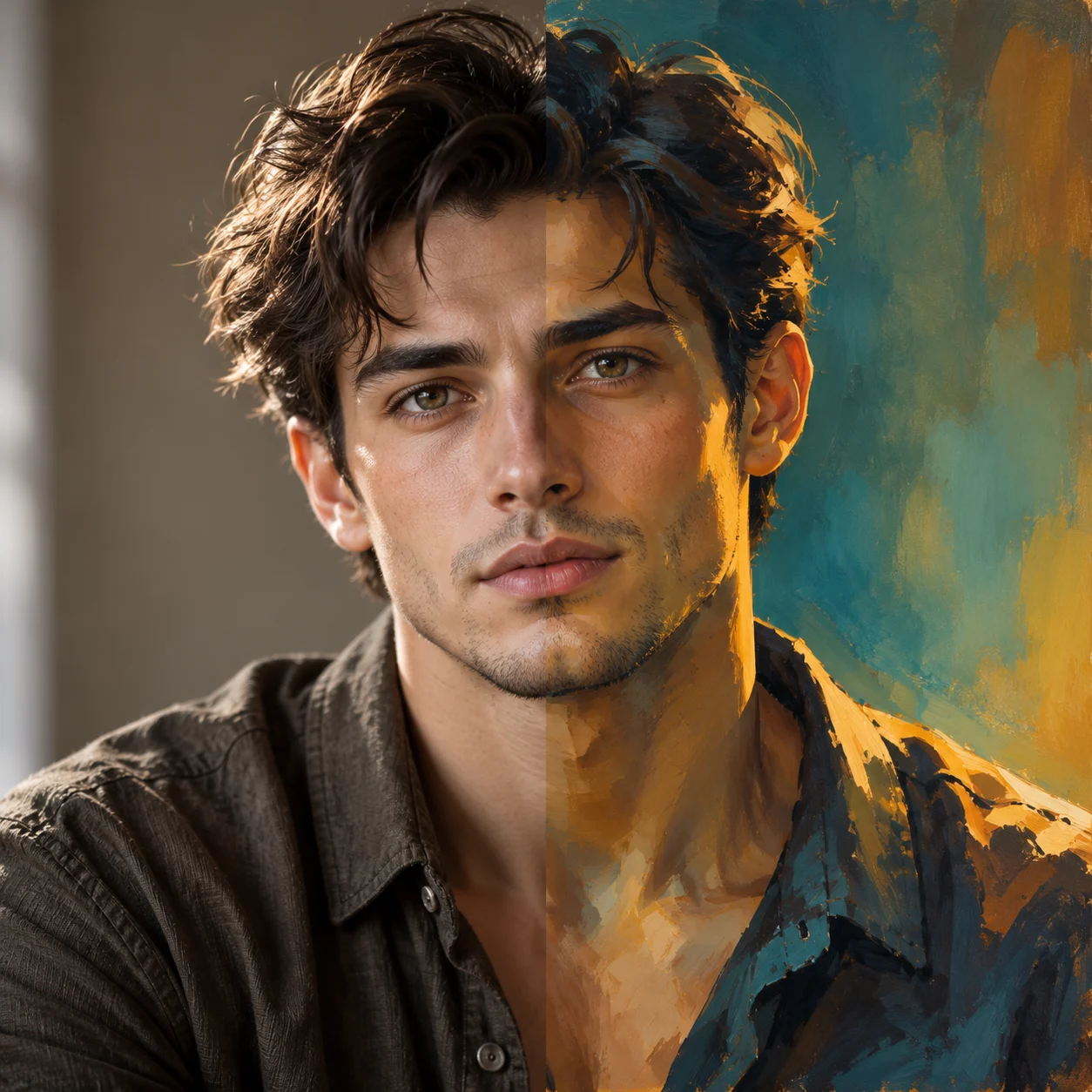
gpt-image-2 Portrait Style Comparison: Realistic and Artistic Prompts
Style Portrait Photography · Photorealistic · Prompt Reference
Prompt
A square 1:1 portrait demonstration, presented as a split between two stylistic intentions: photographic realism and painterly art. Realistic photography half: a three-quarter profile close-up portrait of a young adult, natural skin texture, visible pores and fine facial vellus hair, soft diffused window light from the left side of the camera, gently transitioning to a neutral warm-gray seamless background, 85mm lens effect with shallow depth of field, delicate catchlights in the eyes, understated earth-tone clothing, calm neutral expression, high dynamic range, restrained color grading, no visible retouching traces. Painterly texture variant: the same subject, rendered with visible brushstrokes, saturated blue-green and amber tones, sculptural rim light with soft shadow planes, simplified broad color-field background, expressive edges. Balanced composition, centered subject with headroom above, focus clearly on the eyes, clean and uncluttered image, suitable as a commercial portrait reference.
Copy the full prompt and adapt it for your own generation.
Tags
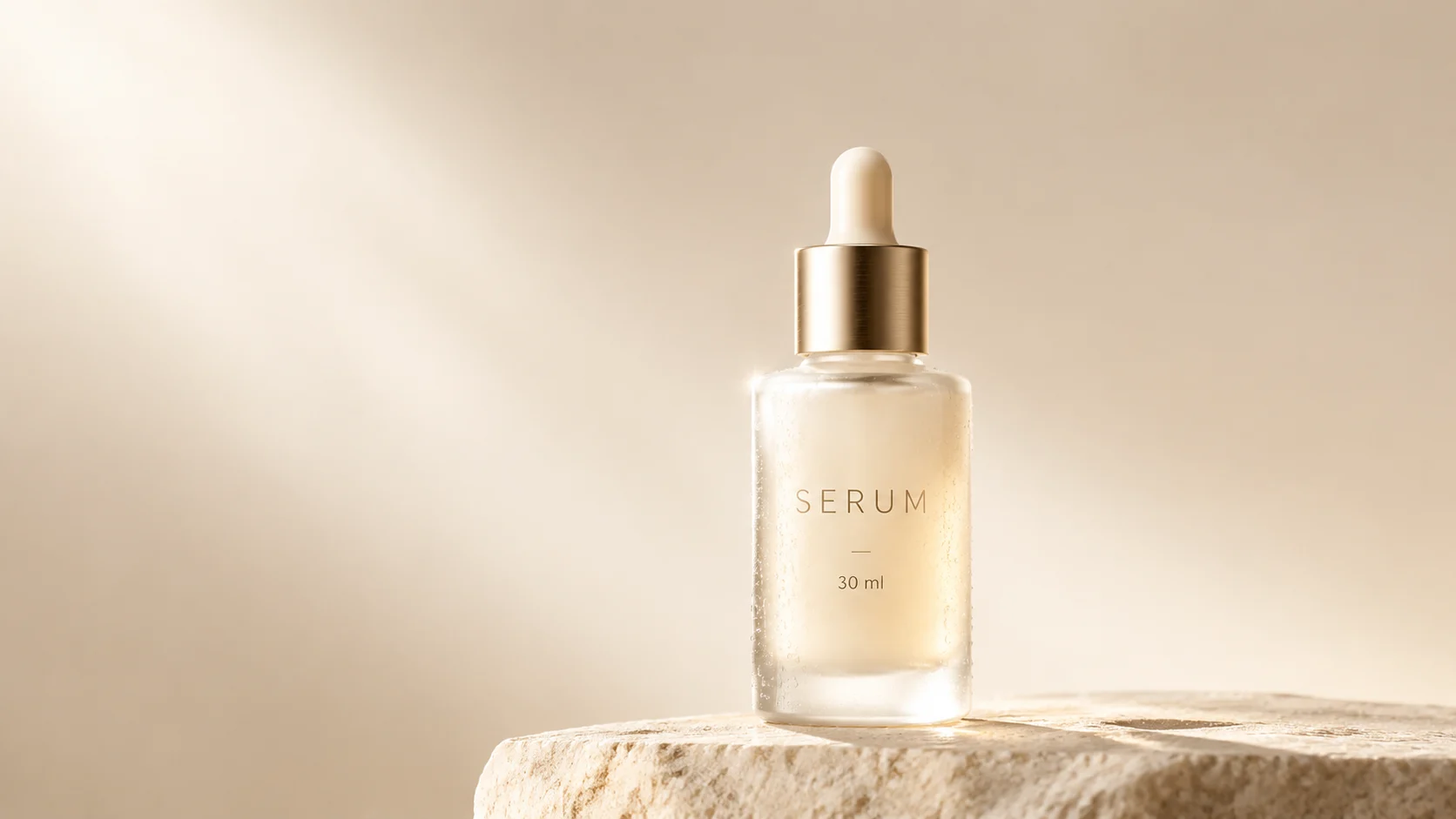
E-commerce Product Photography: gpt-image-2 Image Prompt Practice
Style Product Image · e-commerce · Studio lighting
Prompt
A commercial product photography image: a single bottle of skincare serum centered on a matte stone pedestal, with a soft warm off-white seamless studio backdrop. The frosted glass bottle has a brushed champagne-gold dropper cap, subtle condensation marks on the body, and a clean highlight reflection along the left edge; on the label, the word "SERUM" is printed in thin uppercase sans-serif type, with a line of small text "30 ml" below it, clearly legible. Lighting: a large softbox key light from the upper left, a narrow rim light from the rear right defining the silhouette, soft gradient falloff in the background, no harsh shadows. Shot from a slightly low three-quarter angle with an 85mm-equivalent lens feel, shallow depth of field keeping the cap and label sharp while the background is softly blurred. Color palette limited to ivory white, warm beige, and champagne gold; ample negative space at the top for copy. Photorealistic, high dynamic range, cleanly retouched, e-commerce-grade quality, 16:9 horizontal composition.
Copy the full prompt and adapt it for your own generation.
Tags
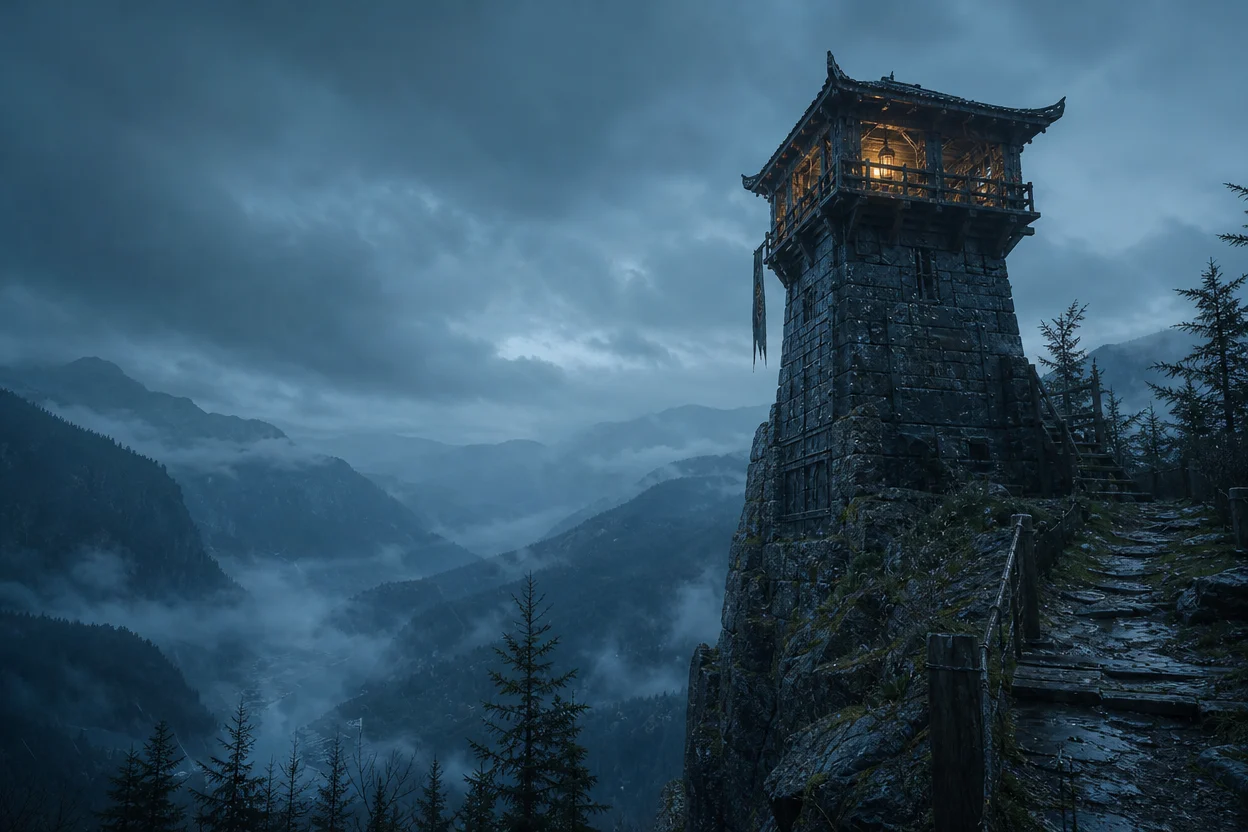
Worldbuilding Scene Concept Art: An Atmospheric Visual Exploration
Style Concept Art · Worldbuilding · Cinematic
Prompt
Cinematic widescreen concept art: at blue hour, a lone weathered stone watchtower stands atop a cliff, overlooking a vast and fog-filled valley. The tower is built from stacked slabs of slate, studded with iron rivets, moss growing in the cracks, and a warm lantern glowing in an upper window. Low-hanging fog rolls in layers between the ridges, gradually receding into pale silhouettes. A cool, low-saturation palette of teal and deep indigo, with the lantern providing the only touch of warm amber, soft volumetric light beams, fine dust and drizzle floating in the air. Ultra-wide 21:9 composition, strong depth layering from foreground to background, a low camera position looking slightly up at the tower, rule-of-thirds layout, realistic material details of stone and wet wood, subtle film grain, no text, no logos.
Copy the full prompt and adapt it for your own generation.
Tags
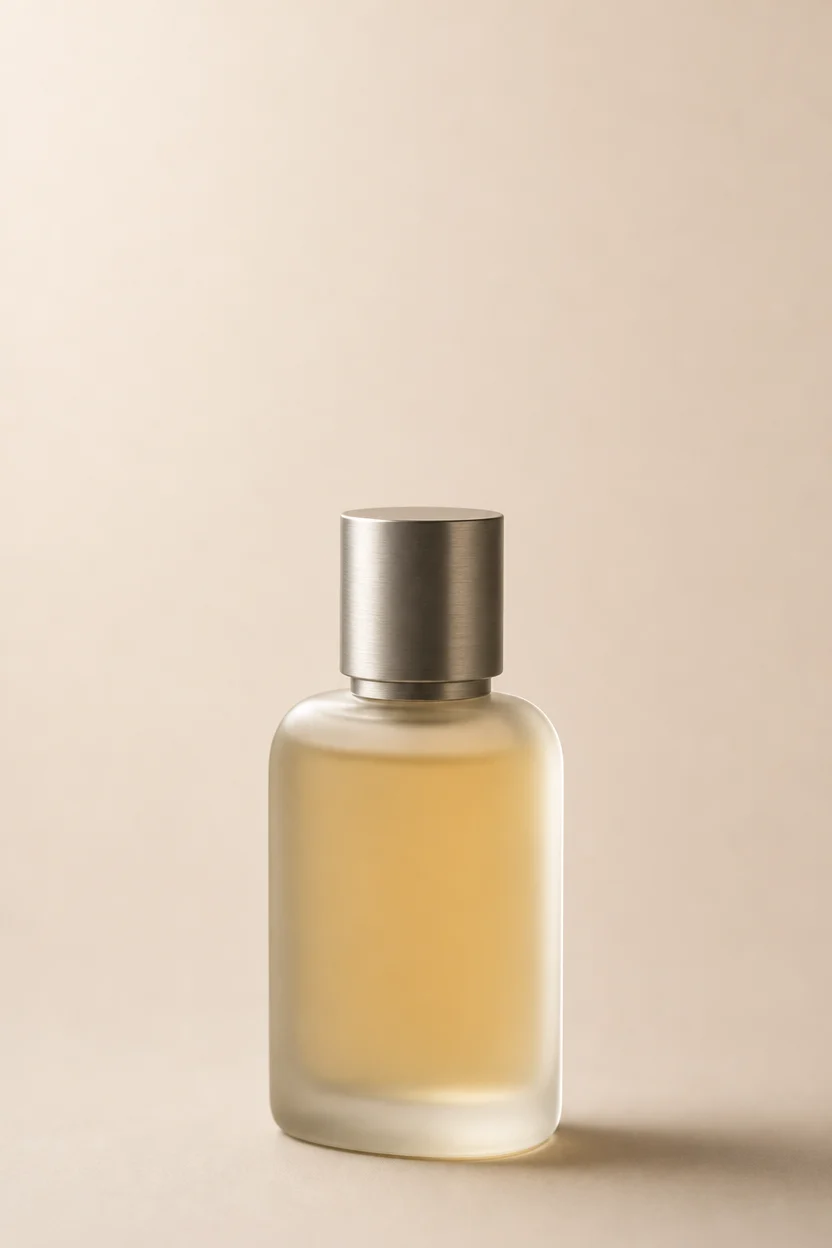
E-commerce Product Photography: gpt-image-2 Prompt Breakdown
Style Product Image · ecommerce · Studio lighting
Prompt
Studio product photography of a frosted glass perfume bottle with a brushed matte metal cap, centered on a warm off-white seamless backdrop. Medium-format camera quality, 100mm macro lens, slight three-quarter angle, camera height level with the label. Large softbox key light from the upper left, forming a soft long gradient highlight along the edge of the bottle; a subtle rim light on the right separates the glass from the background; a soft fill board on the left. Realistic light passing through the frosted glass with a faint amber liquid glow, precise specular highlight transitions, and a subtle contact shadow anchoring the bottle firmly to the surface. Clean neutral color grading, soft contrast, no heavy glow. Shallow depth of field, the label plane extremely sharp, background softly blurred. Ample negative space in the upper third for later layout, no other elements in the frame, no text, no watermark, commercial e-commerce main image quality, 4:5 vertical composition.
Copy the full prompt and adapt it for your own generation.
Tags
Pricing
gpt-image-2/text-to-image per image
| Specifications | Unit Price |
|---|---|
| 1K | $0.030 |
| 2K | $0.040 |
| 4K | $0.060 |
gpt-image-2/text-to-image @beta per image
| Specifications | Unit Price |
|---|---|
| With Reference Resources | $0.020 |
gpt-image-2/text-to-image @ext per image
Positioning Overview
gpt-image-2 is OpenAI's text-to-image model, aimed at developers who need to reliably produce commercial-grade visual assets. It excels at honoring the multiple constraints within complex prompts, maintains good typographic tidiness in posters, packaging, and layouts that contain text, and supports resolutions from 1K to 4K along with a variety of aspect ratios. You can generate an image simply by passing a prompt through the unified HiAPI.ai interface, making it well suited for teams embedding image-generation capabilities into design tools, marketing asset pipelines, and content production backends.
Core Highlights
- Good adherence to complex prompts — It inherits the semantic understanding of the GPT series and can still generate images according to intent when a prompt contains subject, style, text, and layout constraints at the same time.
- More reliable rendering of images containing text — It delivers good fidelity and layout performance for text content in signage, packaging, and layouts, reducing the need to fix lettering after generation.
- Broad resolution and aspect-ratio coverage — It supports 1K, 2K, and 4K output and more than a dozen ratios from 1:1 to 21:9, so one integration can accommodate many placement specifications.
- Multiple versions per single call — It can generate several results at once, making it easy to compare options and explore styles under the same prompt.
Capability Details
Image generation from text prompts: Generate images by passing a prompt of up to 20,000 characters, making it suitable for turning natural-language descriptions directly into usable visual assets.
Multi-resolution and multi-aspect-ratio output: Choose among 1K, 2K, and 4K, and select landscape or portrait ratios according to placement. The auto ratio and extreme ratios such as 9:21 and 3:1 are limited to 1K, and 1:1 does not support 4K.
Transparent-background output: background supports three modes—auto, opaque, and transparent. Transparent images can be used directly for compositing and overlaying; this parameter takes effect only at 1K.
Text and layout presentation: It delivers good rendering and layout performance for mixed text-and-image compositions, making it suitable for commercial visuals that need a finished look.
Multiple results returned at once: A single prompt can produce multiple style-consistent images, making it easy to quickly compare versions and pick the best one.
Applicable Scenarios
- Marketing teams: ad posters and key visual generation — Input campaign themes and layout requirements to produce campaign key visuals that can go directly into placement or further retouching.
- E-commerce operations: product image and product-photography style rendering — Use product descriptions as input to generate photography-style product images for detail pages, shelf images, and social assets.
- Design teams: packaging and layout drafts with text — Input copy and text-image relationships to produce packaging, signage, and layout design drafts containing multilingual text.
- Content platforms: multi-version iteration of concepts — Batch-generate images from the same prompt for style exploration, then send candidate options for review before finalizing.
Limitations and Selection Advice
It outputs images only and does not support other modalities such as video. The official rating places its generation speed at medium, so it is not suitable for real-time interactive scenarios that are extremely latency-sensitive; high resolution and batch image generation will lengthen processing time and raise call costs at the same time, so trade-offs must be made according to placement specifications. For images containing precise text, manual proofreading is still recommended. If the need leans toward compositional reasoning in complex scenes or extreme generation speed, other models should be evaluated separately; HiAPI.ai also offers an image-to-image route in this series, which can be used when an existing image must serve as input. Billing is calculated per image, and the specific amount is subject to the pricing panel.
What's new
View changelog →- Parameter change gpt-image-2 added 1K / 2K / 4K resolution tiers
Frequently asked questions
View all FAQs →-
What is GPT Image 2?
GPT Image 2 is an OpenAI text-to-image model for posters, knowledge cards, product visuals, and images with explicit text and layout requirements.
-
Is GPT Image 2 the same as GPT Image 2.0?
GPT Image 2.0 is a common search shorthand; use the exact GPT Image 2 model ID shown on this page and in the API docs.
-
Which endpoint and model ID does the GPT Image 2 API use?
Send POST requests to /v1/tasks, set model to gpt-image-2/text-to-image, and pass prompt, aspect_ratio, and resolution in input. The create response returns a taskId; retrieve the final image through task polling or a callback.
-
How do I use GPT Image 2?
In the Playground, describe the subject, scene, layout, and exact text, then choose the aspect ratio, resolution, and background. Click Run to view the result.
Create a generation task
https://api.hiapi.ai/v1/tasks Headers
AuthorizationstringRequiredAccount API key. Required on every request. Example: Bearer YOUR_HIAPI_API_KEY. Get your API key
Content-TypestringOptionalThe request body is always parsed as JSON; when sent, only application/json (optionally with charset) is accepted — any other value returns 415. Example: application/json.
Idempotency-KeystringOptionalIdempotency key, up to 255 bytes. Retries with the same key from the same account create the task only once; replays return the original taskId.
On network timeouts or client retries, the same key creates the task only once — no double charges (scope: the API key's account). Use a business-unique identifier as the key (e.g. "order-42"); replays return the original taskId, and keys expire 24 hours after the first request. See the Unified Async API overview for the full scenario matrix.
Body
modelstringRequiredCurrent fixed value: gpt-image-2/text-to-image
routestringOptionalCurrent fixed value: default
inputobjectRequired
Business parameters for gpt-image-2/text-to-image and route default — see the parameter table below.
promptstringRequiredminLength 1maxLength 20000Text prompt, required, maximum length 20,000 characters.
backgroundstringOptionalBackground mode, supported only at 1K resolution.
autoopaquetransparentresolutionstringOptionalDefault: "1K"Resolution of the generated image, default 1K. When aspect_ratio is auto, only 1K is supported, and 1:1 does not support 4K; when aspect_ratio is 3:1/1:3/9:21, only 1K is supported; when background is auto/opaque/transparent, only 1K is supported.
1K2K4Kaspect_ratiostringOptionalDefault: "auto"Aspect ratio of the generated image, default auto. When omitted or set to auto, only 1K resolution is supported.
auto1:13:22:34:33:45:44:5Show all (8)
16:99:162:11:23:11:321:99:21callbackobjectOptional
Terminal-state notification config. When omitted, no callback is delivered — poll the task yourself. See the callback note below.
Provide callback.url when creating a task and HiAPI POSTs to your service once the task reaches a terminal state — no polling needed. The callback payload mirrors the task detail structure; signature verification, delivery retries and idempotency are documented on the Unified Async API overview page.
urlstringRequiredRequired when callback is present. A POST is sent to this URL once the task reaches a terminal state; must be a valid http(s) URL.
whenstringOptionalDefault: "final"Only final is supported today — notified on both success and fail.
finalstoragestringOptionalDefault: "temp"Artifact storage tier: temp (default, retained about 7 days) or persistent (long-term, billed by size). Insufficient balance or exceeding the storage cap silently downgrades to temp; the effective tier is shown in the task detail response.
temppersistentmodelstringRequiredCurrent fixed value: gpt-image-2/text-to-image
routestringOptionalCurrent fixed value: beta
inputobjectRequired
Business parameters for gpt-image-2/text-to-image and route beta — see the parameter table below.
sizestringOptionalDefault: "auto"pattern ^(auto|[1-9][0-9]{2,4}x[1-9][0-9]{2,4})$Output image size. Use auto or a compliant WIDTHxHEIGHT value such as 2048x2048.
promptstringRequiredmaxLength 20000Text prompt describing the image to generate. Max 20000 characters.
callbackobjectOptional
Terminal-state notification config. When omitted, no callback is delivered — poll the task yourself. See the callback note below.
Provide callback.url when creating a task and HiAPI POSTs to your service once the task reaches a terminal state — no polling needed. The callback payload mirrors the task detail structure; signature verification, delivery retries and idempotency are documented on the Unified Async API overview page.
urlstringRequiredRequired when callback is present. A POST is sent to this URL once the task reaches a terminal state; must be a valid http(s) URL.
whenstringOptionalDefault: "final"Only final is supported today — notified on both success and fail.
finalstoragestringOptionalDefault: "temp"Artifact storage tier: temp (default, retained about 7 days) or persistent (long-term, billed by size). Insufficient balance or exceeding the storage cap silently downgrades to temp; the effective tier is shown in the task detail response.
temppersistentmodelstringRequiredCurrent fixed value: gpt-image-2/text-to-image
routestringOptionalCurrent fixed value: ext
inputobjectRequired
Business parameters for gpt-image-2/text-to-image and route ext — see the parameter table below.
promptstringRequiredminLength 1maxLength 20000图像生成提示词 Max 20000 characters.
qualitystringRequiredDefault: "low"lowmediumhighresolutionstringRequiredDefault: "1K"1K2K4Kaspect_ratiostringOptionalDefault: "1:1"输出画幅比例
auto1:13:22:34:33:45:44:5Show all (8)
16:99:162:11:23:11:321:99:21callbackobjectOptional
Terminal-state notification config. When omitted, no callback is delivered — poll the task yourself. See the callback note below.
Provide callback.url when creating a task and HiAPI POSTs to your service once the task reaches a terminal state — no polling needed. The callback payload mirrors the task detail structure; signature verification, delivery retries and idempotency are documented on the Unified Async API overview page.
urlstringRequiredRequired when callback is present. A POST is sent to this URL once the task reaches a terminal state; must be a valid http(s) URL.
whenstringOptionalDefault: "final"Only final is supported today — notified on both success and fail.
finalstoragestringOptionalDefault: "temp"Artifact storage tier: temp (default, retained about 7 days) or persistent (long-term, billed by size). Insufficient balance or exceeding the storage cap silently downgrades to temp; the effective tier is shown in the task detail response.
temppersistentRequest examples
# Submit an async task; returns a taskId immediately (no waiting for generation)
curl -X POST "https://api.hiapi.ai/v1/tasks" \
  -H "Authorization: Bearer $HIAPI_API_KEY" \
  -H "Content-Type: application/json" \
  -d '{
  "model": "gpt-image-2/text-to-image",
  "input": {
    "prompt": "…",
    "resolution": "1K",
    "aspect_ratio": "auto"
  }
}'
const res = await fetch("https://api.hiapi.ai/v1/tasks", {
method: "POST",
headers: {
Authorization: `Bearer ${process.env.HIAPI_API_KEY}`,
"Content-Type": "application/json",
},
body: JSON.stringify({
model: "gpt-image-2/text-to-image",
input: {
"prompt": "…",
"resolution": "1K",
"aspect_ratio": "auto"
}
}),
});
const task = await res.json();
// { code: 200, message: "success", data: { taskId } }import os, requests
res = requests.post(
"https://api.hiapi.ai/v1/tasks",
headers={"Authorization": f"Bearer {os.environ['HIAPI_API_KEY']}"},
json={
"model": "gpt-image-2/text-to-image",
"input": {
"prompt": "…",
"resolution": "1K",
"aspect_ratio": "auto"
}
},
)
print(res.json()) # { code, message, data: { taskId } }200 OK
{
  "code": 200,
  "message": "success",
  "data": {
    "taskId": "tk-hiapi-01HZTQ8BX2N3GM3YFK4Z9D7VQR"
  }
}
400 Bad Request
{
  "code": 400,
  "message": "invalid request",
  "data": null,
  "error_code": "INVALID_REQUEST"
}# Submit an async task; returns a taskId immediately (no waiting for generation)
curl -X POST "https://api.hiapi.ai/v1/tasks" \
-H "Authorization: Bearer $HIAPI_API_KEY" \
-H "Content-Type: application/json" \
-d '{
"model": "gpt-image-2/text-to-image@beta",
"input": {
"size": "auto",
"prompt": "…"
}
}'const res = await fetch("https://api.hiapi.ai/v1/tasks", {
method: "POST",
headers: {
Authorization: `Bearer ${process.env.HIAPI_API_KEY}`,
"Content-Type": "application/json",
},
body: JSON.stringify({
model: "gpt-image-2/text-to-image@beta",
input: {
"size": "auto",
"prompt": "…"
}
}),
});
const task = await res.json();
// { code: 200, message: "success", data: { taskId } }import os, requests
res = requests.post(
"https://api.hiapi.ai/v1/tasks",
headers={"Authorization": f"Bearer {os.environ['HIAPI_API_KEY']}"},
json={
"model": "gpt-image-2/text-to-image@beta",
"input": {
"size": "auto",
"prompt": "…"
}
},
)
print(res.json()) # { code, message, data: { taskId } }200 OK
{
  "code": 200,
  "message": "success",
  "data": {
    "taskId": "tk-hiapi-01HZTQ8BX2N3GM3YFK4Z9D7VQR"
  }
}
400 Bad Request
{
  "code": 400,
  "message": "invalid request",
  "data": null,
  "error_code": "INVALID_REQUEST"
}# Submit an async task; returns a taskId immediately (no waiting for generation)
curl -X POST "https://api.hiapi.ai/v1/tasks" \
-H "Authorization: Bearer $HIAPI_API_KEY" \
-H "Content-Type: application/json" \
-d '{
"model": "gpt-image-2/text-to-image@ext",
"input": {
"prompt": "…",
"quality": "low",
"resolution": "1K",
"aspect_ratio": "1:1"
}
}'const res = await fetch("https://api.hiapi.ai/v1/tasks", {
method: "POST",
headers: {
Authorization: `Bearer ${process.env.HIAPI_API_KEY}`,
"Content-Type": "application/json",
},
body: JSON.stringify({
model: "gpt-image-2/text-to-image@ext",
input: {
"prompt": "…",
"quality": "low",
"resolution": "1K",
"aspect_ratio": "1:1"
}
}),
});
const task = await res.json();
// { code: 200, message: "success", data: { taskId } }import os, requests
res = requests.post(
"https://api.hiapi.ai/v1/tasks",
headers={"Authorization": f"Bearer {os.environ['HIAPI_API_KEY']}"},
json={
"model": "gpt-image-2/text-to-image@ext",
"input": {
"prompt": "…",
"quality": "low",
"resolution": "1K",
"aspect_ratio": "1:1"
}
},
)
print(res.json()) # { code, message, data: { taskId } }200 OK
{
  "code": 200,
  "message": "success",
  "data": {
    "taskId": "tk-hiapi-01HZTQ8BX2N3GM3YFK4Z9D7VQR"
  }
}
400 Bad Request
{
  "code": 400,
  "message": "invalid request",
  "data": null,
  "error_code": "INVALID_REQUEST"
}
Get task detail
https://api.hiapi.ai/v1/tasks/:id Response fields
taskIdstringRequiredTask ID, always prefixed with tk-hiapi-.
modelstringRequiredResolved full model name. Tasks submitted with the route parameter return base@route (e.g. gpt-image-2/text-to-image@ext); otherwise identical to the name passed at creation.
routestringOptionalPresent only when the task was submitted with an explicit route parameter; echoes the submitted value.
statusstringRequiredTask status.
queued Queued, not started yet.
handling Being processed.
archiving Processing finished, artifacts being prepared.
success Terminal: completed, artifacts available (output returned).
fail Terminal: failed (error returned).
After submission, check status: success and fail are terminal, everything else is non-terminal. Poll every 1–3 seconds until terminal. On success, download artifacts from output[].url and transfer them before expireAt; pass storage: "persistent" at creation time when long-term retention is needed.
creatednumberRequiredTask creation time (Unix seconds).
completednumberRequiredUnix seconds when the task reached a terminal state; fixed to 0 while not terminal.
outputarrayOptional
Present only when status == success. Artifact list — always an array; a single task may return multiple types at once (e.g. video + first_frame).
Array [ object ]
Array items
urlstringRequiredArtifact URL, directly downloadable.
typestringRequiredCurrent possible values: video, image, audio, first_frame, last_frame, thumbnail; more may be added later.
expireAtnumberRequiredUnix seconds until which the artifact remains accessible; download or transfer before it expires.
errorobjectOptional
Present only when status == fail.
codestringRequiredBusiness error code.
messagestringRequiredError description.
Response examples
Success
{
  "code": 200,
  "message": "success",
  "data": {
    "taskId": "tk-hiapi-01HZTQ8BX2N3GM3YFK4Z9D7VQR",
    "model": "happyhorse-1-0",
    "status": "success",
    "created": 1777282033,
    "completed": 1777282099,
    "output": [
      {
        "url": "https://cdn.hiapi.ai/tasks/.../video.mp4",
        "type": "video",
        "expireAt": 1777886899
      }
    ]
  }
}
Processing (non-terminal)
{
  "code": 200,
  "message": "success",
  "data": {
    "taskId": "tk-hiapi-...",
    "model": "happyhorse-1-0",
    "status": "archiving",
    "created": 1777282033,
    "completed": 0
  }
}
Failed
{
  "code": 200,
  "message": "success",
  "data": {
    "taskId": "tk-hiapi-...",
    "model": "happyhorse-1-0",
    "status": "fail",
    "created": 1777282033,
    "completed": 1777282099,
    "error": {
      "code": "TASK_FAILED",
      "message": "task failed"
    }
  }
}