xAI
Grok Imagine Image 2.0
grok-imagine-image-2.0/text-to-image
xAI's image generation and editing model, with strong instruction following and complex layout rendering, supports iterative image editing with reference images, and can output 1K/2K images in multiple aspect ratios
Try grok-imagine-image-2.0/text-to-image
Input
Showcases
View all showcasesOutput
image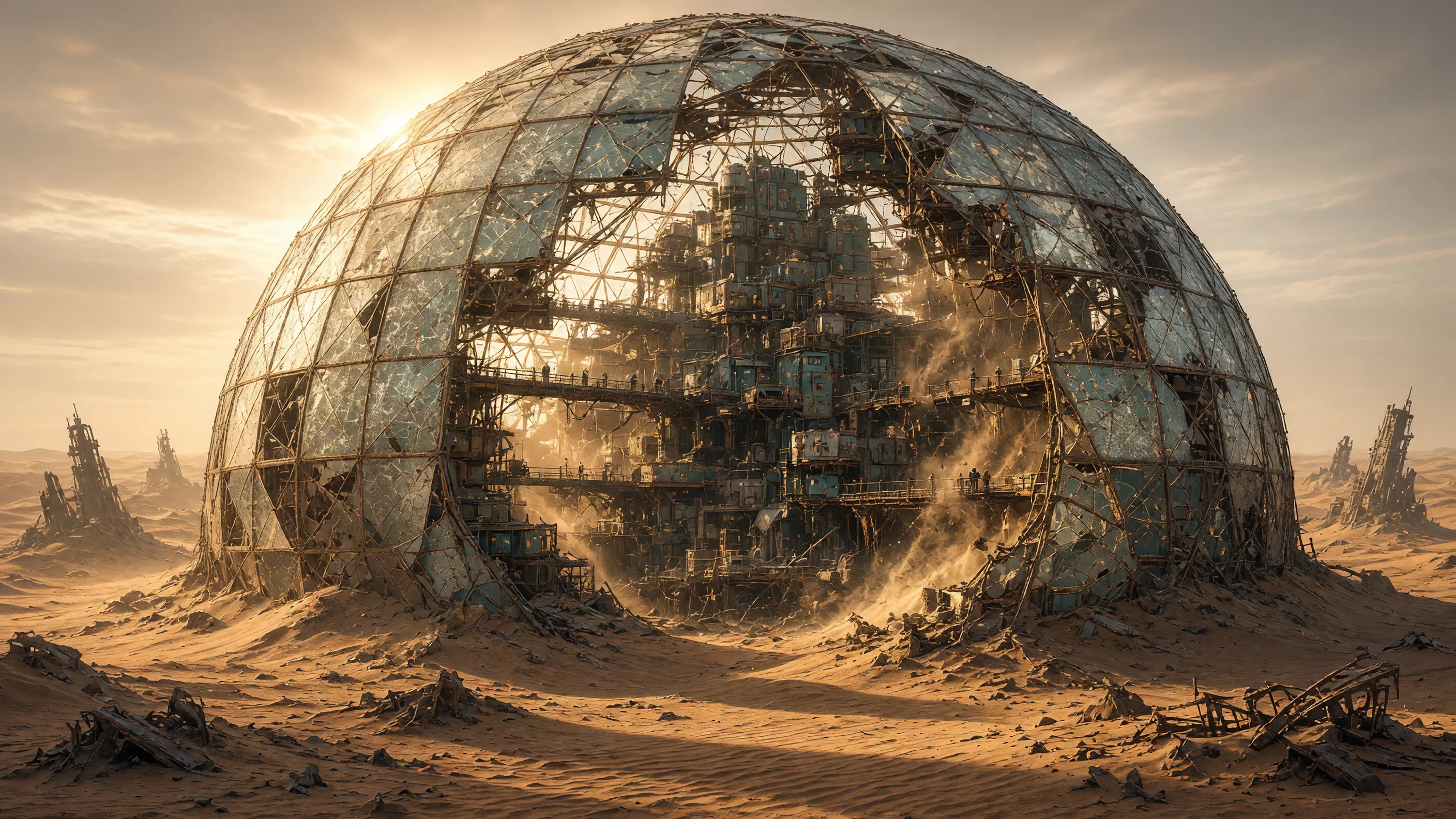
Dawn of the Wasteland Dome City: Worldbuilding Concept Art
Style Sci-Fi · Worldbuilding · Concept Art
Prompt
A cinematic sci-fi worldbuilding concept art image, 16:9 widescreen composition. A gigantic cracked glass geodesic dome shelters a dense vertical settlement in the middle of a vast ochre sand sea; jagged dunes and half-buried skeletal towers stretch to the horizon. Inside the dome, stacked modular habitat pods, rusted scaffolding, and improvised walkways climb along the inner ribs, with tiny figures moving across the bridges to convey scale. The dome glass is frosted and patched with welded plates; some panes are missing, and sand pours in through the gaps. Low morning sunlight behind the dome creates strong backlighting, long shadows sweep across the dunes, and volumetric dust haze fills the air; warm amber highlights contrast with cool teal shadows. The overall palette is a desaturated utilitarian mix of sand ochre, oxidized steel, faded teal, and pale bone white. Hand-painted digital concept art texture, clear and readable structure, richly detailed wear on architecture and materials, subtle atmospheric perspective, no text, no watermark, no logo.
Copy the full prompt and adapt it for your own generation.
Tags
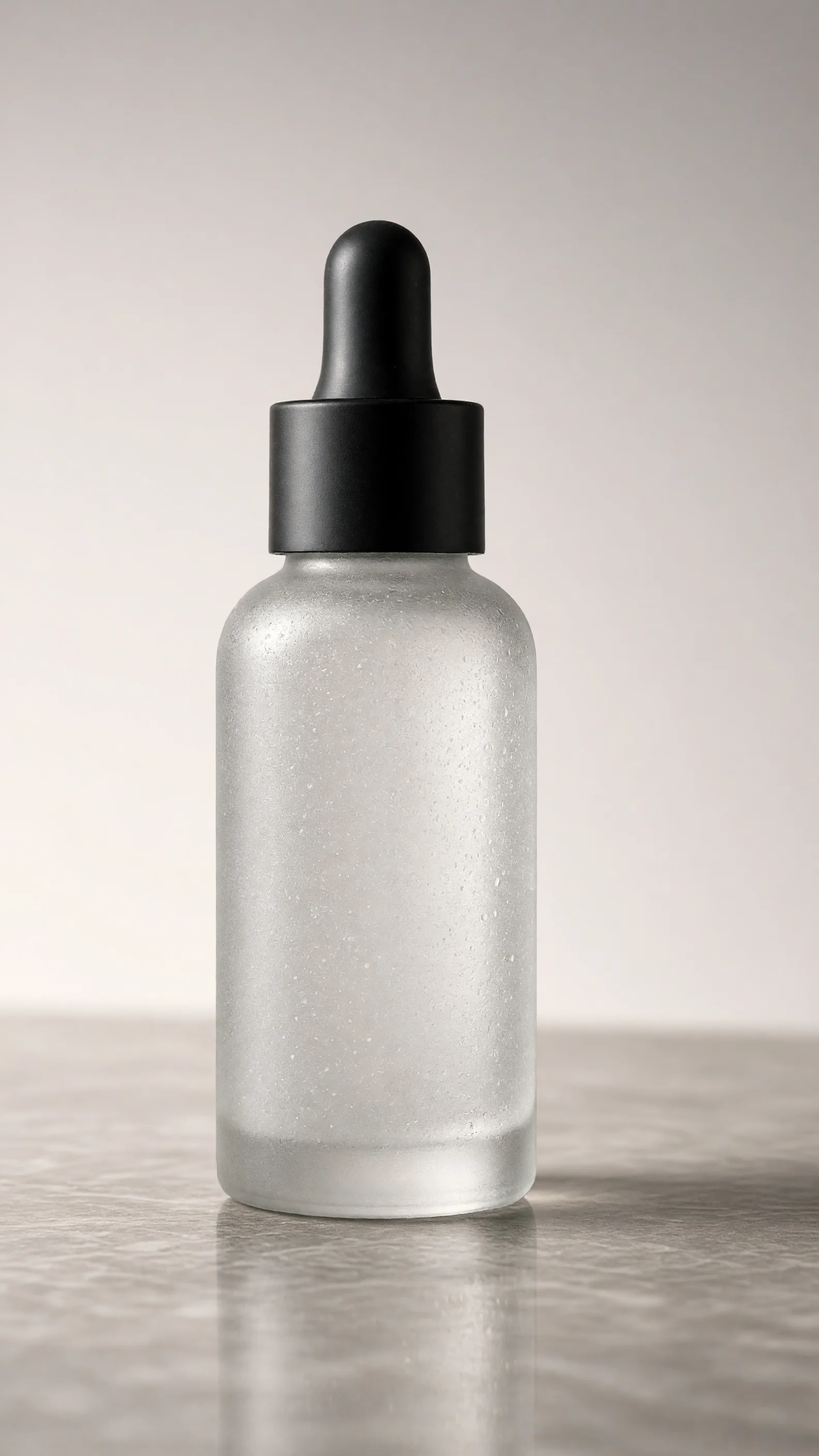
E-commerce Product Images: Deconstructing Grok Imagine 2.0 Prompts
Style Product Image · ecommerce · Studio lighting
Prompt
A high-end e-commerce product photography image, with an unbranded frosted glass serum bottle standing upright in the exact center of the frame, fitted with a matte black dropper cap. Studio lighting: a large softbox at a 45-degree angle from the upper left serves as the key light, creating a soft vertical highlight along the left edge of the glass; a narrow strip light on the right defines the contour and separates the edge; toward the background there is a subtle gradient falloff. The background is a seamless light warm gray gradient sweep with a smooth vertical gradient; the bottle sits on a polished stone surface with a faint, soft reflection beneath it. Slightly low camera angle at product eye level, 85mm equivalent lens, shallow depth of field, the bottle sharply in focus, the background completely clean. Neutral-to-warm color temperature, approximately 5200K, restrained saturation, clean commercial retouching, crisp micro-detail of the frosted texture and condensation droplets, no text, no labels, no props, ample negative space above the product. Photorealistic, 16:9 composition, product positioned slightly left of center, with clear copy space on the right.
Copy the full prompt and adapt it for your own generation.
Tags

Grok Imagine Image 2.0 Portrait Prompt Reference: Realistic and Artistic Dual Styles
Style Portrait & Photography · Photorealistic · Prompt Engineering
Prompt
A half-body portrait of a young woman with short dark hair, standing beside a large window, soft natural side backlight forming rim light on her hair strands and shoulders, calm and natural expression, fine skin texture, pores and fine hairs clearly visible, wearing a plain charcoal gray knit sweater, shallow depth of field, indoor background softly blurred, low-saturation film color grading, warm highlights and cool shadows, 85mm lens look, three-quarter side view, vertical 3:4 composition, headroom above the head, realistic editorial style photography, rich detail in the eyes and fabric texture, no text, no watermark
Copy the full prompt and adapt it for your own generation.
Tags
Pricing
grok-imagine-image-2.0/text-to-image per image
| Unit Price | $0.052 |
|---|
Positioning Overview
grok-imagine-image-2.0/text-to-image is the pure text input route of the xAI image generation model, called through the unified HiAPI.ai interface. It excels at turning fine-grained, long prompts into complete images, and shows high instruction-following ability for complex scenes, multiple subjects, artistic styles, and layout tasks involving text typography. Developers can choose between low and medium quality tiers and 1K/2K resolutions as needed, and select an output aspect ratio from more than ten options ranging from 1:1 to 20:9. It is suitable for concept visualization, design draft exploration, and multi-aspect-ratio advertising assets.
Core Highlights
- High adherence to complex long prompts — it can faithfully reproduce detailed creative constraints, and multiple subjects and complex scenes are less likely to go off-model.
- Clearer text typography and complex layouts — for materials with text layouts such as posters and covers, the layout presentation is better than that of general image models.
- Resolution and aspect-ratio options cover common advertising needs — two output tiers, 1K/2K, combined with more than ten aspect ratios, can directly match landscape, portrait, and social scenarios.
- Quality tiers can be traded off against cost — low and medium quality tiers are provided; the low tier renders faster, making it suitable for batch drafting followed by selective refinement.
Capability Description
Text-to-image generation: generates an entire image from a long-text prompt as input, suitable for turning creative descriptions directly into reviewable visual drafts.
Resolution and quality selection: you can specify 1k or 2k output and choose between low and medium quality tiers, switching between draft exploration and final output.
Multi-aspect-ratio output: supports more than ten options including square, landscape, portrait, ultra-wide, and automatic ratio, so a single configuration yields an image that meets layout requirements.
Strong prompt-constraint reproduction: maintains high fidelity to detail-dense descriptions involving text typography, reducing the number of iterations spent rewriting prompts.
Applicable Scenarios
- Art and design teams: text descriptions of scene concepts — generate concept images directly from descriptions of scenes, lighting, and style, for early-stage proposals and visual direction alignment.
- Marketing design: layout materials such as posters and covers — input descriptions containing titles and layouts to produce clearly readable layout drafts, for social media publishing and initial advertising assets.
- Operations and advertising: multi-aspect-ratio advertising assets — configure different aspect ratios at once to batch-produce landscape and portrait assets, directly usable for ad placements across channels.
- Illustration and style exploration — use stylized prompts to quickly produce multiple illustration directions for clients or lead artists to choose from.
Limitations and Model Selection Advice
The maximum output resolution is 2K, with low and medium quality tiers only, so it cannot produce higher-quality or more finely detailed large-format finished pieces; scenarios requiring reference-image driving, local repainting, or multi-image editing should switch to the image-to-image route in the same family. This route accepts only text prompts and does not support image input. If the requirement is ultra-high-definition finished images or complex image editing with multiple references, other models or post-processing workflows need to be evaluated. As the model was released recently, long-term stability and independent benchmark data are limited; it is recommended to first validate results in small batches outside the formal workflow.
Frequently asked questions
View all FAQs →-
What is Grok Image 2.0 Text to Image best for?
Generate product, editorial, landscape, and character visuals in low or medium quality at 1K/2K across square to ultrawide formats.
-
Does Grok Image 2.0 Text to Image accept reference images?
No. This route is text-to-image only.
-
Which output settings are supported?
The page exposes 1K, 2K and auto, 1:1, 16:9, 9:16, 4:3, 3:4, 2:1, 1:2; use the Playground contract for the final available set.
-
How is Grok Image 2.0 Text to Image billed?
Billing is per successful generated image. Resolution or quality differences, when present, are reflected by the live page price.
Create a generation task
https://api.hiapi.ai/v1/tasks Headers
AuthorizationstringRequiredAccount API key. Required on every request. Example: Bearer YOUR_HIAPI_API_KEY. Get your API key
Content-TypestringOptionalThe request body is always parsed as JSON; when sent, only application/json (optionally with charset) is accepted — any other value returns 415. Example: application/json.
Idempotency-KeystringOptionalIdempotency key, up to 255 bytes. Retries with the same key from the same account create the task only once; replays return the original taskId.
On network timeouts or client retries, the same key creates the task only once — no double charges (scope: the API key's account). Use a business-unique identifier as the key (e.g. "order-42"); replays return the original taskId, and keys expire 24 hours after the first request. See the Unified Async API overview for the full scenario matrix.
Body
modelstringRequiredCurrent fixed value: grok-imagine-image-2.0/text-to-image
routestringOptionalCurrent fixed value: default
inputobjectRequired
Business parameters for grok-imagine-image-2.0/text-to-image and route default — see the parameter table below.
promptstringRequiredminLength 1Text prompt for image generation, which determines the image content and style.
qualitystringOptionalDefault: "medium"Generation quality level; defaults to medium (the recommended setting). Selecting low produces faster generation.
lowmediumresolutionstringOptionalDefault: "1k"Resolution of the output image; defaults to 1k.
1k2kaspect_ratiostringOptionalDefault: "1:1"Aspect ratio of the output image; defaults to 1:1.
1:116:99:164:33:43:22:32:1Show all (6)
1:219.5:99:19.520:99:20autocallbackobjectOptional
Terminal-state notification config. When omitted, no callback is delivered — poll the task yourself. See the callback note below.
Provide callback.url when creating a task and HiAPI POSTs to your service once the task reaches a terminal state — no polling needed. The callback payload mirrors the task detail structure; signature verification, delivery retries and idempotency are documented on the Unified Async API overview page.
urlstringRequiredRequired when callback is present. A POST is sent to this URL once the task reaches a terminal state; must be a valid http(s) URL.
whenstringOptionalDefault: "final"Only final is supported today — notified on both success and fail.
finalstoragestringOptionalDefault: "temp"Artifact storage tier: temp (default, retained about 7 days) or persistent (long-term, billed by size). Insufficient balance or exceeding the storage cap silently downgrades to temp; the effective tier is shown in the task detail response.
temppersistentRequest examples
# Submit an async task; returns a taskId immediately (no waiting for generation)
curl -X POST "https://api.hiapi.ai/v1/tasks" \
  -H "Authorization: Bearer $HIAPI_API_KEY" \
  -H "Content-Type: application/json" \
  -d '{
  "model": "grok-imagine-image-2.0/text-to-image",
  "input": {
    "prompt": "…",
    "quality": "medium",
    "resolution": "1k",
    "aspect_ratio": "1:1"
  }
}'
const res = await fetch("https://api.hiapi.ai/v1/tasks", {
method: "POST",
headers: {
Authorization: `Bearer ${process.env.HIAPI_API_KEY}`,
"Content-Type": "application/json",
},
body: JSON.stringify({
model: "grok-imagine-image-2.0/text-to-image",
input: {
"prompt": "…",
"quality": "medium",
"resolution": "1k",
"aspect_ratio": "1:1"
}
}),
});
const task = await res.json();
// { code: 200, message: "success", data: { taskId } }import os, requests
res = requests.post(
"https://api.hiapi.ai/v1/tasks",
headers={"Authorization": f"Bearer {os.environ['HIAPI_API_KEY']}"},
json={
"model": "grok-imagine-image-2.0/text-to-image",
"input": {
"prompt": "…",
"quality": "medium",
"resolution": "1k",
"aspect_ratio": "1:1"
}
},
)
print(res.json()) # { code, message, data: { taskId } }200 OK
{
  "code": 200,
  "message": "success",
  "data": {
    "taskId": "tk-hiapi-01HZTQ8BX2N3GM3YFK4Z9D7VQR"
  }
}
400 Bad Request
{
  "code": 400,
  "message": "invalid request",
  "data": null,
  "error_code": "INVALID_REQUEST"
}
Get task detail
https://api.hiapi.ai/v1/tasks/:id Response fields
taskIdstringRequiredTask ID, always prefixed with tk-hiapi-.
modelstringRequiredResolved full model name. Tasks submitted with the route parameter return base@route (e.g. gpt-image-2/text-to-image@ext); otherwise identical to the name passed at creation.
routestringOptionalPresent only when the task was submitted with an explicit route parameter; echoes the submitted value.
statusstringRequiredTask status.
queued Queued, not started yet.
handling Being processed.
archiving Processing finished, artifacts being prepared.
success Terminal: completed, artifacts available (output returned).
fail Terminal: failed (error returned).
After submission, check status: success and fail are terminal, everything else is non-terminal. Poll every 1–3 seconds until terminal. On success, download artifacts from output[].url and transfer them before expireAt; pass storage: "persistent" at creation time when long-term retention is needed.
creatednumberRequiredTask creation time (Unix seconds).
completednumberRequiredUnix seconds when the task reached a terminal state; fixed to 0 while not terminal.
outputarrayOptional
Present only when status == success. Artifact list — always an array; a single task may return multiple types at once (e.g. video + first_frame).
Array [ object ]
Array items
urlstringRequiredArtifact URL, directly downloadable.
typestringRequiredCurrent possible values: video, image, audio, first_frame, last_frame, thumbnail; more may be added later.
expireAtnumberRequiredUnix seconds until which the artifact remains accessible; download or transfer before it expires.
errorobjectOptional
Present only when status == fail.
codestringRequiredBusiness error code.
messagestringRequiredError description.
Response examples
Success
{
  "code": 200,
  "message": "success",
  "data": {
    "taskId": "tk-hiapi-01HZTQ8BX2N3GM3YFK4Z9D7VQR",
    "model": "happyhorse-1-0",
    "status": "success",
    "created": 1777282033,
    "completed": 1777282099,
    "output": [
      {
        "url": "https://cdn.hiapi.ai/tasks/.../video.mp4",
        "type": "video",
        "expireAt": 1777886899
      }
    ]
  }
}
Processing (non-terminal)
{
  "code": 200,
  "message": "success",
  "data": {
    "taskId": "tk-hiapi-...",
    "model": "happyhorse-1-0",
    "status": "archiving",
    "created": 1777282033,
    "completed": 0
  }
}
Failed
{
  "code": 200,
  "message": "success",
  "data": {
    "taskId": "tk-hiapi-...",
    "model": "happyhorse-1-0",
    "status": "fail",
    "created": 1777282033,
    "completed": 1777282099,
    "error": {
      "code": "TASK_FAILED",
      "message": "task failed"
    }
  }
}Articles
View all articles →Related Models
View all models →Same Type
-
 BRIA Product Shot Bria $0.058 /image
-
 Recraft Creative Upscale Recraft $0.357 /image
-
 Qwen Image 3.0 Alibaba $0.036 /image
-
 Muse Image 1.0 Meta $0.015 per task
-
 FIBO 1.5 Bria $0.058 /image
-
 BRIA Eraser Bria $0.058 /image
-
 GPT Image 2 OpenAI $0.007 /image
-
 FLUX 3 Image Black Forest Labs $0.041 /image
-
 Recraft Crisp Upscale Recraft $0.004 /image
-
 GPT Image 2.5 OpenAI $0.017 /image
-
 FLUX.2 Klein 4B Black Forest Labs $0.0004 /image
-
 Qwen Image 2.0 Alibaba $0.042 /image