xAI
Grok Imagine Quality
grok-imagine-quality/text-to-image
xAI's high-fidelity image generation and editing model, with more stable text rendering and composition, supporting 1K/2K output and consistent editing with reference images
Try grok-imagine-quality/text-to-image
Input
Showcases
View all showcasesOutput
image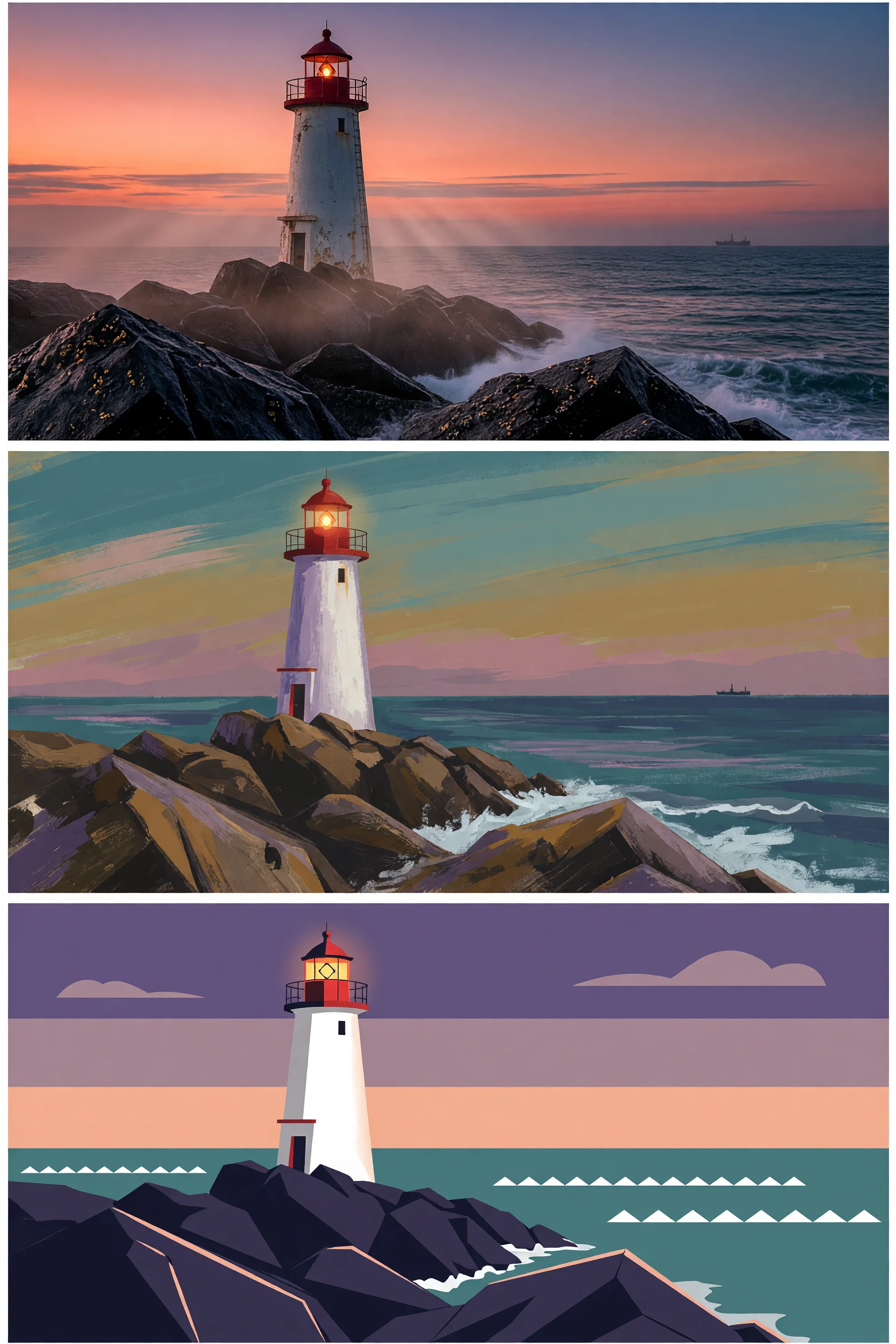
From Realistic to Flat: Grok Imagine Style Spectrum Illustration
Style style-spectrum · Artistic Illustration · Visual Research
Prompt
A three-tier illustration style study on a single subject: at dusk, a lone lighthouse stands on a rocky cliff, low-angle shot, with the horizon cutting across the frame. The first is photo-level realism—sharp rock texture, highlights on wet stone surfaces, volumetric fog, natural warm-to-cool dusk lighting. The second is a semi-realistic painterly style—visible gouache brushstrokes, softened edges, simplified yet still volumetric forms, soft ochre and teal tones. The third is a flat vector illustration—solid color blocks, no gradients, hard geometric contours, minimalist two-tone shading, poster-style negative space. All three share an identical composition, 4:3 landscape, high detail fidelity, clean edges, no text.
Copy the full prompt and adapt it for your own generation.
Tags
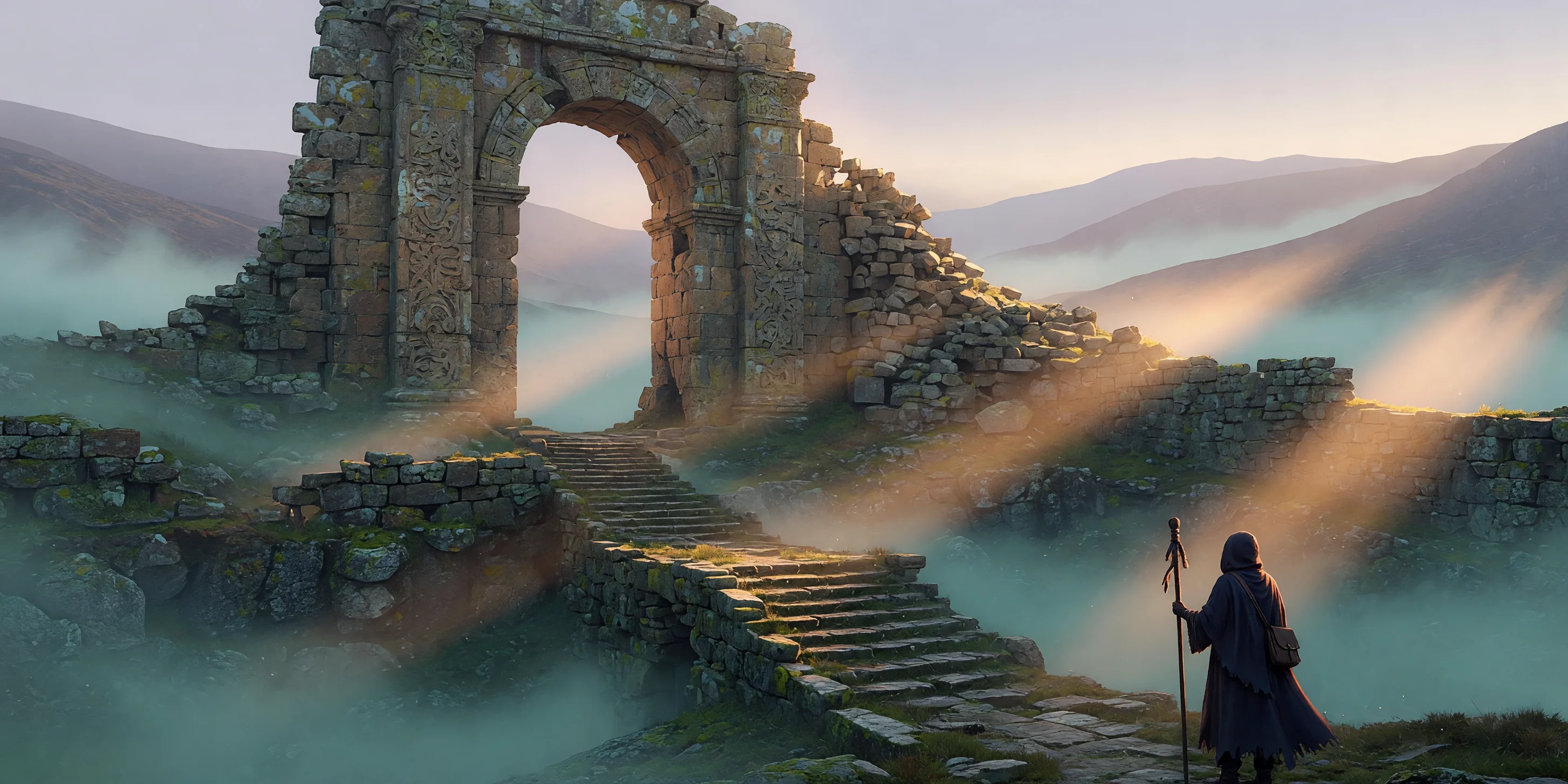
Grok Imagine Worldbuilding Concept Art: Morning Mist at the Wasteland Sanctuary
Style Concept Art · Worldbuilding · Matte painting
Prompt
Epic environmental concept art, 16:9 widescreen composition. A colossal weathered stone gate ruin stands in a mist-filled highland basin, its carved archway half-collapsed, and distant ridges gradually fade into pale haze behind it. Midground: broken stone steps, lichen-covered rock walls, thin mist drifting like gauze and catching low-angle side backlight, with sacred volumetric light beams spilling between the pillars. Foreground: the back of a lone cloaked pilgrim, tiny in stature, rendered as a silhouette within the halo, serving as the human anchor and scale reference. The color palette contrasts cool teal-green mist with warm sandstone and ochre highlights, accented by subtle green moss. Painterly matte-painting-style rendering combined with photoreal material detail: cracked granite, the sheen of wet stone surfaces, soft atmospheric perspective, no text, no watermark, cinematic lighting, high fidelity.
Copy the full prompt and adapt it for your own generation.
Tags
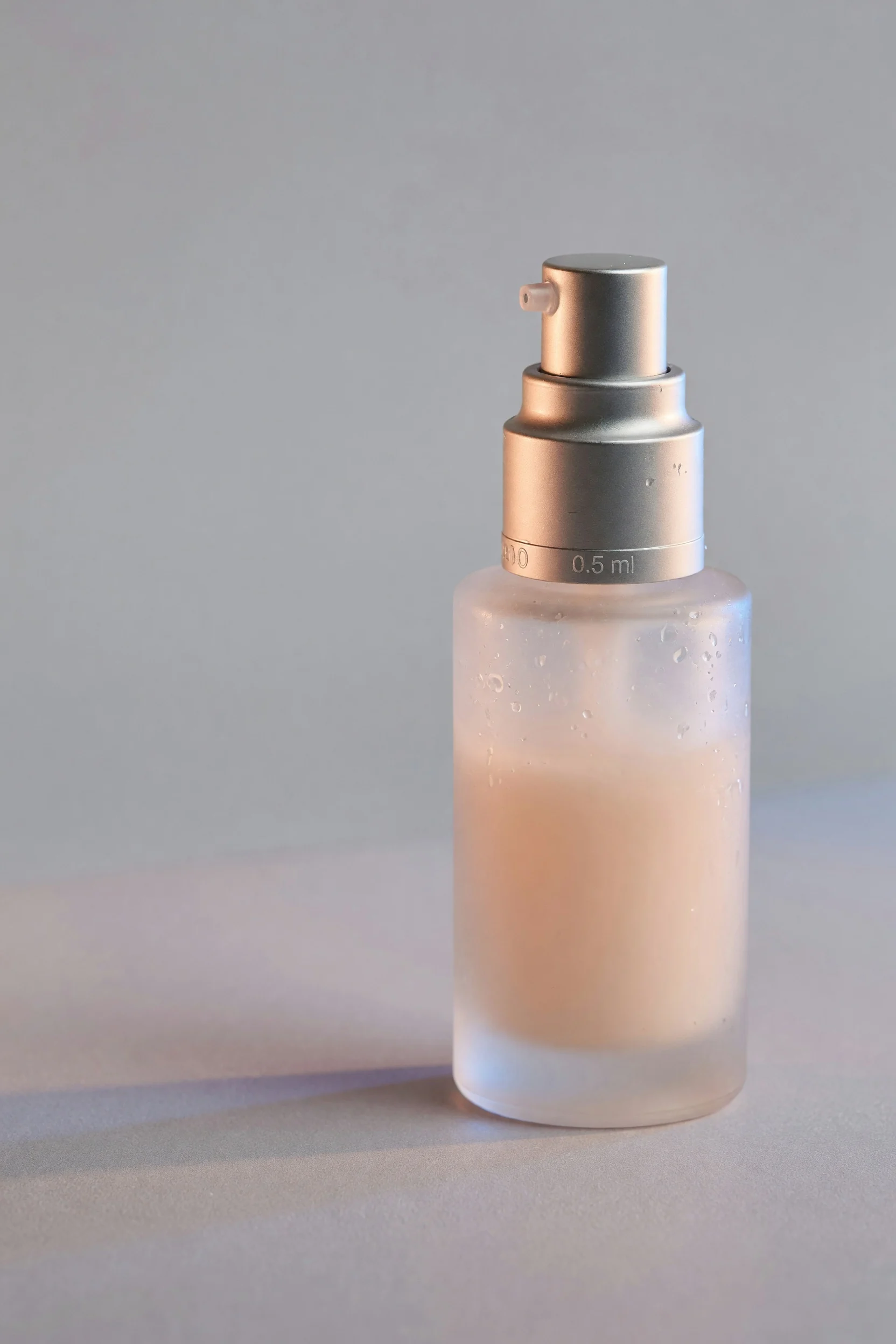
Grok Imagine E-commerce Product Photography Texture Rendering
Style Product Image · e-commerce · Studio lighting
Prompt
Studio product photography of a single skincare serum bottle, placed on a seamless soft gray gradient background, 16:9 horizontal commercial key visual banner composition. Frosted glass bottle with a brushed metal pump, slight condensation droplets on the glass surface, warm key light shining from the upper left through a large softbox, a narrow rim light on the right edge separating the bottle from the background, slight contact shadow and soft reflection on a matte acrylic surface. Shallow depth of field, 85mm lens look, subject centered, clean empty space on the left for placing main headline copy, rich glass texture and metal highlight details, natural color grading, no props, no text, no watermark, e-commerce catalog-grade finished effect, 2K clarity.
Copy the full prompt and adapt it for your own generation.
Tags
Pricing
grok-imagine-quality/text-to-image per image
| Specifications | Unit Price |
|---|---|
| 1K | $0.070 |
| 2K | $0.100 |
Positioning Overview
grok-imagine-quality/text-to-image is a high-fidelity text-to-image model from xAI, positioned as the quality-focused tier of the Grok Imagine image family. It generates photorealistic images from text prompts, supports 1k and 2k resolutions, 13 aspect ratios, and three output formats (jpeg, png, webp), with prompts up to 8,000 characters. Compared with the standard version, it is stronger in detail sharpness, texture and lighting naturalness, in-image text rendering, and composition stability, making it better suited to developers who need ready-to-deliver final images rather than just creative drafts.
Key Highlights
- A high-fidelity tier aimed at production-grade output — details, textures, and lighting are more complete than in the standard Grok Imagine, so results come closer to directly usable finished images.
- Supports both 1k and 2k resolutions — switch from fast low-resolution drafts to 2k refinement on the same API without changing models or endpoints.
- 13 aspect ratios cover mainstream layouts — specify ratios from 1:1 to 16:9, 9:16, 20:9, and more, fitting landscape posters, vertical social media, and widescreen banners.
- More accurate in-image text rendering — better reproduction of images containing typographic layouts, reducing rework caused by garbled text in posters and social media graphics.
Capabilities
Generate photorealistic images from text prompts: enter a description to generate an image; prompts can be up to 8,000 characters, leaving room for fairly complete scene, style, and subject descriptions.
Controllable resolution and aspect ratio: choose 1k or 2k via resolution, and specify the frame among 13 ratios via aspect_ratio, so output directly matches the target material layout.
Selectable output formats: jpeg, png, and webp are supported, making it easy to choose the right encoding for front-end display, asset archiving, or downstream compression.
Named entity fidelity: rendering accuracy for named entities such as brands, public figures, and specific locations is relatively high, so you can name the subject directly in the prompt.
Use Cases
- Advertising and marketing asset production — generate 2k landscape or square key visuals from product selling points and scene descriptions for hero banners, posters, and ad creatives.
- Social media images and thumbnail design — generate cover images with typographic layouts in 16:9 or 9:16 for video thumbnails and social media posts.
- An iterative workflow from drafts to refinement — batch-generate creative directions at 1k first, then regenerate selected ones at 2k for final delivery versions.
- Scene image generation with named subjects — specify a particular car model, location, or brand in the prompt to generate contextual images for concept showcases and content illustrations.
Limitations and Selection Advice
Image quality comes at the cost of generation speed; output is slower than the standard Grok Imagine image model, so it is not suited to scenarios that need large batches of rapid drafts. High-resolution tasks and tasks with strict requirements for named subjects or image details may need multiple prompt adjustments to meet expectations; it is recommended to confirm the direction at 1k first and then render at 2k. This endpoint currently covers text-to-image only; for targeted editing based on existing images, use the image-to-image model in the same family instead. Costs are billed per image according to the platform pricing panel.
Frequently asked questions
View all FAQs →-
What is Grok Imagine Quality best for?
Hero images, covers, campaign concepts, and high-quality scenes that need richer material, light, atmosphere, and detail.
-
How are 1k and 2k billed?
1k and 2k use separate per-image tiers. Ratio and output format do not add another fee; see the live page price for the current amounts.
-
Why not always use the standard tier?
Standard is better for volume drafts and speed. Choose Quality when final-image material and detail matter more.
-
Does it accept reference images?
The text-to-image route does not. Use grok-imagine-quality/image-to-image for quality-tier editing.
Create a generation task
https://api.hiapi.ai/v1/tasks Headers
AuthorizationstringRequiredAccount API key. Required on every request. Example: Bearer YOUR_HIAPI_API_KEY. Get your API key
Content-TypestringOptionalThe request body is always parsed as JSON; when sent, only application/json (optionally with charset) is accepted — any other value returns 415. Example: application/json.
Idempotency-KeystringOptionalIdempotency key, up to 255 bytes. Retries with the same key from the same account create the task only once; replays return the original taskId.
On network timeouts or client retries, the same key creates the task only once — no double charges (scope: the API key's account). Use a business-unique identifier as the key (e.g. "order-42"); replays return the original taskId, and keys expire 24 hours after the first request. See the Unified Async API overview for the full scenario matrix.
Body
modelstringRequiredCurrent fixed value: grok-imagine-quality/text-to-image
routestringOptionalCurrent fixed value: default
inputobjectRequired
Business parameters for grok-imagine-quality/text-to-image and route default — see the parameter table below.
promptstringRequiredminLength 1maxLength 8000A textual description used to generate the image, provided as a string, describing the desired picture content.
resolutionstringOptionalDefault: "1k"The resolution of the output image, provided as a string, default 1k.
1k2kaspect_ratiostringOptionalDefault: "1:1"The aspect ratio of the generated image, provided as a string, default 1:1.
2:120:919.5:916:94:33:21:12:3Show all (5)
3:49:169:19.59:201:2output_formatstringOptionalDefault: "jpeg"The format of the output image, provided as a string, default jpeg.
jpegpngwebpcallbackobjectOptional
Terminal-state notification config. When omitted, no callback is delivered — poll the task yourself. See the callback note below.
Provide callback.url when creating a task and HiAPI POSTs to your service once the task reaches a terminal state — no polling needed. The callback payload mirrors the task detail structure; signature verification, delivery retries and idempotency are documented on the Unified Async API overview page.
urlstringRequiredRequired when callback is present. A POST is sent to this URL once the task reaches a terminal state; must be a valid http(s) URL.
whenstringOptionalDefault: "final"Only final is supported today — notified on both success and fail.
finalstoragestringOptionalDefault: "temp"Artifact storage tier: temp (default, retained about 7 days) or persistent (long-term, billed by size). Insufficient balance or exceeding the storage cap silently downgrades to temp; the effective tier is shown in the task detail response.
temppersistentRequest examples
# Submit an async task; returns a taskId immediately (no waiting for generation)
curl -X POST "https://api.hiapi.ai/v1/tasks" \
  -H "Authorization: Bearer $HIAPI_API_KEY" \
  -H "Content-Type: application/json" \
  -d '{
  "model": "grok-imagine-quality/text-to-image",
  "input": {
    "prompt": "…",
    "resolution": "1k",
    "aspect_ratio": "1:1",
    "output_format": "jpeg"
  }
}'
const res = await fetch("https://api.hiapi.ai/v1/tasks", {
method: "POST",
headers: {
Authorization: `Bearer ${process.env.HIAPI_API_KEY}`,
"Content-Type": "application/json",
},
body: JSON.stringify({
model: "grok-imagine-quality/text-to-image",
input: {
"prompt": "…",
"resolution": "1k",
"aspect_ratio": "1:1",
"output_format": "jpeg"
}
}),
});
const task = await res.json();
// { code: 200, message: "success", data: { taskId } }import os, requests
res = requests.post(
"https://api.hiapi.ai/v1/tasks",
headers={"Authorization": f"Bearer {os.environ['HIAPI_API_KEY']}"},
json={
"model": "grok-imagine-quality/text-to-image",
"input": {
"prompt": "…",
"resolution": "1k",
"aspect_ratio": "1:1",
"output_format": "jpeg"
}
},
)
print(res.json()) # { code, message, data: { taskId } }200 OK
{
  "code": 200,
  "message": "success",
  "data": {
    "taskId": "tk-hiapi-01HZTQ8BX2N3GM3YFK4Z9D7VQR"
  }
}
400 Bad Request
{
  "code": 400,
  "message": "invalid request",
  "data": null,
  "error_code": "INVALID_REQUEST"
}
Get task detail
https://api.hiapi.ai/v1/tasks/:id Response fields
taskIdstringRequiredTask ID, always prefixed with tk-hiapi-.
modelstringRequiredResolved full model name. Tasks submitted with the route parameter return base@route (e.g. gpt-image-2/text-to-image@ext); otherwise identical to the name passed at creation.
routestringOptionalPresent only when the task was submitted with an explicit route parameter; echoes the submitted value.
statusstringRequiredTask status.
queued Queued, not started yet.
handling Being processed.
archiving Processing finished, artifacts being prepared.
success Terminal: completed, artifacts available (output returned).
fail Terminal: failed (error returned).
After submission, check status: success and fail are terminal, everything else is non-terminal. Poll every 1–3 seconds until terminal. On success, download artifacts from output[].url and transfer them before expireAt; pass storage: "persistent" at creation time when long-term retention is needed.
creatednumberRequiredTask creation time (Unix seconds).
completednumberRequiredUnix seconds when the task reached a terminal state; fixed to 0 while not terminal.
outputarrayOptional
Present only when status == success. Artifact list — always an array; a single task may return multiple types at once (e.g. video + first_frame).
Array [ object ]
Array items
urlstringRequiredArtifact URL, directly downloadable.
typestringRequiredCurrent possible values: video, image, audio, first_frame, last_frame, thumbnail; more may be added later.
expireAtnumberRequiredUnix seconds until which the artifact remains accessible; download or transfer before it expires.
errorobjectOptional
Present only when status == fail.
codestringRequiredBusiness error code.
messagestringRequiredError description.
Response examples
Success
{
  "code": 200,
  "message": "success",
  "data": {
    "taskId": "tk-hiapi-01HZTQ8BX2N3GM3YFK4Z9D7VQR",
    "model": "happyhorse-1-0",
    "status": "success",
    "created": 1777282033,
    "completed": 1777282099,
    "output": [
      {
        "url": "https://cdn.hiapi.ai/tasks/.../video.mp4",
        "type": "video",
        "expireAt": 1777886899
      }
    ]
  }
}
Processing (non-terminal)
{
  "code": 200,
  "message": "success",
  "data": {
    "taskId": "tk-hiapi-...",
    "model": "happyhorse-1-0",
    "status": "archiving",
    "created": 1777282033,
    "completed": 0
  }
}
Failed
{
  "code": 200,
  "message": "success",
  "data": {
    "taskId": "tk-hiapi-...",
    "model": "happyhorse-1-0",
    "status": "fail",
    "created": 1777282033,
    "completed": 1777282099,
    "error": {
      "code": "TASK_FAILED",
      "message": "task failed"
    }
  }
}Articles
View all articles →Related Models
View all models →Same Type
-
 Grok Imagine Quality xAI $0.070 /image
-
 Wan 2.7 Image Alibaba $0.035 /image
-
 BRIA Product Shot Bria $0.058 /image
-
 Recraft Creative Upscale Recraft $0.357 /image
-
 FLUX 1.1 Pro Black Forest Labs $0.050 /image
-
 851 Labs Background Remover 851 Labs $0.002 /image
-
 Nano Banana Pro Google $0.057 /image
-
 FLUX.2 Black Forest Labs $0.035 /image
-
 Seedream 4.5 ByteDance $0.045 /image
-
 GPT Image 2 OpenAI $0.007 /image
-
 Grok Imagine Image 2.0 xAI $0.052 /image
-
 Krea 3 Krea $0.036 /image