xAI
Grok Imagine
grok-imagine/text-to-image
xAI's creative generation model, supporting image-to-image editing and style guidance, with up to 9 reference images to control composition and characters; called through the unified HiAPI.ai interface
Try grok-imagine/text-to-image
Input
Showcases
View all showcasesOutput
image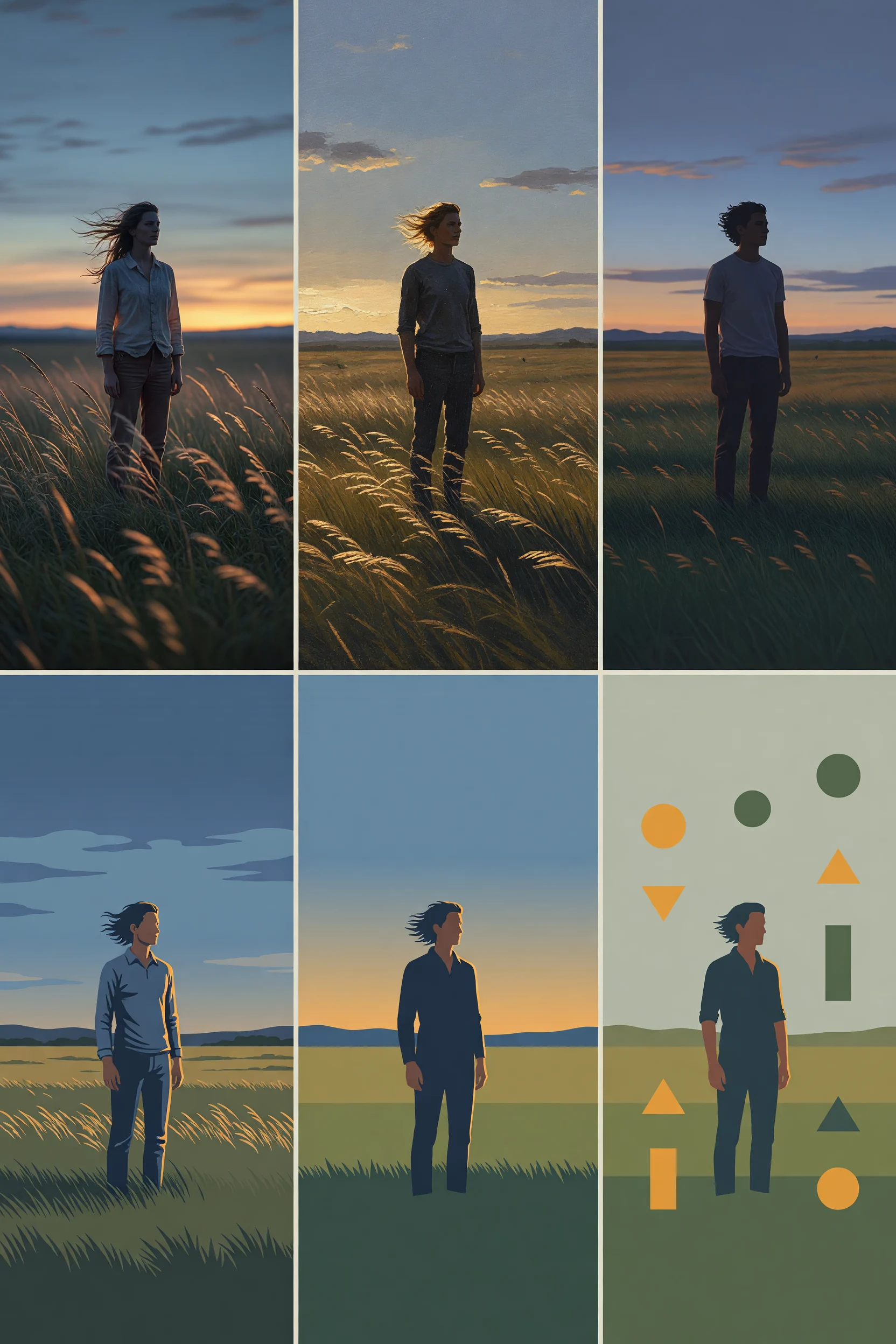
Style Spectrum: A Six-Panel Illustration Exercise from Realistic to Flat
Style style-spectrum · Illustration · Art Direction
Prompt
A six-panel style spectrum diagram, with every panel depicting the same subject: a solitary human figure standing on a windswept plain at dusk. The panels are arranged in a 3x2 grid, presenting from left to right a style spectrum that moves from photographic realism to flat graphics. Panel 1: photographic realism, volumetric dusk lighting, delicate fabric and grass textures, shallow depth of field. Panel 2: painterly realism, visible brushstrokes, warm rim light. Panel 3: semi-realistic illustration, simplified human anatomy, soft gradients. Panel 4: stylized illustration leaning toward vector style, two-tone light and shadow, clean edges. Panel 5: flat illustration, bold silhouette, three-tone palette. Panel 6: minimalist flat graphic, geometric shapes, a single accent color. The overall composition is unified at 16:9 and uses a dusk palette of amber, slate blue, and soft green, with narrow neutral margins between panels, no text or labels of any kind, a highly clear image, and the aesthetic of an art-direction reference board.
Copy the full prompt and adapt it for your own generation.
Tags
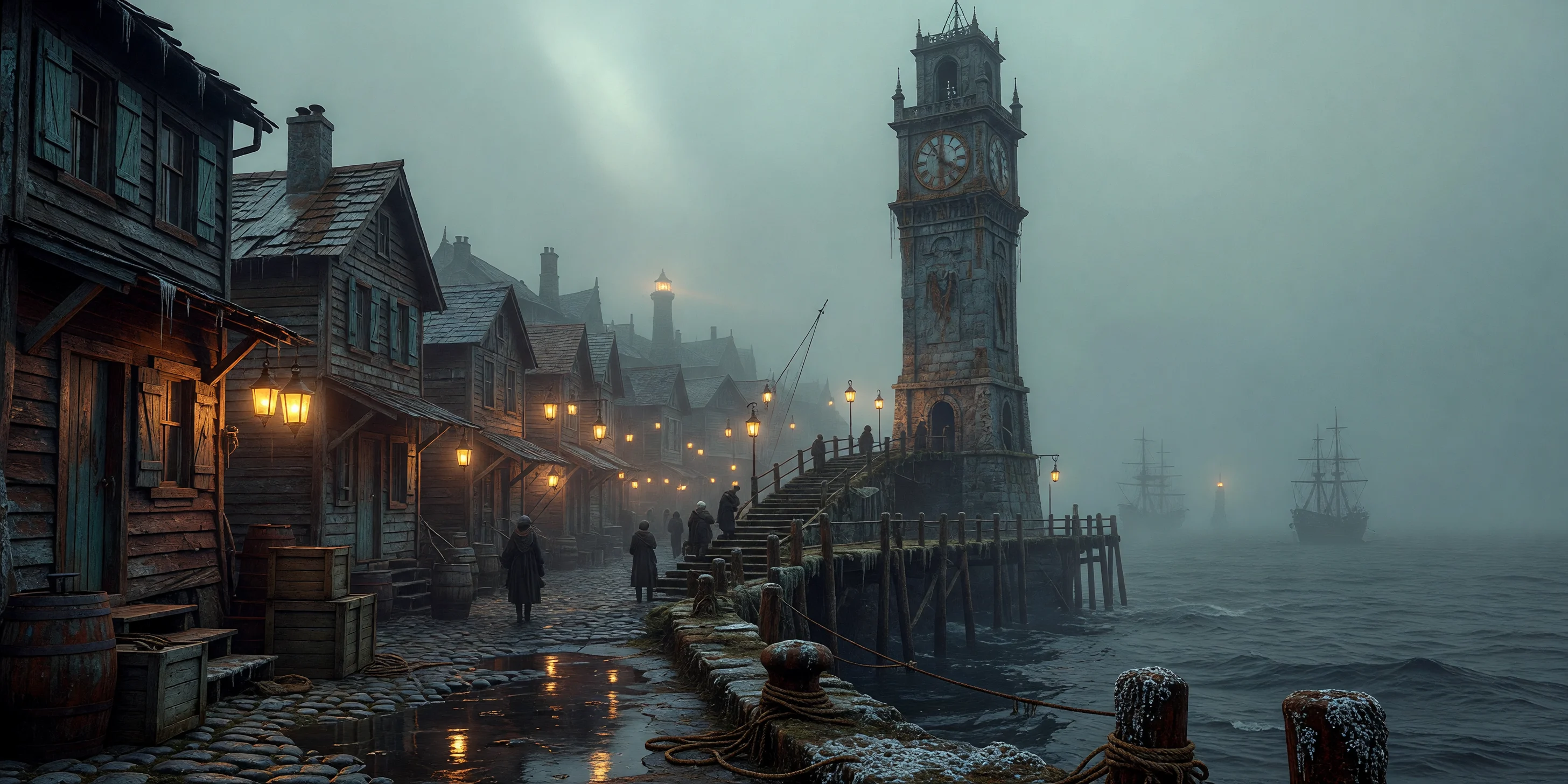
Worldbuilding Scene Concept Art: Fog Harbor Clock Tower
Style Concept Art · Worldbuilding · Cinematic
Prompt
Cinematic worldbuilding concept art depicting a fictional harbor in fog: a towering, mottled stone clock tower rises from a narrow pier, wooden houses and hanging lanterns densely line the waterfront, wet cobblestones reflect warm lantern light, heavy low fog churns over the sea surface, and the outlines of distant ships and a lighthouse loom faintly in the mist. From the mooring ropes and wooden crates in the foreground to the silhouette of the clock tower, the composition advances layer by layer, and tiny figures on the stairs reinforce the sense of scale. Photorealistic lighting, soft volumetric light beams, cool blue-cyan ambient fog contrasting with warm amber practical light sources, meticulously detailed surface textures of wet stone, rusted ironwork, and weathered wood. Widescreen 16:9 composition, low-angle viewpoint, clock tower placed according to the rule of thirds, restrained color grading, a serene and atmospheric mood, high-fidelity detail.
Copy the full prompt and adapt it for your own generation.
Tags

Grok Imagine Portraits: Realistic vs. Artistic Prompt Comparison
Style Portrait & Photography · Photorealistic · Studio lighting
Prompt
A realistic half-body portrait of a young woman standing beside a large window, soft directional daylight outlining the light and shadow on her left cheek, natural skin texture with pores and fine stray hairs clearly visible, subtle catchlights in her eyes, a shallow depth of field softly blurring the neutral indoor background, low-saturation warm color grading, 85mm lens effect, high dynamic range, no excessive skin smoothing, magazine editorial photography style, vertical 3:4 composition, subject slightly off-center
Copy the full prompt and adapt it for your own generation.
Tags
Pricing
grok-imagine/text-to-image per image
| Unit Price | $0.030 |
|---|
Overview
grok-imagine/text-to-image is the text-to-image route in the xAI grok-imagine family, aimed at developers who need to produce high-quality realistic or stylized images at scale. It accepts text prompts up to 8,000 characters, offers output at either 1k or 2k resolution across 13 aspect ratios, and supports three delivery formats: jpeg, png, and webp. It is suited for teams embedding image generation into content production, concept design, and bulk asset workflows, and can be called through the unified HiAPI.ai interface.
Key Highlights
- Two resolution tiers and 13 aspect ratios — output can switch between 1k and 2k, with aspect ratios covering landscape, portrait, and square from 2:1 to 1:2, fitting multiple placement slots.
- Prompt limit of 8,000 characters — long prompts can carry complete scene, lighting, and style descriptions, suitable for structurally complex generation needs.
- Three selectable output formats — jpeg, png, and webp can be specified directly for the downstream pipeline, eliminating the transcoding step after generation.
Capabilities
Long-prompt text-to-image: Generates images from text descriptions of 1 to 8,000 characters; complex scenes and detail constraints can be completed within a single prompt.
Controllable resolution and aspect ratio: Choose from 1k or 2k resolution and 13 aspect ratios as needed, obtaining images that match slot dimensions in one call and reducing subsequent cropping.
Direct output format specification: Supports jpeg, png, and webp, aligning with the format requirements of downstream stages such as asset distribution and web display.
Use Cases
- Bulk illustration assets for content teams — Generate landscape and portrait illustrations in bulk from text scripts or headlines, producing image assets that can go directly into a CMS or design file.
- Concept image previews for product and marketing — Describe scenes, lighting, and texture with long prompts to quickly obtain 2k concept images for proposal comparisons and visual direction confirmation.
- Embedded text-to-image features in apps — Developers submit prompts together with resolution, aspect ratio, and format parameters to output images matching specifications for users and populate pages directly.
Limitations and Selection Advice
This route only performs text-to-image and does not support reference-image guidance or image editing; needs involving style transfer or composition fine-tuning should use image-editing routes instead, and needs for dynamic assets should use video generation routes. Prompts must be provided fully in text, with no visual input to reference. The maximum resolution is 2k, and aspect ratios are limited to the 13 listed in the schema; dimensions outside this range require downstream cropping or secondary processing.
What's new
View changelog →- New model New models: grok-imagine-image-2.0/text-to-image and grok-im…
Frequently asked questions
View all FAQs →-
What is the standard Grok Imagine route best for?
It suits high-volume ideation, social assets, landscapes, and cinematic scenes. Current 1k and 2k output share one flat price.
-
How does standard differ from Quality?
Standard emphasizes speed and a low flat price. Quality is a separate model route focused on material, detail, and light, with tiered 1k/2k pricing.
-
Which ratios are available?
Thirteen landscape, square, and portrait ratios ranging from 2:1 and 20:9 to 1:2.
-
Does this page accept references?
No. Use grok-imagine/image-to-image for reference editing.
Create a generation task
https://api.hiapi.ai/v1/tasks Headers
AuthorizationstringRequiredAccount API key. Required on every request. Example: Bearer YOUR_HIAPI_API_KEY. Get your API key
Content-TypestringOptionalThe request body is always parsed as JSON; when sent, only application/json (optionally with charset) is accepted — any other value returns 415. Example: application/json.
Idempotency-KeystringOptionalIdempotency key, up to 255 bytes. Retries with the same key from the same account create the task only once; replays return the original taskId.
On network timeouts or client retries, the same key creates the task only once — no double charges (scope: the API key's account). Use a business-unique identifier as the key (e.g. "order-42"); replays return the original taskId, and keys expire 24 hours after the first request. See the Unified Async API overview for the full scenario matrix.
Body
modelstringRequiredCurrent fixed value: grok-imagine/text-to-image
routestringOptionalCurrent fixed value: default
inputobjectRequired
Business parameters for grok-imagine/text-to-image and route default — see the parameter table below.
promptstringRequiredminLength 1maxLength 8000The text prompt describing the image to generate; a required string that the model uses to produce the corresponding picture.
resolutionstringOptionalDefault: "1k"Controls the resolution of the output image, given as a string, default 1k.
1k2kaspect_ratiostringOptionalDefault: "1:1"Controls the aspect ratio of the generated image, given as a string, default 1:1.
2:120:919.5:916:94:33:21:12:3Show all (5)
3:49:169:19.59:201:2output_formatstringOptionalDefault: "jpeg"Controls the format of the output image, given as a string, default jpeg.
jpegpngwebpcallbackobjectOptional
Terminal-state notification config. When omitted, no callback is delivered — poll the task yourself. See the callback note below.
Provide callback.url when creating a task and HiAPI POSTs to your service once the task reaches a terminal state — no polling needed. The callback payload mirrors the task detail structure; signature verification, delivery retries and idempotency are documented on the Unified Async API overview page.
urlstringRequiredRequired when callback is present. A POST is sent to this URL once the task reaches a terminal state; must be a valid http(s) URL.
whenstringOptionalDefault: "final"Only final is supported today — notified on both success and fail.
finalstoragestringOptionalDefault: "temp"Artifact storage tier: temp (default, retained about 7 days) or persistent (long-term, billed by size). Insufficient balance or exceeding the storage cap silently downgrades to temp; the effective tier is shown in the task detail response.
temppersistentRequest examples
# Submit an async task; returns a taskId immediately (no waiting for generation)
curl -X POST "https://api.hiapi.ai/v1/tasks" \
  -H "Authorization: Bearer $HIAPI_API_KEY" \
  -H "Content-Type: application/json" \
  -d '{
  "model": "grok-imagine/text-to-image",
  "input": {
    "prompt": "…",
    "resolution": "1k",
    "aspect_ratio": "1:1",
    "output_format": "jpeg"
  }
}'
const res = await fetch("https://api.hiapi.ai/v1/tasks", {
method: "POST",
headers: {
Authorization: `Bearer ${process.env.HIAPI_API_KEY}`,
"Content-Type": "application/json",
},
body: JSON.stringify({
model: "grok-imagine/text-to-image",
input: {
"prompt": "…",
"resolution": "1k",
"aspect_ratio": "1:1",
"output_format": "jpeg"
}
}),
});
const task = await res.json();
// { code: 200, message: "success", data: { taskId } }import os, requests
res = requests.post(
"https://api.hiapi.ai/v1/tasks",
headers={"Authorization": f"Bearer {os.environ['HIAPI_API_KEY']}"},
json={
"model": "grok-imagine/text-to-image",
"input": {
"prompt": "…",
"resolution": "1k",
"aspect_ratio": "1:1",
"output_format": "jpeg"
}
},
)
print(res.json()) # { code, message, data: { taskId } }200 OK
{
  "code": 200,
  "message": "success",
  "data": {
    "taskId": "tk-hiapi-01HZTQ8BX2N3GM3YFK4Z9D7VQR"
  }
}
400 Bad Request
{
  "code": 400,
  "message": "invalid request",
  "data": null,
  "error_code": "INVALID_REQUEST"
}
Get task detail
https://api.hiapi.ai/v1/tasks/:id Response fields
taskIdstringRequiredTask ID, always prefixed with tk-hiapi-.
modelstringRequiredResolved full model name. Tasks submitted with the route parameter return base@route (e.g. gpt-image-2/text-to-image@ext); otherwise identical to the name passed at creation.
routestringOptionalPresent only when the task was submitted with an explicit route parameter; echoes the submitted value.
statusstringRequiredTask status.
queued Queued, not started yet.
handling Being processed.
archiving Processing finished, artifacts being prepared.
success Terminal: completed, artifacts available (output returned).
fail Terminal: failed (error returned).
After submission, check status: success and fail are terminal, everything else is non-terminal. Poll every 1–3 seconds until terminal. On success, download artifacts from output[].url and transfer them before expireAt; pass storage: "persistent" at creation time when long-term retention is needed.
creatednumberRequiredTask creation time (Unix seconds).
completednumberRequiredUnix seconds when the task reached a terminal state; fixed to 0 while not terminal.
outputarrayOptional
Present only when status == success. Artifact list — always an array; a single task may return multiple types at once (e.g. video + first_frame).
Array [ object ]
Array items
urlstringRequiredArtifact URL, directly downloadable.
typestringRequiredCurrent possible values: video, image, audio, first_frame, last_frame, thumbnail; more may be added later.
expireAtnumberRequiredUnix seconds until which the artifact remains accessible; download or transfer before it expires.
errorobjectOptional
Present only when status == fail.
codestringRequiredBusiness error code.
messagestringRequiredError description.
Response examples
Success
{
  "code": 200,
  "message": "success",
  "data": {
    "taskId": "tk-hiapi-01HZTQ8BX2N3GM3YFK4Z9D7VQR",
    "model": "happyhorse-1-0",
    "status": "success",
    "created": 1777282033,
    "completed": 1777282099,
    "output": [
      {
        "url": "https://cdn.hiapi.ai/tasks/.../video.mp4",
        "type": "video",
        "expireAt": 1777886899
      }
    ]
  }
}
Processing (non-terminal)
{
  "code": 200,
  "message": "success",
  "data": {
    "taskId": "tk-hiapi-...",
    "model": "happyhorse-1-0",
    "status": "archiving",
    "created": 1777282033,
    "completed": 0
  }
}
Failed
{
  "code": 200,
  "message": "success",
  "data": {
    "taskId": "tk-hiapi-...",
    "model": "happyhorse-1-0",
    "status": "fail",
    "created": 1777282033,
    "completed": 1777282099,
    "error": {
      "code": "TASK_FAILED",
      "message": "task failed"
    }
  }
}Articles
View all articles →Related Models
View all models →Same Type
-
 FIBO 1.5 Bria $0.058 /image
-
 Grok Imagine Quality xAI $0.070 /image
-
 FLUX.2 Klein 9B Black Forest Labs $0.0086 /image
-
 851 Labs Background Remover 851 Labs $0.002 /image
-
 FLUX 3 Image Black Forest Labs $0.041 /image
-
 FLUX.1 Schnell Black Forest Labs $0.005 /image
-
 Nano Banana 2 Lite Google $0.033 /image
-
 GPT Image 2.5 OpenAI $0.017 /image
-
 Nano Banana Google $0.021 /image
-
 FLUX.2 Black Forest Labs $0.035 /image
-
 Ideogram V3 Character Ideogram $0.090 /image
-
 Recraft Creative Upscale Recraft $0.357 /image