
MiniMax
Hailuo 2.3
hailuo-2.3-fast/image-to-video
A video generation model launched by MiniMax that supports both text-to-video and image-to-video, with improvements over the previous generation in anime-style consistency, full-body motion rendering, and the realism of subtle facial expressions, making it suitable for anime shorts and live-action-feel commercial videos
Try hailuo-2.3-fast/image-to-video
Input
Showcases
View all showcasesOutput
videoHailuo 2.3-Fast Image-to-Video: Single-Frame-Driven Dance and Product Shots
Style Image-to-Video · Sports · Role Performance
Reference inputs
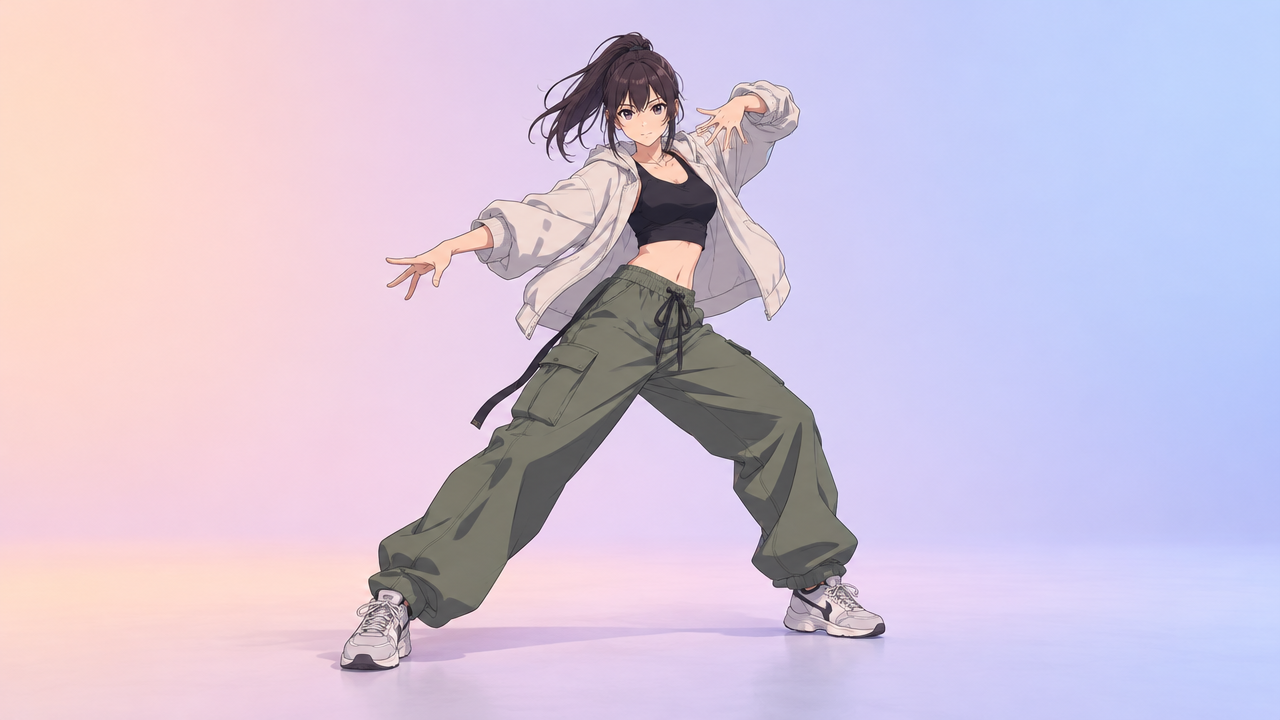
image_url
Prompt
Generate an image-to-video from a single first frame: an anime-style full-body dance performance, the camera first holds a medium-long shot, then slowly orbits to the right while the character completes a spin step, loose multi-layered clothing and hair swaying with the movement, with physically consistent secondary animation, the background remains a soft pastel gradient studio backdrop, smooth and continuous motion, no cuts, no text overlay
Copy the full prompt and adapt it for your own generation.
Tags
Hailuo 2.3 Fast Image-to-Video Prompt Formula Visual Card
Style Prompt Engineering · Motion Graphics · Developer Education
Reference inputs
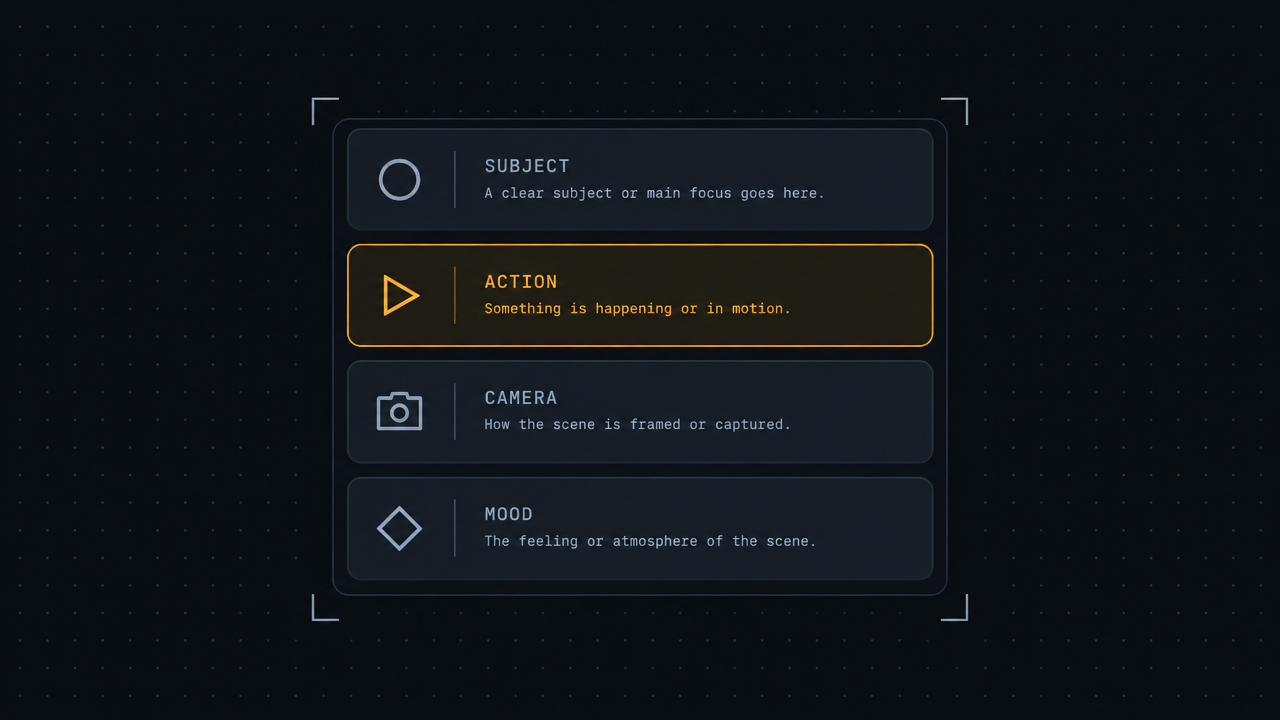
image_url
Prompt
The camera glides slowly and in a controlled manner across a dark, editorial-style infographic card: a subtle push-in combined with a gentle horizontal parallax, the card remains flat and readable throughout, while thin-line brackets and section dividers light up sequentially from top to bottom. Monospace labels and geometric icons come into sharp focus band by band; faint grid lines drift behind the card with a low-amplitude parallax. Lighting is a soft cool key light from the upper left, with warm accent glows sweeping along the highlighted rows. Motion is smooth and mechanical, with no handheld shake, no text distortion, and no camera roll; the typography stays crisp and readable throughout, ending on a stable full-card composition.
Copy the full prompt and adapt it for your own generation.
Tags
From Text to Image: Single-Frame-Driven Scene Storyboard
Style Storyboard · Concept Art · i2v
Reference inputs

image_url
Prompt
A slow cinematic push-in from the static storyboard frame: the sketched text on the paper dissolves into a fully rendered scene, the camera dollies forward at a steady pace, dust particles float in the warm beams of window light, the subject's shoulders rise and fall with calm breathing, clothing and hair sway gently in the faint airflow, a shallow depth of field keeps the paper's foreground edges soft, continuous single shot, no cuts, 24fps cinematic motion, restrained and observational tone.
Copy the full prompt and adapt it for your own generation.
Tags
Camera Movement Visual Notes: Image-to-Video Cinematic Language Demo
Style Camera Movement · Storyboard · Image-to-Video
Reference inputs

image_url
Prompt
Single continuous shot starting from a fixed first frame: the camera slowly and smoothly dollies in along the corridor axis, keeping the subject centered in frame while background parallax gradually deepens; the shot tilts slightly up at the end, revealing ceiling lights. Stable, no handheld shake, cinematic 24fps look, soft morning light streaming in from a side window, slight atmospheric haze, low-saturation teal-and-orange grade, fine grain, no cuts, no text overlays.
Copy the full prompt and adapt it for your own generation.
Tags
Pricing
hailuo-2.3-fast/image-to-video per video
| Specifications | Unit Price |
|---|---|
| 6S | $0.270 |
| 10S | $0.460 |
Positioning Overview
Hailuo 2.3-Fast is the fast image-to-video variant in the MiniMax Hailuo 2.3 series. It accepts a first-frame image and a text prompt to generate a 6-second or 10-second video, with an emphasis on the naturalness of character motion and facial micro-expressions, as well as stable output for anime and other stylized visuals. It is suited to developers who need to quickly test-shoot from a single image, iterate on storyboards, or produce short video assets, and can be integrated through the unified HiAPI.ai API.
Core Highlights
- A lightweight, fast image-to-video variant — the same series also offers a full version and a text-to-video model; Fast focuses on the efficiency of single-image-driven output, making it suitable for early rapid test-shoots and iteration.
- First-frame image directly drives motion — simply provide one jpeg, png, or webp first-frame image along with a prompt to generate continuous moving footage.
- Optional automatic prompt optimization — prompt_optimizer is enabled by default, improving generation results without rewriting the prompt.
- Two duration options: 6 seconds and 10 seconds — switch durations to balance asset length and generation cost, covering short video and storyboard draft needs.
Capability Description
Single-image first-frame video generation: pass in a first-frame image and a text description to output a motion video, directly turning static assets into playable video content.
Text prompt controls the picture: the prompt field supports descriptions up to 2000 characters, used to specify actions, camera shots, and picture content, controlling the generation direction.
Selectable duration: duration offers two options, 6 seconds and 10 seconds, so developers can choose the finished length according to the publishing platform or storyboard structure.
Automatic prompt optimization: prompt_optimizer is enabled by default and can automatically complete and rewrite prompts, reducing the trial-and-error cost of repeated parameter tuning.
Use Cases
- Anime and stylized content creators: single character image + motion prompt — turn illustrations or character art into short video clips with motion, for anime shorts, social platform content, or dynamic posters.
- Short video teams: character image + performance description — generate clips containing dance, body movements, or facial expressions from a character first frame, as finished footage or storyboard drafts.
- Product and commercial promotion: product image + showcase script — turn product stills into dynamic showcase videos, for rapid output of e-commerce detail pages, feed ads, or promotional shorts.
- Creative teams: script visualization test-shoots — quickly generate 6-second or 10-second clips from a single image to validate creative directions, then decide whether to proceed to formal production.
Limitations and Selection Advice
Only single first-frame image driving is supported, with no first-and-last frame control capability; input images must be jpeg, png, or webp, and SVG is not supported. The Fast version only does image-to-video and has no text-to-video path; if you need pure text-to-video generation or full-version picture quality, switch to the same series' text-to-video or full-version image-to-video model. Resolution and generation speed lack official parameter evidence, so it is recommended to run a small-batch test before making a selection.
What's new
View changelog →- New model New model available: hailuo-2.3-fast/image-to-video
Frequently asked questions
View all FAQs →-
Does Hailuo 2.3 Image to Video require an input image?
Yes. hailuo-2.3/image-to-video is an image-to-video route. The image establishes the subject and opening composition; the prompt directs motion, camera, and environmental change.
-
Which durations and resolutions does Hailuo 2.3 Image to Video support?
The current HiAPI contract supports 6s / 10s. Check the page controls and API docs for the current options.
-
How is Hailuo 2.3 Image to Video billed?
Each generated video is billed at the selected duration tier. The page follows the global display unit, while the successful task record contains the final charge.
-
How can I improve subject consistency?
Use a clear, unobstructed source with a complete composition. Describe the main action and camera first, then name the appearance, material, and background relationships that must remain stable. Validate a short clip first.
Create a generation task
https://api.hiapi.ai/v1/tasks Headers
AuthorizationstringRequiredAccount API key. Required on every request. Example: Bearer YOUR_HIAPI_API_KEY. Get your API key
Content-TypestringOptionalThe request body is always parsed as JSON; when sent, only application/json (optionally with charset) is accepted — any other value returns 415. Example: application/json.
Idempotency-KeystringOptionalIdempotency key, up to 255 bytes. Retries with the same key from the same account create the task only once; replays return the original taskId.
On network timeouts or client retries, the same key creates the task only once — no double charges (scope: the API key's account). Use a business-unique identifier as the key (e.g. "order-42"); replays return the original taskId, and keys expire 24 hours after the first request. See the Unified Async API overview for the full scenario matrix.
Body
modelstringRequiredCurrent fixed value: hailuo-2.3-fast/image-to-video
routestringOptionalCurrent fixed value: default
inputobjectRequired
Business parameters for hailuo-2.3-fast/image-to-video and route default — see the parameter table below.
promptstringRequiredminLength 1maxLength 2000Text description for video generation, used to specify the content of the desired generated footage. Takes a string value.
durationstringOptionalDefault: "6"Duration of the generated video in seconds. Takes a numeric value in string form, default 6.
610image_urlstringRequiredURL of the first-frame image; only a single image is supported, in jpeg/png/webp format; SVG is not supported. Takes a string value.
prompt_optimizerbooleanOptionalDefault: trueWhether to automatically optimize the prompt for better generation results. Takes a boolean value, default true.
callbackobjectOptional
Terminal-state notification config. When omitted, no callback is delivered — poll the task yourself. See the callback note below.
Provide callback.url when creating a task and HiAPI POSTs to your service once the task reaches a terminal state — no polling needed. The callback payload mirrors the task detail structure; signature verification, delivery retries and idempotency are documented on the Unified Async API overview page.
urlstringRequiredRequired when callback is present. A POST is sent to this URL once the task reaches a terminal state; must be a valid http(s) URL.
whenstringOptionalDefault: "final"Only final is supported today — notified on both success and fail.
finalstoragestringOptionalDefault: "temp"Artifact storage tier: temp (default, retained about 7 days) or persistent (long-term, billed by size). Insufficient balance or exceeding the storage cap silently downgrades to temp; the effective tier is shown in the task detail response.
temppersistentRequest examples
# Submit an async task; returns a taskId immediately (no waiting for generation)
curl -X POST "https://api.hiapi.ai/v1/tasks" \
  -H "Authorization: Bearer $HIAPI_API_KEY" \
  -H "Content-Type: application/json" \
  -d '{
  "model": "hailuo-2.3-fast/image-to-video",
  "input": {
    "prompt": "…",
    "duration": "6",
    "image_url": "…",
    "prompt_optimizer": true
  }
}'
const res = await fetch("https://api.hiapi.ai/v1/tasks", {
method: "POST",
headers: {
Authorization: `Bearer ${process.env.HIAPI_API_KEY}`,
"Content-Type": "application/json",
},
body: JSON.stringify({
model: "hailuo-2.3-fast/image-to-video",
input: {
"prompt": "…",
"duration": "6",
"image_url": "…",
"prompt_optimizer": true
}
}),
});
const task = await res.json();
// { code: 200, message: "success", data: { taskId } }import os, requests
res = requests.post(
"https://api.hiapi.ai/v1/tasks",
headers={"Authorization": f"Bearer {os.environ['HIAPI_API_KEY']}"},
json={
"model": "hailuo-2.3-fast/image-to-video",
"input": {
"prompt": "…",
"duration": "6",
"image_url": "…",
"prompt_optimizer": True
}
},
)
print(res.json()) # { code, message, data: { taskId } }200 OK
{
  "code": 200,
  "message": "success",
  "data": {
    "taskId": "tk-hiapi-01HZTQ8BX2N3GM3YFK4Z9D7VQR"
  }
}
400 Bad Request
{
  "code": 400,
  "message": "invalid request",
  "data": null,
  "error_code": "INVALID_REQUEST"
}
Get task detail
https://api.hiapi.ai/v1/tasks/:id Response fields
taskIdstringRequiredTask ID, always prefixed with tk-hiapi-.
modelstringRequiredResolved full model name. Tasks submitted with the route parameter return base@route (e.g. gpt-image-2/text-to-image@ext); otherwise identical to the name passed at creation.
routestringOptionalPresent only when the task was submitted with an explicit route parameter; echoes the submitted value.
statusstringRequiredTask status.
queued Queued, not started yet.
handling Being processed.
archiving Processing finished, artifacts being prepared.
success Terminal: completed, artifacts available (output returned).
fail Terminal: failed (error returned).
After submission, check status: success and fail are terminal, everything else is non-terminal. Poll every 1–3 seconds until terminal. On success, download artifacts from output[].url and transfer them before expireAt; pass storage: "persistent" at creation time when long-term retention is needed.
creatednumberRequiredTask creation time (Unix seconds).
completednumberRequiredUnix seconds when the task reached a terminal state; fixed to 0 while not terminal.
outputarrayOptional
Present only when status == success. Artifact list — always an array; a single task may return multiple types at once (e.g. video + first_frame).
Array [ object ]
Array items
urlstringRequiredArtifact URL, directly downloadable.
typestringRequiredCurrent possible values: video, image, audio, first_frame, last_frame, thumbnail; more may be added later.
expireAtnumberRequiredUnix seconds until which the artifact remains accessible; download or transfer before it expires.
errorobjectOptional
Present only when status == fail.
codestringRequiredBusiness error code.
messagestringRequiredError description.
Response examples
Success
{
  "code": 200,
  "message": "success",
  "data": {
    "taskId": "tk-hiapi-01HZTQ8BX2N3GM3YFK4Z9D7VQR",
    "model": "happyhorse-1-0",
    "status": "success",
    "created": 1777282033,
    "completed": 1777282099,
    "output": [
      {
        "url": "https://cdn.hiapi.ai/tasks/.../video.mp4",
        "type": "video",
        "expireAt": 1777886899
      }
    ]
  }
}
Processing (non-terminal)
{
  "code": 200,
  "message": "success",
  "data": {
    "taskId": "tk-hiapi-...",
    "model": "happyhorse-1-0",
    "status": "archiving",
    "created": 1777282033,
    "completed": 0
  }
}
Failed
{
  "code": 200,
  "message": "success",
  "data": {
    "taskId": "tk-hiapi-...",
    "model": "happyhorse-1-0",
    "status": "fail",
    "created": 1777282033,
    "completed": 1777282099,
    "error": {
      "code": "TASK_FAILED",
      "message": "task failed"
    }
  }
}Articles
View all articles →Related Models
View all models →Same Type
-
 Wan 2.6 Flash Alibaba $0.043 /second
-
 Veo 3.1 Lite Google $0.060 /second
-
 HappyHorse 1.1 Alibaba $0.160 /second
-
 Seedance 2.5 ByteDance $0.121 /second
-
 Wan 3.0 Video Alibaba $0.040 /second
-
 HappyHorse 1.0 Alibaba $0.168 /second
-
 Creatify Boreal Creatify $0.015 /second
-
 Grok Imagine 1.5 xAI $0.011 /second
-
 Veo 3.1 Fast Google $0.170 /second
-
 Wan 2.7 Video Alibaba $0.100 /second
-
 Runway Gen 4.5 Runway $0.172 /second
-
 Kling 4.0 Kuaishou $0.330 /second