

Alibaba
HappyHorse 1.1
happyhorse-1.1/reference-to-video
Alibaba video generation model; a single model covers text-to-video, image-to-video, and reference-image-to-video, supports 1080p and 3–15 second clips, and fuses multiple reference images to strengthen character consistency, making it suitable for multi-shot storytelling and e-commerce advertising assets
Try happyhorse-1.1/reference-to-video
Input
Showcases
View all showcasesOutput
videoReference-Image-Driven Storyboard Concept Clip: From Text to Picture
Style Storyboard · Character Consistency · Short Drama
Reference inputs

reference_image
Prompt
A reference-image-to-video shot for short drama storyboards. Use [Image 1] as a fixed character reference: always keep the protagonist's face, hairstyle, and clothing exactly consistent. Shot 1 (0-3 seconds): a wide establishing shot of a rainy night alley, neon signs reflected on the wet asphalt road surface, the character standing sideways at the end of the alley. Shot 2 (3-6 seconds): a slow push-in, the camera moving forward along the alley toward the character, shallow depth of field, with neon light bokeh in the background. Shot 3 (6-8 seconds): a medium close-up, the character turns their head to look at the camera, hair swaying with the movement, white breath visible in the cold air. Smooth continuous camera movement, stable subject identity before and after the cut, natural motion blur, cinematic teal-and-orange color grading, 24fps texture, 16:9 widescreen composition.
Copy the full prompt and adapt it for your own generation.
Tags
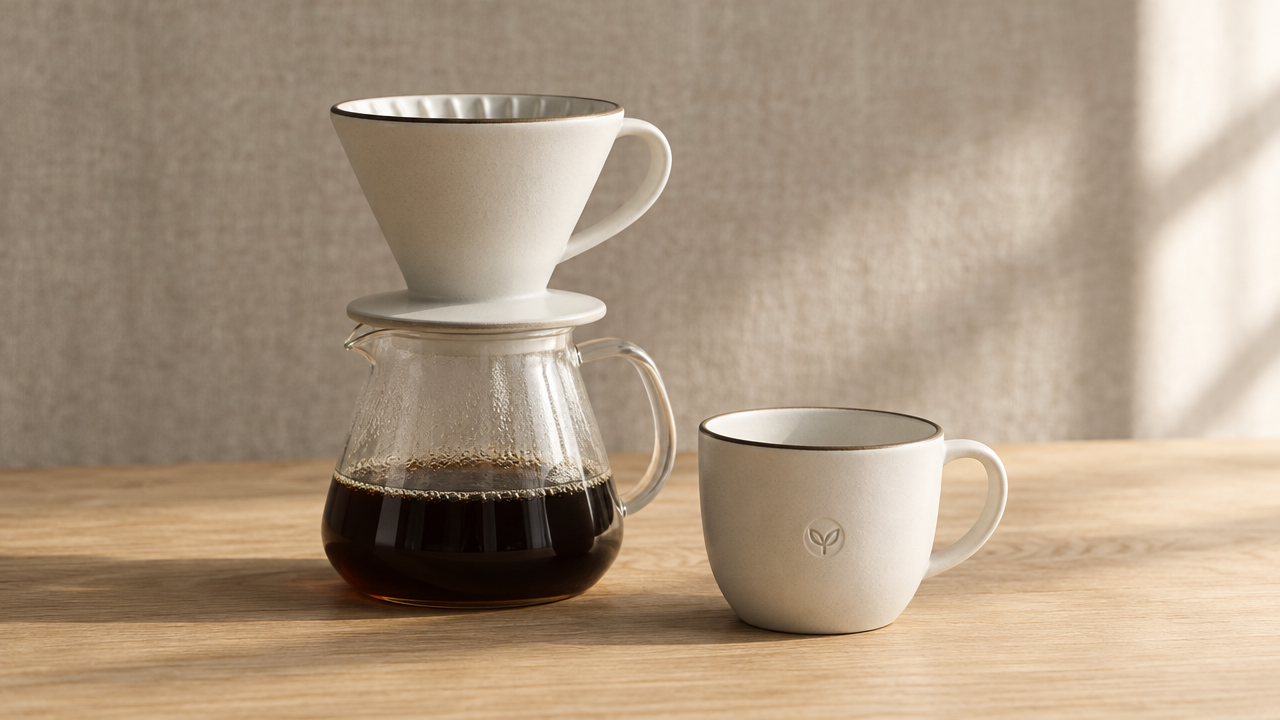
HappyHorse 1.1 Reference-Image-to-Video Capability Illustrated
Style reference-to-video · Character Consistency · Product Demo
Reference inputs
reference_image
Prompt
Product showcase via reference-image-to-video. Using [Image 1] as the precise subject reference, the same set of ceramic pour-over coffee equipment maintains completely consistent shape, glaze color, and logo position throughout the entire shot. Camera movement: at eye-level height, a slow orbiting dolly shot from front-left to front-right, with a slight downward tilt reveal at the midpoint, shallow depth of field, the equipment crisp and sharp, the background softly blurred. Warm morning light from the right side of the camera rakes across the glazed surface, casting a long, soft shadow that gradually shortens as the camera moves; gentle steam rises from the pot. Background: low-saturation linen cloth and a light oak countertop, minimal props. Smooth continuous camera movement, stable temporal consistency, no flicker, no deformation of the reference object, natural color grading, 16:9, 1080p, 5 seconds.
Copy the full prompt and adapt it for your own generation.
Tags
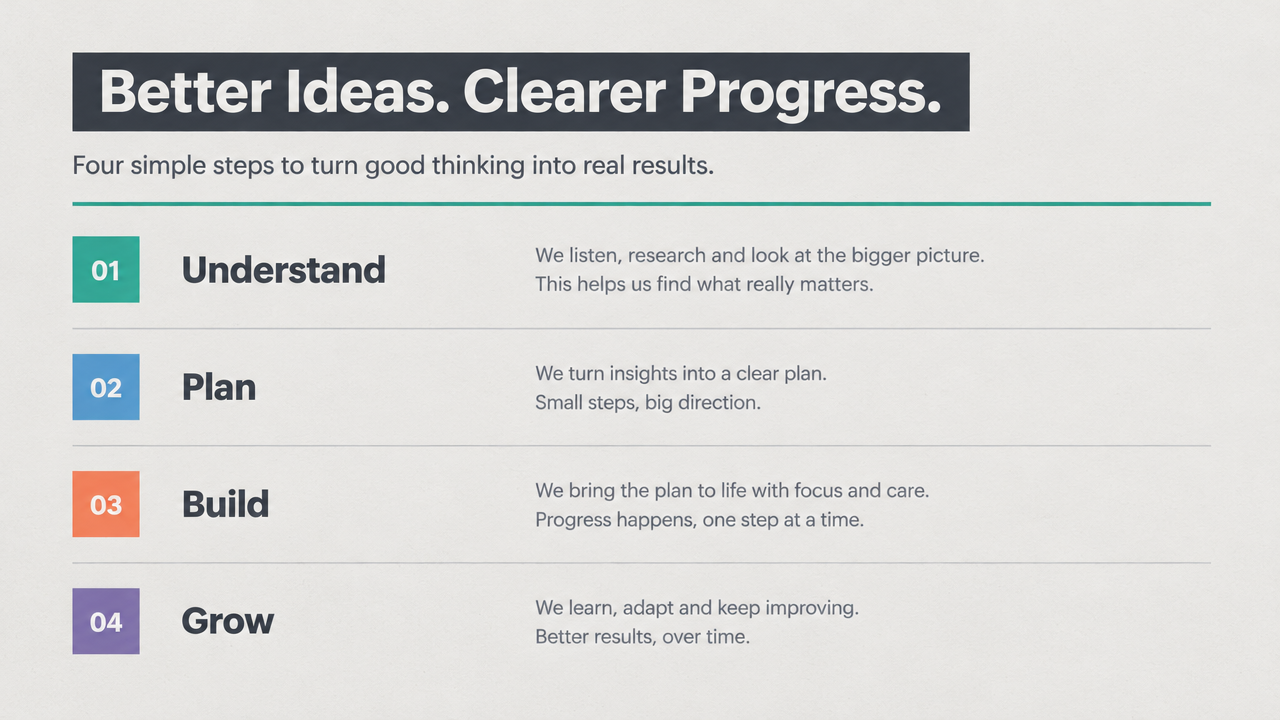
Prompt Formula Card: Structured Approach to Reference-Image-to-Video
Style prompt-design · reference-to-video · Motion Consistency
Reference inputs
reference_image
Prompt
A clean and crisp motion graphics shot, originating from a single reference card. The camera starts from a flat top-down view of the card and slowly pushes in, then tilts slightly to a three-quarter angle, while four labeled rows light up one after another from top to bottom, each sliding in with a 12px displacement and a soft ease-out effect. The text remains sharp and legible, and a thin-line emphasis underline sweeps from left to right beneath the active row. Delicate paper grain texture, soft neutral studio lighting from the upper left, soft ambient occlusion shadows, text undistorted, layout undistorted. Finally freezing on a stable composition with all four rows visible. Steady and restrained pacing, maintaining stable temporal consistency between frames.
Copy the full prompt and adapt it for your own generation.
Tags
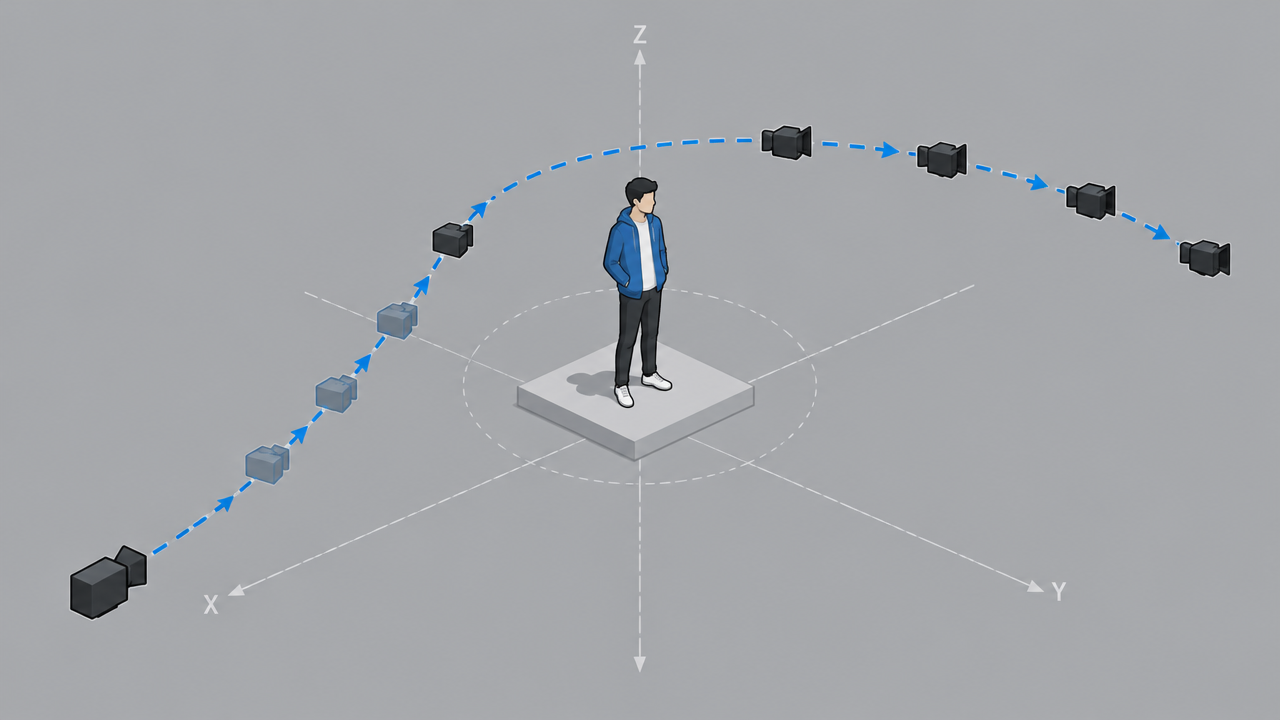
Camera Language Visual Notes: Shot Diagrams for Reference-Image-to-Video
Style Camera Movement · Storyboard · reference-to-video
Reference inputs
reference_image
Prompt
A cinematic camera-movement study shot: the camera starts on a static wide shot of the scene diagram, then slowly and smoothly dollies in along the axis annotated in reference image [Image 1], followed by a gentle lateral tracking move that keeps the subject centered in frame throughout. Steady lateral motion, consistent perspective, minimal camera shake, shallow depth of field with the main subject sharply in focus, soft directional daylight, soft neutral tones. Shot on a 35mm lens, 24fps look, temporal consistency maintained throughout, no text overlays, no cuts, a single continuous shot.
Copy the full prompt and adapt it for your own generation.
Tags
Pricing
happyhorse-1.1/reference-to-video per second
| Specifications | Unit Price |
|---|---|
| 720P | $0.160 |
| 1080P | $0.210 |
Positioning Overview
happyhorse-1.1/reference-to-video is the reference-image-to-video (R2V) line in the Alibaba happyhorse-1.1 series, called through the unified HiAPI.ai interface. It accepts 1 to 9 reference images and a text prompt, fuses the subject features from multiple images to generate a short video of 3 to 15 seconds at 720p or 1080p, and supports multiple aspect ratios such as 16:9, 9:16, and 1:1. This line emphasizes the appearance consistency of subjects and characters across multiple shots, making it suitable for production scenarios that require stable character performance, such as short dramas, e-commerce ads, brand marketing, and CG previsualization.
Core Highlights
- Fusion of up to 9 reference images for stable subject features — You can pass in 1 to 9 reference images at once, and the prompt references them in order as [Image 1], [Image 2], making it easy to keep characters and products visually consistent across multi-shot projects.
- 3 to 15 second single-segment duration, with cost scaling to length — The duration can be set anywhere from 3 to 15 seconds as needed, and billing is by output seconds, so both short trial clips and complete segments can be produced on the same line.
- Dual 720p and 1080p tiers, nine aspect ratios available — Resolution supports 720p and 1080p, with aspect ratios covering 16:9, 9:16, 1:1, 4:5, 21:9, and more, making it easy to deliver directly for the publishing platform.
Capability Description
Multi-reference-image driven generation: Pass in 1 to 9 reference images combined with a text prompt, and the model fuses the subject features from the reference images to generate a video. This is suitable for continuous content production that requires a fixed character or product appearance.
Controllable duration and resolution: The duration of a single video segment can be set between 3 and 15 seconds, and the output resolution can be selected as 720p or 1080p, allowing developers to flexibly control the generation scale and billing basis according to the production stage.
Multi-aspect-ratio adaptation: Supports nine output aspect ratios: 16:9, 9:16, 3:4, 4:3, 4:5, 5:4, 1:1, 9:21, and 21:9. The same reference material can be reused across different placements such as landscape, portrait, and square.
Coordinated audio-video generation: This version improves the coordinated generation of visuals and audio, making the audio-video sync of the output video more accurate and reducing the workload of alignment adjustments in post-production.
Applicable Scenarios
- Short drama teams: character design sheets + storyboard prompts — Use multiple character reference images to maintain appearance consistency, generate each storyboard segment in batches, and edit and splice them into a finished short drama.
- E-commerce operations: multi-angle product images + selling-point copy — Use actual product photos as references to generate dynamic showcase clips, which can be used directly for product detail pages and feed ad creatives.
- Brand marketing: virtual character images + campaign scripts — Fix the virtual character's appearance and generate marketing clips in different aspect ratios according to the script, distributing them to landscape and portrait channels.
- CG previsualization: concept design images + shot descriptions — Quickly turn concept art into dynamic preview clips for early validation of shot rhythm and composition, reducing the trial-and-error cost of formal production.
Limitations and Selection Advice
The maximum duration of a single segment is 15 seconds; longer narratives need to be generated in segments and then spliced. The maximum output is 1080p, so it is not suitable for high-resolution film-grade delivery. It only accepts text and image inputs and does not support video-editing-style inputs or video continuation. Most of this version's improvements over 1.0 come from the provider's description and lack publicly available quantitative benchmarks, so it is recommended to test with your own materials when selecting. Billing is by the second, and long durations or multiple candidate generations will accumulate costs; it is recommended to first validate results with 3 to 5 second short clips. If your needs lean toward purely text-driven cinematic motion performance, you can evaluate the text-to-video line in the same series or other models.
Frequently asked questions
View all FAQs →-
Does HappyHorse 1.1 Reference to Video require an input image?
Yes. happyhorse-1.1/reference-to-video is a reference-to-video route. Reference images constrain subjects, style, and scene details while the prompt directs motion, camera, and environmental change.
-
Which durations and resolutions does HappyHorse 1.1 Reference to Video support?
The current HiAPI contract supports 3–15s at 720p or 1080p. Check the page controls and API docs for the current options.
-
How is HappyHorse 1.1 Reference to Video billed?
Billing follows output duration and the selected tier. The page follows the global display unit, while the successful task record contains the final charge.
-
How can I improve subject consistency?
Use a clear, unobstructed source with a complete composition. Describe the main action and camera first, then name the appearance, material, and background relationships that must remain stable. Validate a short clip first.
Create a generation task
https://api.hiapi.ai/v1/tasks Headers
AuthorizationstringRequiredAccount API key. Required on every request. Example: Bearer YOUR_HIAPI_API_KEY. Get your API key
Content-TypestringOptionalThe request body is always parsed as JSON; when sent, only application/json (optionally with charset) is accepted — any other value returns 415. Example: application/json.
Idempotency-KeystringOptionalIdempotency key, up to 255 bytes. Retries with the same key from the same account create the task only once; replays return the original taskId.
On network timeouts or client retries, the same key creates the task only once — no double charges (scope: the API key's account). Use a business-unique identifier as the key (e.g. "order-42"); replays return the original taskId, and keys expire 24 hours after the first request. See the Unified Async API overview for the full scenario matrix.
Body
modelstringRequiredCurrent fixed value: happyhorse-1.1/reference-to-video
routestringOptionalCurrent fixed value: default
inputobjectRequired
Business parameters for happyhorse-1.1/reference-to-video and route default — see the parameter table below.
promptstringRequiredmaxLength 5000Text prompt describing the desired video content; reference images are cited within the prompt as [Image 1], [Image 2]…, and the numbering order must match the order of the reference_image array.
durationintegerOptionalDefault: 5min 3max 15Duration of the output video in seconds, ranging from 3 to 15; the default is 5 seconds, and the cost increases with the duration.
resolutionstringOptionalDefault: "1080p"Resolution of the output video, defaulting to 1080p; the higher the resolution, the higher the cost.
720p1080paspect_ratiostringOptionalDefault: "16:9"Aspect ratio of the output video, defaulting to 16:9.
16:99:163:44:34:55:41:19:21Show all (1)
21:9reference_imagearrayRequiredminItems 1maxItems 9Array of reference image URLs used to constrain the generated content; 1 to 9 images can be provided; JPEG/PNG/WEBP formats are supported, with each image's shortest side no less than 400px and size no more than 20MB.
Array [ string ]
callbackobjectOptional
Terminal-state notification config. When omitted, no callback is delivered — poll the task yourself. See the callback note below.
Provide callback.url when creating a task and HiAPI POSTs to your service once the task reaches a terminal state — no polling needed. The callback payload mirrors the task detail structure; signature verification, delivery retries and idempotency are documented on the Unified Async API overview page.
urlstringRequiredRequired when callback is present. A POST is sent to this URL once the task reaches a terminal state; must be a valid http(s) URL.
whenstringOptionalDefault: "final"Only final is supported today — notified on both success and fail.
finalstoragestringOptionalDefault: "temp"Artifact storage tier: temp (default, retained about 7 days) or persistent (long-term, billed by size). Insufficient balance or exceeding the storage cap silently downgrades to temp; the effective tier is shown in the task detail response.
temppersistentRequest examples
# Submit an async task; returns a taskId immediately (no waiting for generation)
curl -X POST "https://api.hiapi.ai/v1/tasks" \
  -H "Authorization: Bearer $HIAPI_API_KEY" \
  -H "Content-Type: application/json" \
  -d '{
  "model": "happyhorse-1.1/reference-to-video",
  "input": {
    "prompt": "…",
    "duration": 5,
    "resolution": "1080p",
    "aspect_ratio": "16:9",
    "reference_image": "…"
  }
}'
const res = await fetch("https://api.hiapi.ai/v1/tasks", {
method: "POST",
headers: {
Authorization: `Bearer ${process.env.HIAPI_API_KEY}`,
"Content-Type": "application/json",
},
body: JSON.stringify({
model: "happyhorse-1.1/reference-to-video",
input: {
"prompt": "…",
"duration": 5,
"resolution": "1080p",
"aspect_ratio": "16:9",
"reference_image": "…"
}
}),
});
const task = await res.json();
// { code: 200, message: "success", data: { taskId } }import os, requests
res = requests.post(
"https://api.hiapi.ai/v1/tasks",
headers={"Authorization": f"Bearer {os.environ['HIAPI_API_KEY']}"},
json={
"model": "happyhorse-1.1/reference-to-video",
"input": {
"prompt": "…",
"duration": 5,
"resolution": "1080p",
"aspect_ratio": "16:9",
"reference_image": "…"
}
},
)
print(res.json()) # { code, message, data: { taskId } }200 OK
{
  "code": 200,
  "message": "success",
  "data": {
    "taskId": "tk-hiapi-01HZTQ8BX2N3GM3YFK4Z9D7VQR"
  }
}
400 Bad Request
{
  "code": 400,
  "message": "invalid request",
  "data": null,
  "error_code": "INVALID_REQUEST"
}
Get task detail
https://api.hiapi.ai/v1/tasks/:id Response fields
taskIdstringRequiredTask ID, always prefixed with tk-hiapi-.
modelstringRequiredResolved full model name. Tasks submitted with the route parameter return base@route (e.g. gpt-image-2/text-to-image@ext); otherwise identical to the name passed at creation.
routestringOptionalPresent only when the task was submitted with an explicit route parameter; echoes the submitted value.
statusstringRequiredTask status.
queued Queued, not started yet.
handling Being processed.
archiving Processing finished, artifacts being prepared.
success Terminal: completed, artifacts available (output returned).
fail Terminal: failed (error returned).
After submission, check status: success and fail are terminal, everything else is non-terminal. Poll every 1–3 seconds until terminal. On success, download artifacts from output[].url and transfer them before expireAt; pass storage: "persistent" at creation time when long-term retention is needed.
creatednumberRequiredTask creation time (Unix seconds).
completednumberRequiredUnix seconds when the task reached a terminal state; fixed to 0 while not terminal.
outputarrayOptional
Present only when status == success. Artifact list — always an array; a single task may return multiple types at once (e.g. video + first_frame).
Array [ object ]
Array items
urlstringRequiredArtifact URL, directly downloadable.
typestringRequiredCurrent possible values: video, image, audio, first_frame, last_frame, thumbnail; more may be added later.
expireAtnumberRequiredUnix seconds until which the artifact remains accessible; download or transfer before it expires.
errorobjectOptional
Present only when status == fail.
codestringRequiredBusiness error code.
messagestringRequiredError description.
Response examples
Success
{
  "code": 200,
  "message": "success",
  "data": {
    "taskId": "tk-hiapi-01HZTQ8BX2N3GM3YFK4Z9D7VQR",
    "model": "happyhorse-1-0",
    "status": "success",
    "created": 1777282033,
    "completed": 1777282099,
    "output": [
      {
        "url": "https://cdn.hiapi.ai/tasks/.../video.mp4",
        "type": "video",
        "expireAt": 1777886899
      }
    ]
  }
}
Processing (non-terminal)
{
  "code": 200,
  "message": "success",
  "data": {
    "taskId": "tk-hiapi-...",
    "model": "happyhorse-1-0",
    "status": "archiving",
    "created": 1777282033,
    "completed": 0
  }
}
Failed
{
  "code": 200,
  "message": "success",
  "data": {
    "taskId": "tk-hiapi-...",
    "model": "happyhorse-1-0",
    "status": "fail",
    "created": 1777282033,
    "completed": 1777282099,
    "error": {
      "code": "TASK_FAILED",
      "message": "task failed"
    }
  }
}Articles
View all articles →Related Models
View all models →Same Type
-
 HeyGen Avatar V HeyGen $0.150 /second
-
 Wan 2.7 Video Alibaba $0.100 /second
-
 Wan 2.6 Flash Alibaba $0.043 /second
-
 Seedance 2.5 ByteDance $0.121 /second
-
 Wan 3.0 Video Alibaba $0.040 /second
-
 Hailuo 2.3 MiniMax $0.270 /video
-
 Grok Imagine 1.5 Lite xAI $0.029 /second
-
 PixVerse V6 PixVerse $0.036 /second
-
 HeyGen Avatar IV HeyGen $0.150 /second
-
 Runway Gen 4.5 Runway $0.172 /second
-
 FLUX 3 Max Black Forest Labs $0.061 /second
-
 Grok Imagine 1.5 xAI $0.011 /second
Same Provider
-
 Qwen Image 2.1 Alibaba $0.020 /image
-
 Z-Image Alibaba $0.008 /image
-
 Qwen Image 2.0 Alibaba $0.042 /image
-
 HappyHorse 1.0 Alibaba $0.168 /second
-
 Qwen Image 3.0 Alibaba $0.036 /image
- Wan 3.0 Video Alibaba $0.040 /second
-
 HappyHorse 1.1 Alibaba $0.160 /second
- Wan 2.7 Video Alibaba $0.100 /second
-
 Wan 2.7 Image Alibaba $0.035 /image
- Wan 2.6 Flash Alibaba $0.043 /second
-
 Qwen Audio 3.0 TTS Alibaba $0.030 /1,000 characters