
Imagen 4
imagen-4.0-ultra
Google's text-to-image series, focused on in-image text rendering and complex lighting, offering Fast, Standard, and Ultra tiers that trade off quality against cost
Try imagen-4.0-ultra
Input
Showcases
View all showcasesOutput
image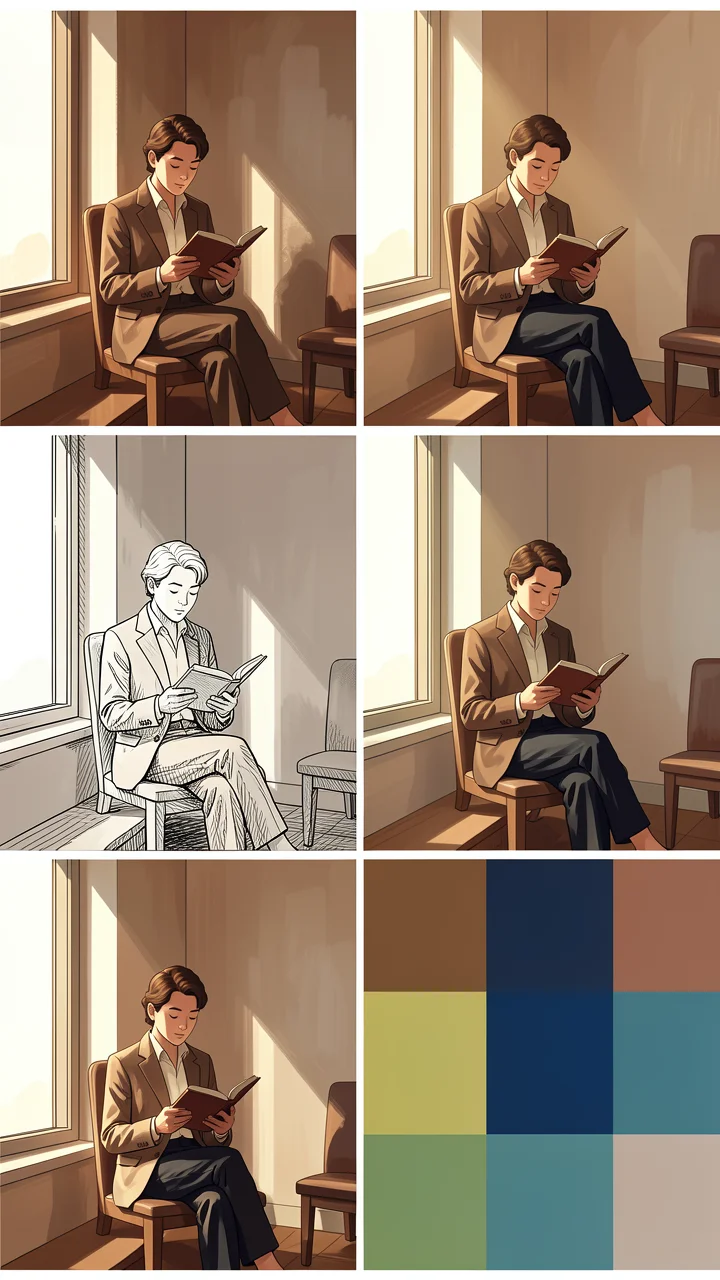
Illustration Style Spectrum: From Realistic Rendering to Flat Composition
Style Illustration · Style Research · Editorial Art
Prompt
A four-stage illustration style spectrum of the same subject: a person reading by a tall window, light from the left, three-quarter medium shot, seated holding a book, minimalist interior furniture. Stage one: painterly realism, visible brushstrokes, warm volumetric light, soft earth tones, gentle shadow transitions. Stage two: semi-realistic illustration, clean rendering, soft rim light, restrained palette with a single accent color. Stage three: decorative line art, fine confident contour lines, hatching for shadows, flat spot colors, poster-like clarity. Stage four: geometric flat illustration, no outlines, hard-edged shapes, limited four-color palette, large areas of negative space. All stages share consistent composition and light direction, no text, no watermark, high detail, 16:9.
Copy the full prompt and adapt it for your own generation.
Tags
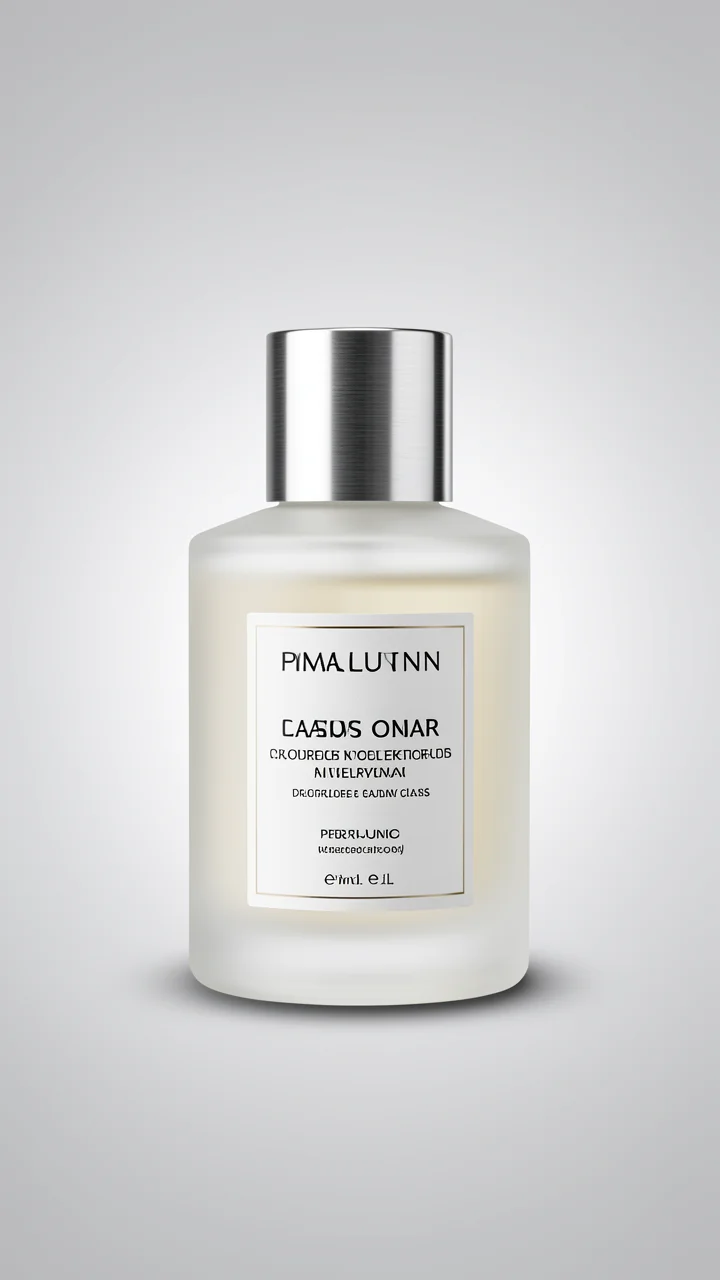
Imagen 4 Ultra E-commerce Product Photography: Perfume Bottle Lighting Practice
Style Product Image · Studio lighting · ecommerce
Prompt
Studio product photography: a matte frosted glass perfume bottle with a brushed metal cap, centered on a seamless light gray gradient background, square 1:1 composition. A single large softbox key light comes from the upper left, with a subtle rim light along the right edge of the bottle to separate it from the background, and a soft oval contact shadow beneath the base. Shot with an equivalent 85mm macro lens, shallow depth of field, the label area sharply in focus, delicate reflections on the metal cap, clean neutral color grading, no props, no text overlay, high-end e-commerce catalog aesthetic.
Copy the full prompt and adapt it for your own generation.
Tags

Imagen 4 Ultra Portrait Lighting Study: Window Light vs. Rembrandt Comparison
Style Portrait & Photography · Lighting Study · Photorealistic
Prompt
Realistic close-up portrait of a woman in her early thirties sitting beside a large indoor window, soft directional daylight coming from the left side of the frame, faint shadows from the window frame falling across her cheek, clearly visible skin texture, natural pores, subtle freckles, no retouching, window reflection visible in her eyes, 85mm prime lens, aperture f/1.8, shallow depth of field, background blurred into a warm interior scene, neutral color palette, slightly cool shadows, head turned three-quarters, calmly looking straight at the camera, 16:9 horizontal composition, subject positioned on the right third, negative space left in the direction of the light source, high detail, magazine editorial photography
Copy the full prompt and adapt it for your own generation.
Tags
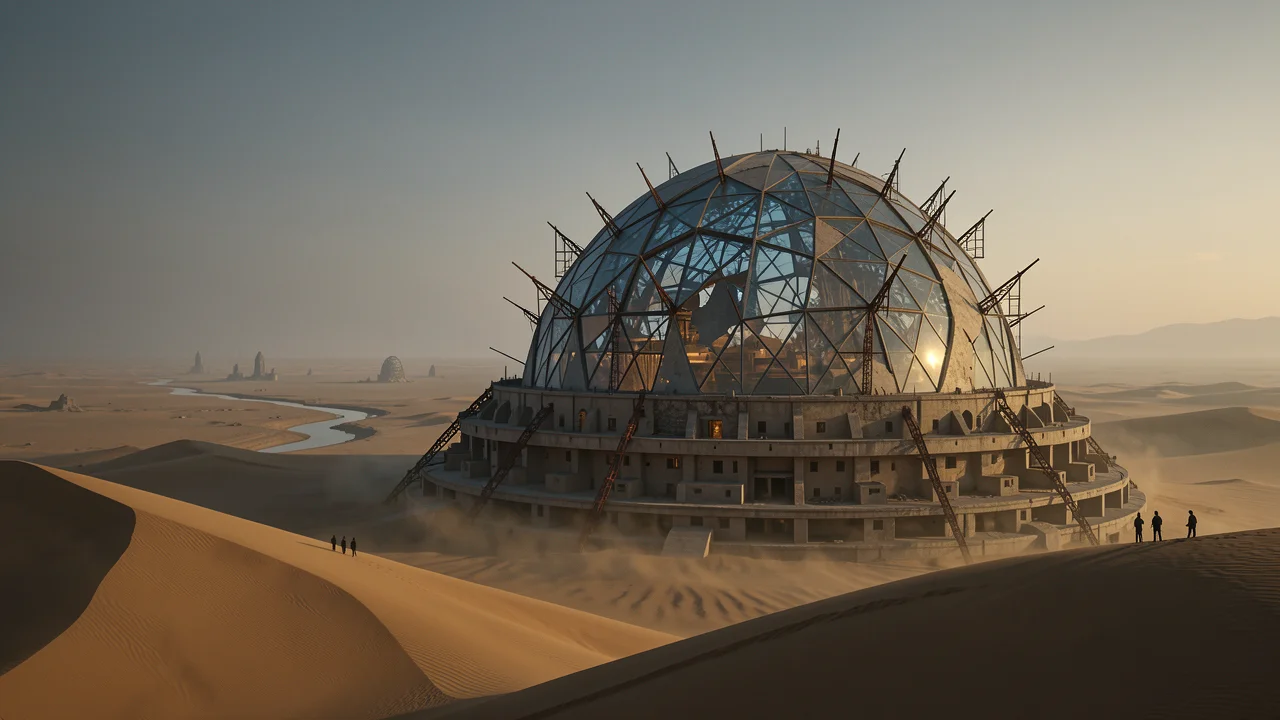
Worldbuilding Concept Art: Dome City Above the Sand Sea
Style Concept Art · Sci-Fi · Worldbuilding
Prompt
Widescreen 16:9 cinematic concept art: at dusk, a colossal dome city rises from an endless sand sea. A richly layered worldbuilding setup: a grid-like dome of glass and concrete, its glass cracked and half-buried beneath the dunes; exposed rusted scaffolding ribs pierce through the shell; terraced adobe dwelling rings spiral up along the dome's base; in the distance, a dried riverbed leaves a faint trace as it stretches toward the horizon; a few tiny silhouetted figures stand on a wind-eroded ridge, conveying the immense sense of scale. Materials appear as weathered concrete, oxidized steel, and sand-abraded glass, with warm interior lights glowing through the cracks. Lighting: low-angle golden-hour side light rakes across the dunes, volumetric dust haze, the dome interior filled with cool blue shadow light, and subtle aerial perspective fading the distant structures. Composition: ultra-wide-angle lens, horizon in the lower third, strong diagonal dune leading lines, the main structure slightly right of center and off-center, with ample negative space and sky above. A production-design render blending painterly quality with photorealistic detail, high detail, dominated by soft ochre and slate gray, with a single warm accent color.
Copy the full prompt and adapt it for your own generation.
Tags
Pricing
imagen-4.0-ultra per image
| Unit Price | $0.090 |
|---|
Overview
imagen-4.0-ultra is the text-to-image model in the Imagen 4 family aimed at high-fidelity output, suited to generation tasks that demand precise prompt adherence, complex scene composition, and legible in-image text. Developers generate images from text prompts through the unified HiAPI.ai interface, with a choice of 1:1, 16:9, 9:16, 3:4, 4:3, or auto aspect ratios, making it the pick for the final-output stage of brand visuals, design drafts, and concept art.
Key Highlights
- Sharper prompt adherence and detail — as the Ultra version, it aligns more strongly with text prompts and produces output closer to the instructions, making it suitable for production-grade image generation.
- Improved in-image text rendering — a marked improvement over previous generations in generating text inside images, making posters and signage-type content more usable.
- Direct output by aspect ratio — the required aspect_ratio supports 1:1, 16:9, 9:16, 3:4, 4:3, and auto, so images fit ad placements without a second crop.
Capabilities
High-fidelity text-to-image: generates photorealistic images from text prompts, suitable for professional brand and design-grade output; prompts have a length limit, so the full intent must be expressed within a limited word count.
Complex composition and lighting: supports generation needs involving complex scene composition and complex lighting, reducing multiple retries and making each call count toward a usable image.
Aspect ratio control: specify the output ratio via the required aspect_ratio, covering square, landscape, portrait, and 3:4 and 4:3 placements to match material specs across channels.
Negative prompt constraints: the optional negative_prompt describes elements to avoid, used to tighten image content and reduce the likelihood of unwanted elements appearing.
Reproducible generation: the optional seed parameter enables reproducible generation, making it easy to fix results during debugging and batch production and to compare the effects of different prompts.
Use Cases
- Brand and marketing teams: product selling-point copy — input brand tone and selling-point descriptions to generate high-fidelity visual assets ready for ad placements and social channels.
- Design teams: text needs for posters and presentations — input layout descriptions containing headline text to produce drafts with clearer in-image text, used for design reference and iteration on posters and presentation materials.
- Concept design: complex composition and lighting descriptions — input scene, camera, and lighting requirements to generate high-fidelity concept images for early-stage visual direction and proposal presentations.
- Development teams: batch image pipelines — call in batches with fixed seeds and ratio parameters to produce finished images with a consistent style, integrating into content production or asset management workflows.
Limitations and Selection Advice
Accepts text input only and does not support image-input editing; prompt length is constrained by the schema limit, so overly long descriptions must be condensed. Although in-image text has improved, it still needs human review before publishing. The Ultra version costs more per image than other versions in the family, so for large batches of drafts it is advisable to screen first with the standard or Fast version and then output finished images with this model; when image editing or image-to-image capabilities are needed, choose another model.
What's new
View changelog →- Feature change Imagen 4 model IDs are now imagen-4.0…
- New model Added Google Imagen 4 image-generation docs
Frequently asked questions
View all FAQs →-
What is Imagen 4 good for?
Everyday product, lifestyle and content images. Describe the subject, scene, material and light to get an image ready for review, for product heroes, campaign drafts and editorial illustrations.
-
Which aspect ratios does Imagen 4 support?
Six: 1:1, 16:9, 9:16, 3:4, 4:3 and auto. aspect_ratio is required; the Playground on this page defaults to 16:9.
-
How long can the prompt be?
Up to 5,000 characters. prompt is required; order it as subject, scene, material, light and text.
-
Can I exclude things I don't want?
Yes, with negative_prompt. It is optional, up to 5,000 characters, and works for extra text, watermarks or a cluttered background.
Create a generation task
https://api.hiapi.ai/v1/tasks Headers
AuthorizationstringRequiredAccount API key. Required on every request. Example: Bearer YOUR_HIAPI_API_KEY. Get your API key
Content-TypestringOptionalThe request body is always parsed as JSON; when sent, only application/json (optionally with charset) is accepted — any other value returns 415. Example: application/json.
Idempotency-KeystringOptionalIdempotency key, up to 255 bytes. Retries with the same key from the same account create the task only once; replays return the original taskId.
On network timeouts or client retries, the same key creates the task only once — no double charges (scope: the API key's account). Use a business-unique identifier as the key (e.g. "order-42"); replays return the original taskId, and keys expire 24 hours after the first request. See the Unified Async API overview for the full scenario matrix.
Body
modelstringRequiredCurrent fixed value: imagen-4.0-ultra
routestringOptionalCurrent fixed value: default
inputobjectRequired
Business parameters for imagen-4.0-ultra and route default — see the parameter table below.
seedstringOptionalmaxLength 500Optional random seed, in string form; passing the same seed reproduces the generation result under the same input.
promptstringRequiredminLength 1maxLength 5000Text description of the image to generate, a string used to specify the visual content.
aspect_ratiostringRequiredAspect ratio of the output image, a string, required.
1:116:99:163:44:3autonegative_promptstringOptionalmaxLength 5000Optional negative prompt, a string used to describe elements you want to avoid in the generated image.
callbackobjectOptional
Terminal-state notification config. When omitted, no callback is delivered — poll the task yourself. See the callback note below.
Provide callback.url when creating a task and HiAPI POSTs to your service once the task reaches a terminal state — no polling needed. The callback payload mirrors the task detail structure; signature verification, delivery retries and idempotency are documented on the Unified Async API overview page.
urlstringRequiredRequired when callback is present. A POST is sent to this URL once the task reaches a terminal state; must be a valid http(s) URL.
whenstringOptionalDefault: "final"Only final is supported today — notified on both success and fail.
finalstoragestringOptionalDefault: "temp"Artifact storage tier: temp (default, retained about 7 days) or persistent (long-term, billed by size). Insufficient balance or exceeding the storage cap silently downgrades to temp; the effective tier is shown in the task detail response.
temppersistentRequest examples
# Submit an async task; returns a taskId immediately (no waiting for generation)
curl -X POST "https://api.hiapi.ai/v1/tasks" \
  -H "Authorization: Bearer $HIAPI_API_KEY" \
  -H "Content-Type: application/json" \
  -d '{
  "model": "imagen-4.0-ultra",
  "input": {
    "prompt": "…",
    "aspect_ratio": "…"
  }
}'
const res = await fetch("https://api.hiapi.ai/v1/tasks", {
method: "POST",
headers: {
Authorization: `Bearer ${process.env.HIAPI_API_KEY}`,
"Content-Type": "application/json",
},
body: JSON.stringify({
model: "imagen-4.0-ultra",
input: {
"prompt": "…",
"aspect_ratio": "…"
}
}),
});
const task = await res.json();
// { code: 200, message: "success", data: { taskId } }import os, requests
res = requests.post(
"https://api.hiapi.ai/v1/tasks",
headers={"Authorization": f"Bearer {os.environ['HIAPI_API_KEY']}"},
json={
"model": "imagen-4.0-ultra",
"input": {
"prompt": "…",
"aspect_ratio": "…"
}
},
)
print(res.json()) # { code, message, data: { taskId } }200 OK
{
  "code": 200,
  "message": "success",
  "data": {
    "taskId": "tk-hiapi-01HZTQ8BX2N3GM3YFK4Z9D7VQR"
  }
}
400 Bad Request
{
  "code": 400,
  "message": "invalid request",
  "data": null,
  "error_code": "INVALID_REQUEST"
}
Get task detail
https://api.hiapi.ai/v1/tasks/:id Response fields
taskIdstringRequiredTask ID, always prefixed with tk-hiapi-.
modelstringRequiredResolved full model name. Tasks submitted with the route parameter return base@route (e.g. gpt-image-2/text-to-image@ext); otherwise identical to the name passed at creation.
routestringOptionalPresent only when the task was submitted with an explicit route parameter; echoes the submitted value.
statusstringRequiredTask status.
queued Queued, not started yet.
handling Being processed.
archiving Processing finished, artifacts being prepared.
success Terminal: completed, artifacts available (output returned).
fail Terminal: failed (error returned).
After submission, check status: success and fail are terminal, everything else is non-terminal. Poll every 1–3 seconds until terminal. On success, download artifacts from output[].url and transfer them before expireAt; pass storage: "persistent" at creation time when long-term retention is needed.
creatednumberRequiredTask creation time (Unix seconds).
completednumberRequiredUnix seconds when the task reached a terminal state; fixed to 0 while not terminal.
outputarrayOptional
Present only when status == success. Artifact list — always an array; a single task may return multiple types at once (e.g. video + first_frame).
Array [ object ]
Array items
urlstringRequiredArtifact URL, directly downloadable.
typestringRequiredCurrent possible values: video, image, audio, first_frame, last_frame, thumbnail; more may be added later.
expireAtnumberRequiredUnix seconds until which the artifact remains accessible; download or transfer before it expires.
errorobjectOptional
Present only when status == fail.
codestringRequiredBusiness error code.
messagestringRequiredError description.
Response examples
Success
{
  "code": 200,
  "message": "success",
  "data": {
    "taskId": "tk-hiapi-01HZTQ8BX2N3GM3YFK4Z9D7VQR",
    "model": "happyhorse-1-0",
    "status": "success",
    "created": 1777282033,
    "completed": 1777282099,
    "output": [
      {
        "url": "https://cdn.hiapi.ai/tasks/.../video.mp4",
        "type": "video",
        "expireAt": 1777886899
      }
    ]
  }
}
Processing (non-terminal)
{
  "code": 200,
  "message": "success",
  "data": {
    "taskId": "tk-hiapi-...",
    "model": "happyhorse-1-0",
    "status": "archiving",
    "created": 1777282033,
    "completed": 0
  }
}
Failed
{
  "code": 200,
  "message": "success",
  "data": {
    "taskId": "tk-hiapi-...",
    "model": "happyhorse-1-0",
    "status": "fail",
    "created": 1777282033,
    "completed": 1777282099,
    "error": {
      "code": "TASK_FAILED",
      "message": "task failed"
    }
  }
}Articles
View all articles →Related Models
View all models →Same Type
-
 Grok Imagine xAI $0.011 /second
-
 Qwen Image 3.0 Alibaba $0.036 /image
-
 Nano Banana Google $0.021 /image
-
 Z-Image Alibaba $0.008 /image
-
 Nano Banana 2 Lite Google $0.033 /image
-
 GPT Image 2 OpenAI $0.007 /image
-
 Muse Image 1.0 Meta $0.015 per task
-
 FASHN Tryon v1.6 FASHN $0.107 /image
-
 Krea 2 Medium Turbo Krea $0.021 /image
-
 Qwen Image 2.1 Alibaba $0.020 /image
-
 FLUX 3 Image Black Forest Labs $0.041 /image
-
 Grok Imagine Image 2.0 xAI $0.052 /image
Same Provider
-
 Veo 3.1 Lite Google $0.060 /second
-
 Veo 3.1 Google $0.290 /second
- Nano Banana 2 Lite Google $0.033 /image
-
 Nano Banana Pro Google $0.057 /image
-
 Lyria 3 Pro Google $0.140 /song
-
 Gemini Omni Google --
-
 Gemini Omni 1.1 Flash Google $0.450 /video
-
 Gemini 3.1 Flash TTS Google --
- Nano Banana Google $0.021 /image
-
 Imagen 4 Google $0.030 /image
-
 Google Virtual Try-On Google $0.107 /image
-
 Nano Banana 2 Google $0.036 /image