

Krea
Krea 2 Medium Turbo
krea-2-medium-turbo
The speed-first distilled and accelerated version in the Krea 2 series, with low per-image billing cost, suitable for rapid iteration and design concept exploration
Try krea-2-medium-turbo
Input
Showcases
View all showcasesOutput
image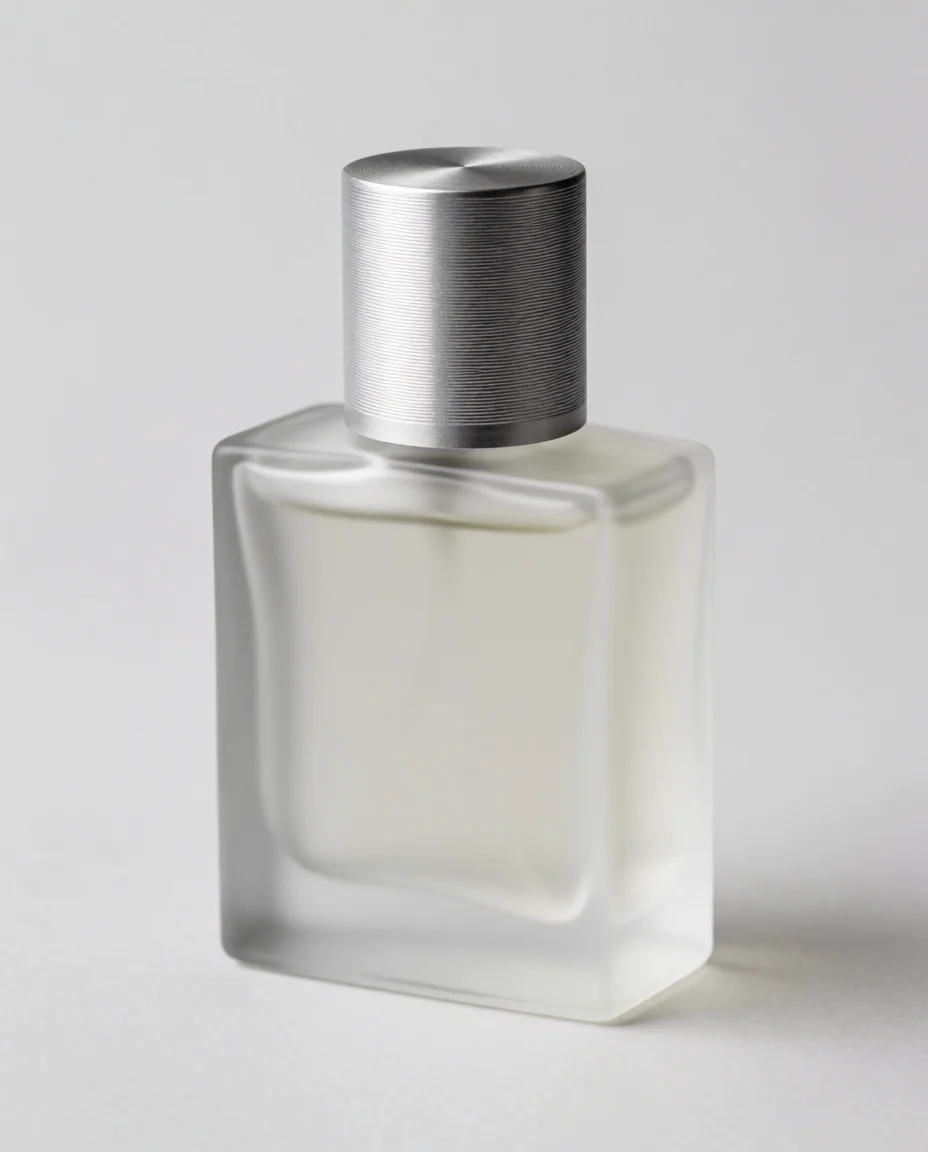
Krea 2 Medium Turbo Product Photography Texture: E-commerce-grade Image Generation Prompt Approach
Style Product Image · ecommerce · Studio lighting
Prompt
E-commerce product photography: a frosted glass perfume bottle with a brushed aluminum cap, centered on a seamless light gray curved background. A soft, large-area softbox key light from the upper left forms a long vertical strip highlight along the glass edge, while a narrow rim light on the right separates the bottle from the background, with a subtle gradient transition toward the bottom and a soft contact shadow beneath the base. Shot with a 100mm macro lens at f/8, eye-level three-quarter angle, clean and minimalist composition, with ample negative space above the product. Neutral tones, high micro-contrast in the knurled metal texture, no studio reflections, no text or logos, catalog-grade sharpness.
Copy the full prompt and adapt it for your own generation.
Tags
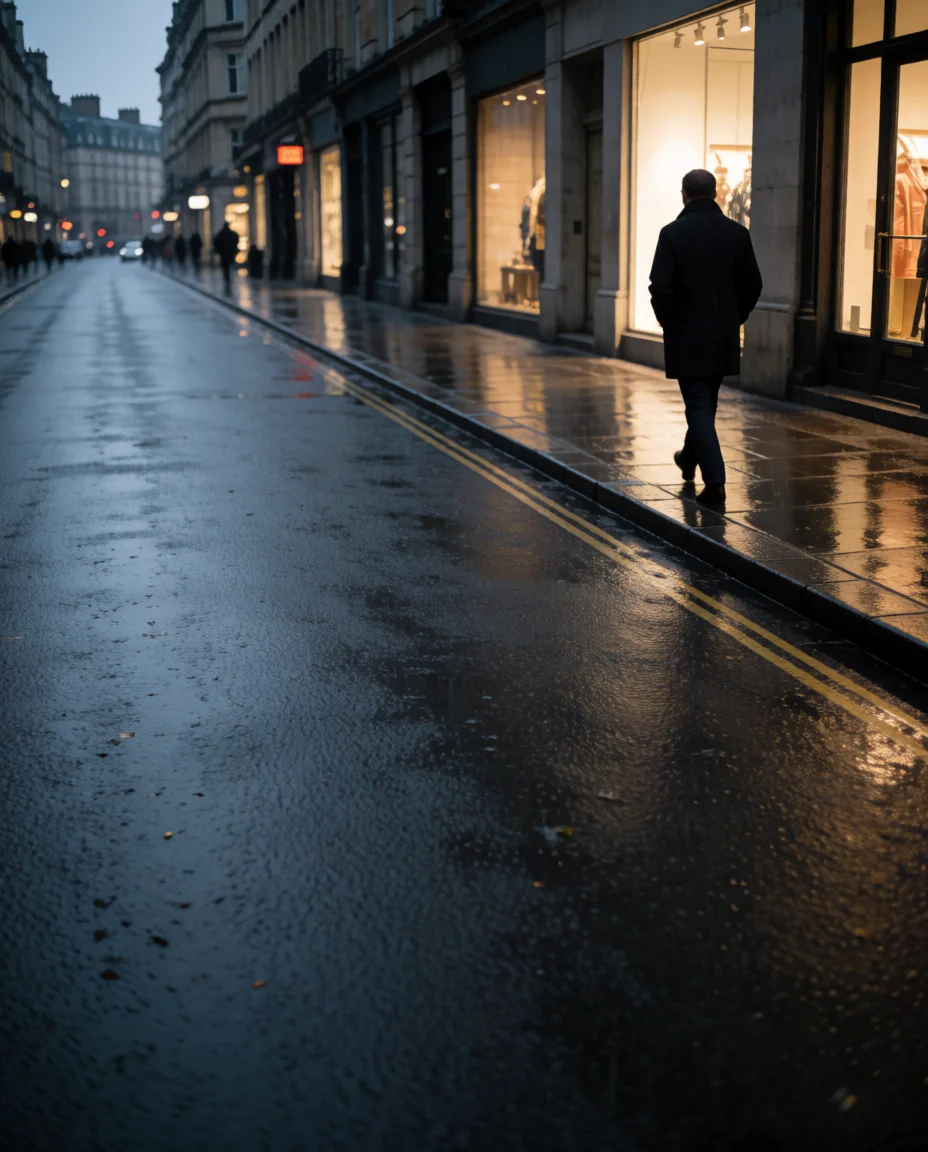
Krea 2 Turbo Style Spectrum: An Illustration Evolution from Realistic to Flat
Style style-spectrum · editorial-illustration · Flat design
Prompt
At dusk, a solitary figure walks along a rain-soaked city street, shot from a low-angle three-quarter view. Painterly semi-realistic rendering: visible brushstrokes in the reflections on the wet asphalt, soft rim light spilling from shop windows, cool blue-violet shadows set against warm amber highlights, atmospheric haze fading into the distance. The composition is a widescreen 16:9 canvas, with the figure placed on the right third and ample negative space left on the left, strong horizontal perspective lines guiding the eye, a restrained color palette, rich detail in the foreground pavement gradually simplified toward the background. Editorial illustration quality, coherent lighting logic, no text, no watermark.
Copy the full prompt and adapt it for your own generation.
Tags
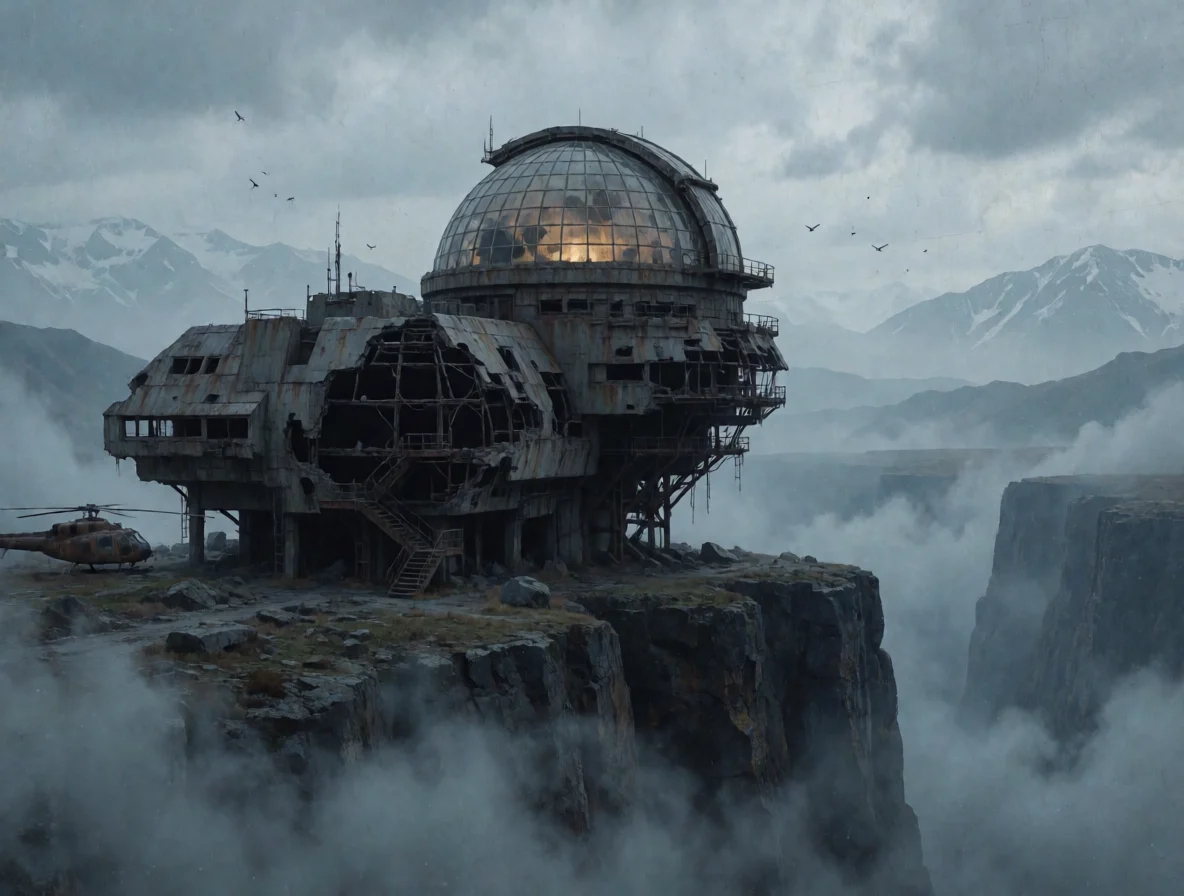
Krea 2 Medium Turbo Scene Concept Art: Visual Exploration of Worldbuilding and Atmosphere
Style Concept Art · Worldbuilding · Cinematic
Prompt
Wide-format cinematic concept art: an abandoned cliffside observatory suspended above a deep ravine, brutalist concrete and rusted steel structure, with an intact glass dome, volumetric fog churning in the canyon, cold gloomy blue-gray daylight, a warm amber interior light glowing from inside the dome as the sole focal contrast, layered mountain silhouettes in the distance, birds reduced to tiny specks to provide a sense of scale, aerial perspective, matte painting texture with fine grain, 16:9 composition, no text, no watermark
Copy the full prompt and adapt it for your own generation.
Tags
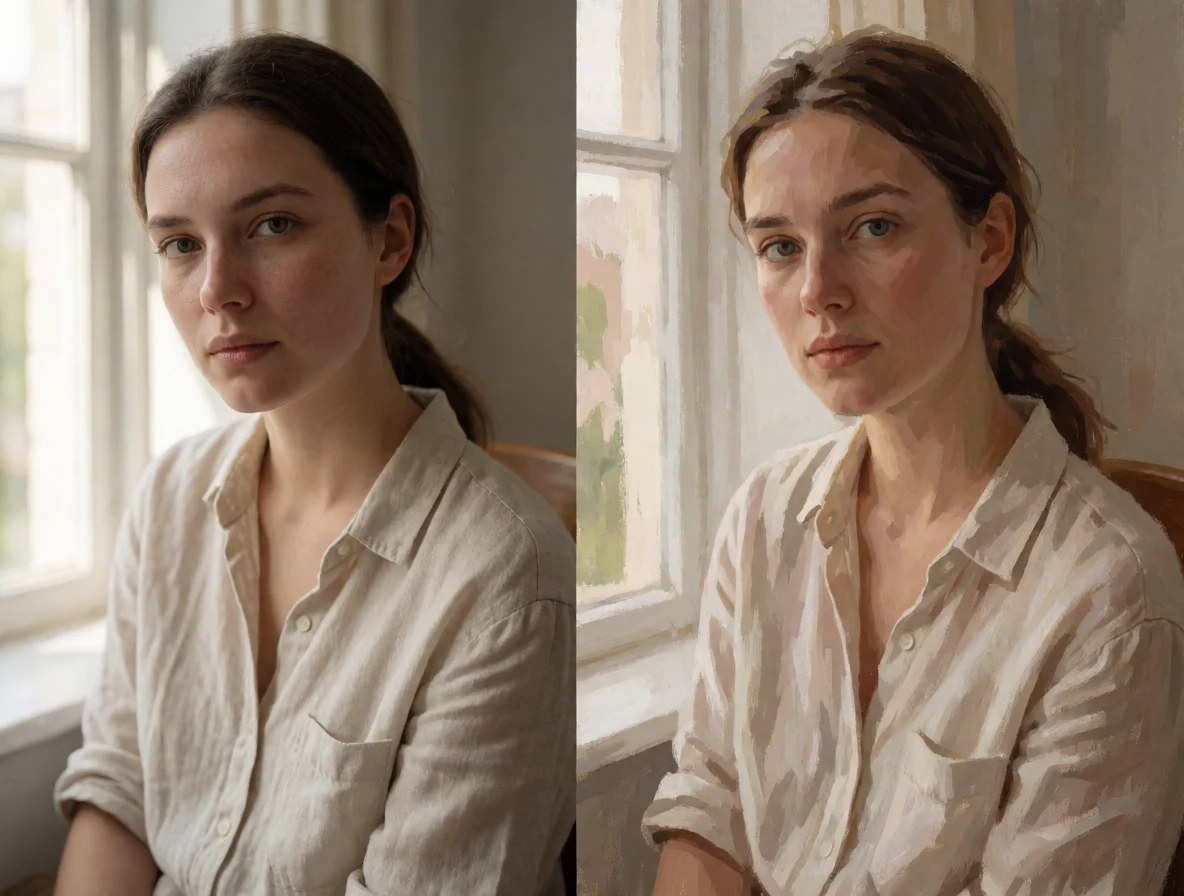
Krea 2 Medium Turbo Portrait Style Reference: Realistic and Artistic Two-Tier Comparison
Style Portrait & Photography · Style Reference · Mood board
Prompt
A diptych-style style reference of the same portrait subject, 4:5 vertical portrait composition. Left panel: a realistic half-body portrait of a young woman in a linen shirt standing by a window, soft natural side light, visible skin texture and fine strands of hair, shallow depth of field, low-saturation warm neutral tones, 50mm lens look. Right panel: the same subject reinterpreted as an expressive painterly illustration, flat color blocks, visible brushstrokes, slightly exaggerated facial features, a decorative background with bold graphic accents, a limited palette dominated by cyan and coral. Clean editorial layout, even lighting across both panels, rich detail, no text.
Copy the full prompt and adapt it for your own generation.
Tags
Pricing
krea-2-medium-turbo per image
| Unit Price | $0.0215 |
|---|
Positioning Overview
krea-2-medium-turbo is Krea's fast image generation model for text-to-image, using a distillation-accelerated sampling process to reduce the cost of generating a single image while preserving the expressiveness of the Krea 2 style system. It is suited to designers and creative developers who need high-frequency trial and error and want to quickly explore visual directions. Through the unified HiAPI.ai interface, it generates images from natural-language prompts, and results can be controlled with aspect ratio, creativity level, and random seed.
Key Highlights
- Accelerated generation for high-frequency iteration — the distilled sampling process shortens the time needed to generate a single image, making it easy to try multiple prompt directions in quick succession.
- Adjustable creative freedom — creativity offers four levels from raw to high, ranging from close adherence to the prompt to free interpretation, making it easy to balance controllability and exploration.
- Composition presets for different channels — supports eight aspect ratios including 1:1, 16:9, 2.35:1, and 9:16, directly matching placement and layout requirements.
- Reproducible results — once a seed is specified, the same prompt and seed can reproduce the same image, making regression and version comparison easy.
Capabilities
Natural-language text-to-image: describe the image in a prompt of up to 5000 characters, and the model outputs the finished image directly, making it suitable for quickly turning creative descriptions into usable visual assets.
Creativity level control: creativity defaults to low, with raw, medium, and high available, so you can switch between strict prompt adherence and freer interpretation as needed.
Aspect ratio and seed control: aspect_ratio covers ratios from square to ultra-wide and portrait, and pairing it with seed fixes the result, making batch generation and repeated verification easy.
Stylized visual coverage: it continues the Krea 2 style system and offers broad room for expression in illustration, graphic styles, and conceptual directions.
Use Cases
- Designers quickly exploring visual directions — enter style and theme prompts to produce batches of candidate drafts with different compositions, for screening directions early in a project.
- Concept sketches for marketing campaigns — generate multiple concept images using campaign themes and layout aspect ratios as input, for internal proposals and direction discussions.
- Illustration and graphic style exploration — use descriptive prompts to experiment with illustration and graphic visual languages and produce style samples that can go directly into an asset library.
- Instant image generation within apps — integrate text-to-image into creative tools or content apps to return image results immediately based on user prompts.
Limitations and Selection Advice
This model is positioned as a speed-first distilled version, better suited to rapid iteration and concept exploration and not recommended as the default choice for high-fidelity final artwork; it supports only text-to-image and does not involve video or image editing. If the workflow requires more stable style consistency and production-grade detail, consider the non-Turbo version in the same series; for scenarios with high resolution requirements, first verify whether the output meets them.
What's new
View changelog →- New model Added krea-2-medium-turbo text-to-image documentation
Frequently asked questions
View all FAQs →-
What is Krea 2 Medium Turbo good for?
It turns a text description into a high-fidelity image very quickly, which suits work that needs fast iteration on prompts, such as concept sketches, social visuals and cinematic frames.
-
Which aspect ratios are supported?
aspect_ratio accepts eight values: 1:1 (default), 4:3, 3:2, 16:9, 2.35:1, 4:5, 2:3 and 9:16.
-
What is the 2.35:1 ratio for?
2.35:1 is a common widescreen cinema ratio, suited to cinematic scenes, website banners and video covers that need an extra-wide frame.
-
What does creativity do?
creativity controls how loosely the prompt is interpreted: raw, low, medium or high. Lower values stay closer to the prompt; higher values are more creative and may drift from it.
Create a generation task
https://api.hiapi.ai/v1/tasks Headers
AuthorizationstringRequiredAccount API key. Required on every request. Example: Bearer YOUR_HIAPI_API_KEY. Get your API key
Content-TypestringOptionalThe request body is always parsed as JSON; when sent, only application/json (optionally with charset) is accepted — any other value returns 415. Example: application/json.
Idempotency-KeystringOptionalIdempotency key, up to 255 bytes. Retries with the same key from the same account create the task only once; replays return the original taskId.
On network timeouts or client retries, the same key creates the task only once — no double charges (scope: the API key's account). Use a business-unique identifier as the key (e.g. "order-42"); replays return the original taskId, and keys expire 24 hours after the first request. See the Unified Async API overview for the full scenario matrix.
Body
modelstringRequiredCurrent fixed value: krea-2-medium-turbo
routestringOptionalCurrent fixed value: default
inputobjectRequired
Business parameters for krea-2-medium-turbo and route default — see the parameter table below.
seedintegerOptionalOptional random seed. The same seed and prompt reproduce the same image; if not provided, the server generates one randomly.
promptstringRequiredminLength 1maxLength 5000A text description of the image to generate, telling the model what to draw.
creativitystringOptionalDefault: "low"Controls how freely the model interprets the prompt: values closer to literal follow the prompt more strictly, while values closer to creative allow more room for improvisation. Default is low.
rawlowmediumhighaspect_ratiostringOptionalDefault: "1:1"The aspect ratio of the output image. Default is 1:1.
1:14:33:216:92.35:14:52:39:16callbackobjectOptional
Terminal-state notification config. When omitted, no callback is delivered — poll the task yourself. See the callback note below.
Provide callback.url when creating a task and HiAPI POSTs to your service once the task reaches a terminal state — no polling needed. The callback payload mirrors the task detail structure; signature verification, delivery retries and idempotency are documented on the Unified Async API overview page.
urlstringRequiredRequired when callback is present. A POST is sent to this URL once the task reaches a terminal state; must be a valid http(s) URL.
whenstringOptionalDefault: "final"Only final is supported today — notified on both success and fail.
finalstoragestringOptionalDefault: "temp"Artifact storage tier: temp (default, retained about 7 days) or persistent (long-term, billed by size). Insufficient balance or exceeding the storage cap silently downgrades to temp; the effective tier is shown in the task detail response.
temppersistentRequest examples
# Submit an async task; returns a taskId immediately (no waiting for generation)
curl -X POST "https://api.hiapi.ai/v1/tasks" \
  -H "Authorization: Bearer $HIAPI_API_KEY" \
  -H "Content-Type: application/json" \
  -d '{
  "model": "krea-2-medium-turbo",
  "input": {
    "prompt": "…",
    "creativity": "low",
    "aspect_ratio": "1:1"
  }
}'
const res = await fetch("https://api.hiapi.ai/v1/tasks", {
method: "POST",
headers: {
Authorization: `Bearer ${process.env.HIAPI_API_KEY}`,
"Content-Type": "application/json",
},
body: JSON.stringify({
model: "krea-2-medium-turbo",
input: {
"prompt": "…",
"creativity": "low",
"aspect_ratio": "1:1"
}
}),
});
const task = await res.json();
// { code: 200, message: "success", data: { taskId } }import os, requests
res = requests.post(
"https://api.hiapi.ai/v1/tasks",
headers={"Authorization": f"Bearer {os.environ['HIAPI_API_KEY']}"},
json={
"model": "krea-2-medium-turbo",
"input": {
"prompt": "…",
"creativity": "low",
"aspect_ratio": "1:1"
}
},
)
print(res.json()) # { code, message, data: { taskId } }200 OK
{
  "code": 200,
  "message": "success",
  "data": {
    "taskId": "tk-hiapi-01HZTQ8BX2N3GM3YFK4Z9D7VQR"
  }
}
400 Bad Request
{
  "code": 400,
  "message": "invalid request",
  "data": null,
  "error_code": "INVALID_REQUEST"
}
Get task detail
https://api.hiapi.ai/v1/tasks/:id Response fields
taskIdstringRequiredTask ID, always prefixed with tk-hiapi-.
modelstringRequiredResolved full model name. Tasks submitted with the route parameter return base@route (e.g. gpt-image-2/text-to-image@ext); otherwise identical to the name passed at creation.
routestringOptionalPresent only when the task was submitted with an explicit route parameter; echoes the submitted value.
statusstringRequiredTask status.
queued Queued, not started yet.
handling Being processed.
archiving Processing finished, artifacts being prepared.
success Terminal: completed, artifacts available (output returned).
fail Terminal: failed (error returned).
After submission, check status: success and fail are terminal, everything else is non-terminal. Poll every 1–3 seconds until terminal. On success, download artifacts from output[].url and transfer them before expireAt; pass storage: "persistent" at creation time when long-term retention is needed.
creatednumberRequiredTask creation time (Unix seconds).
completednumberRequiredUnix seconds when the task reached a terminal state; fixed to 0 while not terminal.
outputarrayOptional
Present only when status == success. Artifact list — always an array; a single task may return multiple types at once (e.g. video + first_frame).
Array [ object ]
Array items
urlstringRequiredArtifact URL, directly downloadable.
typestringRequiredCurrent possible values: video, image, audio, first_frame, last_frame, thumbnail; more may be added later.
expireAtnumberRequiredUnix seconds until which the artifact remains accessible; download or transfer before it expires.
errorobjectOptional
Present only when status == fail.
codestringRequiredBusiness error code.
messagestringRequiredError description.
Response examples
Success
{
  "code": 200,
  "message": "success",
  "data": {
    "taskId": "tk-hiapi-01HZTQ8BX2N3GM3YFK4Z9D7VQR",
    "model": "happyhorse-1-0",
    "status": "success",
    "created": 1777282033,
    "completed": 1777282099,
    "output": [
      {
        "url": "https://cdn.hiapi.ai/tasks/.../video.mp4",
        "type": "video",
        "expireAt": 1777886899
      }
    ]
  }
}
Processing (non-terminal)
{
  "code": 200,
  "message": "success",
  "data": {
    "taskId": "tk-hiapi-...",
    "model": "happyhorse-1-0",
    "status": "archiving",
    "created": 1777282033,
    "completed": 0
  }
}
Failed
{
  "code": 200,
  "message": "success",
  "data": {
    "taskId": "tk-hiapi-...",
    "model": "happyhorse-1-0",
    "status": "fail",
    "created": 1777282033,
    "completed": 1777282099,
    "error": {
      "code": "TASK_FAILED",
      "message": "task failed"
    }
  }
}Articles
View all articles →Related Models
View all models →Same Type
-
 Recraft Creative Upscale Recraft $0.357 /image
-
 FLUX 3 Image Black Forest Labs $0.041 /image
-
 Seedream 4.5 ByteDance $0.045 /image
-
 Nano Banana Google $0.021 /image
-
 FIBO 1.5 Bria $0.058 /image
-
 Krea 3 Krea $0.036 /image
-
 Recraft V4.1 Recraft $0.010 /image
-
 Qwen Image 3.0 Alibaba $0.036 /image
-
 FASHN Tryon v1.6 FASHN $0.107 /image
-
 Grok Imagine Image 2.0 xAI $0.052 /image
-
 FLUX.1 Fill Pro Black Forest Labs $0.071 /image
-
 Ideogram V3 Character Ideogram $0.090 /image