

Lightricks
LTX 2.5 Fast
ltx-2.5-fast/image-to-video
Lightricks' accelerated video generation model supports text-to-video and image-to-video, generating visuals and audio in sync, ideal for rapid output and prototype validation
Try ltx-2.5-fast/image-to-video
Input
Showcases
View all showcasesOutput
videoFrom Text to Frame: A Scene Storyboard Demo of First-and-Last-Frame Interpolation
Style Storyboard · Camera Movement · Cinematic
Reference inputs

image_urls

image_urls
Prompt
Perform an image-to-video transition between the two storyboard frames. Camera: slowly push in from a medium-long shot to a medium shot, with slight parallax as the camera drifts to the right, accompanied by a subtle handheld breathing feel. Motion: the subject turns from a three-quarter back view toward the camera, the coat fabric sways with the movement, and ambient dust floats in the light. Lighting: warm low-angle window light rakes across the room, soft volumetric fog, and exposure gradually stabilizes from the first frame to the last. Atmosphere: quiet, cinematic, restrained. Continuity: keep the subject's identity, clothing, and set dressing consistent throughout the shot; ensure the transition is smooth and physically plausible, and end precisely on the composition of the last frame.
Copy the full prompt and adapt it for your own generation.
Tags
LTX-2.5 Prompt Formula Card: A Visual Guide to Image-to-Video Craft
Style Motion Graphics · Explanation · Prompt Engineering
Reference inputs
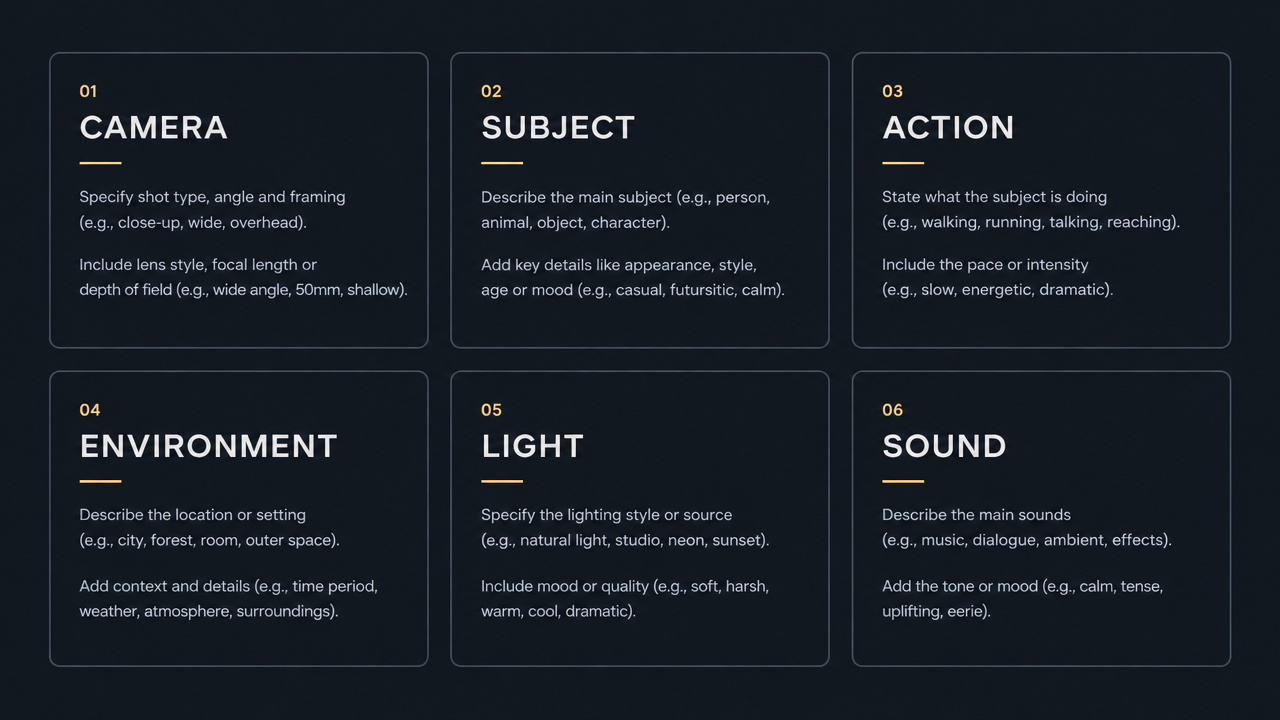
image_urls
Prompt
A minimalist dark-UI-style reference card slowly comes to life: static typographic blocks labeled camera, subject, action, environment, light, and sound are arranged on a deep charcoal-gray canvas in a tidy grid, accented by thin decorative lines. The camera performs a slow, smooth push-in with a subtle lateral drift, sweeping across each block in reading order; small underline accents gradually light up; finally the camera pulls back slightly to reveal the full poster layout. The text remains crisp and legible throughout, with no distortion and no letterform warping; motion is restrained, soft studio lighting leaves a faint glow on the accent lines, and the overall tone is cinematic yet informative.
Copy the full prompt and adapt it for your own generation.
Tags
LTX-2.5 Fast Camera Language Notes: Image-to-Video Demos of Dolly-In, Pan, and Orbit
Style Camera Movement · Storyboard · Reference shot
Reference inputs

image_urls
Prompt
A set of reference shots demonstrating camera language from a fixed first frame: a wide-angle architectural interior with a lone human figure at the center, concrete columns, and diffused daylight. Each variant performs a single, clean camera move—a slow push-in, a lateral pan, an orbiting arc, and a vertical crane move—maintaining a steady, mechanical rhythm, with visible parallax between foreground columns and background. Natural perspective, slight motion blur, soft neutral color grading, no cuts, no text overlays, documentary test-footage aesthetic.
Copy the full prompt and adapt it for your own generation.
Tags
Pricing
ltx-2.5-fast/image-to-video per second
| Specifications | Unit Price |
|---|---|
| 1080P | $0.086 |
Overview
ltx-2.5-fast/image-to-video is a fast image-to-video model from Lightricks that generates video clips with synchronized audio starting from a still image. It supports first-frame/last-frame interpolation and can be combined as needed across 2–20 second durations, 720p or 1080p resolutions, and landscape or portrait orientations, making it suitable for developers who need to quickly validate shot direction or produce short video assets in batches.
Key Highlights
- First-frame/last-frame interpolation controls shot transitions — you can pass in a first-frame image and then add a last-frame image, letting the model generate a smooth transition between the two points to lock down the starting and ending compositions.
- Video and native audio generated in sync — by default, native audio is produced together with the visuals, reducing the post-production work of aligning audio and video.
- Flexible combinations of duration and aspect ratio — supports 2–20 seconds, 720p or 1080p, and landscape or portrait, so you can quickly switch output specs by distribution channel.
Capabilities
Image-to-video and first-frame/last-frame interpolation: Generates dynamic video based on a single first-frame image; after adding a second image as the last frame, the model interpolates a transition between the start and end, making it suitable for shots that require precise control over the opening and closing frames.
Parametrized duration and aspect ratio: Duration can be selected in even-second increments from 2 to 20 seconds, resolution supports 720p and 1080p, and aspect ratio supports 16:9 and 9:16, so a single call can output landscape or portrait assets for the target platform.
Synchronized audio-video generation: The generate_audio parameter controls whether native audio is produced in sync when generating video; it is enabled by default and is suitable for scenarios that need a finished clip with sound directly.
Prompts describe scenes and camera movement: The prompt field accepts up to 5000 characters and can describe the scene, motion, camera, and sound at the same time, making the generated result closer to the creator's intended shot.
Use Cases
- Developers doing rapid prototype validation — use a concept image plus a short prompt to quickly generate a short clip, testing shot direction and style at low cost before deciding whether to move into refined production.
- Batch asset production for social media and advertising — generate 2–20 second clips with audio in 9:16 portrait and 16:9 landscape respectively, for short-video distribution or as batch options for ad assets.
- Producing first-frame/last-frame transition shots — provide two images, a first frame and a last frame, to generate the in-between transition animation, for use in transitions, product showcases, or storyboard shots that need locked start and end compositions.
Limitations and Selection Advice
This model is positioned as a speed-optimized version; when the duration exceeds 10 seconds, it only supports 720p or 1080p, and the frame rate is limited to 24/25 FPS. Extra-long durations and high resolution cannot be satisfied at the same time, so you need to trade off between duration and resolution according to the scenario. If you need output with longer duration or higher frame rate, you should evaluate other versions in the same series. The input must include at least one first-frame image; for text-only video generation scenarios, use the text-to-video pipeline.
Frequently asked questions
View all FAQs →-
Which resolutions does LTX 2.5 Fast support?
720p and 1080p, with 720p as the default, for both text-to-video and image-to-video.
-
How long can a clip be?
2 to 20 seconds: 2, 3, 4, 5, 6, 8, 10, 12, 14, 16, 18 or 20, with 6 as the default.
-
Does it support vertical video?
Yes. Set aspect_ratio to 9:16 for vertical output; the default is 16:9 landscape.
-
What is native audio, and does it cost extra?
With generate_audio on (the default) the model also creates ambience, effects or music. Turning it off gives a silent clip at the same price.
Create a generation task
https://api.hiapi.ai/v1/tasks Headers
AuthorizationstringRequiredAccount API key. Required on every request. Example: Bearer YOUR_HIAPI_API_KEY. Get your API key
Content-TypestringOptionalThe request body is always parsed as JSON; when sent, only application/json (optionally with charset) is accepted — any other value returns 415. Example: application/json.
Idempotency-KeystringOptionalIdempotency key, up to 255 bytes. Retries with the same key from the same account create the task only once; replays return the original taskId.
On network timeouts or client retries, the same key creates the task only once — no double charges (scope: the API key's account). Use a business-unique identifier as the key (e.g. "order-42"); replays return the original taskId, and keys expire 24 hours after the first request. See the Unified Async API overview for the full scenario matrix.
Body
modelstringRequiredCurrent fixed value: ltx-2.5-fast/image-to-video
routestringOptionalCurrent fixed value: default
inputobjectRequired
Business parameters for ltx-2.5-fast/image-to-video and route default — see the parameter table below.
promptstringRequiredminLength 1maxLength 5000Text prompt describing the scene, motion, camera, and audio of the video. Value is a string.
durationintegerOptionalDefault: 6min 2max 20Video duration in seconds. Value is an integer, default 6.
2345681012Show all (4)
14161820image_urlsarrayRequiredminItems 1maxItems 2Array of first-frame and last-frame image URLs: the first URL is the first frame, and when a second URL is appended it is used as the last frame. Supports jpeg, png, and webp formats.
Array [ string ]
resolutionstringOptionalDefault: "720p"Resolution of the output video. Takes a string, default 720p.
720p1080paspect_ratiostringOptionalDefault: "16:9"Aspect ratio of the output image, used to select landscape or portrait output. Takes a string, default 16:9.
16:99:16generate_audiobooleanOptionalDefault: trueWhether to generate native audio while generating the video. Takes a boolean value, default true.
callbackobjectOptional
Terminal-state notification config. When omitted, no callback is delivered — poll the task yourself. See the callback note below.
Provide callback.url when creating a task and HiAPI POSTs to your service once the task reaches a terminal state — no polling needed. The callback payload mirrors the task detail structure; signature verification, delivery retries and idempotency are documented on the Unified Async API overview page.
urlstringRequiredRequired when callback is present. A POST is sent to this URL once the task reaches a terminal state; must be a valid http(s) URL.
whenstringOptionalDefault: "final"Only final is supported today — notified on both success and fail.
finalstoragestringOptionalDefault: "temp"Artifact storage tier: temp (default, retained about 7 days) or persistent (long-term, billed by size). Insufficient balance or exceeding the storage cap silently downgrades to temp; the effective tier is shown in the task detail response.
temppersistentRequest examples
# Submit an async task; returns a taskId immediately (no waiting for generation)
curl -X POST "https://api.hiapi.ai/v1/tasks" \
  -H "Authorization: Bearer $HIAPI_API_KEY" \
  -H "Content-Type: application/json" \
  -d '{
  "model": "ltx-2.5-fast/image-to-video",
  "input": {
    "prompt": "…",
    "duration": 6,
    "image_urls": "…",
    "resolution": "720p",
    "aspect_ratio": "16:9",
    "generate_audio": true
  }
}'
const res = await fetch("https://api.hiapi.ai/v1/tasks", {
method: "POST",
headers: {
Authorization: `Bearer ${process.env.HIAPI_API_KEY}`,
"Content-Type": "application/json",
},
body: JSON.stringify({
model: "ltx-2.5-fast/image-to-video",
input: {
"prompt": "…",
"duration": 6,
"image_urls": "…",
"resolution": "720p",
"aspect_ratio": "16:9",
"generate_audio": true
}
}),
});
const task = await res.json();
// { code: 200, message: "success", data: { taskId } }import os, requests
res = requests.post(
"https://api.hiapi.ai/v1/tasks",
headers={"Authorization": f"Bearer {os.environ['HIAPI_API_KEY']}"},
json={
"model": "ltx-2.5-fast/image-to-video",
"input": {
"prompt": "…",
"duration": 6,
"image_urls": "…",
"resolution": "720p",
"aspect_ratio": "16:9",
"generate_audio": True
}
},
)
print(res.json()) # { code, message, data: { taskId } }200 OK
{
  "code": 200,
  "message": "success",
  "data": {
    "taskId": "tk-hiapi-01HZTQ8BX2N3GM3YFK4Z9D7VQR"
  }
}
400 Bad Request
{
  "code": 400,
  "message": "invalid request",
  "data": null,
  "error_code": "INVALID_REQUEST"
}
Get task detail
https://api.hiapi.ai/v1/tasks/:id Response fields
taskIdstringRequiredTask ID, always prefixed with tk-hiapi-.
modelstringRequiredResolved full model name. Tasks submitted with the route parameter return base@route (e.g. gpt-image-2/text-to-image@ext); otherwise identical to the name passed at creation.
routestringOptionalPresent only when the task was submitted with an explicit route parameter; echoes the submitted value.
statusstringRequiredTask status.
queued Queued, not started yet.
handling Being processed.
archiving Processing finished, artifacts being prepared.
success Terminal: completed, artifacts available (output returned).
fail Terminal: failed (error returned).
After submission, check status: success and fail are terminal, everything else is non-terminal. Poll every 1–3 seconds until terminal. On success, download artifacts from output[].url and transfer them before expireAt; pass storage: "persistent" at creation time when long-term retention is needed.
creatednumberRequiredTask creation time (Unix seconds).
completednumberRequiredUnix seconds when the task reached a terminal state; fixed to 0 while not terminal.
outputarrayOptional
Present only when status == success. Artifact list — always an array; a single task may return multiple types at once (e.g. video + first_frame).
Array [ object ]
Array items
urlstringRequiredArtifact URL, directly downloadable.
typestringRequiredCurrent possible values: video, image, audio, first_frame, last_frame, thumbnail; more may be added later.
expireAtnumberRequiredUnix seconds until which the artifact remains accessible; download or transfer before it expires.
errorobjectOptional
Present only when status == fail.
codestringRequiredBusiness error code.
messagestringRequiredError description.
Response examples
Success
{
  "code": 200,
  "message": "success",
  "data": {
    "taskId": "tk-hiapi-01HZTQ8BX2N3GM3YFK4Z9D7VQR",
    "model": "happyhorse-1-0",
    "status": "success",
    "created": 1777282033,
    "completed": 1777282099,
    "output": [
      {
        "url": "https://cdn.hiapi.ai/tasks/.../video.mp4",
        "type": "video",
        "expireAt": 1777886899
      }
    ]
  }
}
Processing (non-terminal)
{
  "code": 200,
  "message": "success",
  "data": {
    "taskId": "tk-hiapi-...",
    "model": "happyhorse-1-0",
    "status": "archiving",
    "created": 1777282033,
    "completed": 0
  }
}
Failed
{
  "code": 200,
  "message": "success",
  "data": {
    "taskId": "tk-hiapi-...",
    "model": "happyhorse-1-0",
    "status": "fail",
    "created": 1777282033,
    "completed": 1777282099,
    "error": {
      "code": "TASK_FAILED",
      "message": "task failed"
    }
  }
}Articles
View all articles →Related Models
View all models →Same Type
-
 HeyGen Avatar IV HeyGen $0.150 /second
-
 Wan 3.0 Video Alibaba $0.040 /second
-
 Grok Imagine 1.5 xAI $0.011 /second
-
 Kandinsky 6.0 Pro $1.93 /video
-
 Wan 2.6 Flash Alibaba $0.043 /second
-
 Runway Gen 4.5 Runway $0.172 /second
-
 MiniMax H3 MiniMax $0.072 /second
-
 Seedance 2.5 ByteDance $0.121 /second
-
 Kling 3.0 Turbo Kuaishou $0.130 /second
-
 HappyHorse 1.0 Alibaba $0.168 /second
-
 Hailuo 2.3 MiniMax $0.270 /video
-
 Vidu Q3 Vidu $0.149 /second