

Alibaba
Qwen Image 3.0
qwen-image-3.0-pro/image-to-image
Alibaba's third-generation image generation and editing model, skilled at dense layout and multilingual text rendering under long prompts, and supports reference-image editing
Try qwen-image-3.0-pro/image-to-image
Input
Showcases
View all showcasesOutput
image
Worldbuilding Scene Concept Art: Reference-Image-Driven Atmosphere Iteration
Style Concept Art · Worldbuilding · Cinematic
Reference inputs
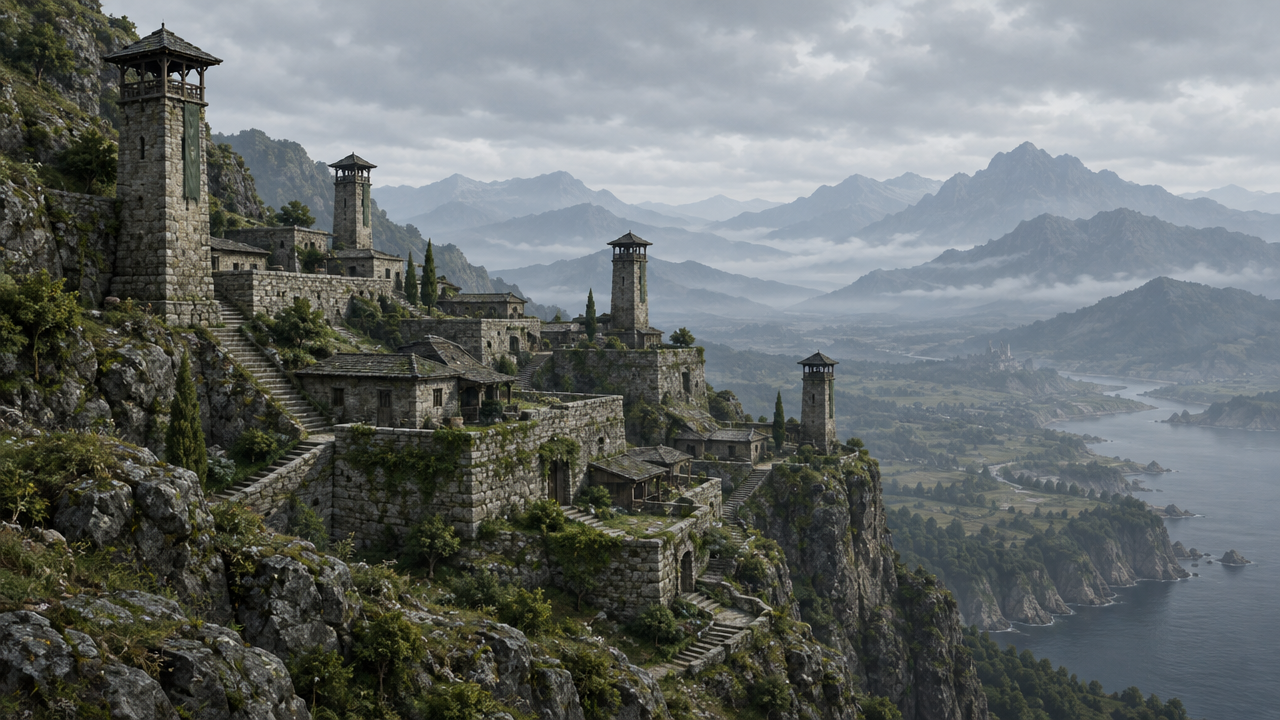
image_urls
Prompt
A 16:9 atmospheric environment concept art piece, based on a reference scene: a coastal cliffside settlement composed of layered stone terraces and slender watchtowers, with its spatial layout, silhouette, and camera framing kept completely unchanged, while the atmosphere is recolored to deep twilight, with low-angle golden rim light, drifting sea mist, and cold blue shadows filling the valley below. Weathered masonry, wet rock textures, sparse wind-bent vegetation, and distant layered mountains fading into thin mist. Painterly production art rendering, with fine surface detail, controlled value structure, a single dominant light source, subtle aerial perspective, and a clean, clear sky to ensure readability. No text, no logos, no UI overlays.
Copy the full prompt and adapt it for your own generation.
Tags
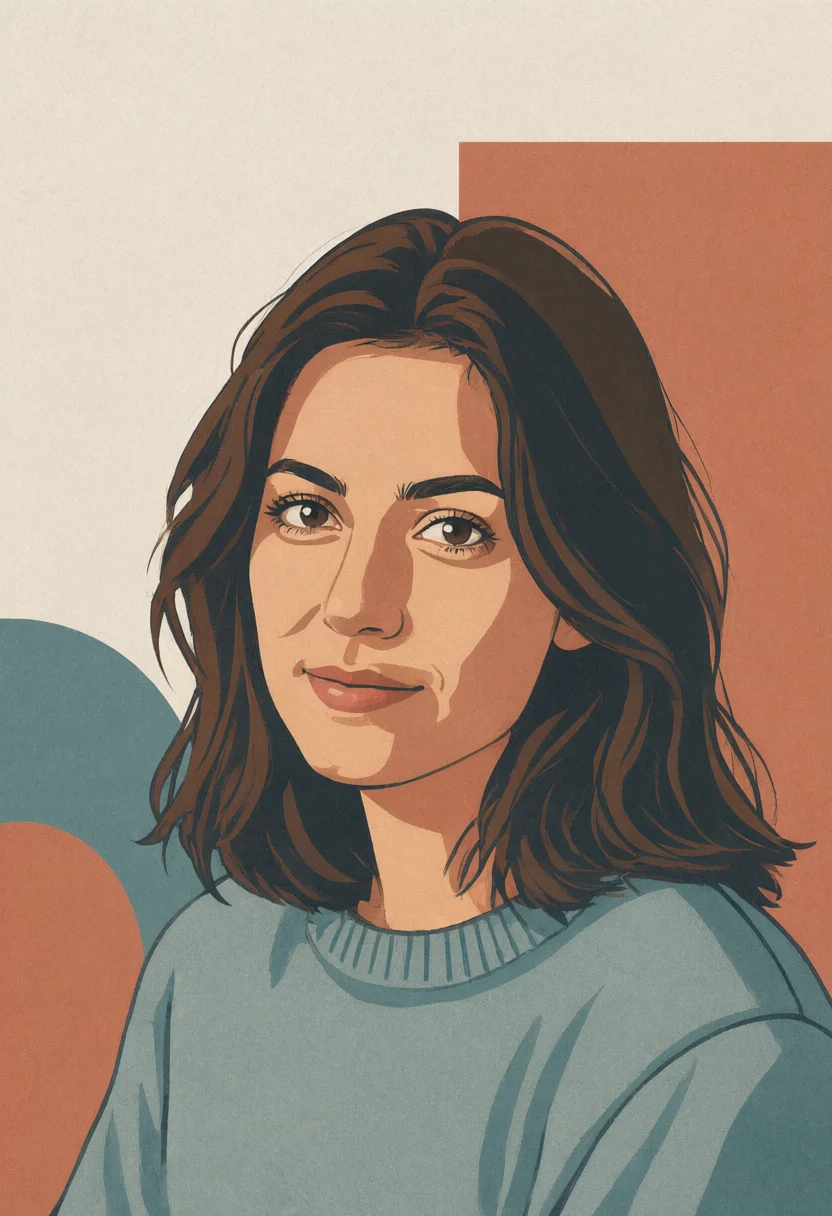
Realism-to-Flat Style Spectrum: Illustration Reconstruction from a Single Reference Image
Style Artistic Illustration · style-transfer · editorial-poster
Reference inputs
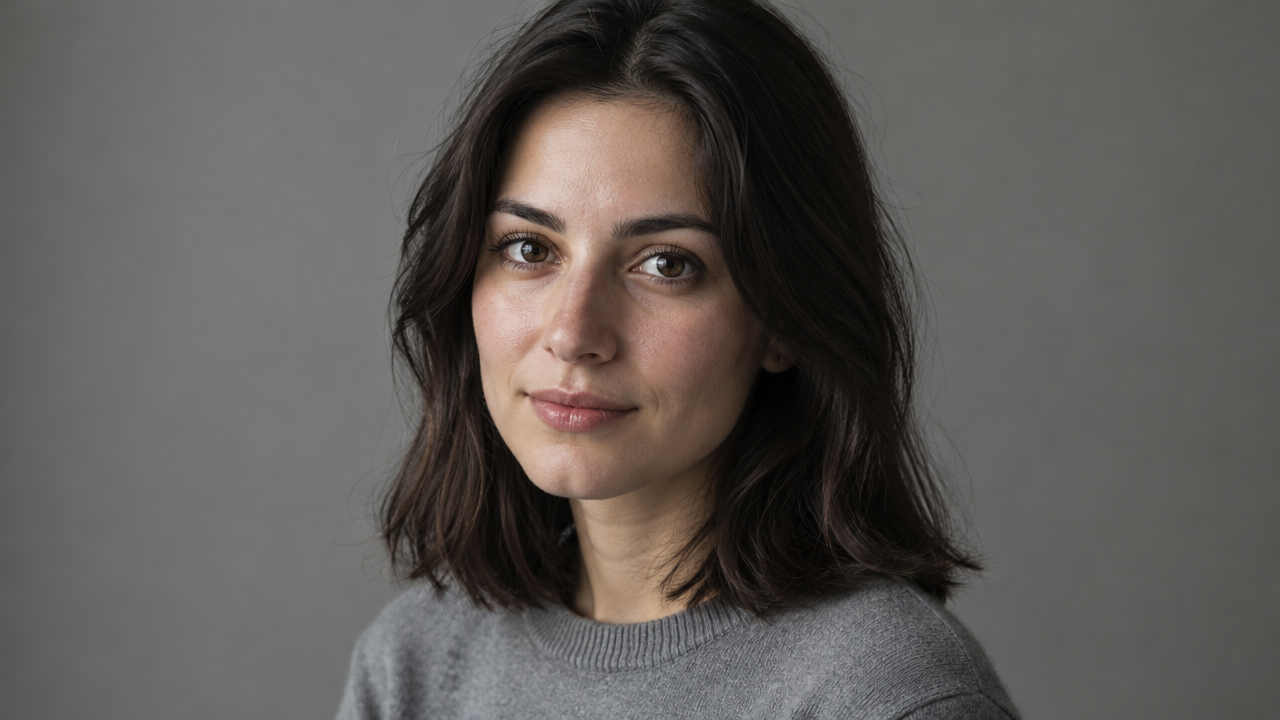
image_urls
Prompt
Restyle a single realistic portrait into a flat vector art illustration via image-to-image. Preserve the subject's identity cues: pose, head angle, hairstyle silhouette, clothing shapes, and framing. Replace photographic rendering with flat color blocks, two-tone shading, crisp simplified outlines, and a restrained decorative geometric background. Limit the palette to warm terracotta, desaturated teal, and off-white; overlay a soft paper grain; use no gradients or glow. Editorial poster-style composition, centered head-and-shoulders crop, ample negative space at the top. Clean modern illustration language, uniform line weight, non-realistic, no text.
Copy the full prompt and adapt it for your own generation.
Tags
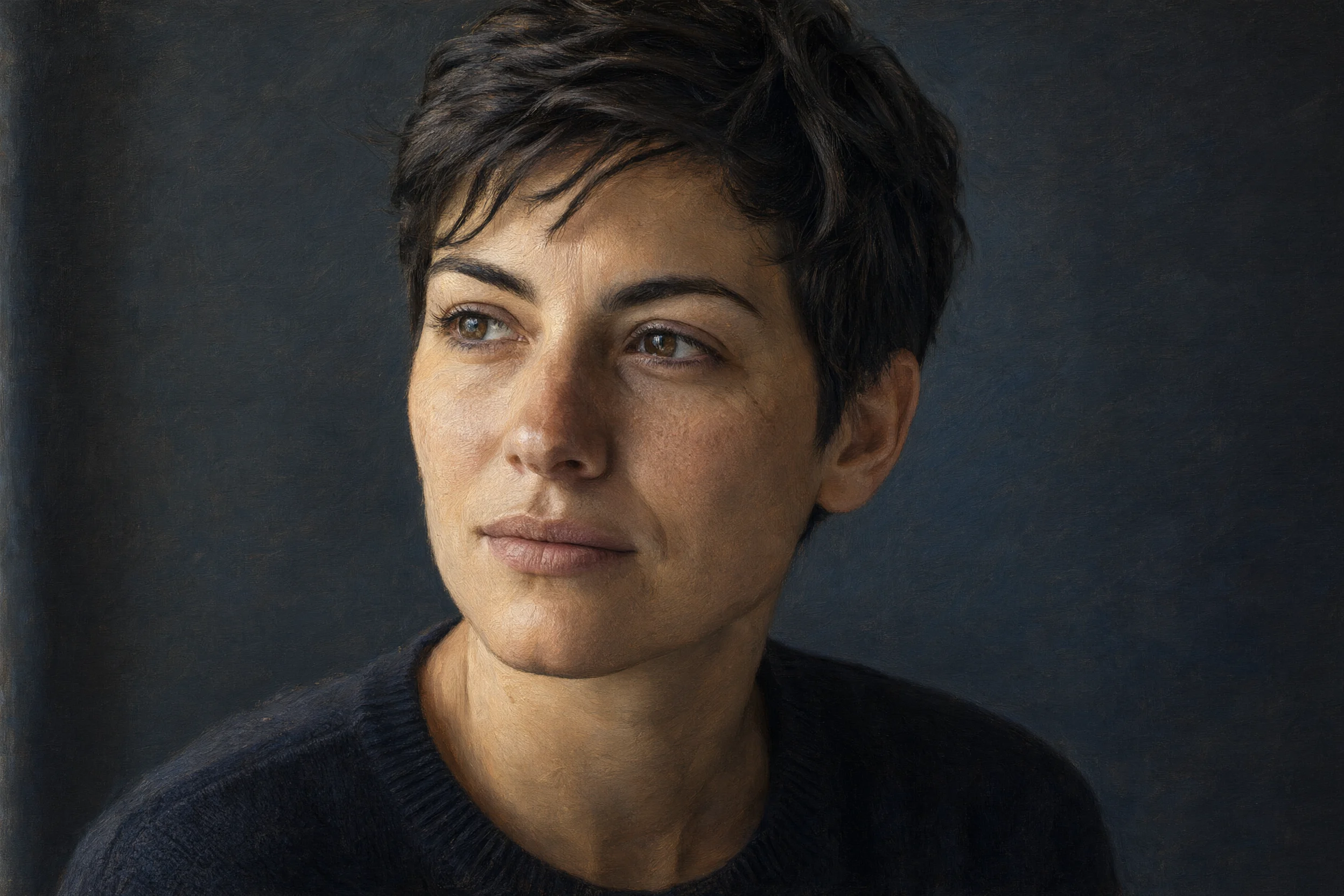
Realistic and Artistic Dual-Style Comparison of the Same Portrait
Style Portrait & Photography · style-transfer · Photo editing
Reference inputs
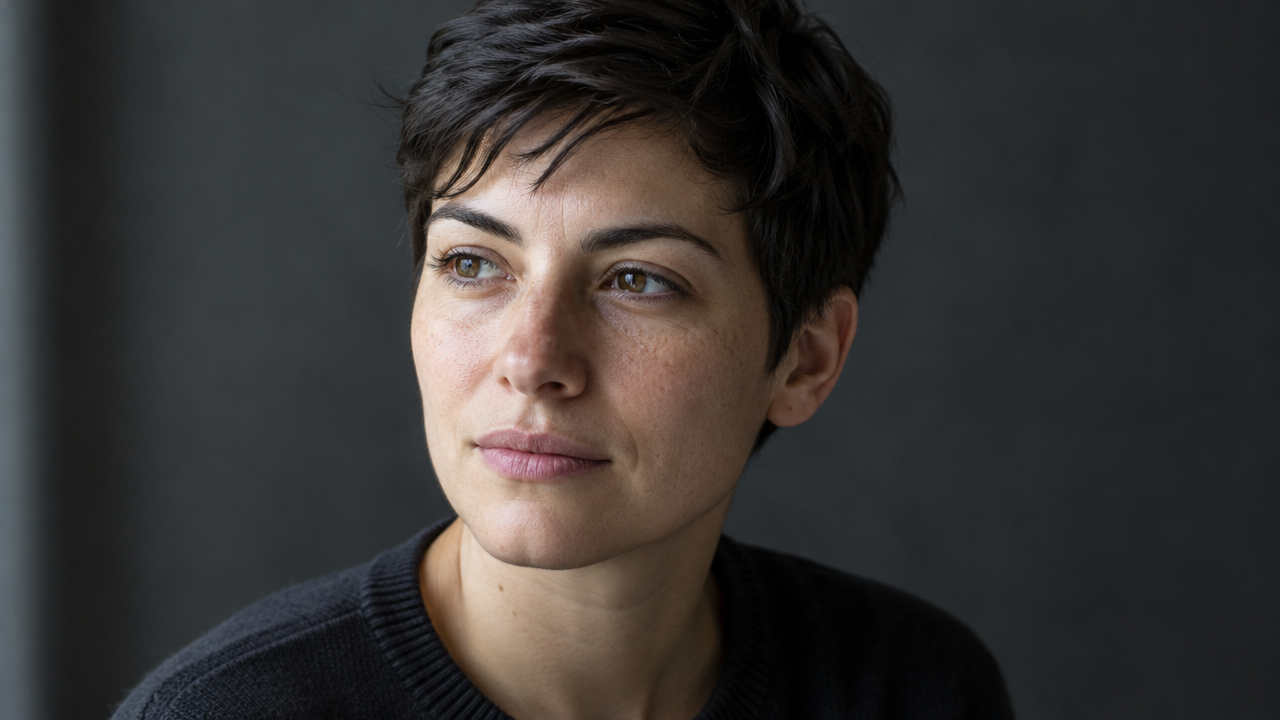
image_urls
Prompt
Use image-to-image style reshaping on a single portrait. Strictly preserve the subject's facial structure, hairstyle silhouette, and body pose from the reference image; keep the composition and background layout unchanged. Repaint the surface texture in an oil painting portrait style: visible directional brushstrokes, soft skin transitions, warm amber key light from the upper left, cool blue-gray fill light from the right, and a dark mottled background with fine canvas texture. Beneath the paint layer, the skin still retains realistic pores and hair strand details, and the eyes remain clearly discernible. Medium close-up, shallow depth of field, 3:4 vertical composition, soft earth tones, with no text or graphic elements.
Copy the full prompt and adapt it for your own generation.
Tags
Pricing
qwen-image-3.0-pro/image-to-image per image
| Specifications | Unit Price |
|---|---|
| 1K | $0.0497 |
| 2K | $0.0993 |
Positioning Overview
The image editing pipeline of Qwen Image 3.0 Pro makes controllable modifications to an image based on 1–3 reference images, with the focus on preserving the key details of the original image while replacing the scene, style, clothing, or on-image text. It suits design, e-commerce, and content teams that need to iterate repeatedly on the same asset. Called through the unified HiAPI.ai interface, you describe the parts to keep and the scope of changes in a prompt and get the finished image, making it suitable for turning existing visual assets into multiple versions of material.
Core Highlights
- Iterate on reference images rather than redraw — uses 1–3 reference images as the input base and modifies the specified content while preserving the key details of the original image.
- Built for information-dense images — prompts can describe dense content such as layouts, elements, and text, producing results closer to actual work deliverables.
- Controllable output specifications — resolution tier, aspect ratio, output format, and random seed can all be specified, making it easy to batch-produce assets of uniform specifications.
Capabilities
Multi-reference image editing: accepts 1–3 reference images in common formats such as JPEG, PNG, WEBP, BMP, GIF, and TIFF, with each image no larger than 10 MB; can be used for targeted modifications of scene, style, and clothing.
Long prompts to describe changes: the positive prompt can be up to 18,000 characters and can separately state the parts to keep and the parts to change; the negative prompt independently controls content you do not want to appear.
Layout and text adjustments: for element-dense images, the layout and text content can be adjusted during editing, making it suitable for turning existing posters, interface mockups, and product images into new versions.
Output specification control: choose 1K or 2K resolution, eight aspect ratios, and png or jpeg output formats, with support for a fixed seed to reproduce results.
Automatic prompt optimization: prompt expansion is enabled by default to fill in descriptive details when the prompt is short, and can be turned off to execute exactly as written.
Applicable Scenarios
- Design teams revising posters and banners — input the existing layout image and change instructions to get a new version with updated dimensions, proportions, and copy, ready for direct use in ad delivery and material replacement.
- E-commerce operations transforming product images — use existing product images as references to replace the background, scene, or model clothing, producing multiple sets of display images for detail pages and campaign pages.
- UI concept iteration — input interface sketches or existing mockups, modify the layout and control presentation as prompted, and use them as high-fidelity prototypes for design discussions.
- Multilingual material localization — replace the on-image text and language based on the same original material image, batch-producing versions for different markets for localized ad delivery.
Limitations and Selection Advice
A maximum of 3 reference images, so complex multi-image composition scenarios are limited; SVG input is not supported, and a single reference image must not exceed 10 MB. The readability of layouts and text is affected by typesetting density and language, and dense small text still requires spot-checking. This pipeline only does image-to-image; if you only need to generate an image from text, use the text-to-image pipeline in the same series instead. For batch tasks with high requirements on result stability, it is recommended to fix the seed and keep the prompt version for reproducibility.
What's new
View changelog →- New model New model available: qwen-image-3.0-pro/text-to-image
- New model qwen-image-3.0-pro image-to-image model now live
- New model New model docs
Frequently asked questions
View all FAQs →-
How many references does Qwen Image 3.0 Image to Image accept?
It accepts 1 to 3 reference images. At least one is required in input.image_urls.
-
How does standard editing differ from Pro?
Standard prioritizes lower cost and rapid iteration. Pro is better for exact text replacement, complex materials, and final layouts.
-
How are 1K, 2K, and reference images billed?
1K and 2K use the same output tier, and each reference adds a fee. See the live page price for current amounts.
-
How do I reduce subject, layout, or text drift?
Separate what should change from the subject, text, position, material, camera, and lighting that must remain fixed. Put exact replacement text in quotation marks.
Create a generation task
https://api.hiapi.ai/v1/tasks Headers
AuthorizationstringRequiredAccount API key. Required on every request. Example: Bearer YOUR_HIAPI_API_KEY. Get your API key
Content-TypestringOptionalThe request body is always parsed as JSON; when sent, only application/json (optionally with charset) is accepted — any other value returns 415. Example: application/json.
Idempotency-KeystringOptionalIdempotency key, up to 255 bytes. Retries with the same key from the same account create the task only once; replays return the original taskId.
On network timeouts or client retries, the same key creates the task only once — no double charges (scope: the API key's account). Use a business-unique identifier as the key (e.g. "order-42"); replays return the original taskId, and keys expire 24 hours after the first request. See the Unified Async API overview for the full scenario matrix.
Body
modelstringRequiredCurrent fixed value: qwen-image-3.0-pro/image-to-image
routestringOptionalCurrent fixed value: default
inputobjectRequired
Business parameters for qwen-image-3.0-pro/image-to-image and route default — see the parameter table below.
seedintegerOptionalmin 0max 2147483647Random seed used to control the randomness of generation results; with the same seed and other parameters identical, similar image outputs can be reproduced.
promptstringRequiredminLength 1maxLength 18000Positive prompt describing the image content you want to keep and the content you need to change; it is the main guiding input for image-to-image generation.
image_urlsarrayRequiredminItems 1maxItems 3Array of reference image URLs that control the input images used for image-to-image generation; 1–3 images are required, supporting JPEG, PNG, WEBP, BMP, GIF, and TIFF formats, each no larger than 10 MB; SVG is not supported.
Array [ string ]
resolutionstringOptionalDefault: "1K"Output resolution level, controlling the clarity level of the generated image; default 1K.
1K2Kaspect_ratiostringOptionalDefault: "1:1"Aspect ratio of the output image, controlling the composition dimensions of the generated image; default 1:1.
1:13:22:34:33:416:99:1621:9output_formatstringOptionalDefault: "png"File format of the generated image, controlling the file type of the returned result; default png.
pngjpegprompt_extendbooleanOptionalDefault: trueWhether to automatically optimize the prompt; when enabled, the model will expand and polish the input prompt; default true.
negative_promptstringOptionalDefault: ""maxLength 500Negative prompt describing content you do not want to appear in the image; default empty string.
callbackobjectOptional
Terminal-state notification config. When omitted, no callback is delivered — poll the task yourself. See the callback note below.
Provide callback.url when creating a task and HiAPI POSTs to your service once the task reaches a terminal state — no polling needed. The callback payload mirrors the task detail structure; signature verification, delivery retries and idempotency are documented on the Unified Async API overview page.
urlstringRequiredRequired when callback is present. A POST is sent to this URL once the task reaches a terminal state; must be a valid http(s) URL.
whenstringOptionalDefault: "final"Only final is supported today — notified on both success and fail.
finalstoragestringOptionalDefault: "temp"Artifact storage tier: temp (default, retained about 7 days) or persistent (long-term, billed by size). Insufficient balance or exceeding the storage cap silently downgrades to temp; the effective tier is shown in the task detail response.
temppersistentRequest examples
# Submit an async task; returns a taskId immediately (no waiting for generation)
curl -X POST "https://api.hiapi.ai/v1/tasks" \
  -H "Authorization: Bearer $HIAPI_API_KEY" \
  -H "Content-Type: application/json" \
  -d '{
  "model": "qwen-image-3.0-pro/image-to-image",
  "input": {
    "prompt": "…",
    "image_urls": "…",
    "resolution": "1K",
    "aspect_ratio": "1:1",
    "output_format": "png",
    "prompt_extend": true,
    "negative_prompt": ""
  }
}'
const res = await fetch("https://api.hiapi.ai/v1/tasks", {
method: "POST",
headers: {
Authorization: `Bearer ${process.env.HIAPI_API_KEY}`,
"Content-Type": "application/json",
},
body: JSON.stringify({
model: "qwen-image-3.0-pro/image-to-image",
input: {
"prompt": "…",
"image_urls": "…",
"resolution": "1K",
"aspect_ratio": "1:1",
"output_format": "png",
"prompt_extend": true,
"negative_prompt": ""
}
}),
});
const task = await res.json();
// { code: 200, message: "success", data: { taskId } }import os, requests
res = requests.post(
"https://api.hiapi.ai/v1/tasks",
headers={"Authorization": f"Bearer {os.environ['HIAPI_API_KEY']}"},
json={
"model": "qwen-image-3.0-pro/image-to-image",
"input": {
"prompt": "…",
"image_urls": "…",
"resolution": "1K",
"aspect_ratio": "1:1",
"output_format": "png",
"prompt_extend": True,
"negative_prompt": ""
}
},
)
print(res.json()) # { code, message, data: { taskId } }200 OK
{
  "code": 200,
  "message": "success",
  "data": {
    "taskId": "tk-hiapi-01HZTQ8BX2N3GM3YFK4Z9D7VQR"
  }
}
400 Bad Request
{
  "code": 400,
  "message": "invalid request",
  "data": null,
  "error_code": "INVALID_REQUEST"
}
Get task detail
https://api.hiapi.ai/v1/tasks/:id Response fields
taskIdstringRequiredTask ID, always prefixed with tk-hiapi-.
modelstringRequiredResolved full model name. Tasks submitted with the route parameter return base@route (e.g. gpt-image-2/text-to-image@ext); otherwise identical to the name passed at creation.
routestringOptionalPresent only when the task was submitted with an explicit route parameter; echoes the submitted value.
statusstringRequiredTask status.
queued Queued, not started yet.
handling Being processed.
archiving Processing finished, artifacts being prepared.
success Terminal: completed, artifacts available (output returned).
fail Terminal: failed (error returned).
After submission, check status: success and fail are terminal, everything else is non-terminal. Poll every 1–3 seconds until terminal. On success, download artifacts from output[].url and transfer them before expireAt; pass storage: "persistent" at creation time when long-term retention is needed.
creatednumberRequiredTask creation time (Unix seconds).
completednumberRequiredUnix seconds when the task reached a terminal state; fixed to 0 while not terminal.
outputarrayOptional
Present only when status == success. Artifact list — always an array; a single task may return multiple types at once (e.g. video + first_frame).
Array [ object ]
Array items
urlstringRequiredArtifact URL, directly downloadable.
typestringRequiredCurrent possible values: video, image, audio, first_frame, last_frame, thumbnail; more may be added later.
expireAtnumberRequiredUnix seconds until which the artifact remains accessible; download or transfer before it expires.
errorobjectOptional
Present only when status == fail.
codestringRequiredBusiness error code.
messagestringRequiredError description.
Response examples
Success
{
  "code": 200,
  "message": "success",
  "data": {
    "taskId": "tk-hiapi-01HZTQ8BX2N3GM3YFK4Z9D7VQR",
    "model": "happyhorse-1-0",
    "status": "success",
    "created": 1777282033,
    "completed": 1777282099,
    "output": [
      {
        "url": "https://cdn.hiapi.ai/tasks/.../video.mp4",
        "type": "video",
        "expireAt": 1777886899
      }
    ]
  }
}
Processing (non-terminal)
{
  "code": 200,
  "message": "success",
  "data": {
    "taskId": "tk-hiapi-...",
    "model": "happyhorse-1-0",
    "status": "archiving",
    "created": 1777282033,
    "completed": 0
  }
}
Failed
{
  "code": 200,
  "message": "success",
  "data": {
    "taskId": "tk-hiapi-...",
    "model": "happyhorse-1-0",
    "status": "fail",
    "created": 1777282033,
    "completed": 1777282099,
    "error": {
      "code": "TASK_FAILED",
      "message": "task failed"
    }
  }
}Articles
View all articles →Related Models
View all models →Same Type
-
 Ideogram V4.5 Ideogram $0.011 /image
-
 Recraft Creative Upscale Recraft $0.357 /image
-
 Grok Imagine Quality xAI $0.070 /image
-
 Qwen Image 2.0 Alibaba $0.042 /image
-
 Nano Banana Pro Google $0.057 /image
-
 GPT Image 2 OpenAI $0.007 /image
-
 FASHN Tryon v1.6 FASHN $0.107 /image
-
 FLUX 1.1 Pro Black Forest Labs $0.050 /image
-
 FLUX.1 Schnell Black Forest Labs $0.005 /image
-
 FLUX.2 Black Forest Labs $0.035 /image
-
 Grok Imagine xAI $0.011 /second
-
 Seedream 5.0 ByteDance $0.025 /image
Same Provider
- Qwen Image 2.0 Alibaba $0.042 /image
-
 Wan 2.7 Video Alibaba $0.100 /second
-
 Qwen Image 3.0 Alibaba $0.036 /image
-
 Qwen Image 2.1 Alibaba $0.020 /image
-
 Z-Image Alibaba $0.008 /image
-
 Wan 2.6 Flash Alibaba $0.043 /second
-
 Wan 3.0 Video Alibaba $0.040 /second
-
 HappyHorse 1.1 Alibaba $0.160 /second
-
 Wan 2.7 Image Alibaba $0.035 /image
-
 Qwen Audio 3.0 TTS Alibaba $0.030 /1,000 characters
-
 HappyHorse 1.0 Alibaba $0.168 /second