

Veo 3.1 Lite
veo-3.1-lite/image-to-video
Google's low-cost, high-throughput video generation tier, with speed on par with Veo 3.1 Fast, supporting image-to-video, multiple aspect ratios, and durations
Try veo-3.1-lite/image-to-video
Input
Showcases
View all showcasesOutput
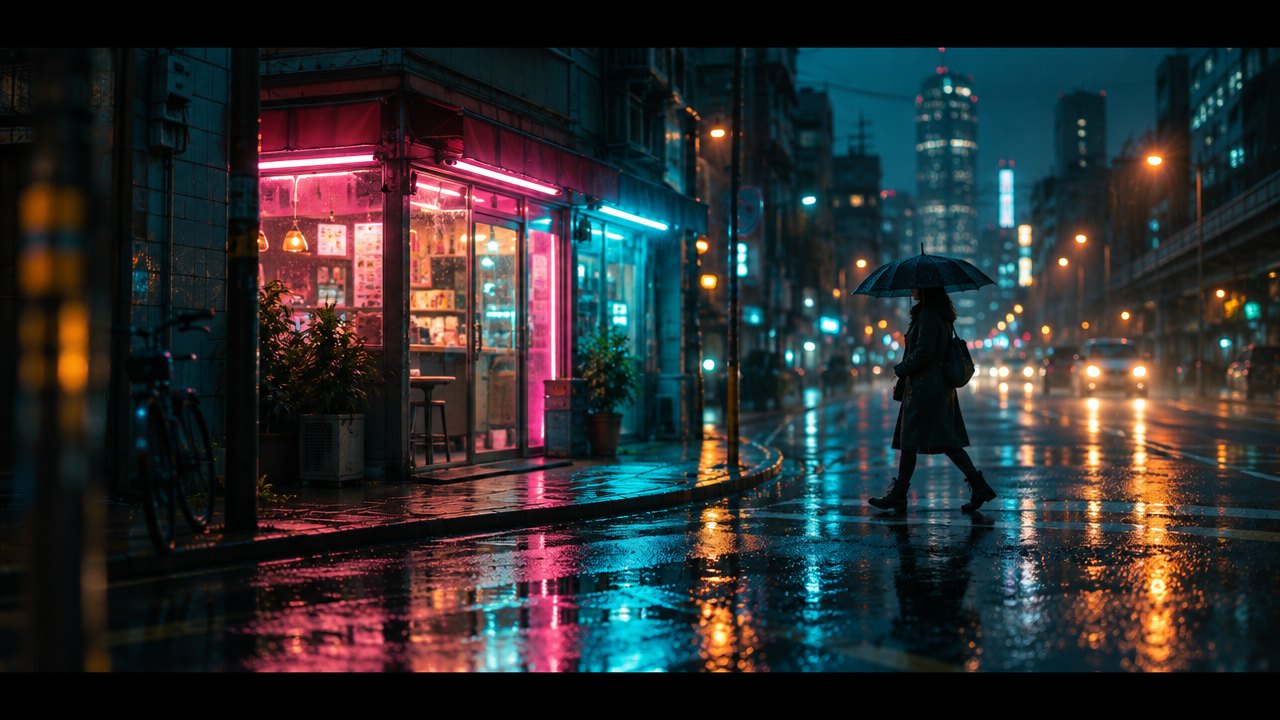
videoVeo 3.1 Lite Image-to-Video: Storyboard Concept Conversion Example
Style Storyboard · Image-to-Video · Cinematic
Reference inputs
Input image
Prompt
A slow cinematic push-in on a rainy-night neon street corner, the camera advancing steadily forward at eye level with a slight handheld float; rain streaks fall diagonally, puddles ripple and reflect pink and cyan sign lights; a lone figure holding an umbrella walks past the storefront and exits frame to the right; shallow depth of field, anamorphic lens flare, moody teal-and-orange grade, 24fps motion blur, continuous single-take shot, no cuts, no overlaid text.
Copy the full prompt and adapt it for your own generation.
Tags
Visual Notes on Cinematic Language: A Guide to Common Camera Movements in Image-to-Video
Style Camera Movement · Storyboard · Education
Reference inputs

Input image
Prompt
Turn the given still frame into a continuous camera-movement animation. Begin with a slow push-in along the narrow corridor, then a gentle lateral move to the right that reveals the window light source, followed by a subtle focus shift from the foreground subject to the deep background of the corridor. Keep the lighting and set exactly consistent with the source image; the motion should be physically plausible, with no object deformation. Steadicam-like smoothness, 24fps cinematic feel, shallow depth of field, ambient interior sound only.
Copy the full prompt and adapt it for your own generation.
Tags
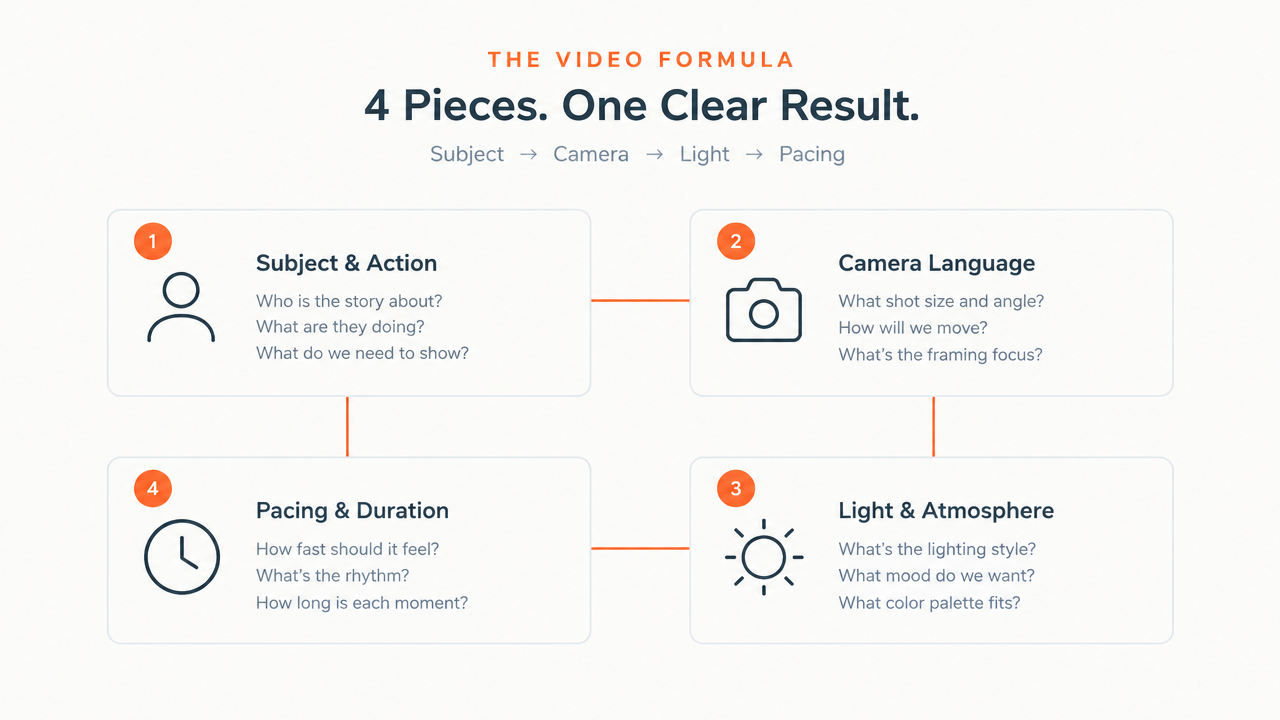
Veo 3.1 Lite Image-to-Video Prompt Formula Card
Style Prompt Engineering · Developer Education · Image-to-Video
Reference inputs
Input image
Prompt
Turn the provided prompt formula card into a clean motion-graphics explainer video: the camera holds a fixed position with a slow push-in and subtle parallax; the four formula blocks (subject and action, camera language, lighting and atmosphere, rhythm and duration) light up in sequence, with thin connecting lines drawn between them; small icons ease into place with easing animations, the text stays crisp and legible, and a soft vignette gently pulses. Lighting is even, cool neutral studio white, with a warm accent light sweeping across the card. The mood is precise and instructional, the pacing calm and easy to follow, with no camera shake, no text distortion, and no flicker. 16:9, 720p, 6 seconds, native ambient audio of soft clicks and a low hum.
Copy the full prompt and adapt it for your own generation.
Tags
Pricing
veo-3.1-lite/image-to-video per second
Positioning Overview
veo-3.1-lite/image-to-video is an image-to-video model in the Google Veo 3.1 Lite series, accessed through the unified HiAPI.ai interface. Starting from an input image and combining it with a prompt, it turns a static picture into a video clip with native audio. Output supports 720p and 1080p, 16:9 and 9:16 aspect ratios, and durations of 4, 6, or 8 seconds. It is suited to developers who need to batch-convert existing image assets into short videos, and to teams integrating video generation capabilities into cost-sensitive products.
Key Highlights
- Image as the anchor, controllable starting frame — The input image serves as the generation condition, and the prompt describes the motion, reducing the visual drift that comes with pure text-to-video generation.
- Native audio generated alongside the video — Native audio is generated by default, so you directly get a video clip with sound, eliminating the need for separate voiceover or sound-effect composition.
- Aspect ratio and duration combined as needed — Supports two aspect ratios (16:9 and 9:16), two resolution tiers (720p and 1080p), and a choice of 4, 6, or 8 seconds for duration.
- Adjustable and controllable generation — Offers negative prompts, random seeds, and safety tolerance parameters, making results reproducible and output content constrained.
Capability Description
Image-driven video generation: Pass in an image URL and a prompt describing the motion to generate the corresponding video; input images are recommended to be 720p or higher and in a 16:9 or 9:16 aspect ratio.
Resolution and aspect ratio selection: Output can be 720p or 1080p, with aspect ratios of 16:9, 9:16, or automatically inferred from the image, covering both landscape content and vertical short-video needs.
Controllable duration: A single generation can be set to 4, 6, or 8 seconds, defaulting to 8 seconds; billing is by output seconds, making it easy to control cost by clip length.
Audio toggle: Native audio generation can be turned on or off; when you need silent footage for post-production voiceover, you can turn it off directly to avoid unnecessary processing.
Output constraints and reproducibility: Use negative prompts to exclude unwanted content, adjust moderation strength with safety tolerance, and reproduce the same generation result with a fixed seed.
Applicable Scenarios
- E-commerce and advertising teams: turning product stills into dynamic short clips — Convert product images into several-second dynamic display clips for detail pages, feed ads, and social media campaign assets.
- Content operations: batch production of vertical short videos — Turn image assets into short videos in 9:16 with 4 to 8 second durations for daily content updates on short-video platforms.
- Product teams: integrating image-to-video features — Integrate image-to-video capability into products so users can upload an image and get a short video clip with audio.
- Creative validation: quick previews of storyboard sketches — Quickly turn storyboards or concept art into dynamic previews for proposal reviews and creative direction confirmation before deciding whether to invest in further production.
Limitations and Selection Advice
The resolution ceiling is 1080p and the maximum duration per generation is 8 seconds, so it is not suitable for long videos or higher-resolution finished outputs; input depends on an image of 720p or higher, and pure text-to-video should use the text-to-video route in the same series. Generation results are affected by prompts and moderation parameters, so retry and filtering costs should be budgeted. If you need longer durations, higher resolution, or stronger visual consistency control, evaluate higher-tier video models.
Create a generation task
https://api.hiapi.ai/v1/tasks Headers
AuthorizationstringRequiredAccount API key. Required on every request. Example: Bearer YOUR_HIAPI_API_KEY. Get your API key
Content-TypestringOptionalThe request body is always parsed as JSON; when sent, only application/json (optionally with charset) is accepted — any other value returns 415. Example: application/json.
Idempotency-KeystringOptionalIdempotency key, up to 255 bytes. Retries with the same key from the same account create the task only once; replays return the original taskId.
On network timeouts or client retries, the same key creates the task only once — no double charges (scope: the API key's account). Use a business-unique identifier as the key (e.g. "order-42"); replays return the original taskId, and keys expire 24 hours after the first request. See the Unified Async API overview for the full scenario matrix.
Body
modelstringRequiredCurrent fixed value: veo-3.1-lite/image-to-video
routestringOptionalCurrent fixed value: default
inputobjectRequired
Business parameters for veo-3.1-lite/image-to-video and route default — see the parameter table below.
seedintegerOptionalRandom seed, an integer used to make generation results reproducible; the same seed with other parameters held constant yields the same output.
promptstringRequiredminLength 1Text prompt describing how the input image should be animated, as a string.
auto_fixbooleanOptionalDefault: falseWhether to automatically rewrite prompts that fail validation, a boolean, default false.
durationintegerOptionalDefault: 8min 4max 8Duration of the generated video clip in seconds, an integer, default 8.
468image_urlstringRequiredURL of the input image to animate, a string; images with a 16:9 or 9:16 aspect ratio and a resolution of at least 720p are recommended.
resolutionstringOptionalDefault: "720p"Output video resolution, a string, default 720p.
720p1080paspect_ratiostringOptionalDefault: "auto"Output video aspect ratio, a string, default auto.
auto16:99:16generate_audiobooleanOptionalDefault: trueWhether to generate native audio, a boolean, default true.
negative_promptstringOptionalNegative prompt describing content that should be avoided in the generated video, as a string.
safety_tolerancestringOptionalDefault: "4"Content moderation tolerance level, a string, default 4.
123456callbackobjectOptional
Terminal-state notification config. When omitted, no callback is delivered — poll the task yourself. See the callback note below.
Provide callback.url when creating a task and HiAPI POSTs to your service once the task reaches a terminal state — no polling needed. The callback payload mirrors the task detail structure; signature verification, delivery retries and idempotency are documented on the Unified Async API overview page.
urlstringRequiredRequired when callback is present. A POST is sent to this URL once the task reaches a terminal state; must be a valid http(s) URL.
whenstringOptionalDefault: "final"Only final is supported today — notified on both success and fail.
finalstoragestringOptionalDefault: "temp"Artifact storage tier: temp (default, retained about 7 days) or persistent (long-term, billed by size). Insufficient balance or exceeding the storage cap silently downgrades to temp; the effective tier is shown in the task detail response.
temppersistentRequest examples
# Submit an async task; returns a taskId immediately (no waiting for generation)
curl -X POST "https://api.hiapi.ai/v1/tasks" \
  -H "Authorization: Bearer $HIAPI_API_KEY" \
  -H "Content-Type: application/json" \
  -d '{
  "model": "veo-3.1-lite/image-to-video",
  "input": {
    "prompt": "…",
    "auto_fix": false,
    "duration": 8,
    "image_url": "…",
    "resolution": "720p",
    "aspect_ratio": "auto",
    "generate_audio": true,
    "safety_tolerance": "4"
  }
}'
const res = await fetch("https://api.hiapi.ai/v1/tasks", {
method: "POST",
headers: {
Authorization: `Bearer ${process.env.HIAPI_API_KEY}`,
"Content-Type": "application/json",
},
body: JSON.stringify({
model: "veo-3.1-lite/image-to-video",
input: {
"prompt": "…",
"auto_fix": false,
"duration": 8,
"image_url": "…",
"resolution": "720p",
"aspect_ratio": "auto",
"generate_audio": true,
"safety_tolerance": "4"
}
}),
});
const task = await res.json();
// { code: 200, message: "success", data: { taskId } }import os, requests
res = requests.post(
"https://api.hiapi.ai/v1/tasks",
headers={"Authorization": f"Bearer {os.environ['HIAPI_API_KEY']}"},
json={
"model": "veo-3.1-lite/image-to-video",
"input": {
"prompt": "…",
"auto_fix": False,
"duration": 8,
"image_url": "…",
"resolution": "720p",
"aspect_ratio": "auto",
"generate_audio": True,
"safety_tolerance": "4"
}
},
)
print(res.json()) # { code, message, data: { taskId } }200 OK
{
  "code": 200,
  "message": "success",
  "data": {
    "taskId": "tk-hiapi-01HZTQ8BX2N3GM3YFK4Z9D7VQR"
  }
}
400 Bad Request
{
  "code": 400,
  "message": "invalid request",
  "data": null,
  "error_code": "INVALID_REQUEST"
}
Get task detail
https://api.hiapi.ai/v1/tasks/:id Response fields
taskIdstringRequiredTask ID, always prefixed with tk-hiapi-.
modelstringRequiredResolved full model name. Tasks submitted with the route parameter return base@route (e.g. gpt-image-2/text-to-image@ext); otherwise identical to the name passed at creation.
routestringOptionalPresent only when the task was submitted with an explicit route parameter; echoes the submitted value.
statusstringRequiredTask status.
queued Queued, not started yet.
handling Being processed.
archiving Processing finished, artifacts being prepared.
success Terminal: completed, artifacts available (output returned).
fail Terminal: failed (error returned).
After submission, check status: success and fail are terminal, everything else is non-terminal. Poll every 1–3 seconds until terminal. On success, download artifacts from output[].url and transfer them before expireAt; pass storage: "persistent" at creation time when long-term retention is needed.
creatednumberRequiredTask creation time (Unix seconds).
completednumberRequiredUnix seconds when the task reached a terminal state; fixed to 0 while not terminal.
outputarrayOptional
Present only when status == success. Artifact list — always an array; a single task may return multiple types at once (e.g. video + first_frame).
Array [ object ]
Array items
urlstringRequiredArtifact URL, directly downloadable.
typestringRequiredCurrent possible values: video, image, audio, first_frame, last_frame, thumbnail; more may be added later.
expireAtnumberRequiredUnix seconds until which the artifact remains accessible; download or transfer before it expires.
errorobjectOptional
Present only when status == fail.
codestringRequiredBusiness error code.
messagestringRequiredError description.
Response examples
Success
{
  "code": 200,
  "message": "success",
  "data": {
    "taskId": "tk-hiapi-01HZTQ8BX2N3GM3YFK4Z9D7VQR",
    "model": "happyhorse-1-0",
    "status": "success",
    "created": 1777282033,
    "completed": 1777282099,
    "output": [
      {
        "url": "https://cdn.hiapi.ai/tasks/.../video.mp4",
        "type": "video",
        "expireAt": 1777886899
      }
    ]
  }
}
Processing (non-terminal)
{
  "code": 200,
  "message": "success",
  "data": {
    "taskId": "tk-hiapi-...",
    "model": "happyhorse-1-0",
    "status": "archiving",
    "created": 1777282033,
    "completed": 0
  }
}
Failed
{
  "code": 200,
  "message": "success",
  "data": {
    "taskId": "tk-hiapi-...",
    "model": "happyhorse-1-0",
    "status": "fail",
    "created": 1777282033,
    "completed": 1777282099,
    "error": {
      "code": "TASK_FAILED",
      "message": "task failed"
    }
  }
}Articles
View all articles →Related Models
View all models →Same Type
-
 Vidu Q4 Preview Vidu $0.051 /second
-
 Ray 3.2 Luma $0.214 /video
-
 Wan 3.0 Video Alibaba $0.040 /second
-
 LTX 2.5 Fast Lightricks $0.086 /second
-
 Kling 3.0 Turbo Kuaishou $0.130 /second
-
 Veo 3.1 Google $0.290 /second
-
 Grok Imagine 1.5 Lite xAI $0.029 /second
-
 Wan 2.6 Flash Alibaba $0.043 /second
-
 HeyGen Avatar V HeyGen $0.150 /second
-
 FLUX 3 Video Black Forest Labs $0.090 /second
-
 Veo 3.1 Fast Google $0.170 /second
-
 Kling 2.5 Kuaishou $0.060 /second
Same Provider
-
 Nano Banana 2 Google $0.036 /image
-
 Lyria 3.5 Google $0.090 /song
-
 Lyria 3 Pro Google $0.140 /song
-
 Imagen 4 Google $0.030 /image
-
 Nano Banana Google $0.021 /image
-
 Gemini Omni 1.1 Flash Google $0.450 /video
-
 Google Virtual Try-On Google $0.107 /image
-
 Gemini Omni Google --
-
 Nano Banana 2 Lite Google $0.033 /image
- Veo 3.1 Google $0.290 /second
-
 Gemini 3.1 Flash TTS Google --
-
 Nano Banana Pro Google $0.057 /image