

Alibaba
Wan 2.7 Image
wan2.7-image-standard
An image generation and editing model launched by Alibaba that integrates text-to-image, multi-reference image composition, and instruction-based editing into a single workflow, with support for long-text rendering and brand color control
Try wan2.7-image-standard
Input
Showcases
View all showcasesOutput
image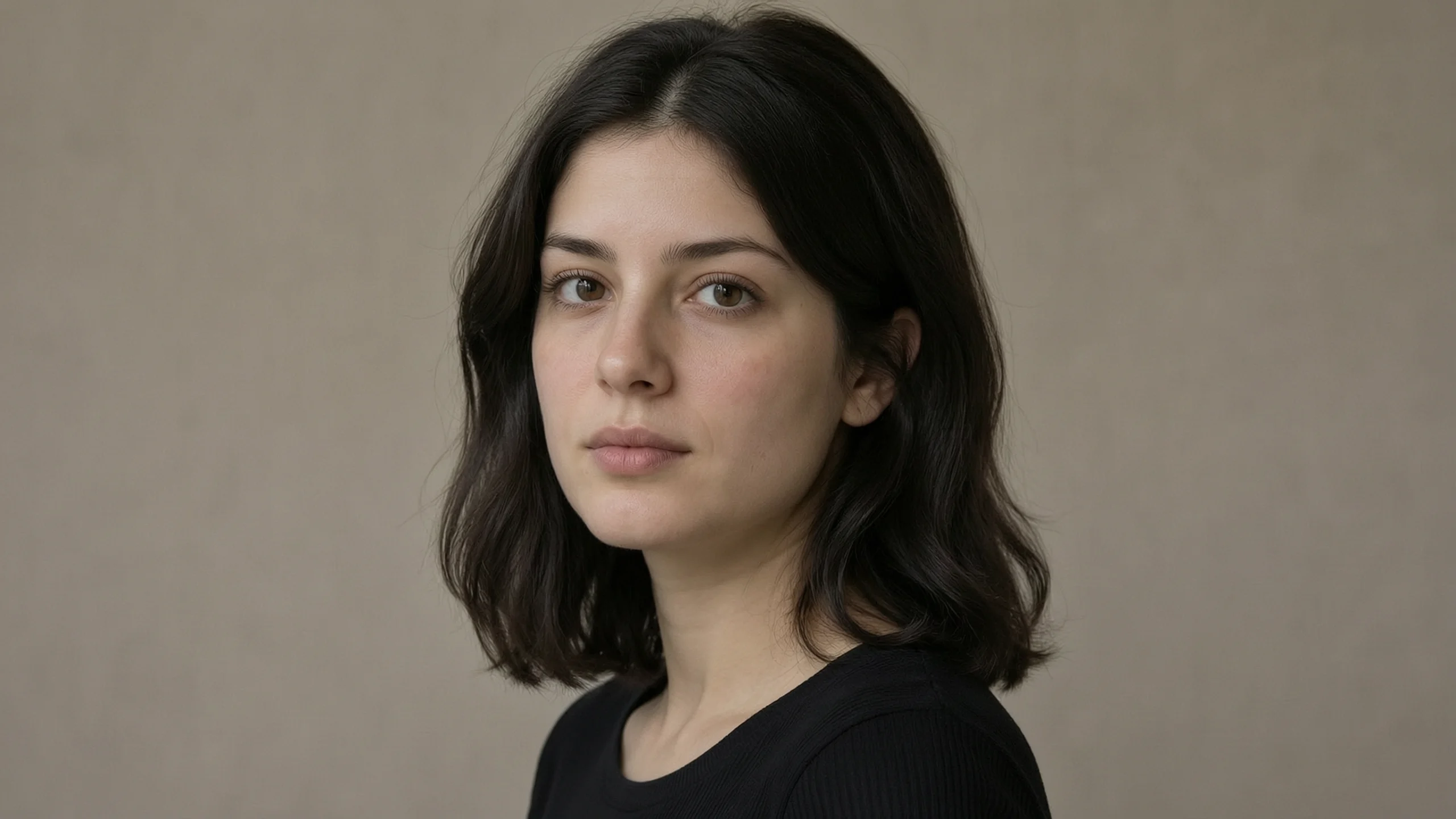
wan2.7-image Portrait Style Comparison: Realistic vs. Artistic
Style Portrait & Photography · Photorealistic · Editing
Reference inputs
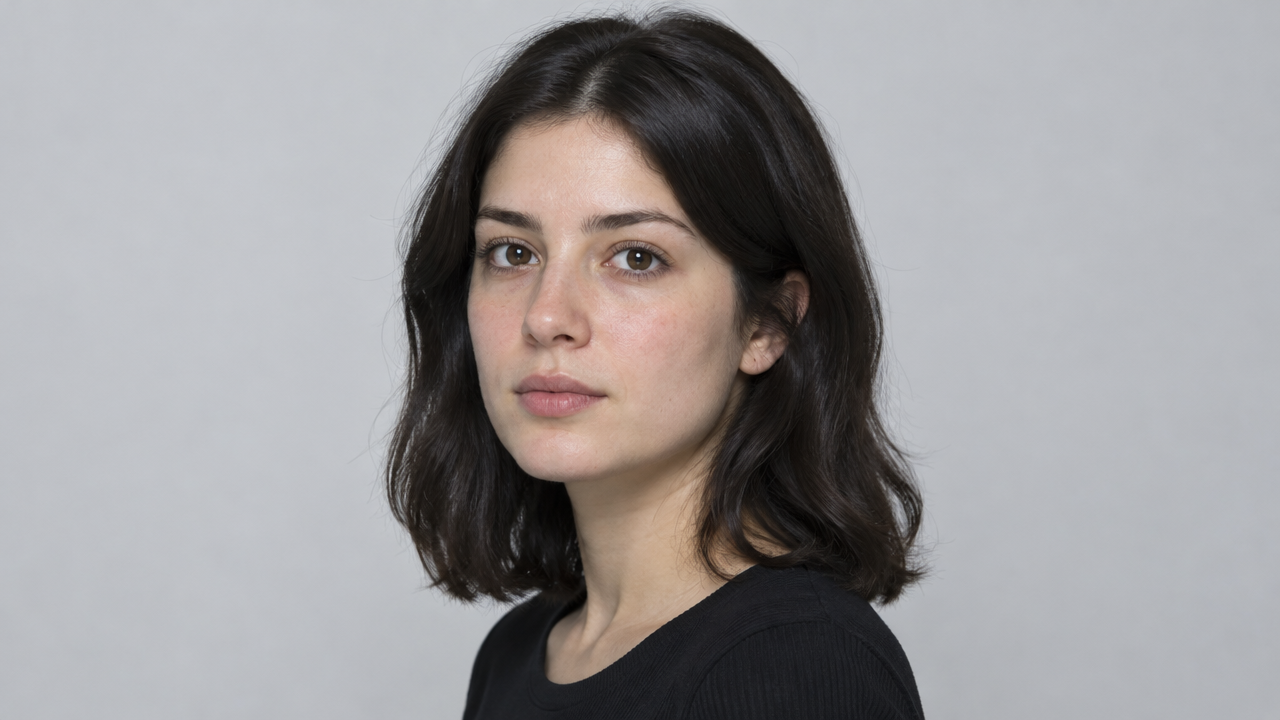
image_urls
Prompt
A magazine-style portrait of a young woman with shoulder-length dark hair, body turned three-quarters toward the camera, with a calm and direct gaze, natural skin texture with clearly visible pores and fine vellus hair, soft diffused window light coming from the left side of the camera, subtly transitioning into shadow on the right cheek, soft warm neutral background, shallow depth of field, 85mm lens effect, restrained color grading with slightly reduced saturation, rich detail in the eyes and hair strands, photorealistic, vertical 4:5 composition with headroom, no heavy retouching
Copy the full prompt and adapt it for your own generation.
Tags
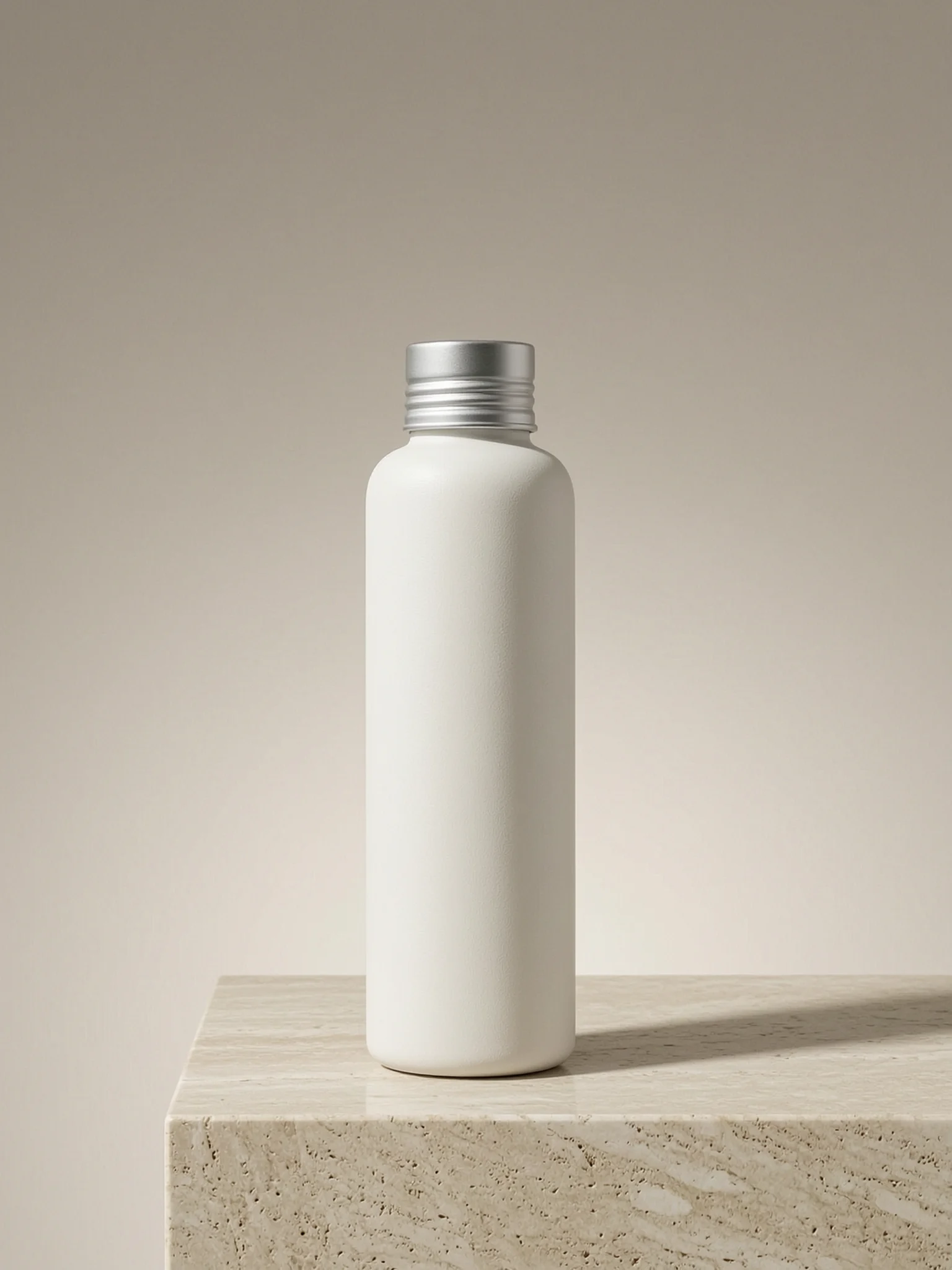
E-commerce-Grade Product Still Life: A Texture Rendering Showcase from Wan 2.7 Image
Style Product Image · ecommerce · Studio lighting
Reference inputs
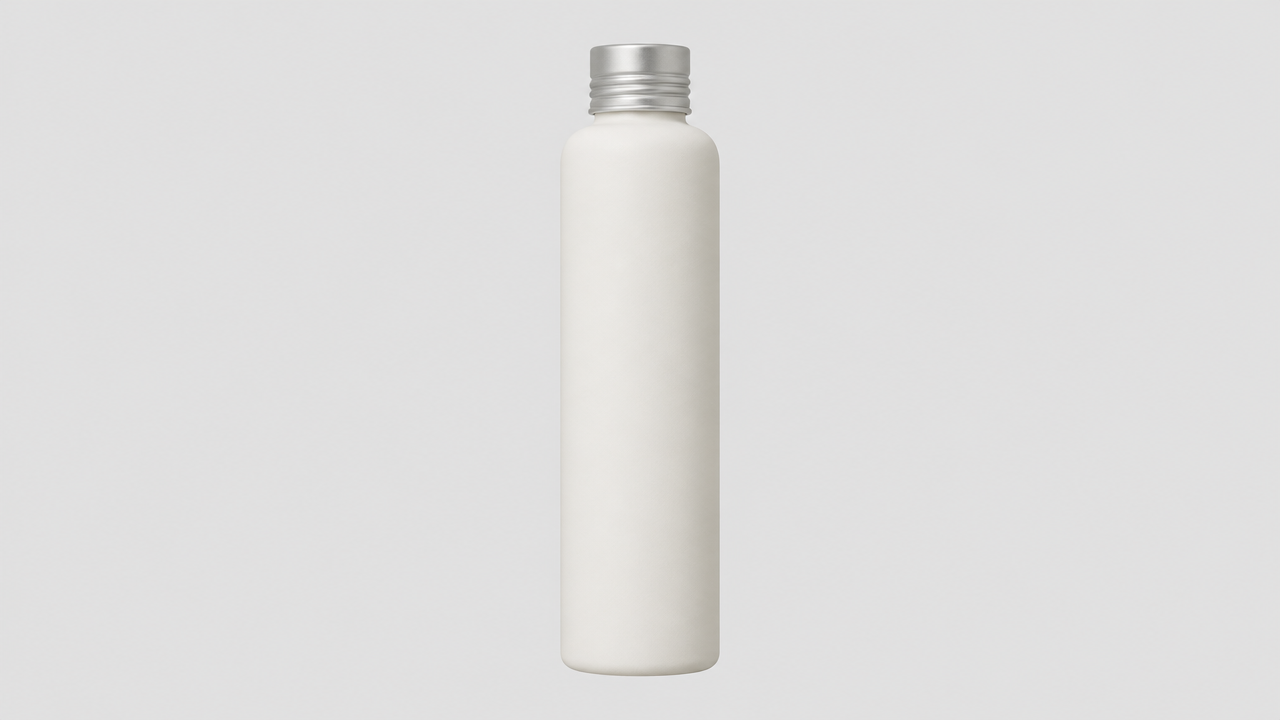
image_urls
Prompt
Studio product photography of a matte ceramic cosmetic bottle standing on a frosted travertine pedestal, three-quarter front view, slightly above eye level, 85mm equivalent lens look with mild perspective compression. Large softbox key light from upper left with smooth falloff, a white bounce card filling the shadow side on the right, a thin rim light separating the bottle shoulder from a warm greige seamless background. Visible fine texture on the ceramic glaze, crisp specular highlight on the aluminum cap, soft grounded contact shadow with realistic ambient occlusion. Restrained neutral palette, faint warm 5200K daylight, no props, generous negative space above the product for layout. High-fidelity commercial still life, clean sharp edges, fine grain, no text, no logo, no watermark.
Copy the full prompt and adapt it for your own generation.
Tags
Pricing
wan2.7-image-standard per image
| Specifications | Unit Price |
|---|---|
| 1K | $0.0345 |
| 2K | $0.0345 |
Positioning Overview
Wan 2.7 Image Standard Edition is an image generation and editing model launched by Alibaba, offering text-to-image and image-to-image capabilities through the unified HiAPI.ai interface. It supports up to 9 reference images as input, two resolution tiers (1K/2K), a variety of aspect ratios, and random seed control, making it suitable for developers who need complete sets of visual outputs or instruction-based image modifications, in scenarios such as brand materials, e-commerce image collections, and concept design.
Key Highlights
- Unified text-to-image and reference-image editing — the same model can generate images directly from text or perform composition and instruction-based modifications based on up to 9 reference images, reducing tool switching.
- Multi-reference-image input maintains consistency — supports up to 9 public images as references; the output aspect ratio follows the last reference image, making it easy to produce complete sets of serialized visuals.
- Controllable resolution and aspect-ratio parameters — choose 1K or 2K output; for text-to-image, multiple aspect ratios from 1:1 to 8:1 are supported, making it easy to fit sizes to display placements.
Capability Description
Text-to-image: generate an image from a text prompt alone; you can specify the resolution tier and aspect ratio, and prompts of up to 5,000 characters are supported, making it suitable for getting usable visuals directly from conceptual descriptions.
Reference-image instruction editing: pass in a public URL of a reference image or an image to be edited, describe the modification requirements in natural language, and the model outputs the edited image, with the aspect ratio following the last reference image.
Multi-image reference composition: accepts up to 9 reference images, each no larger than 20 MB, supporting JPEG, PNG, BMP, and WebP; visual elements from multiple reference images can be fused into a single output.
Resolution and seed control: choose a 1K or 2K output tier; a random seed from 0–2147483647 can yield relatively stable results under the same input, facilitating reproduction and batch iteration.
Applicable Scenarios
- Marketers producing complete sets of campaign visual materials — input brand descriptions and multiple style reference images to produce banners, accompanying images, and other assets with a consistent tone for campaign landing pages and social media placements.
- E-commerce operations: product and scene image production — upload product photos and describe scene transformation requirements to obtain product scene images that meet display specifications, for use in product detail pages and advertising materials.
- Designers: concept sketches and storyboard generation — use text descriptions or reference-image input to generate storyboard sketches and character concept art for early-stage proposal discussions and storyboard drawing.
- Developers: batch image generation API integration — call through the unified HiAPI.ai interface to embed text-to-image or image-to-image capabilities into your own workflows and generate 1K/2K image assets on demand.
Limitations and Selection Advice
The Standard Edition's output resolution is limited to 1K and 2K, with no higher tiers available; if you need higher resolution or stronger composition stability, consider the Pro version in the same series. Reference images must be publicly accessible URLs, each no larger than 20 MB; once reference images are uploaded, the aspect ratio is determined by the last reference image and can no longer be specified via parameters. A fixed seed only makes results relatively stable and does not guarantee exact reproduction. For scenarios involving long-text layout or precise brand-color control, it is recommended to validate results with a small batch of samples before scaling up usage.
What's new
View changelog →- New model wan2.7-image-standard image generation model now available
Frequently asked questions
View all FAQs →-
Which unusual ratios does Wan 2.7 Image support?
Alongside common ratios, it supports 21:9, 8:1, and 1:8 for extreme wide or tall output.
-
What does Thinking Mode do?
It adds latency to improve reasoning and composition for complex prompts. Leave it off for fast drafts.
-
How should I choose 1K, 2K, or 4K?
Validate direction at 1K or 2K, then move to 4K for larger final output. Current page pricing is flat per image.
-
Does it accept references?
No. This model ID is text-to-image only.
Create a generation task
https://api.hiapi.ai/v1/tasks Headers
AuthorizationstringRequiredAccount API key. Required on every request. Example: Bearer YOUR_HIAPI_API_KEY. Get your API key
Content-TypestringOptionalThe request body is always parsed as JSON; when sent, only application/json (optionally with charset) is accepted — any other value returns 415. Example: application/json.
Idempotency-KeystringOptionalIdempotency key, up to 255 bytes. Retries with the same key from the same account create the task only once; replays return the original taskId.
On network timeouts or client retries, the same key creates the task only once — no double charges (scope: the API key's account). Use a business-unique identifier as the key (e.g. "order-42"); replays return the original taskId, and keys expire 24 hours after the first request. See the Unified Async API overview for the full scenario matrix.
Body
modelstringRequiredCurrent fixed value: wan2.7-image-standard
routestringOptionalCurrent fixed value: default
inputobjectRequired
Business parameters for wan2.7-image-standard and route default — see the parameter table below.
seedintegerOptionalmin 0max 2147483647Random seed, value range 0–2147483647; fixing the seed makes results relatively stable, random if not provided.
promptstringRequiredminLength 1maxLength 5000Describe the image to generate, or explain what modifications to make to the reference image; Chinese or English both accepted, maximum 5000 characters.
image_urlsarrayOptionalminItems 1maxItems 9Array of public URLs of reference images or images to edit, up to 9 images; omit for text-to-image; supports JPEG, PNG, BMP, WebP, each file no larger than 20 MB, side length 240–8000 pixels, aspect ratio 1:8–8:1. When images are provided, the output canvas follows the last reference image.
Array [ string ]
resolutionstringOptionalDefault: "2K"Output resolution tier, options are 1K or 2K; 1K is roughly 1024² and 2K roughly 2048² in total pixel magnitude; default 2K.
1K2Kaspect_ratiostringOptionalDefault: "1:1"Output canvas, only effective when no reference image is uploaded; once a reference image is uploaded the canvas is determined by the reference image and no setting is needed. Default 1:1.
1:116:94:321:93:49:168:11:8callbackobjectOptional
Terminal-state notification config. When omitted, no callback is delivered — poll the task yourself. See the callback note below.
Provide callback.url when creating a task and HiAPI POSTs to your service once the task reaches a terminal state — no polling needed. The callback payload mirrors the task detail structure; signature verification, delivery retries and idempotency are documented on the Unified Async API overview page.
urlstringRequiredRequired when callback is present. A POST is sent to this URL once the task reaches a terminal state; must be a valid http(s) URL.
whenstringOptionalDefault: "final"Only final is supported today — notified on both success and fail.
finalstoragestringOptionalDefault: "temp"Artifact storage tier: temp (default, retained about 7 days) or persistent (long-term, billed by size). Insufficient balance or exceeding the storage cap silently downgrades to temp; the effective tier is shown in the task detail response.
temppersistentRequest examples
# Submit an async task; returns a taskId immediately (no waiting for generation)
curl -X POST "https://api.hiapi.ai/v1/tasks" \
  -H "Authorization: Bearer $HIAPI_API_KEY" \
  -H "Content-Type: application/json" \
  -d '{
  "model": "wan2.7-image-standard",
  "input": {
    "prompt": "…",
    "resolution": "2K",
    "aspect_ratio": "1:1"
  }
}'
const res = await fetch("https://api.hiapi.ai/v1/tasks", {
method: "POST",
headers: {
Authorization: `Bearer ${process.env.HIAPI_API_KEY}`,
"Content-Type": "application/json",
},
body: JSON.stringify({
model: "wan2.7-image-standard",
input: {
"prompt": "…",
"resolution": "2K",
"aspect_ratio": "1:1"
}
}),
});
const task = await res.json();
// { code: 200, message: "success", data: { taskId } }import os, requests
res = requests.post(
"https://api.hiapi.ai/v1/tasks",
headers={"Authorization": f"Bearer {os.environ['HIAPI_API_KEY']}"},
json={
"model": "wan2.7-image-standard",
"input": {
"prompt": "…",
"resolution": "2K",
"aspect_ratio": "1:1"
}
},
)
print(res.json()) # { code, message, data: { taskId } }200 OK
{
  "code": 200,
  "message": "success",
  "data": {
    "taskId": "tk-hiapi-01HZTQ8BX2N3GM3YFK4Z9D7VQR"
  }
}
400 Bad Request
{
  "code": 400,
  "message": "invalid request",
  "data": null,
  "error_code": "INVALID_REQUEST"
}
Get task detail
https://api.hiapi.ai/v1/tasks/:id Response fields
taskIdstringRequiredTask ID, always prefixed with tk-hiapi-.
modelstringRequiredResolved full model name. Tasks submitted with the route parameter return base@route (e.g. gpt-image-2/text-to-image@ext); otherwise identical to the name passed at creation.
routestringOptionalPresent only when the task was submitted with an explicit route parameter; echoes the submitted value.
statusstringRequiredTask status.
queued Queued, not started yet.
handling Being processed.
archiving Processing finished, artifacts being prepared.
success Terminal: completed, artifacts available (output returned).
fail Terminal: failed (error returned).
After submission, check status: success and fail are terminal, everything else is non-terminal. Poll every 1–3 seconds until terminal. On success, download artifacts from output[].url and transfer them before expireAt; pass storage: "persistent" at creation time when long-term retention is needed.
creatednumberRequiredTask creation time (Unix seconds).
completednumberRequiredUnix seconds when the task reached a terminal state; fixed to 0 while not terminal.
outputarrayOptional
Present only when status == success. Artifact list — always an array; a single task may return multiple types at once (e.g. video + first_frame).
Array [ object ]
Array items
urlstringRequiredArtifact URL, directly downloadable.
typestringRequiredCurrent possible values: video, image, audio, first_frame, last_frame, thumbnail; more may be added later.
expireAtnumberRequiredUnix seconds until which the artifact remains accessible; download or transfer before it expires.
errorobjectOptional
Present only when status == fail.
codestringRequiredBusiness error code.
messagestringRequiredError description.
Response examples
Success
{
  "code": 200,
  "message": "success",
  "data": {
    "taskId": "tk-hiapi-01HZTQ8BX2N3GM3YFK4Z9D7VQR",
    "model": "happyhorse-1-0",
    "status": "success",
    "created": 1777282033,
    "completed": 1777282099,
    "output": [
      {
        "url": "https://cdn.hiapi.ai/tasks/.../video.mp4",
        "type": "video",
        "expireAt": 1777886899
      }
    ]
  }
}
Processing (non-terminal)
{
  "code": 200,
  "message": "success",
  "data": {
    "taskId": "tk-hiapi-...",
    "model": "happyhorse-1-0",
    "status": "archiving",
    "created": 1777282033,
    "completed": 0
  }
}
Failed
{
  "code": 200,
  "message": "success",
  "data": {
    "taskId": "tk-hiapi-...",
    "model": "happyhorse-1-0",
    "status": "fail",
    "created": 1777282033,
    "completed": 1777282099,
    "error": {
      "code": "TASK_FAILED",
      "message": "task failed"
    }
  }
}Articles
View all articles →Related Models
View all models →Same Type
-
 FLUX.2 Black Forest Labs $0.035 /image
-
 Imagen 4 Google $0.030 /image
-
 Qwen Image 2.0 Alibaba $0.042 /image
-
 FLUX.1 Schnell Black Forest Labs $0.005 /image
-
 Grok Imagine Image 2.0 xAI $0.052 /image
-
 Wan 2.7 Image Alibaba $0.035 /image
-
 Ideogram V3 Character Ideogram $0.090 /image
-
 Seedream 4.5 ByteDance $0.045 /image
-
 Grok Imagine Quality xAI $0.070 /image
-
 FLUX.2 Klein 4B Black Forest Labs $0.0004 /image
-
 Nano Banana 2 Lite Google $0.033 /image
-
 FASHN Tryon v1.6 FASHN $0.107 /image
Same Provider
-
 Qwen Image 3.0 Alibaba $0.036 /image
- Wan 2.7 Image Alibaba $0.035 /image
-
 HappyHorse 1.1 Alibaba $0.160 /second
-
 Wan 2.6 Flash Alibaba $0.043 /second
- Qwen Image 2.0 Alibaba $0.042 /image
-
 Z-Image Alibaba $0.008 /image
-
 Qwen Audio 3.0 TTS Alibaba $0.030 /1,000 characters
-
 Wan 3.0 Video Alibaba $0.040 /second
-
 Qwen Image 2.1 Alibaba $0.020 /image
-
 HappyHorse 1.0 Alibaba $0.168 /second
-
 Wan 2.7 Video Alibaba $0.100 /second