
FLUX 3 Max Image-to-Video: Model Selection Infographic for Same-Price Models
Starting from a single infographic, use the FLUX 3 Max image-to-video pipeline to turn it into a playable model-selection short: the frame opens on a static comparison table, then the camera slowly pushes in and pans horizontally across each metric, paired with generated synchronized audio to form a light rhythm. The infographic content is built around comparison dimensions from public sources—video generation time versus Seedance 2.5 for a 10-second clip (about 11 seconds vs. 277.8 seconds), image-to-video Elo versus FLUX 3 (1139 vs. 1089) and generation time (about 12.45 seconds vs. 126.44 seconds), plus specifications for 720p, roughly 10-second clips. It is suited for developers and design teams to quickly produce explanatory shorts during model-selection reviews, content production tool introductions, or internal technical sharing. Because authorSchema only provides inputs such as duration, resolution, aspect ratio, first and last frames, and prompt, all on-screen text information is carried by the first-frame image; the video pipeline handles camera movement and visual atmosphere and does not render additional new copy.
Style Infographic · Model comparison · Image-to-Video
Model FLUX 3 Max
Reference inputs
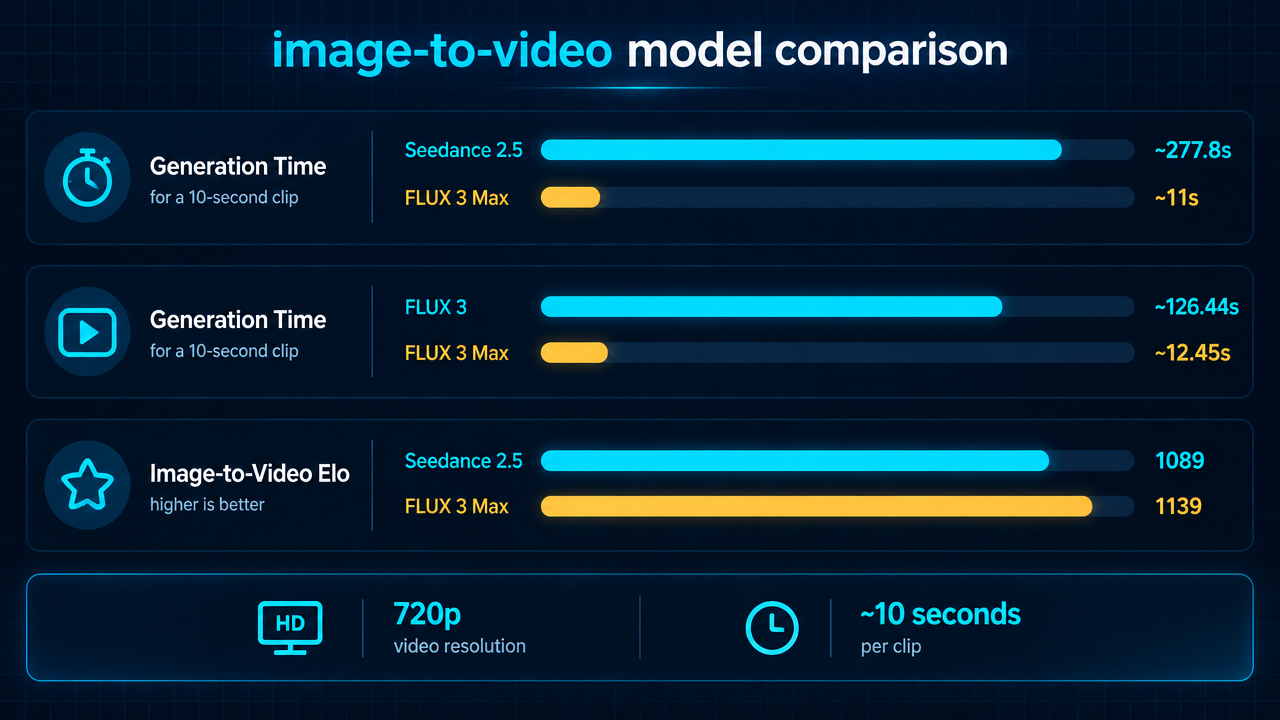
image_url
Prompt
Turn a clean dark-mode technical infographic poster into a short explanatory video. The camera starts on the full comparison table, then slowly pushes in and pans horizontally, sweeping across each metric row in turn, pausing long enough on each row to read. There is a subtle parallax effect between the table layer and the faint grid background, soft cyan accent light sweeps along the comparison bars, shallow depth of field, and very light film grain. Smooth cinematic motion, no cuts, restrained pacing, 16:9 composition, professional product marketing style.
Copy the full prompt and adapt it for your own generation.
Tags