
HappyHorse 1.1 Reference-Image-to-Video Capability Illustrated
Using a single reference image as the subject anchor, this demonstrates the reference-image-to-video path of happyhorse-1.1: the reference image is denoted as [Image 1] in the prompt, and the output is controlled by three core parameters—duration, resolution, and aspect_ratio. The piece selects the typical e-commerce scenario of "desktop product showcase," driving a 5-second short film with camera movement and lighting/shadow changes from a single still-life reference image, so developers can intuitively see how the reference image affects the subject's appearance and how parameter changes affect framing and cost. It is suitable for short-video generation that needs to keep product or character appearance stable, multi-shot consistency previews, and validation of image-to-video pipelines.
Style reference-to-video · Character Consistency · Product Demo
Model HappyHorse 1.1
Reference inputs
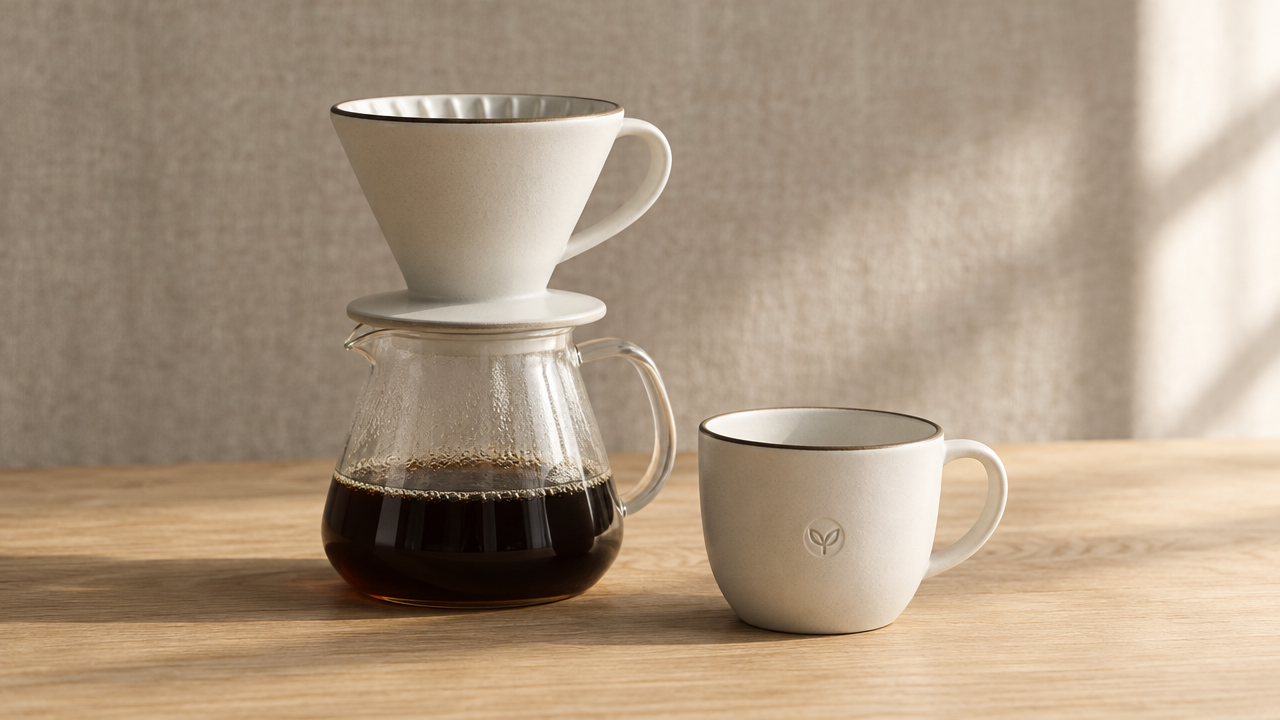
reference_image
Prompt
Product showcase via reference-image-to-video. Using [Image 1] as the precise subject reference, the same set of ceramic pour-over coffee equipment maintains completely consistent shape, glaze color, and logo position throughout the entire shot. Camera movement: at eye-level height, a slow orbiting dolly shot from front-left to front-right, with a slight downward tilt reveal at the midpoint, shallow depth of field, the equipment crisp and sharp, the background softly blurred. Warm morning light from the right side of the camera rakes across the glazed surface, casting a long, soft shadow that gradually shortens as the camera moves; gentle steam rises from the pot. Background: low-saturation linen cloth and a light oak countertop, minimal props. Smooth continuous camera movement, stable temporal consistency, no flicker, no deformation of the reference object, natural color grading, 16:9, 1080p, 5 seconds.
Copy the full prompt and adapt it for your own generation.
Tags