
Kling 3.0 Omni Image-to-Video: Core Parameters and Use Cases Illustrated
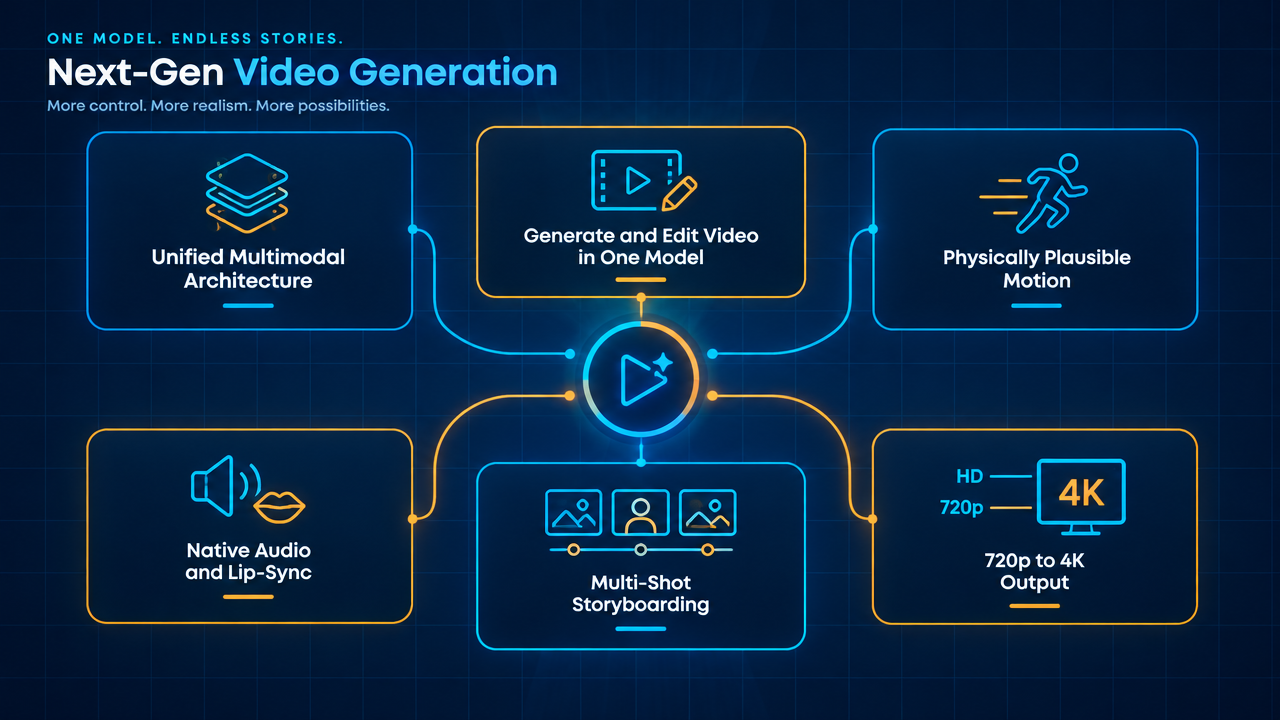
Starting from a 16:9 infographic first frame, use Kling 3.0 Omni's image-to-video pipeline to make the "parameter cards" emerge naturally in the frame and highlight one after another, creating a 5-second capability explainer short. Design approach: the first frame carries all the text information (unified multimodal architecture, text-to-video / image-to-video / reference-to-video and in-video editing, physical consistency via 3D Spacetime Joint Attention, native audio and lip sync, multi-shot storyboarding and 15-second duration, 720p–4K output); the video segment only handles lightweight camera movement and highlight animations, avoiding information distortion caused by the model redrawing text. Input composition: image_urls provides only 1 first frame (single-image first-frame mode, output aspect ratio follows the first frame); in base, enable prefer_multi_shots so the model splits shots on its own according to the prompt; resolution is fixed at 1080p, duration 5 seconds, audio off to avoid a meaningless audio track. In the prompt, do not reference any subject using @ syntax, leave elements empty, and keep the concise single-image-driven pipeline. Use cases: capability overview GIFs for developer docs and product pages, opening assets for model comparison pages, one-page infographics for tech talks. This structure also works as a template for "turning parameter tables into short videos"—just replace the first-frame text to reuse it.
Style Explanation · i2v · Product Demo
Model Kling 3.0
Reference inputs
image_urls
Prompt
Turn a clean 16:9 technical capability infographic into a short explainer clip. The opening frame already presents a deep navy grid layout with six labeled parameter cards: unified multimodal architecture, text-to-video / image-to-video / reference-to-video and in-video editing, 3D spatiotemporal joint attention for physically plausible motion generation, native audio and multilingual lip sync, multi-shot storyboarding up to 15 seconds, and 720p to 4K output. The camera slowly and steadily pushes in with a slight parallax drift; the cards highlight one after another with a soft left-to-right wipe and a subtle glow, while connecting lines between cards are progressively drawn as thin light streaks. Keep all text crisp, legible and unchanged, with no text re-rendering or garbled glyphs. Restrained corporate tech aesthetic, deep navy background, cyan and warm amber accent lights, gentle volumetric haze, shallow depth of field on the background layers, high-contrast studio lighting, stable composition, labels without distortion, no added people or objects.
Copy the full prompt and adapt it for your own generation.
Tags