
First-Frame-Driven Storyboard Concept Transformation: Vidu Q4 Image-to-Video Example
Using a single concept storyboard image as the first frame, let the image-to-video pipeline of Vidu Q4 Preview extend it into a continuous shot with native audio. The creative approach is to break down and demonstrate the transformation chain of "text → image → motion": first use the image asset to lock in composition, character, and lighting, then use the prompt to describe camera movement, motion amplitude, and sound atmosphere, and finally use duration and resolution to control the pacing and clarity of the final video. This example uses 5 seconds, 720p, and native audio enabled, making it suitable for independent creators and small studios for story segment previews, advertising shot comparisons, and multi-solution testing by repeatedly adjusting camera position and opening style on the same first frame. Since the schema only requires the first-frame image, the input structure is clear, making it easy for developers to understand the actual input form of the first-frame-driven mode.
Style Storyboard · Cinematic · Image-to-Video
Model Vidu Q4 Preview
Reference inputs
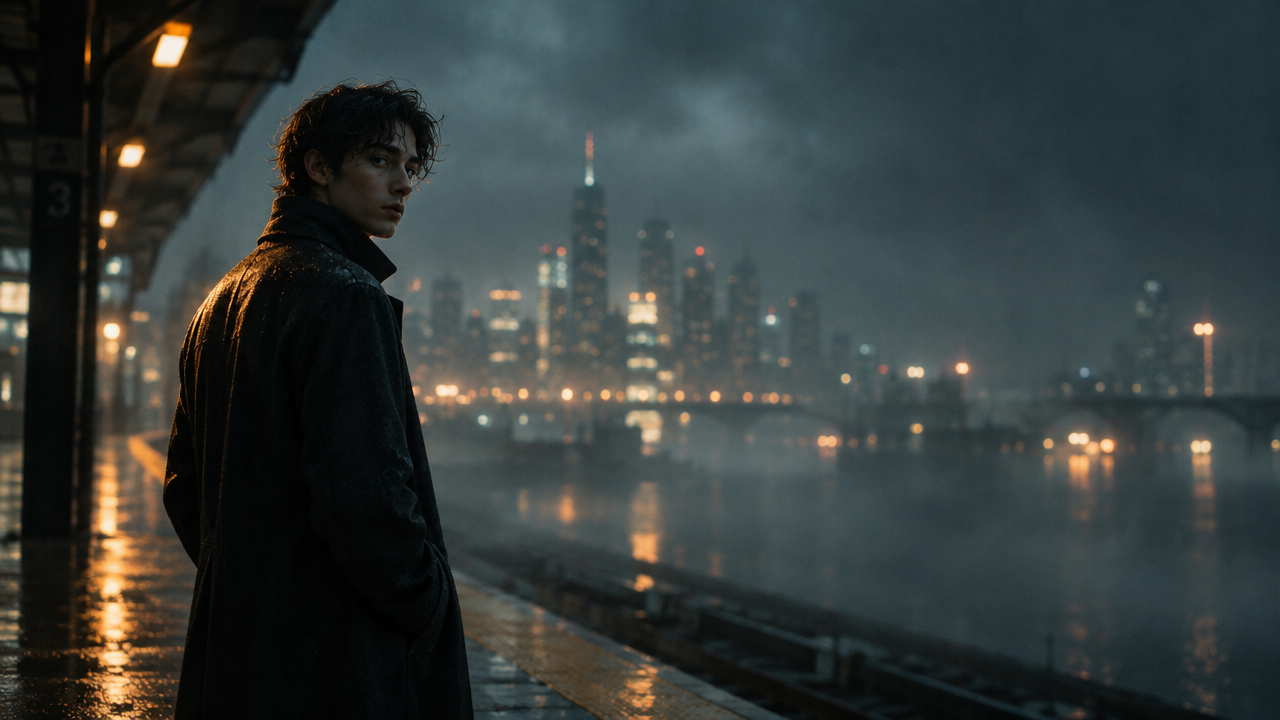
image_url
Prompt
Animate from the first frame with a slow, cinematic push-in: the character in the storyboard frame lifts their gaze toward the camera, with slight breathing and a single blink, while hair and clothing flutter in a gentle breeze. The camera cranes slightly downward while parallax separates the foreground silhouette from the misty background; warm rim light moves across the face. Keep the character identity, clothing, and composition consistent with the reference image. Ambient indoor room tone and a soft low-frequency hum, natural synchronized sound effects, restrained pacing, suitable for a 5-second concept shot.
Copy the full prompt and adapt it for your own generation.
Tags