
사용 가이드
Kling 3.0 Omni 프롬프트 사례: 실제 완성 영상 7편 바로 복사하기
종이배 하나로 텍스트→비디오, 참조→비디오, 비디오 변환을 넘나들고, 어항 이미지→비디오와 상품·캐릭터·두 주체 동시 등장까지, 각 편마다 완전한 프롬프트를 제공합니다.
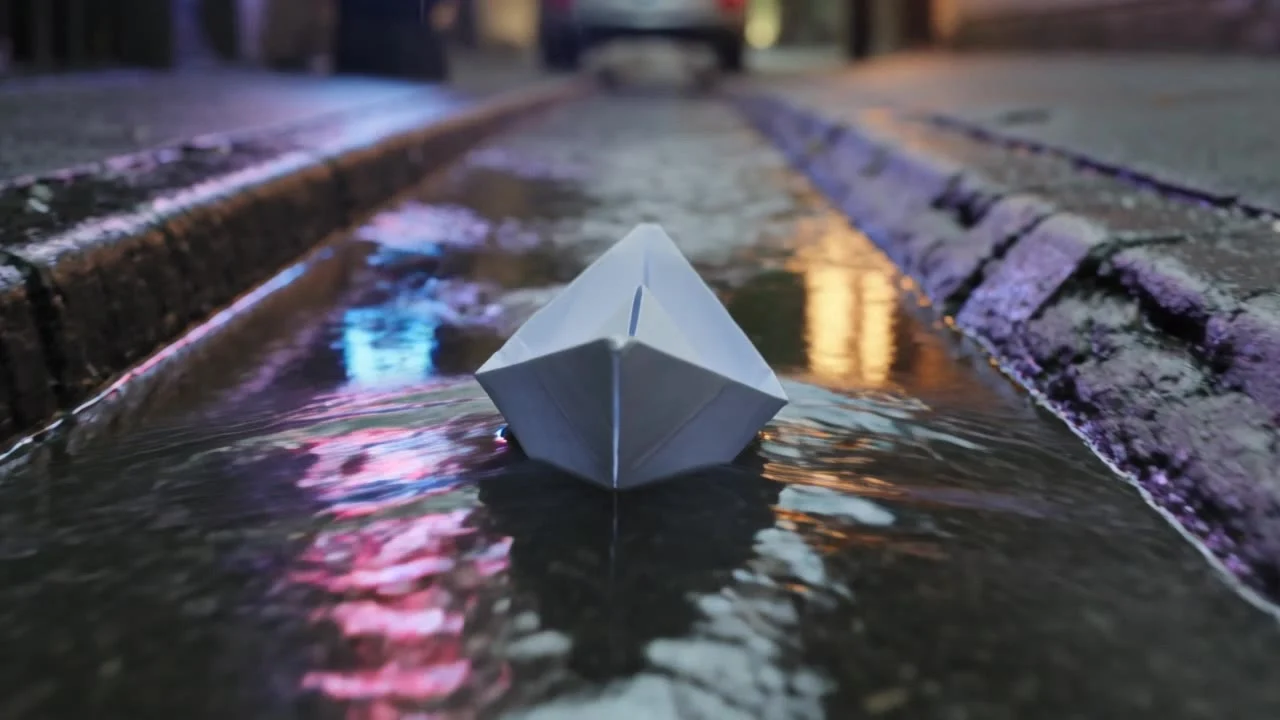
Kling 3.0 Omni의 가장 좋은 점은 같은 주체가 여러 진입점 사이를 이어서 넘나들 수 있다는 것입니다. 아래에서는 먼저 종이배 하나로 텍스트→비디오, 참조→비디오, 비디오 변환이라는 세 진입점을 시연합니다. 먼저 텍스트로 샷을 하나 만들고, 참조→비디오로 장면을 바꾸고, 비디오 변환으로 계절을 바꿉니다. 이어서 어항 이미지→비디오 한 편과 상품·캐릭터 일관성 사례 세 편을 추가합니다. 아래 7편은 모두 HiAPI에서 실제로 생성한 것이며, 프롬프트는 원문 그대로 제공합니다. 「이 프롬프트로 생성」을 누르면 모델 페이지에 자동으로 입력됩니다. 신규 사용자 가입 시 200 크레딧을 증정하며, 720p 3초 한 편이 $0.30부터입니다.
1. 텍스트→비디오: 비 오는 밤 배수로 속 종이배
처음부터 샷을 만들 때는 주체, 환경, 카메라가 어떻게 움직이는지를 분명히 씁니다.
텍스트→비디오 · 720p · 3초 · 16:9 · 소리 끔 · $0.30
A paper boat drifts down a rain-soaked city gutter at dusk, neon signs reflecting and rippling on the water; the camera glides low beside it as raindrops splash around. Cinematic, shallow depth of field, smooth tracking motion.
로우 앵글 트래킹(the camera glides low beside it)이 이 편의 핵심입니다. 카메라가 수면에 바짝 붙어야 네온 반영이 화면 전체를 채웁니다.
2. 참조→비디오: 같은 종이배를 숲속 시냇물로
종이배 첫 프레임 이미지를 주체 참조로, 1번 영상을 카메라 무브 참조로 사용해 장면을 완전히 바꿉니다.
참조→비디오 · 720p · 3초 · 참조 영상 포함 · $0.429
The same white paper boat from the reference drifts along a sunlit forest stream at golden hour, leaves floating beside it, camera tracks low alongside it with the same smooth motion as the reference video. Cinematic, shallow depth of field.
프롬프트에 "The same ... from the reference"와 "the same smooth motion as the reference video"를 명시해 참조 이미지로 주체를, 참조 영상으로 카메라 무브를 유도했습니다. 이 편에서는 종이배의 형태와 로우 앵글 트래킹이 모두 유지되었습니다.
3. 비디오 변환: 비 오는 밤을 눈 오는 밤으로
1번 영상을 그대로 넣고, 무엇으로 바꿀지만 씁니다.
비디오 변환 · 720p · 원본 영상과 동일한 3초 · $0.429
Transform the scene into a snowy winter night: the gutter becomes a frozen stream with drifting snowflakes, the paper boat becomes a small glowing paper lantern boat, keep the exact camera motion and water movement from the original video. Cinematic, cold blue tones.
마지막 문장 "keep the exact camera motion and water movement"가 원본 영상의 카메라 무브와 물의 흐름을 지켜내고, 계절과 조명, 종이배의 재질만 바꿉니다.
4. 이미지→비디오: 아침 안개 속 어항
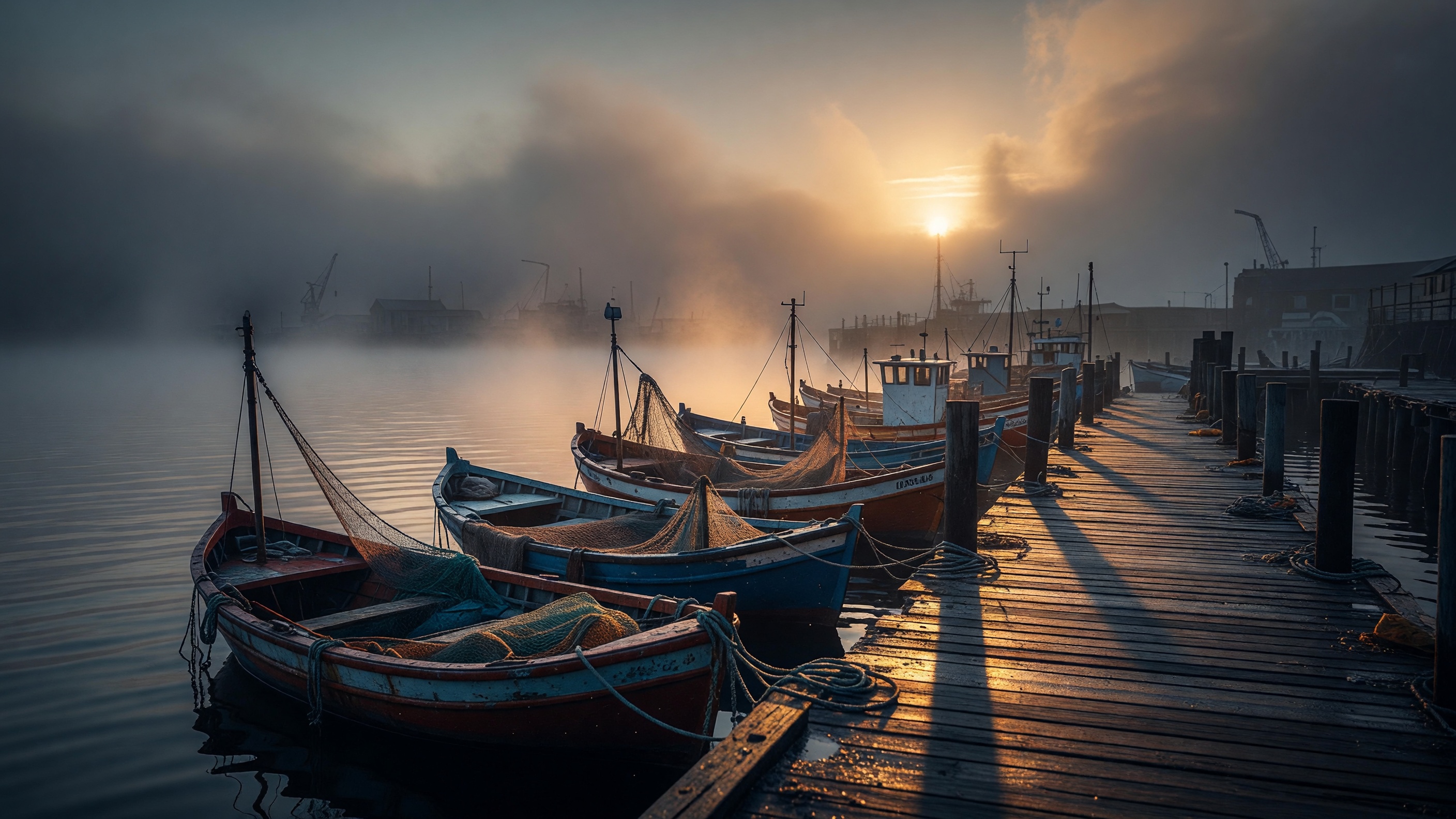
정지 사진 한 장을 첫 프레임으로 쓰고, 프롬프트에는 다음에 무슨 일이 일어나는지만 씁니다.
이미지→비디오 · 720p · 3초 · 첫 프레임 · $0.30
Morning fog slowly lifts over the harbor as the fishing boats rock gently on the water; the low sun breaks through the haze and glints on the wet pier, camera slowly pushes in along the dock. Cinematic, calm, photorealistic.
이미지→비디오에서는 이미 화면에 있는 것을 다시 설명할 필요가 없으므로, "안개가 걷히고, 배가 흔들리고, 카메라가 앞으로 밀고 들어간다" 같은 동작에 분량을 할애합니다.
5. 상품 샷: 세럼 한 병을 고정하기
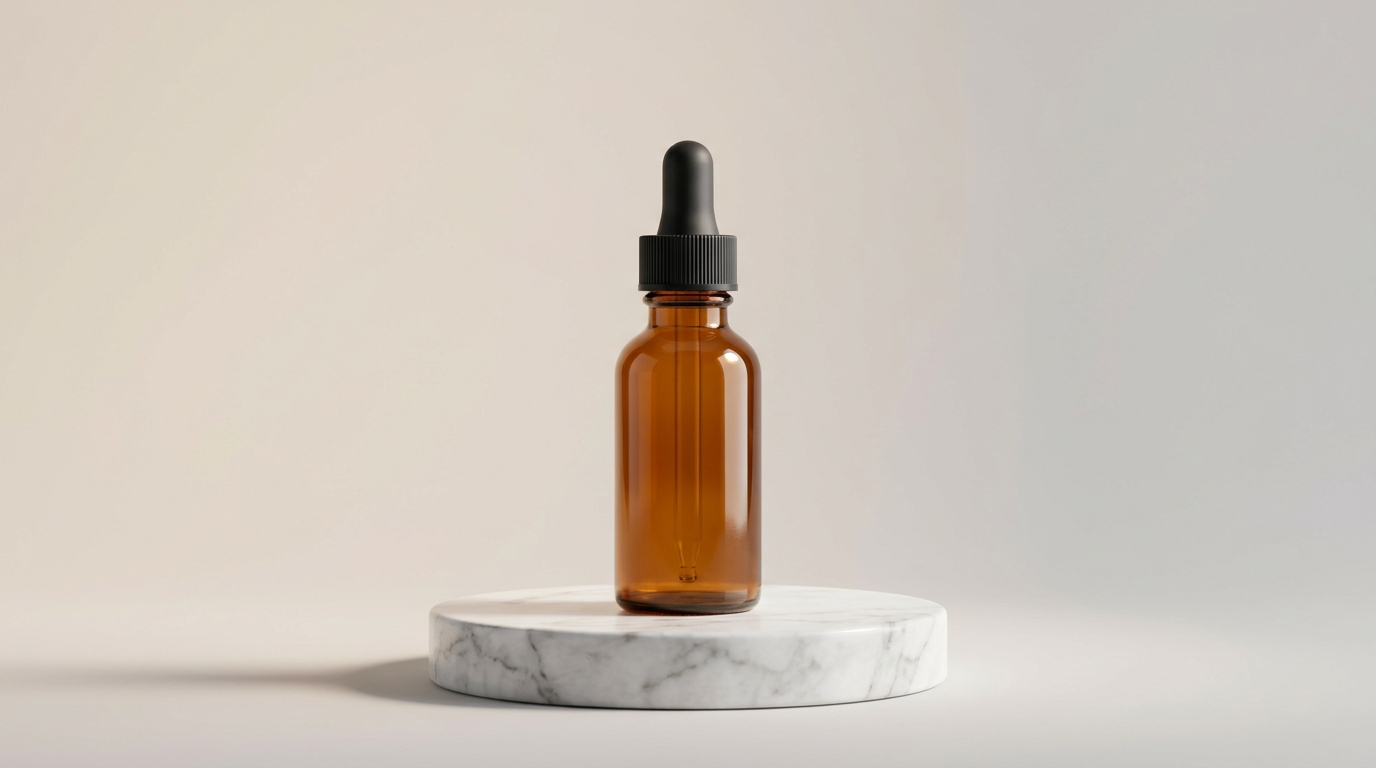
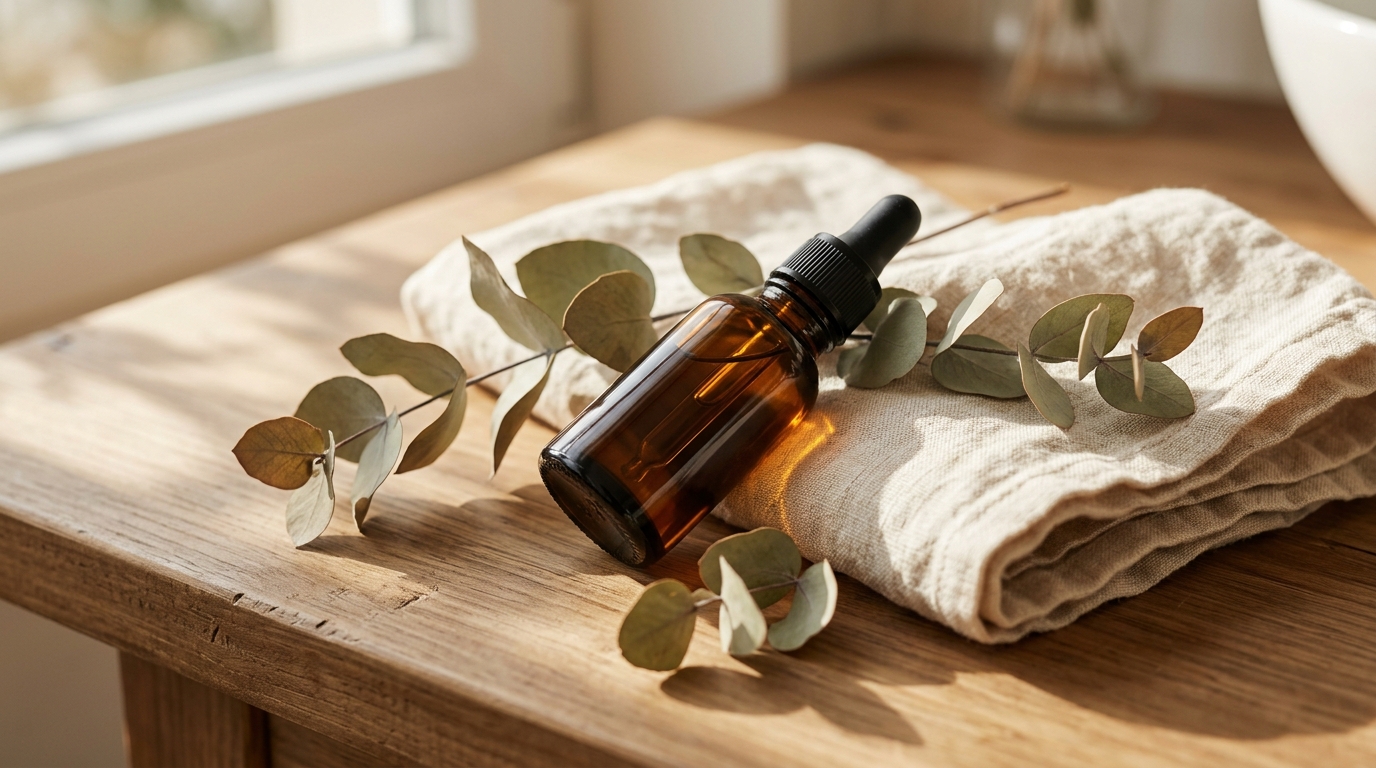
같은 세럼 병을 여러 각도에서 찍은 사진 두 장을 image_urls에 넣으면, 카메라가 가까워져도 병身, 검은 스포이드, 앰버색 유리가 그대로 유지됩니다.
참조→비디오 · 1080p · 5초 · 소리 끔 · $0.645
Cinematic skincare product reveal. The camera slowly dollies in on the amber glass serum bottle from the reference images, standing on a round white marble pedestal, soft diffused studio light from the upper left, faint volumetric haze behind it. A single droplet of golden serum slowly forms and hangs at the tip of the black dropper. Shallow depth of field, premium commercial look, gentle highlights sliding across the amber glass as the camera eases in.
6. 캐릭터 샷: 같은 마스코트를 다른 장면으로
정면과 비스듬한 측면 두 장으로, 마스코트가 카페에 서서 손을 흔들고 고개를 갸웃하며, 민트색 페이스 마스크, 동그란 눈, 배에 달린 버튼이 모두 선명하게 보입니다.


참조→비디오 · 1080p · 5초 · 소리 끔 · $0.645
The matte-white robot mascot from the reference images stands in a cozy sunlit cafe with a warm morning glow from a window behind it. It gives a cheerful little wave with one arm, tilts its head, and its antenna bobs gently. Smooth friendly motion, soft bokeh of wooden cafe shelves in the background, a slow gentle camera push-in, wholesome animated-film look.
7. 두 주체 동시 등장: 마스코트가 세럼 소개
두 주체를 모두 고정해야 할 때는 elements로 각각 이름을 붙이고, 프롬프트에 @mascot과 @serum을 씁니다:
"elements": [
  {"name": "mascot", "description": "Small matte-white rounded robot mascot with soft mint-green accents ...", "element_input_urls": ["ref-mascot-01.jpg", "ref-mascot-02.jpg"]},
  {"name": "serum", "description": "Amber glass skincare serum bottle with a black rubber-bulb glass dropper cap", "element_input_urls": ["serum-1.jpg", "serum-2.jpg"]}
]
참조→비디오 · 1080p · 6초 · 소리 끔 · $0.774
A clean, playful product commercial. @mascot stands beside a round white marble pedestal and gestures with one arm toward @serum resting on top of it, presenting it to the viewer. @mascot glances at the bottle, then turns to look at the camera. Soft diffused studio light, pale mint seamless background, a slow gentle camera push-in, premium yet friendly brand-ad look.
전체 요청(참조 이미지 주소 포함)은 영문판 Kling 3.0 Omni Reference-to-Video Prompt Recipes에서 확인하세요.
프롬프트를 더 안정적으로 쓰려면?
- 아이덴티티는 참조 이미지에, 동작은 프롬프트에: 주체의 생김새는 이미지에 맡기고, 프롬프트에는 카메라, 동작, 환경만 씁니다.
- 카메라 동사를 앞에: dolly-in, tracks low, pulls back처럼 디테일보다 카메라를 먼저 씁니다.
- 변환은 차이만: 비디오 변환에서는 "무엇으로 바뀌는지"와 "무엇을 유지하는지"만 쓰고 원본 영상을 다시 서술하지 않습니다.
자주 묻는 질문
프롬프트를 영어로 써야 하나요?
아니요, 중국어와 영어 모두 가능합니다. 이 글은 생성 당시의 원문을 그대로 유지해 같은 화면을 재현하기 쉽게 했습니다.
7편을 모두 재현하려면 얼마인가요?
위에 표기된 파라미터 기준으로 합계 $3.522입니다. 먼저 720p, 3~5초로 시도하고 만족스러우면 1080p로 올리세요.
참조 이미지는 몇 장이 필요한가요?
image_urls는 최소 1장, elements의 각 주체는 같은 주체를 여러 각도에서 찍은 2~4장을 씁니다. 참조 이미지와 주체를 합쳐 최대 7개이며, 참조 영상을 포함하면 최대 4개입니다.
1번부터 시작하는 것이 가장 저렴합니다: 비 오는 밤 종이배 생성 →, 720p 3초 $0.30. 연동 코드는 Kling 3.0 Omni API 중국어 튜토리얼을 참고하세요.
관련 글
모든 아티클 보기 →-

사용 가이드
seedream-5.0-pro/image-to-image 시작 가이드: 기능, 가격 및 연동 핵심 포인트
ByteDance 이미지 편집 모델의 기능 경계, 과금 방식 및 엔지니어링 연동 실무
-

사용 가이드
seedream-5.0-pro 텍스트-이미지 생성 입문 가이드: 능력 경계, API 연동 및 비용 관리
개발자를 위한 실무 관점: 파라미터 핵심부터 장당 $0.05 비용 추정까지
-

사용 가이드
Hailuo 2.3 Fast 이미지-투-비디오 입문 가이드: 성능 범위, 가격 및 연동 실무
개발자를 위한 MiniMax 이미지-투-비디오 모델 선택과 연동 핵심 포인트