
Guide
Ray 3.2 Prompt Guide: 5 Text-to-Video + 3 Image-to-Video Examples
A dolly-in opener, an aerial establishing shot, a neon atmosphere, a tracking shot of a moving subject and a vertical product macro shot, plus 3 image-to-video examples: first frame, first and last frames, and 1080p vertical.
All 8 examples below are real outputs from Ray 3.2: 5 text-to-video prompts and 3 image-to-video ones. Each comes with the full prompt and parameters, ready to copy and use. Clicking "Generate with this prompt" opens the model page with the prompt pre-filled. Ray 3.2 is now live on HiAPI — open the text-to-video model page to generate directly. New users get 200 credits on sign-up.
1. Camera Opener: Dolly-In on a Lighthouse
Parameters: 5 seconds · 540p · 21:9
Slow cinematic dolly-in toward a lone lighthouse keeper standing on a weathered iron balcony, salt spray drifting across the frame. Overcast dawn light, cool blue-grey tones, soft diffused shadows. The camera glides forward at a steady, patient pace, compressing the distance as gulls cross the background. Anamorphic lens look, shallow depth of field, gentle film grain. Negative: no text, no logos, no warping hands, no abrupt cuts.
Put the camera movement in the first sentence and Ray 3.2 treats it as the main instruction, keeping the forward glide throughout. patient pace reins in the overly fast motion that's common in text-to-video; the negative list at the end suppresses text, logos and hand deformation. When changing scenes, just swap the subject and weather and keep that camera sentence.
2. Establishing Shot: Aerial Sunrise Over Rice Terraces
Parameters: 5 seconds · 720p · 16:9
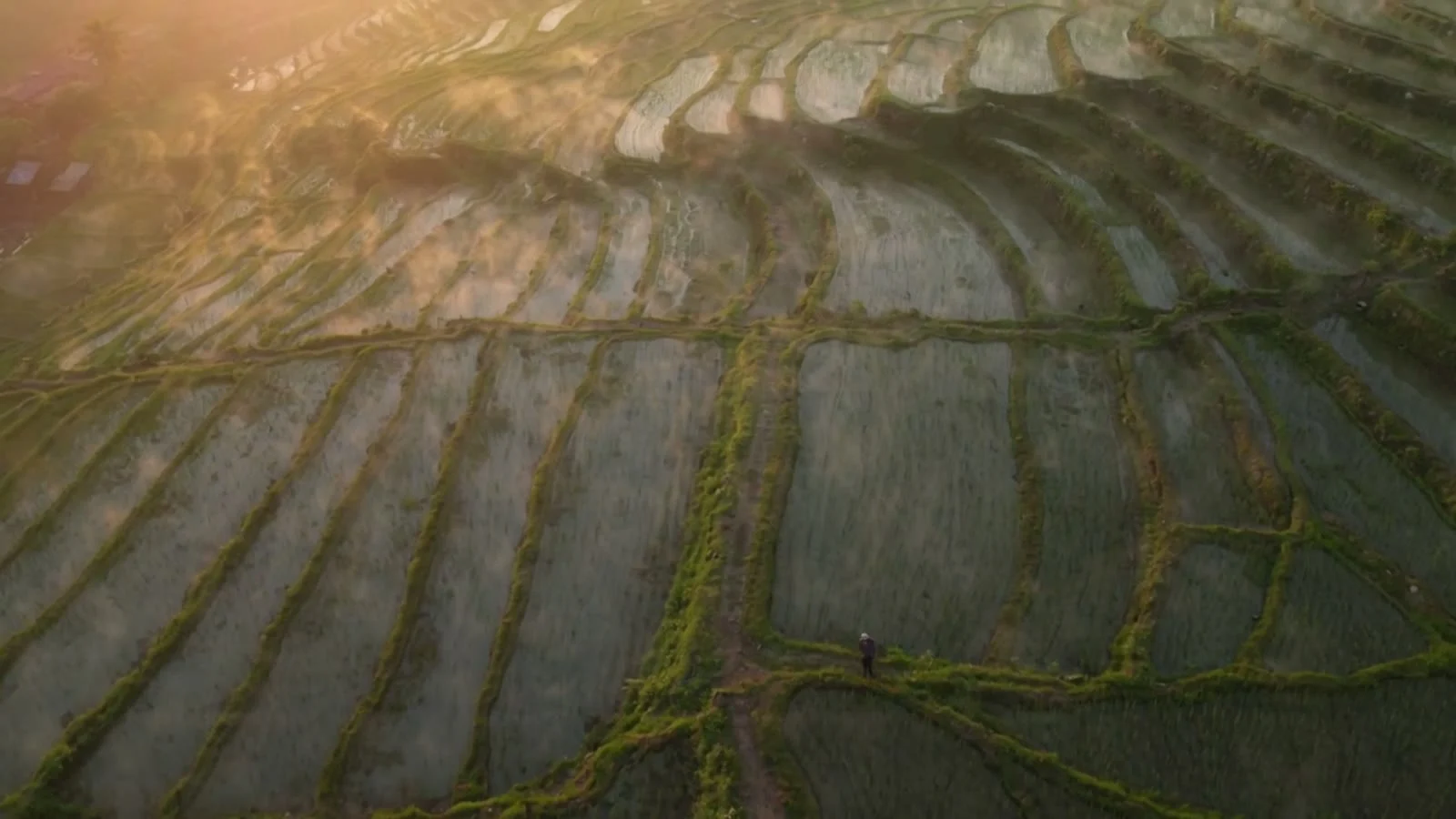
Aerial establishing shot drifting slowly over a terraced rice valley at golden hour, a low sun raking across flooded paddies that mirror an amber sky. Thin mist pools in the lower terraces. The camera moves laterally with a slow, patient pace, gradually revealing a single farmer walking a narrow dirt path. Warm high-dynamic-range lighting, rich greens and golds, cinematic haze. Negative: no text, no watermark, no flicker, no distorted geometry.
A lateral move needs somewhere to go: gradually revealing a single farmer gives the camera a clear target so the shot doesn't just float. The lighting sentences are the main source of the cinematic feel — writing golden hour, low sun raking and warm high-dynamic-range together is far more concrete than just saying cinematic. The cover frame from this 720p clip was also used as the article's header image.
3. Atmospheric Light: Rainy Neon Alley
Parameters: 5 seconds · 540p · 16:9
A rain-slicked alley at night, neon signage reflecting in puddles, steam rising from a street-food stall. A handheld camera pushes gently down the alley, wet reflections shimmering with every step. Moody cyan-and-magenta neon lighting, deep shadows, volumetric haze, cinematic bokeh from the background signs. Negative: no readable text, no logos, no morphing people, no strobing.
handheld camera pushes gently adds a touch of handheld shake, and gently keeps it from turning into wild jitter. Neon scenes are the most likely to produce garbled signage, so putting no readable text in the negative list is more reliable than hoping it spells words correctly. If you need brand lettering, add the text in post.
4. Tracking a Moving Subject: Fox in the Snow
Parameters: 5 seconds · 540p · 16:9
A red fox bounding through fresh powder snow in a sunlit birch forest, snow kicking up in slow backlit sprays. The camera tracks alongside the fox at a steady pace, keeping it centered as the trees blur past. Crisp winter morning light, cool whites with a warm sunlight rim, sparkling snow particles. Negative: no extra limbs, no jitter, no text, no unnatural speed ramps.
keeping it centered as the trees blur past is the key: it tells the model the subject is the anchor and the background is what moves — exactly how a real tracking shot reads. Animal motion is the most prone to limb problems, so no extra limbs and no unnatural speed ramps are worth keeping in the negative list.
5. Vertical Macro: Espresso
Parameters: 5 seconds · 540p · 9:16
Vertical macro shot of a single espresso being pulled, dark crema swirling into a warm glass cup on a marble counter in soft morning window light. The camera slowly tilts up from the dripping portafilter to the finished cup. Shallow depth of field, warm caramel tones, gentle rising steam, premium commercial finish. Negative: no shaking hands, no spills, no text overlay, no colour banding.
9:16 costs no extra: Ray 3.2 charges only by duration and resolution, so vertical and horizontal are the same price. Macro subjects have little inherent motion, so using slowly tilts up from ... to ... gives the camera a clear start and end point and keeps the frame from going static.
Image-to-Video: The First Frame Already Sets the Scene, So the Prompt Only Describes Change
The 3 examples below use ray-3.2/image-to-video. The first frame already fixes the subject, composition and lighting, so the prompt focuses on what happens next: the subject's motion, how the camera moves, how the light or weather changes. Each is fixed at 5 seconds, and the aspect ratio follows the first frame.
6. First Frame: A Shooting Star Across the Desert Night Sky
First frame image: desert tent, Milky Way and glowing lights

Parameters: 5 seconds · 720p · first frame approx. 3:2 (1024×687), output 4:3 at 1104×832
The shooting star streaks across the Milky Way as the camera slowly cranes down toward the glowing tent, desert sand ripples shimmer in the lantern light, cinematic night timelapse feel
Generate with this prompt → (upload the image above as the first frame)
The first frame determines the subject and scene, so the prompt only describes the shooting star and the camera craning down, leaving everything else unchanged. The original image isn't a standard ratio, so the output snaps to the nearest 4:3 with a small crop at the edges; keep important elements as close to the center as possible.
7. First and Last Frames: A Peony from Bud to Full Bloom
| First frame | Last frame |
|---|---|
| A peony in bud at dawn | The same peony in full bloom in morning light |


Parameters: 5 seconds · 540p · 16:9 · first frame + last frame
Time-lapse in a greenhouse at dawn: the peony bud slowly unfolds into full bloom as morning light brightens, static camera
Generate with this prompt → (upload both images, first frame then last frame)
After you pass end_image_url, the video lands on the last frame. In this example the two images are framed slightly differently, so even with static camera in the prompt the model still added a lateral pan to align to the last frame. If you want a fully locked-off camera, align the composition of the two images first.
8. 1080p Vertical: Milk Sinking Through Iced Coffee
First frame image: a 9:16 iced coffee product shot

Parameters: 5 seconds · 1080p · 9:16 · 1080×1920
The ribbon of milk keeps folding down through the iced espresso, the ice cubes settle and shift slightly, condensation beads slide down the outside of the glass, very slow push-in toward the glass, warm rim light stays steady, vertical product commercial shot
Generate with this prompt → (upload the image above as the first frame)
The first frame is a 9:16 product shot, so the 1080×1920 output has virtually no crop. 1080p is the top tier at $1.7145 per clip; confirm the motion at 540p first, then render this tier.
General Guidelines
- Write in the order "camera movement → subject and action → environment → light and color → negative list," and give each video only one main action.
- State the camera's direction and speed clearly:
slow dolly-in,drifts laterally,handheld push,slowly tilts up. - Use specific words for light:
golden hour,overcast dawn,cyan-and-magenta neon,backlit— far more effective than "cinematic." - End with a
Negative:list of exclusions: text, logos, extra limbs, flicker, jump cuts. - For image-to-video, don't re-describe the appearance already in the image; state clearly "what happens next" and "what must stay unchanged"; for first-and-last-frame transitions, align the composition of the two images first.
- Start with 5 seconds at 540p to nail down the motion ($0.2145 per clip, about 46 clips for $10), then bump up to 720p or 1080p once you're happy.
| Scenario | Aspect ratio | Suggested resolution |
|---|---|---|
| Dolly-in opener | 21:9, 16:9 | 540p to lock composition, 720p for the final |
| Aerial establishing shot | 16:9 | 720p |
| Atmospheric empty shot | 16:9, 21:9 | 540p to test the light, 720p for the final |
| Tracking a moving subject | 16:9, 9:16 | 540p to test the motion, 720p for the final |
| Vertical product macro | 9:16 | 540p to test, 1080p for the final |
Want to try these for yourself? Click "Generate with this prompt" under any example and the prompt is filled in automatically; you can also head to the text-to-video model page or the image-to-video model page to write your first one. The 200 credits from sign-up can be used right on the model page; running a full video deducts credits according to the tier you select.
Ray 3.2 Series Articles
- Ray 3.2 Text-to-Video Model Page: Generate Online, See Real Examples
- Ray 3.2 Image-to-Video Model Page: First Frame, Last Frame and Vertical Examples
- How Much Does the Ray 3.2 API Cost: 6 Tier Prices and Monthly Budgets
- How to Use the Ray 3.2 API: Run Your First Video in 5 Minutes
- Ray 3.2 vs Runway Gen-4.5: Choosing Between Text-to-Video and Image-to-Video
Related articles
View all articles →-

Guide
Getting Started with seedream-5.0-pro/image-to-image: Capabilities, Pricing, and Integration Essentials
Capability boundaries, billing model, and engineering integration practices for ByteDance's image editing model
-

Guide
seedream-5.0-pro Text-to-Image Getting Started Guide: Capability Boundaries, API Integration, and Cost Control
A hands-on developer perspective: from key parameters to a cost estimate of $0.05 per image
-

Guide
Hailuo 2.3 Fast Image-to-Video Getting Started Guide: Capability Boundaries, Pricing, and Integration Practices
MiniMax image-to-video model selection and integration key points for developers