

851 Labs
851 Labs Background Remover
851-labs/background-remover
An image processing model focused on automatic cutout, capable of outputting transparent PNGs or masks, suitable for batch background removal from e-commerce product photos and portraits
Try 851-labs/background-remover
Input
Showcases
View all showcases
Output
image
Light Blue Gradient Background ID Photo Cutout
Style portrait-retouch · ID Photo · Background Replacement
Reference inputs

image_url
Prompt
Copy the full prompt and adapt it for your own generation.
Tags

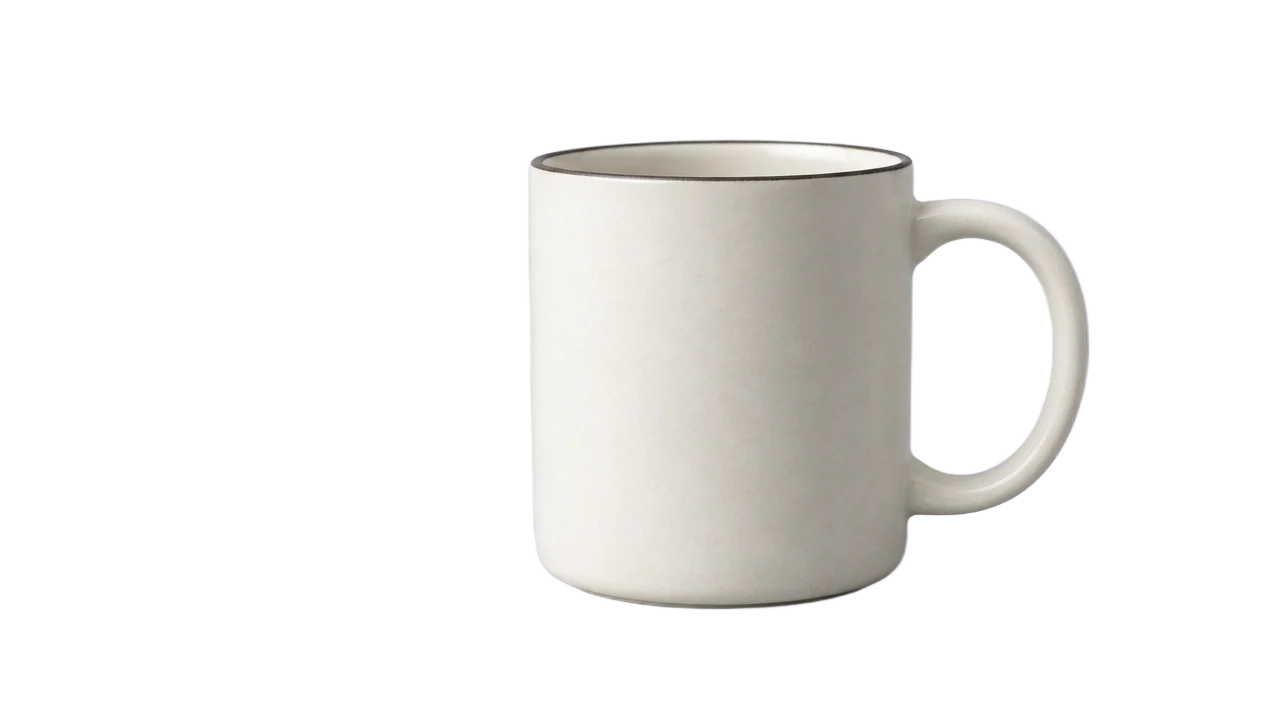
Ceramic Coffee Mug White-Background Product Image Cutout
Style Product Image · ecommerce · Studio lighting
Reference inputs

image_url
Prompt
Copy the full prompt and adapt it for your own generation.
Tags

Solid color background removal for ID photos: clean edges
Style Portrait Cutout · ID Photo · E-commerce Preparation
Reference inputs

image_url
Prompt
Copy the full prompt and adapt it for your own generation.
Tags
Pricing
851-labs/background-remover per image
| Unit Price | $0.002 |
|---|
Positioning Overview
background-remover is a single-task image background removal model offered by 851 Labs and accessed through the unified HiAPI.ai interface. Developers submit a publicly accessible image URL and receive a background-removed result, making it suitable for automated workflows that require low-cost, fast cutout processing, such as preprocessing for e-commerce assets, avatars, and content imagery. It does not handle generation or editing; its purpose is to do the single step of cleanly separating foreground from background reliably.
Key Highlights
- Lightweight cutout focused on a single task — it only performs background removal with no extra parameters, keeping integration costs low and making it suitable for embedding into existing image processing pipelines.
- Direct URL input, one request per image — the input requires only an image address, and the simple call structure makes it easy to integrate into batch jobs and asynchronous queues.
- Low-cost batch processing — billing is per image, making it suitable for asset cleanup scenarios that require large volumes of repeated cutouts.
Capability Description
Automatic background removal: performs foreground separation on the input image and directly returns the background-removed image result, eliminating manual outlining and mask adjustments.
Remote image URL input: supports a publicly accessible image address starting with http or https as the only input, with no need to upload files first, making it easy to connect with existing image hosting and asset libraries.
Single-image output, easy to chain: each call produces one processed image, which can be directly integrated as an intermediate asset in subsequent composition, layout, or listing workflows.
Use Cases
- E-commerce operations: product image background removal — process original product images into clean foreground assets for listings with a unified background color or for ad image layout.
- Content creators: portrait and avatar cutouts — remove backgrounds from portrait photos to produce transparent assets that can be used directly in stickers, social media images, and personal profile pages.
- Design workflows: asset preprocessing — process images into background-removed layers before design layout to reduce manual cutout time, as a standardized step for asset ingestion.
- Platform operations: batch asset cleanup — submit images already hosted at URLs in the image hosting service for batch processing and uniformly obtain background-removed versions for product or content display.
Limitations and Selection Advice
The capability is limited to background removal and does not include image generation, inpainting, or complex editing; when creative image modification is needed, other image models should be selected. Output quality is affected by the input image; images where the subject and background colors are similar or edge details are complex may require manual review. Calls require a publicly accessible image URL, and files on local or private networks must first be hosted at an accessible location. If the task is primarily not cutout, it is recommended to use a model with generation or editing capabilities instead.
Frequently asked questions
View all FAQs →-
Do I need a prompt?
No. Supply one image URL and the model separates the foreground from the background.
-
Is the output actually transparent?
The output is a PNG with an alpha channel. The checkerboard on this page illustrates transparency and is not embedded in the original downloadable result.
-
Which fields does the API require?
Submit model and input.image_url. The image must be directly accessible over HTTP or HTTPS.
-
Can I change the aspect ratio, colors or background?
This endpoint focuses on background removal and offers no aspect-ratio, background-color or prompt controls. Use the transparent output in a subsequent editing step.
Create a generation task
https://api.hiapi.ai/v1/tasks Headers
AuthorizationstringRequiredAccount API key. Required on every request. Example: Bearer YOUR_HIAPI_API_KEY. Get your API key
Content-TypestringOptionalThe request body is always parsed as JSON; when sent, only application/json (optionally with charset) is accepted — any other value returns 415. Example: application/json.
Idempotency-KeystringOptionalIdempotency key, up to 255 bytes. Retries with the same key from the same account create the task only once; replays return the original taskId.
On network timeouts or client retries, the same key creates the task only once — no double charges (scope: the API key's account). Use a business-unique identifier as the key (e.g. "order-42"); replays return the original taskId, and keys expire 24 hours after the first request. See the Unified Async API overview for the full scenario matrix.
Body
modelstringRequiredCurrent fixed value: 851-labs/background-remover
routestringOptionalCurrent fixed value: default
inputobjectRequired
Business parameters for 851-labs/background-remover and route default — see the parameter table below.
image_urlstringRequiredminLength 1pattern ^https?://[^\s]+$The URL of the image to be processed, which must be a publicly accessible image URL. This parameter is the input source for background removal; once provided, the service will fetch the image and return the result with the background removed.
callbackobjectOptional
Terminal-state notification config. When omitted, no callback is delivered — poll the task yourself. See the callback note below.
Provide callback.url when creating a task and HiAPI POSTs to your service once the task reaches a terminal state — no polling needed. The callback payload mirrors the task detail structure; signature verification, delivery retries and idempotency are documented on the Unified Async API overview page.
urlstringRequiredRequired when callback is present. A POST is sent to this URL once the task reaches a terminal state; must be a valid http(s) URL.
whenstringOptionalDefault: "final"Only final is supported today — notified on both success and fail.
finalstoragestringOptionalDefault: "temp"Artifact storage tier: temp (default, retained about 7 days) or persistent (long-term, billed by size). Insufficient balance or exceeding the storage cap silently downgrades to temp; the effective tier is shown in the task detail response.
temppersistentRequest examples
# Submit an async task; returns a taskId immediately (no waiting for generation)
curl -X POST "https://api.hiapi.ai/v1/tasks" \
  -H "Authorization: Bearer $HIAPI_API_KEY" \
  -H "Content-Type: application/json" \
  -d '{
  "model": "851-labs/background-remover",
  "input": {
    "image_url": "…"
  }
}'
const res = await fetch("https://api.hiapi.ai/v1/tasks", {
method: "POST",
headers: {
Authorization: `Bearer ${process.env.HIAPI_API_KEY}`,
"Content-Type": "application/json",
},
body: JSON.stringify({
model: "851-labs/background-remover",
input: {
"image_url": "…"
}
}),
});
const task = await res.json();
// { code: 200, message: "success", data: { taskId } }import os, requests
res = requests.post(
"https://api.hiapi.ai/v1/tasks",
headers={"Authorization": f"Bearer {os.environ['HIAPI_API_KEY']}"},
json={
"model": "851-labs/background-remover",
"input": {
"image_url": "…"
}
},
)
print(res.json()) # { code, message, data: { taskId } }200 OK
{
  "code": 200,
  "message": "success",
  "data": {
    "taskId": "tk-hiapi-01HZTQ8BX2N3GM3YFK4Z9D7VQR"
  }
}
400 Bad Request
{
  "code": 400,
  "message": "invalid request",
  "data": null,
  "error_code": "INVALID_REQUEST"
}
Get task detail
https://api.hiapi.ai/v1/tasks/:id Response fields
taskIdstringRequiredTask ID, always prefixed with tk-hiapi-.
modelstringRequiredResolved full model name. Tasks submitted with the route parameter return base@route (e.g. gpt-image-2/text-to-image@ext); otherwise identical to the name passed at creation.
routestringOptionalPresent only when the task was submitted with an explicit route parameter; echoes the submitted value.
statusstringRequiredTask status.
queued Queued, not started yet.
handling Being processed.
archiving Processing finished, artifacts being prepared.
success Terminal: completed, artifacts available (output returned).
fail Terminal: failed (error returned).
After submission, check status: success and fail are terminal, everything else is non-terminal. Poll every 1–3 seconds until terminal. On success, download artifacts from output[].url and transfer them before expireAt; pass storage: "persistent" at creation time when long-term retention is needed.
creatednumberRequiredTask creation time (Unix seconds).
completednumberRequiredUnix seconds when the task reached a terminal state; fixed to 0 while not terminal.
outputarrayOptional
Present only when status == success. Artifact list — always an array; a single task may return multiple types at once (e.g. video + first_frame).
Array [ object ]
Array items
urlstringRequiredArtifact URL, directly downloadable.
typestringRequiredCurrent possible values: video, image, audio, first_frame, last_frame, thumbnail; more may be added later.
expireAtnumberRequiredUnix seconds until which the artifact remains accessible; download or transfer before it expires.
errorobjectOptional
Present only when status == fail.
codestringRequiredBusiness error code.
messagestringRequiredError description.
Response examples
Success
{
  "code": 200,
  "message": "success",
  "data": {
    "taskId": "tk-hiapi-01HZTQ8BX2N3GM3YFK4Z9D7VQR",
    "model": "happyhorse-1-0",
    "status": "success",
    "created": 1777282033,
    "completed": 1777282099,
    "output": [
      {
        "url": "https://cdn.hiapi.ai/tasks/.../video.mp4",
        "type": "video",
        "expireAt": 1777886899
      }
    ]
  }
}
Processing (non-terminal)
{
  "code": 200,
  "message": "success",
  "data": {
    "taskId": "tk-hiapi-...",
    "model": "happyhorse-1-0",
    "status": "archiving",
    "created": 1777282033,
    "completed": 0
  }
}
Failed
{
  "code": 200,
  "message": "success",
  "data": {
    "taskId": "tk-hiapi-...",
    "model": "happyhorse-1-0",
    "status": "fail",
    "created": 1777282033,
    "completed": 1777282099,
    "error": {
      "code": "TASK_FAILED",
      "message": "task failed"
    }
  }
}Articles
View all articles →Related Models
View all models →Same Type
-
 FASHN Tryon v1.6 FASHN $0.107 /image
-
 Grok Imagine xAI $0.011 /second
-
 Seedream 4.5 ByteDance $0.045 /image
-
 BRIA Eraser Bria $0.058 /image
-
 Muse Image 1.0 Meta $0.015 per task
-
 Ideogram V4.5 Ideogram $0.011 /image
-
 BRIA Product Shot Bria $0.058 /image
-
 Nano Banana 2 Google $0.036 /image
-
 FLUX 1.1 Pro Black Forest Labs $0.050 /image
-
 Nano Banana Pro Google $0.057 /image
-
 FLUX.2 Klein 9B Black Forest Labs $0.0086 /image
-
 Ideogram V4 Ideogram $0.050 /image