

Black Forest Labs
FLUX.2 Klein 9B
flux-2-klein-9b/text-to-image
A 9-billion-parameter rectified-flow image model, step-distilled to 4 steps, unifying text-to-image and single/multi-reference image editing in a compact architecture, aimed at low-latency real-time generation scenarios
Try flux-2-klein-9b/text-to-image
Input
Showcases
View all showcasesOutput
image
From Realism to Flat: FLUX.2 klein Style Spectrum Illustration
Style Illustration · style-transfer · Editing
Prompt
At dusk, a solitary coastal lighthouse on a rocky headland, shot with a low-angle wide-angle lens, a single frame filling a 16:9 composition, the tower positioned at the right third, the open sea occupying the left side. The image sits at the midpoint of the style spectrum between realistic photography and flat vector illustration: clear architectural silhouette, simplified rock planes with visible brush texture, restrained palette—slate blue, warm ochre, and off-white, soft directional light from the low sun behind clouds, gentle atmospheric haze, no text, no watermark.
Copy the full prompt and adapt it for your own generation.
Tags
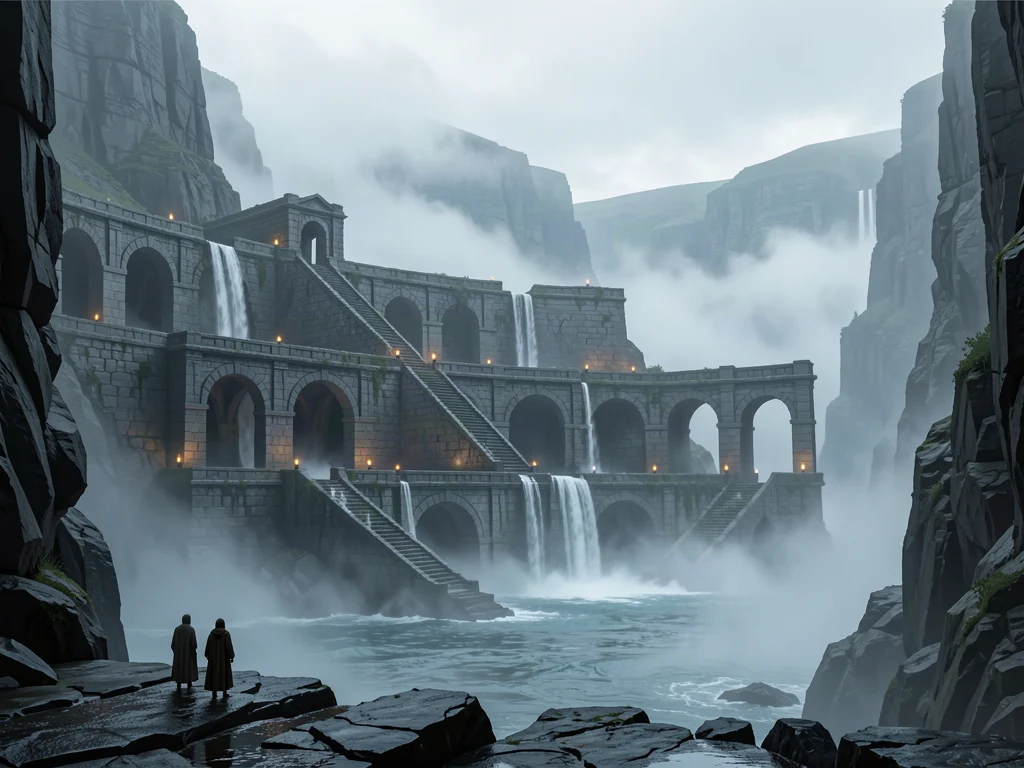
FLUX.2 klein Worldbuilding Concept Art: Sanctuary of the Mist Harbor
Style Concept Art · Worldbuilding · Atmosphere
Prompt
Cinematic widescreen 16:9 concept art, a grand stone sanctuary built within a tidal canyon, three tiers of weathered basalt arches and suspended staircases, thin waterfalls cascading from the upper terraces into mist-filled pools below. Foreground: two small cloaked figures standing at the edge of wet rock, backs to the viewer, providing a sense of scale and of arrival. Midground: the silhouette of the sanctuary, scattered warm lantern lights contrasting against the cold stone. Background: layered mist bands and a pale overcast sky, distant cliff walls gradually dissolving into atmospheric haze. Single directional side light from the upper left, cool gray-blue palette with restrained warm accents, soft volumetric fog, fine stone textures, painterly matte-painting quality, high detail, no text, no watermark.
Copy the full prompt and adapt it for your own generation.
Tags
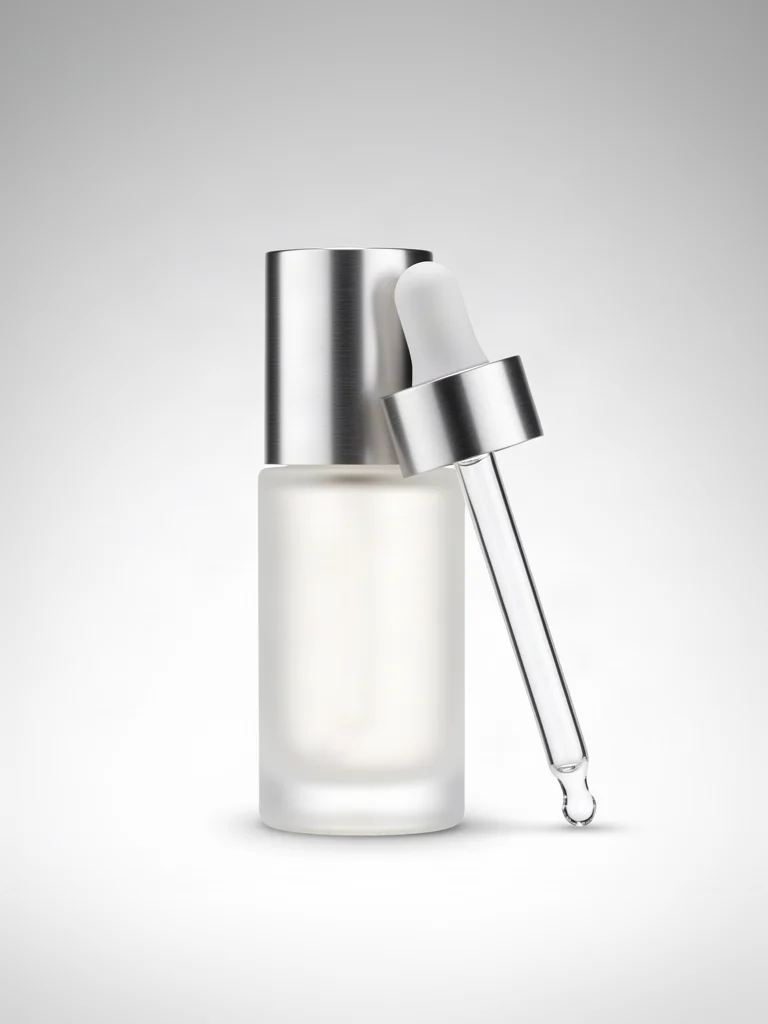
FLUX.2 klein E-commerce Product Photography Texture
Style Product Image · Studio lighting · ecommerce
Prompt
High-end e-commerce product photography, a bottle of frosted glass serum with a brushed aluminum cap, a glass dropper placed beside it, centered on a seamless light gray studio background with a subtle soft gradient transition. Two large softboxes, one as the key light at the front left of the camera, one as fill light at the right of the camera, plus a narrow rim light strip placed behind to outline the bottle's silhouette; the aluminum edges show controlled highlights, and the glass surface has clean vertical reflections. Shot with a 100mm macro lens at f/11 aperture, the entire product is in sharp focus, with a soft contact shadow at the base anchoring its position, no clutter props. Neutral color grading, accurate whites, no color cast, catalog-grade sharpness, high resolution, commercial retouching style.
Copy the full prompt and adapt it for your own generation.
Tags

FLUX.2 klein Portrait Prompts: Dual-Style Reference
Style Portrait & Photography · Photorealistic · Prompt Reference
Prompt
A realistic portrait of a young woman in her twenties sitting beside a large window in a quiet apartment, soft directional daylight from camera left tracing her cheekbones and jawline, fine skin texture with visible pores and faint freckles, natural unretouched skin tone, voluminous dark hair with a few loose strands catching the light, wearing a simple charcoal knit sweater, shallow depth of field, softly blurred warm interior background, 85mm lens look, eye-level medium close-up, gentle natural color grading, smooth highlight roll-off, richly detailed eyes and hair, calm neutral expression, fashion magazine photography aesthetic
Copy the full prompt and adapt it for your own generation.
Tags
Pricing
flux-2-klein-9b/text-to-image per image
| Unit Price | $0.00858 |
|---|
Overview
The text-to-image-only pipeline of FLUX.2 klein 9B, released by Black Forest Labs, focuses on balancing quality and latency. It generates images directly from text prompts, supports aspect ratios from 1:1 to 16:9, and offers three output formats: jpeg, png, and webp; inference steps can be set between 4 and 8, and generation can be completed with the default 4 steps. It is well suited for latency-sensitive batch content production, marketing visuals, and visual exploration during the prototyping stage, and developers can integrate it through the unified API on HiAPI.ai.
Key Highlights
- Low-step inference for latency-sensitive scenarios — The step-distillation design enables image generation in just 4 steps, with the parameter adjustable between 4 and 8 steps, making it easy to trade off between speed and detail.
- Fixed seed support for reproducible generation — A seed parameter is provided; the same prompt and seed combination can reproduce results, which facilitates regression testing and version comparison.
- Output parameters aligned with engineering pipelines — Aspect ratios cover the commonly used compositions 1:1, 4:3, 3:4, 16:9, and 9:16, and outputs can be selected directly as jpeg, png, or webp, eliminating the need for additional transcoding.
Capabilities
Text-to-image generation: Pass in a text prompt to obtain the corresponding image, with no required reference image; only prompt is needed, and all other parameters have default values, keeping integration costs low.
Inference step and seed control: num_inference_steps can be adjusted between 4 and 8 to change generation detail, while seed locks randomness, making it suitable for evaluation and debugging that require stable reproduction.
Composition ratios and output formats: aspect_ratio covers five ratios across portrait, landscape, and square formats, and output_format supports jpeg, png, and webp, so generated results can directly match page placements and storage requirements.
Use Cases
- Batch image production for content teams — Use product or topic descriptions as input to generate images in batches, specify the ratio and output format, and use them directly for articles, landing pages, and social media assets.
- Visual draft exploration for product prototypes — Use short prompts to quickly produce multiple composition options, and reproduce candidate styles with fixed seeds for direction screening before design review.
- Integration into real-time or high-frequency image generation applications — For latency-sensitive online features, generate images with the default 4-step inference and adjust the number of steps as needed to control quality and processing time.
Limitations and Selection Advice
This pipeline generates images from plain text only and does not accept reference images. When editing existing images or changing styles is required, choose the image-to-image pipeline in the same series. Inference steps support only 4 to 8 steps, not finer long-sampling adjustments; apart from prompt, there are no parameters such as negative prompts. The model card imposes constraints on out-of-scope use, so check the original license text before commercial use. If a task requires other modalities such as video or audio output, this model is not suitable.
Frequently asked questions
View all FAQs →-
How many references does FLUX.2 [klein] 9B Image to Image accept?
It currently accepts one JPEG, PNG, or WebP reference. image_urls must contain exactly one public image URL.
-
Which editing tasks is it best for?
It is suited to product cleanup, background replacement, in-image text rewriting, color changes, and commercial edits that preserve subject and camera.
-
How do I set inference steps?
num_inference_steps accepts integers from 4 to 8 and defaults to 4. The current price does not change with the step count.
-
Which ratios and formats are supported?
Ratios: 1:1, 4:3, 3:4, 16:9, and 9:16. Formats: JPEG, PNG, and WebP.
Create a generation task
https://api.hiapi.ai/v1/tasks Headers
AuthorizationstringRequiredAccount API key. Required on every request. Example: Bearer YOUR_HIAPI_API_KEY. Get your API key
Content-TypestringOptionalThe request body is always parsed as JSON; when sent, only application/json (optionally with charset) is accepted — any other value returns 415. Example: application/json.
Idempotency-KeystringOptionalIdempotency key, up to 255 bytes. Retries with the same key from the same account create the task only once; replays return the original taskId.
On network timeouts or client retries, the same key creates the task only once — no double charges (scope: the API key's account). Use a business-unique identifier as the key (e.g. "order-42"); replays return the original taskId, and keys expire 24 hours after the first request. See the Unified Async API overview for the full scenario matrix.
Body
modelstringRequiredCurrent fixed value: flux-2-klein-9b/text-to-image
routestringOptionalCurrent fixed value: default
inputobjectRequired
Business parameters for flux-2-klein-9b/text-to-image and route default — see the parameter table below.
seedintegerOptionalRandom seed used for reproducibility of the generated result; takes an integer.
promptstringRequiredText prompt used for image generation; takes a string.
aspect_ratiostringOptionalDefault: "4:3"Aspect ratio of the generated image; takes a string. Default is 4:3.
1:14:33:416:99:16output_formatstringOptionalDefault: "png"Output format of the generated image; takes a string. Default is png.
jpegpngwebpnum_inference_stepsintegerOptionalDefault: 4min 4max 8Number of inference steps; takes an integer between 4 and 8. Default is 4.
callbackobjectOptional
Terminal-state notification config. When omitted, no callback is delivered — poll the task yourself. See the callback note below.
Provide callback.url when creating a task and HiAPI POSTs to your service once the task reaches a terminal state — no polling needed. The callback payload mirrors the task detail structure; signature verification, delivery retries and idempotency are documented on the Unified Async API overview page.
urlstringRequiredRequired when callback is present. A POST is sent to this URL once the task reaches a terminal state; must be a valid http(s) URL.
whenstringOptionalDefault: "final"Only final is supported today — notified on both success and fail.
finalstoragestringOptionalDefault: "temp"Artifact storage tier: temp (default, retained about 7 days) or persistent (long-term, billed by size). Insufficient balance or exceeding the storage cap silently downgrades to temp; the effective tier is shown in the task detail response.
temppersistentRequest examples
# Submit an async task; returns a taskId immediately (no waiting for generation)
curl -X POST "https://api.hiapi.ai/v1/tasks" \
  -H "Authorization: Bearer $HIAPI_API_KEY" \
  -H "Content-Type: application/json" \
  -d '{
  "model": "flux-2-klein-9b/text-to-image",
  "input": {
    "prompt": "…",
    "aspect_ratio": "4:3",
    "output_format": "png",
    "num_inference_steps": 4
  }
}'
const res = await fetch("https://api.hiapi.ai/v1/tasks", {
method: "POST",
headers: {
Authorization: `Bearer ${process.env.HIAPI_API_KEY}`,
"Content-Type": "application/json",
},
body: JSON.stringify({
model: "flux-2-klein-9b/text-to-image",
input: {
"prompt": "…",
"aspect_ratio": "4:3",
"output_format": "png",
"num_inference_steps": 4
}
}),
});
const task = await res.json();
// { code: 200, message: "success", data: { taskId } }import os, requests
res = requests.post(
"https://api.hiapi.ai/v1/tasks",
headers={"Authorization": f"Bearer {os.environ['HIAPI_API_KEY']}"},
json={
"model": "flux-2-klein-9b/text-to-image",
"input": {
"prompt": "…",
"aspect_ratio": "4:3",
"output_format": "png",
"num_inference_steps": 4
}
},
)
print(res.json()) # { code, message, data: { taskId } }200 OK
{
  "code": 200,
  "message": "success",
  "data": {
    "taskId": "tk-hiapi-01HZTQ8BX2N3GM3YFK4Z9D7VQR"
  }
}
400 Bad Request
{
  "code": 400,
  "message": "invalid request",
  "data": null,
  "error_code": "INVALID_REQUEST"
}
Get task detail
https://api.hiapi.ai/v1/tasks/:id Response fields
taskIdstringRequiredTask ID, always prefixed with tk-hiapi-.
modelstringRequiredResolved full model name. Tasks submitted with the route parameter return base@route (e.g. gpt-image-2/text-to-image@ext); otherwise identical to the name passed at creation.
routestringOptionalPresent only when the task was submitted with an explicit route parameter; echoes the submitted value.
statusstringRequiredTask status.
queued Queued, not started yet.
handling Being processed.
archiving Processing finished, artifacts being prepared.
success Terminal: completed, artifacts available (output returned).
fail Terminal: failed (error returned).
After submission, check status: success and fail are terminal, everything else is non-terminal. Poll every 1–3 seconds until terminal. On success, download artifacts from output[].url and transfer them before expireAt; pass storage: "persistent" at creation time when long-term retention is needed.
creatednumberRequiredTask creation time (Unix seconds).
completednumberRequiredUnix seconds when the task reached a terminal state; fixed to 0 while not terminal.
outputarrayOptional
Present only when status == success. Artifact list — always an array; a single task may return multiple types at once (e.g. video + first_frame).
Array [ object ]
Array items
urlstringRequiredArtifact URL, directly downloadable.
typestringRequiredCurrent possible values: video, image, audio, first_frame, last_frame, thumbnail; more may be added later.
expireAtnumberRequiredUnix seconds until which the artifact remains accessible; download or transfer before it expires.
errorobjectOptional
Present only when status == fail.
codestringRequiredBusiness error code.
messagestringRequiredError description.
Response examples
Success
{
  "code": 200,
  "message": "success",
  "data": {
    "taskId": "tk-hiapi-01HZTQ8BX2N3GM3YFK4Z9D7VQR",
    "model": "happyhorse-1-0",
    "status": "success",
    "created": 1777282033,
    "completed": 1777282099,
    "output": [
      {
        "url": "https://cdn.hiapi.ai/tasks/.../video.mp4",
        "type": "video",
        "expireAt": 1777886899
      }
    ]
  }
}
Processing (non-terminal)
{
  "code": 200,
  "message": "success",
  "data": {
    "taskId": "tk-hiapi-...",
    "model": "happyhorse-1-0",
    "status": "archiving",
    "created": 1777282033,
    "completed": 0
  }
}
Failed
{
  "code": 200,
  "message": "success",
  "data": {
    "taskId": "tk-hiapi-...",
    "model": "happyhorse-1-0",
    "status": "fail",
    "created": 1777282033,
    "completed": 1777282099,
    "error": {
      "code": "TASK_FAILED",
      "message": "task failed"
    }
  }
}Articles
View all articles →Related Models
View all models →Same Type
-
 Grok Imagine Quality xAI $0.070 /image
-
 FLUX 3 Image Black Forest Labs $0.041 /image
-
 Recraft Creative Upscale Recraft $0.357 /image
-
 FLUX.1 Fill Pro Black Forest Labs $0.071 /image
-
 Recraft V4.1 Recraft $0.010 /image
-
 Krea 3 Krea $0.036 /image
-
 Nano Banana 2 Lite Google $0.033 /image
-
 Imagen 4 Google $0.030 /image
-
 BRIA Eraser Bria $0.058 /image
-
 Seedream 4.5 ByteDance $0.045 /image
-
 Ideogram V4 Ideogram $0.050 /image
-
 GPT Image 2.5 OpenAI $0.017 /image
Same Provider
- FLUX.1 Fill Pro Black Forest Labs $0.071 /image
-
 FLUX.2 Black Forest Labs $0.035 /image
-
 FLUX.2 Klein 4B Black Forest Labs $0.0004 /image
-
 FLUX.2 Klein 9B Black Forest Labs $0.0086 /image
-
 FLUX.1 Schnell Black Forest Labs $0.005 /image
-
 FLUX 3 Video Black Forest Labs $0.090 /second
-
 FLUX 1.1 Pro Black Forest Labs $0.050 /image
-
 FLUX 3 Max Black Forest Labs $0.061 /second
-
 FLUX.1 Kontext Max Black Forest Labs $0.071 /image
- FLUX 3 Image Black Forest Labs $0.041 /image