

Black Forest Labs
FLUX 3 Max
flux-3-max/image-to-video
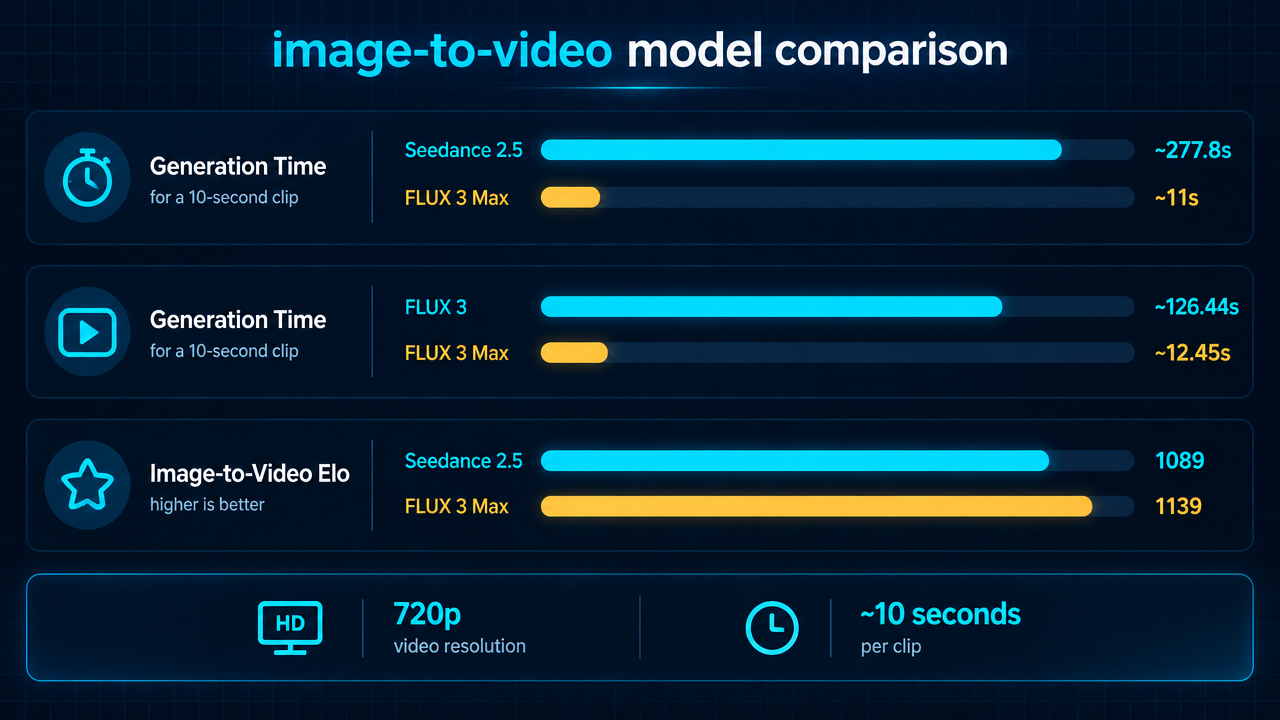
A video generation model that supports text-to-video and image-to-video, focused on low-latency, fast turnaround; public benchmarks report roughly 11–12 seconds to generate a 10-second clip, making it well suited to creative iteration and short-video assets
Try flux-3-max/image-to-video
Input
Showcases
View all showcasesOutput
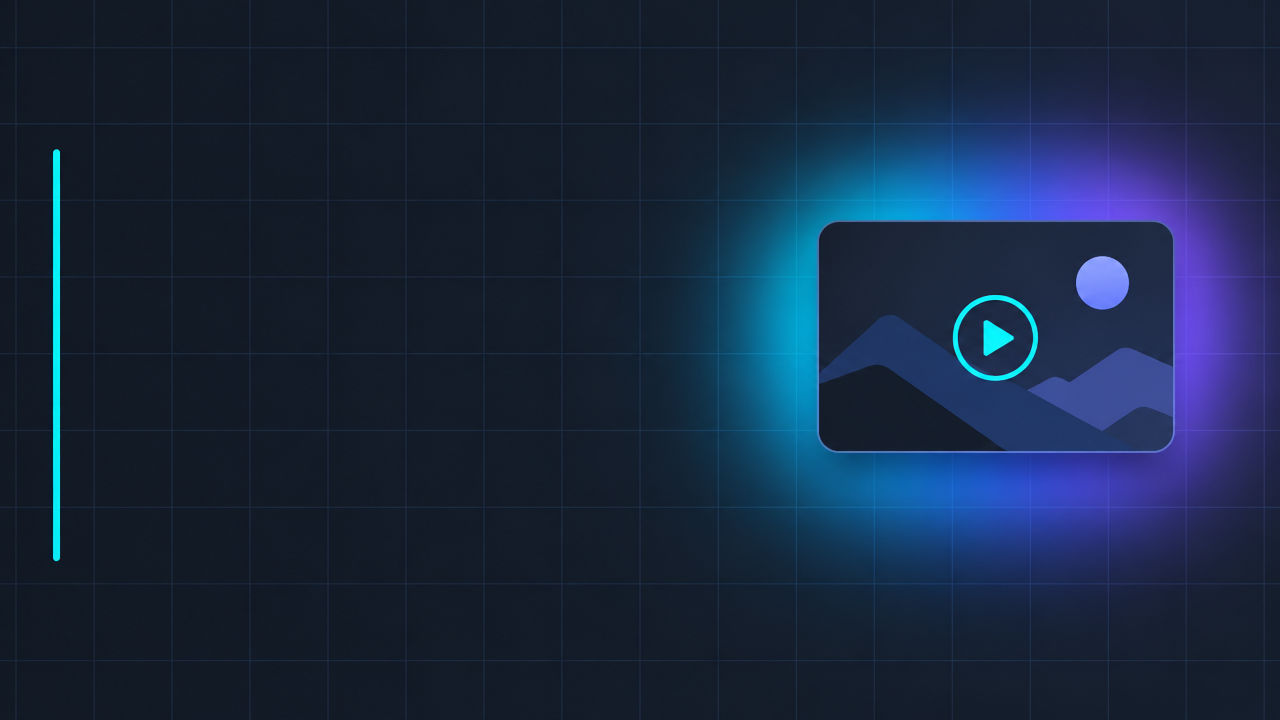
videoFLUX 3 Max Image-to-Video Tutorial Cover: Visual Reference for the Getting Started Guide
Style tutorial-cover · Motion Graphics · Design Notes
Reference inputs
image_url
Prompt
Turn a static tutorial cover design into subtle motion graphics. The image starts from a dark charcoal-gray 16:9 layout: at the left third is a clean sans-serif title block with ample blank space reserved for title text; a thin vertical accent line; on the right is a small floating thumbnail card with a rounded playback button outline. The motion is restrained and graphic-design-oriented: faint blueprint grid lines slowly pulse in brightness, a soft cyan-to-purple gradient light band sweeps horizontally across the title area once, and a slender moving highlight glides along the edge of the thumbnail card. The camera is completely locked off, with no zoom and no rotation, so the typographic layout always remains clear and readable. All surfaces stay flat and minimal, no objects are added, the text is not distorted, and there is no flicker. Cinematic studio lighting, high contrast, sharp edges, friendly pacing, suitable for looping within five seconds.
Copy the full prompt and adapt it for your own generation.
Tags
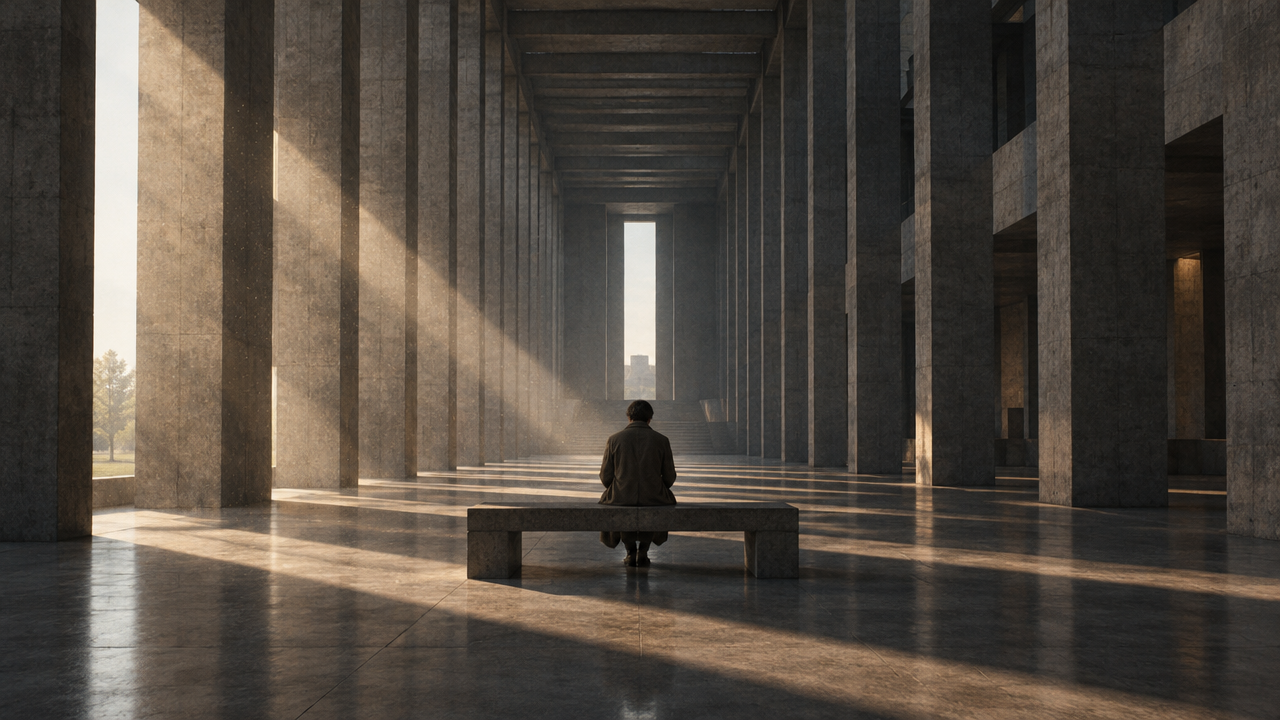
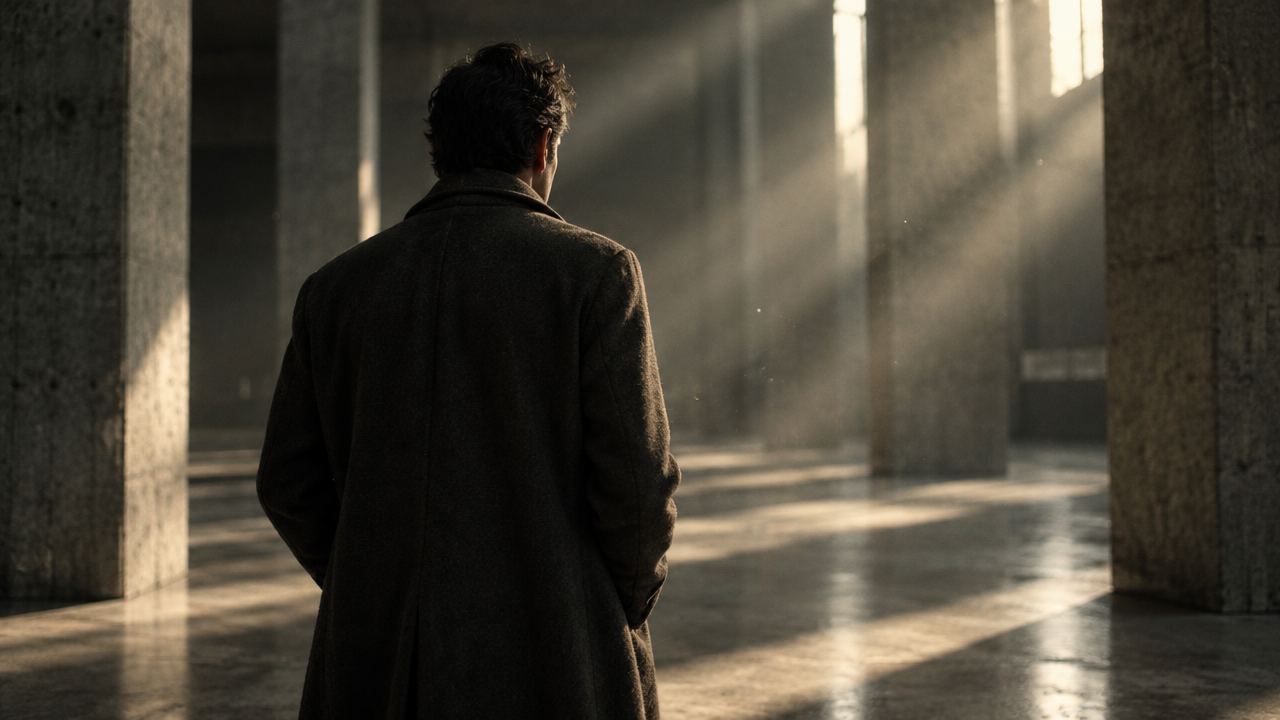
From Storyboards to Moving Shots: FLUX 3 Max Image-to-Video Concept Demo
Style Storyboard · Concept Art · Camera Movement
Reference inputs
image_url
end_image_url
Prompt
Turn the storyboard image into a continuous cinematic long take: the camera slowly and steadily pushes in toward a seated figure at the center of a brutalist hall, dust particles floating in the slanting afternoon light beams, fabric and hair stirring gently in a faint air current, and as the camera advances, the concrete columns produce a subtle parallax effect. Keep the original composition, color palette, and lighting direction consistent with the first frame; end on the framing shown in the last frame. The camera language is restrained and objectively observational, with no cuts and no whip pans, and the movement speed is natural.
Copy the full prompt and adapt it for your own generation.
Tags
Perfume Ad Short Film Opening Frame Cover
Style Product Image · Luxury advertisement · Business
Reference inputs

image_url
Prompt
A slow cinematic product ad. A multi-faceted crystal perfume bottle stands on a wet dark stone surface; the camera makes a gentle 20-degree arc movement around it with a slight push-in, shallow depth of field. Water droplets condense on the glass, reflections slowly flow across the multiple facets, fine dust floats in the strong side key light, and a soft volumetric fog halo glows behind. The bottle remains the anchor in the frame, while the background transitions into a deep gradient from warm to cool. Controlled specular highlights, luxury ad-grade texture, stable geometric structure, no camera shake, no text overlay.
Copy the full prompt and adapt it for your own generation.
Tags
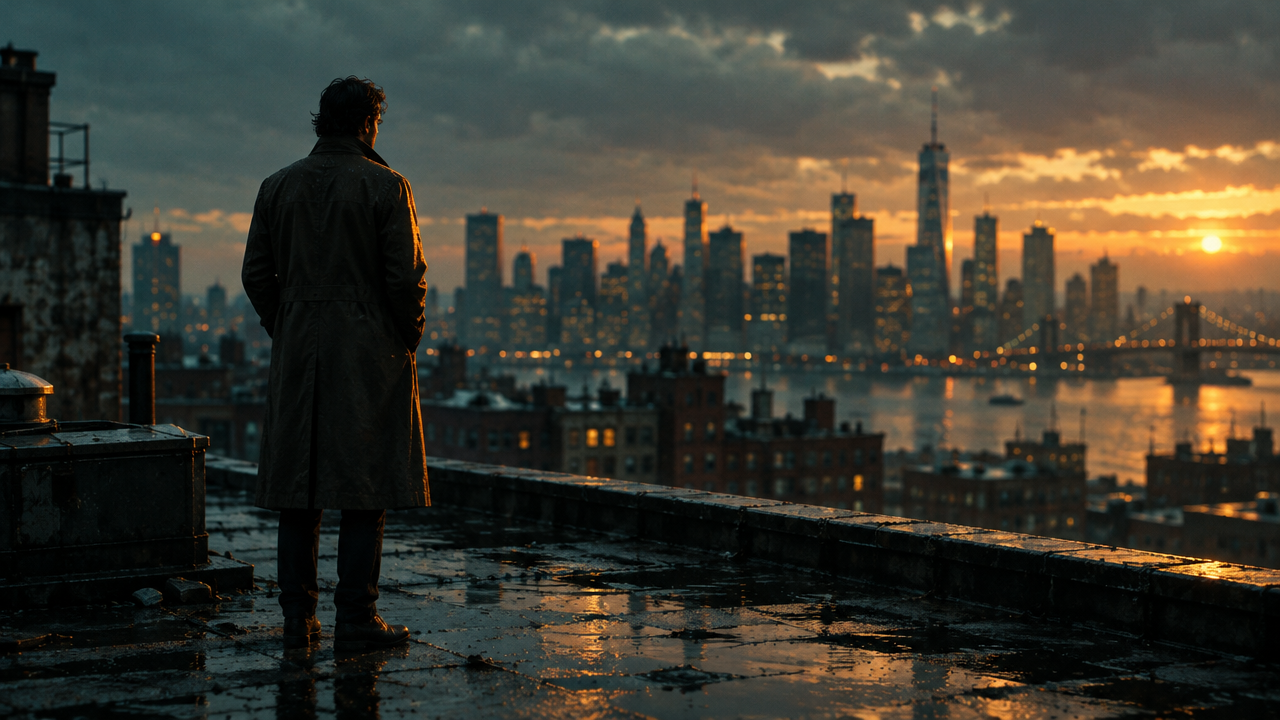
FLUX 3 Max Image-to-Video: First-Frame-Driven Parameters and Scenario Demonstration
Style Image-to-Video · Product Demo · Cinematic
Reference inputs
image_url
Prompt
Image-to-video shot: the camera slowly pushes in with slight parallax, and the subject in the first frame comes to life—a gentle breeze stirs hair and clothing, warm rim light drifts slowly across the surfaces, and fine dust particles float in the air. Preserve the composition and color characteristics of the source image, stable handheld feel, shallow depth of field, cinematic 720p framing, natural and smooth motion rhythm, five seconds long.
Copy the full prompt and adapt it for your own generation.
Tags
FLUX 3 Max Image-to-Video: Model Selection Infographic for Same-Price Models
Style Infographic · Model comparison · Image-to-Video
Reference inputs
image_url
Prompt
Turn a clean dark-mode technical infographic poster into a short explanatory video. The camera starts on the full comparison table, then slowly pushes in and pans horizontally, sweeping across each metric row in turn, pausing long enough on each row to read. There is a subtle parallax effect between the table layer and the faint grid background, soft cyan accent light sweeps along the comparison bars, shallow depth of field, and very light film grain. Smooth cinematic motion, no cuts, restrained pacing, 16:9 composition, professional product marketing style.
Copy the full prompt and adapt it for your own generation.
Tags
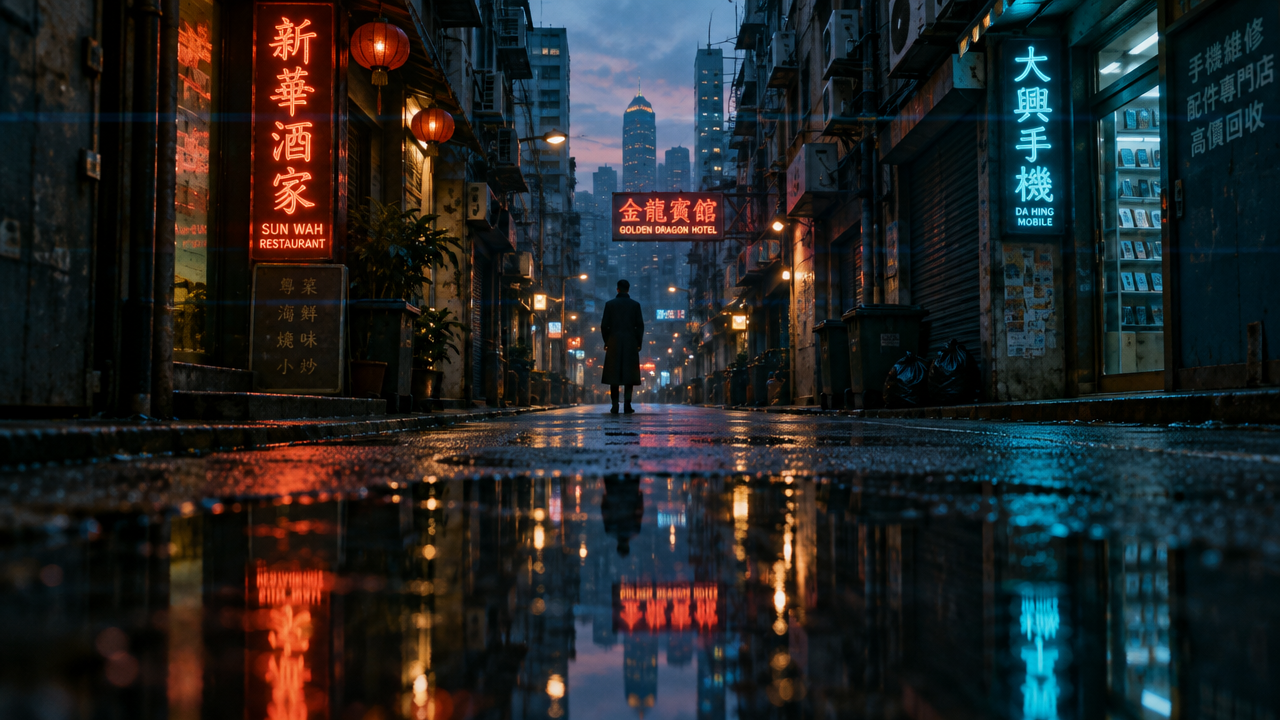
FLUX 3 Max Camera Movement Language Visual Notes: Image-to-Video Illustrations of Push-In, Pan, Tracking, and Crane
Style Camera Movement · Storyboard · film-grammar
Reference inputs
image_url
Prompt
A cinematic camera movement study built on a single still frame. It opens on a narrow alley soaked by rain at dusk, neon signs reflected on the wet asphalt, and a lone figure in a dark coat standing in the midground. The camera slowly and steadily pushes in toward the figure, keeping the horizon level and the vanishing point centered; there is a subtle handheld micro-shake, and the shallow depth of field gradually shifts from the foreground puddle to the subject. Camera language: 35mm anamorphic lens, horizontal flares, cool teal shadows paired with warm amber highlights. Atmosphere: quiet tension, restrained pacing, no cuts, one continuous take. Natural motion blur, film grain, 24fps cadence.
Copy the full prompt and adapt it for your own generation.
Tags
FLUX 3 Max Image-to-Video: A Static Frame-Driven VFX Demonstration
Style Visual Effects Showcase · Image-to-Video · Motion Design
Reference inputs

image_url
Prompt
The camera slowly and controlledly pushes in on a dimly lit studio scene, in which a glass prism sits on a matte black pedestal. As the camera moves, slender volumetric light beams sweep across the frame, fine dust particles float and catch the light, and a subtle dispersion halo glows along the prism's edges. Soft rim light gradually intensifies, then levels off. Slight motion blur, high micro-contrast, cinematic color grading, teal-leaning shadows and warm highlights, 16:9 aspect ratio, stable composition with the prism in the central third of the frame, deliberate and precise movement rhythm, suitable as a visual-effects concept demo.
Copy the full prompt and adapt it for your own generation.
Tags
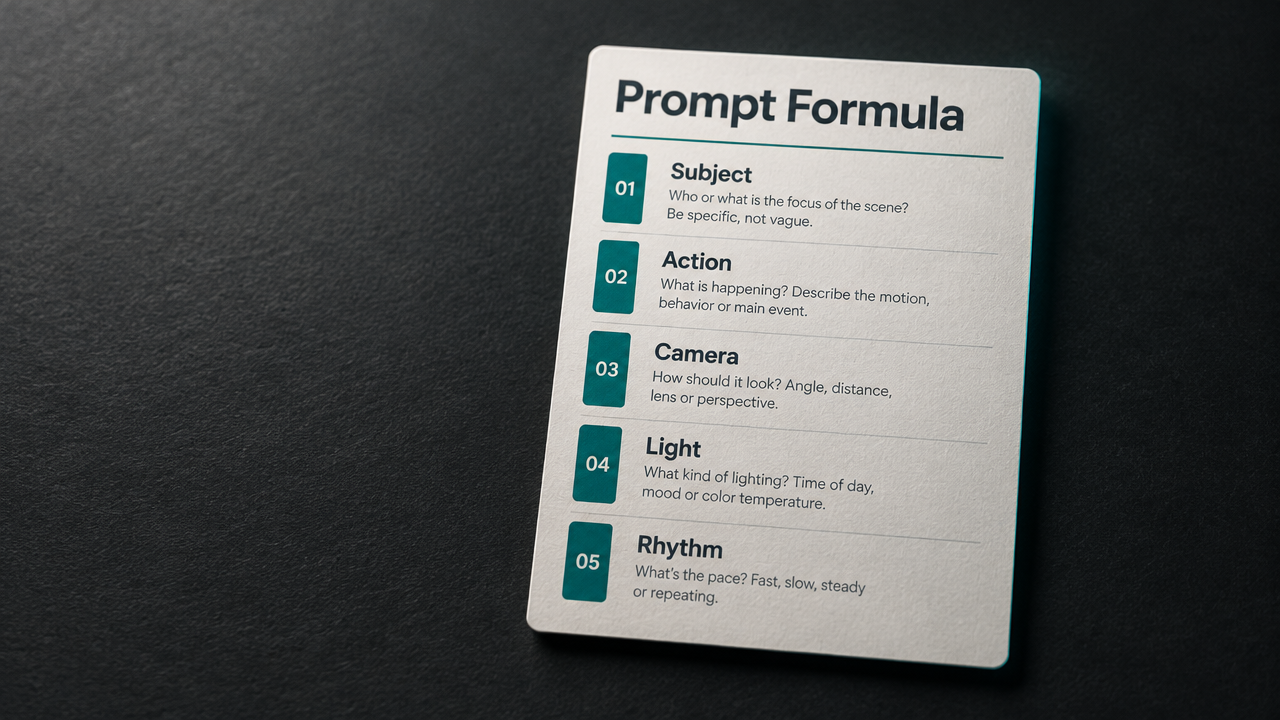
FLUX 3 Max Image-to-Video Prompt Formula Card
Style prompt-design · Motion Graphics · Image-to-Video
Reference inputs
image_url
Prompt
A slow, cinematic dolly-in shot aimed at a portrait-format infographic card titled "Prompt Formula." The card sits on a dark matte desk under soft directional key lighting with a faint teal rim light. Five sections are arranged vertically on the card, labeled Subject, Action, Camera, Light, and Rhythm; as the camera slowly moves closer, these five sections light up one after another with a thin animated underline and highlight. The paper texture is fine, the depth of field is shallow, and the overall color palette is restrained, dominated by charcoal gray, off-white, and teal accents. The motion is steady and minimalist, with no cuts, and the overall pacing is calm, suitable for a developer-facing tutorial short.
Copy the full prompt and adapt it for your own generation.
Tags
Pricing
flux-3-max/image-to-video per second
| Specifications | Unit Price |
|---|---|
| 720P | $0.0608 |
| 1080P | $0.1036 |
Overview
FLUX 3 Max image-to-video model: input a first-frame image and a prompt to generate a dynamic video clip that can include synchronized audio. It supports durations from 5 to 20 seconds, 720p and 1080p resolutions, 8 aspect ratios, and an optional last-frame image for first-to-last-frame transitions. It is suited for developers and content teams that need to quickly turn static images into usable video assets, callable via a unified API on HiAPI.ai.
Key Highlights
- Dual first/last frame control — the first frame is required and the last frame is optional; by specifying the start and end images, you can constrain the shot's beginning and end and reduce composition drift in the generated result.
- Synchronized audio generated with the video — audio generation is enabled by default, outputting video with synchronized sound and eliminating the later dubbing and track-alignment step.
- Wide adjustable range for duration and aspect ratio — duration can be set from 5 to 20 seconds, and aspect ratios support 8 options from 21:9 to 9:16, or adapt to the input image.
- Switchable reasoning level — reasoning_level offers low and high tiers; use the high tier for complex scenes to improve understanding, and the low tier for simple visuals to get lower latency.
Capabilities
First-frame-driven image-to-video: pass a publicly accessible HTTPS first-frame image (PNG, JPEG, WebP) and a prompt to generate a video that opens with that image, ideal for extending existing assets directly into dynamic clips.
Optional last-frame transition: after providing a last-frame image, the model generates a transition between the two given images, useful for shot continuity and transition asset creation with fixed start and end compositions.
Resolution and aspect ratio control: output can be 720p or 1080p, with aspect ratios covering 21:9, 16:9, 4:3, 1:1, 9:16, and more, or set to auto to follow the input image, making it easy to generate assets for different placements in one pass.
Set duration as needed: duration can be specified between 5 and 20 seconds, billed by output seconds, so short-clip validation and longer assets can be completed through the same API.
Synchronized audio toggle: generate_audio controls whether synchronized audio is generated with the visuals; disable it when you need silent footage for later scoring.
Use Cases
- Design teams turning static key visuals into video — input a brand key visual and a prompt describing camera movement to produce a short video clip with audio for social media placements and landing page hero sections.
- First/last-frame continuity in storyboard previews — given two images, the storyboard's first frame and last frame, generate the intermediate transition video as a shot draft for editing and client approval.
- Vertical short-video content production — generate clips in 9:16 with shorter durations, directly usable for asset supplementation and re-editing on short-video platforms.
- Rapid validation of creative concepts — generate multiple results from the same image with different aspect ratios, durations, and reasoning levels, quickly compare directions, and then finalize.
Limitations and Selection Advice
The first-frame image must be a publicly accessible HTTPS link, and prompts are capped at 6000 characters; trim them yourself if they exceed this. Long durations and high resolutions increase generation time, so batch tasks should allow for a waiting window. This model only does image-to-video; when controllable reference images are lacking, a text-to-video model is more suitable. If you need a fixed rhythm across multiple keyframes, consider the same family's keyframes-to-video route. For complex scenes, use the high reasoning level and manually verify the output.
What's new
View changelog →- New model flux-3-max/text-to-video video generation model now available
- Price update flux-3-max/text-to-video Pricing Adjustment
- Price update flux-3-max/image-to-video price update: new pricing at $0.0608
Frequently asked questions
View all FAQs →-
What inputs does FLUX 3 Max Image to Video need?
prompt and image_url (the first frame, PNG/JPEG/WebP) are required. Optional: end_image_url as the last frame, plus duration, resolution, aspect_ratio, generate_audio and reasoning_level.
-
Can I set the video length?
Yes. duration accepts whole seconds from 5 to 20, 5 by default. Image to video shares the same per-second pricing as text to video, and a 5-second check shows whether the source stays stable.
-
What decides the aspect ratio?
aspect_ratio defaults to auto, which follows the first frame's ratio. You can also set 21:9, 2:1, 16:9, 4:3, 1:1, 3:4 or 9:16. If a manual ratio differs from the image, the frame may be cropped.
-
How do first and last frames work?
Pass the first frame in image_url and the last in end_image_url; the video moves from one to the other. The prompt only needs to describe the change in between, and the closer the two frames match in framing and light, the smoother the transition.
Create a generation task
https://api.hiapi.ai/v1/tasks Headers
AuthorizationstringRequiredAccount API key. Required on every request. Example: Bearer YOUR_HIAPI_API_KEY. Get your API key
Content-TypestringOptionalThe request body is always parsed as JSON; when sent, only application/json (optionally with charset) is accepted — any other value returns 415. Example: application/json.
Idempotency-KeystringOptionalIdempotency key, up to 255 bytes. Retries with the same key from the same account create the task only once; replays return the original taskId.
On network timeouts or client retries, the same key creates the task only once — no double charges (scope: the API key's account). Use a business-unique identifier as the key (e.g. "order-42"); replays return the original taskId, and keys expire 24 hours after the first request. See the Unified Async API overview for the full scenario matrix.
Body
modelstringRequiredCurrent fixed value: flux-3-max/image-to-video
routestringOptionalCurrent fixed value: default
inputobjectRequired
Business parameters for flux-3-max/image-to-video and route default — see the parameter table below.
promptstringRequiredminLength 1maxLength 6000The text prompt used to describe the video content to be generated, provided as a string.
durationintegerOptionalDefault: 5min 5max 20The duration of the output video, in seconds, ranging from 5 to 20. The default is 5 seconds.
image_urlstringRequiredA public HTTPS URL of the first-frame image, supporting PNG, JPEG, or WebP format.
resolutionstringOptionalDefault: "720p"The resolution of the output video, provided as a string. The default is 720p.
720p1080paspect_ratiostringOptionalDefault: "auto"The aspect ratio of the output video; when set to auto, it follows the aspect ratio of the input image. The default is auto.
auto21:92:116:94:31:13:49:16end_image_urlstringOptionalAn optional parameter: a public HTTPS URL of the last-frame image, supporting PNG, JPEG, or WebP format.
generate_audiobooleanOptionalDefault: trueWhether to generate audio synchronized with the video, provided as a boolean value. The default is true.
reasoning_levelstringOptionalDefault: "high"Controls the degree of reasoning applied when interpreting the prompt; a higher value can improve generation quality for complex scenes, but also increases latency. The default is high.
lowhighcallbackobjectOptional
Terminal-state notification config. When omitted, no callback is delivered — poll the task yourself. See the callback note below.
Provide callback.url when creating a task and HiAPI POSTs to your service once the task reaches a terminal state — no polling needed. The callback payload mirrors the task detail structure; signature verification, delivery retries and idempotency are documented on the Unified Async API overview page.
urlstringRequiredRequired when callback is present. A POST is sent to this URL once the task reaches a terminal state; must be a valid http(s) URL.
whenstringOptionalDefault: "final"Only final is supported today — notified on both success and fail.
finalstoragestringOptionalDefault: "temp"Artifact storage tier: temp (default, retained about 7 days) or persistent (long-term, billed by size). Insufficient balance or exceeding the storage cap silently downgrades to temp; the effective tier is shown in the task detail response.
temppersistentRequest examples
# Submit an async task; returns a taskId immediately (no waiting for generation)
curl -X POST "https://api.hiapi.ai/v1/tasks" \
  -H "Authorization: Bearer $HIAPI_API_KEY" \
  -H "Content-Type: application/json" \
  -d '{
  "model": "flux-3-max/image-to-video",
  "input": {
    "prompt": "…",
    "duration": 5,
    "image_url": "…",
    "resolution": "720p",
    "aspect_ratio": "auto",
    "generate_audio": true,
    "reasoning_level": "high"
  }
}'
const res = await fetch("https://api.hiapi.ai/v1/tasks", {
method: "POST",
headers: {
Authorization: `Bearer ${process.env.HIAPI_API_KEY}`,
"Content-Type": "application/json",
},
body: JSON.stringify({
model: "flux-3-max/image-to-video",
input: {
"prompt": "…",
"duration": 5,
"image_url": "…",
"resolution": "720p",
"aspect_ratio": "auto",
"generate_audio": true,
"reasoning_level": "high"
}
}),
});
const task = await res.json();
// { code: 200, message: "success", data: { taskId } }import os, requests
res = requests.post(
"https://api.hiapi.ai/v1/tasks",
headers={"Authorization": f"Bearer {os.environ['HIAPI_API_KEY']}"},
json={
"model": "flux-3-max/image-to-video",
"input": {
"prompt": "…",
"duration": 5,
"image_url": "…",
"resolution": "720p",
"aspect_ratio": "auto",
"generate_audio": True,
"reasoning_level": "high"
}
},
)
print(res.json()) # { code, message, data: { taskId } }200 OK
{
  "code": 200,
  "message": "success",
  "data": {
    "taskId": "tk-hiapi-01HZTQ8BX2N3GM3YFK4Z9D7VQR"
  }
}
400 Bad Request
{
  "code": 400,
  "message": "invalid request",
  "data": null,
  "error_code": "INVALID_REQUEST"
}
Get task detail
https://api.hiapi.ai/v1/tasks/:id Response fields
taskIdstringRequiredTask ID, always prefixed with tk-hiapi-.
modelstringRequiredResolved full model name. Tasks submitted with the route parameter return base@route (e.g. gpt-image-2/text-to-image@ext); otherwise identical to the name passed at creation.
routestringOptionalPresent only when the task was submitted with an explicit route parameter; echoes the submitted value.
statusstringRequiredTask status.
queued Queued, not started yet.
handling Being processed.
archiving Processing finished, artifacts being prepared.
success Terminal: completed, artifacts available (output returned).
fail Terminal: failed (error returned).
After submission, check status: success and fail are terminal, everything else is non-terminal. Poll every 1–3 seconds until terminal. On success, download artifacts from output[].url and transfer them before expireAt; pass storage: "persistent" at creation time when long-term retention is needed.
creatednumberRequiredTask creation time (Unix seconds).
completednumberRequiredUnix seconds when the task reached a terminal state; fixed to 0 while not terminal.
outputarrayOptional
Present only when status == success. Artifact list — always an array; a single task may return multiple types at once (e.g. video + first_frame).
Array [ object ]
Array items
urlstringRequiredArtifact URL, directly downloadable.
typestringRequiredCurrent possible values: video, image, audio, first_frame, last_frame, thumbnail; more may be added later.
expireAtnumberRequiredUnix seconds until which the artifact remains accessible; download or transfer before it expires.
errorobjectOptional
Present only when status == fail.
codestringRequiredBusiness error code.
messagestringRequiredError description.
Response examples
Success
{
  "code": 200,
  "message": "success",
  "data": {
    "taskId": "tk-hiapi-01HZTQ8BX2N3GM3YFK4Z9D7VQR",
    "model": "happyhorse-1-0",
    "status": "success",
    "created": 1777282033,
    "completed": 1777282099,
    "output": [
      {
        "url": "https://cdn.hiapi.ai/tasks/.../video.mp4",
        "type": "video",
        "expireAt": 1777886899
      }
    ]
  }
}
Processing (non-terminal)
{
  "code": 200,
  "message": "success",
  "data": {
    "taskId": "tk-hiapi-...",
    "model": "happyhorse-1-0",
    "status": "archiving",
    "created": 1777282033,
    "completed": 0
  }
}
Failed
{
  "code": 200,
  "message": "success",
  "data": {
    "taskId": "tk-hiapi-...",
    "model": "happyhorse-1-0",
    "status": "fail",
    "created": 1777282033,
    "completed": 1777282099,
    "error": {
      "code": "TASK_FAILED",
      "message": "task failed"
    }
  }
}Articles
View all articles →Related Models
View all models →Same Type
-
 Vidu Q4 Preview Vidu $0.051 /second
-
 Grok Imagine 1.5 xAI $0.011 /second
-
 HappyHorse 1.1 Alibaba $0.160 /second
-
 Veo 3.1 Google $0.290 /second
-
 Creatify Boreal Creatify $0.015 /second
-
 Seedance 2.0 ByteDance $0.017 /second
-
 Kling 2.5 Kuaishou $0.060 /second
-
 Wan 3.0 Video Alibaba $0.040 /second
-
 Gemini Omni Google --
-
 Kandinsky 6.0 Pro $1.93 /video
-
 Veo 3.1 Lite Google $0.060 /second
-
 HeyGen Avatar V HeyGen $0.150 /second
Same Provider
-
 FLUX.2 Klein 9B Black Forest Labs $0.0086 /image
-
 FLUX.2 Klein 4B Black Forest Labs $0.0004 /image
-
 FLUX.1 Fill Pro Black Forest Labs $0.071 /image
-
 FLUX.1 Schnell Black Forest Labs $0.005 /image
-
 FLUX 1.1 Pro Black Forest Labs $0.050 /image
-
 FLUX 3 Video Black Forest Labs $0.090 /second
-
 FLUX.2 Black Forest Labs $0.035 /image
-
 FLUX.1 Kontext Max Black Forest Labs $0.071 /image
-
 FLUX 3 Image Black Forest Labs $0.041 /image