

Ideogram
Ideogram V4
ideogram-v4
An open-weight text-to-image model featuring multilingual text rendering and native 2K output, with support for JSON prompts and bounding-box layout control
Try ideogram-v4
Input
Showcases
View all showcasesOutput
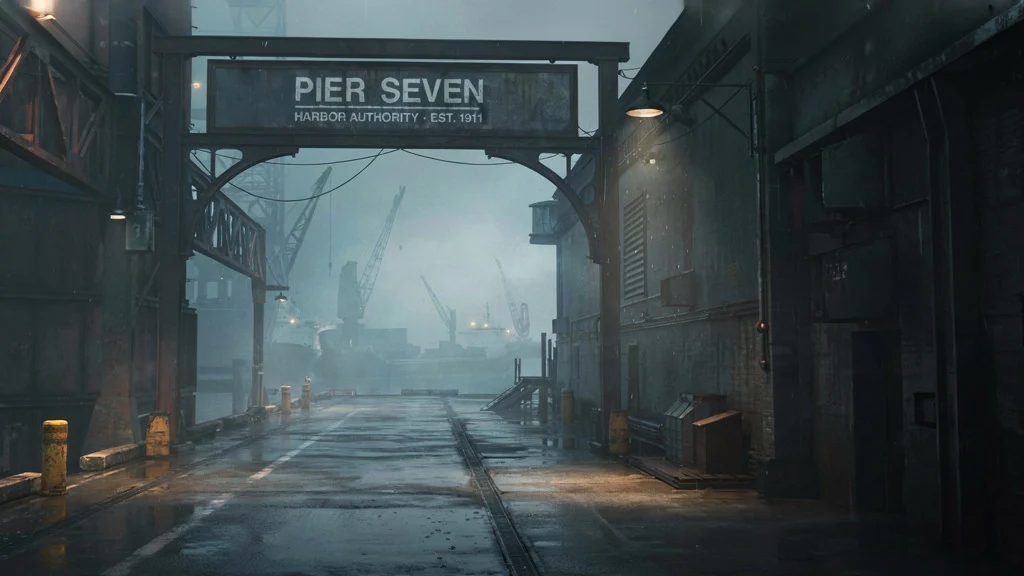
Worldbuilding Concept Art: Pier Seven of Fog Harbor
Style Concept Art · Worldbuilding · Cinematic
Prompt
Cinematic concept art, a harbor city shrouded in thick fog, the entrance gate of Pier Seven. 16:9 widescreen composition: the left midground is dominated by a rusted steel archway and a weathered sign, on which the clearly legible text "PIER SEVEN" and a smaller line "HARBOR AUTHORITY · EST. 1911" appear, in a condensed industrial sans-serif typeface; the perspective recedes along a wet concrete pier toward silhouetted cranes and moored cargo ships, which gradually fade into the heavy sea fog. The color palette is limited to cool desaturated teal-green, iron-oxide orange, and pale sodium-vapor halos. Volumetric fog, a thin sheen of rain on the ground, subtle rim light from a single overhead lamp, highly detailed micro-detail on rivets, wet metal, and peeling paint. A quiet, melancholic, grounded sci-fi worldbuilding atmosphere; no figures in the foreground, environment-focused, sharp typography, photorealistic painterly texture.
Copy the full prompt and adapt it for your own generation.
Tags
Style Spectrum: Four Illustration Languages from Realism to Flat
Style Illustration · Style Research · Editing
Prompt
A 16:9 editorial illustration study: a lone figure stands on a rain-soaked rooftop overlooking a city skyline at dusk, with distant towers and antenna silhouettes set against a gradient sky. Painterly semi-realistic rendering, visible oil-paint brushwork texture, a palette of warm amber and deep teal, soft atmospheric haze, restrained rim light on the figure's shoulders, subtle grain. The composition has a clear foreground–midground–background layering, with ample negative space left in the upper third of the frame for a style-comparison grid to be placed later.
Copy the full prompt and adapt it for your own generation.
Tags
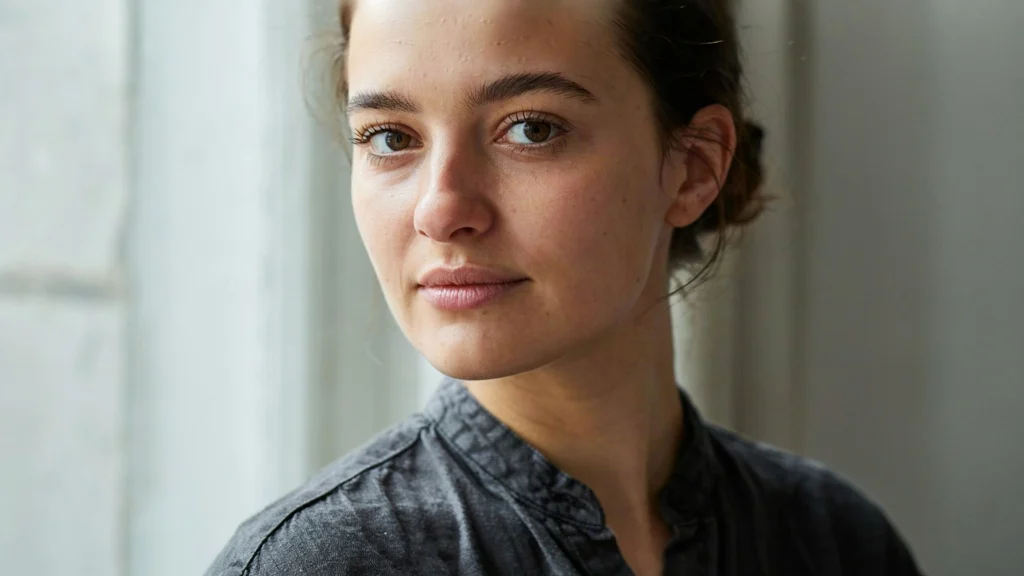
Ideogram V4 Portrait Style Comparison: Realistic and Artistic Dual Prompts
Style Portrait & Photography · Photorealistic · Editing
Prompt
Realistic half-body portrait, a woman in her late twenties standing beside a large window, soft overcast daylight coming in from the left, natural skin texture with visible pores and fine vellus hair, wearing a dark gray linen shirt, gazing calmly and directly at the camera, 85mm lens effect, shallow depth of field, soft neutral tones, subtle film grain, clean background fading into a soft blur, editorial photography style, rich detail in the eyes and fabric texture, 16:9 horizontal composition, subject slightly off-center
Copy the full prompt and adapt it for your own generation.
Tags
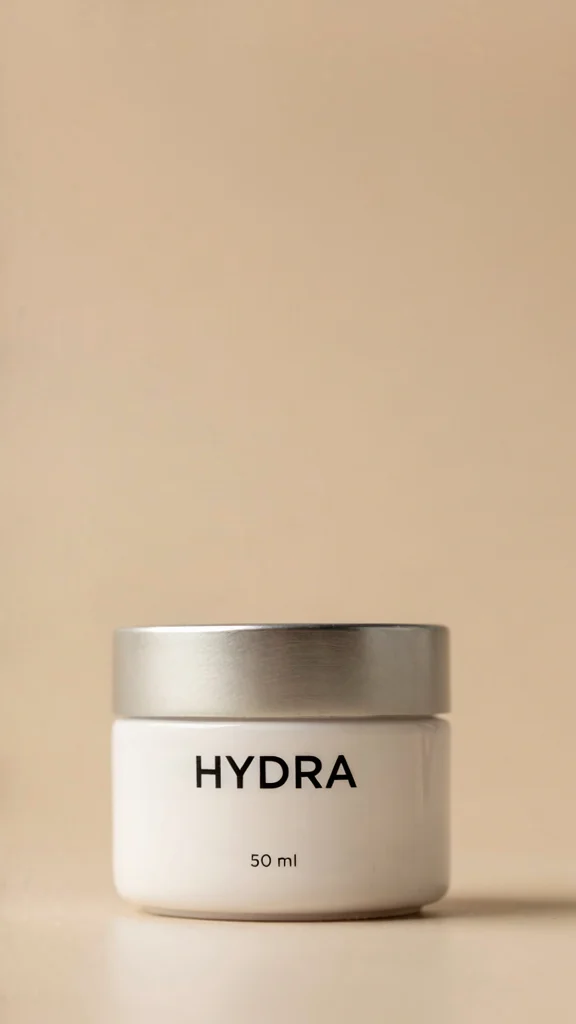
ideogram-v4 E-commerce Product Photography: Image Generation with Structured Prompts
Style Product Image · ecommerce · Typography
Prompt
An e-commerce editorial style product photography photo, featuring a matte ceramic skincare jar with a brushed metal lid, centered against a warm sand seamless background. A soft, large softbox key light from the upper left, with a subtle rim light on the right edge of the jar, gently fading toward the corners, and a soft contact shadow at the base. The label is clearly legible, printed with "HYDRA" in a bold condensed sans-serif font, and "50 ml" below in small uppercase letters. Shot at eye level, with a 100mm macro lens effect, shallow but controlled depth of field, sharp detail on the ceramic and metal textures, a neutral, low-saturation palette of sand, off-white, and brushed steel, 4:3 portrait-friendly composition, ample negative space at the top for a headline, no props, no clutter, realistic studio lighting.
Copy the full prompt and adapt it for your own generation.
Tags
Pricing
ideogram-v4 per image
| Specifications | Unit Price |
|---|---|
| TURBO | $0.050 |
| BALANCED | $0.100 |
| QUALITY | $0.170 |
Positioning Overview
ideogram-v4 is a text-to-image generation model from Ideogram, known for its accurate text typography within images. It is suited for developers who need to render clear text and multilingual copy directly into materials such as posters and advertisements. Called through the unified HiAPI.ai interface, it generates images from natural language prompts and a rendering speed tier, and supports multiple aspect ratios, JPEG/PNG output, and fixed-seed reproducibility. Its parameter structure is concise, making it easy to integrate and use for batch production.
Core Highlights
- In-image text rendering is a key optimization focus — text specified in the prompt can be rendered directly as image content, making it suitable for completing typography during generation rather than overlaying text afterward.
- Three rendering speed tiers can be switched as needed — TURBO, BALANCED, and QUALITY correspond to different speed and detail orientations, making it easy to allocate calls between batch drafts and high-quality output.
- Seed and aspect ratio are controllable for reproducibility and adaptation — fixed seeds are supported for reproducing results, and five ratios (1:1, 16:9, 4:3, 9:16, 3:4) cover common layout needs.
Capabilities
Generate images containing text directly from prompts: Enter a descriptive prompt and specify the text to be displayed to obtain a finished image with typography, reducing the need for post-processing text overlays.
Adjustable rendering speed tiers: Choose between TURBO, BALANCED, and QUALITY via rendering_speed to trade off speed against detail depending on the use case.
Selectable aspect ratios and output formats: Output ratios cover square, landscape, and portrait, and formats support JPEG and PNG, making it easy to match placement slots directly or process further.
Fixed seeds reproduce generation results: Specifying a seed allows the same result to be reproduced under identical parameters, making it easy to compare the effects of prompt fine-tuning or to stabilize batch output.
Use Cases
- Design teams generating batches of poster drafts containing text — Enter copy and layout descriptions to get a complete image with typography in a single call, for initial concept screening and creative direction confirmation.
- Marketers producing multilingual assets — Write target-language copy into the prompt to generate marketing images that can be used directly for placement or further editing.
- Developers integrating an on-demand image generation interface — Generate images in specified ratios and formats on demand through the unified interface, embedding them into content workflows or automated asset production pipelines.
Limitations and Selection Advice
This model covers text-to-image generation only and does not have image editing or image-to-image capabilities; when image modification or local repainting is needed, other models should be selected. The prompt length limit is relatively long, but layout control still relies on textual description, and complex typography requires repeated adjustment. Rendering speed tiers affect output detail and processing time; for batch scenarios, it is recommended to first validate results with lower tiers. Text that needs to appear in the image should be fully specified in the prompt, as vague descriptions may cause rendering deviations.
Frequently asked questions
View all FAQs →-
What is Ideogram V4 best for?
Logos, posters, wordmarks, packaging, and signage that require accurate Latin lettering.
-
How should I choose a speed tier?
TURBO for quick drafts, BALANCED for speed-quality balance, and QUALITY for final detail and complex signage.
-
How do the pricing tiers differ?
TURBO, BALANCED, and QUALITY use separate per-image tiers. See the live page price for the current amounts.
-
How do I improve text accuracy?
Spell out the exact text and define type style, hierarchy, placement, and background contrast.
Create a generation task
https://api.hiapi.ai/v1/tasks Headers
AuthorizationstringRequiredAccount API key. Required on every request. Example: Bearer YOUR_HIAPI_API_KEY. Get your API key
Content-TypestringOptionalThe request body is always parsed as JSON; when sent, only application/json (optionally with charset) is accepted — any other value returns 415. Example: application/json.
Idempotency-KeystringOptionalIdempotency key, up to 255 bytes. Retries with the same key from the same account create the task only once; replays return the original taskId.
On network timeouts or client retries, the same key creates the task only once — no double charges (scope: the API key's account). Use a business-unique identifier as the key (e.g. "order-42"); replays return the original taskId, and keys expire 24 hours after the first request. See the Unified Async API overview for the full scenario matrix.
Body
modelstringRequiredCurrent fixed value: ideogram-v4
routestringOptionalCurrent fixed value: default
inputobjectRequired
Business parameters for ideogram-v4 and route default — see the parameter table below.
seedintegerOptionalRandom seed for reproducible generation: with the same seed and parameters, you get consistent results; if not provided, the server picks a random value.
promptstringRequiredminLength 1maxLength 10000Text description of the image content. Text that needs to be rendered should be spelled out explicitly here; accurate typography is this model's specialty.
aspect_ratiostringOptionalDefault: "1:1"Aspect ratio of the output image, corresponding to a preset size of about 1MP; default is 1:1.
1:116:94:39:163:4output_formatstringOptionalDefault: "jpeg"Format of the output image; default is jpeg.
jpegpngrendering_speedstringRequiredDefault: "BALANCED"Rendering speed tier. TURBO is the fastest and cheapest, QUALITY offers the richest detail, and pricing differs by tier; default is BALANCED.
TURBOBALANCEDQUALITYcallbackobjectOptional
Terminal-state notification config. When omitted, no callback is delivered — poll the task yourself. See the callback note below.
Provide callback.url when creating a task and HiAPI POSTs to your service once the task reaches a terminal state — no polling needed. The callback payload mirrors the task detail structure; signature verification, delivery retries and idempotency are documented on the Unified Async API overview page.
urlstringRequiredRequired when callback is present. A POST is sent to this URL once the task reaches a terminal state; must be a valid http(s) URL.
whenstringOptionalDefault: "final"Only final is supported today — notified on both success and fail.
finalstoragestringOptionalDefault: "temp"Artifact storage tier: temp (default, retained about 7 days) or persistent (long-term, billed by size). Insufficient balance or exceeding the storage cap silently downgrades to temp; the effective tier is shown in the task detail response.
temppersistentRequest examples
# Submit an async task; returns a taskId immediately (no waiting for generation)
curl -X POST "https://api.hiapi.ai/v1/tasks" \
  -H "Authorization: Bearer $HIAPI_API_KEY" \
  -H "Content-Type: application/json" \
  -d '{
  "model": "ideogram-v4",
  "input": {
    "prompt": "…",
    "aspect_ratio": "1:1",
    "output_format": "jpeg",
    "rendering_speed": "BALANCED"
  }
}'
const res = await fetch("https://api.hiapi.ai/v1/tasks", {
method: "POST",
headers: {
Authorization: `Bearer ${process.env.HIAPI_API_KEY}`,
"Content-Type": "application/json",
},
body: JSON.stringify({
model: "ideogram-v4",
input: {
"prompt": "…",
"aspect_ratio": "1:1",
"output_format": "jpeg",
"rendering_speed": "BALANCED"
}
}),
});
const task = await res.json();
// { code: 200, message: "success", data: { taskId } }import os, requests
res = requests.post(
"https://api.hiapi.ai/v1/tasks",
headers={"Authorization": f"Bearer {os.environ['HIAPI_API_KEY']}"},
json={
"model": "ideogram-v4",
"input": {
"prompt": "…",
"aspect_ratio": "1:1",
"output_format": "jpeg",
"rendering_speed": "BALANCED"
}
},
)
print(res.json()) # { code, message, data: { taskId } }200 OK
{
  "code": 200,
  "message": "success",
  "data": {
    "taskId": "tk-hiapi-01HZTQ8BX2N3GM3YFK4Z9D7VQR"
  }
}
400 Bad Request
{
  "code": 400,
  "message": "invalid request",
  "data": null,
  "error_code": "INVALID_REQUEST"
}
Get task detail
https://api.hiapi.ai/v1/tasks/:id Response fields
taskIdstringRequiredTask ID, always prefixed with tk-hiapi-.
modelstringRequiredResolved full model name. Tasks submitted with the route parameter return base@route (e.g. gpt-image-2/text-to-image@ext); otherwise identical to the name passed at creation.
routestringOptionalPresent only when the task was submitted with an explicit route parameter; echoes the submitted value.
statusstringRequiredTask status.
queued Queued, not started yet.
handling Being processed.
archiving Processing finished, artifacts being prepared.
success Terminal: completed, artifacts available (output returned).
fail Terminal: failed (error returned).
After submission, check status: success and fail are terminal, everything else is non-terminal. Poll every 1–3 seconds until terminal. On success, download artifacts from output[].url and transfer them before expireAt; pass storage: "persistent" at creation time when long-term retention is needed.
creatednumberRequiredTask creation time (Unix seconds).
completednumberRequiredUnix seconds when the task reached a terminal state; fixed to 0 while not terminal.
outputarrayOptional
Present only when status == success. Artifact list — always an array; a single task may return multiple types at once (e.g. video + first_frame).
Array [ object ]
Array items
urlstringRequiredArtifact URL, directly downloadable.
typestringRequiredCurrent possible values: video, image, audio, first_frame, last_frame, thumbnail; more may be added later.
expireAtnumberRequiredUnix seconds until which the artifact remains accessible; download or transfer before it expires.
errorobjectOptional
Present only when status == fail.
codestringRequiredBusiness error code.
messagestringRequiredError description.
Response examples
Success
{
  "code": 200,
  "message": "success",
  "data": {
    "taskId": "tk-hiapi-01HZTQ8BX2N3GM3YFK4Z9D7VQR",
    "model": "happyhorse-1-0",
    "status": "success",
    "created": 1777282033,
    "completed": 1777282099,
    "output": [
      {
        "url": "https://cdn.hiapi.ai/tasks/.../video.mp4",
        "type": "video",
        "expireAt": 1777886899
      }
    ]
  }
}
Processing (non-terminal)
{
  "code": 200,
  "message": "success",
  "data": {
    "taskId": "tk-hiapi-...",
    "model": "happyhorse-1-0",
    "status": "archiving",
    "created": 1777282033,
    "completed": 0
  }
}
Failed
{
  "code": 200,
  "message": "success",
  "data": {
    "taskId": "tk-hiapi-...",
    "model": "happyhorse-1-0",
    "status": "fail",
    "created": 1777282033,
    "completed": 1777282099,
    "error": {
      "code": "TASK_FAILED",
      "message": "task failed"
    }
  }
}Articles
View all articles →Related Models
View all models →Same Type
-
 851 Labs Background Remover 851 Labs $0.002 /image
-
 Imagen 4 Google $0.030 /image
-
 BRIA Eraser Bria $0.058 /image
-
 Wan 2.7 Image Alibaba $0.035 /image
-
 Krea 2 Medium Turbo Krea $0.021 /image
-
 FIBO 1.5 Bria $0.058 /image
-
 FASHN Tryon v1.6 FASHN $0.107 /image
-
 Ideogram V3 Character Ideogram $0.090 /image
-
 Ideogram V4.5 Ideogram $0.011 /image
-
 Recraft V4.1 Recraft $0.010 /image
-
 Qwen Image 2.1 Alibaba $0.020 /image
-
 Nano Banana 2 Google $0.036 /image