

Imagen 4
imagen-4.0-fast
Google's text-to-image series, focused on in-image text rendering and complex lighting, offering Fast, Standard, and Ultra tiers that trade off quality against cost
Try imagen-4.0-fast
Input
Showcases
View all showcasesOutput
image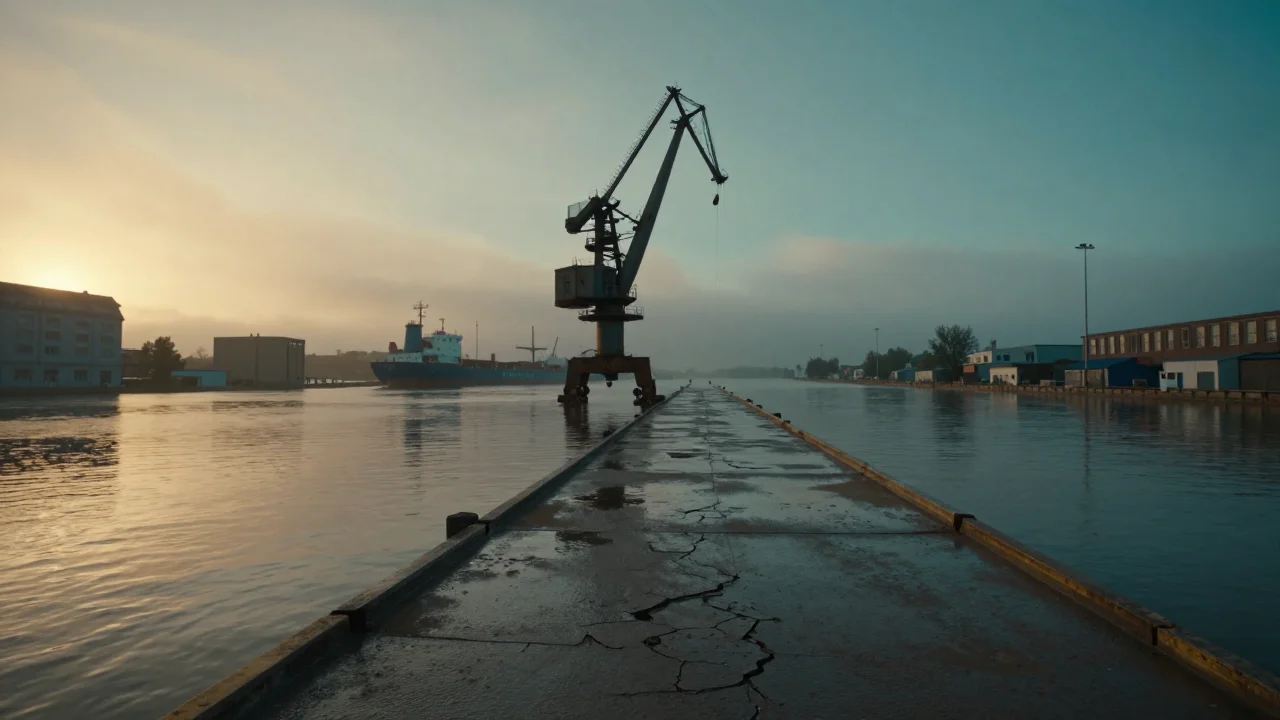
Worldbuilding Concept Art: Dusk in a Wasteland Harbor City
Style Worldbuilding · Concept Art · Cinematic
Prompt
Cinematic wide-angle shot of a flooded industrial harbor city at dusk, cracked concrete docks exposed after the tide recedes, a giant rusted gantry crane tilting above the water, a half-sunken cargo ship hull in the midground, layers of fog drifting between buildings, warm amber sunset afterglow slanting in from the left contrasting with cool teal shadows, long reflections on wet surfaces, strong one-point perspective along the empty harbor road, worn metal and salt-stained textures, atmospheric depth with clear foreground–midground–background separation, concept art style, high fidelity, 16:9 composition
Copy the full prompt and adapt it for your own generation.
Tags
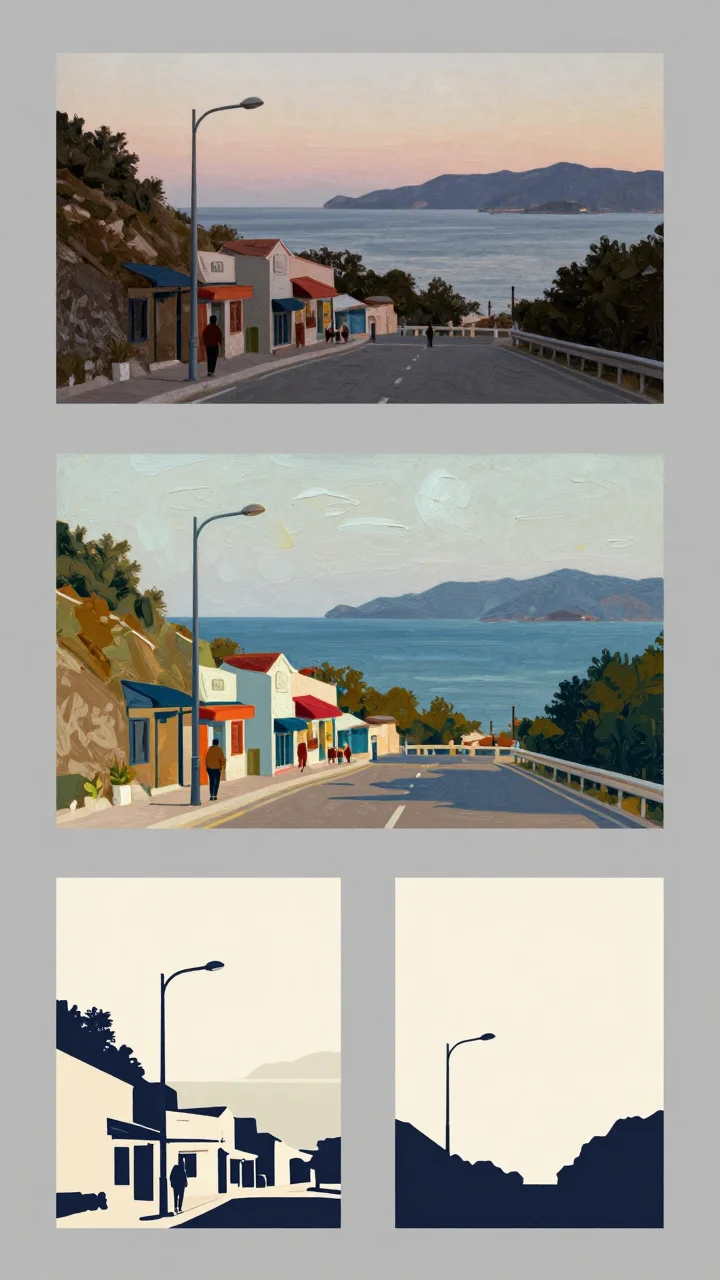
From Realism to Flat Design: The Spectrum of Artistic Illustration Styles
Style Illustration · style-transfer · Editing
Prompt
A four-panel style spectrum of the same scene: a hillside street overlooking the sea at dusk, with a solitary figure under a streetlight in the foreground, a sloping road and storefronts in the midground, and silhouettes of the sea and mountains in the distance. The first panel is in realistic photography style, with natural light and delicate textures; the second panel is a thick impasto oil painting with clearly visible brushstrokes; the third panel is a decorative vector illustration with layered flat shapes and a limited color palette; the fourth panel is a minimalist flat design with bold silhouettes and no gradients. The composition remains consistent across all panels, with panels separated by a neutral gray background, in a 16:9 layout.
Copy the full prompt and adapt it for your own generation.
Tags

imagen-4-fast Portrait Prompt Reference: Realistic and Artistic Dual Styles
Style Portrait & Photography · Photorealistic · Prompt Reference
Prompt
Portrait photography, 3:4 vertical composition. A woman in her early thirties, body turned three-quarters toward the camera, gaze calm and direct, natural skin texture with visible pores and fine grain, extremely light makeup. Soft window light from the left of the lens acts as the key light, falling off gently toward the right, with a subtle warm rim light along the edges of the hair. 85mm lens rendering, shallow depth of field, background is a plain low-saturation gray-green plaster wall, slightly defocused. Neutral color grading, restrained contrast, no heavy retouching. Eyes, eyelashes, and hair strands show photo-level detail, and a simple linen shirt has a believable fabric texture.
Copy the full prompt and adapt it for your own generation.
Tags
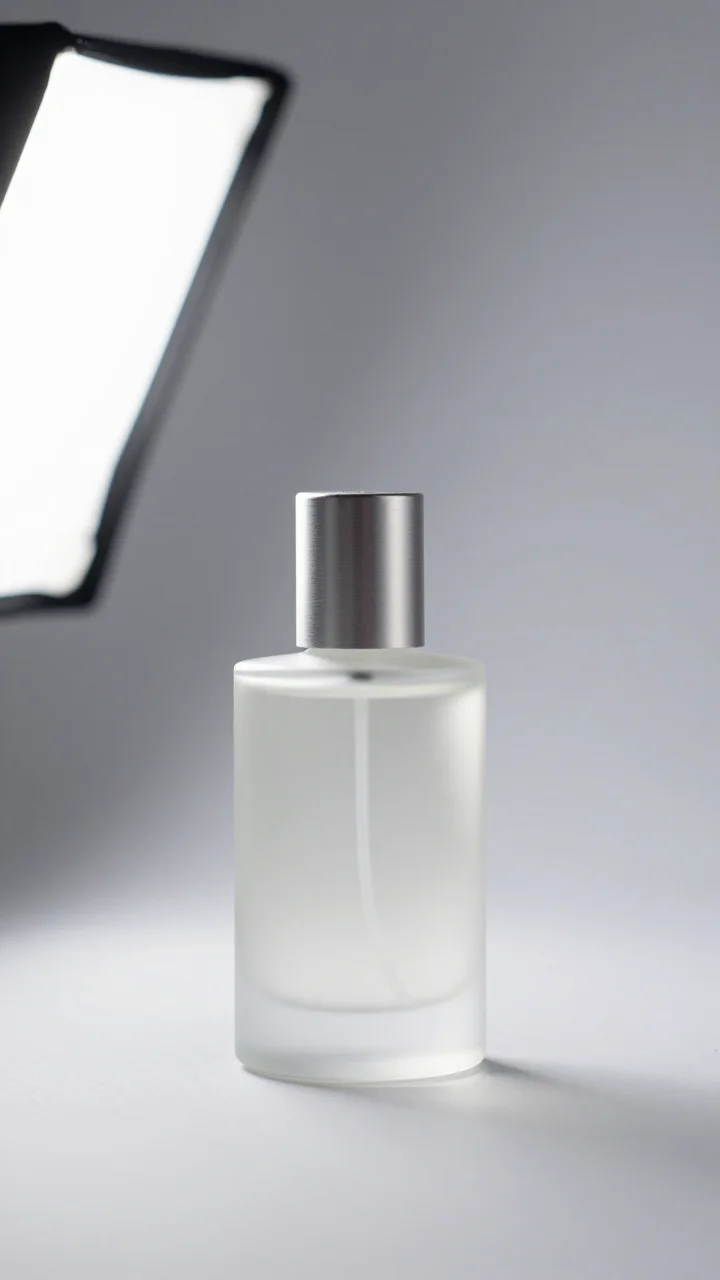
Imagen 4 Fast E-commerce Product Photography: Perfume Bottle Texture Sample
Style Product Image · Studio lighting · ecommerce
Prompt
A high-end e-commerce product photography image, the subject is a frosted glass perfume bottle with a brushed aluminum cap, centered on a seamless light gray background. Studio lighting: a large softbox key light from the upper left, a soft rim light on the right edge to reveal the glass's translucency, and a soft gradient falloff behind the bottle body. Shot with a full-frame camera and an 85mm macro lens at f/8, with shallow depth of field keeping the label area sharp. Clean minimalist composition, headroom at the top, a subtle contact shadow at the base of the bottle, high dynamic range, neutral white balance, the frosted glass surface showing fine texture, crisp sharp reflections on the metal cap, commercial retouching quality, photorealistic, 4k detail.
Copy the full prompt and adapt it for your own generation.
Tags
Pricing
imagen-4.0-fast per image
| Unit Price | $0.030 |
|---|
Positioning Overview
Imagen 4.0 fast is the fast text-to-image model in the same family, aimed at developers who need low-cost, low-latency batch image generation. It accepts text prompts and outputs images, supporting negative prompts, random seeds, and multiple aspect ratios, making it easy to embed the generation process into product prototypes, batch content production, and creative drafting. Compared with the standard and Ultra versions in the same family, it is better suited to scenarios that are sensitive to generation speed and per-image cost, and where the precision requirements for the final image can be relaxed.
Key Highlights
- The fast generation tier in the same family — trades lighter-weight generation for shorter waits, suitable for workflows that first produce drafts and then decide whether to refine them.
- Supports seeds and negative prompts — a fixed seed reproduces the same result, and negative prompts exclude unwanted content, making regression testing and parameter tuning easier.
- Aspect ratios cover common layouts — options include 1:1, 16:9, 9:16, 3:4, 4:3, and auto, directly matching the needs of social media, landscape, and portrait assets.
- Prompt limit of 5000 characters — a single prompt can hold longer scene, composition, and style descriptions, reducing the communication cost of splitting multiple generations.
Capability Description
Text-prompt-to-image generation: pass in a descriptive prompt to get an image; the output is an image asset that can be directly integrated into content production and asset management workflows.
Negative prompt constraints: use negative_prompt to exclude unwanted elements or styles, reducing repeated retries and improving the usability rate of batch generation.
Random seed reproduction: specifying a seed stably reproduces the generation result for the same prompt, facilitating version comparison, A/B testing, and troubleshooting.
Flexible aspect ratios: aspect_ratio supports square, landscape, portrait, and auto, generating the appropriate layout for the delivery channel in one pass and reducing post-cropping.
Applicable Scenarios
- Batch generation of social media images for content operations — batch-submit prompts and corresponding ratios by topic to produce landscape or portrait images ready for scheduled publishing.
- Rapid creative drafting for product teams — generate multiple visual concepts at low cost during the proposal discussion stage, then decide on refinement directions after review and selection.
- Layout placeholders in design workflows — generate placeholder images matching the target ratio for posters and landing pages, used for layout and information hierarchy validation.
- Automated regression testing of generation pipelines — use fixed seeds and negative prompts to construct stable inputs and verify the stability and consistency of the image generation pipeline.
Limitations and Selection Advice
It accepts only text input and does not support image input or editing based on existing images; the prompt length limit is 5000 characters. As a fast tier, its output is better suited to drafts, placeholders, and batch assets. If there are higher requirements for detail sharpness, prompt adherence, or text accuracy within the image, the standard or Ultra version in the same family should be used instead; even when text within the image is generated successfully, manual verification is recommended. This model is not suitable when image editing or reference-image capabilities are needed.
What's new
View changelog →- Feature change Imagen 4 model IDs are now imagen-4.0…
- New model Added Google Imagen 4 image-generation docs
Frequently asked questions
View all FAQs →-
What is Imagen 4 good for?
Everyday product, lifestyle and content images. Describe the subject, scene, material and light to get an image ready for review, for product heroes, campaign drafts and editorial illustrations.
-
Which aspect ratios does Imagen 4 support?
Six: 1:1, 16:9, 9:16, 3:4, 4:3 and auto. aspect_ratio is required; the Playground on this page defaults to 16:9.
-
How long can the prompt be?
Up to 5,000 characters. prompt is required; order it as subject, scene, material, light and text.
-
Can I exclude things I don't want?
Yes, with negative_prompt. It is optional, up to 5,000 characters, and works for extra text, watermarks or a cluttered background.
Create a generation task
https://api.hiapi.ai/v1/tasks Headers
AuthorizationstringRequiredAccount API key. Required on every request. Example: Bearer YOUR_HIAPI_API_KEY. Get your API key
Content-TypestringOptionalThe request body is always parsed as JSON; when sent, only application/json (optionally with charset) is accepted — any other value returns 415. Example: application/json.
Idempotency-KeystringOptionalIdempotency key, up to 255 bytes. Retries with the same key from the same account create the task only once; replays return the original taskId.
On network timeouts or client retries, the same key creates the task only once — no double charges (scope: the API key's account). Use a business-unique identifier as the key (e.g. "order-42"); replays return the original taskId, and keys expire 24 hours after the first request. See the Unified Async API overview for the full scenario matrix.
Body
modelstringRequiredCurrent fixed value: imagen-4.0-fast
routestringOptionalCurrent fixed value: default
inputobjectRequired
Business parameters for imagen-4.0-fast and route default — see the parameter table below.
seedintegerOptionalOptional, random seed used to reproduce the generated result; takes an integer.
promptstringRequiredminLength 1maxLength 5000Prompt describing the image content to generate; takes a string.
aspect_ratiostringRequiredThe aspect ratio of the output image, controlling the width-to-height ratio of the generated image; takes a string.
1:116:99:163:44:3autonegative_promptstringOptionalmaxLength 5000Optional, negative prompt used to describe content to avoid; takes a string.
callbackobjectOptional
Terminal-state notification config. When omitted, no callback is delivered — poll the task yourself. See the callback note below.
Provide callback.url when creating a task and HiAPI POSTs to your service once the task reaches a terminal state — no polling needed. The callback payload mirrors the task detail structure; signature verification, delivery retries and idempotency are documented on the Unified Async API overview page.
urlstringRequiredRequired when callback is present. A POST is sent to this URL once the task reaches a terminal state; must be a valid http(s) URL.
whenstringOptionalDefault: "final"Only final is supported today — notified on both success and fail.
finalstoragestringOptionalDefault: "temp"Artifact storage tier: temp (default, retained about 7 days) or persistent (long-term, billed by size). Insufficient balance or exceeding the storage cap silently downgrades to temp; the effective tier is shown in the task detail response.
temppersistentRequest examples
# Submit an async task; returns a taskId immediately (no waiting for generation)
curl -X POST "https://api.hiapi.ai/v1/tasks" \
  -H "Authorization: Bearer $HIAPI_API_KEY" \
  -H "Content-Type: application/json" \
  -d '{
  "model": "imagen-4.0-fast",
  "input": {
    "prompt": "…",
    "aspect_ratio": "…"
  }
}'
const res = await fetch("https://api.hiapi.ai/v1/tasks", {
method: "POST",
headers: {
Authorization: `Bearer ${process.env.HIAPI_API_KEY}`,
"Content-Type": "application/json",
},
body: JSON.stringify({
model: "imagen-4.0-fast",
input: {
"prompt": "…",
"aspect_ratio": "…"
}
}),
});
const task = await res.json();
// { code: 200, message: "success", data: { taskId } }import os, requests
res = requests.post(
"https://api.hiapi.ai/v1/tasks",
headers={"Authorization": f"Bearer {os.environ['HIAPI_API_KEY']}"},
json={
"model": "imagen-4.0-fast",
"input": {
"prompt": "…",
"aspect_ratio": "…"
}
},
)
print(res.json()) # { code, message, data: { taskId } }200 OK
{
  "code": 200,
  "message": "success",
  "data": {
    "taskId": "tk-hiapi-01HZTQ8BX2N3GM3YFK4Z9D7VQR"
  }
}
400 Bad Request
{
  "code": 400,
  "message": "invalid request",
  "data": null,
  "error_code": "INVALID_REQUEST"
}
Get task detail
https://api.hiapi.ai/v1/tasks/:id Response fields
taskIdstringRequiredTask ID, always prefixed with tk-hiapi-.
modelstringRequiredResolved full model name. Tasks submitted with the route parameter return base@route (e.g. gpt-image-2/text-to-image@ext); otherwise identical to the name passed at creation.
routestringOptionalPresent only when the task was submitted with an explicit route parameter; echoes the submitted value.
statusstringRequiredTask status.
queued Queued, not started yet.
handling Being processed.
archiving Processing finished, artifacts being prepared.
success Terminal: completed, artifacts available (output returned).
fail Terminal: failed (error returned).
After submission, check status: success and fail are terminal, everything else is non-terminal. Poll every 1–3 seconds until terminal. On success, download artifacts from output[].url and transfer them before expireAt; pass storage: "persistent" at creation time when long-term retention is needed.
creatednumberRequiredTask creation time (Unix seconds).
completednumberRequiredUnix seconds when the task reached a terminal state; fixed to 0 while not terminal.
outputarrayOptional
Present only when status == success. Artifact list — always an array; a single task may return multiple types at once (e.g. video + first_frame).
Array [ object ]
Array items
urlstringRequiredArtifact URL, directly downloadable.
typestringRequiredCurrent possible values: video, image, audio, first_frame, last_frame, thumbnail; more may be added later.
expireAtnumberRequiredUnix seconds until which the artifact remains accessible; download or transfer before it expires.
errorobjectOptional
Present only when status == fail.
codestringRequiredBusiness error code.
messagestringRequiredError description.
Response examples
Success
{
  "code": 200,
  "message": "success",
  "data": {
    "taskId": "tk-hiapi-01HZTQ8BX2N3GM3YFK4Z9D7VQR",
    "model": "happyhorse-1-0",
    "status": "success",
    "created": 1777282033,
    "completed": 1777282099,
    "output": [
      {
        "url": "https://cdn.hiapi.ai/tasks/.../video.mp4",
        "type": "video",
        "expireAt": 1777886899
      }
    ]
  }
}
Processing (non-terminal)
{
  "code": 200,
  "message": "success",
  "data": {
    "taskId": "tk-hiapi-...",
    "model": "happyhorse-1-0",
    "status": "archiving",
    "created": 1777282033,
    "completed": 0
  }
}
Failed
{
  "code": 200,
  "message": "success",
  "data": {
    "taskId": "tk-hiapi-...",
    "model": "happyhorse-1-0",
    "status": "fail",
    "created": 1777282033,
    "completed": 1777282099,
    "error": {
      "code": "TASK_FAILED",
      "message": "task failed"
    }
  }
}Articles
View all articles →Related Models
View all models →Same Type
-
 FASHN Tryon v1.6 FASHN $0.107 /image
-
 Grok Imagine Quality xAI $0.070 /image
-
 Google Virtual Try-On Google $0.107 /image
-
 Grok Imagine xAI $0.011 /second
-
 Nano Banana 2 Google $0.036 /image
-
 Imagen 4 Google $0.030 /image
-
 FLUX 1.1 Pro Black Forest Labs $0.050 /image
-
 GPT Image 2.5 OpenAI $0.017 /image
-
 Seedream 5.0 ByteDance $0.025 /image
-
 GPT Image 2 OpenAI $0.007 /image
-
 Recraft Crisp Upscale Recraft $0.004 /image
-
 Nano Banana Google $0.021 /image
Same Provider
- Google Virtual Try-On Google $0.107 /image
-
 Veo 3.1 Lite Google $0.060 /second
- Imagen 4 Google $0.030 /image
-
 Lyria 3 Pro Google $0.140 /song
-
 Gemini Omni 1.1 Flash Google $0.450 /video
-
 Gemini Omni Google --
- Nano Banana Google $0.021 /image
-
 Gemini 3.1 Flash TTS Google --
-
 Nano Banana Pro Google $0.057 /image
- Nano Banana 2 Google $0.036 /image
-
 Lyria 3.5 Google $0.090 /song
-
 Veo 3.1 Google $0.290 /second