ByteDance
Seedream 5.5
seedream-5.5
An image generation and editing model from the ByteDance Seed team, supporting text-to-image and reference-image editing with up to 10 reference images; it can output transparent-background PNGs and offers three size tiers: 1K, 1.5K, and 2K
Try seedream-5.5
Input
Showcases
View all showcasesOutput
image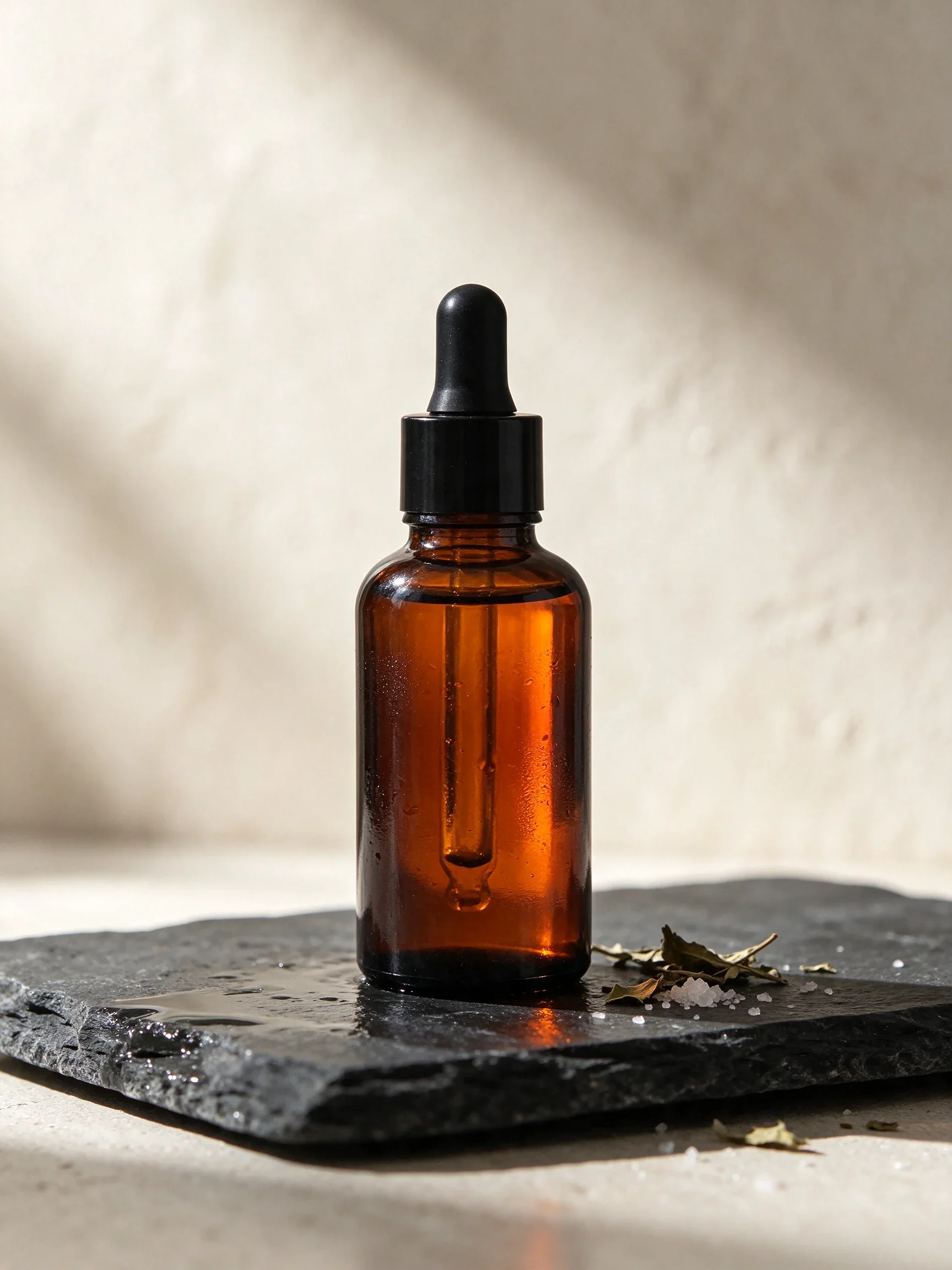
Amber Glass Bottle and Morning Light Still Life
Style Product Image · Still Life · Natural light
Prompt
A tall amber glass dropper bottle stands upright on wet slate tiles, its multifaceted edges catching a fine ring of bright light. The warm orange liquid glows through the glass with visible depth inside, and a crisp highlight runs along one side. Beside the base of the bottle lie a few dried herb leaves and a small pinch of coarse salt, glinting with tiny specular points. In the background, an off-white plaster wall is softly blurred, with a faint gradient formed by the morning light. Product photography style: clean, clear commercial lighting, controlled reflections, delicate texture on the glass and stone surfaces, subtle water condensation droplets, and a quiet, restrained palette of amber, slate gray, and cream. The subject is centered, with ample calm space around the bottle, shallow depth of field, and photorealistic detail in the cap, dropper, and unlabeled bottle body.
Copy the full prompt and adapt it for your own generation.
Tags
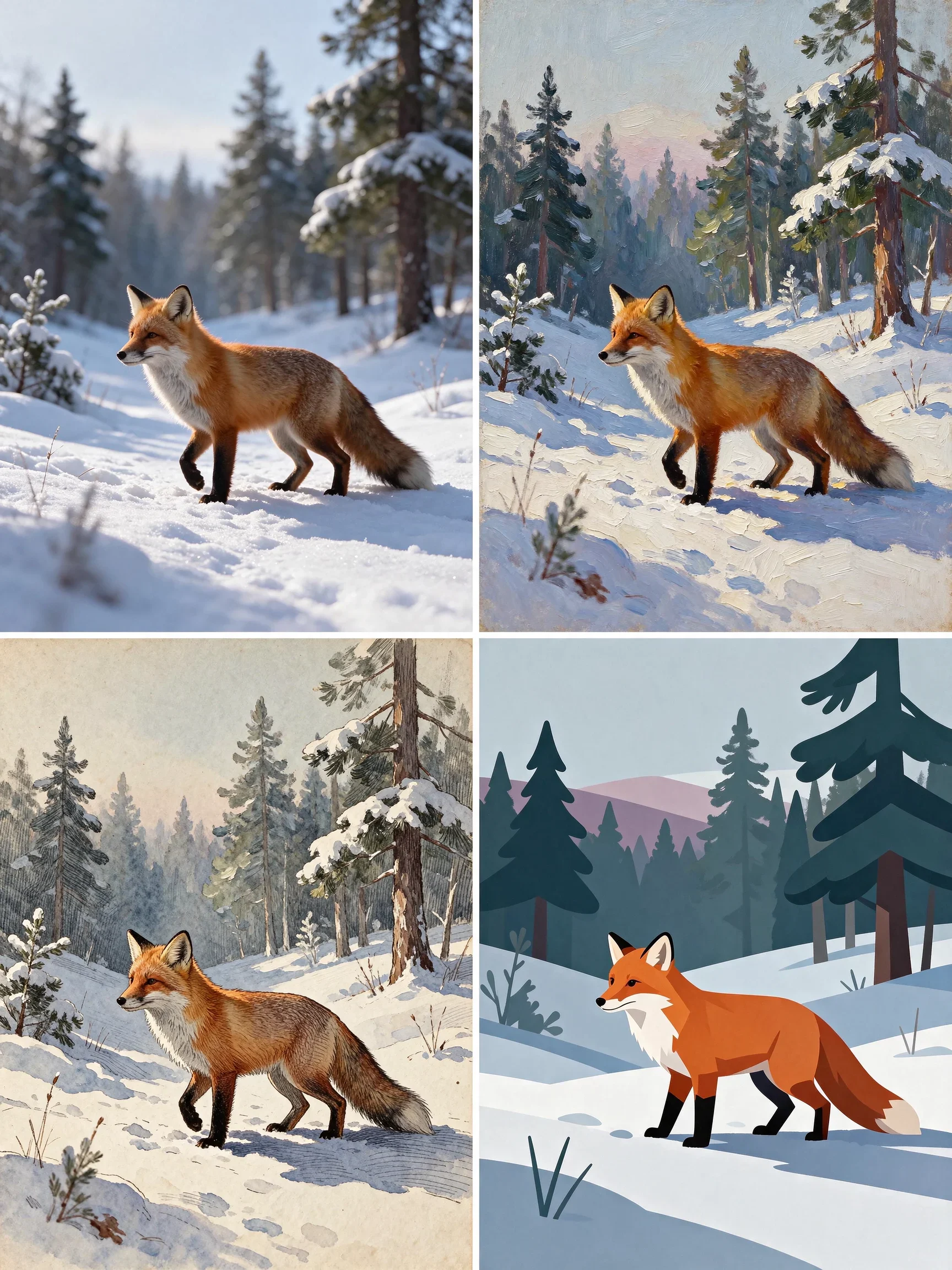
Red Fox on a Snowy Path: Four Art Styles from Realistic to Flat
Style Illustration · style-spectrum · Character Art
Prompt
A red fox standing on a snow-covered path in a pine forest, rendered in four distinct illustration styles, all sharing a unified palette of cool blue-gray snow and warm orange fur: a nearly photorealistic version with individual hairs showing light and shadow and soft reflections on the snow surface; an oil-painting version with thick, clear brushstrokes building up impasto texture; a vintage storybook version made of desaturated ink tones, fine cross-hatching, and aged paper grain; and a flat minimalist vector version built from simple color blocks and clean silhouettes with no gradients. Across all four styles, the fox's pose and the forest layout stay consistent, with delicate rim light along the edges, a tranquil winter atmosphere, and an overall refined magazine-illustration quality.
Copy the full prompt and adapt it for your own generation.
Tags
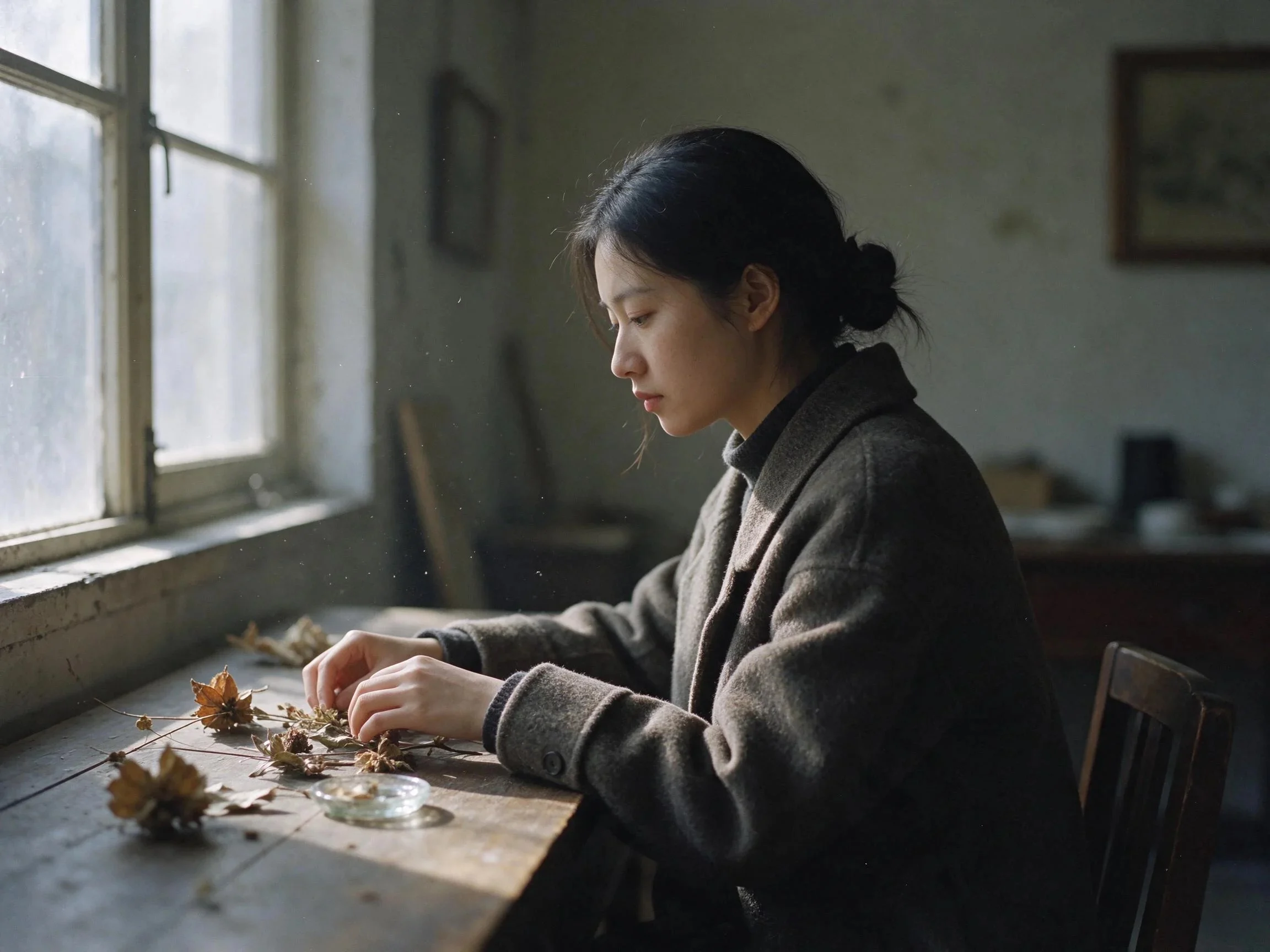
Wet Plate Photography Texture · Botanical Specimen Portrait
Style analog-photography · Portrait & Photography · Editing
Prompt
A quiet analog photographic portrait study: a young woman sits in profile by the tall window of an old studio, wearing a heavy wool coat, her hands resting on an old wooden table between dried botanical specimens and a small glass dish. Soft north-window light slants across her cheek and clothing, shadows transition gently, and fine dust motes float in the air. A muted palette of gray-green and warm brown, delicate grain, edges with a subtle wet-plate photographic softening effect, natural skin texture, no shine or blown highlights. Balanced composition with breathing space on one side of the frame, shallow depth of field, the material details of wool, skin, dried leaves, and glass are close at hand.
Copy the full prompt and adapt it for your own generation.
Tags
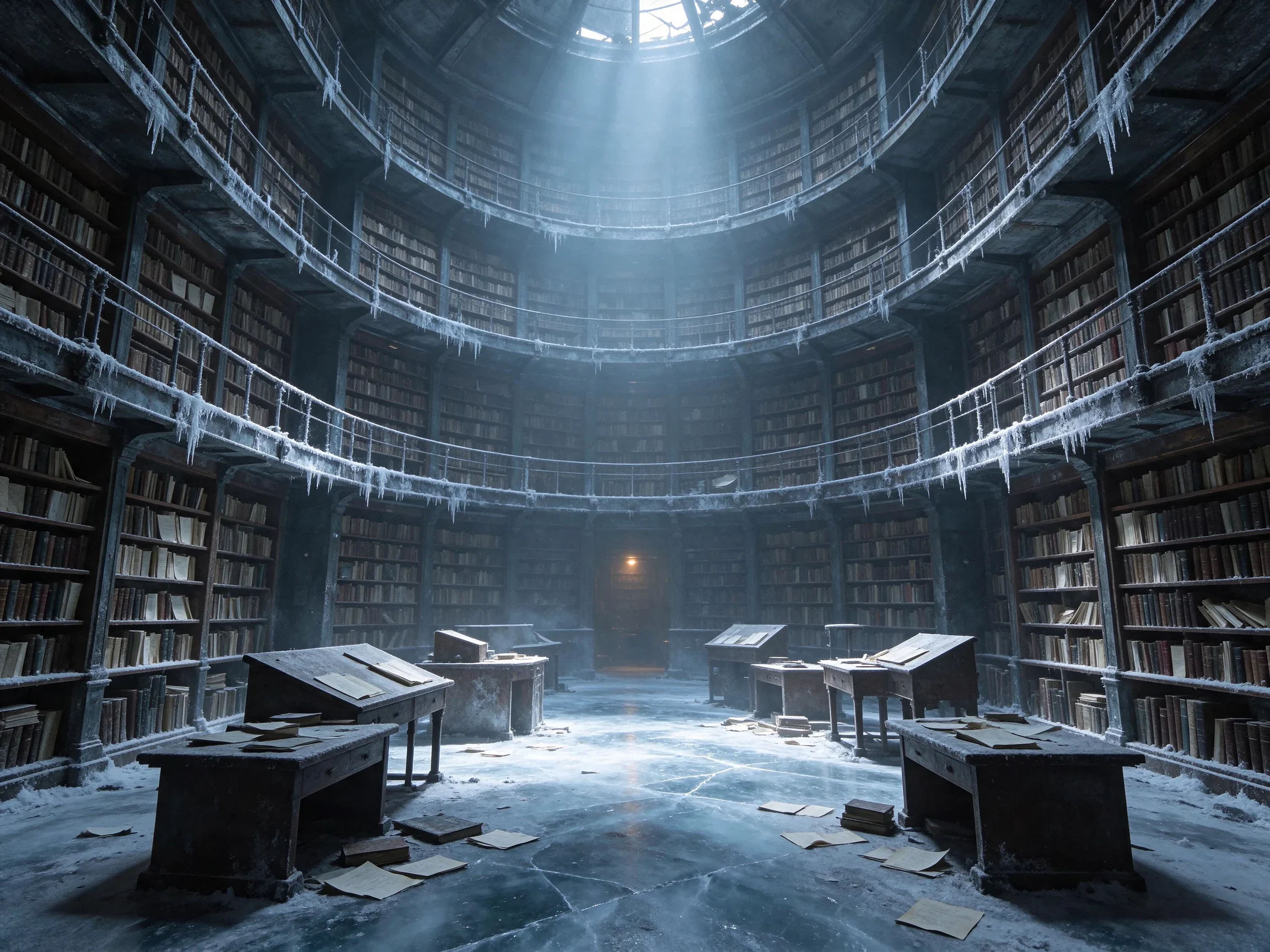
Frost-Eroded Archive: Worldbuilding Concept Scene
Style Worldbuilding · Sci-Fi · Concept Art
Prompt
The interior of a vast frozen archive library: concentric circular bookshelves stack layer upon layer, rising toward the distant domed ceiling, with metal frames and rows of documents covered in pale frost crystals. A tall central aisle guides the eye deeper into the space, where a broken skylight lets down a beam of cold blue daylight, casting a bright pool of light across the cracked ice and dust. Tilted reading desks, scattered frozen papers, and slender icicles hanging from the balconies add foreground detail. Realistic cinematic concept art, a wide panoramic establishing shot, strong atmospheric depth, subtle volumetric haze, dominated by soft slate blue and pale silver tones, with a warm amber practical light glowing deep in the background, crisp material separation among metal, paper, and ice, rich texture detail, matte highlights, no overexposure.
Copy the full prompt and adapt it for your own generation.
Tags
Pricing
seedream-5.5 per image
| Specifications | Unit Price |
|---|---|
| 1K | |
| 1.5K | |
| 2K | |
Positioning Overview
This is an image generation and editing model that supports generating images from text alone, as well as modifying or preserving image content with reference images. Outputs are static images, with selectable 1K, 1.5K, or 2K pixel tiers, aspect ratios, and PNG or JPEG formats; when a transparent background is selected, the output format is limited to PNG. It is suitable for e-commerce operations, advertising design, localized material production, and creators who need to repeatedly adjust images, for quickly producing product images, posters, and photorealistic images.
Core Highlights
- Text-to-image and image editing in one — the same prompt can generate a new image, or work with reference images to modify or preserve an existing image.
- Native transparent background output — when a transparent background is selected and PNG is output, an image with transparent areas is produced directly, reducing the need for post-processing cutouts.
- Multiple reference images for generation — 1 to 10 public http(s) reference images can be provided at once, each billed separately, to guide image generation or editing.
- Selectable aspect ratio and resolution — outputs can specify one of ten aspect ratios and choose one of three pixel tiers: 1K, 1.5K, or 2K.
Capability Description
Text-to-image: Entering only a prompt generates an image; prompts can be up to 5000 characters. You can also specify the aspect ratio, pixel tier, and output format at the same time; when omitted, output defaults to 2K and PNG.
Reference image editing: Provide 1 to 10 public http(s) reference images and use the prompt to describe what should be modified and preserved, for image editing such as replacing objects and adjusting details.
Transparent background control: The background can be set to automatic, transparent, or opaque; when a transparent background is selected, the output format must be PNG, which is suitable for scenarios requiring transparent-background assets.
Output specification configuration: The output pixel tier is one of 1K, 1.5K, or 2K, the aspect ratio is one of ten options, and the format can be PNG or JPEG; when the ratio is omitted, the model automatically selects it based on the prompt and reference images.
Use Cases
- E-commerce operations creating transparent-background product images — use product reference images with prompts to adjust the background and details, and output transparent-background PNGs for product detail pages and advertising materials.
- Designers generating campaign posters in batches — describe the layout and visuals in text, select a portrait or landscape ratio and the 2K tier, and output poster base images for subsequent layout work.
- Advertising teams replacing visual elements — upload existing advertising images and describe the objects or scenes to replace, then generate the modified image for comparing multiple versions of the same visual.
- Content creators continuously retouching images — upload portraits or product images, adjust clothing, lighting, and details through multiple rounds of prompts, and output photorealistic images for social media publishing.
Limitations and Selection Advice
Output pixel tiers are only 1K, 1.5K, and 2K, with 2K as the default billing tier. Transparent backgrounds are available only when the output format is PNG; transparent areas cannot be preserved when JPEG is selected. Reference images must be publicly accessible http(s) addresses, numbering 1 to 10, and each is billed separately. Prompts can be up to 5000 characters. Image layering and 4K output are not yet available in this API and should not be used as currently available specifications.
What's new
View changelog →- New model Seedream 5.5 Now Available: Text-to-Image and Reference Image Editing
Create a generation task
https://api.hiapi.ai/v1/tasks Headers
AuthorizationstringRequiredAccount API key. Required on every request. Example: Bearer YOUR_HIAPI_API_KEY. Get your API key
Content-TypestringOptionalThe request body is always parsed as JSON; when sent, only application/json (optionally with charset) is accepted — any other value returns 415. Example: application/json.
Idempotency-KeystringOptionalIdempotency key, up to 255 bytes. Retries with the same key from the same account create the task only once; replays return the original taskId.
On network timeouts or client retries, the same key creates the task only once — no double charges (scope: the API key's account). Use a business-unique identifier as the key (e.g. "order-42"); replays return the original taskId, and keys expire 24 hours after the first request. See the Unified Async API overview for the full scenario matrix.
Body
modelstringRequiredCurrent fixed value: seedream-5.5
routestringOptionalCurrent fixed value: default
inputobjectRequired
Business parameters for seedream-5.5 and route default — see the parameter table below.
sizestringOptionalDefault: "2K"Controls the pixel tier of the output image, takes a string enum value; defaults to 2K (billed as 2K when omitted), 1K and 1.5K are priced the same.
1K1.5K2KpromptstringRequiredminLength 1maxLength 5000Describes the image you want to generate, or, together with reference images, explains what needs to be modified and preserved; this is the main instruction input for image generation and editing.
backgroundstringOptionalDefault: "auto"Controls the background mode of the generated result, takes a string enum value; defaults to auto. When set to a transparent background, the output format must be PNG.
autotransparentopaqueimage_urlsarrayOptionalminItems 1maxItems 10An array of reference images, providing 1–10 public http(s) image URLs; if omitted, the image is generated from the text prompt only. Each reference image is billed separately; its elements are image link strings.
Array [ string ]
aspect_ratiostringOptionalControls the aspect ratio of the output, takes a string enum value; when omitted, the model selects it automatically based on the prompt and reference images.
1:14:33:416:99:163:22:321:9Show all (2)Show less
2:11:2output_formatstringOptionalDefault: "png"Controls the output image format, takes a string enum value; defaults to png. When background is transparent, only png is supported.
pngjpegcallbackobjectOptional
Terminal-state notification config. When omitted, no callback is delivered — poll the task yourself. See the callback note below.
Provide callback.url when creating a task and HiAPI POSTs to your service once the task reaches a terminal state — no polling needed. The callback payload mirrors the task detail structure; signature verification, delivery retries and idempotency are documented on the Unified Async API overview page.
urlstringRequiredRequired when callback is present. A POST is sent to this URL once the task reaches a terminal state; must be a valid http(s) URL.
whenstringOptionalDefault: "final"Only final is supported today — notified on both success and fail.
finalstoragestringOptionalDefault: "temp"Artifact storage tier: temp (default, retained about 7 days) or persistent (long-term, billed by size). Insufficient balance or exceeding the storage cap silently downgrades to temp; the effective tier is shown in the task detail response.
temppersistentRequest examples
# Submit an async task; returns a taskId immediately (no waiting for generation)
curl -X POST "https://api.hiapi.ai/v1/tasks" \
  -H "Authorization: Bearer $HIAPI_API_KEY" \
  -H "Content-Type: application/json" \
  -d '{
  "model": "seedream-5.5",
  "input": {
    "size": "2K",
    "prompt": "…",
    "background": "auto",
    "output_format": "png"
  }
}'
const res = await fetch("https://api.hiapi.ai/v1/tasks", {
method: "POST",
headers: {
Authorization: `Bearer ${process.env.HIAPI_API_KEY}`,
"Content-Type": "application/json",
},
body: JSON.stringify({
model: "seedream-5.5",
input: {
"size": "2K",
"prompt": "…",
"background": "auto",
"output_format": "png"
}
}),
});
const task = await res.json();
// { code: 200, message: "success", data: { taskId } }import os, requests
res = requests.post(
"https://api.hiapi.ai/v1/tasks",
headers={"Authorization": f"Bearer {os.environ['HIAPI_API_KEY']}"},
json={
"model": "seedream-5.5",
"input": {
"size": "2K",
"prompt": "…",
"background": "auto",
"output_format": "png"
}
},
)
print(res.json()) # { code, message, data: { taskId } }200 OK
{
  "code": 200,
  "message": "success",
  "data": {
    "taskId": "tk-hiapi-01HZTQ8BX2N3GM3YFK4Z9D7VQR"
  }
}
400 Bad Request
{
  "code": 400,
  "message": "invalid request",
  "data": null,
  "error_code": "INVALID_REQUEST"
}
Get task detail
https://api.hiapi.ai/v1/tasks/:id Response fields
taskIdstringRequiredTask ID, always prefixed with tk-hiapi-.
modelstringRequiredResolved full model name. Tasks submitted with the route parameter return base@route (e.g. gpt-image-2/text-to-image@ext); otherwise identical to the name passed at creation.
routestringOptionalPresent only when the task was submitted with an explicit route parameter; echoes the submitted value.
statusstringRequiredTask status.
queued Queued, not started yet.
handling Being processed.
archiving Processing finished, artifacts being prepared.
success Terminal: completed, artifacts available (output returned).
fail Terminal: failed (error returned).
After submission, check status: success and fail are terminal, everything else is non-terminal. Poll every 1–3 seconds until terminal. On success, download artifacts from output[].url and transfer them before expireAt; pass storage: "persistent" at creation time when long-term retention is needed.
creatednumberRequiredTask creation time (Unix seconds).
completednumberRequiredUnix seconds when the task reached a terminal state; fixed to 0 while not terminal.
outputarrayOptional
Present only when status == success. Artifact list — always an array; a single task may return multiple types at once (e.g. video + first_frame).
Array [ object ]
Array items
urlstringRequiredArtifact URL, directly downloadable.
typestringRequiredCurrent possible values: video, image, audio, first_frame, last_frame, thumbnail; more may be added later.
expireAtnumberRequiredUnix seconds until which the artifact remains accessible; download or transfer before it expires.
errorobjectOptional
Present only when status == fail.
codestringRequiredBusiness error code.
messagestringRequiredError description.
Response examples
Success
{
  "code": 200,
  "message": "success",
  "data": {
    "taskId": "tk-hiapi-01HZTQ8BX2N3GM3YFK4Z9D7VQR",
    "model": "happyhorse-1-0",
    "status": "success",
    "created": 1777282033,
    "completed": 1777282099,
    "output": [
      {
        "url": "https://cdn.hiapi.ai/tasks/.../video.mp4",
        "type": "video",
        "expireAt": 1777886899
      }
    ]
  }
}
Processing (non-terminal)
{
  "code": 200,
  "message": "success",
  "data": {
    "taskId": "tk-hiapi-...",
    "model": "happyhorse-1-0",
    "status": "archiving",
    "created": 1777282033,
    "completed": 0
  }
}
Failed
{
  "code": 200,
  "message": "success",
  "data": {
    "taskId": "tk-hiapi-...",
    "model": "happyhorse-1-0",
    "status": "fail",
    "created": 1777282033,
    "completed": 1777282099,
    "error": {
      "code": "TASK_FAILED",
      "message": "task failed"
    }
  }
}Articles
View all articles →
Related Models
View all models →Same Type
-
 FIBO 1.5 Bria $0.058 /image
-
 Wan 2.7 Image Alibaba $0.035 /image
-
 Krea 2 Medium Turbo Krea $0.021 /image
-
 851 Labs Background Remover 851 Labs $0.002 /image
-
 Nano Banana Pro Google $0.029 /image
-
 Nano Banana 2 Google $0.018 /image
-
 FLUX.2 Klein 9B Black Forest Labs $0.0086 /image
-
 Recraft Creative Upscale Recraft $0.357 /image
-
 Grok Imagine Quality xAI $0.070 /image
-
 BRIA Eraser Bria $0.058 /image
-
 Qwen Image 2.1 Alibaba $0.020 /image
-
 FLUX.1 Fill Pro Black Forest Labs $0.071 /image