

Veo 3.1
veo-3.1/image-to-video
Google's video generation model: image input can natively generate 8-second videos with ambient sound and dialogue, supporting up to 4K while keeping the subject's appearance consistent
Try veo-3.1/image-to-video
Input
Showcases
View all showcasesOutput
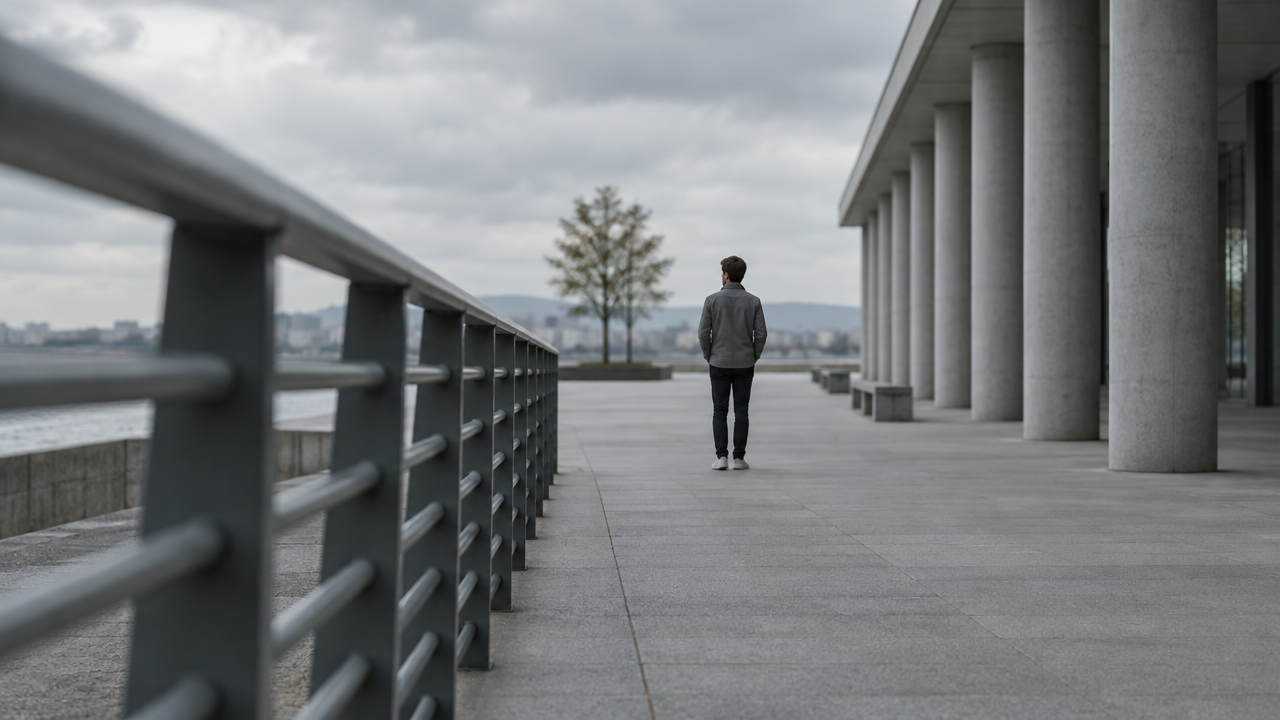
videoCamera Movement Visual Notes: A Demonstration of Cinematic Language for Image-to-Video
Style Camera Movement · Storyboard · film-grammar
Reference inputs
image_url
Prompt
Animate the still frame with a slow, deliberate dolly-in shot: the camera moves steadily forward along the lens axis, keeping the horizon level and the subject centered, and as depth of field is compressed, foreground elements gradually produce parallax. Subtle non-handheld stabilization, no zoom breathing, no perspective distortion. Retain the cinematic neutral lighting of the source frame, with shallow depth of field gradually narrowing. Low-saturation color grading, clean frame edges, motion blur consistent with a 35mm lens. Has the quality of an instructional camera movement demonstration, a single continuous long take, no cuts.
Copy the full prompt and adapt it for your own generation.
Tags
Storyboard Concept Visualization: Text to First Frame to Camera Movement
Style Storyboard · Cinematic · Image-to-Video
Reference inputs

image_url
Prompt
Turn a single cinematic keyframe into a slow, controlled camera movement: a gentle push-in from a wide establishing shot toward the subject, with subtle parallax in the foreground dust and drifting haze. Keep the original composition and color grading unchanged, maintain a shallow depth of field, and let the light shift softly as if cloud shadows are passing over. Ambient wind and distant indoor room tone support the scene; no cuts, no text overlays, steady pacing within eight seconds.
Copy the full prompt and adapt it for your own generation.
Tags
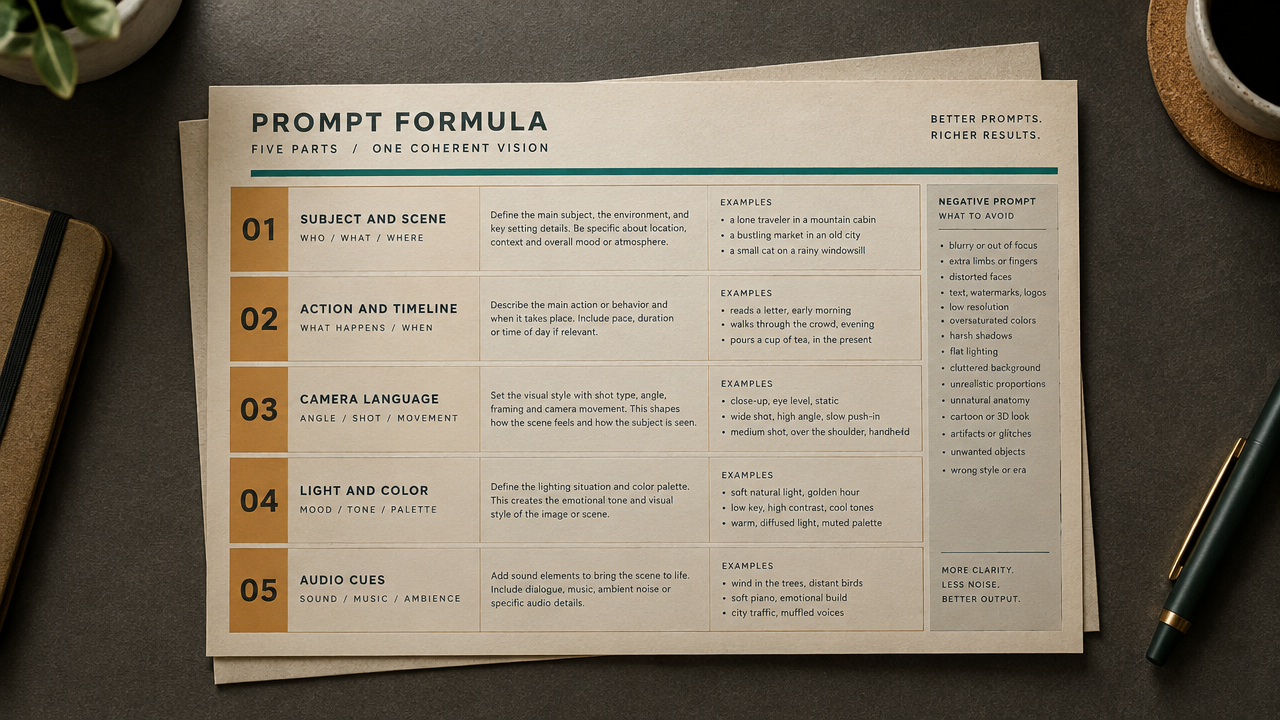
Veo 3.1 Image-to-Video Prompt Formula Card
Style Prompt Engineering · Explanation · Motion Design
Reference inputs
image_url
Prompt
A single continuous push-in shot, looking down at a prompt formula card laid flat on a warm graphite-colored desktop. The card uses a clean, crisp editorial layout style, containing five rows of labeled content—Subject & Scene, Action & Timeline, Camera Language, Light & Color, Audio Cues—set in precise sans-serif type, with a small column of negative prompts on the right side. The camera glides forward at a slow, constant speed, creating subtle parallax above the edges of the layered paper, with no cuts and no whip pans. Soft, diffused key light comes in from the upper left and falls off gently toward the corners; the overall palette is desaturated amber and off-white, with a single cyan accent line. A shallow depth of field keeps the center of the card sharp while the desktop softens. Only ambient room tone, quiet and focused, suitable for a documentary or tutorial narration.
Copy the full prompt and adapt it for your own generation.
Tags
Veo 3.1 Image-to-Video Parameter Illustrated: Single-Shot Demonstration
Style Image-to-Video · Technical Explanation · Product Demo
Reference inputs

image_url
Prompt
Turn the static image into a slow, controlled cinematic dolly-in animation. The camera drifts forward at a steady pace with a slight handheld micro-jitter, keeping the subject centered in the frame and in sharp focus. The ambient light shifts subtly across the scene, and fine particles float through the frame. Shallow depth of field, natural motion blur, cinematic color grading, 24fps look. No cuts, no violent camera shake, a single continuous long take.
Copy the full prompt and adapt it for your own generation.
Tags
Pricing
veo-3.1/image-to-video per second
Overview
The Veo 3.1 image-to-video route is the image-driven version of Google's video generation model on HiAPI.ai. It takes an image and a text prompt and produces dynamic video with a native audio track. It excels at controlling camera movement and scene progression while preserving the appearance of the subject in the input image, making it suitable for developers who need to quickly turn static visual assets into playable clips for advertising, social media, concept previews, and similar scenarios.
Key Highlights
- Native synchronized audio-video generation — ambient sound, dialogue, and sound effects are generated alongside the video, reducing the need for separate post-production dubbing and sound effect synthesis.
- Up to 4K resolution — output supports 720p, 1080p, and 4k, and the aspect ratio can automatically match the input image or be set to 16:9 or 9:16.
- Controllable output duration and audio — duration can be 4, 6, or 8 seconds, and the audio track can be toggled on or off, making it easy to adjust generation specifications to delivery channels and cost budgets.
- Negative prompts and fixed seeds — use negative_prompt to exclude unwanted elements and seed to reproduce similar generation results.
Capabilities
Image-driven animation generation: Starting from a single image and a prompt of up to 20,000 characters describing the motion, it outputs a 4- to 8-second video clip, ideal for converting existing visual assets directly into dynamic content.
Native audio track generation: Native audio is generated by default; disable generate_audio to get silent video, making it easy to add your own music or voiceover in post-production.
Resolution and aspect ratio control: You can specify 720p, 1080p, or 4k output, and the aspect ratio can automatically follow the input image or be forced to 16:9 or 9:16, supporting both landscape and portrait delivery.
Controllability of results: Describe content to avoid via negative_prompt and fix the random seed via seed, making it easy to maintain consistent style across batch generations or run A/B comparisons.
Use Cases
- Marketing teams turning product images into ad clips — input a static product image and motion description to produce 4K or 1080p landscape video clips for online advertising and website display.
- Social media operators creating portrait dynamic content — use portrait images and prompts to generate 9:16 videos with native sound effects for publishing as material on short-video platforms.
- Film and TV pre-production turning concept art into dynamic previews — generate storyboards or concept design images into dynamic clips to help teams confirm camera movement and atmosphere before formal production.
- Developers batch-generating dynamic assets — pass images and prompts in programmatic workflows and use seed to batch-produce style-consistent video clips for testing or content filling.
Limitations and Selection Advice
The maximum duration per generation is 8 seconds; longer narratives require segmented generation and stitching, and multi-shot continuity still needs manual arrangement. Input images should be 720p or higher and in 16:9 or 9:16, as other ratios will be cropped. Resolution and the audio toggle affect billing, so run low-spec trials before batch generation. If you need to build a scene from scratch rather than drive an existing image, use the text-to-video route in the same family.
Frequently asked questions
View all FAQs →-
What type of video model is Veo 3.1 Text to Video?
It is a pure text-to-video route and does not require an opening image.
-
Which output settings does Veo 3.1 Text to Video support?
4-8 seconds, 720p, 1080p, 4k, and 16:9, 9:16.
-
Can it generate sound or use audio references?
Generated audio enabled by default
-
How is Veo 3.1 Text to Video billed?
Billing follows output duration and the live tier. Resolution, mode, or audio differences are reflected by the page price and task record.
Create a generation task
https://api.hiapi.ai/v1/tasks Headers
AuthorizationstringRequiredAccount API key. Required on every request. Example: Bearer YOUR_HIAPI_API_KEY. Get your API key
Content-TypestringOptionalThe request body is always parsed as JSON; when sent, only application/json (optionally with charset) is accepted — any other value returns 415. Example: application/json.
Idempotency-KeystringOptionalIdempotency key, up to 255 bytes. Retries with the same key from the same account create the task only once; replays return the original taskId.
On network timeouts or client retries, the same key creates the task only once — no double charges (scope: the API key's account). Use a business-unique identifier as the key (e.g. "order-42"); replays return the original taskId, and keys expire 24 hours after the first request. See the Unified Async API overview for the full scenario matrix.
Body
modelstringRequiredCurrent fixed value: veo-3.1/image-to-video
routestringOptionalCurrent fixed value: default
inputobjectRequired
Business parameters for veo-3.1/image-to-video and route default — see the parameter table below.
seedintegerOptionalRandom seed used to make the generation result reproducible; passing the same seed yields consistent output.
promptstringRequiredminLength 1maxLength 20000Text prompt describing how the input image should be animated.
durationintegerRequiredDefault: 8min 4max 8Duration of the generated video (in seconds); the cost increases with duration; default is 8 seconds.
468image_urlstringRequiredURL of the input image to animate; a resolution of 720p or higher and a 16:9 or 9:16 aspect ratio are recommended, as other aspect ratios will be cropped.
resolutionstringRequiredDefault: "720p"Output video resolution; the higher the resolution, the higher the cost; default is 720p.
720p1080p4kaspect_ratiostringOptionalDefault: "auto"Aspect ratio of the output video; default is auto, which follows the aspect ratio of the input image.
auto16:99:16generate_audiobooleanOptionalDefault: trueWhether to generate a native audio track; pricing is higher when enabled; enabled by default.
negative_promptstringOptionalNegative prompt describing content that should be avoided in the generated video.
callbackobjectOptional
Terminal-state notification config. When omitted, no callback is delivered — poll the task yourself. See the callback note below.
Provide callback.url when creating a task and HiAPI POSTs to your service once the task reaches a terminal state — no polling needed. The callback payload mirrors the task detail structure; signature verification, delivery retries and idempotency are documented on the Unified Async API overview page.
urlstringRequiredRequired when callback is present. A POST is sent to this URL once the task reaches a terminal state; must be a valid http(s) URL.
whenstringOptionalDefault: "final"Only final is supported today — notified on both success and fail.
finalstoragestringOptionalDefault: "temp"Artifact storage tier: temp (default, retained about 7 days) or persistent (long-term, billed by size). Insufficient balance or exceeding the storage cap silently downgrades to temp; the effective tier is shown in the task detail response.
temppersistentRequest examples
# Submit an async task; returns a taskId immediately (no waiting for generation)
curl -X POST "https://api.hiapi.ai/v1/tasks" \
  -H "Authorization: Bearer $HIAPI_API_KEY" \
  -H "Content-Type: application/json" \
  -d '{
  "model": "veo-3.1/image-to-video",
  "input": {
    "prompt": "…",
    "duration": 8,
    "image_url": "…",
    "resolution": "720p",
    "aspect_ratio": "auto",
    "generate_audio": true
  }
}'
const res = await fetch("https://api.hiapi.ai/v1/tasks", {
method: "POST",
headers: {
Authorization: `Bearer ${process.env.HIAPI_API_KEY}`,
"Content-Type": "application/json",
},
body: JSON.stringify({
model: "veo-3.1/image-to-video",
input: {
"prompt": "…",
"duration": 8,
"image_url": "…",
"resolution": "720p",
"aspect_ratio": "auto",
"generate_audio": true
}
}),
});
const task = await res.json();
// { code: 200, message: "success", data: { taskId } }import os, requests
res = requests.post(
"https://api.hiapi.ai/v1/tasks",
headers={"Authorization": f"Bearer {os.environ['HIAPI_API_KEY']}"},
json={
"model": "veo-3.1/image-to-video",
"input": {
"prompt": "…",
"duration": 8,
"image_url": "…",
"resolution": "720p",
"aspect_ratio": "auto",
"generate_audio": True
}
},
)
print(res.json()) # { code, message, data: { taskId } }200 OK
{
  "code": 200,
  "message": "success",
  "data": {
    "taskId": "tk-hiapi-01HZTQ8BX2N3GM3YFK4Z9D7VQR"
  }
}
400 Bad Request
{
  "code": 400,
  "message": "invalid request",
  "data": null,
  "error_code": "INVALID_REQUEST"
}
Get task detail
https://api.hiapi.ai/v1/tasks/:id Response fields
taskIdstringRequiredTask ID, always prefixed with tk-hiapi-.
modelstringRequiredResolved full model name. Tasks submitted with the route parameter return base@route (e.g. gpt-image-2/text-to-image@ext); otherwise identical to the name passed at creation.
routestringOptionalPresent only when the task was submitted with an explicit route parameter; echoes the submitted value.
statusstringRequiredTask status.
queued Queued, not started yet.
handling Being processed.
archiving Processing finished, artifacts being prepared.
success Terminal: completed, artifacts available (output returned).
fail Terminal: failed (error returned).
After submission, check status: success and fail are terminal, everything else is non-terminal. Poll every 1–3 seconds until terminal. On success, download artifacts from output[].url and transfer them before expireAt; pass storage: "persistent" at creation time when long-term retention is needed.
creatednumberRequiredTask creation time (Unix seconds).
completednumberRequiredUnix seconds when the task reached a terminal state; fixed to 0 while not terminal.
outputarrayOptional
Present only when status == success. Artifact list — always an array; a single task may return multiple types at once (e.g. video + first_frame).
Array [ object ]
Array items
urlstringRequiredArtifact URL, directly downloadable.
typestringRequiredCurrent possible values: video, image, audio, first_frame, last_frame, thumbnail; more may be added later.
expireAtnumberRequiredUnix seconds until which the artifact remains accessible; download or transfer before it expires.
errorobjectOptional
Present only when status == fail.
codestringRequiredBusiness error code.
messagestringRequiredError description.
Response examples
Success
{
  "code": 200,
  "message": "success",
  "data": {
    "taskId": "tk-hiapi-01HZTQ8BX2N3GM3YFK4Z9D7VQR",
    "model": "happyhorse-1-0",
    "status": "success",
    "created": 1777282033,
    "completed": 1777282099,
    "output": [
      {
        "url": "https://cdn.hiapi.ai/tasks/.../video.mp4",
        "type": "video",
        "expireAt": 1777886899
      }
    ]
  }
}
Processing (non-terminal)
{
  "code": 200,
  "message": "success",
  "data": {
    "taskId": "tk-hiapi-...",
    "model": "happyhorse-1-0",
    "status": "archiving",
    "created": 1777282033,
    "completed": 0
  }
}
Failed
{
  "code": 200,
  "message": "success",
  "data": {
    "taskId": "tk-hiapi-...",
    "model": "happyhorse-1-0",
    "status": "fail",
    "created": 1777282033,
    "completed": 1777282099,
    "error": {
      "code": "TASK_FAILED",
      "message": "task failed"
    }
  }
}Articles
View all articles →Related Models
View all models →Same Type
-
 Kling 2.5 Kuaishou $0.060 /second
-
 LTX 2.5 Fast Lightricks $0.086 /second
-
 Grok Imagine 1.5 xAI $0.011 /second
-
 Runway Gen 4.5 Runway $0.172 /second
-
 Wan 2.6 Flash Alibaba $0.043 /second
-
 MiniMax H3 MiniMax $0.072 /second
-
 FLUX 3 Max Black Forest Labs $0.061 /second
-
 Creatify Boreal Creatify $0.015 /second
-
 FLUX 3 Video Black Forest Labs $0.090 /second
-
 Kandinsky 6.0 Pro $1.93 /video
-
 Kling 3.0 Turbo Kuaishou $0.130 /second
-
 Kling 4.0 Kuaishou $0.330 /second
Same Provider
-
 Gemini Omni 1.1 Flash Google $0.450 /video
-
 Gemini Omni Google --
-
 Lyria 3.5 Google $0.090 /song
-
 Gemini 3.1 Flash TTS Google --
-
 Nano Banana Google $0.021 /image
-
 Google Virtual Try-On Google $0.107 /image
-
 Lyria 3 Pro Google $0.140 /song
-
 Nano Banana 2 Google $0.036 /image
-
 Nano Banana 2 Lite Google $0.033 /image
-
 Veo 3.1 Lite Google $0.060 /second
-
 Veo 3.1 Fast Google $0.170 /second
-
 Imagen 4 Google $0.030 /image