
HeyGen Avatar IV Text-to-Video Capability Diagram
Use the "single image + script" path of HeyGen Avatar IV to make a short capability explainer video: a single frontal portrait photo serves as the driving source; the script synthesizes speech and drives lip sync, facial expressions, and gestures, outputting a 1080p landscape talking-head video. In base, voice, resolution, and aspect_ratio are fixed, and background is set to a solid color fill, so the frame stays intact when cropping across multiple aspect ratios; the image is the only required media input and is bound to image_url after being generated by the pipeline. The overall result is a minimal usable configuration that developers can reuse directly: one photo, one spoken script, one voice, and one frame size yield narration material with synchronized speech. Suitable scenarios include corporate digital spokespeople, spoken product capability explainers, training walkthroughs, and short social media videos; it also works well as a baseline entry for comparing different voice and aspect-ratio parameters. Reference materials note that Avatar IV emphasizes speech-driven full-body motion performance and 1280p+ high-definition output; actual image quality is affected by the source photo's quality and pose, and the generated result should be treated as authoritative.
Style Spoken presentation · Explanation · Avatar Video
Model HeyGen Avatar IV
Reference inputs
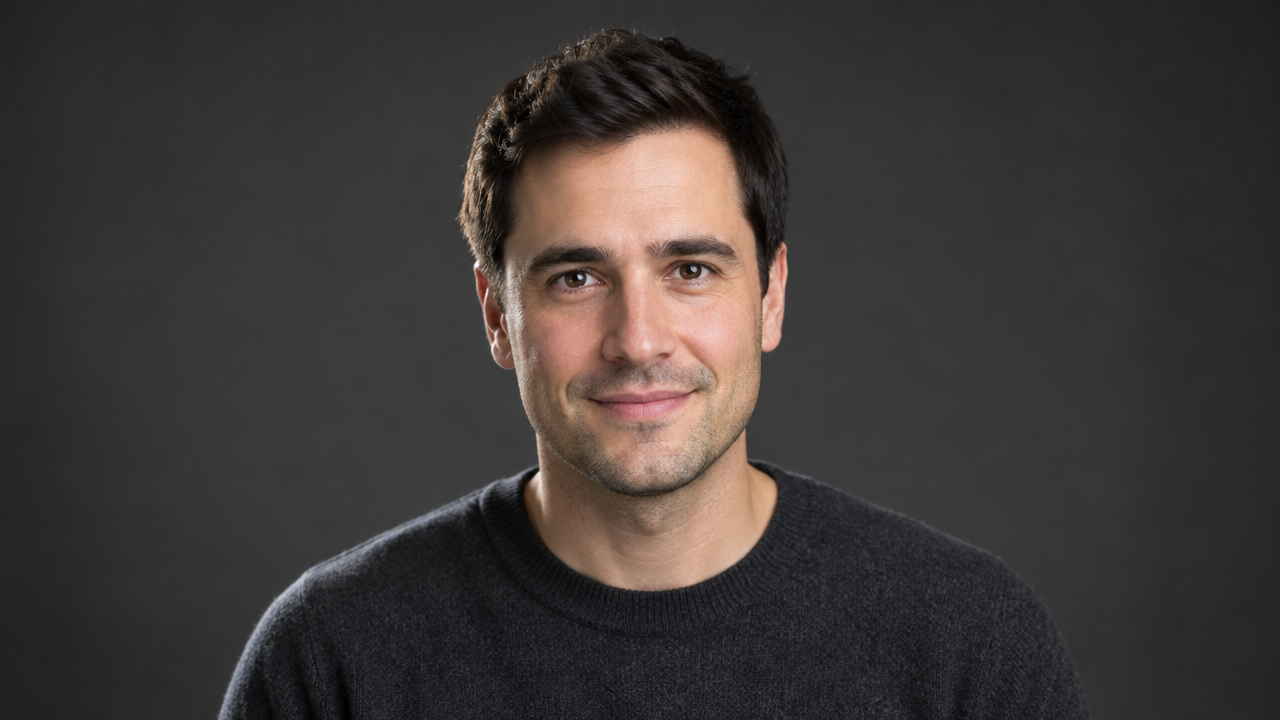
image_url
Prompt
A presenter speaks directly to the camera in a clean studio setting: head-and-shoulders framing, facing forward, steady eye contact with the lens, subtle head movement and natural gestures matching the speaking rhythm; soft key light from the front left with gentle fill light, a neutral dark gray seamless background, shallow depth of field, 1080p 16:9 widescreen composition, a realistic corporate explainer style, with a calm and confident pace.
Copy the full prompt and adapt it for your own generation.
Tags