
チュートリアル
FLUX.2 テキスト-to-画像 API の使い方?パラメータ、コード、実際の生成画像1枚
FLUX.2 Pro テキスト-to-画像のパラメータ表、curl と Python のサンプル、4段階の解像度価格、seed による再現、リリース前の注意点。
TL;DR
- FLUX.2 Pro のテキスト-to-画像は HiAPI 上でのモデル名が
flux-2/text-to-image。Black Forest Labs 製で、プロンプトへの追従性と画像内の文字が強み。モデルページを開くとオンラインで試せます。 - 解像度の段階ごとに課金:0.5 MP は $0.0375、1 MP(デフォルト)は $0.05、2 MP は $0.075、4 MP は $0.125。アスペクト比は価格に影響しません。
- 最も手早い方法:
POST /v1/tasksにpromptを渡し、successになるまでポーリングして、output[0].urlをダウンロードします。resolutionの値には中間にスペースがあるので、"1 MP"と書きます。
まずは実際の生成画像を1枚
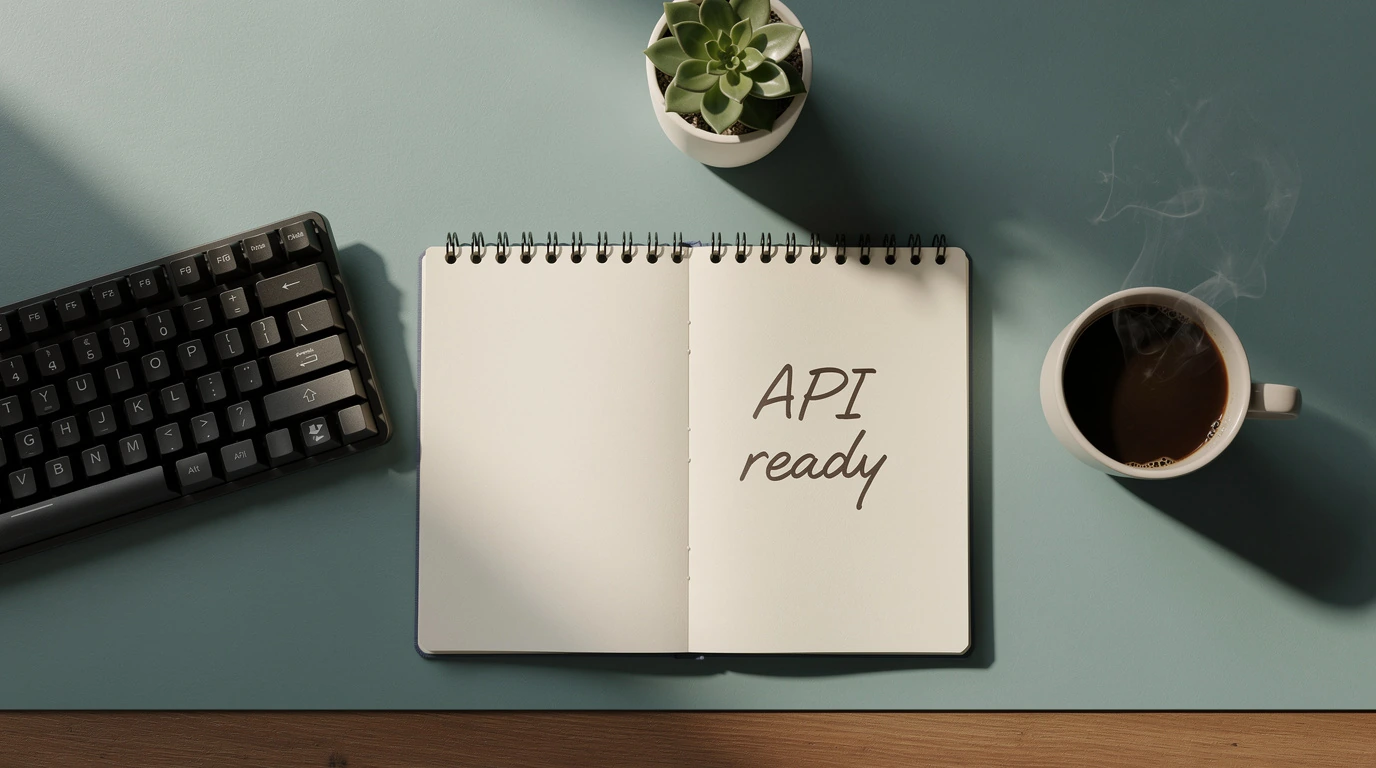
次の画像は本文中のリクエストで生成したもので、2 MP、16:9 です:
A wide overhead flat-lay of a modern developer desk: a matte black mechanical
keyboard on the left, a ceramic mug of steaming coffee on the right, a small
potted succulent in the top corner, and an open spiral notebook in the center
with the handwritten words 'API ready' clearly visible on the page, soft
natural window light falling from the left, a muted teal and warm wood color
palette, no other text or logos anywhere in the frame
このプロンプトで生成 →(16:9、2 MP)
flux-2/text-to-image、16:9、2 MP、$0.075。ノートに「API ready」と正しく書かれ、画面内に余計な文字はありません。
パラメータ早見表
| フィールド | 必須 | 値 | 説明 |
|---|---|---|---|
prompt |
はい | 文字列 | 重要な要素を文頭に置き、30〜80 語の英語が最も効果的 |
aspect_ratio |
いいえ | 1:1 16:9 3:2 2:3 4:5 5:4 9:16 3:4 4:3 custom、デフォルト 1:1 |
custom を選ぶときは width / height と併用 |
resolution |
いいえ | 0.5 MP / 1 MP / 2 MP / 4 MP、デフォルト 1 MP |
価格を決定;custom 時は無視 |
width / height |
custom のみ |
256–2048 | 自動的に 16 の倍数に丸められる |
output_format |
いいえ | webp(デフォルト)/ jpg / png |
|
output_quality |
いいえ | 0–100、デフォルト 80 | webp、jpg にのみ有効 |
seed |
いいえ | 整数 | 固定すると同じ結果を再現可能 |
safety_tolerance |
いいえ | 1–5、デフォルト 2 | 1 が最も厳格 |
パラメータは厳密に検証されます:ドキュメントにないフィールドを余分に渡すと、直接 HTTP 400(additional properties ... not allowed)を返します。このエンドポイントはテキストのみを受け付け、参照画像を用いた編集には flux-2/image-to-image を使ってください。
curl:最初の1枚を動かす
curl -X POST https://api.hiapi.ai/v1/tasks \
  -H "Authorization: Bearer $HIAPI_KEY" \
  -H "Content-Type: application/json" \
  -d '{
    "model": "flux-2/text-to-image",
    "input": {
      "prompt": "A matte charcoal coffee bag on a rustic oak counter, kraft paper label reading DAYBREAK ROAST, warm morning window light",
      "aspect_ratio": "4:3",
      "resolution": "1 MP",
      "output_format": "png"
    }
  }'
レスポンスには data.taskId しか含まれず、画像はまだ生成されていません。GET /v1/tasks/{taskId} をポーリングし、status が success になったら output[0].url からダウンロードします。
Python:送信、ポーリング、ダウンロード
# pip install requests; export HIAPI_KEY=あなたの Key
import os, time, uuid, requests

API = "https://api.hiapi.ai/v1/tasks"
H = {"Authorization": f"Bearer {os.environ['HIAPI_KEY']}"}

def generate(timeout_s=300, **inp):
    # 同じ送信をリトライするときは同じ Idempotency-Key を再利用すると、課金は1回だけ
    r = requests.post(API, json={"model": "flux-2/text-to-image", "input": inp},
                      headers={**H, "Idempotency-Key": str(uuid.uuid4())}, timeout=30)
    r.raise_for_status()
    task_id = r.json()["data"]["taskId"]
    deadline = time.time() + timeout_s
    while time.time() < deadline:
        d = requests.get(f"{API}/{task_id}", headers=H, timeout=30).json()["data"]
        if d["status"] == "success":
            return d["output"][0]["url"]
        if d["status"] in ("fail", "failed"):
            raise RuntimeError(d)
        time.sleep(5)
    raise TimeoutError(task_id)

url = generate(
    prompt="A wide overhead flat-lay of a modern developer desk, an open notebook with the handwritten words 'API ready', soft window light",
    aspect_ratio="16:9", resolution="2 MP", output_format="png", seed=42,
)
with open("desk.png", "wb") as f:
    f.write(requests.get(url).content)
料金
| 解像度 | 1枚あたり | 100枚 |
|---|---|---|
| 0.5 MP | $0.0375 | $3.75 |
| 1 MP(デフォルト) | $0.05 | $5.00 |
| 2 MP | $0.075 | $7.50 |
| 4 MP | $0.125 | $12.50 |
HiAPI の現行価格、2026 年 10 月 18 日時点で確認。
アスペクト比、seed、出力形式はいずれも価格に影響せず、解像度の段階のみで決まります。失敗時は課金されません。より安くしたい場合は、FLUX.2 [klein] 4B 1 MP が1枚 $0.00143、各段階の比較は FLUX.2 API の価格 を参照。
リリース前の注意
resolutionの中間にスペースがある:"1 MP"と書き、"1MP"や"1K"ではありません。誤ると 400 を返し、選択可能な値を列挙します。customサイズではresolutionが無視される:aspect_ratioにcustomを指定すると、width×heightで画像を生成します。- 再現したいなら
seedを固定:同じプロンプト、同じseedなら結果はほぼ一致し、文言の微調整時に比較しやすくなります。 - 結果はすぐに保存:
output[0].urlには有効期限があるため、ダウンロード後は自分のストレージに保存してください。 - ポーリングの代わりにコールバックを使う:
inputと同階層に"callback": {"url": "https://your-app.example.com/hiapi/callback"}を追加し、taskIdで重複排除します。
よくある質問
resolution は必ず書く必要がありますか?
必須ではありません。デフォルトは 1 MP です。ただし 4 MP と混同しないよう、毎回書くことをおすすめします。
参照画像は渡せますか?
このエンドポイントでは不可です。参照画像を用いた編集や複数画像の合成には flux-2/image-to-image を使います。参照画像は最大 8 枚、既成のプロンプトは FLUX.2 編集プロンプト を参照。
なぜ「additional properties not allowed」が返るのですか?
このモデルにないフィールド、たとえば strength や prompt_upsampling を渡しているためです。上のパラメータ表にあるフィールドのみを使ってください。
FLUX.3 Image とはどう選び分けますか?
FLUX.3 Image は1つのモデル名で生成と編集の両方ができ、4K の出力、最大 10 枚の参照画像に対応;FLUX.2 Pro は seed とカスタム幅・高さがあり、4 MP でもわずか $0.125 です。同じプロンプトでの比較は FLUX.3 Image vs FLUX.2 を参照。
上のデスクのプロンプトをコピーして、モデルページで最初の1枚を生成。
関連記事
すべての記事を見る →-

チュートリアル
HiAPI API で hailuo-2.3-fast/image-to-video を呼び出す方法:curl と Python の実践
高速・低コストな画像から動画へのティアにおける最初の実行可能なリクエスト — モデル ID から MP4 のダウンロードまで
-

チュートリアル
HiAPI APIでhailuo-2.3/text-to-videoを呼び出す方法:curl、Python、実行可能なリクエスト例
-

チュートリアル
HiAPI で Kandinsky 6.0 Pro のテキストto動画を使用する:curl と Python チュートリアル
リクエスト優先の実践デモ:プロンプトから動画クリップへの呼び出しを構築し、リクエストを送信し、完了状態をポーリングし、結果をダウンロードする