

Black Forest Labs
FLUX.2 Klein 9B
flux-2-klein-9b/image-to-image
A 9-billion-parameter rectified-flow image model, step-distilled to 4 steps, unifying text-to-image and single/multi-reference image editing in a compact architecture, aimed at low-latency real-time generation scenarios
Try flux-2-klein-9b/image-to-image
Input
Showcases
View all showcasesOutput
image
From Realistic to Flat: FLUX.2 klein Single-Reference Style Spectrum
Style Illustration · style-transfer · Editorial Art
Reference inputs

image_urls
Prompt
Image-to-image style transfer of a still-life photograph: on a clean, plain tabletop by a window sits a matte ceramic vase holding dried branches. Convert the original photograph into a flat vector illustration: compress the tonal range into a limited palette of 5–6 low-saturation colors, replace gradients with solid color blocks, simplify edges into clean, crisp outlines, remove texture and specular highlights, and keep the original composition, silhouettes, and object positions unchanged. Overlay a subtle paper-grain texture to achieve an editorial poster style, with balanced negative space and no text.
Copy the full prompt and adapt it for your own generation.
Tags

World Atmosphere Concept Frames: Scene Concept Art Driven by a Single Reference Image
Style Concept Art · Worldbuilding · Cinematic
Reference inputs
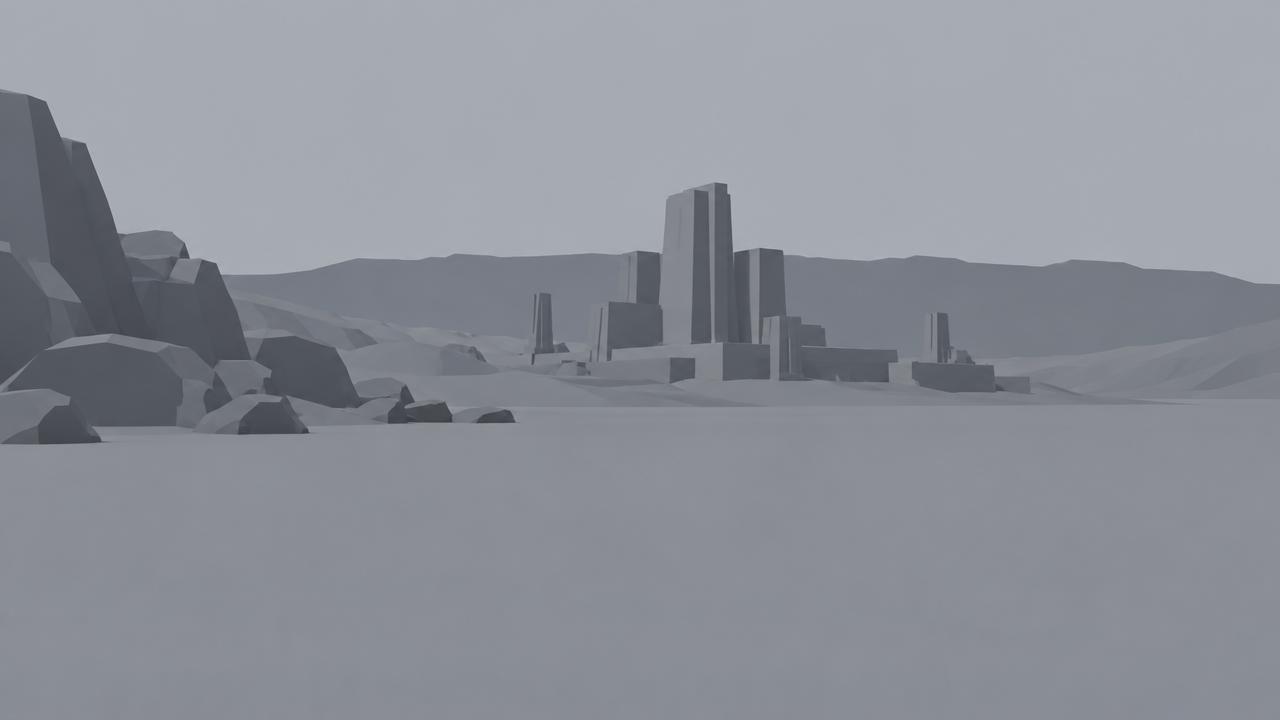
image_urls
Prompt
Edit the reference image into a cinematic world-building concept frame: keep the original composition, horizon line, and building masses unchanged, then push the atmosphere toward cool-toned blue hour. Add low, drifting ground fog that gathers in the lower third of the frame; emit a single warm amber light source from the central building, rim-lighting its edges; and give the wet, reflective stone surfaces subtle puddles. Shift the palette toward desaturated teal-green and slate gray with a single warm accent, soften the sky into a flat overcast gradient, and keep the render matte and painterly, like concept art rather than photorealism. 16:9 widescreen composition with strong depth layering from foreground silhouettes to distant ridges, no text, no people.
Copy the full prompt and adapt it for your own generation.
Tags
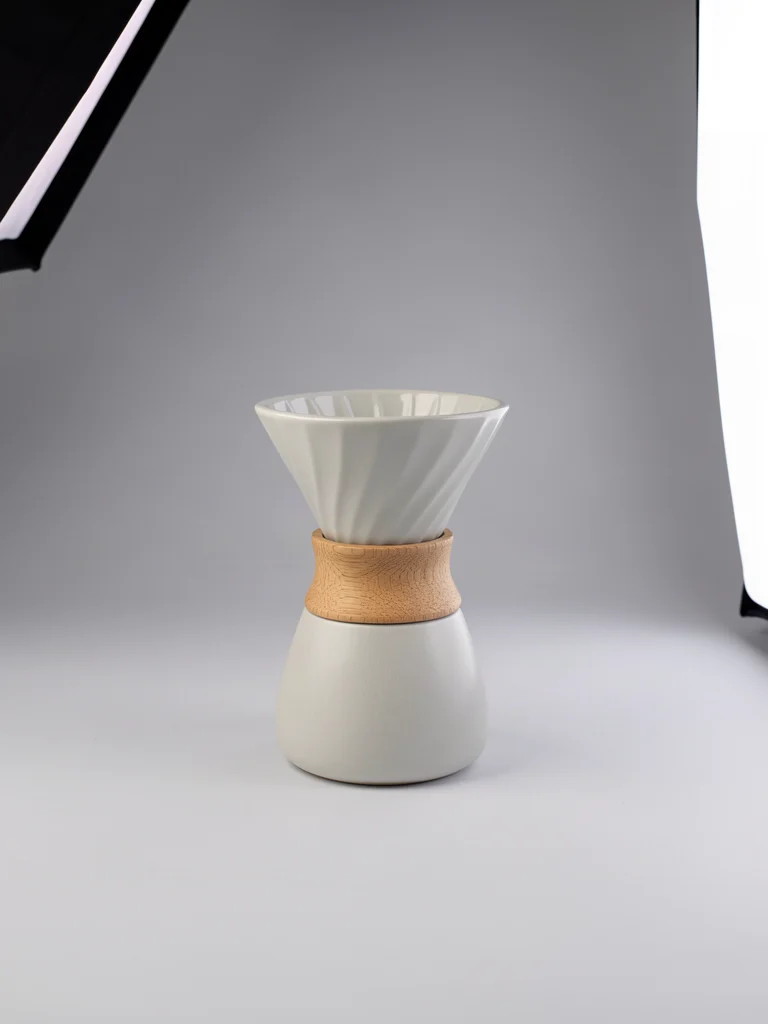
FLUX.2 Klein E-commerce-Grade Product Image Quality Rewriting
Style Product Image · ecommerce · Studio lighting
Reference inputs
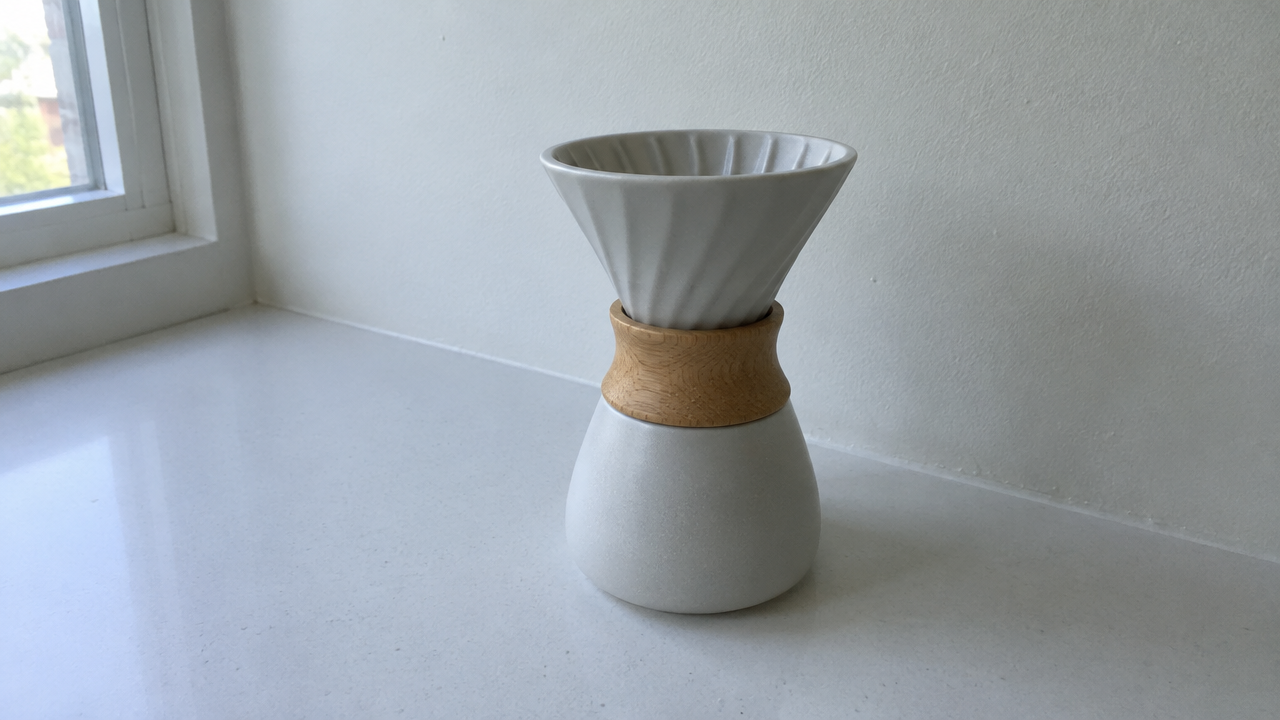
image_urls
Prompt
Studio e-commerce product photography, a matte ceramic pour-over coffee dripper with a light oak collar, centered on a seamless light gray paper background with a slight floor curve. Three-point lighting: a large softbox at 45 degrees upper left, a white reflector on the right, and a narrow rim light on the right edge to separate the object from the background. Soft fading shadow at the lower right; no harsh specular hotspot. Soft reflections on the glaze, revealing ceramic texture and the open pores of the wood. Shot with an equivalent 85mm lens at f/8, camera slightly above eye level, shallow to medium depth of field with the entire product in sharp focus, low contrast, approximately 5500K neutral white balance, clean commercial color grading, ample negative space above the product, 16:9 composition.
Copy the full prompt and adapt it for your own generation.
Tags

FLUX.2 klein 9B Single-Image Portrait Style Repaint
Style Portrait & Photography · Image Editing · Photorealistic
Reference inputs

image_urls
Prompt
Edit the reference portrait into a cinematic magazine editorial shot: keep the subject's facial identity, pose, and composition unchanged, relight with soft directional window light from the left, add soft falloff and subtle rim highlights on the hair, shift the color grading toward warm neutral skin tones with cool-toned shadow accents, clean the background into a softly blurred dark studio wall, retain realistic skin texture and pores, 85mm portrait lens effect, shallow depth of field, high detail, 16:9 composition.
Copy the full prompt and adapt it for your own generation.
Tags
Pricing
flux-2-klein-9b/image-to-image per image
| Unit Price | $0.03143 |
|---|
Positioning Overview
An image editing model built on the FLUX.2 klein 9B architecture, accessed through the unified HiAPI.ai interface. It takes one reference image and an editing instruction, adjusts the content and style of the original image as described, and supports specifying the output aspect ratio and format. It is suited to developers who need image-to-image rapid iteration and low-latency editing results, and can be used for prototyping, content re-creation, and similar scenarios.
Key Highlights
- Instruction-based editing driven by a single reference image — simply upload one reference image and provide an editing description, and the model modifies the image according to the instruction, with no additional masks or complex preprocessing required.
- Few-step inference with 4 to 8 steps — using step distillation, the number of inference steps can be adjusted between 4 and 8, offering a flexible trade-off between quality and latency.
- Specifiable output aspect ratio and format — supports five aspect ratios (1:1, 4:3, 3:4, 16:9, 9:16) and three output formats (jpeg, png, webp), making it easy to connect directly to downstream pipelines.
Capability Description
Reference-image instruction editing: input a jpeg/png/webp image and a text editing description, and the model generates the modified image accordingly, making it suitable for quickly validating editing ideas.
Adjustable inference steps: num_inference_steps supports integers from 4 to 8; more steps yield more detail, while fewer steps yield faster responses, so you can choose based on your scenario.
Controlled output specifications: you can specify the aspect ratio and file format of the generated image, reducing subsequent cropping and transcoding steps and allowing direct use for display or storage.
Reproducible generation: fix the random seed via the seed parameter, making it easy to reproduce the same editing result during debugging and comparison.
Use Cases
- Designers rapidly iterating on visual concepts — upload a style reference image and describe the desired adjustment direction in text to produce multiple edited versions for concept screening and client communication.
- Content creators re-creating images — input editing instructions based on existing source images to generate stylized or content-adjusted images for social media and article illustrations.
- Validating image-to-image pipelines during development integration — use a fixed seed and a small number of inference steps to quickly generate images, verify API parameters and downstream pipelines, and use the results for integration testing.
Limitations and Selection Advice
Only a single reference image input is supported, and input images are scaled to 1 MP, so high-resolution detail retention is limited; the svg format is not supported. The maximum number of inference steps is 8, which may be insufficient for ultra-high-quality or fine-grained control needs. This model focuses on image editing and does not cover modalities such as video or audio. If you need pure text-to-image or higher-resolution output, evaluate other lines in the same series or models with the corresponding capabilities.
Frequently asked questions
View all FAQs →-
How many references does FLUX.2 [klein] 9B Image to Image accept?
It currently accepts one JPEG, PNG, or WebP reference. image_urls must contain exactly one public image URL.
-
Which editing tasks is it best for?
It is suited to product cleanup, background replacement, in-image text rewriting, color changes, and commercial edits that preserve subject and camera.
-
How do I set inference steps?
num_inference_steps accepts integers from 4 to 8 and defaults to 4. The current price does not change with the step count.
-
Which ratios and formats are supported?
Ratios: 1:1, 4:3, 3:4, 16:9, and 9:16. Formats: JPEG, PNG, and WebP.
Create a generation task
https://api.hiapi.ai/v1/tasks Headers
AuthorizationstringRequiredAccount API key. Required on every request. Example: Bearer YOUR_HIAPI_API_KEY. Get your API key
Content-TypestringOptionalThe request body is always parsed as JSON; when sent, only application/json (optionally with charset) is accepted — any other value returns 415. Example: application/json.
Idempotency-KeystringOptionalIdempotency key, up to 255 bytes. Retries with the same key from the same account create the task only once; replays return the original taskId.
On network timeouts or client retries, the same key creates the task only once — no double charges (scope: the API key's account). Use a business-unique identifier as the key (e.g. "order-42"); replays return the original taskId, and keys expire 24 hours after the first request. See the Unified Async API overview for the full scenario matrix.
Body
modelstringRequiredCurrent fixed value: flux-2-klein-9b/image-to-image
routestringOptionalCurrent fixed value: default
inputobjectRequired
Business parameters for flux-2-klein-9b/image-to-image and route default — see the parameter table below.
seedintegerOptionalRandom seed used to reproduce generation results; takes an integer, and identical seeds yield consistent output.
promptstringRequiredPrompt: a text description of the edit to perform on the reference image.
image_urlsarrayRequiredminItems 1maxItems 1Array of reference images; only one image is needed; supports jpeg, png, and webp formats, does not support svg; input images are scaled to 1 MP.
Array [ string ]
aspect_ratiostringOptionalDefault: "1:1"Aspect ratio of the generated image, as a string; defaults to 1:1.
1:14:33:416:99:16output_formatstringOptionalDefault: "png"Output format of the generated image, as a string; defaults to png.
jpegpngwebpnum_inference_stepsintegerOptionalDefault: 4min 4max 8Number of inference steps, an integer between 4 and 8; defaults to 4.
callbackobjectOptional
Terminal-state notification config. When omitted, no callback is delivered — poll the task yourself. See the callback note below.
Provide callback.url when creating a task and HiAPI POSTs to your service once the task reaches a terminal state — no polling needed. The callback payload mirrors the task detail structure; signature verification, delivery retries and idempotency are documented on the Unified Async API overview page.
urlstringRequiredRequired when callback is present. A POST is sent to this URL once the task reaches a terminal state; must be a valid http(s) URL.
whenstringOptionalDefault: "final"Only final is supported today — notified on both success and fail.
finalstoragestringOptionalDefault: "temp"Artifact storage tier: temp (default, retained about 7 days) or persistent (long-term, billed by size). Insufficient balance or exceeding the storage cap silently downgrades to temp; the effective tier is shown in the task detail response.
temppersistentRequest examples
# Submit an async task; returns a taskId immediately (no waiting for generation)
curl -X POST "https://api.hiapi.ai/v1/tasks" \
  -H "Authorization: Bearer $HIAPI_API_KEY" \
  -H "Content-Type: application/json" \
  -d '{
  "model": "flux-2-klein-9b/image-to-image",
  "input": {
    "prompt": "…",
    "image_urls": "…",
    "aspect_ratio": "1:1",
    "output_format": "png",
    "num_inference_steps": 4
  }
}'
const res = await fetch("https://api.hiapi.ai/v1/tasks", {
method: "POST",
headers: {
Authorization: `Bearer ${process.env.HIAPI_API_KEY}`,
"Content-Type": "application/json",
},
body: JSON.stringify({
model: "flux-2-klein-9b/image-to-image",
input: {
"prompt": "…",
"image_urls": "…",
"aspect_ratio": "1:1",
"output_format": "png",
"num_inference_steps": 4
}
}),
});
const task = await res.json();
// { code: 200, message: "success", data: { taskId } }import os, requests
res = requests.post(
"https://api.hiapi.ai/v1/tasks",
headers={"Authorization": f"Bearer {os.environ['HIAPI_API_KEY']}"},
json={
"model": "flux-2-klein-9b/image-to-image",
"input": {
"prompt": "…",
"image_urls": "…",
"aspect_ratio": "1:1",
"output_format": "png",
"num_inference_steps": 4
}
},
)
print(res.json()) # { code, message, data: { taskId } }200 OK
{
  "code": 200,
  "message": "success",
  "data": {
    "taskId": "tk-hiapi-01HZTQ8BX2N3GM3YFK4Z9D7VQR"
  }
}
400 Bad Request
{
  "code": 400,
  "message": "invalid request",
  "data": null,
  "error_code": "INVALID_REQUEST"
}
Get task detail
https://api.hiapi.ai/v1/tasks/:id Response fields
taskIdstringRequiredTask ID, always prefixed with tk-hiapi-.
modelstringRequiredResolved full model name. Tasks submitted with the route parameter return base@route (e.g. gpt-image-2/text-to-image@ext); otherwise identical to the name passed at creation.
routestringOptionalPresent only when the task was submitted with an explicit route parameter; echoes the submitted value.
statusstringRequiredTask status.
queued Queued, not started yet.
handling Being processed.
archiving Processing finished, artifacts being prepared.
success Terminal: completed, artifacts available (output returned).
fail Terminal: failed (error returned).
After submission, check status: success and fail are terminal, everything else is non-terminal. Poll every 1–3 seconds until terminal. On success, download artifacts from output[].url and transfer them before expireAt; pass storage: "persistent" at creation time when long-term retention is needed.
creatednumberRequiredTask creation time (Unix seconds).
completednumberRequiredUnix seconds when the task reached a terminal state; fixed to 0 while not terminal.
outputarrayOptional
Present only when status == success. Artifact list — always an array; a single task may return multiple types at once (e.g. video + first_frame).
Array [ object ]
Array items
urlstringRequiredArtifact URL, directly downloadable.
typestringRequiredCurrent possible values: video, image, audio, first_frame, last_frame, thumbnail; more may be added later.
expireAtnumberRequiredUnix seconds until which the artifact remains accessible; download or transfer before it expires.
errorobjectOptional
Present only when status == fail.
codestringRequiredBusiness error code.
messagestringRequiredError description.
Response examples
Success
{
  "code": 200,
  "message": "success",
  "data": {
    "taskId": "tk-hiapi-01HZTQ8BX2N3GM3YFK4Z9D7VQR",
    "model": "happyhorse-1-0",
    "status": "success",
    "created": 1777282033,
    "completed": 1777282099,
    "output": [
      {
        "url": "https://cdn.hiapi.ai/tasks/.../video.mp4",
        "type": "video",
        "expireAt": 1777886899
      }
    ]
  }
}
Processing (non-terminal)
{
  "code": 200,
  "message": "success",
  "data": {
    "taskId": "tk-hiapi-...",
    "model": "happyhorse-1-0",
    "status": "archiving",
    "created": 1777282033,
    "completed": 0
  }
}
Failed
{
  "code": 200,
  "message": "success",
  "data": {
    "taskId": "tk-hiapi-...",
    "model": "happyhorse-1-0",
    "status": "fail",
    "created": 1777282033,
    "completed": 1777282099,
    "error": {
      "code": "TASK_FAILED",
      "message": "task failed"
    }
  }
}Articles
View all articles →Related Models
View all models →Same Type
-
 FLUX.1 Kontext Max Black Forest Labs $0.071 /image
-
 Seedream 4.5 ByteDance $0.045 /image
-
 Qwen Image 2.1 Alibaba $0.020 /image
-
 FLUX 1.1 Pro Black Forest Labs $0.050 /image
-
 Nano Banana 2 Lite Google $0.033 /image
-
 Qwen Image 2.0 Alibaba $0.042 /image
-
 Z-Image Alibaba $0.008 /image
-
 Recraft V4.1 Recraft $0.010 /image
-
 Muse Image 1.0 Meta $0.015 per task
-
 851 Labs Background Remover 851 Labs $0.002 /image
-
 Nano Banana Pro Google $0.057 /image
-
 Ideogram V4 Ideogram $0.050 /image
Same Provider
-
 FLUX 3 Image Black Forest Labs $0.041 /image
-
 FLUX 3 Max Black Forest Labs $0.061 /second
- FLUX.1 Kontext Max Black Forest Labs $0.071 /image
-
 FLUX.1 Schnell Black Forest Labs $0.005 /image
-
 FLUX 3 Video Black Forest Labs $0.090 /second
- FLUX 1.1 Pro Black Forest Labs $0.050 /image
-
 FLUX.2 Klein 4B Black Forest Labs $0.0004 /image
-
 FLUX.1 Fill Pro Black Forest Labs $0.071 /image
-
 FLUX.2 Black Forest Labs $0.035 /image