
Kuaishou
Kling 3.0
kling-3.0/motion-control
A unified multimodal video generation series supporting text-to-video, image-to-video, reference-to-video, and in-video editing, with native lip sync and multilingual audio
Try kling-3.0/motion-control
Input
Showcases
View all showcasesOutput
Text to Visuals: Kling 3.0 Motion-Control Storyboard Concept
Style Storyboard · Motion Transfer · Character Consistency
Reference inputs
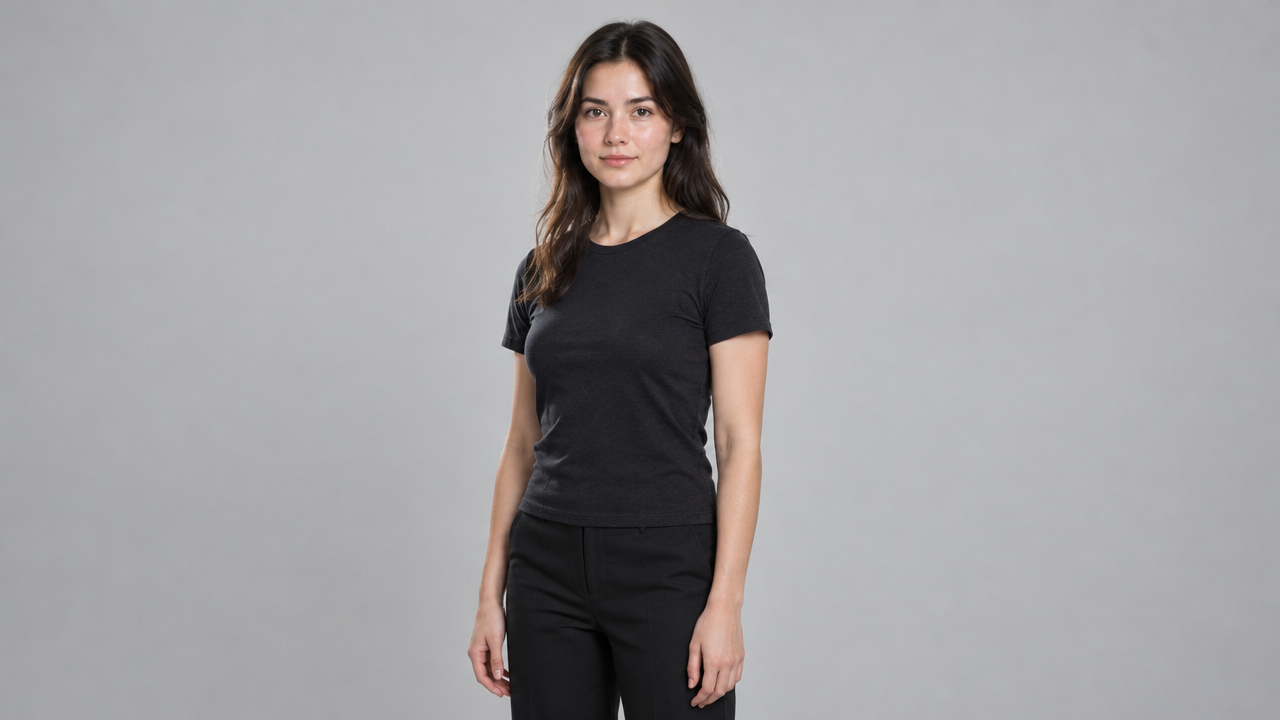
image_url
video_url
Prompt
A director-level storyboard motion-control concept: a cleanly composed character reference drives identity consistency, while a single continuous reference clip drives pose, gestures, and timing. The prompt describes a neutral transition from studio to street scene, soft directional key light with gentle rim light, natural skin texture, a 35mm lens look, a slight handheld breathing feel, the subject centered in a medium shot, with head, shoulders, and torso visible throughout. Keep motion physically plausible and clearly readable, maintain consistent clothing and facial identity across the entire clip, restrained color grading, cool shadows and warm highlights, no cuts, no stylized artifacts.
Copy the full prompt and adapt it for your own generation.
Tags
Kling 3.0 Motion Control Prompt Formula Card: A Structured Shot Description Demo
Style Motion Transfer · Prompt Engineering · Storyboard
Reference inputs

image_url
video_url
Prompt
A medium shot of the character in the reference image, standing in a modern photography studio with soft lighting, featuring a large diffused window as the key light and a faint cool-toned rim light coming from behind. Always ensure the subject's head, shoulders, and torso remain fully visible and centered in the frame, with clean negative space at the top of the image. Cinematic color grading, shallow depth of field, natural skin texture, fine film grain, 35mm equivalent lens. The camera is fixed and pushes in very slowly; posture, expression, and pacing follow the reference video entirely, and the prompt does not describe any additional action.
Copy the full prompt and adapt it for your own generation.
Tags
Kling 3.0 Motion Control: Parameter and Scenario Capability Illustrated
Style Motion Transfer · Character Consistency · Capability breakdown
Reference inputs

image_url
video_url
Prompt
Character motion transfer: a continuous medium shot of a young woman with shoulder-length dark hair, wearing a light-colored knit top, standing in a bright minimalist studio with soft window light on the left. She performs a natural, relaxed sequence of movements—turning slightly toward the camera, tucking her hair behind one ear, then giving a gentle nod with a soft smile. The camera remains largely fixed with a subtle handheld breathing feel, framing the head, shoulders, and torso throughout. Skin and fabric retain realistic textures, shallow depth of field, neutral cool-toned background, natural motion rhythm, with a believable sense of weight and head movement, no cuts, no stylization.
Copy the full prompt and adapt it for your own generation.
Tags
Visual Notes on Camera Language: Reproducing Five Basic Camera Movements with motion-control
Style Camera Movement · Storyboard · Reference video
Reference inputs

image_url
video_url
Prompt
A continuous medium shot of a character framed from the head and shoulders, against a neutral studio background, for studying camera movement: the camera slowly and steadily pushes in from a medium shot to a close-up, keeping the character centered and the horizon level. Soft directional key light from camera left, supplemented by slight fill light, creating delicate contour separation, shallow depth of field, cinematic color grading, restrained contrast. Smooth mechanical movement, no cuts, no handheld shake, character identity consistent throughout the shot.
Copy the full prompt and adapt it for your own generation.
Tags
Pricing
kling-3.0/motion-control per second
| Specifications | Unit Price |
|---|---|
| 720P | $0.100 |
| 1080P | $0.172 |
Positioning Overview
kling-3.0/motion-control is a motion-driven video generation pipeline: you provide a reference image of a person and a reference video containing motion, and it outputs a new video choreographed by that motion. The character's appearance comes from the image, while motion and expressions come from the video; an optional prompt is used to supplement the scene, style, and camera. It is suited for developers who need to transfer live-action performance onto a specified character, such as short dramas, talking-head videos, and e-commerce showcases — any scenario that requires reusing the same set of motion footage.
Core Highlights
- Decoupled character and motion inputs — the character's appearance is determined by the reference image and the motion rhythm by the reference video, so the same performance can be applied to different character assets.
- Output duration adapts to the character orientation mode — when the character orientation follows the video, output can be up to 30 seconds; when it follows the image, up to 10 seconds, so you can choose based on the shot type.
- Supports retaining the reference video's original audio — the reference video's audio track is kept by default, so motion and sound are output in sync, eliminating the need for separate audio alignment.
Capability Description
Dual-asset-driven motion transfer: you must provide two inputs — a person image and a motion video. The image determines the character's appearance, and the video determines motion and expressions; the generated result inherits both.
Character orientation mode switching: character_orientation can be set to video or image. The former suits complex motion with a maximum duration of 30 seconds; the latter suits camera movement with a maximum duration of 10 seconds.
Prompt supplements scene and camera: the optional prompt can be up to 2500 characters and is used to supplement the scene, style, and camera direction without changing the motion and expressions determined by the reference video.
Selectable resolution and audio track retention: output can be 720p or 1080p, and you can choose whether to retain the reference video's original audio; higher resolution corresponds to higher billing.
Use Cases
- Short drama and talking-head creators reusing motion assets — upload a character portrait and a performance video to get a finished clip of that character performing the same motion, for serialized content production.
- E-commerce and brands creating character-based product demos — pair a model or virtual character image with a product demo motion video to produce a character showcase clip for detail pages and ad placements.
- Motion content that needs original audio preserved — with original audio retention enabled, directly output a video with a synchronized audio track for publishing as social media short videos.
Limitations and Selection Guidance
Both input assets have hard requirements: the person image must show the head, shoulders, and torso clearly, have an aspect ratio between 2:5 and 5:2, and be no larger than 10MB; the reference video must be 3 to 30 seconds long, a single continuous shot with the subject visible, and no larger than 100MB. Motion and expressions are determined by the reference video, and the prompt can only adjust the scene and style — it cannot rewrite the motion itself. If you need text-to-video or image-to-video, choose other pipelines in the same series; long narrative content still needs to be generated in segments and stitched together afterward.
What's new
View changelog →- New model New models: Kling 3.0 Omni (可灵 O3) via POST /v1/tasks
Frequently asked questions
View all FAQs →-
Does Kling 3.0 Image-to-Video require an input image?
Yes. kling-3.0/image-to-video is an image-to-video route. The image establishes the subject and opening composition; the prompt directs motion, camera, and environmental change.
-
Which durations and resolutions does Kling 3.0 Image-to-Video support?
The current HiAPI contract supports 3–15s at 720p or 1080p or 4K. Check the page controls and API docs for the current options.
-
How is Kling 3.0 Image-to-Video billed?
Billing follows output duration and the selected tier. The page follows the global display unit, while the successful task record contains the final charge.
-
How can I improve subject consistency?
Use a clear, unobstructed source with a complete composition. Describe the main action and camera first, then name the appearance, material, and background relationships that must remain stable. Validate a short clip first.
Create a generation task
https://api.hiapi.ai/v1/tasks Headers
AuthorizationstringRequiredAccount API key. Required on every request. Example: Bearer YOUR_HIAPI_API_KEY. Get your API key
Content-TypestringOptionalThe request body is always parsed as JSON; when sent, only application/json (optionally with charset) is accepted — any other value returns 415. Example: application/json.
Idempotency-KeystringOptionalIdempotency key, up to 255 bytes. Retries with the same key from the same account create the task only once; replays return the original taskId.
On network timeouts or client retries, the same key creates the task only once — no double charges (scope: the API key's account). Use a business-unique identifier as the key (e.g. "order-42"); replays return the original taskId, and keys expire 24 hours after the first request. See the Unified Async API overview for the full scenario matrix.
Body
modelstringRequiredCurrent fixed value: kling-3.0/motion-control
routestringOptionalCurrent fixed value: default
inputobjectRequired
Business parameters for kling-3.0/motion-control and route default — see the parameter table below.
promptstringOptionalmaxLength 2500Optional prompt describing the scene, style, and camera. Character actions and expressions are taken from the reference video, and the character appearance is taken from the reference image; if left empty, the reference materials themselves are relied upon.
image_urlstringRequiredCharacter reference image, supporting jpeg/png/jpg formats, no larger than 10MB, with both width and height greater than 340px and an aspect ratio between 2:5 and 5:2; the head, shoulders, and torso must be clearly visible.
video_urlstringRequiredMotion reference video, supporting mp4/mov formats, no larger than 100MB, 3-30 seconds long, must be a single continuous shot with the subject's head, shoulders, and torso visible; the output duration follows this video, up to 10 seconds when character_orientation is image, and up to 30 seconds when it is video.
resolutionstringOptionalDefault: "720p"Output resolution; higher resolution costs more; default is 720p.
720p1080pkeep_original_soundbooleanOptionalDefault: trueWhether to retain the reference video's original audio in the output; default is true, meaning it is retained by default.
character_orientationstringOptionalDefault: "video"Source of character orientation: when set to video, orientation follows the reference video, suitable for complex movements, supporting up to 30 seconds; when set to image, orientation follows the reference image, suitable for camera movement, supporting up to 10 seconds. Default is video.
videoimagecallbackobjectOptional
Terminal-state notification config. When omitted, no callback is delivered — poll the task yourself. See the callback note below.
Provide callback.url when creating a task and HiAPI POSTs to your service once the task reaches a terminal state — no polling needed. The callback payload mirrors the task detail structure; signature verification, delivery retries and idempotency are documented on the Unified Async API overview page.
urlstringRequiredRequired when callback is present. A POST is sent to this URL once the task reaches a terminal state; must be a valid http(s) URL.
whenstringOptionalDefault: "final"Only final is supported today — notified on both success and fail.
finalstoragestringOptionalDefault: "temp"Artifact storage tier: temp (default, retained about 7 days) or persistent (long-term, billed by size). Insufficient balance or exceeding the storage cap silently downgrades to temp; the effective tier is shown in the task detail response.
temppersistentRequest examples
# Submit an async task; returns a taskId immediately (no waiting for generation)
curl -X POST "https://api.hiapi.ai/v1/tasks" \
  -H "Authorization: Bearer $HIAPI_API_KEY" \
  -H "Content-Type: application/json" \
  -d '{
  "model": "kling-3.0/motion-control",
  "input": {
    "image_url": "…",
    "video_url": "…",
    "resolution": "720p",
    "keep_original_sound": true,
    "character_orientation": "video"
  }
}'
const res = await fetch("https://api.hiapi.ai/v1/tasks", {
method: "POST",
headers: {
Authorization: `Bearer ${process.env.HIAPI_API_KEY}`,
"Content-Type": "application/json",
},
body: JSON.stringify({
model: "kling-3.0/motion-control",
input: {
"image_url": "…",
"video_url": "…",
"resolution": "720p",
"keep_original_sound": true,
"character_orientation": "video"
}
}),
});
const task = await res.json();
// { code: 200, message: "success", data: { taskId } }import os, requests
res = requests.post(
"https://api.hiapi.ai/v1/tasks",
headers={"Authorization": f"Bearer {os.environ['HIAPI_API_KEY']}"},
json={
"model": "kling-3.0/motion-control",
"input": {
"image_url": "…",
"video_url": "…",
"resolution": "720p",
"keep_original_sound": True,
"character_orientation": "video"
}
},
)
print(res.json()) # { code, message, data: { taskId } }200 OK
{
  "code": 200,
  "message": "success",
  "data": {
    "taskId": "tk-hiapi-01HZTQ8BX2N3GM3YFK4Z9D7VQR"
  }
}
400 Bad Request
{
  "code": 400,
  "message": "invalid request",
  "data": null,
  "error_code": "INVALID_REQUEST"
}
Get task detail
https://api.hiapi.ai/v1/tasks/:id Response fields
taskIdstringRequiredTask ID, always prefixed with tk-hiapi-.
modelstringRequiredResolved full model name. Tasks submitted with the route parameter return base@route (e.g. gpt-image-2/text-to-image@ext); otherwise identical to the name passed at creation.
routestringOptionalPresent only when the task was submitted with an explicit route parameter; echoes the submitted value.
statusstringRequiredTask status.
queued Queued, not started yet.
handling Being processed.
archiving Processing finished, artifacts being prepared.
success Terminal: completed, artifacts available (output returned).
fail Terminal: failed (error returned).
After submission, check status: success and fail are terminal, everything else is non-terminal. Poll every 1–3 seconds until terminal. On success, download artifacts from output[].url and transfer them before expireAt; pass storage: "persistent" at creation time when long-term retention is needed.
creatednumberRequiredTask creation time (Unix seconds).
completednumberRequiredUnix seconds when the task reached a terminal state; fixed to 0 while not terminal.
outputarrayOptional
Present only when status == success. Artifact list — always an array; a single task may return multiple types at once (e.g. video + first_frame).
Array [ object ]
Array items
urlstringRequiredArtifact URL, directly downloadable.
typestringRequiredCurrent possible values: video, image, audio, first_frame, last_frame, thumbnail; more may be added later.
expireAtnumberRequiredUnix seconds until which the artifact remains accessible; download or transfer before it expires.
errorobjectOptional
Present only when status == fail.
codestringRequiredBusiness error code.
messagestringRequiredError description.
Response examples
Success
{
  "code": 200,
  "message": "success",
  "data": {
    "taskId": "tk-hiapi-01HZTQ8BX2N3GM3YFK4Z9D7VQR",
    "model": "happyhorse-1-0",
    "status": "success",
    "created": 1777282033,
    "completed": 1777282099,
    "output": [
      {
        "url": "https://cdn.hiapi.ai/tasks/.../video.mp4",
        "type": "video",
        "expireAt": 1777886899
      }
    ]
  }
}
Processing (non-terminal)
{
  "code": 200,
  "message": "success",
  "data": {
    "taskId": "tk-hiapi-...",
    "model": "happyhorse-1-0",
    "status": "archiving",
    "created": 1777282033,
    "completed": 0
  }
}
Failed
{
  "code": 200,
  "message": "success",
  "data": {
    "taskId": "tk-hiapi-...",
    "model": "happyhorse-1-0",
    "status": "fail",
    "created": 1777282033,
    "completed": 1777282099,
    "error": {
      "code": "TASK_FAILED",
      "message": "task failed"
    }
  }
}Articles
View all articles →Related Models
View all models →Same Type
-
 HappyHorse 1.1 Alibaba $0.160 /second
-
 Grok Imagine 1.5 Lite xAI $0.029 /second
-
 HappyHorse 1.0 Alibaba $0.168 /second
-
 FLUX 3 Video Black Forest Labs $0.090 /second
-
 HeyGen Avatar IV HeyGen $0.150 /second
-
 Veo 3.1 Fast Google $0.170 /second
-
 Seedance 2.5 ByteDance $0.121 /second
-
 Ray 3.2 Luma $0.214 /video
-
 Gemini Omni 1.1 Flash Google $0.450 /video
-
 Kling 3.0 Turbo Kuaishou $0.130 /second
-
 Grok Imagine 1.5 xAI $0.011 /second
-
 LTX 2.5 Fast Lightricks $0.086 /second