Recraft
Recraft V4.1
recraft-v4.1-flash/text-to-image
A production-oriented model for generating design assets, with native editable SVG vector output. It reliably produces images from short prompts and is well suited to icons, typography, and brand illustrations.
Try recraft-v4.1-flash/text-to-image
Input
Showcases
View all showcasesOutput
image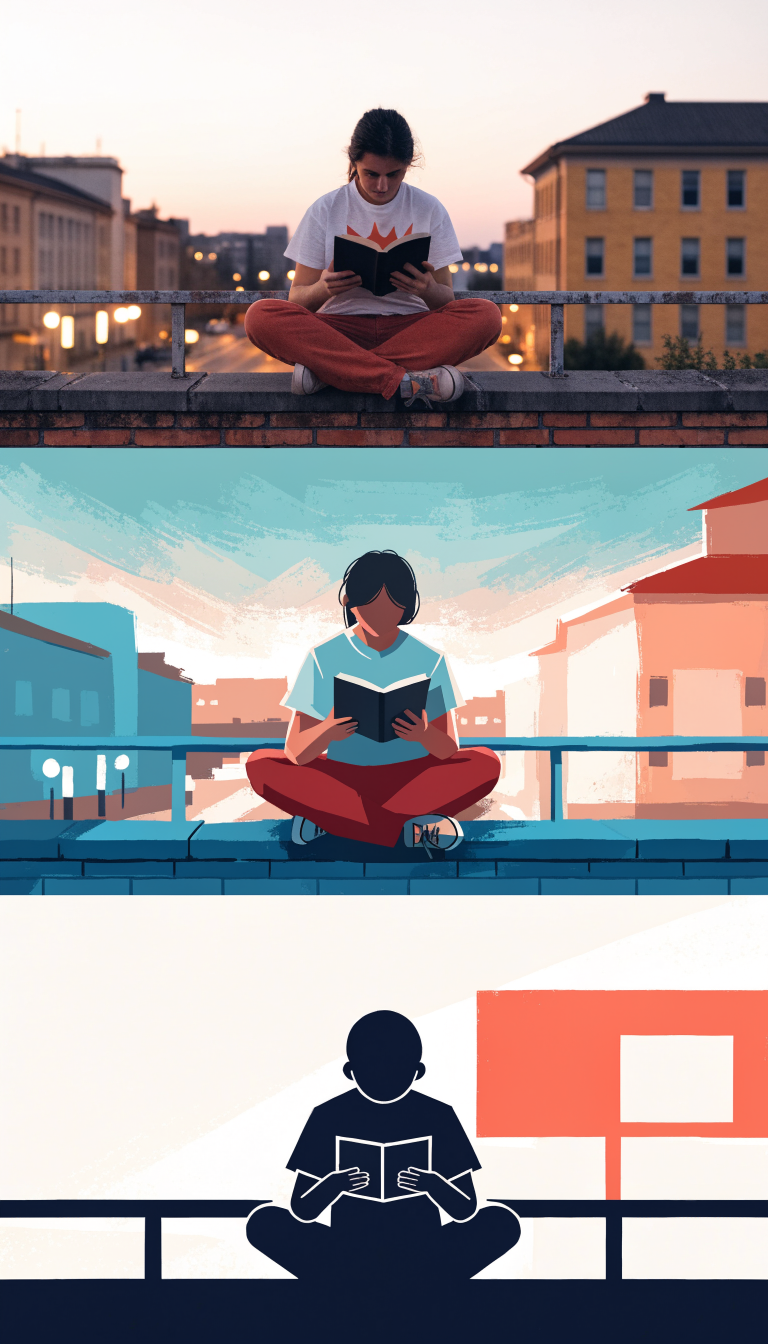
Style Spectrum: An Illustration Experiment from Realistic to Flat
Style Illustration · style-spectrum · Editorial Art
Prompt
A three-part illustration style study of the same subject: a young person reading on an urban rooftop at dusk. The first part is rendered in a realistic photographic style, with natural skin tones, shallow depth of field, and warm bokeh from streetlights. The second part shifts to a semi-realistic painterly style, featuring smooth gradients, desaturated teal and coral tones, and simplified forms. The third part resolves into a flat vector illustration, using bold geometric silhouettes, no gradients, and a limited two-color palette. A consistent 16:9 editorial composition, with the subject centered and clean negative space in the upper third.
Copy the full prompt and adapt it for your own generation.
Tags
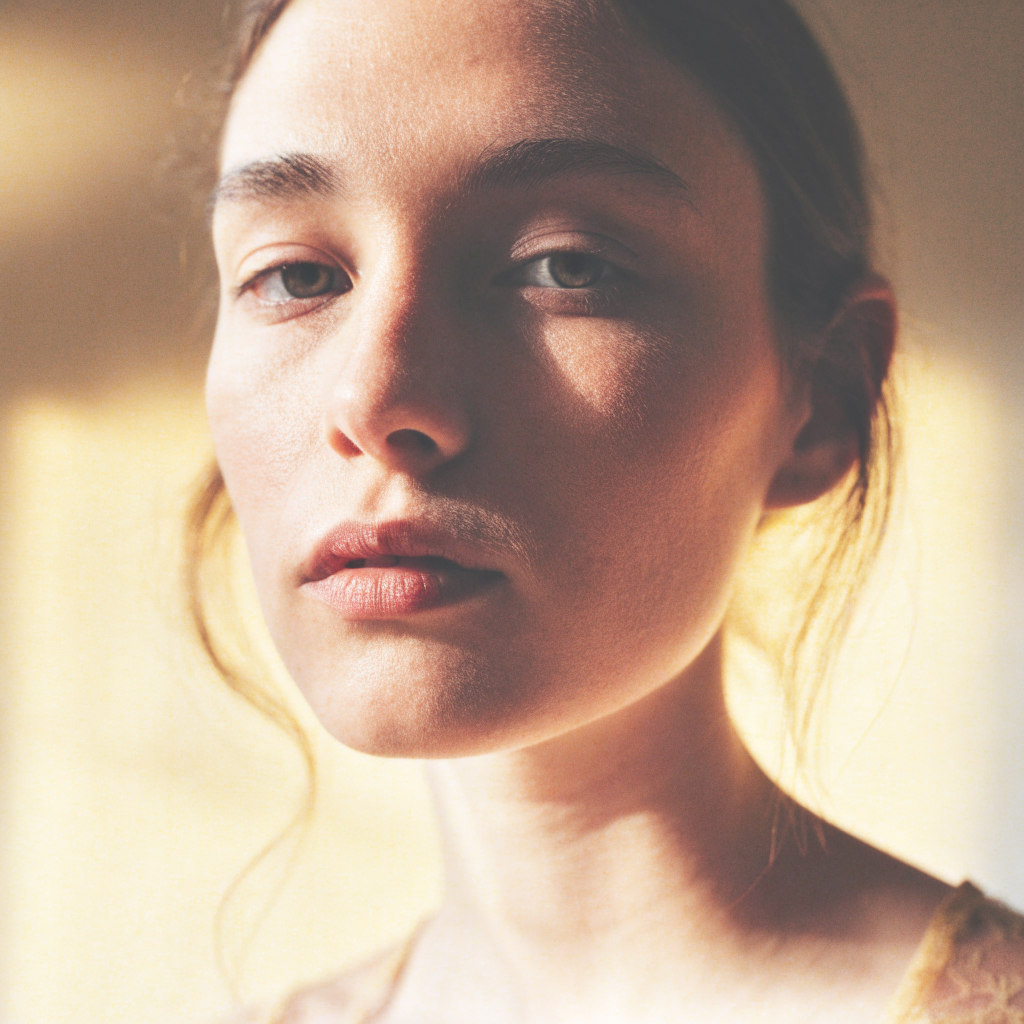
Recraft V4.1 Flash Portrait Style Reference: Realistic and Artistic Dual Approaches
Style Portrait & Photography · Photorealistic · Editing
Prompt
A realistic-style portrait of a young woman, nearing thirty, three-quarter profile angle, calm and neutral expression, gaze slightly averted from the camera. Soft warm side lighting from a large window, light transitions naturally into shadow across the far cheek, skin texture and fine hairs clearly visible, subtle catchlights in the eyes. Shallow depth of field, 85mm lens effect, soft warm beige and light cream background with a slight gradient, low-contrast magazine-style color grading, natural tones, no heavy retouching, no text, no watermark. Vertical 3:4 composition, subject framed from the chest up, breathing room left above the head.
Copy the full prompt and adapt it for your own generation.
Tags
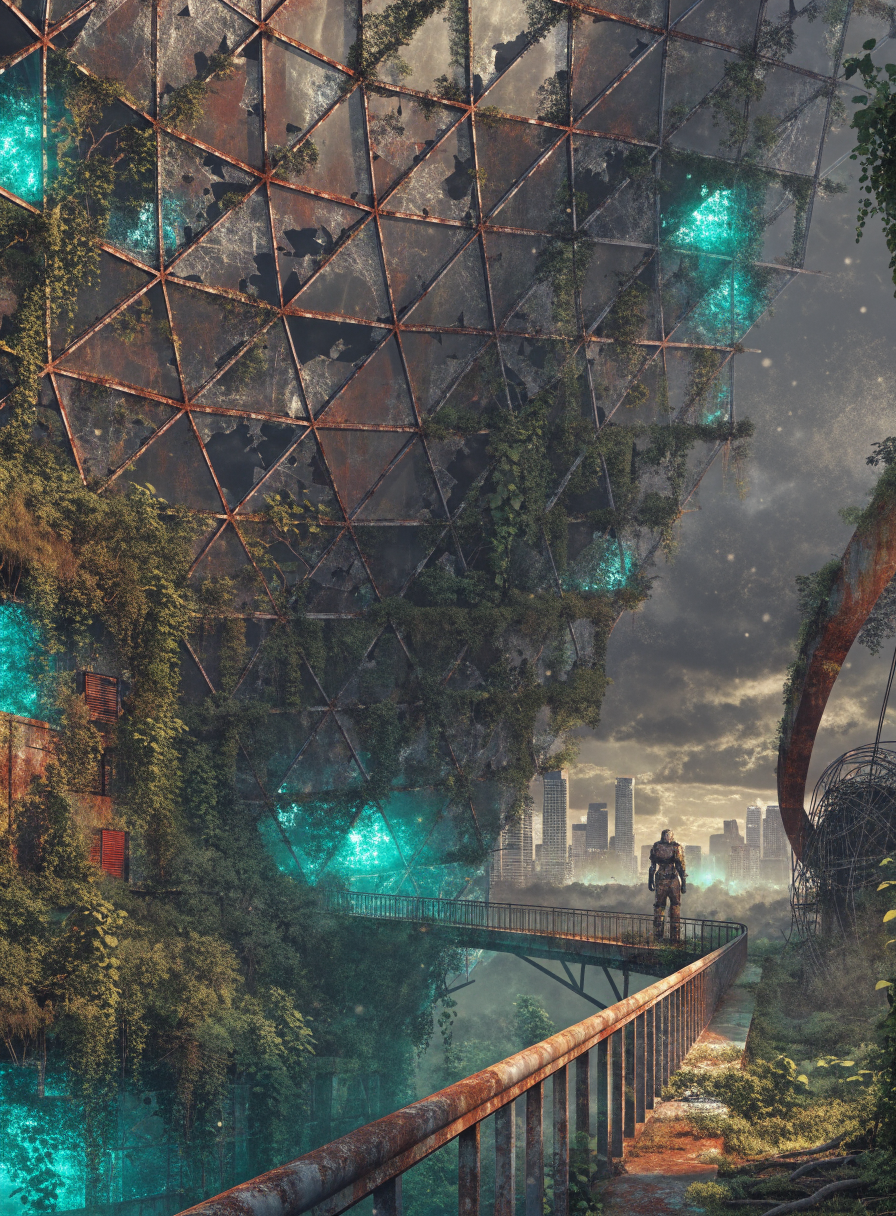
Post-Apocalyptic Greenhouse: Recraft V4.1 Scene Concept Art
Style Concept Art · Worldbuilding · Sci-Fi
Prompt
Wide-format cinematic concept art: a vast abandoned geodesic greenhouse dome reclaimed by overgrown vegetation, a lone figure in a worn exoskeleton suit standing on a rusted walkway, a storm-lit city skyline visible through cracked glass panels in the distance, artificial plant grow lights still casting patches of teal-green glow among the leaves, fog and floating dust filling the air, restrained color palette dominated by teal green, oxidized rust red, and cool concrete gray, soft gradual transitions between light and shadow, the dome's support frame rendered with a smooth 3D-like volumetric quality, balancing painterly feel with production-ready design quality, 16:9 horizontal composition, strong layered depth from the foreground railing to the distant skyline, rich atmospheric lighting, no text
Copy the full prompt and adapt it for your own generation.
Tags

E-commerce Product Photography: Short-Prompt Image Generation with Recraft V4.1
Style Product Image · Studio lighting · e-commerce
Prompt
Studio product photography of a frosted glass serum bottle with a brushed metal dropper cap, centered on a smooth beige stone pedestal against a seamless warm gray-brown background. A soft large softbox from the upper left, with a delicate rim light along the right edge, gently fading toward the four corners, soft contact shadow and subtle reflection on the pedestal. Matte label with clean sans-serif placeholder lettering, no logo. Shallow depth of field, crisp material detail in the glass texture and metallic highlights, natural color rendition, commercial e-commerce catalog quality, 16:9 horizontal composition with ample negative space on the right.
Copy the full prompt and adapt it for your own generation.
Tags
Pricing
recraft-v4.1-flash/text-to-image per image
| Unit Price | $0.010 |
|---|
Positioning Overview
Recraft V4.1 Flash is the fast tier of the Recraft V4.1 series for text-to-image generation. It is accessed through the unified HiAPI.ai interface and produces images from text prompts. It continues the series' design-oriented approach, delivering high-quality results on illustration, icon, and brand visual tasks, and can achieve relatively stable visual results with short prompts. It is suitable for developers and design teams that need batch image generation and want to embed the generation step into content automation workflows.
Core Highlights
- Design asset-oriented visual style — Compared with general-purpose image models, it leans more toward production-ready design outputs such as icons, illustrations, and brand visuals, rather than previews that only look good.
- Stable results from short prompts — A brief description is enough to obtain a fairly clear composition and aesthetic direction, reducing the prompt engineering burden of repeated parameter tuning.
- Optional palette and background color control — Supports specifying preferred colors and background color via RGB values, making it easy to keep a consistent style across multiple images in a series.
- Multiple aspect ratio and size presets — Provides six size presets in square, 4:3, and 16:9, in both landscape and portrait, covering common layouts such as social images, vertical posters, and banners.
Capabilities
Text-to-image generation: Generates images from a text prompt of up to 10,000 characters, which can describe the subject, style, and scene details. It is suitable for integration into automated image generation workflows.
Color and background color control: Preferred palettes and background colors can be specified via RGB objects, keeping batch-generated assets consistent under the same visual specification.
Output size presets: Built-in size presets in multiple tiers for square and both landscape and portrait ratios. Select the layout directly according to the placement during the call, with no post-cropping required.
Use Cases
- Batch generation of series assets for brand and marketing teams — Batch-produce campaign images and promotional assets with unified colors and size presets, ready for ad placements and content scheduling.
- Interface illustrations and graphics in UI/UX design — Generate interface illustrations and decorative graphics from brief descriptions, usable as assets in design files for product pages and prototypes.
- Image generation in content automation pipelines — Connect image generation calls to publishing systems to automatically generate images based on article or product information, reducing manual one-by-one production.
Limitations and Selection Advice
It is positioned toward design assets and concept exploration, and does not cover all image generation needs. Generated results, especially colors and composition, are still recommended for human review before formal delivery. If higher-quality single-image output is required, consider the non-Flash version of the same series. This tier emphasizes fast image generation, so extreme detail and complex realistic scenes should be evaluated with caution.
What's new
View changelog →- New model New model available: recraft-v4.1-flash/text-to-image
- New model Added recraft-v4.1-flash/text-to-image documentation
Frequently asked questions
View all FAQs →-
How is Recraft V4.1 different from V4.1 Flash?
V4.1 focuses on detail and finish; Flash is faster and good for drafts in bulk.
-
Which sizes are supported?
image_size accepts square_hd (default), square, portrait_4_3, portrait_16_9, landscape_4_3 and landscape_16_9.
-
How do I set colors?
Pass colors (an array of RGB objects) and background_color (one RGB object) through the API, each channel 0–255. The online Playground does not show these two fields yet.
-
Are the colors followed strictly?
colors is a preferred palette and the image will lean toward it; if the prompt names clearly conflicting colors, the result may mix both.
Create a generation task
https://api.hiapi.ai/v1/tasks Headers
AuthorizationstringRequiredAccount API key. Required on every request. Example: Bearer YOUR_HIAPI_API_KEY. Get your API key
Content-TypestringOptionalThe request body is always parsed as JSON; when sent, only application/json (optionally with charset) is accepted — any other value returns 415. Example: application/json.
Idempotency-KeystringOptionalIdempotency key, up to 255 bytes. Retries with the same key from the same account create the task only once; replays return the original taskId.
On network timeouts or client retries, the same key creates the task only once — no double charges (scope: the API key's account). Use a business-unique identifier as the key (e.g. "order-42"); replays return the original taskId, and keys expire 24 hours after the first request. See the Unified Async API overview for the full scenario matrix.
Body
modelstringRequiredCurrent fixed value: recraft-v4.1-flash/text-to-image
routestringOptionalCurrent fixed value: default
inputobjectRequired
Business parameters for recraft-v4.1-flash/text-to-image and route default — see the parameter table below.
colorsarrayOptional
Preferred color palette, an array of RGB color objects, where each object's channel values range from 0 to 255; used to constrain the dominant tones of the generated image.
Array [ object ]
Array items
bintegerRequiredmin 0max 255The blue channel value of a single color in the palette, an integer from 0 to 255.
gintegerRequiredmin 0max 255The green channel value of a single color in the palette, an integer from 0 to 255.
rintegerRequiredmin 0max 255The red channel value of a single color in the palette, an integer from 0 to 255.
promptstringRequiredminLength 1maxLength 10000A textual description of the image to be generated, i.e., the prompt.
image_sizestringOptionalDefault: "square_hd"Output size preset, given as a preset name in string form; defaults to square_hd.
square_hdsquareportrait_4_3portrait_16_9landscape_4_3landscape_16_9background_colorobjectOptional
Preferred background color, represented by a single RGB color object, with each channel value ranging from 0 to 255.
bintegerRequiredmin 0max 255The blue channel value of the background color, an integer from 0 to 255.
gintegerRequiredmin 0max 255The green channel value of the background color, an integer from 0 to 255.
rintegerRequiredmin 0max 255The red channel value of the background color, an integer from 0 to 255.
callbackobjectOptional
Terminal-state notification config. When omitted, no callback is delivered — poll the task yourself. See the callback note below.
Provide callback.url when creating a task and HiAPI POSTs to your service once the task reaches a terminal state — no polling needed. The callback payload mirrors the task detail structure; signature verification, delivery retries and idempotency are documented on the Unified Async API overview page.
urlstringRequiredRequired when callback is present. A POST is sent to this URL once the task reaches a terminal state; must be a valid http(s) URL.
whenstringOptionalDefault: "final"Only final is supported today — notified on both success and fail.
finalstoragestringOptionalDefault: "temp"Artifact storage tier: temp (default, retained about 7 days) or persistent (long-term, billed by size). Insufficient balance or exceeding the storage cap silently downgrades to temp; the effective tier is shown in the task detail response.
temppersistentRequest examples
# Submit an async task; returns a taskId immediately (no waiting for generation)
curl -X POST "https://api.hiapi.ai/v1/tasks" \
  -H "Authorization: Bearer $HIAPI_API_KEY" \
  -H "Content-Type: application/json" \
  -d '{
  "model": "recraft-v4.1-flash/text-to-image",
  "input": {
    "prompt": "…",
    "image_size": "square_hd"
  }
}'
const res = await fetch("https://api.hiapi.ai/v1/tasks", {
method: "POST",
headers: {
Authorization: `Bearer ${process.env.HIAPI_API_KEY}`,
"Content-Type": "application/json",
},
body: JSON.stringify({
model: "recraft-v4.1-flash/text-to-image",
input: {
"prompt": "…",
"image_size": "square_hd"
}
}),
});
const task = await res.json();
// { code: 200, message: "success", data: { taskId } }import os, requests
res = requests.post(
"https://api.hiapi.ai/v1/tasks",
headers={"Authorization": f"Bearer {os.environ['HIAPI_API_KEY']}"},
json={
"model": "recraft-v4.1-flash/text-to-image",
"input": {
"prompt": "…",
"image_size": "square_hd"
}
},
)
print(res.json()) # { code, message, data: { taskId } }200 OK
{
  "code": 200,
  "message": "success",
  "data": {
    "taskId": "tk-hiapi-01HZTQ8BX2N3GM3YFK4Z9D7VQR"
  }
}
400 Bad Request
{
  "code": 400,
  "message": "invalid request",
  "data": null,
  "error_code": "INVALID_REQUEST"
}
Get task detail
https://api.hiapi.ai/v1/tasks/:id Response fields
taskIdstringRequiredTask ID, always prefixed with tk-hiapi-.
modelstringRequiredResolved full model name. Tasks submitted with the route parameter return base@route (e.g. gpt-image-2/text-to-image@ext); otherwise identical to the name passed at creation.
routestringOptionalPresent only when the task was submitted with an explicit route parameter; echoes the submitted value.
statusstringRequiredTask status.
queued Queued, not started yet.
handling Being processed.
archiving Processing finished, artifacts being prepared.
success Terminal: completed, artifacts available (output returned).
fail Terminal: failed (error returned).
After submission, check status: success and fail are terminal, everything else is non-terminal. Poll every 1–3 seconds until terminal. On success, download artifacts from output[].url and transfer them before expireAt; pass storage: "persistent" at creation time when long-term retention is needed.
creatednumberRequiredTask creation time (Unix seconds).
completednumberRequiredUnix seconds when the task reached a terminal state; fixed to 0 while not terminal.
outputarrayOptional
Present only when status == success. Artifact list — always an array; a single task may return multiple types at once (e.g. video + first_frame).
Array [ object ]
Array items
urlstringRequiredArtifact URL, directly downloadable.
typestringRequiredCurrent possible values: video, image, audio, first_frame, last_frame, thumbnail; more may be added later.
expireAtnumberRequiredUnix seconds until which the artifact remains accessible; download or transfer before it expires.
errorobjectOptional
Present only when status == fail.
codestringRequiredBusiness error code.
messagestringRequiredError description.
Response examples
Success
{
  "code": 200,
  "message": "success",
  "data": {
    "taskId": "tk-hiapi-01HZTQ8BX2N3GM3YFK4Z9D7VQR",
    "model": "happyhorse-1-0",
    "status": "success",
    "created": 1777282033,
    "completed": 1777282099,
    "output": [
      {
        "url": "https://cdn.hiapi.ai/tasks/.../video.mp4",
        "type": "video",
        "expireAt": 1777886899
      }
    ]
  }
}
Processing (non-terminal)
{
  "code": 200,
  "message": "success",
  "data": {
    "taskId": "tk-hiapi-...",
    "model": "happyhorse-1-0",
    "status": "archiving",
    "created": 1777282033,
    "completed": 0
  }
}
Failed
{
  "code": 200,
  "message": "success",
  "data": {
    "taskId": "tk-hiapi-...",
    "model": "happyhorse-1-0",
    "status": "fail",
    "created": 1777282033,
    "completed": 1777282099,
    "error": {
      "code": "TASK_FAILED",
      "message": "task failed"
    }
  }
}Articles
View all articles →Related Models
View all models →Same Type
-
 FLUX 3 Image Black Forest Labs $0.041 /image
-
 FLUX.1 Kontext Max Black Forest Labs $0.071 /image
-
 Recraft V4.1 Recraft $0.010 /image
-
 Nano Banana Google $0.021 /image
-
 Krea 2 Medium Turbo Krea $0.021 /image
-
 Nano Banana 2 Lite Google $0.033 /image
-
 Ideogram V3 Character Ideogram $0.090 /image
-
 Krea 3 Krea $0.036 /image
-
 Imagen 4 Google $0.030 /image
-
 FLUX.1 Fill Pro Black Forest Labs $0.071 /image
-
 Seedream 4.5 ByteDance $0.045 /image
-
 GPT Image 2 OpenAI $0.007 /image