

Alibaba
Z-Image
z-image
Alibaba Tongyi's open-source text-to-image model, built on a single-stream DiT architecture with roughly 6 billion parameters, excelling at Chinese and English text rendering and bilingual instruction following
Try z-image
Input
Showcases
View all showcasesOutput
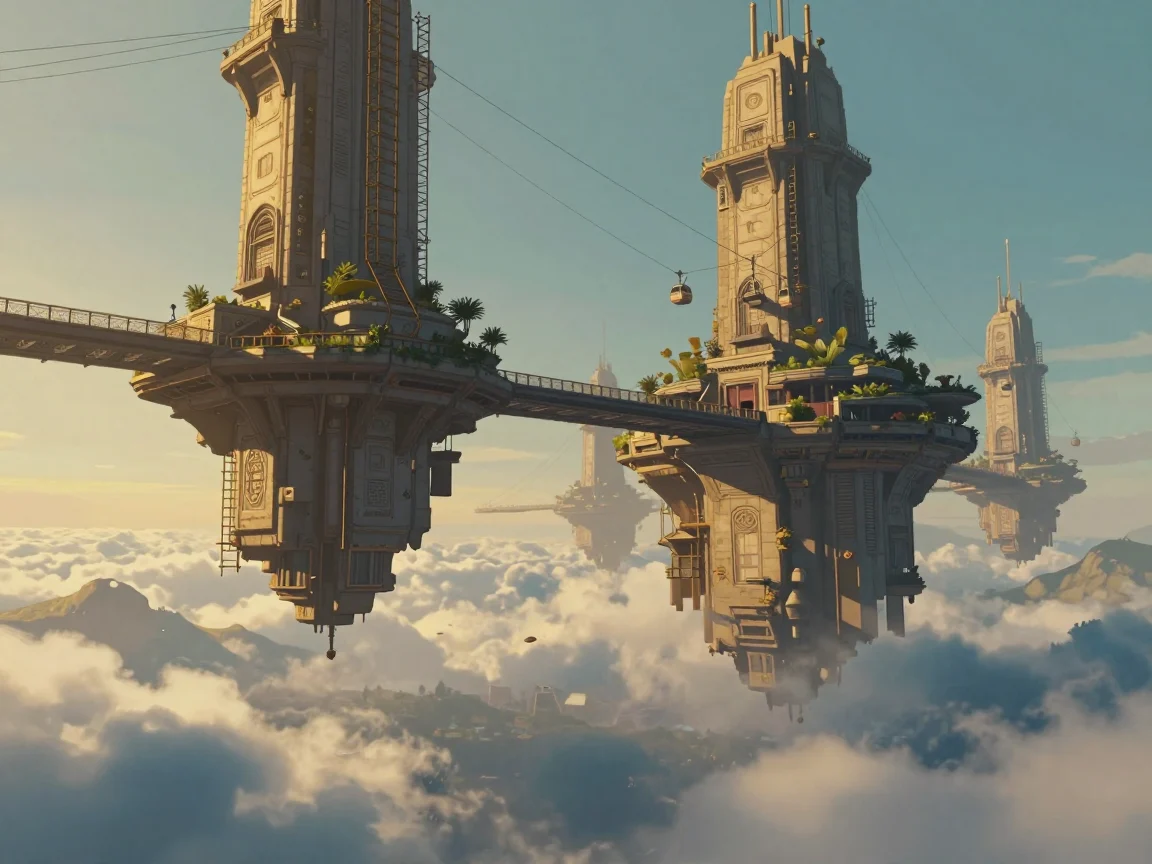
z-image Worldbuilding Concept Art: Twilight Floating City
Style Concept Art · Worldbuilding · Matte painting
Prompt
Cinematic environment concept art of a floating city at golden hour, wide panoramic shot, slightly low angle. Enormous stone platforms float above a sea of clouds, connected by slanted suspension bridges, cable-car elevators, and hanging gardens; weathered carved facades interweave with slender brass scaffolding. Warm sunset light slants in from the left, casting long shadows, volumetric light and mist drift between the platforms, while the valley below lies in cool blue shadow. Layers of cloud sea and faint mountain silhouettes in the distance create depth, and tiny human figures on a nearby bridge serve as a scale reference. Painterly matte-painting finish, rich detail, restrained color palette dominated by amber, slate cyan, and slate gray, natural atmospheric perspective, no exaggerated lens flare. 16:9 composition, horizon at the lower third, with clear negative sky space in the upper area.
Copy the full prompt and adapt it for your own generation.
Tags

z-image Style Spectrum: From Realistic to Flat on the Same Motif
Style style-spectrum · Illustration · Character Design
Prompt
A young woman sits alone reading beside a tall arched window, rendered as a stylized editorial illustration. Composition: 16:9 landscape format, the three-quarter figure positioned slightly right of center, window light entering from the left, ample negative space in the upper left. Style: a transition from semi-realistic digital painting toward flat vector shapes—soft volumetric skin shading kept restrained, clothing folds and background simplified into large, clean color fields with crisp edges, a warm terracotta and muted sage green palette, subtle paper grain texture, painterly highlights retained only on the face and hands. Lighting: directional daylight with soft falloff, gentle rim light on the shoulders and hair strands. No text, no watermark.
Copy the full prompt and adapt it for your own generation.
Tags
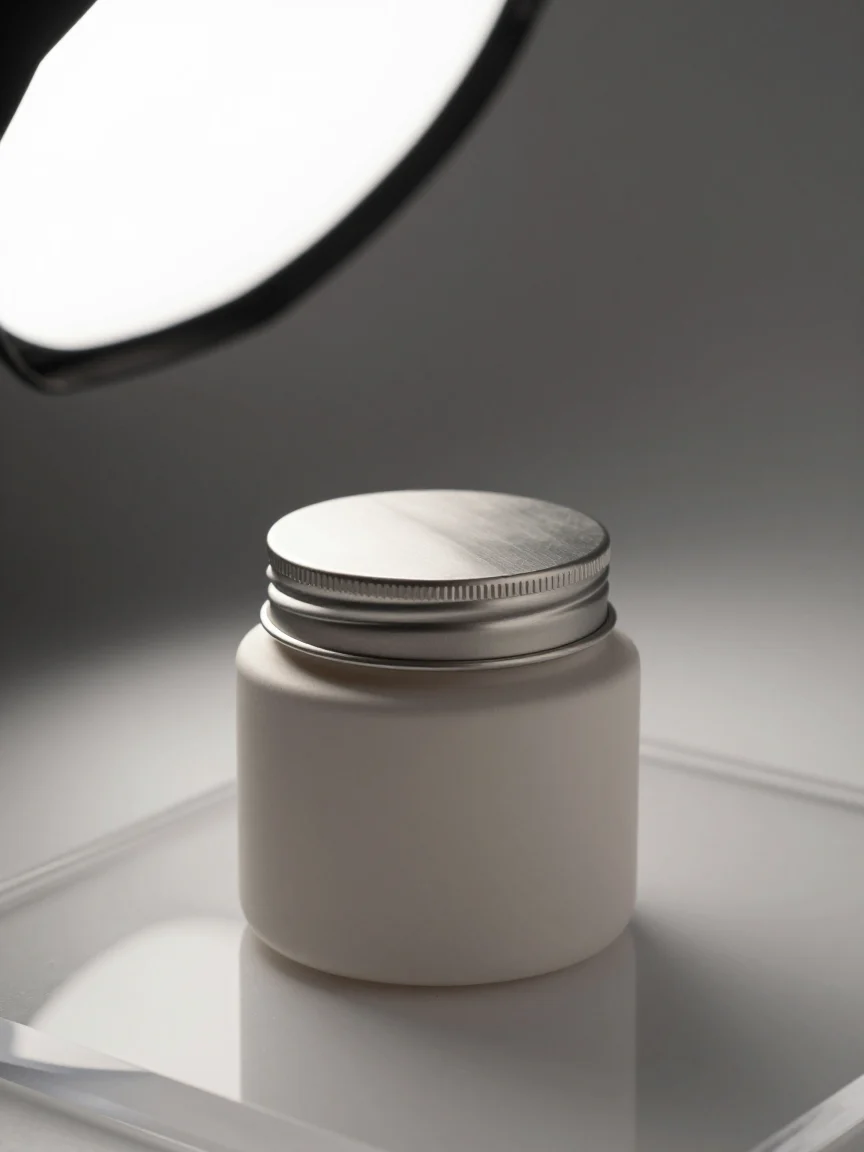
z-image e-commerce product photography texture image generation
Style Product Image · Studio lighting · ecommerce
Prompt
Commercial e-commerce product photography, a matte ceramic cosmetic jar with a brushed metal lid, centered on a seamless warm gray paper backdrop, a large softbox key light from the upper left, a subtle rim highlight on the right edge of the jar, soft graduated shadow falling toward the lower right, a faint reflection on the clear acrylic surface, macro-level detail in the ceramic texture and the lid threading, 85mm lens look, shallow depth of field with crisp product edges, balanced neutral color grading, clean negative space at the top for copy, no text, high-end catalog aesthetic
Copy the full prompt and adapt it for your own generation.
Tags
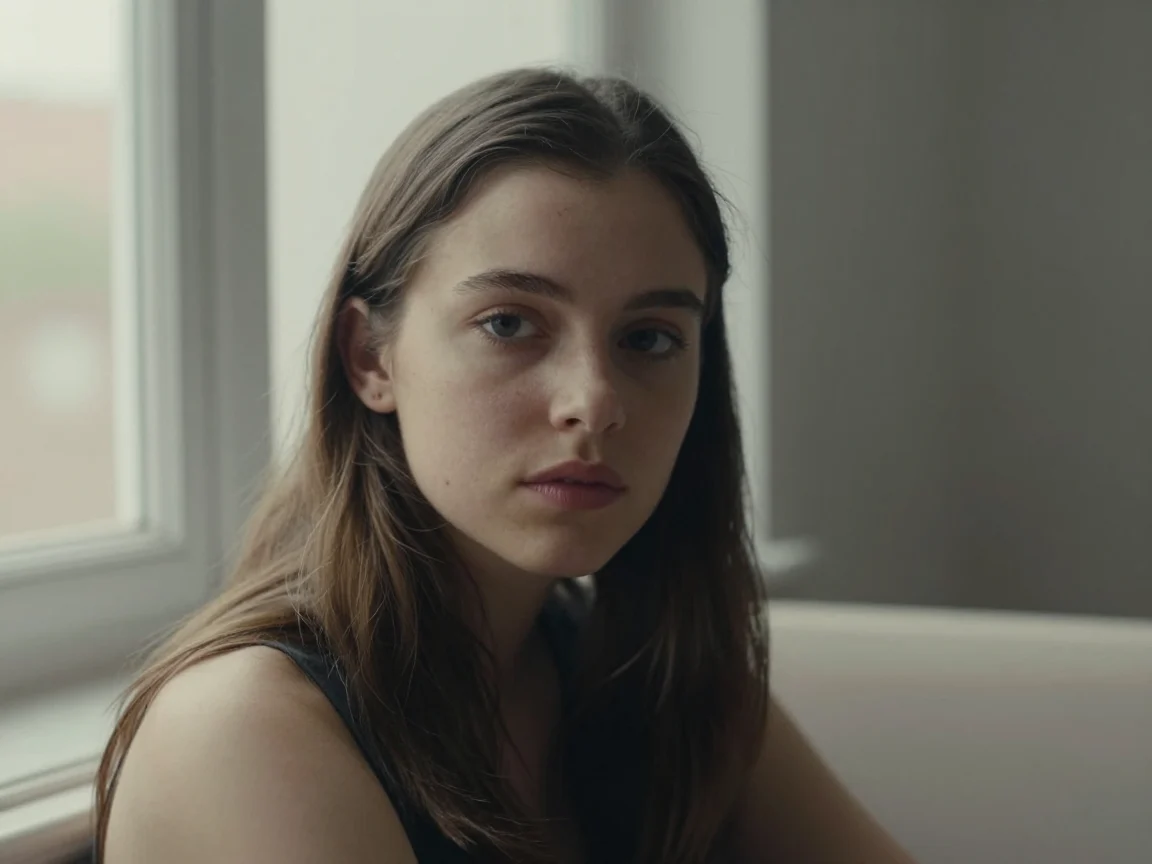
z-image portrait generation: realistic vs. artistic style comparison
Style Portrait & Photography · Photorealistic · Style Reference
Prompt
A cinematic 16:9 portrait: a young woman sitting by a large window, soft diffused daylight from the left outlining her facial contours, natural skin texture with visible pores and fine hairs, a calm, direct gaze, shallow depth of field, softly blurred indoor background, low-saturation neutral tones, delicate film grain, 85mm lens quality, high detail, photorealistic
Copy the full prompt and adapt it for your own generation.
Tags
Pricing
z-image per image
| Unit Price | $0.008 |
|---|
Overview
z-image is a text-to-image model released by Alibaba Tongyi Lab. It is called through the unified HiAPI.ai interface and can generate realistic or artistic images from Chinese and English prompts, while also handling Chinese and English typography within the image. It is suitable for developers who need to quickly produce creative visuals, posters, and stylized illustrations, as well as for integration evaluation scenarios focused on open-source model capabilities.
Key Highlights
- Bilingual Chinese-English prompts and in-image text rendering — prompts support Chinese and English input, and Chinese and English text can be rendered in the generated image, making it convenient to create visual materials with copy.
- Single-stream DiT architecture with high parameter efficiency — text and image conditions are modeled uniformly at the sequence level, achieving usable visual quality with a relatively small parameter scale.
- Multiple aspect ratios available at once — output supports five aspect ratios: 1:1, 4:3, 3:4, 16:9, and 9:16, covering square, landscape, and portrait placement needs.
- Lightweight image generation billed per image — the interface bills by the number of generated images, with prompts and aspect ratio as the only inputs, making integration and cost accounting simple.
Capabilities
Chinese-English text-to-image: enter a Chinese or English prompt of up to 1000 characters to generate an image, suitable for quickly validating creative directions or producing illustration assets in batches.
In-image text rendering: Chinese and English text can be presented in the image, suitable for creating visual drafts with titles or slogans and reducing secondary layout work afterward.
Aspect ratio control: specify one of five canvases via aspect_ratio, defaulting to 1:1, so the composition can directly match the requirements of different placement slots.
Realistic and stylized performance: the same interface covers both realistic scenes and artistic stylized output, addressing needs ranging from product visuals to creative illustrations.
Use Cases
- Operations staff creating social media illustrations — generate portrait or square illustrations with Chinese and English prompts and a specified canvas, ready for direct use in social platform content publishing.
- Designers generating poster backgrounds and title lettering — enter prompts containing title copy to get images with text layout, which can be used as poster drafts before refinement.
- Developers integrating text-to-image capabilities — pass prompts and aspect ratio through the unified interface to connect generated images into their own applications or content production workflows.
- Creative teams exploring styles — use the same prompt with different style descriptions to quickly generate images for option comparison and visual direction confirmation.
Limitations and Selection Advice
The interface currently supports only two inputs: text prompts and aspect ratio. It cannot perform image editing or multi-image reference through image input, nor does it provide fine-grained parameters such as steps or style strength. For tasks requiring precise composition control, layer editing, or consistent character reproduction, models that support these capabilities should be used instead. Generation results are heavily influenced by prompt wording, so it is recommended to validate the effect with a small number of images before making batch calls.
Frequently asked questions
View all FAQs →-
What is Z-Image best for?
Low-cost Chinese-prompt generation, realistic portraits, signage, urban nights, and food assets.
-
Which aspect ratios are supported?
1:1, 4:3, 3:4, 16:9, and 9:16.
-
Can I control resolution or format?
The current public contract exposes only prompt and aspect_ratio. Do not add undeclared resolution or format fields.
-
Does it accept reference images?
No. The current Z-Image model ID is text-to-image only.
Create a generation task
https://api.hiapi.ai/v1/tasks Headers
AuthorizationstringRequiredAccount API key. Required on every request. Example: Bearer YOUR_HIAPI_API_KEY. Get your API key
Content-TypestringOptionalThe request body is always parsed as JSON; when sent, only application/json (optionally with charset) is accepted — any other value returns 415. Example: application/json.
Idempotency-KeystringOptionalIdempotency key, up to 255 bytes. Retries with the same key from the same account create the task only once; replays return the original taskId.
On network timeouts or client retries, the same key creates the task only once — no double charges (scope: the API key's account). Use a business-unique identifier as the key (e.g. "order-42"); replays return the original taskId, and keys expire 24 hours after the first request. See the Unified Async API overview for the full scenario matrix.
Body
modelstringRequiredCurrent fixed value: z-image
routestringOptionalCurrent fixed value: default
inputobjectRequired
Business parameters for z-image and route default — see the parameter table below.
promptstringRequiredmaxLength 1000Text prompt for image generation that controls the content of the output image; supports both Chinese and English.
aspect_ratiostringOptionalDefault: "1:1"Aspect ratio of the output image, default is 1:1.
1:14:33:416:99:16callbackobjectOptional
Terminal-state notification config. When omitted, no callback is delivered — poll the task yourself. See the callback note below.
Provide callback.url when creating a task and HiAPI POSTs to your service once the task reaches a terminal state — no polling needed. The callback payload mirrors the task detail structure; signature verification, delivery retries and idempotency are documented on the Unified Async API overview page.
urlstringRequiredRequired when callback is present. A POST is sent to this URL once the task reaches a terminal state; must be a valid http(s) URL.
whenstringOptionalDefault: "final"Only final is supported today — notified on both success and fail.
finalstoragestringOptionalDefault: "temp"Artifact storage tier: temp (default, retained about 7 days) or persistent (long-term, billed by size). Insufficient balance or exceeding the storage cap silently downgrades to temp; the effective tier is shown in the task detail response.
temppersistentRequest examples
# Submit an async task; returns a taskId immediately (no waiting for generation)
curl -X POST "https://api.hiapi.ai/v1/tasks" \
  -H "Authorization: Bearer $HIAPI_API_KEY" \
  -H "Content-Type: application/json" \
  -d '{
  "model": "z-image",
  "input": {
    "prompt": "…",
    "aspect_ratio": "1:1"
  }
}'
const res = await fetch("https://api.hiapi.ai/v1/tasks", {
method: "POST",
headers: {
Authorization: `Bearer ${process.env.HIAPI_API_KEY}`,
"Content-Type": "application/json",
},
body: JSON.stringify({
model: "z-image",
input: {
"prompt": "…",
"aspect_ratio": "1:1"
}
}),
});
const task = await res.json();
// { code: 200, message: "success", data: { taskId } }import os, requests
res = requests.post(
"https://api.hiapi.ai/v1/tasks",
headers={"Authorization": f"Bearer {os.environ['HIAPI_API_KEY']}"},
json={
"model": "z-image",
"input": {
"prompt": "…",
"aspect_ratio": "1:1"
}
},
)
print(res.json()) # { code, message, data: { taskId } }200 OK
{
  "code": 200,
  "message": "success",
  "data": {
    "taskId": "tk-hiapi-01HZTQ8BX2N3GM3YFK4Z9D7VQR"
  }
}
400 Bad Request
{
  "code": 400,
  "message": "invalid request",
  "data": null,
  "error_code": "INVALID_REQUEST"
}
Get task detail
https://api.hiapi.ai/v1/tasks/:id Response fields
taskIdstringRequiredTask ID, always prefixed with tk-hiapi-.
modelstringRequiredResolved full model name. Tasks submitted with the route parameter return base@route (e.g. gpt-image-2/text-to-image@ext); otherwise identical to the name passed at creation.
routestringOptionalPresent only when the task was submitted with an explicit route parameter; echoes the submitted value.
statusstringRequiredTask status.
queued Queued, not started yet.
handling Being processed.
archiving Processing finished, artifacts being prepared.
success Terminal: completed, artifacts available (output returned).
fail Terminal: failed (error returned).
After submission, check status: success and fail are terminal, everything else is non-terminal. Poll every 1–3 seconds until terminal. On success, download artifacts from output[].url and transfer them before expireAt; pass storage: "persistent" at creation time when long-term retention is needed.
creatednumberRequiredTask creation time (Unix seconds).
completednumberRequiredUnix seconds when the task reached a terminal state; fixed to 0 while not terminal.
outputarrayOptional
Present only when status == success. Artifact list — always an array; a single task may return multiple types at once (e.g. video + first_frame).
Array [ object ]
Array items
urlstringRequiredArtifact URL, directly downloadable.
typestringRequiredCurrent possible values: video, image, audio, first_frame, last_frame, thumbnail; more may be added later.
expireAtnumberRequiredUnix seconds until which the artifact remains accessible; download or transfer before it expires.
errorobjectOptional
Present only when status == fail.
codestringRequiredBusiness error code.
messagestringRequiredError description.
Response examples
Success
{
  "code": 200,
  "message": "success",
  "data": {
    "taskId": "tk-hiapi-01HZTQ8BX2N3GM3YFK4Z9D7VQR",
    "model": "happyhorse-1-0",
    "status": "success",
    "created": 1777282033,
    "completed": 1777282099,
    "output": [
      {
        "url": "https://cdn.hiapi.ai/tasks/.../video.mp4",
        "type": "video",
        "expireAt": 1777886899
      }
    ]
  }
}
Processing (non-terminal)
{
  "code": 200,
  "message": "success",
  "data": {
    "taskId": "tk-hiapi-...",
    "model": "happyhorse-1-0",
    "status": "archiving",
    "created": 1777282033,
    "completed": 0
  }
}
Failed
{
  "code": 200,
  "message": "success",
  "data": {
    "taskId": "tk-hiapi-...",
    "model": "happyhorse-1-0",
    "status": "fail",
    "created": 1777282033,
    "completed": 1777282099,
    "error": {
      "code": "TASK_FAILED",
      "message": "task failed"
    }
  }
}Articles
View all articles →Related Models
View all models →Same Type
-
 BRIA Eraser Bria $0.058 /image
-
 FLUX.2 Black Forest Labs $0.035 /image
-
 Nano Banana 2 Google $0.036 /image
-
 Recraft V4.1 Recraft $0.010 /image
-
 851 Labs Background Remover 851 Labs $0.002 /image
-
 FLUX.1 Schnell Black Forest Labs $0.005 /image
-
 Qwen Image 2.1 Alibaba $0.020 /image
-
 Krea 3 Krea $0.036 /image
-
 FLUX 1.1 Pro Black Forest Labs $0.050 /image
-
 FLUX.1 Fill Pro Black Forest Labs $0.071 /image
-
 Ideogram V4.5 Ideogram $0.011 /image
-
 Nano Banana Pro Google $0.057 /image
Same Provider
-
 Qwen Image 2.0 Alibaba $0.042 /image
-
 Wan 2.7 Video Alibaba $0.100 /second
-
 HappyHorse 1.0 Alibaba $0.168 /second
-
 Wan 3.0 Video Alibaba $0.040 /second
-
 Wan 2.7 Image Alibaba $0.035 /image
-
 Qwen Image 3.0 Alibaba $0.036 /image
-
 Qwen Audio 3.0 TTS Alibaba $0.030 /1,000 characters
-
 Wan 2.6 Flash Alibaba $0.043 /second
- Qwen Image 2.1 Alibaba $0.020 /image
-
 HappyHorse 1.1 Alibaba $0.160 /second