
ByteDance
Seedream 5.0
seedream-5.0-pro/text-to-image
ByteDance's production-grade image generation model, supporting web retrieval and multi-step logical reasoning, 4K output, and example-based editing, suitable for product images and infographic creation
Try seedream-5.0-pro/text-to-image
Input
Showcases
View all showcasesOutput
image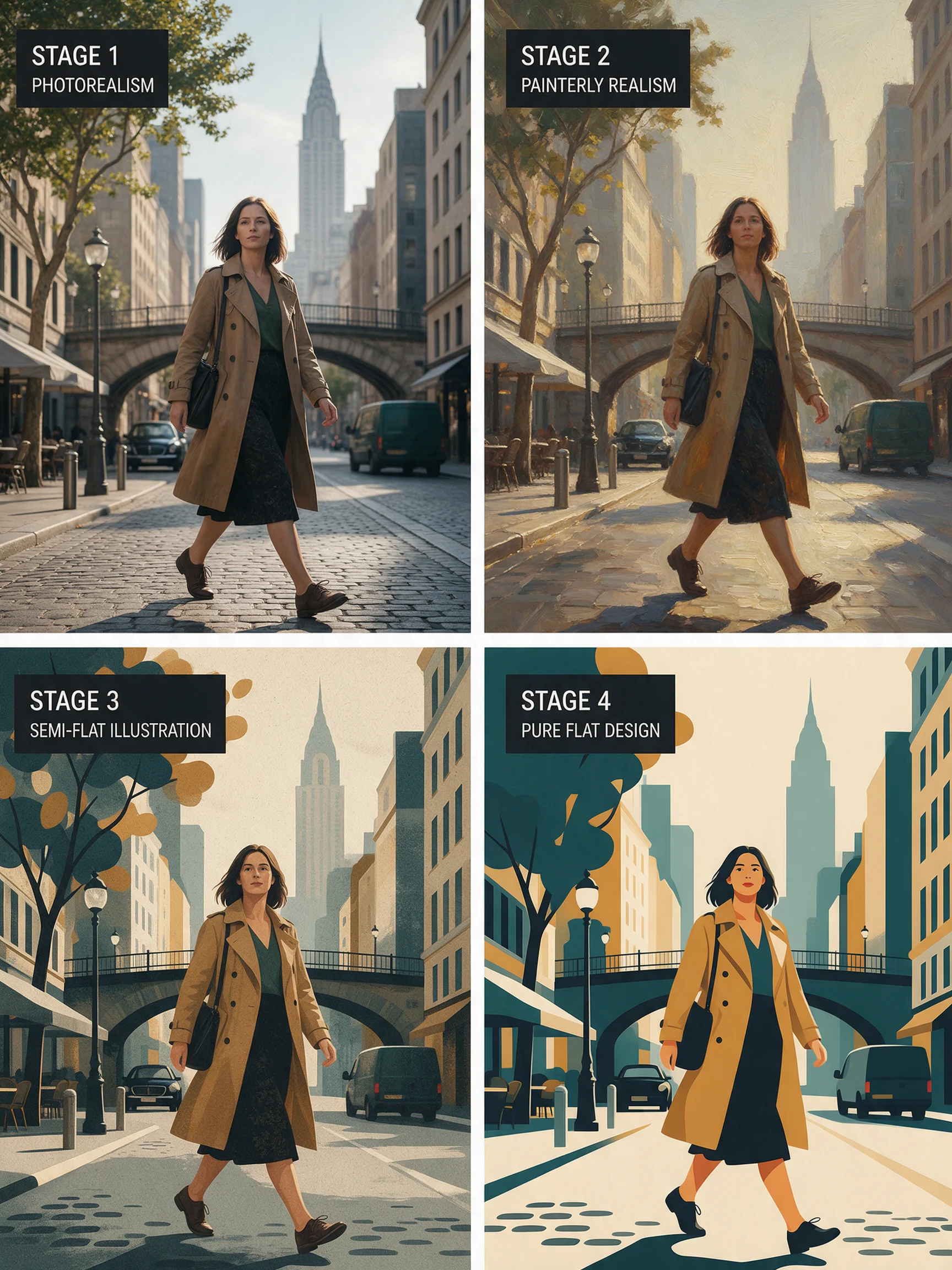
From Realistic to Flat: A Four-Level Comparison Across the Illustration Style Spectrum
Style Illustration · Style Research · Flat design
Prompt
A four-stage style spectrum study presented on the same composition: a foreground figure walking, a midground city street, a distant skyline. Stage one, photo-realistic: natural daylight, visible skin texture and fabric weave, true depth of field, subtle lens grain. Stage two, painterly realism: the same scene, but with visible brushstrokes, softened edges, warm reflected light, and slightly reduced color saturation. Stage three, semi-flat illustration: simplified volume, two-tone shading, crisp silhouettes, and a limited palette of soft teal, ochre, and cream. Stage four, pure flat design: geometric color blocks, no gradients, hard-edged shapes, and a bold flat palette. All stages keep a consistent composition and subject pose, 3:2 landscape framing, editorial art-direction reference quality.
Copy the full prompt and adapt it for your own generation.
Tags
Pricing
seedream-5.0-pro/text-to-image per image
| Specifications | Unit Price |
|---|---|
| 1K | $0.050 |
| 2K | $0.100 |
Overview
Seedream 5.0 Pro is an advanced text-to-image model in the ByteDance Seedream 5.0 series, accessed through the unified HiAPI.ai interface. It is aimed at developers who need to integrate image generation into production workflows, and beyond visual quality it emphasizes factual and logical accuracy: it supports real-time web retrieval, multi-step reasoning, and high-density text rendering, and can output PNG/JPEG images at 1K or 2K resolution in up to 8 common aspect ratios. It is suited to scenarios with high demands on content accuracy and layout, such as e-commerce assets, infographics, and multilingual text posters.
Key Highlights
- Retrieval and reasoning built into the generation pipeline — when a prompt involves time-sensitive topics, it can automatically retrieve web information and incorporate it into generation, reducing factual deviations.
- High-density text and multilingual rendering — specifically optimized for text layout and multilingual understanding, it can handle complex infographic-style compositions.
- Selectable resolution and aspect ratio — supports two resolution tiers, 1K and 2K, and 8 aspect ratios, balancing rapid iteration with final output.
- Long prompt support — prompts can be up to 4000 characters, making it easy to control complex image structure and layout with full descriptions.
Capabilities
Text-to-image generation: enter a text description of 3 to 4000 characters to generate an image; the more complete the prompt, the more control you have over the structure and relationships of elements in the image.
Resolution and aspect ratio control: choose 1K (about 2MP) for rapid iteration or 2K (about 4MP, up to 2048x2048) for refined final output, with 8 ratios from 1:1 to 21:9 to fit different placements.
Output format selection: choose between PNG and JPEG output, making it easy to connect directly to downstream cutout, compression, or asset-ingestion workflows.
Image-text alignment and structural understanding: according to official statements, the Pro version improves on image-text alignment and structural coherence compared with previous generations, making it suitable for generation tasks that require layout accuracy.
Use Cases
- E-commerce operations: generating main images from product selling-point copy — use titles and selling-point descriptions to directly generate product promotional images that can be used in detail pages or ad assets.
- Design teams: multilingual text posters and infographics — write the text and layout to be presented into the prompt, generate a draft poster or infographic containing text, and then move on to refinement.
- Content teams: imagery for time-sensitive topics — when a prompt involves time-sensitive topics, the model retrieves web information, making it useful for news or event imagery that needs to reflect the current context.
- Product development: batch placeholders and visual drafts — quickly generate sketches in batches at 1K resolution, validate layout and visual direction, and then increase to 2K output.
Limitations and Selection Advice
This model supports only text-to-image; the input is limited to a single text prompt, and reference images cannot be supplied for image-to-image or example-based editing. If you need image editing and style transfer, use the image-to-image line in the same series. The official documentation also acknowledges room for improvement in finer-grained text rendering and pixel-level editing consistency; images containing large amounts of small text should be manually reviewed. Time-sensitive prompts trigger web retrieval, and output is affected by the retrieved content; for scenarios requiring high result stability, use clear, self-consistent descriptions instead of time-sensitive phrasing wherever possible.
What's new
View changelog →- New model seedream-5.0-pro/image-to-image Now Available
- New model New model launched: seedream-5.0-pro/text-to-image
- New model seedream-5.0-lite/image-to-image model now available
Create a generation task
https://api.hiapi.ai/v1/tasks Headers
AuthorizationstringRequiredAccount API key. Required on every request. Example: Bearer YOUR_HIAPI_API_KEY. Get your API key
Content-TypestringOptionalThe request body is always parsed as JSON; when sent, only application/json (optionally with charset) is accepted — any other value returns 415. Example: application/json.
Idempotency-KeystringOptionalIdempotency key, up to 255 bytes. Retries with the same key from the same account create the task only once; replays return the original taskId.
On network timeouts or client retries, the same key creates the task only once — no double charges (scope: the API key's account). Use a business-unique identifier as the key (e.g. "order-42"); replays return the original taskId, and keys expire 24 hours after the first request. See the Unified Async API overview for the full scenario matrix.
Body
modelstringRequiredCurrent fixed value: seedream-5.0-pro/text-to-image
routestringOptionalCurrent fixed value: default
inputobjectRequired
Business parameters for seedream-5.0-pro/text-to-image and route default — see the parameter table below.
promptstringRequiredminLength 3maxLength 4000The text prompt describing the image you want to generate; must be between 3 and 4000 characters long.
resolutionstringRequiredDefault: "2K"The resolution of the output image. 1K (about 2 MP) is suitable for fast iteration, while 2K (about 4 MP, up to 2048x2048) is suitable for generating higher detail. Default is 2K.
1K2Kaspect_ratiostringRequiredDefault: "1:1"The aspect ratio of the generated image. Default is 1:1.
1:14:33:416:99:162:33:221:9output_formatstringOptionalDefault: "png"The format of the output image. Default is png.
pngjpegcallbackobjectOptional
Terminal-state notification config. When omitted, no callback is delivered — poll the task yourself. See the callback note below.
Provide callback.url when creating a task and HiAPI POSTs to your service once the task reaches a terminal state — no polling needed. The callback payload mirrors the task detail structure; signature verification, delivery retries and idempotency are documented on the Unified Async API overview page.
urlstringRequiredRequired when callback is present. A POST is sent to this URL once the task reaches a terminal state; must be a valid http(s) URL.
whenstringOptionalDefault: "final"Only final is supported today — notified on both success and fail.
finalstoragestringOptionalDefault: "temp"Artifact storage tier: temp (default, retained about 7 days) or persistent (long-term, billed by size). Insufficient balance or exceeding the storage cap silently downgrades to temp; the effective tier is shown in the task detail response.
temppersistentRequest examples
# Submit an async task; returns a taskId immediately (no waiting for generation)
curl -X POST "https://api.hiapi.ai/v1/tasks" \
  -H "Authorization: Bearer $HIAPI_API_KEY" \
  -H "Content-Type: application/json" \
  -d '{
  "model": "seedream-5.0-pro/text-to-image",
  "input": {
    "prompt": "…",
    "resolution": "2K",
    "aspect_ratio": "1:1",
    "output_format": "png"
  }
}'
const res = await fetch("https://api.hiapi.ai/v1/tasks", {
method: "POST",
headers: {
Authorization: `Bearer ${process.env.HIAPI_API_KEY}`,
"Content-Type": "application/json",
},
body: JSON.stringify({
model: "seedream-5.0-pro/text-to-image",
input: {
"prompt": "…",
"resolution": "2K",
"aspect_ratio": "1:1",
"output_format": "png"
}
}),
});
const task = await res.json();
// { code: 200, message: "success", data: { taskId } }import os, requests
res = requests.post(
"https://api.hiapi.ai/v1/tasks",
headers={"Authorization": f"Bearer {os.environ['HIAPI_API_KEY']}"},
json={
"model": "seedream-5.0-pro/text-to-image",
"input": {
"prompt": "…",
"resolution": "2K",
"aspect_ratio": "1:1",
"output_format": "png"
}
},
)
print(res.json()) # { code, message, data: { taskId } }200 OK
{
  "code": 200,
  "message": "success",
  "data": {
    "taskId": "tk-hiapi-01HZTQ8BX2N3GM3YFK4Z9D7VQR"
  }
}
400 Bad Request
{
  "code": 400,
  "message": "invalid request",
  "data": null,
  "error_code": "INVALID_REQUEST"
}
Get task detail
https://api.hiapi.ai/v1/tasks/:id Response fields
taskIdstringRequiredTask ID, always prefixed with tk-hiapi-.
modelstringRequiredResolved full model name. Tasks submitted with the route parameter return base@route (e.g. gpt-image-2/text-to-image@ext); otherwise identical to the name passed at creation.
routestringOptionalPresent only when the task was submitted with an explicit route parameter; echoes the submitted value.
statusstringRequiredTask status.
queued Queued, not started yet.
handling Being processed.
archiving Processing finished, artifacts being prepared.
success Terminal: completed, artifacts available (output returned).
fail Terminal: failed (error returned).
After submission, check status: success and fail are terminal, everything else is non-terminal. Poll every 1–3 seconds until terminal. On success, download artifacts from output[].url and transfer them before expireAt; pass storage: "persistent" at creation time when long-term retention is needed.
creatednumberRequiredTask creation time (Unix seconds).
completednumberRequiredUnix seconds when the task reached a terminal state; fixed to 0 while not terminal.
outputarrayOptional
Present only when status == success. Artifact list — always an array; a single task may return multiple types at once (e.g. video + first_frame).
Array [ object ]
Array items
urlstringRequiredArtifact URL, directly downloadable.
typestringRequiredCurrent possible values: video, image, audio, first_frame, last_frame, thumbnail; more may be added later.
expireAtnumberRequiredUnix seconds until which the artifact remains accessible; download or transfer before it expires.
errorobjectOptional
Present only when status == fail.
codestringRequiredBusiness error code.
messagestringRequiredError description.
Response examples
Success
{
  "code": 200,
  "message": "success",
  "data": {
    "taskId": "tk-hiapi-01HZTQ8BX2N3GM3YFK4Z9D7VQR",
    "model": "happyhorse-1-0",
    "status": "success",
    "created": 1777282033,
    "completed": 1777282099,
    "output": [
      {
        "url": "https://cdn.hiapi.ai/tasks/.../video.mp4",
        "type": "video",
        "expireAt": 1777886899
      }
    ]
  }
}
Processing (non-terminal)
{
  "code": 200,
  "message": "success",
  "data": {
    "taskId": "tk-hiapi-...",
    "model": "happyhorse-1-0",
    "status": "archiving",
    "created": 1777282033,
    "completed": 0
  }
}
Failed
{
  "code": 200,
  "message": "success",
  "data": {
    "taskId": "tk-hiapi-...",
    "model": "happyhorse-1-0",
    "status": "fail",
    "created": 1777282033,
    "completed": 1777282099,
    "error": {
      "code": "TASK_FAILED",
      "message": "task failed"
    }
  }
}Articles
View all articles →Related Models
View all models →Same Type
-
 GPT Image 2 OpenAI $0.007 /image
-
 Nano Banana Google $0.021 /image
-
 Qwen Image 3.0 Alibaba $0.036 /image
-
 Krea 2 Medium Turbo Krea $0.021 /image
-
 FLUX.1 Fill Pro Black Forest Labs $0.071 /image
-
 Z-Image Alibaba $0.008 /image
-
 FLUX.2 Klein 4B Black Forest Labs $0.0004 /image
-
 GPT Image 2.5 OpenAI $0.017 /image
-
 Recraft Crisp Upscale Recraft $0.004 /image
-
 FLUX.1 Schnell Black Forest Labs $0.005 /image
-
 FIBO 1.5 Bria $0.058 /image
-
 Imagen 4 Google $0.030 /image