
Comparison
GPT Image 2.6 vs 2.5: Same Prompt, Side-by-Side Comparison
Parameter surfaces, billing rules, output sizes and what actually changes on screen
このページの内容
The short answer
Short version: if your prompt depends on readable text, small hardware detail, or multi-round edits, upgrade to GPT Image 2.6. If you are running cheap, high-volume drafts, GPT Image 2.5 is still the right default.
The split shows up in mechanism, not marketing. gpt-image-2.5-flare/text-to-image has no quality parameter at all. It bills by resolution: 1K $0.025, 2K $0.040, 4K $0.060. gpt-image-2.6-flare/text-to-image has two independent dimensions, quality (low / medium / high / xhigh / max) and resolution (default 1K), plus complexity and an expanded output_format list.
So "same quality tier" is not available as a comparison axis. The only honest same-dimension comparison is resolution. We ran 2.6 at quality: "high". A high 1K image on 2.6 Flare costs $0.049. A 1K image on 2.5 Flare costs $0.025. That is a $0.024 per-image difference, and the rest of this post is about whether the pixels earn it.
Parameter surfaces: what each model accepts
Here is what each model accepts, read directly from the model catalog.
GPT Image 2.5 Flare
resolution: 1K / 2K / 4Kaspect_ratio: auto or one of the supported ratiosbackground: auto / opaque / transparentoutput_format: png and the standard still-image setprompt: string
No quality. No complexity. No output_compression on the surface, no GIF, no SVG.
GPT Image 2.6 Flare
quality: low / medium / high / xhigh / maxresolution: 1K / 2K / 4K (default 1K)aspect_ratio: auto or 15 ratioscomplexity: low / medium / high (default high)output_format: png (default) / jpeg / webp / gif / svgoutput_compression: 0–100, jpeg and webp onlybackground: auto / opaque / transparent (transparent needs png or webp)
Two distinctions matter. quality and complexity are independent: quality governs render fidelity, complexity is a planning level. And gif / svg exist only on text-to-image, not on image-to-image.
On the image-to-image side, 2.6 accepts 1–16 source images in jpeg / png / webp via image_urls, plus mask_url (an RGBA PNG the same size as the first source image, where transparent pixels are the region you want changed) or markup_url (a transparent PNG annotation where the marks do not appear in the result). The two are mutually exclusive. Note that with a mask, regions outside the mask can still shift slightly. Outputs there are png / jpeg / webp only.
If you want the full argument list in one place, the GPT Image 2.6 Flare text-to-image model page has it.
Billing rules after the parameter split
Because 2.5 has one dimension, its billing is simple. Because 2.6 has two, its billing is a grid.
2.5 Flare standard line
Priced per image by resolution only: 1K $0.025, 2K $0.040, 4K $0.060. There is no quality setting to choose, so treat 2.5 as "a picture at a size," not "a picture at a quality level."
2.6 Flare and Sunburst
Priced by quality and resolution together, from low 1K at $0.023 to max 4K at $0.636:
| quality | 1K | 2K | 4K |
|---|---|---|---|
| low | $0.023 | $0.042 | $0.075 |
| medium | $0.041 | $0.075 | $0.133 |
| high | $0.049 | $0.090 | $0.160 |
| xhigh | $0.087 | $0.160 | $0.283 |
| max | $0.195 | $0.360 | $0.636 |
Resolution, quality, and format are all known before the call, so cost is predictable.
Add-ons on 2.6
-
SVG is the same tier's PNG price plus $0.030 (low 1K SVG $0.053, max 4K SVG $0.666).
-
GIF is priced by
qualityonly, independent of resolution: low $0.070, medium $0.124, high $0.150, xhigh $0.266, max $0.598. -
Image-to-image uses the same quality-by-resolution grid, plus $0.012 per reference image.
GIF has its own constraints: frame_size is written as literal pixels like 512x512 (each side a multiple of 16, default 512x512, which also sets the GIF ratio), frame_count is 2–16 with a cap of 12 at 768x768, and frame_duration_ms is 20 or more, rounded to 10 ms automatically. The whole stitched frame sheet must stay within 3840 per side, 8,294,400 total pixels and a 3:1 ratio. Requests rejected at submission are refunded in full and not billed.
The full table also lives on the pricing page.
The same prompt, both models
One prompt, two calls, both at 1K and 16:9. The prompt:
A tidy isometric illustration of a small coffee counter: an espresso machine with a visible pressure gauge, three glass jars labelled BEANS, SUGAR and TEA, and a chalkboard menu listing ESPRESSO and LATTE, warm morning light through a window, muted terracotta and cream palette, crisp clean edges, no watermark.
Call A: GPT Image 2.6 Flare
{
  "model": "gpt-image-2.6-flare/text-to-image",
  "prompt": "A tidy isometric illustration of a small coffee counter: ...",
  "quality": "high",
  "resolution": "1K",
  "aspect_ratio": "16:9"
}
Output: 1536 × 864.
Call B: GPT Image 2.5 Flare
{
  "model": "gpt-image-2.5-flare/text-to-image",
  "prompt": "A tidy isometric illustration of a small coffee counter: ...",
  "resolution": "1K",
  "aspect_ratio": "16:9"
}
No quality field: the model does not accept one. Output: 1672 × 941.
Both images returned a complete counter in 16:9. 2.5's actual pixel count is slightly larger; 2.6's is the tighter 1536 × 864. Neither is wrong, but it is worth knowing that "1K" is a bucket, not a promise of identical dimensions in the output.
What changed on screen
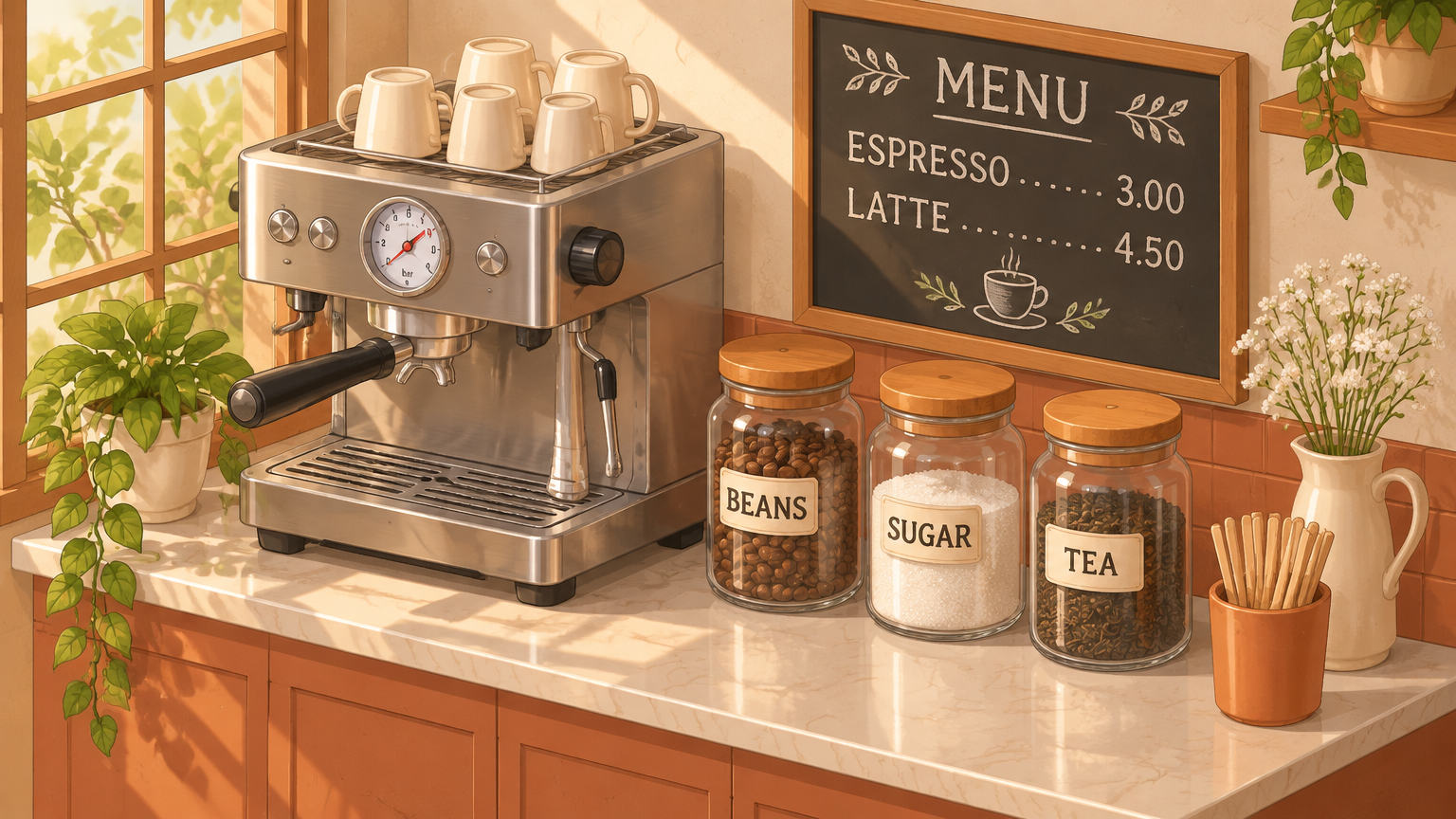
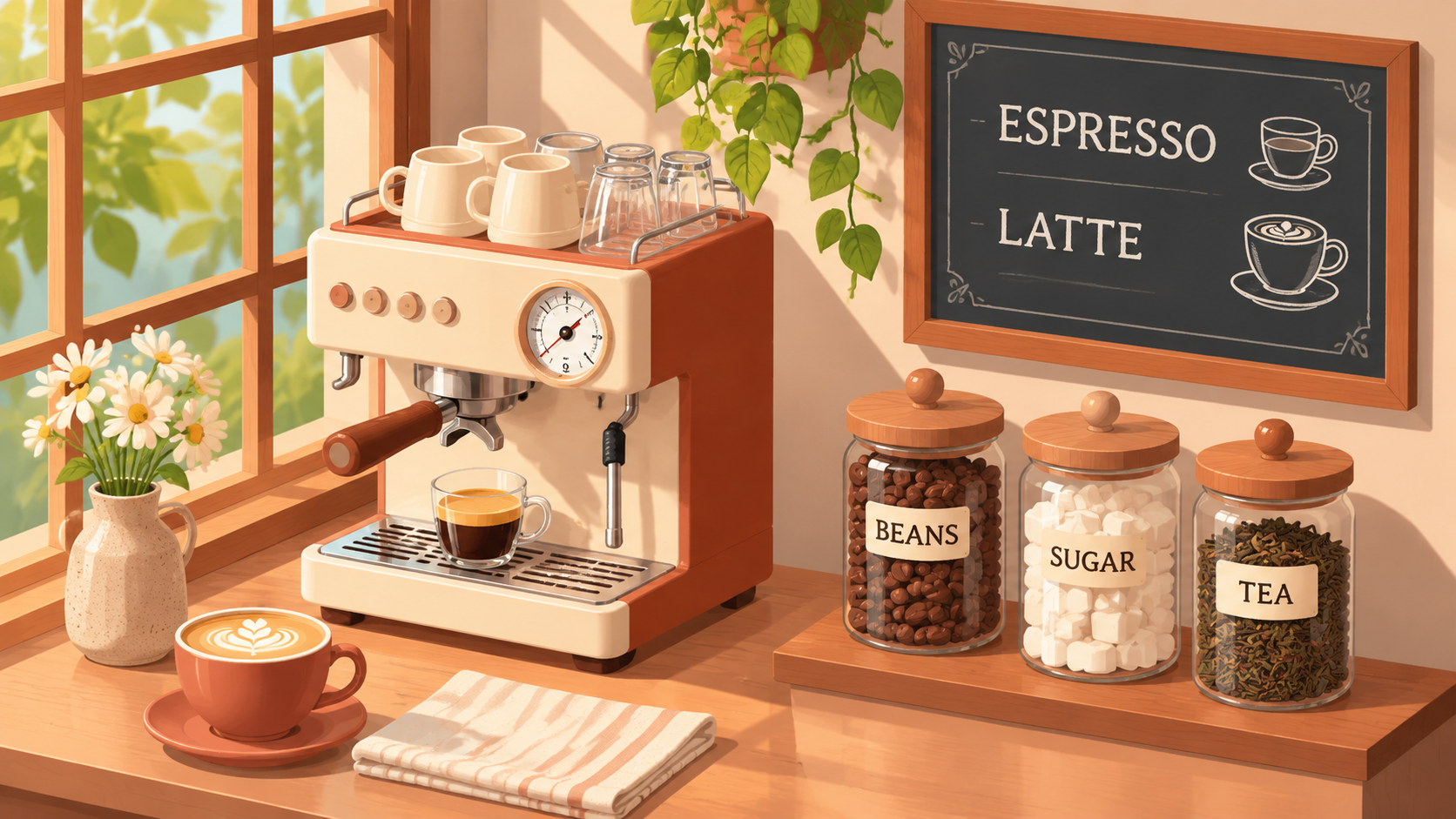
Menu text
The prompt asks for a chalkboard listing ESPRESSO and LATTE. 2.6 wrote MENU, then ESPRESSO …… 3.00 and LATTE …… 4.50. The prices were not in the prompt; the model added them. 2.5 wrote ESPRESSO and LATTE with two coffee-cup icons and no prices. In this test, menu text was the clearest gap.
Pressure gauge
2.6 drew a dial with tick numbers and a bar unit. 2.5 drew tick marks with very few numbers. Both read as a gauge; 2.6's holds up better when you zoom in.
Jar labels
Both models spelled all three labels correctly: BEANS, SUGAR, TEA. Short label text was not a differentiator here.
Hardware
Both machines have a steam wand, a group head and a drip tray. The difference is rendering, not missing parts: 2.6's edges are sharper, 2.5's are softer.
Material and surface
2.6 filled the sugar jar with granulated sugar and put the scene on a marble countertop. 2.5 used sugar cubes and a wooden counter and cabinets.
Overall style
2.6 came out sharper and closer to a realistic illustration. 2.5 came out softer and flatter. Both kept the full counter in the 16:9 frame; composition was not the differentiator in this test. Detail density and sharpness were.
A useful way to summarize: both produced a correct illustration of the scene. In this test, 2.6 packed in more small information — prices, gauge numbers, surface materials — and drew it more crisply.
Choosing Flare or Sunburst on 2.6
On 2.6 you also pick a line, and the choice is not about price. Parameters, usage and pricing are identical across Flare and Sunburst, so the decision is purely operational.
Flare is the faster line and the recommended default. It suits fast iteration, prompt exploration and batches where you generate many candidates and pick the best. If you are still tuning wording, start here.
Sunburst puts more weight on detail. At medium quality and above, it holds detail more consistently across multi-round edits: the same character, the same product, the same layout from one revision to the next. If your workflow is "generate once, then edit five times," that consistency is the thing that saves you rework.
Practical pattern: explore on Flare, then switch to Sunburst when the image becomes a series. Both lines are on the model catalog, including Flare image-to-image and Sunburst text-to-image.
Upgrade decision
Here is the rule.
Upgrade to 2.6 when at least one of these is true:
-
Your prompt asks for readable text: labels, prices, menus, signage.
-
Small mechanical or product detail is the subject, not background.
-
You plan multi-round edits where consistency across revisions matters.
-
You need
qualitycontrol to trade fidelity against cost, or you needcomplexity, GIF or SVG output.
Stay on 2.5 when:
-
You generate high volume of drafts where nobody reads the menu.
-
Resolution is the only lever you actually need.
-
You are exploring composition and will throw most results away.
The $0.024 per-image gap at 1K is a per-image decision, and for text-heavy or product-critical work it is small relative to one rejected image or one manual retouch. For a thousand throwaway drafts, it is $24. Decide by how often a human looks closely at the output.
Start from the model catalog, run your own prompt through both lines, and let the pixels decide.
関連記事
すべての記事を見る →-
Comparison
Wan 2.6 Flash vs Wan 2.7: Should You Upgrade?
720P budgets and 1080P fox/car outputs, with audio conditions and actual request tiers disclosed.
5 -
Comparison
Vidu Q4 Preview vs Kling 3.0: Which to Pick?
Vidu Q4 Preview for default audio, 16-second clips and five resolution tiers; Kling 3.0 for first-and-last-frame control. Two same-prompt pairs included.
6 -

Comparison
Replicate Alternative for Image & Video Generation: hiapi vs Replicate (2026)
What changes in your prediction calls, webhooks and billing when you move image and video jobs to hiapi, with a 10-step migration checklist.
9