Meta
Muse Video 1.0
muse-video-1.0/image-to-video
A video generation model launched by Meta Superintelligence Labs, supporting text-to-video and image-to-video. Each video is a fixed 10 seconds at 720p with built-in audio; image-to-video can use 1 to 9 reference images to guide the visuals, making it suitable for visualizing social media assets and storyboard concepts.
Try muse-video-1.0/image-to-video
Input
Showcases
View all showcasesOutput
videoRainy Night Platform · Train Arriving
Style Cinematic · Camera Movement · Atmosphere
Reference inputs

Reference images
Prompt
A rainy dusk at the platform of a quiet, old railway station. The camera slowly pushes forward along the wet platform while zooming out, so that the distant pillars and the nearby iron columns shift against each other in a subtle dolly zoom (vertigo) effect. Warm light reflects on the damp tiles, rainwater drips from the edge of the canopy, and in the distance the headlight of a train gradually approaches through the thin mist. Soft natural light, low-saturation teal and amber tones, fine rain texture, starting with a shallow depth of field and gradually deepening focus as the movement settles smoothly. The ambient sound echoes with raindrops falling on the metal roof and a low rumble in the distance.
Copy the full prompt and adapt it for your own generation.
Tags
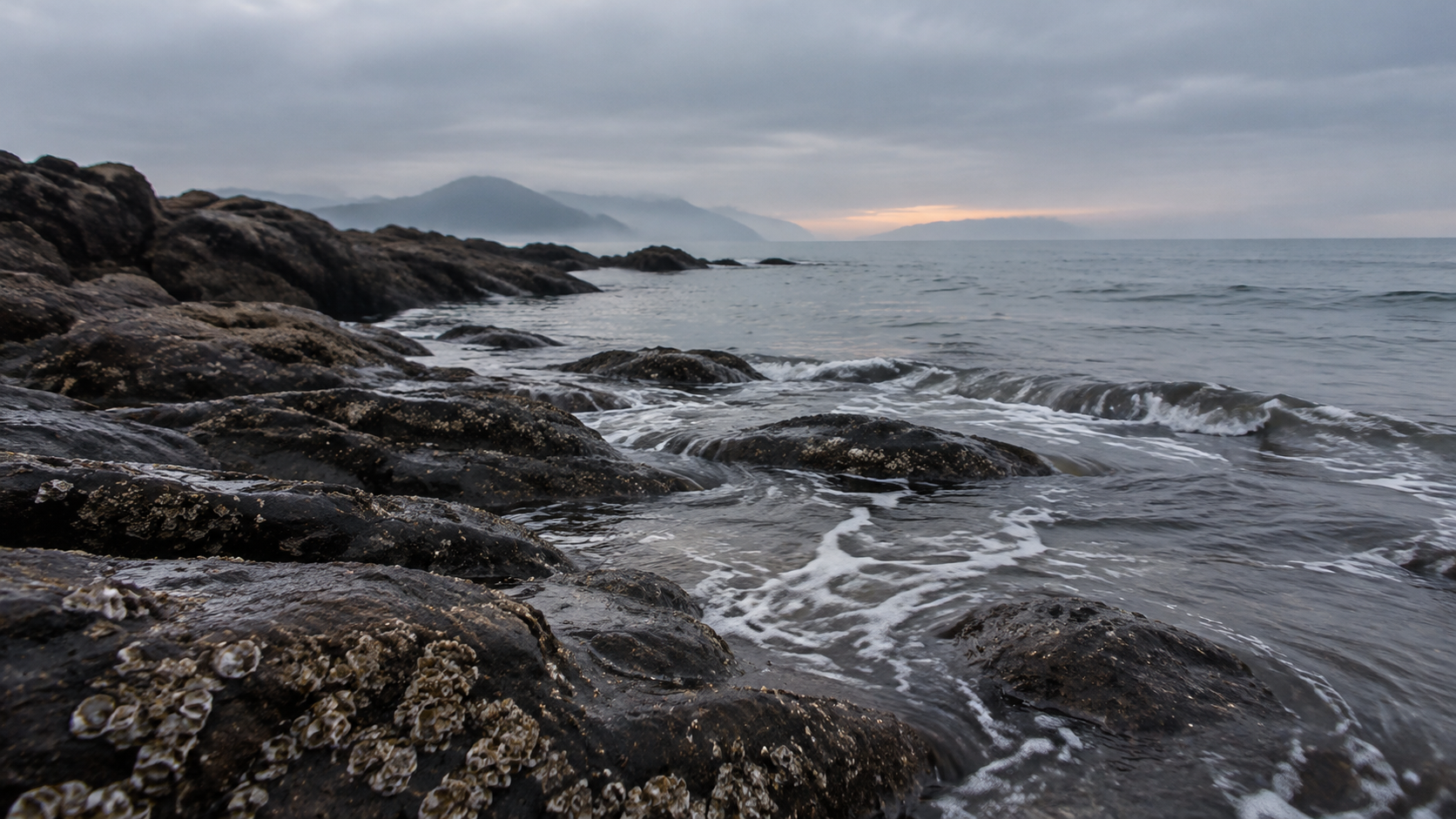
Seaside Rocks · Tidal Walk
Style Coastal · slow-cinema · Atmosphere
Reference inputs
Reference images
Prompt
On an overcast dawn, the camera slowly trucks laterally above dark, wet coastal rocks. Thin ripples of white foam wash over barnacle-covered stone and retreat, leaving a thin mirror-like film of water that reflects the pale gray-blue sky. Mist drifts through the air, softening the distant horizon. The camera glides steadily at a low angle, keeping the richly textured rock surface in the foreground while the open sea remains calm and vast. The overall mood is quiet and cold; the ambient sound includes small waves washing over the rocks, water receding, and faint wind.
Copy the full prompt and adapt it for your own generation.
Tags
Pricing
muse-video-1.0/image-to-video per video
| Unit Price | $0.0336 |
|---|
Positioning Overview
This model accepts images and text prompts and outputs a fixed 10-second, 720p video with its own audio. Users can upload 1 to 9 reference images to guide the visuals and use prompts to describe subject motion and camera movement; it supports automatically following the aspect ratio of the reference images or manually specifying the frame size. It is suitable for developers and creators who need to quickly turn static concepts, product images, or storyboard drafts into video clips.
Core Highlights
- Multi-image reference visual guidance — supports passing in 1 to 9 reference images at once to provide visual grounding for the scene, subject, or style.
- Automatic or manual frame size specification — by default it automatically follows the aspect ratio of the reference images, or you can select an output frame size from seven common ratios.
- Prompts describe motion and camera — use a prompt of up to 5000 characters to explain how the subject moves, how the camera moves, and the desired audio.
Capability Description
Image-reference video generation: pass in 1 to 9 reference images along with a prompt to generate a video clip with subject motion and camera movement; the reference images are used to guide the visuals and are not guaranteed to become a pixel-identical first frame.
Motion and camera description: the prompt can be up to 5000 characters and is used to describe how the subject in the reference images moves, the direction of camera movement, and the desired visual atmosphere.
Aspect ratio control: aspect_ratio can be auto, 16:9, 9:16, 1:1, 4:3, 3:4, 3:2, or 2:3; when auto is selected, the output ratio follows the reference images, or you can manually specify the frame size.
Use Cases
- Creators turn concept art into motion clips — upload concept design images and describe the action and camera to get motion footage that can be used directly in short films or social content.
- Generate showcase videos from product images — use product images as references, describe orbit or dolly camera moves, and generate video clips for e-commerce pages or promotional materials.
- Dynamic previews of storyboard sketches — use storyboard sketches as reference images, fill in the motion rhythm with prompts, and quickly get dynamic previews for pitches or internal reviews.
Limitations and Selection Advice
aspect_ratio accepts only one enum value per request and cannot output multiple frame sizes at the same time. Reference images are passed in via URLs and must use accessible http or https links, with a maximum of 9 per request. Reference images guide the visuals and are not guaranteed to become a pixel-identical first frame, nor are characters or scenes guaranteed to be absolutely consistent. The duration is fixed at 10 seconds and the resolution is fixed at 720p and cannot be adjusted. Requests with an empty prompt or a prompt containing only whitespace cannot be submitted.
What's new
View changelog →- New model New model: Muse Video 1.0 Image-to-Video
- New model New model: Muse Video 1.0 Text-to-Video
Frequently asked questions
View all FAQs →-
How long a video can this model generate?
Each clip is fixed at 10 seconds. The duration is not adjustable; writing "longer duration" in the prompt will not take effect. If you need longer content, generate it in 10-second segments and stitch them together yourself.
-
Can the output resolution and aspect ratio be changed?
The resolution is fixed at 720p and cannot be adjusted. Specify the aspect ratio with aspect_ratio: for image-to-video, the options are auto, 16:9, 9:16, 1:1, 4:3, 3:4, 3:2, 2:3, with the default being auto (which follows the aspect ratio of the reference image); for text-to-video, the latter 7 ratios are available, with the default being 16:9.
-
How many reference images can I upload at most?
1 to 9 images, passed in as http or https links. Reference images are used to guide the visuals and are not guaranteed to become a pixel-identical first frame; if you want a particular image to dominate the composition, point to it explicitly in the prompt (for example, "use the person in the first image as the main subject"), and the remaining images will only supplement the style or elements.
-
How should I write the prompt so the image moves correctly?
Write in the four-part order of “how the subject corresponds to the reference image → subject action → camera movement → sound,” with one specific sentence per part. For example, first write “Use the red sports car in image 1 as the subject,” then write “the wheels turn and the body slowly moves forward,” then write “the camera follows from a low side angle,” and finally write “low engine hum and tire-screeching sounds.” Put camera movement in its own sentence; do not mix it with subject action in the same sentence.
Create a generation task
https://api.hiapi.ai/v1/tasks Headers
AuthorizationstringRequiredAccount API key. Required on every request. Example: Bearer YOUR_HIAPI_API_KEY. Get your API key
Content-TypestringOptionalThe request body is always parsed as JSON; when sent, only application/json (optionally with charset) is accepted — any other value returns 415. Example: application/json.
Idempotency-KeystringOptionalIdempotency key, up to 255 bytes. Retries with the same key from the same account create the task only once; replays return the original taskId.
On network timeouts or client retries, the same key creates the task only once — no double charges (scope: the API key's account). Use a business-unique identifier as the key (e.g. "order-42"); replays return the original taskId, and keys expire 24 hours after the first request. See the Unified Async API overview for the full scenario matrix.
Body
modelstringRequiredCurrent fixed value: muse-video-1.0/image-to-video
routestringOptionalCurrent fixed value: default
inputobjectRequired
Business parameters for muse-video-1.0/image-to-video and route default — see the parameter table below.
promptstringRequiredminLength 1maxLength 5000pattern \SDescribe how the subject in the reference image moves, how the camera moves, and the desired sound effects. The generated video is fixed at 10 seconds, 720p, and includes its own audio.
image_urlsarrayRequiredminItems 1maxItems 9An array of reference image URLs used to guide video generation; supports 1–9 http or https images. These images are not guaranteed to become a pixel-perfect first frame.
Array [ string ]
aspect_ratiostringOptionalDefault: "auto"Controls the aspect ratio of the output video: auto means follow the reference image's ratio, or you can specify a fixed aspect ratio. Default is auto.
auto16:99:161:14:33:43:22:3callbackobjectOptional
Terminal-state notification config. When omitted, no callback is delivered — poll the task yourself. See the callback note below.
Provide callback.url when creating a task and HiAPI POSTs to your service once the task reaches a terminal state — no polling needed. The callback payload mirrors the task detail structure; signature verification, delivery retries and idempotency are documented on the Unified Async API overview page.
urlstringRequiredRequired when callback is present. A POST is sent to this URL once the task reaches a terminal state; must be a valid http(s) URL.
whenstringOptionalDefault: "final"Only final is supported today — notified on both success and fail.
finalstoragestringOptionalDefault: "temp"Artifact storage tier: temp (default, retained about 7 days) or persistent (long-term, billed by size). Insufficient balance or exceeding the storage cap silently downgrades to temp; the effective tier is shown in the task detail response.
temppersistentRequest examples
# Submit an async task; returns a taskId immediately (no waiting for generation)
curl -X POST "https://api.hiapi.ai/v1/tasks" \
  -H "Authorization: Bearer $HIAPI_API_KEY" \
  -H "Content-Type: application/json" \
  -d '{
  "model": "muse-video-1.0/image-to-video",
  "input": {
    "prompt": "…",
    "image_urls": "…",
    "aspect_ratio": "auto"
  }
}'
const res = await fetch("https://api.hiapi.ai/v1/tasks", {
method: "POST",
headers: {
Authorization: `Bearer ${process.env.HIAPI_API_KEY}`,
"Content-Type": "application/json",
},
body: JSON.stringify({
model: "muse-video-1.0/image-to-video",
input: {
"prompt": "…",
"image_urls": "…",
"aspect_ratio": "auto"
}
}),
});
const task = await res.json();
// { code: 200, message: "success", data: { taskId } }import os, requests
res = requests.post(
"https://api.hiapi.ai/v1/tasks",
headers={"Authorization": f"Bearer {os.environ['HIAPI_API_KEY']}"},
json={
"model": "muse-video-1.0/image-to-video",
"input": {
"prompt": "…",
"image_urls": "…",
"aspect_ratio": "auto"
}
},
)
print(res.json()) # { code, message, data: { taskId } }200 OK
{
  "code": 200,
  "message": "success",
  "data": {
    "taskId": "tk-hiapi-01HZTQ8BX2N3GM3YFK4Z9D7VQR"
  }
}
400 Bad Request
{
  "code": 400,
  "message": "invalid request",
  "data": null,
  "error_code": "INVALID_REQUEST"
}
Get task detail
https://api.hiapi.ai/v1/tasks/:id Response fields
taskIdstringRequiredTask ID, always prefixed with tk-hiapi-.
modelstringRequiredResolved full model name. Tasks submitted with the route parameter return base@route (e.g. gpt-image-2/text-to-image@ext); otherwise identical to the name passed at creation.
routestringOptionalPresent only when the task was submitted with an explicit route parameter; echoes the submitted value.
statusstringRequiredTask status.
queued Queued, not started yet.
handling Being processed.
archiving Processing finished, artifacts being prepared.
success Terminal: completed, artifacts available (output returned).
fail Terminal: failed (error returned).
After submission, check status: success and fail are terminal, everything else is non-terminal. Poll every 1–3 seconds until terminal. On success, download artifacts from output[].url and transfer them before expireAt; pass storage: "persistent" at creation time when long-term retention is needed.
creatednumberRequiredTask creation time (Unix seconds).
completednumberRequiredUnix seconds when the task reached a terminal state; fixed to 0 while not terminal.
outputarrayOptional
Present only when status == success. Artifact list — always an array; a single task may return multiple types at once (e.g. video + first_frame).
Array [ object ]
Array items
urlstringRequiredArtifact URL, directly downloadable.
typestringRequiredCurrent possible values: video, image, audio, first_frame, last_frame, thumbnail; more may be added later.
expireAtnumberRequiredUnix seconds until which the artifact remains accessible; download or transfer before it expires.
errorobjectOptional
Present only when status == fail.
codestringRequiredBusiness error code.
messagestringRequiredError description.
Response examples
Success
{
  "code": 200,
  "message": "success",
  "data": {
    "taskId": "tk-hiapi-01HZTQ8BX2N3GM3YFK4Z9D7VQR",
    "model": "happyhorse-1-0",
    "status": "success",
    "created": 1777282033,
    "completed": 1777282099,
    "output": [
      {
        "url": "https://cdn.hiapi.ai/tasks/.../video.mp4",
        "type": "video",
        "expireAt": 1777886899
      }
    ]
  }
}
Processing (non-terminal)
{
  "code": 200,
  "message": "success",
  "data": {
    "taskId": "tk-hiapi-...",
    "model": "happyhorse-1-0",
    "status": "archiving",
    "created": 1777282033,
    "completed": 0
  }
}
Failed
{
  "code": 200,
  "message": "success",
  "data": {
    "taskId": "tk-hiapi-...",
    "model": "happyhorse-1-0",
    "status": "fail",
    "created": 1777282033,
    "completed": 1777282099,
    "error": {
      "code": "TASK_FAILED",
      "message": "task failed"
    }
  }
}Articles
View all articles →
Related Models
View all models →Same Type
-
 PixVerse V6 Max PixVerse $0.030 /second
-
 MiniMax H3 MiniMax $0.072 /second
-
 Seedance 2.5 ByteDance $0.121 /second
-
 Vidu Q4 Preview Vidu $0.051 /second
-
 Kling 2.5 Kuaishou $0.090 /second
-
 P-Video 2 Pro Avatar Pruna AI $0.029 /second
-
 Kling 4.0 Kuaishou $0.204 /second
-
 Wan 3.0 Video Alibaba $0.040 /second
-
 Grok Imagine 1.5 Lite xAI $0.029 /second
-
 Kandinsky 6.0 Pro $1.93 /video
-
 Gemini Omni 1.2 Google $0.023 /second
-
 Grok Imagine 1.5 xAI $0.011 /second