
Comparison
seedream-5.0-lite/text-to-image Side-by-Side Comparison: How to Choose, Integrate, and Migrate Text-to-Image Models

Conclusion First: In Which Scenarios Is It Worth Trying seedream-5.0-lite First
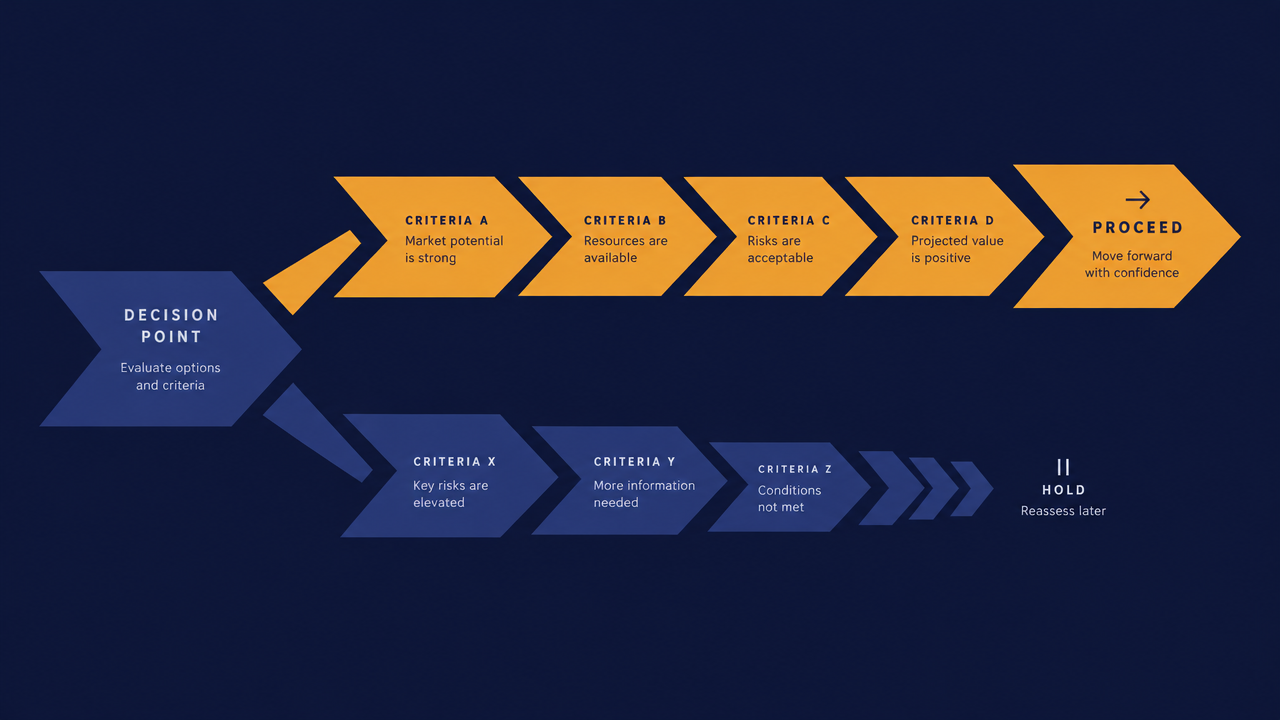
If you are a developer looking for candidate models for an image generation pipeline, you can use the decision tree below for a quick initial placement.
Scenarios suitable for priority trial:
- High-volume, cost-sensitive batch image generation: Mass production of product images, illustrations for content platforms, and first-round drafts of marketing materials. In these scenarios, the value of a single request is low and the call volume is high, so differences in per-image cost get amplified. The per-image pricing model of seedream-5.0-lite/text-to-image makes it a very suitable first candidate.
- Scenarios with relatively high tolerance for "good enough" generation quality: Draft images, thumbnails, placeholder visuals for list pages, and internal previews.
- Early-stage projects that need to quickly validate product form: First get the pipeline running and refine the prompts and business logic, then upgrade to stronger models based on results later.
- Teams that want to avoid being locked in by a single vendor: They want a unified calling method so that future model changes require changing only one identifier.
It is recommended to continue observing or choose another model:
- Finished-product-level scenarios with hard requirements for details, text rendering, and complex composition.
- Scenarios requiring extremely high concurrency in a short time and sensitive to latency jitter—such requirements depend on actual rate limiting and quota behavior, not just list prices.
- Teams that already have a mature image generation pipeline and whose current model results and costs are within an acceptable range; the switching benefit is not enough to cover the migration cost.
One-sentence conclusion: Treat seedream-5.0-lite as the first candidate for "cost-sensitive batch image generation," not as the default answer for all scenarios.
Comparison Dimensions: What Developers Should Look At When Choosing a Text-to-Image Model
Do not choose a model based on "which sample image looks better." The following six dimensions can be reused directly to compare any text-to-image model side by side.
1. Per-Image Cost (Not List Price)
The real cost is the "effective cost per usable image": list price ÷ usability rate. If only six out of ten images from a model can be used directly and the other half rely on retries, the actual cost is far higher than the list price. seedream-5.0-lite is billed per image, so the conversion logic is straightforward—just multiply by the retry rate and the unusable-image rate.
2. Concurrency, Latency, and Rate Limiting
The bottleneck of batch tasks is often not model quality but rate limiting. You need to clarify: the request-per-second limit, queue behavior, and how timeouts and failures are returned. These directly affect how you design your task scheduler.
3. Output Size and Parameter Controllability
Supported aspect ratios, resolution tiers, whether negative prompts are supported, and which sampling parameters actually take effect. If a size is not supported, you can only crop or resize after generation, which implicitly increases cost.
4. Style Consistency and Reproducibility
How large is the variation in generated images when the same prompt is called repeatedly? Can it be stably reproduced by fixing the seed or similar methods? When creating brand visuals or grouped multi-image materials, this dimension directly determines the amount of rework.
5. Compliance and Content Moderation
The moderation policy on the model side, the return format when generation is refused, and whether your business side still needs an additional filtering layer. This part is often overlooked but can suddenly become a blocker after launch.
6. Integration Complexity
Authentication method, SDK ecosystem, response structure, and error code design. The more complex the integration, the higher the sunk cost of subsequent model switching—this is also the focus of the next section.

Pricing Side-by-Side: What Does $0.035/Image Mean
The pricing basis of seedream-5.0-lite/text-to-image is billed per image, $0.035 per image. The number itself is not the point; the point is how large a share it takes in your business cost structure.
Convert the List Price into an Effective Cost
Effective per-image cost ≈ list price per image × (1 + retry rate) ÷ usability rate.
Here is a purely logical example (not real business data): If 20% of requests in a pipeline need retries and 25% of the generated results need manual rework, then the cost of producing each usable image is about 1.6 times the list price. Therefore, when evaluating seedream-5.0-lite, do not just look at the number 0.035; first measure these two ratios in your own pipeline.
When Cost Differences Really Matter
- Low-frequency scenarios: Dozens of images per day; cost differences among any models can be ignored, and quality and controllability should be prioritized.
- Medium-to-high-frequency scenarios: Thousands to tens of thousands per day; cost begins to enter a perceptible range, but it still needs to be calculated together with the labor cost of quality rework.
- Batch generation scenarios: Once daily output reaches the scale of one hundred thousand images, per-image cost differences are linearly amplified, and rate limiting and scheduling complexity become new bottlenecks—at this point, cost optimization must be done together with throughput design, not by looking only at the quote.
The Billing Basis Itself Is Also a Selection Factor
The advantage of per-image billing is predictable budgeting: one request corresponds to one image, cost corresponds linearly to business volume, and quota control and user-side metering are easy. By contrast, modalities billed by output seconds or by token require an additional conversion model. If your billing system needs to be simple and explainable, per-image billing is more convenient.
Integration Methods: Trade-offs Between Direct Connection and Aggregated API
There are two ways to integrate a text-to-image model: connect directly to the model provider, or call uniformly through an aggregated API. The two are not a pure good-versus-bad relationship, but for teams that need to try models frequently, the trade-off is clear.
Direct Connection to the Model Provider
- Authentication, SDK, error codes, and rate limiting policies are all different for each provider; each new model integration adds another set of credentials and dependencies.
- The advantage is the shortest path, allowing you to obtain the provider's unique capabilities and new features as soon as possible.
- The disadvantage is high switching cost: once a model is written into business code, changing the model means modifying the integration layer again.
Integration Through an Aggregated API
- Unified base address, authentication method, and response structure; models are distinguished by model identifiers. Switching models usually requires changing only one field, without rewriting request logic.
- When multiple models coexist, A/B testing, gradual rollout, and routing by scenario are easier to implement: you can route price-sensitive scenarios to seedream-5.0-lite and quality-sensitive scenarios to other models, while the calling code shares the same set.
- The cost is an additional layer; you need to pay attention to the availability of the aggregation layer itself and the pace of model coverage updates.
Engineering Recommendations
Whichever path you take, wrap model calls in your own adapter layer: define a unified internal request structure (prompt, size, quantity, optional parameters) and a unified response structure (image URL or binary, status, error reason). In this way, the aggregation layer is merely one implementation of the adapter layer, and no matter whether you switch aggregation or direct connection in the future, the business code remains unchanged.
For teams preparing for large-scale model selection, the most practical value of the aggregation approach is: it downgrades "which model to choose" from an architectural decision to a configuration decision.

How to Verify Differences in Side-by-Side Comparison with Similar Models
Sample image comparisons have almost no decision-making value—platforms pick only the best-looking ones. An executable verification method is to construct your own small-sample evaluation set.
Step 1: Build Samples with Real Business Prompts
Extract 50–200 real prompts from online logs, covering your main business types (people, products, scene images, text elements, etc.), and allocate quantities according to business proportions. Do not use beautiful prompts intended for demos.
Step 2: Unify Variables
All models should use the same size tier, the same number of images, and the same sampling parameters as much as possible. Comparison conclusions with inconsistent parameters are meaningless. Call each model with the same batch of prompts in the same order.
Step 3: Define Quantifiable Metrics
- Request success rate: The proportion of valid returns, used to calculate retry cost.
- Unusable-image rate: The proportion manually judged unusable; this is a key item in the cost formula.
- Manual selection time: How many labor minutes are needed for every N usable images produced. This item is often overlooked but is often more expensive than API cost.
- Consistency: Whether results generated multiple times from the same prompt are stable.
Step 4: Small-Traffic A/B
The evaluation set only answers "whether it can be used"; real traffic answers "whether it is worth full rollout." Route 5%–10% of online traffic to the new model, run it for a full business cycle, and compare downstream metrics (user clicks, manual rework ticket volume, failure alert count). The conclusion of this step is more reliable than any offline comparison.
What to Pay Attention to When Migrating from an Existing Model
Migration risks are almost never about "whether the call can go through," but about differences in details. Align item by item according to the following.
Prompt Style Adaptation
Prompt preferences vary greatly among models: some handle long descriptions well, while others are more sensitive to keyword lists. Do not hard-code prompts in business code; put them in a configuration or template layer so that during migration you can replace them as a whole and compare in parallel, instead of changing strings all over the repository.
Parameter and Size Differences
Field names may differ, and value ranges also differ. Before migration, confirm:
- The list of supported aspect ratios and resolution tiers;
- Whether unsupported sizes return an error or are silently rewritten to the closest value;
- The default values of sampling-type parameters and whether they take effect.
Silent size rewriting is the most hidden problem—the call succeeds, but the image aspect ratio is wrong, and downstream cropping logic goes wrong with it.
Response Structure and Status
Are images returned as URLs or binary? Do URLs expire? What statuses represent generating and failed? Handle the four cases "call succeeded," "generating," "content rejected," and "server error" separately; do not wrap everything in a single try-catch.
Error Codes and Retry Strategy
Which errors are worth retrying (rate limiting, transient failures), and which should not be retried (content moderation refusal, invalid parameters). Retrying cases that should not be retried is equivalent to paying repeatedly. At the same time, add exponential backoff and an upper limit to retries.
Key Design for Cache and Asset Storage
Cache keys must include the model identifier and key parameters; otherwise, after migration, old cache entries may be hit incorrectly, making it look like "the new model's results have not changed." Name object storage paths with a separate model prefix for easy comparison and rollback.
Gradual Switching Steps
- Add a new model implementation in the adapter layer without changing business code;
- Run it in the internal environment and confirm the response structure and error branches;
- Roll out with a small proportion of traffic and observe the success rate and downstream metrics;
- Keep the old model as a fallback path for at least one full business cycle;
- After metrics meet the target, set the new model as the default and downgrade the old path to backup.
Selection Checklist and Implementation Recommendations
Finally, condense it into a checklist that can be ticked off item by item.
Before Integration
- Clarify the business positioning of this pipeline: is it batch drafts or finished-product-level output?
- Measure the request success rate and unusable-image rate of the existing pipeline, and calculate the effective per-image cost baseline.
- Extract a sample set of real prompts from online logs, covering the main business types.
- Confirm whether the sizes and parameters supported by seedream-5.0-lite/text-to-image cover your needs.
During Integration
- Add an adapter layer between the business and the model; do not hard-code prompts, parameters, or response structures.
- Unify authentication and base address; pass the model only as an identifier, leaving room for subsequent switching.
- Distinguish retryable and non-retryable errors, and use a retry strategy with backoff and an upper limit.
- Cache keys include the model identifier and key parameters.
After Launch
- Run small-traffic A/B for a full business cycle before deciding whether to roll out fully.
- Monitor three metrics: success rate, unusable-image rate, and manual rework ticket volume.
- Keep a fallback path until the new model's metrics are stable.
- When call volume grows, re-evaluate throughput and cost structure instead of reusing old conclusions.
The value of seedream-5.0-lite/text-to-image lies in pushing the per-image expenditure for "cost-sensitive batch image generation" to a level where budgeting is easy, while the real selection conclusion must be given by your own sample set and real traffic. With the model integrated behind a unified adapter layer, you can change the answer at any time without rewriting the business.
Related articles
View all articles →-

Comparison
Recraft v4.1 Flash Text-to-Image Horizontal Comparison: Developer Model Selection and Migration Guide
Use the $0.01 per-image cost and pure text-to-image capability to judge whether it fits your image generation pipeline
-

Comparison
hailuo-2.3-fast/image-to-video Side-by-Side Comparison: How to Choose an Image-to-Video Model and Key Migration Points
-

Comparison
Seedream 5.0 Pro Image-to-Image Side-by-Side Comparison: Capabilities, Pricing, and Selection Guidance