Bria
FIBO 2.0
fibo-2.0/text-to-image
A unified image model from Bria that handles text-to-image generation and instruction-based image editing within a single model, accepting up to four input images for editing; trained only on licensed data, it is suitable for concept art, marketing stills, and e-commerce product images
Try fibo-2.0/text-to-image
Input
Showcases
View all showcasesOutput
image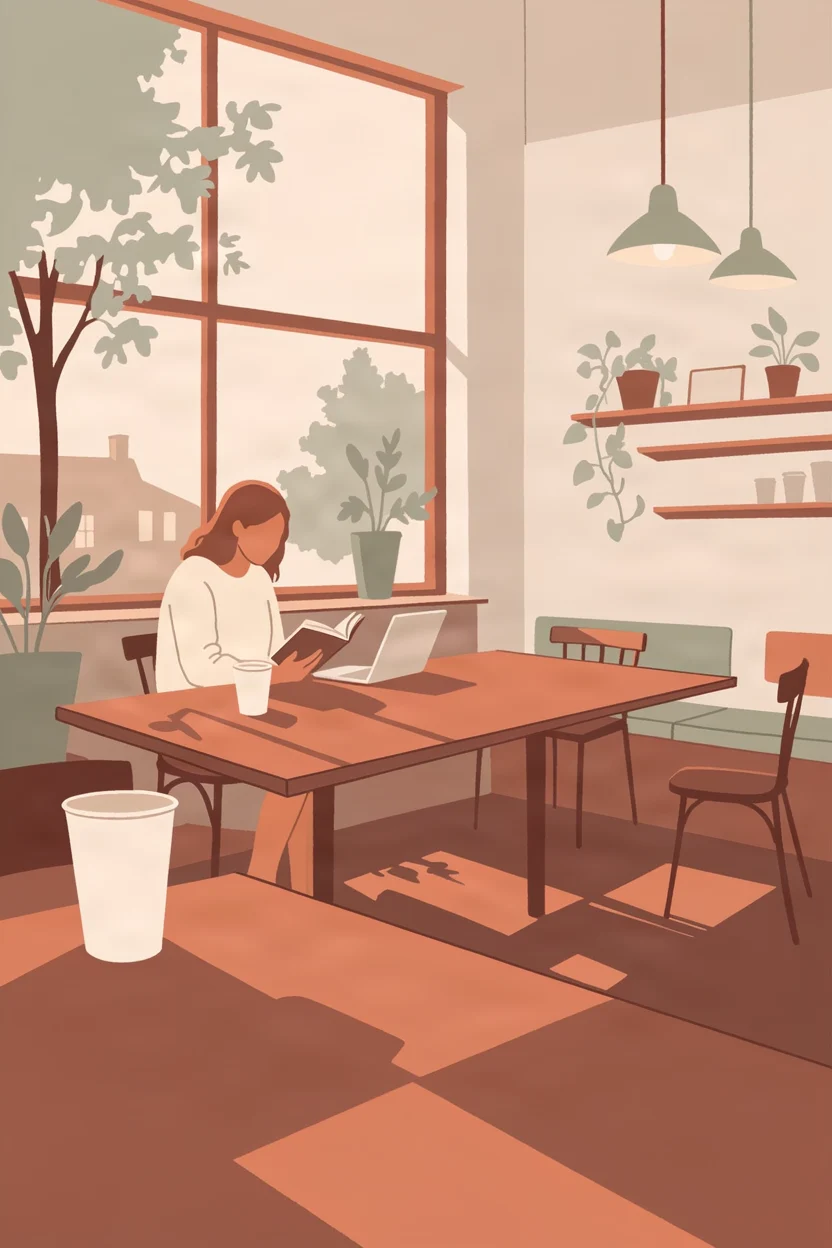
Flat Prairie Café · Afternoon Window-Side Ensemble
Style Flat illustration · Editing · Warm tones
Prompt
A flat editorial illustration depicting the interior of a neighborhood café in the afternoon. A large window on one side casts geometric patches of warm light onto a long wooden table; several customers sit quietly at different depths of the room—one reading a book with a paper cup nearby, one leaning over a laptop, and another holding a steaming mug while gazing out the window. The scene is rendered with clean flat color blocks and crisp, clear silhouettes, with no gradients; furniture, hair, and leaves are all depicted with simplified geometric shapes; the palette is restrained and warm, using terracotta orange, cream white, soft sage green, and deep ochre, with darker outline strokes only where shapes overlap. The foreground tabletop and cups anchor the bottom of the composition, the window and tree silhouettes occupy the upper area, and shelves and pendant lamps sit close to the edges, leaving breathing space in the middle, so the composition still works when the image is vertical. The overall mood is calm, with the feel of a contemporary lifestyle magazine.
Copy the full prompt and adapt it for your own generation.
Tags
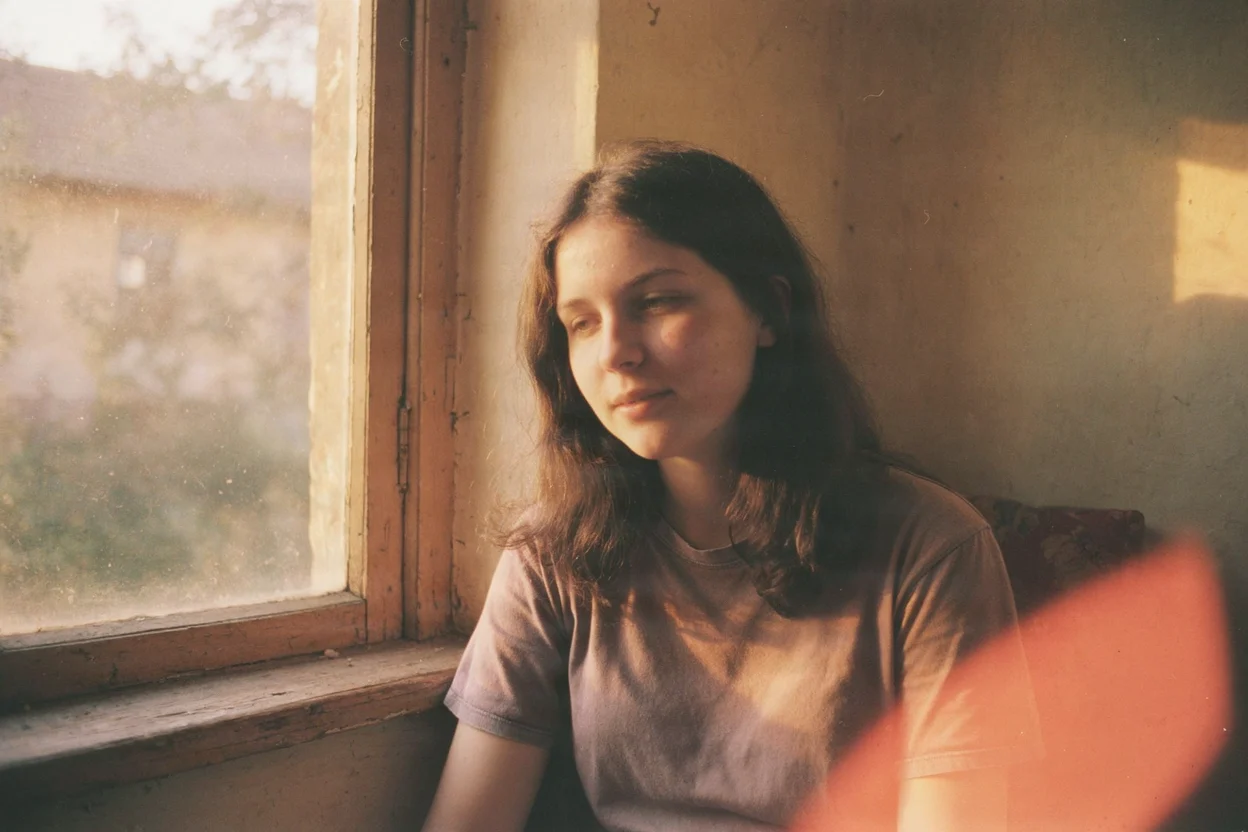
Window Side Light · Kodak Film Portrait
Style Portrait & Photography · Analog Film · Natural light
Prompt
A close-up portrait of a young woman with loose dark long hair, sitting beside an old wooden window frame, her face turned slightly toward the window, her expression relaxed, her gaze drifting just past the lens. Afternoon sunlight rakes across her cheekbones and fine strands of hair, casting soft shadows on the other side of her face. Natural skin texture, visible pores and a few faint freckles, no heavy retouching. Warm Kodak golden film tones, highlights at the temples gently blown out, shadows tinged with a faint cool green, and an overall delicate, even grain across the image. Shallow depth of field, with a blurred window and dust motes in the air behind her; the mood is quiet and unhurried.
Copy the full prompt and adapt it for your own generation.
Tags
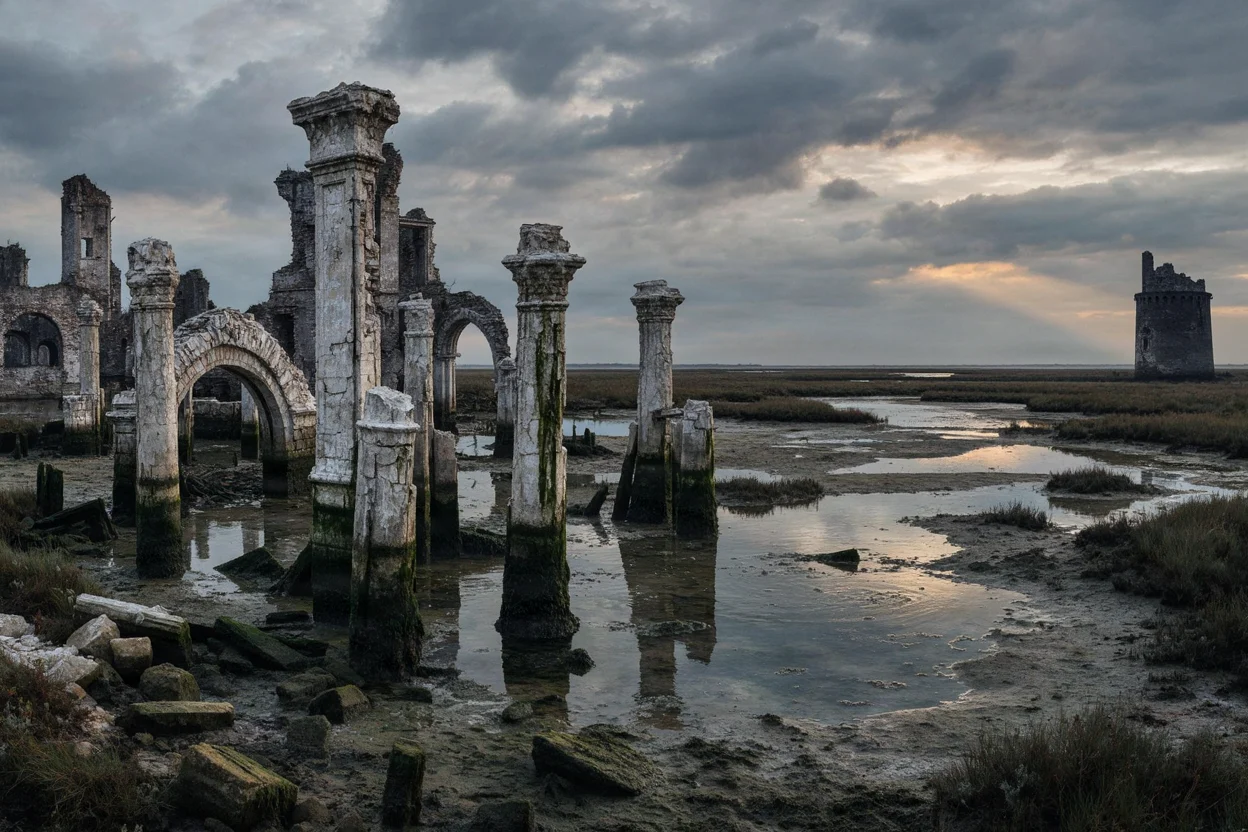
Salt Marsh Ruined City · Dusk Worldbuilding Concept Art
Style Worldbuilding · Atmosphere · Concept Art
Prompt
A worldbuilding concept scene of a ruined city swallowed by a salt marsh, broken colonnades and arches standing in shallow tidal water, with the silhouette of a half-collapsed tower at the far edge. Only a single gap in the dense evening clouds lets low warm light spill onto the water, while the ruins themselves are steeped in cool blue-gray shadow. Weathered salt-crusted stone, lines of algae marking the former waterline, faint reflections and slow ripples. Cinematic matte-painting composition, the main ruins offset to one side of the frame, open sky above, low-saturation muted palette, soft volumetric fog, delicate painterly texture, a silent and desolate atmosphere.
Copy the full prompt and adapt it for your own generation.
Tags
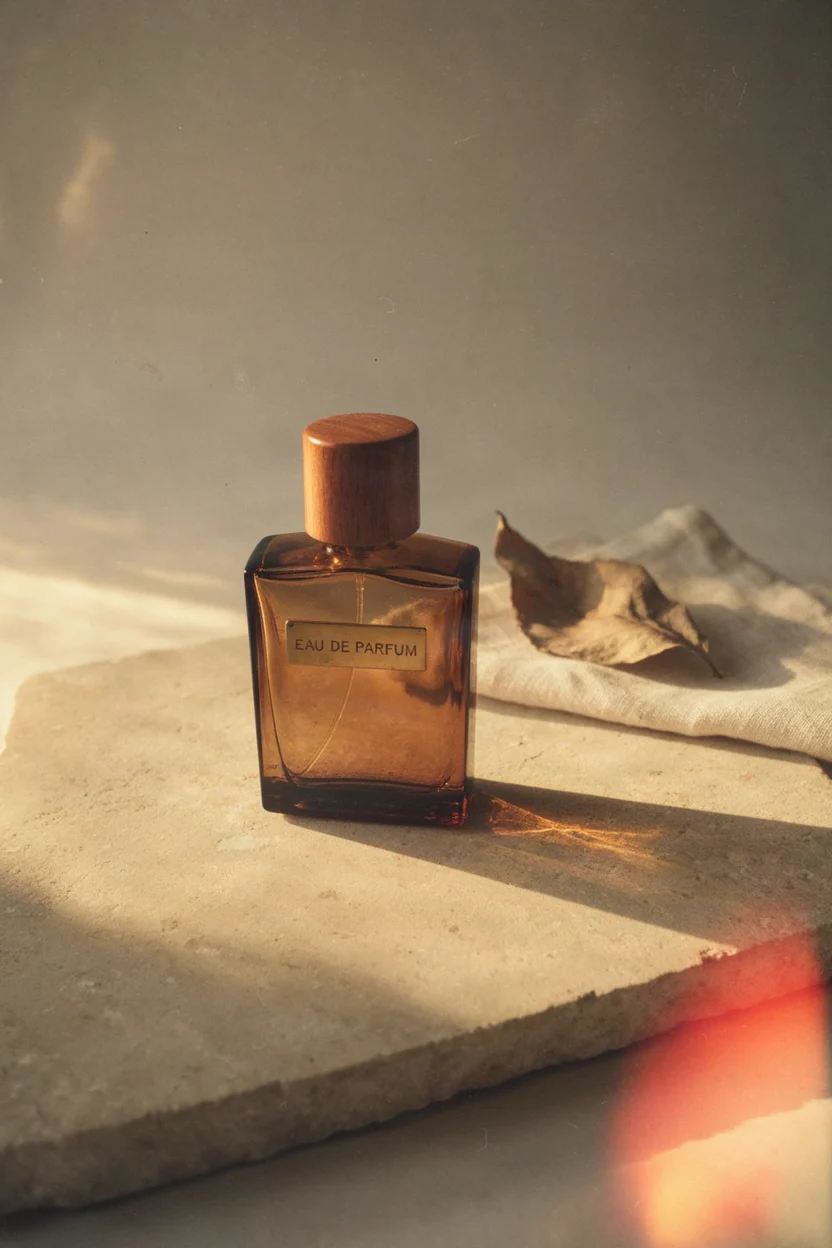
Amber Perfume Bottle · Morning Light Still Life
Style Product Image · Still Life · Editing
Prompt
A cinematic product still life photograph: a thick-walled amber glass perfume bottle with a polished wooden cap and a small brushed brass nameplate, resting on a pale beige limestone slab. A dried leaf and a softly folded piece of linen sit slightly behind it, and the background gradually fades into a creamy gray mist. Warm, low-angle morning light slants in from one side, casting a soft, long shadow and producing bright refractions in the glass, with fine floating dust motes visible near the light. Shot with a medium-format camera, shallow depth of field, focus falling sharply on the shoulder of the bottle and the cap, with smooth transitions and delicate natural grain, warm and understated tones, in a high-end magazine product photography style, subject centered with ample negative space above and around it.
Copy the full prompt and adapt it for your own generation.
Tags
Pricing
fibo-2.0/text-to-image per image
| Unit Price | $0.0572 |
|---|
Positioning Overview
This is a text-to-image model that accepts prompts along with an optional reference image or photographic style preset and outputs a still image. It supports selecting one of several aspect ratio presets and passing in a seed to reproduce the same result. It is aimed at developers who need to quickly explore visual ideas, and is suitable for early-stage generation of assets such as concept art, marketing stills, and character designs.
Core Highlights
- Choose either a style or a reference image — You can use a photographic style preset or a public image URL as a visual reference. The two are mutually exclusive; only one can be selected at a time.
- Wide range of aspect ratio presets — Twenty-one aspect ratio presets are available, from 1:1 to 5:1. You select one per call, and the output is approximately one megapixel.
- Seed reproducibility — The same seed and prompt can repeatedly generate the same image, which is convenient for debugging and comparing results.
Capability Description
Basic text-to-image generation: Enter a text prompt to generate an image. The prompt can be up to 10,000 characters, is required, and cannot be empty.
Photographic style presets: You can choose one of four styles: Kodak Film, Hard Flash, Hazy Dreamy, and Rough Realism, but it cannot be used together with a reference image.
Reference image guidance: You can provide a public image URL as a visual reference for the scene, which is mutually exclusive with style presets.
Aspect ratio and seed control: Choose one of twenty-one aspect ratio presets, and the output is approximately one megapixel; passing in a seed reproduces the same result.
Use Cases
- Concept art direction exploration — Concept designers use short prompts to generate sketches with different styles and compositions in batches, for early-stage direction screening and discussion.
- Marketing still thumbnail testing — Marketers use product descriptions together with style presets to generate multiple still versions, quickly compare different visual directions, and use them for preliminary screening of advertising assets.
- Rapid iteration of character designs — Character designers describe character poses and styling in text and combine them with reference images to generate concept art, for preliminary comparison of design options.
Limitations and Selection Advice
Each call can select only one of twenty-one aspect ratio presets, and the output resolution is approximately 1 megapixel. Photographic style presets and reference images cannot be used at the same time. Prompts can be up to 10,000 characters; longer prompts cannot be submitted. The same seed and prompt can reproduce results, but different parameter combinations do not guarantee completely identical images.
What's new
View changelog →- New model FIBO 2.0 Image Editing Now Live
- New model FIBO 2.0 Text-to-Image Now Live
Frequently asked questions
View all FAQs →-
How do I fix the composition to reproduce the same image?
To reproduce the same result, simply fix the seed and keep the prompt unchanged. The seed defaults to 5555 and accepts values from 0 to 2147483647; as long as the seed and prompt stay the same, the output stays the same. Changing the seed yields a different composition on the same subject.
-
Which aspect ratios can I choose? What is the resolution?
Pick an aspect ratio from the presets based on your composition; the output is approximately 1 megapixel. Available values include 1:1, 2:3, 3:2, 3:4, 4:3, 4:5, 5:4, 9:16, 16:9, 16:10, 10:16, 2:1, 1:2, 21:9, 9:21, as well as elongated ratios such as 3:1, 1:3, 4:1, 1:4, 5:1, 1:5; if not provided, the default is 1:1.
-
Can a reference image and a style preset be used together in text-to-image?
They cannot be used at the same time; you can only choose one of the two. In text-to-image, if you pass style, you cannot also pass image_url, and vice versa; if you want a reference image to set the scene, give up the style preset, and if you want film, hard flash, hazy, or gritty realistic feel, use only text prompts. Image-to-image editing has no style preset parameter; the visual tone is written directly in the instruction.
-
What photography style presets are available for text-to-image?
Text-to-image supports four photographic looks: Kodak Film, Hard Flash, Hazy Dreamy, and Rough Realism. They serve only as an optional overall photo tone and are mutually exclusive with reference images; when precise control of lighting and camera position is needed, you should still specify it in the prompt rather than relying solely on presets. Image-to-image editing does not offer style presets.
Create a generation task
https://api.hiapi.ai/v1/tasks Headers
AuthorizationstringRequiredAccount API key. Required on every request. Example: Bearer YOUR_HIAPI_API_KEY. Get your API key
Content-TypestringOptionalThe request body is always parsed as JSON; when sent, only application/json (optionally with charset) is accepted — any other value returns 415. Example: application/json.
Idempotency-KeystringOptionalIdempotency key, up to 255 bytes. Retries with the same key from the same account create the task only once; replays return the original taskId.
On network timeouts or client retries, the same key creates the task only once — no double charges (scope: the API key's account). Use a business-unique identifier as the key (e.g. "order-42"); replays return the original taskId, and keys expire 24 hours after the first request. See the Unified Async API overview for the full scenario matrix.
Body
modelstringRequiredCurrent fixed value: fibo-2.0/text-to-image
routestringOptionalCurrent fixed value: default
inputobjectRequired
Business parameters for fibo-2.0/text-to-image and route default — see the parameter table below.
seedintegerOptionalDefault: 5555min 0max 2147483647Random seed, default 5555. The same seed and the same prompt reproduce the same image.
stylestringOptionalOptional photography style: Kodak Film, Hard Flash, Hazy Dreamy, Rough Realism. Cannot be used together with a reference image (image_url).
Kodak FilmHard FlashHazy DreamyRough RealismpromptstringRequiredminLength 1maxLength 10000Required. Describes the scene to generate; longer descriptions containing multiple subjects and spatial relationships are supported.
image_urlstringOptionalminLength 1pattern ^https?://Optional public image URL used as a visual reference for the prompt scene. Cannot be used together with style.
aspect_ratiostringOptionalDefault: "1:1"Aspect ratio of the output image, approximately one million pixels, default 1:1.
1:12:33:23:44:34:55:49:16Show all (13)Show less
16:916:1010:162:11:221:99:213:11:34:11:45:11:5callbackobjectOptional
Terminal-state notification config. When omitted, no callback is delivered — poll the task yourself. See the callback note below.
Provide callback.url when creating a task and HiAPI POSTs to your service once the task reaches a terminal state — no polling needed. The callback payload mirrors the task detail structure; signature verification, delivery retries and idempotency are documented on the Unified Async API overview page.
urlstringRequiredRequired when callback is present. A POST is sent to this URL once the task reaches a terminal state; must be a valid http(s) URL.
whenstringOptionalDefault: "final"Only final is supported today — notified on both success and fail.
finalstoragestringOptionalDefault: "temp"Artifact storage tier: temp (default, retained about 7 days) or persistent (long-term, billed by size). Insufficient balance or exceeding the storage cap silently downgrades to temp; the effective tier is shown in the task detail response.
temppersistentRequest examples
# Submit an async task; returns a taskId immediately (no waiting for generation)
curl -X POST "https://api.hiapi.ai/v1/tasks" \
  -H "Authorization: Bearer $HIAPI_API_KEY" \
  -H "Content-Type: application/json" \
  -d '{
  "model": "fibo-2.0/text-to-image",
  "input": {
    "seed": 5555,
    "prompt": "…",
    "aspect_ratio": "1:1"
  }
}'
const res = await fetch("https://api.hiapi.ai/v1/tasks", {
method: "POST",
headers: {
Authorization: `Bearer ${process.env.HIAPI_API_KEY}`,
"Content-Type": "application/json",
},
body: JSON.stringify({
model: "fibo-2.0/text-to-image",
input: {
"seed": 5555,
"prompt": "…",
"aspect_ratio": "1:1"
}
}),
});
const task = await res.json();
// { code: 200, message: "success", data: { taskId } }import os, requests
res = requests.post(
"https://api.hiapi.ai/v1/tasks",
headers={"Authorization": f"Bearer {os.environ['HIAPI_API_KEY']}"},
json={
"model": "fibo-2.0/text-to-image",
"input": {
"seed": 5555,
"prompt": "…",
"aspect_ratio": "1:1"
}
},
)
print(res.json()) # { code, message, data: { taskId } }200 OK
{
  "code": 200,
  "message": "success",
  "data": {
    "taskId": "tk-hiapi-01HZTQ8BX2N3GM3YFK4Z9D7VQR"
  }
}
400 Bad Request
{
  "code": 400,
  "message": "invalid request",
  "data": null,
  "error_code": "INVALID_REQUEST"
}
Get task detail
https://api.hiapi.ai/v1/tasks/:id Response fields
taskIdstringRequiredTask ID, always prefixed with tk-hiapi-.
modelstringRequiredResolved full model name. Tasks submitted with the route parameter return base@route (e.g. gpt-image-2/text-to-image@ext); otherwise identical to the name passed at creation.
routestringOptionalPresent only when the task was submitted with an explicit route parameter; echoes the submitted value.
statusstringRequiredTask status.
queued Queued, not started yet.
handling Being processed.
archiving Processing finished, artifacts being prepared.
success Terminal: completed, artifacts available (output returned).
fail Terminal: failed (error returned).
After submission, check status: success and fail are terminal, everything else is non-terminal. Poll every 1–3 seconds until terminal. On success, download artifacts from output[].url and transfer them before expireAt; pass storage: "persistent" at creation time when long-term retention is needed.
creatednumberRequiredTask creation time (Unix seconds).
completednumberRequiredUnix seconds when the task reached a terminal state; fixed to 0 while not terminal.
outputarrayOptional
Present only when status == success. Artifact list — always an array; a single task may return multiple types at once (e.g. video + first_frame).
Array [ object ]
Array items
urlstringRequiredArtifact URL, directly downloadable.
typestringRequiredCurrent possible values: video, image, audio, first_frame, last_frame, thumbnail; more may be added later.
expireAtnumberRequiredUnix seconds until which the artifact remains accessible; download or transfer before it expires.
errorobjectOptional
Present only when status == fail.
codestringRequiredBusiness error code.
messagestringRequiredError description.
Response examples
Success
{
  "code": 200,
  "message": "success",
  "data": {
    "taskId": "tk-hiapi-01HZTQ8BX2N3GM3YFK4Z9D7VQR",
    "model": "happyhorse-1-0",
    "status": "success",
    "created": 1777282033,
    "completed": 1777282099,
    "output": [
      {
        "url": "https://cdn.hiapi.ai/tasks/.../video.mp4",
        "type": "video",
        "expireAt": 1777886899
      }
    ]
  }
}
Processing (non-terminal)
{
  "code": 200,
  "message": "success",
  "data": {
    "taskId": "tk-hiapi-...",
    "model": "happyhorse-1-0",
    "status": "archiving",
    "created": 1777282033,
    "completed": 0
  }
}
Failed
{
  "code": 200,
  "message": "success",
  "data": {
    "taskId": "tk-hiapi-...",
    "model": "happyhorse-1-0",
    "status": "fail",
    "created": 1777282033,
    "completed": 1777282099,
    "error": {
      "code": "TASK_FAILED",
      "message": "task failed"
    }
  }
}Articles
View all articles →
Related Models
View all models →Same Type
-
 Nano Banana 2 Lite Google $0.033 /image
-
 MiniMax H3 Image MiniMax $0.013 /image
-
 Seedream 4.5 ByteDance $0.045 /image
-
 Nano Banana Google $0.011 /image
-
 FLUX 3 Image Black Forest Labs $0.041 /image
-
 FASHN Tryon v1.6 FASHN $0.107 /image
-
 FLUX 1.1 Pro Black Forest Labs $0.050 /image
-
 Recraft Creative Upscale Recraft $0.357 /image
-
 GPT Image 2.5 OpenAI $0.017 /image
-
 BRIA Product Shot Bria $0.058 /image
-
 Recraft Crisp Upscale Recraft $0.004 /image
-
 Grok Imagine xAI $0.011 /second