
MiniMax
MiniMax H3 Max Turbo
minimax-h3-max-turbo/image-to-video
MiniMax's speed-optimized video model, supporting text-to-video and image-to-video (with a specified first frame and an optional last frame), generating 1- to 15-second clips at 480P to 1080P per run, ideal for quickly producing marketing short videos and storyboard previews
Try minimax-h3-max-turbo/image-to-video
Input
Showcases
View all showcasesOutput
videoNeon Rainy Night · First-and-Last-Frame Street Corner Transition
Style Cinematic · Urban Nightscape · neon
Reference inputs
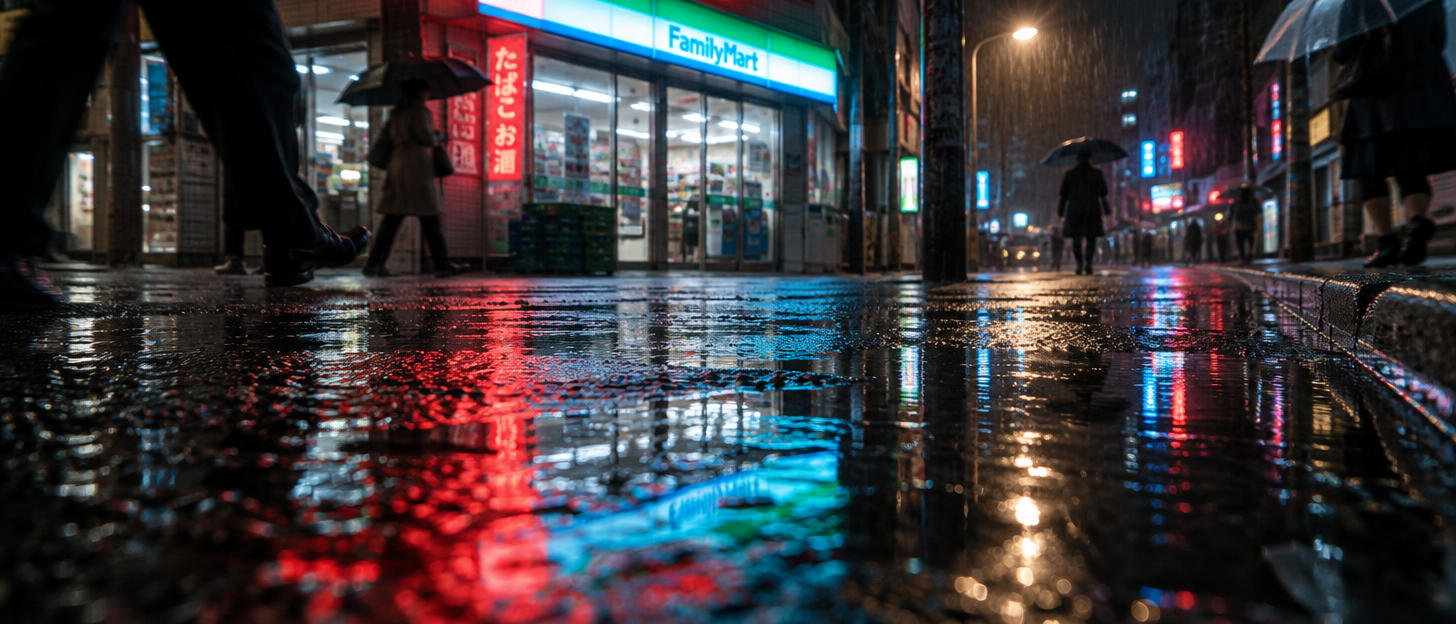
First frame image
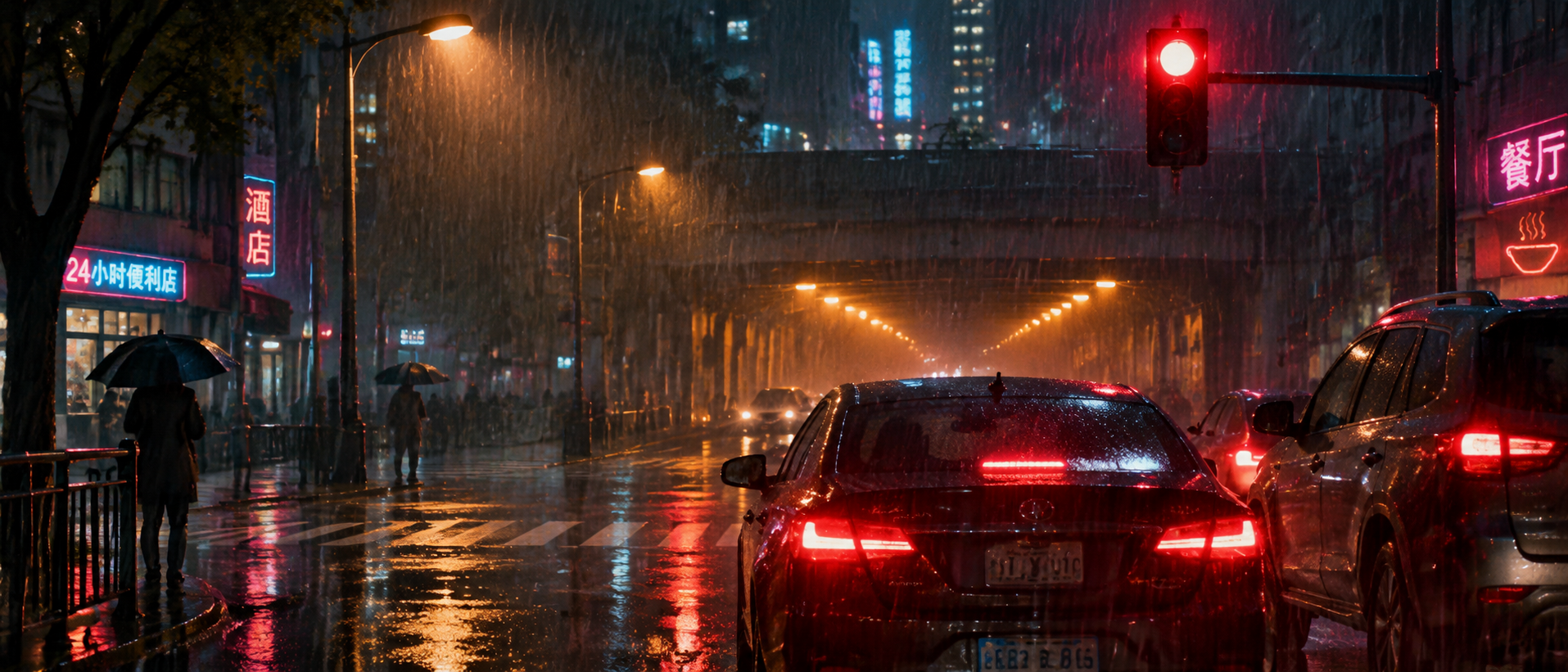
End frame image
Prompt
Cinematic rainy-night city street corner shot: starting from a low angle on the wet black asphalt, convenience store neon signs blur into red and cyan reflections in the puddles, a group of pedestrians with umbrellas crosses the frame, then the camera rises and glides along the sidewalk toward the intersection, raindrops are visible in the cones of streetlight, tires hiss on the slick wet road, the camera finally settles on traffic stopped at a red light, while warm amber light spills from a distant underpass. Slow push-in that gradually accelerates, shallow depth of field, film-like grain, natural streetlight illumination, cool blue shadows contrasting with warm shop lights.
Copy the full prompt and adapt it for your own generation.
Tags
Rainy Night Bicycle · Storyboard Concept of a Glance Back at the Alley Entrance
Style Storyboard · Emotional · City
Reference inputs
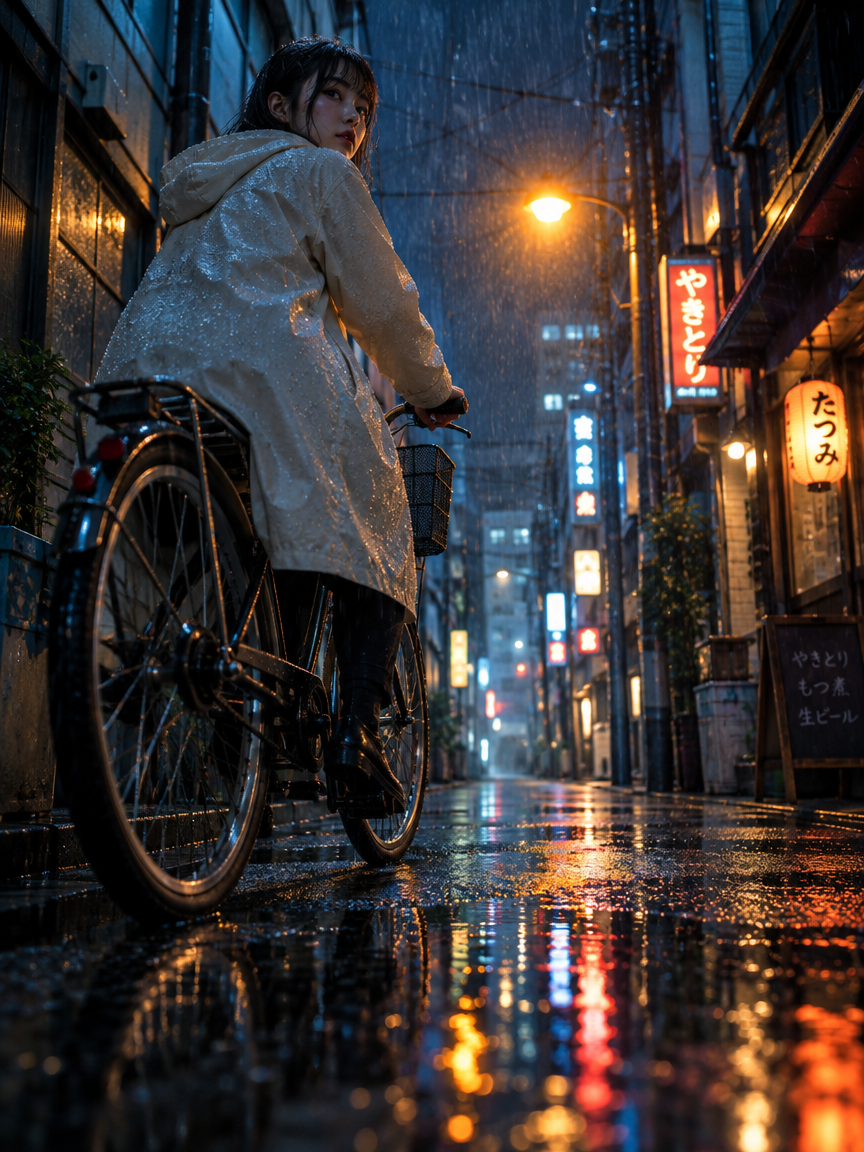
First frame image
Prompt
A young cyclist in a light-colored raincoat rides through a narrow city alley at night, the wheels leaving thin trails in the puddles. The shot begins at a low angle close to the wet asphalt, gliding along the spinning front bicycle wheel, then rises and settles behind the cyclist's shoulder. She slows beside a flickering streetlamp, turns her head to look back toward the camera, and raindrops slide off the edge of her hood. Warm shop neon blurs into soft streaks of color on the rain-soaked pavement, and with each pass of the light the reflections stretch out. Shallow depth of field, cool blue shadows set against a single patch of amber light, a slow cinematic rhythm, and at the end the camera slowly pushes in toward her face.
Copy the full prompt and adapt it for your own generation.
Tags
Vertical Camera Movement Notes: Dolly and Crane Diagram
Style Cinematic · Camera Movement · Film Studies
Reference inputs
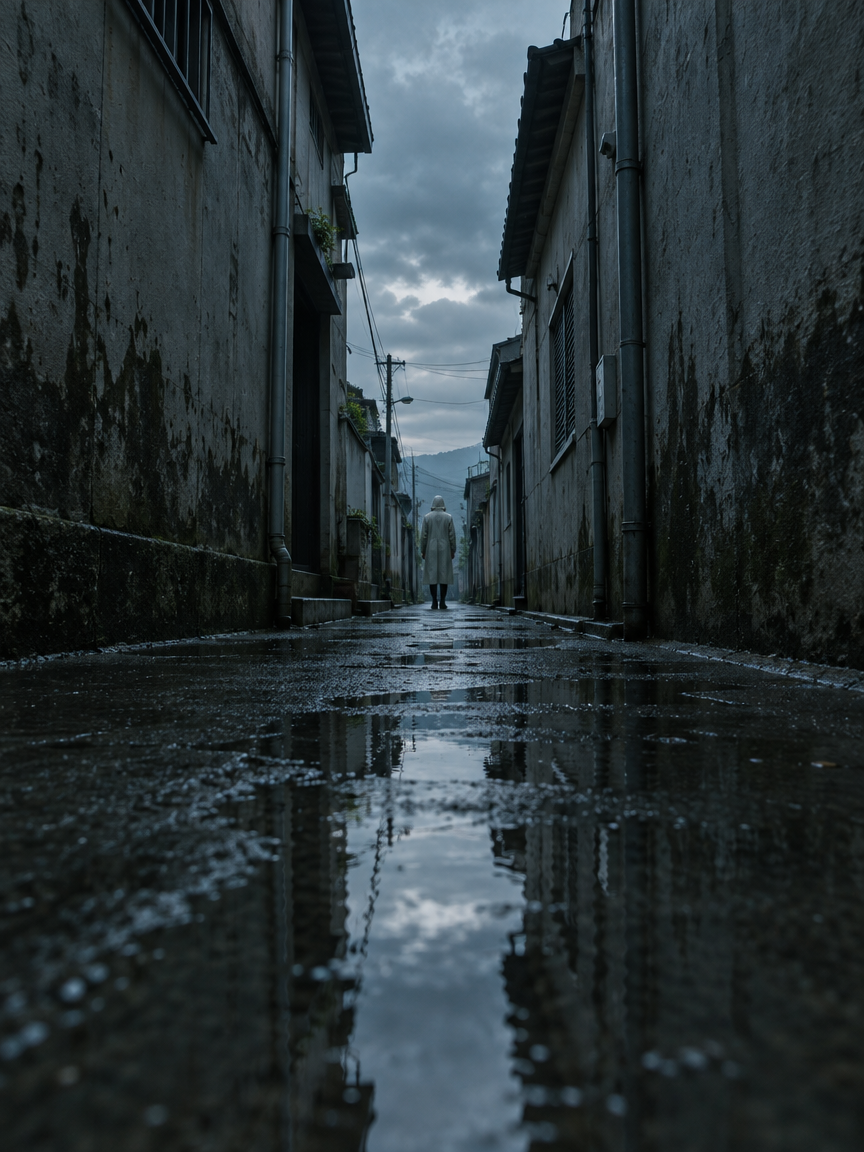
First frame image
Prompt
At dusk, a solitary figure in a light-colored raincoat stands in a narrow concrete alley, with the camera initially shooting from a low angle. The camera slowly pushes forward along the wet pavement, then rises in a gentle crane movement, lifting the perspective over the figure's shoulder toward a sliver of sky overhead, and then slides laterally along the wall, causing the figure to drift to the edge of the frame. Cold, diffused light, reflections on wet stone and glass, drifting mist, a slow and deliberate pace, shallow depth of field, low-saturation cyan-gray and gray tones.
Copy the full prompt and adapt it for your own generation.
Tags
Pricing
minimax-h3-max-turbo/image-to-video per second
| Specifications | Unit Price |
|---|---|
| 480P | $0.025 |
| 768P | $0.040 |
| 1080P | $0.080 |
Positioning Overview
Generates a video clip using a single image as the first frame, with the output canvas following the aspect ratio of the input image. It is suitable for developers who need to turn static images into dynamic short videos, and can be used for rapid social media content production, animated storyboard previews for advertising, or dynamic display of image assets. It supports an optional end-frame image to constrain the closing shot, and the generation result can be controlled through prompt, duration, and resolution parameters.
Core Highlights
- First-frame-driven generation — Upload an image as the first frame; the output video canvas follows that image's aspect ratio, keeping the starting composition consistent.
- Optional end-frame constraint — Provide an additional end-frame image to converge the video's final shot toward the specified image, ideal for transitions or freeze-frame endings.
- Adjustable duration and resolution — Each generation can last from 1 to 15 seconds, with a choice of 480P, 768P, or 1080P resolution.
- Controllable and reproducible seeding — Fix the random seed via the seed parameter, making it easy to reproduce or fine-tune the same visual direction across batch generations.
Capability Description
First-frame image-to-video: Specify the first-frame image via image_url and combine it with a prompt to generate a dynamic video. The output canvas follows that image's aspect ratio, making it suitable for turning static images into dynamic clips.
End-frame constraint: On top of providing a first frame, you can additionally pass end_image_url as the end frame, so the video's final shot moves toward the specified image, for use in transitions or freeze-frame shots.
Duration and resolution control: duration can be set between 1 and 15 seconds, and the actual output may be about 0.7 seconds longer than requested; resolution offers a choice of 480P, 768P, or 1080P, where 1080P is an upscaled and refined output based on native 768P generation.
Prompt expansion adjustment: prompt_expansion_mode can be set to disabled, balanced, or quality, which respectively skip expansion, return quickly, or spend about 30 seconds generating a richer prompt, helping control generation details.
Use Cases
- Social media image animation — Operations teams use product images or posters as the first frame, paired with a short prompt to quickly generate dynamic short videos for social platform publishing or feed assets.
- Animated storyboard previews for advertising — Advertising or film pre-production teams use keyframe images plus an end-frame image to generate transition clips as animated storyboard previews for internal pitches or shooting references.
- Turning image assets into video clips — Content creators use photographic works or illustrations as the first frame to generate several-second dynamic shorts for portfolio showcases or transition shots in video editing.
- Freeze-frame ending shot production — Use two images, first frame and end frame, to constrain the start and end of the shot, generating a short clip that transitions from the starting image to the specified ending image, for opening or closing freeze-frame effects.
Limitations and Selection Advice
The first-frame image image_url is required; text-only input generation is not supported. The end-frame image is an optional constraint, and the video is not guaranteed to converge precisely to that image. When resolution is set to 1080P, the output is an upscaled and refined result based on native 768P generation, not native 1080P generation. duration is set from 1 to 15 seconds, and the actual output may be about 0.7 seconds longer than requested. The prompt can be up to 50,000 characters, and the image link can be up to 50,000 characters. Generation results are not guaranteed to keep characters absolutely consistent or reproduce the image precisely.
What's new
View changelog →- New model MiniMax H3 Max Turbo is live: text-to-video and first/last-frame image-to-video
Frequently asked questions
View all FAQs →-
Is the 1080P of this model natively generated?
No, it is not native generation—1080P is obtained by latent-space refinement from a 768P source; the highest tier natively generated by the model is 768P. If you have strict requirements for image detail, it is recommended to evaluate based on native 768P generation, or switch to a tier that supports 2K masters.
-
Can image-to-video use reference images to lock in a character?
Currently, reference-image-to-video is not supported. image_url is used only as the starting frame, and the generated canvas will follow this image; you cannot use reference images, reference clips, or audio to lock in the character and style. For scenarios that require character consistency, you should switch to a tier that supports reference-image-to-video.
-
How should the first and last frames be set to control where the camera ends up?
Use image_url to specify the first frame and the optional end_image_url to specify the last frame; the model will interpolate motion between the two. The first frame determines the entire output canvas, so the last frame's composition and aspect ratio should closely match the first frame; otherwise, the interpolation is prone to distortion.
-
Can the generated video be longer than 15 seconds?
A single generation can be at most 15 seconds long; it cannot produce a longer clip in one go. The actual output may be about 0.7 seconds longer than the duration you specify. If you need a longer final video, generate it segment by segment and then stitch the segments together.
Create a generation task
https://api.hiapi.ai/v1/tasks Headers
AuthorizationstringRequiredAccount API key. Required on every request. Example: Bearer YOUR_HIAPI_API_KEY. Get your API key
Content-TypestringOptionalThe request body is always parsed as JSON; when sent, only application/json (optionally with charset) is accepted — any other value returns 415. Example: application/json.
Idempotency-KeystringOptionalIdempotency key, up to 255 bytes. Retries with the same key from the same account create the task only once; replays return the original taskId.
On network timeouts or client retries, the same key creates the task only once — no double charges (scope: the API key's account). Use a business-unique identifier as the key (e.g. "order-42"); replays return the original taskId, and keys expire 24 hours after the first request. See the Unified Async API overview for the full scenario matrix.
Body
modelstringRequiredCurrent fixed value: minimax-h3-max-turbo/image-to-video
routestringOptionalCurrent fixed value: default
inputobjectRequired
Business parameters for minimax-h3-max-turbo/image-to-video and route default — see the parameter table below.
seedintegerOptionalRandom seed used to control the randomness of the generation result; if omitted, a random seed is selected automatically.
promptstringRequiredminLength 1maxLength 50000Text prompt used for video generation.
durationnumberOptionalDefault: 5min 1max 15Video duration in seconds, default 5 seconds; the actual output may be up to about 0.7 seconds longer than the requested value. When target_audio_url is provided, the duration must be at least 2 seconds.
image_urlstringRequiredmaxLength 50000URL of the image to use as the first frame; the output canvas will follow this image.
resolutionstringOptionalDefault: "768P"Generation resolution, default 768P; 1080P can also be specified, in which case latent-space refinement is performed from the native 768P source.
480P768P1080Pend_image_urlstringOptionalOptional, URL of the image to use as the last frame.
target_audio_urlstringOptionalOptional, URL of an audio clip to pin to the generated soundtrack; the audio must be at least 2 seconds long and at most 15 MB in size.
prompt_expansion_modestringOptionalDefault: "balanced"The degree of effort invested in rewriting the prompt before generation, default balanced: disabled skips prompt expansion, balanced returns in about 1 second, and quality takes up to about 30 seconds to generate a richer prompt.
disabledbalancedqualitycallbackobjectOptional
Terminal-state notification config. When omitted, no callback is delivered — poll the task yourself. See the callback note below.
Provide callback.url when creating a task and HiAPI POSTs to your service once the task reaches a terminal state — no polling needed. The callback payload mirrors the task detail structure; signature verification, delivery retries and idempotency are documented on the Unified Async API overview page.
urlstringRequiredRequired when callback is present. A POST is sent to this URL once the task reaches a terminal state; must be a valid http(s) URL.
whenstringOptionalDefault: "final"Only final is supported today — notified on both success and fail.
finalstoragestringOptionalDefault: "temp"Artifact storage tier: temp (default, retained about 7 days) or persistent (long-term, billed by size). Insufficient balance or exceeding the storage cap silently downgrades to temp; the effective tier is shown in the task detail response.
temppersistentRequest examples
# Submit an async task; returns a taskId immediately (no waiting for generation)
curl -X POST "https://api.hiapi.ai/v1/tasks" \
  -H "Authorization: Bearer $HIAPI_API_KEY" \
  -H "Content-Type: application/json" \
  -d '{
  "model": "minimax-h3-max-turbo/image-to-video",
  "input": {
    "prompt": "…",
    "duration": 5,
    "image_url": "…",
    "resolution": "768P",
    "prompt_expansion_mode": "balanced"
  }
}'
const res = await fetch("https://api.hiapi.ai/v1/tasks", {
method: "POST",
headers: {
Authorization: `Bearer ${process.env.HIAPI_API_KEY}`,
"Content-Type": "application/json",
},
body: JSON.stringify({
model: "minimax-h3-max-turbo/image-to-video",
input: {
"prompt": "…",
"duration": 5,
"image_url": "…",
"resolution": "768P",
"prompt_expansion_mode": "balanced"
}
}),
});
const task = await res.json();
// { code: 200, message: "success", data: { taskId } }import os, requests
res = requests.post(
"https://api.hiapi.ai/v1/tasks",
headers={"Authorization": f"Bearer {os.environ['HIAPI_API_KEY']}"},
json={
"model": "minimax-h3-max-turbo/image-to-video",
"input": {
"prompt": "…",
"duration": 5,
"image_url": "…",
"resolution": "768P",
"prompt_expansion_mode": "balanced"
}
},
)
print(res.json()) # { code, message, data: { taskId } }200 OK
{
  "code": 200,
  "message": "success",
  "data": {
    "taskId": "tk-hiapi-01HZTQ8BX2N3GM3YFK4Z9D7VQR"
  }
}
400 Bad Request
{
  "code": 400,
  "message": "invalid request",
  "data": null,
  "error_code": "INVALID_REQUEST"
}
Get task detail
https://api.hiapi.ai/v1/tasks/:id Response fields
taskIdstringRequiredTask ID, always prefixed with tk-hiapi-.
modelstringRequiredResolved full model name. Tasks submitted with the route parameter return base@route (e.g. gpt-image-2/text-to-image@ext); otherwise identical to the name passed at creation.
routestringOptionalPresent only when the task was submitted with an explicit route parameter; echoes the submitted value.
statusstringRequiredTask status.
queued Queued, not started yet.
handling Being processed.
archiving Processing finished, artifacts being prepared.
success Terminal: completed, artifacts available (output returned).
fail Terminal: failed (error returned).
After submission, check status: success and fail are terminal, everything else is non-terminal. Poll every 1–3 seconds until terminal. On success, download artifacts from output[].url and transfer them before expireAt; pass storage: "persistent" at creation time when long-term retention is needed.
creatednumberRequiredTask creation time (Unix seconds).
completednumberRequiredUnix seconds when the task reached a terminal state; fixed to 0 while not terminal.
outputarrayOptional
Present only when status == success. Artifact list — always an array; a single task may return multiple types at once (e.g. video + first_frame).
Array [ object ]
Array items
urlstringRequiredArtifact URL, directly downloadable.
typestringRequiredCurrent possible values: video, image, audio, first_frame, last_frame, thumbnail; more may be added later.
expireAtnumberRequiredUnix seconds until which the artifact remains accessible; download or transfer before it expires.
errorobjectOptional
Present only when status == fail.
codestringRequiredBusiness error code.
messagestringRequiredError description.
Response examples
Success
{
  "code": 200,
  "message": "success",
  "data": {
    "taskId": "tk-hiapi-01HZTQ8BX2N3GM3YFK4Z9D7VQR",
    "model": "happyhorse-1-0",
    "status": "success",
    "created": 1777282033,
    "completed": 1777282099,
    "output": [
      {
        "url": "https://cdn.hiapi.ai/tasks/.../video.mp4",
        "type": "video",
        "expireAt": 1777886899
      }
    ]
  }
}
Processing (non-terminal)
{
  "code": 200,
  "message": "success",
  "data": {
    "taskId": "tk-hiapi-...",
    "model": "happyhorse-1-0",
    "status": "archiving",
    "created": 1777282033,
    "completed": 0
  }
}
Failed
{
  "code": 200,
  "message": "success",
  "data": {
    "taskId": "tk-hiapi-...",
    "model": "happyhorse-1-0",
    "status": "fail",
    "created": 1777282033,
    "completed": 1777282099,
    "error": {
      "code": "TASK_FAILED",
      "message": "task failed"
    }
  }
}Articles
View all articles →
Related Models
View all models →Same Type
-
 Veo 3.1 Lite Google $0.060 /second
-
 Muse Video 1.0 Meta $0.034 /video
-
 Hailuo 2.3 MiniMax $0.270 /video
-
 P-Video 2 Pro Avatar Pruna AI $0.029 /second
-
 HappyHorse 1.1 Alibaba $0.160 /second
-
 OmniHuman 2.0 ByteDance $0.100 /second
-
 Wan 3.0 Video Alibaba $0.040 /second
-
 HeyGen Avatar V HeyGen $0.150 /second
-
 Wan 2.6 Flash Alibaba $0.043 /second
-
 Runway Gen 4.5 Runway $0.172 /second
-
 Kandinsky 6.0 Pro $1.93 /video
-
 Veo 3.1 Google $0.290 /second